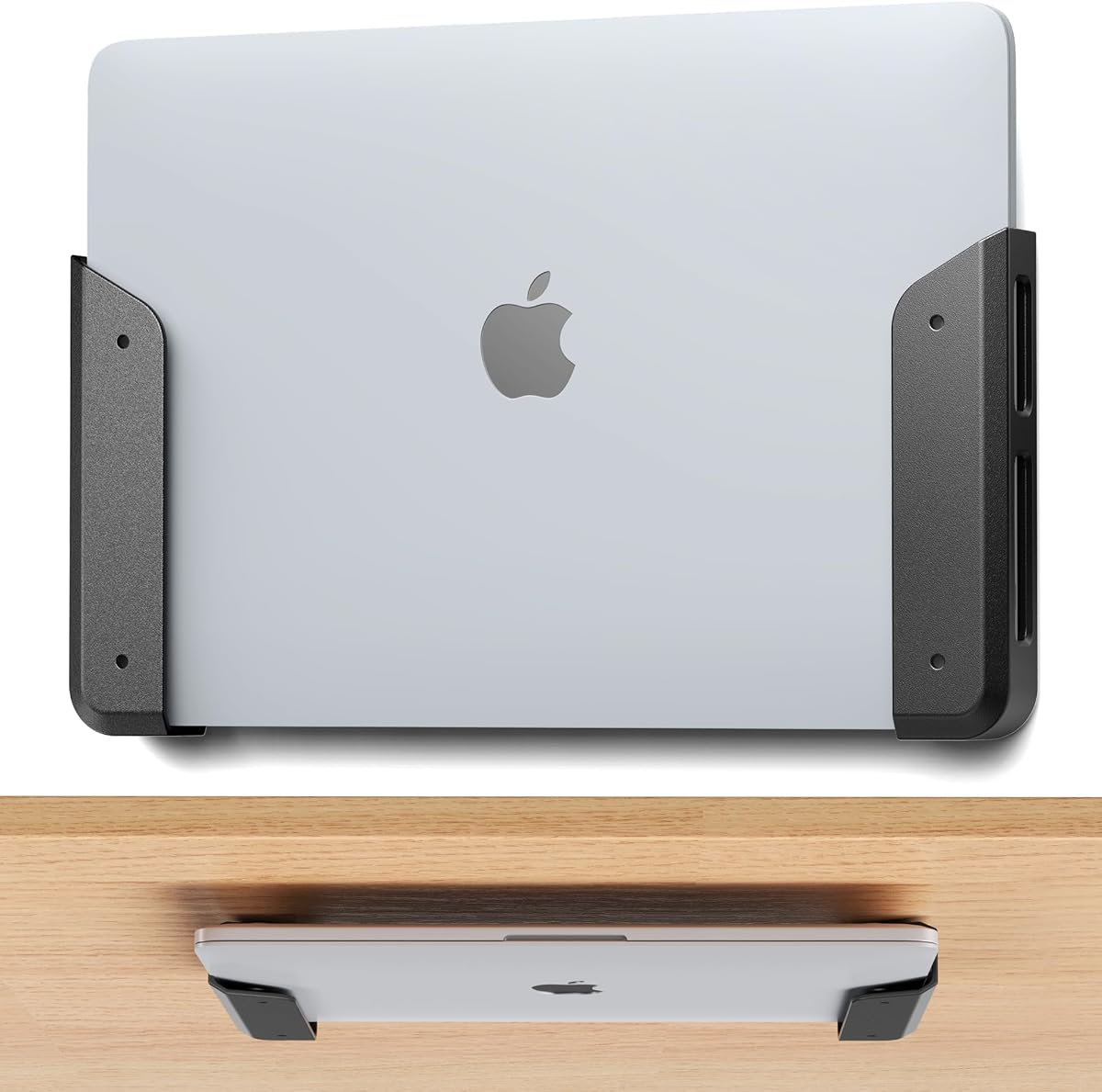
ELETIUO Wall & Under Desk Mount
4.2Editor score
Adhesive or screw mounting
Universal device compatibility
Anti-scratch protective pads
A laptop wall mount transforms your workspace by lifting devices off the desk for better ergonomics and clutter free environments. Choosing the right model ensures stability, flexibility, and protection for your valuable electronics during daily use.
We evaluated ten leading laptop wall mounts based on build quality, adjustability, cooling features, and ease of installation. Our analysis highlights how each product fits different needs from home offices to retail displays without compromising on safety or performance.
Each pick below shows key strengths, pros, cons, and real world benefits based on product specifications. Keep in mind that product availability and pricing can change over time so verify current details before making your final purchase decision.
4.2Editor score

4.6Editor score

4.4Editor score
As an Amazon Associate we earn from qualifying purchases.
The following comparison table breaks down key specifications and features for each of the ten top rated laptop wall mounts to help you quickly identify the best fit for your specific workspace needs and device types.


The MOUNT PRO Laptop Wall Mount stands out as a top choice for users seeking versatility and durability. With a 4.6 rating it delivers strong support for laptops from 11 to 17 inches while also converting to a monitor arm for larger screens.
We may earn a commission when you buy through this link, at no additional cost to you.
Its full motion articulating arms allow tilting swiveling and rotating to achieve the perfect viewing angle. The ventilated tray promotes airflow to prevent overheating during long sessions. Integrated cable management keeps your workspace tidy and organized effectively.
While the mount requires a stud or solid wall for safety which might limit some installations its robust construction ensures stability. The weight capacity and range of motion make it ideal for home offices or commercial settings where reliability matters.
This product is perfect for anyone wanting a single solution for both laptop and monitor mounting. If you value ergonomics and space saving features this mount offers excellent performance and flexibility for daily use.
This mount converts to a monitor arm using an included VESA plate supporting screens from 13 to 32 inches with standard VESA patterns.
Ventilated slots on the tray maximize airflow while adjustable arms reduce neck strain by positioning screens at eye level for comfort.
We may earn a commission when you buy through this link, at no additional cost to you.
The ELETIUO Wall & Under Desk Mount offers an affordable solution for securing laptops and other devices without breaking the bank. Its simple design focuses on holding devices securely in place whether on a wall or under a desk.
We may earn a commission when you buy through this link, at no additional cost to you.
Installation is flexible with strong adhesive strips for quick tool-free setup or screws for permanent stability. Anti-scratch pads protect your device during insertion while cut-out designs ensure full port access for charging and connectivity.
Although the adhesive option suits lighter devices and the screw mount adds security users should note the lack of articulating arms. This makes it better for docking than for dynamic viewing adjustments but it saves space effectively.
Choose this mount if you need a cost-effective way to organize small devices in offices or kitchens. Its versatility for keyboards tablets and laptops makes it a practical choice for decluttering workspaces.
Users can choose between adhesive strips for temporary use or screws for permanent mounting depending on device weight and wall type.
Compatible with MacBooks Surface tablets and even gaming consoles ensuring multiple devices can be stored securely in one spot.
We may earn a commission when you buy through this link, at no additional cost to you.
This 2-in-1 Laptop Wall Mount is designed for durability supporting up to 22 pounds which accommodates heavier laptops and monitors. Its locking mechanism and adjustable clamps ensure devices stay secure even when moved.
We may earn a commission when you buy through this link, at no additional cost to you.
The open frame design with ventilation slots keeps devices cool during heavy use. By lifting devices off the desk you can free up to 80 percent of workspace space making it ideal for crowded offices.
While installation requires wood studs or concrete for maximum safety the robust build justifies the effort. The ability to convert to a monitor arm adds versatility for users needing both laptop and display mounting.
If you need a mount that can handle larger devices without sagging this is a strong candidate. It balances strength with airflow features to protect your investment and maximize desk real estate.
Dual adjustable clamps and a locking mechanism prevent laptops from slipping or falling during adjustments or daily interactions.
Lifting devices off the desk creates a floating workstation that reduces clutter and improves accessibility in compact environments.
We may earn a commission when you buy through this link, at no additional cost to you.
The MOUNTUP Laptop Wall Mount combines a generous 20.7 inch extended reach with robust 22 pound weight capacity. This makes it suitable for users who need to pull devices away from the wall for easier access.
We may earn a commission when you buy through this link, at no additional cost to you.
A clever latch locks laptops in place to prevent slips during use. The ventilated tray keeps devices cool while full motion adjustments including tilting and swiveling support ergonomic viewing from any angle.
Installation requires secure mounting on studs or solid walls to handle the extended leverage. While this adds steps to setup the resulting stability ensures the mount does not sag over time.
Ideal for kitchens workshops or clinics where devices need to move further from the wall. This mount delivers flexibility and strength for diverse environments demanding reliable performance.
The 20.7 inch extension allows users to position screens closer for detailed tasks or further away for collaborative viewing.
An innovative latch mechanism locks devices firmly preventing accidental slips while allowing easy removal when needed.
We may earn a commission when you buy through this link, at no additional cost to you.
WALI Laptop Wall Mount is engineered for users who need reliable cooling and flexibility especially during intensive tasks like gaming or video editing. Its ventilated platform helps dissipate heat effectively.
We may earn a commission when you buy through this link, at no additional cost to you.
The full motion arm allows tilting swiveling and rotation to reduce strain during long sessions. By lifting devices off the desk you create a clean setup that maximizes usable surface area.
While it supports laptops up to 17 inches the 15.4 pound limit may exclude some heavier models. For most standard laptops though it provides stable support without sacrificing adjustability or performance.
Gamers and professionals seeking ergonomic setups will appreciate the balance of cooling and motion features. This mount keeps devices organized while promoting comfort and focus over extended periods.
Built-in ventilation holes enhance airflow to prevent overheating during high performance tasks like gaming or rendering.
Adjustable arms help position screens at eye level reducing neck and shoulder strain during long work or play.
We may earn a commission when you buy through this link, at no additional cost to you.
This 2-in-1 Laptop Wall Mount features a detachable tray allowing quick conversion to a standard monitor arm. With anti-scratch pads it protects devices during frequent insertion and removal cycles.
We may earn a commission when you buy through this link, at no additional cost to you.
A 250 mm height adjustment range lets you position screens for optimal comfort. The concealed cable management system keeps wires hidden creating a polished professional look in any office.
While removing the tray for monitor use adds a step the flexibility pays off for mixed device setups. Anti-scratch pads ensure devices remain pristine over time regardless of usage frequency.
Choose this if you want modularity in your setup. It offers a clean aesthetic and practical features for users switching between laptops and monitors regularly.
Detaching the tray converts the mount to a standard VESA arm for monitors offering versatile dual device support.
Concealed cables and anti-scratch pads maintain a tidy look while protecting your device from wear and tear.
We may earn a commission when you buy through this link, at no additional cost to you.
The VIVO Black Laptop Wall Mount stands out for its premium pneumatic counter-balance arm offering smooth effortless height adjustments. It includes a three year warranty reflecting confidence in its durability and build quality.
We may earn a commission when you buy through this link, at no additional cost to you.
Tool-less installation simplifies setup while rubber tabs secure laptops without scratches. Ventilation slots prevent overheating ensuring devices run efficiently during extended use.
While limited to laptops up to 15.6 inches and 9.9 pounds the pneumatic arm provides unmatched ease of movement. This makes it ideal for users prioritizing premium features over maximum size support.
If you want a high-end mount that balances style with performance this VIVO model delivers. Its warranty and robust design ensure long-term reliability for your workspace.
Pneumatic arms allow instant tool-less height changes so you can adapt your screen position quickly throughout the day.
A three year manufacturer warranty and sturdy steel construction ensure the mount stands the test of daily use.
We may earn a commission when you buy through this link, at no additional cost to you.
The Mount-It! Ergonomic Laptop Arm offers unique flexibility with included brackets for both wall and pole mounting. This versatility makes it suitable for RVs clinics workshops or reception areas where poles are common.
We may earn a commission when you buy through this link, at no additional cost to you.
A spring arm prevents sagging and drift while full motion adjustments support comfortable viewing. The tray is designed to hold devices firmly ensuring stability during operation or movement.
While the 10 to 15.6 inch range limits it to smaller laptops the pole option expands usage scenarios. Installation remains simple with all necessary hardware provided for quick setup.
Choose this if you need non-traditional mounting solutions. Its adaptability and robust support make it a practical choice for mobile or industrial environments.
Includes both wall plate and clamp for round poles enabling versatile mounting in clinics RVs or workshops.
Spring tension adjusts to hold laptops firmly without drooping ensuring stable positioning over long periods.
We may earn a commission when you buy through this link, at no additional cost to you.
This Universal Wall Mount features a two-tier shelf design supporting multiple devices simultaneously. With a 22 pound capacity and protective EVA pads it handles laptops keyboards and tablets with ease.
We may earn a commission when you buy through this link, at no additional cost to you.
Made of high quality metal it offers long-lasting durability. While it lacks articulating arms the fixed position ensures stable storage that declutters desks and counters effectively.
Ideal for homes offices or retail displays where organization matters more than screen adjustment. The two-tier layout allows you to store a laptop and keyboard together or other combinations.
Choose this if you need simple robust storage for multiple electronics. It maximizes space without complex mechanisms making setup quick and reliable.
Store a laptop and keyboard or multiple tablets on two tiers to keep essential tech within reach.
High quality metal construction and EVA pads ensure devices stay secure and scratch-free during storage.
We may earn a commission when you buy through this link, at no additional cost to you.
This Long Arm 2-in-1 Laptop Wall Mount offers an impressive 27.83 inch reach enabling placement far from the wall. The three-section gas spring arm provides smooth stable movement without sagging.
We may earn a commission when you buy through this link, at no additional cost to you.
A detachable tray converts the mount to a monitor arm for screens up to 32 inches. This dual functionality supports diverse workflows from laptop docking to full monitor setup.
While the extended reach requires a sturdy mounting surface the flexibility is unmatched. It creates space in tight environments while keeping screens accessible for various tasks.
Ideal for users needing maximum extension or dual device support. This mount combines reach with versatility to adapt to changing workspace needs.
The 27.83 inch reach lets you position screens closer for detailed work or further for collaborative viewing.
Detachable tray allows conversion to monitor arm supporting versatile use for laptops and large screens.
We may earn a commission when you buy through this link, at no additional cost to you.
Choosing the right laptop wall mount involves evaluating key factors that ensure your devices stay secure and accessible while maintaining ergonomic comfort.
Ensure the mount fits your laptop or monitor size and weight. Most mounts specify screen inch limits and pound capacities so check these before purchasing.
Verify that your device falls within the supported range to avoid instability or damage over time.
Some mounts require solid walls like wood studs or concrete for safety. Others offer adhesive options for temporary setups on lighter devices.
Assess your wall type to ensure the mount can be installed securely without compromising stability.
Look for mounts with full motion features such as tilting swiveling and rotation. These allow you to find the perfect ergonomic viewing angle.
Greater adjustability helps reduce strain during long hours of use and improves overall comfort.
Aluminum and steel mounts tend to be more durable than plastic alternatives. Strong materials ensure the device stays stable over time.
Check for robust construction to guarantee long-term reliability and support for heavier devices.
Ventilated trays with slots or holes help dissipate heat during intensive tasks. This keeps laptops from overheating and maintains performance.
A cooling design is especially important if you use your device for gaming or heavy workloads.
Integrated cable management systems keep wires organized and hidden for a tidy workspace. Look for clips or channels that guide cords neatly.
Effective cable management reduces clutter and protects wires from damage.
Mounts with clear instructions and included hardware simplify setup. Some models offer tool-less adjustments for quick changes.
Easy installation saves time and ensures the mount is secured correctly for safety.
A solid warranty period indicates manufacturer confidence in product quality. Look for options offering at least one to three years of coverage.
Responsive customer support helps resolve any issues that arise during or after installation.
Begin by selecting the right wall location and ensuring it is structurally sound. Use the provided hardware to anchor the mount securely into wood studs or concrete for maximum safety.
Once installed place your laptop on the tray and tighten any clamps or latches to secure it in place. Verify that the device sits level and does not wobble before regular use.
Regularly check screws and joints to ensure they remain tight over time. Keep vents clear of dust to maintain proper airflow and prevent overheating during extended sessions.
Most mounts support laptops from 10 to 17 inches but some handle larger sizes depending on the design. Check the manufacturer specifications to ensure your device fits within the weight and dimensions range.
Yes most mounts are universal and work with MacBooks Windows laptops and other brands. Ensure the laptop size and weight match the mount specifications for secure installation.
Some mounts offer adhesive options for drywall but heavy devices require anchors into studs for safety. Always follow manufacturer guidelines to ensure secure mounting on your wall type.
Many laptop mounts convert to monitor arms using VESA plates. Verify compatibility with VESA patterns like 75×75 or 100×100 before installing for monitor use.
Yes when installed correctly they are safe for daily use. Ensure you mount on stable surfaces and follow all instructions to prevent tipping or sagging over time.
Many brands offer warranties ranging from one to three years depending on the model. Check product details for warranty terms and support options before purchasing.
Most mounts come with tools and instructions for DIY installation. If you are unsure about anchoring into walls consider hiring a professional for safety and stability.
Choose a mount with a ventilated tray that allows airflow to the device. Keep vents clear of dust and avoid blocking ports to maintain proper cooling during use.
From budget friendly options to premium articulating arms these ten mounts offer a range of features to suit any workspace. The MOUNT PRO lead as a versatile choice while others like ELETIUO provide cost effective solutions.
Prioritize ergonomics build quality and compatibility with your devices to get the most out of your investment. Proper installation ensures safety and long-term stability for your setup.
Remember that product details and availability can change so check current information before purchasing. A quality laptop wall mount transforms your workspace into a cleaner more efficient environment.