
Adesso Easy Touch 630Ub
4.2Editor score
IP67 Waterproof Design
Large Durable Keys
Plug-and-Play Connectivity
Finding the right keyboard for your point of sale setup is crucial for operational efficiency. The ideal device offers durability, speed, and specific features like touchpads or card readers to streamline transactions.
We evaluated ten top-rated options based on build quality, layout functionality, and integration capabilities. Each product was assessed for its ability to handle high-volume environments and resist daily wear.
Each selection highlights unique strengths suited to different business needs and budgets. Please note that availability and pricing can change frequently, so verify current details before making a final purchase decision.
4.2Editor score

4.6Editor score
As an Amazon Associate we earn from qualifying purchases.
This table provides a side-by-side comparison of all ten products to help you quickly identify the best fit for your specific point of sale environment and operational requirements.


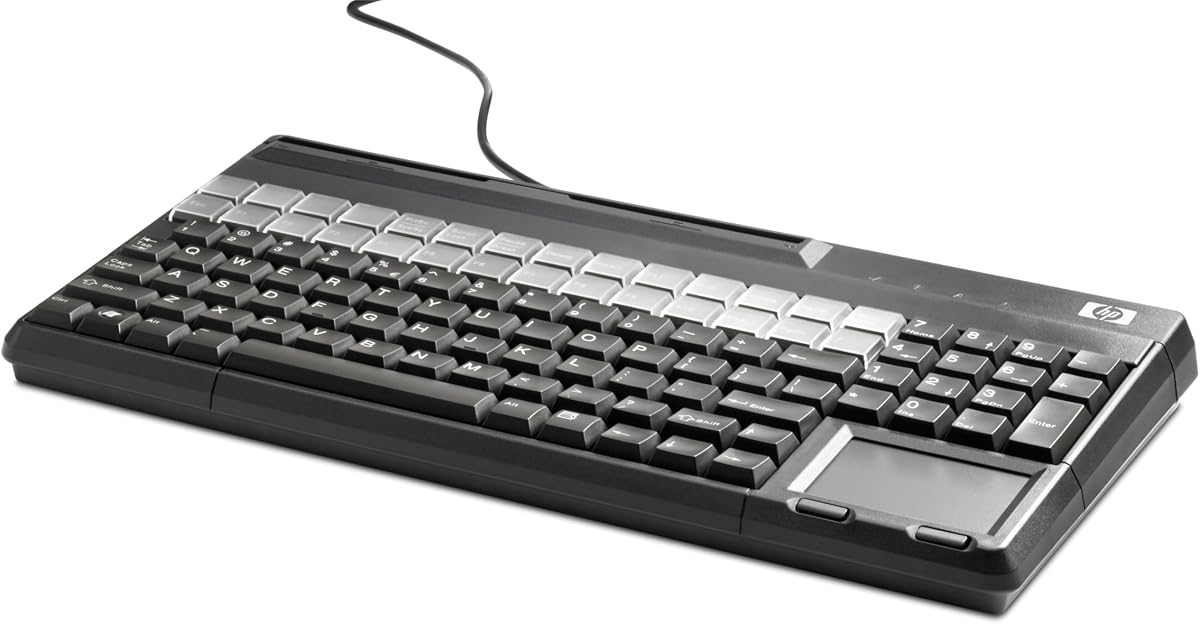
This HP keyboard offers a robust solution for retail environments needing specialized hardware. It combines a standard typing layout with a built-in magnetic stripe reader for seamless transactions.
We may earn a commission when you buy through this link, at no additional cost to you.
The inclusion of 28 relegendable keys allows businesses to tailor shortcuts to their specific software. The integrated touchpad further reduces desk clutter by removing the need for a separate mouse device.
While the price is higher than standard models, the consolidation of functions often justifies the cost in busy POS setups. Durability is evident in its design intended for continuous daily use.
Businesses seeking an integrated workstation should consider this model for its efficiency. It is an excellent choice where reducing hardware footprint is a priority.
Combining a card reader and keyboard reduces cable clutter and saves valuable counter space.
Relegendable keys can be assigned specific commands to speed up common transactions.
We may earn a commission when you buy through this link, at no additional cost to you.
Cherry delivers a reliable compact keyboard suitable for spaces where desk real estate is limited. The integrated touchpad offers convenience for users who prefer minimal peripherals.
We may earn a commission when you buy through this link, at no additional cost to you.
Spill resistance is a critical feature for retail environments where drinks might be nearby. This model ensures that accidental splashes do not immediately disrupt operations.
The standard QWERTY layout ensures familiarity for staff reducing training time. While it lacks advanced programmable keys, its simplicity is a strength for basic POS tasks.
Users needing a space-saving solution with navigation capabilities will find this model effective. It balances affordability with essential durability features.
The compact design frees up counter space while maintaining full typing functionality.
Spill resistant materials protect internal components from common liquid accidents.
We may earn a commission when you buy through this link, at no additional cost to you.
The Logitech K120 is a staple for many businesses due to its reliability and low cost. It provides a standard full-size layout that supports efficient data entry without fuss.
We may earn a commission when you buy through this link, at no additional cost to you.
Its spill-proof design ensures that minor accidents do not lead to expensive replacements. The deep-profile keys offer comfort during long shifts reducing user fatigue.
Setup is instantaneous with plug-and-play compatibility across most Windows systems. This lack of driver requirements simplifies deployment across multiple terminals in a network.
For small businesses prioritizing budget without sacrificing durability, this keyboard is an ideal choice. It remains a top recommendation for general office and POS use.
Designed to withstand daily wear and tear with a robust chassis.
Affordable pricing makes it easy to replace or expand setups.
We may earn a commission when you buy through this link, at no additional cost to you.
This Cherry model expands on the standard POS keyboard with a larger 169-key layout. It is designed for complex environments needing extensive shortcut availability.
We may earn a commission when you buy through this link, at no additional cost to you.
The 42 relegendable keys provide significant customization options for specialized retail software. Combined with a magnetic stripe reader, it offers a comprehensive input solution.
While the price point reflects its premium features, the durability expected from Cherry justifies the investment. It serves well in high-traffic retail or hospitality settings.
Users requiring extensive programmability and card processing in one device should consider this option. It delivers professional-grade functionality for demanding operations.
A high number of relegendable keys supports complex workflow automation.
Built-in card reader streamlines payment entry for staff efficiency.
We may earn a commission when you buy through this link, at no additional cost to you.
The Perixx PERIBOARD-513III brings a modern feel with quiet scissor switches and a touchpad. It is ideal for quieter environments where noise reduction is appreciated.
We may earn a commission when you buy through this link, at no additional cost to you.
Multimedia hotkeys add convenience for controlling volume and playback without leaving the keyboard. The full-size layout ensures a number pad is available for numerical data entry.
While designed for productivity, it holds up well in light commercial use. The price point makes it an accessible option for startups needing functional hardware.
Businesses looking for a comfortable and quiet typing experience will appreciate this model. It offers a balance of features without compromising on cost.
Quiet scissor switches minimize auditory disruption during busy shifts.
Dedicated hotkeys allow quick access to system and media functions.
We may earn a commission when you buy through this link, at no additional cost to you.
The Adesso Easy Touch 630Ub stands out for its IP67 waterproof rating making it ideal for messy environments. It can withstand submersion ensuring longevity in harsh conditions.
We may earn a commission when you buy through this link, at no additional cost to you.
Large keys offer excellent contrast which aids readability in low light or busy settings. The robust construction is built to withstand rough handling common in industrial areas.
Despite its durability, the price remains very accessible for small businesses. It is a practical choice where liquid exposure is a frequent risk.
For those needing maximum protection at a minimum cost, this keyboard is a top contender. It prioritizes function and resilience over aesthetic details.
IP67 rating ensures protection against immersion and liquid spills.
Large print keys improve visibility for all staff members.
We may earn a commission when you buy through this link, at no additional cost to you.
This Cherry model provides extensive programmability with 127 keys and 42 relegendable ones. It suits businesses needing tailored input for specialized applications.
We may earn a commission when you buy through this link, at no additional cost to you.
The integrated touchpad allows for efficient navigation without moving hands to a mouse. This design supports a compact setup while maintaining functional efficiency.
While some users report initial setup challenges, the customization potential is high. It remains a viable option for specialized commercial environments.
Organizations needing complex input mappings should explore this model. It offers robust features for specific operational needs.
Numerous programmable keys support complex task automation.
Built-in touchpad simplifies cursor control and menu navigation.
We may earn a commission when you buy through this link, at no additional cost to you.
The Cherry KC 1000 is a specialized keyboard focused on secure smartcard transactions. It includes a built-in terminal for reading ISO 7816 compliant cards.
We may earn a commission when you buy through this link, at no additional cost to you.
Security is paramount with FIPS 201 and EMV approvals ensuring compliant handling of sensitive data. The design supports secure PIN entry for enhanced protection.
This model is essential for industries requiring high-security authentication and secure access. It serves well in government or banking POS settings.
Organizations prioritizing security and regulatory compliance will find this device appropriate. It offers reliable hardware for secure transactions.
Approved for secure handling of sensitive financial and government data.
Built-in PIN pad protects sensitive credentials during entry.
We may earn a commission when you buy through this link, at no additional cost to you.
This mechanical keyboard is built for industrial applications demanding reliability and longevity. It features MX Black switches designed for over 100 million actuations.
We may earn a commission when you buy through this link, at no additional cost to you.
The compact design saves valuable counter space while retaining a full functional layout. Dual connectivity options offer flexibility for older and newer systems.
While it lacks some modern consumer features, its robust build is ideal for heavy-use environments. It ensures continuous operation in demanding settings.
Businesses needing industrial-grade hardware should consider this compact mechanical model. It balances space efficiency with high durability standards.
Mechanical switches ensure long-term performance under constant use.
Support for USB and PS/2 ensures wide system compatibility.
We may earn a commission when you buy through this link, at no additional cost to you.
The Logitech K270 provides wireless freedom reducing cable clutter on the counter. It features a full-size layout ensuring comfortable typing for long periods.
We may earn a commission when you buy through this link, at no additional cost to you.
Battery life is exceptional allowing up to 24 months of operation without replacement. This convenience reduces maintenance needs for staff managing multiple terminals.
Despite being wireless, the connection remains stable and reliable for POS operations. The spill-proof design ensures durability against accidental liquid exposure.
Organizations preferring a cleaner desk setup will appreciate this wireless option. It balances convenience with reliable performance.
Wireless connectivity eliminates clutter and improves desk organization.
Long-lasting batteries reduce maintenance frequency and operational downtime.
We may earn a commission when you buy through this link, at no additional cost to you.
Selecting the right keyboard involves considering durability, layout, and connectivity to match your operational needs.
In high-traffic environments, keyboards face constant use and potential accidents. Look for models with spill-resistant or waterproof designs to protect internal components from liquids. Additionally, durable switches such as mechanical or membrane types determine how long the keyboard lasts under pressure.
Prioritize keyboards with robust housings designed for industrial or commercial settings.
POS systems often require specific shortcuts or data entry methods. Decide if you need a standard QWERTY layout or one with relegendable keys for custom commands. A full-size keyboard with a number pad is essential for accounting or inventory tasks.
Choose a layout that matches the workflow requirements of your specific industry.
Wired connections ensure stability and eliminate battery concerns making them ideal for fixed terminals. Wireless models offer flexibility and reduce cable clutter but require battery management. Check compatibility with your POS operating system to ensure seamless integration.
Select connectivity that balances stability with the flexibility your workspace requires.
Some keyboards include integrated touchpads or card readers to streamline operations. These all-in-one solutions save desk space and reduce hardware costs. Consider whether these features align with your POS software capabilities.
Evaluate if built-in peripherals offer tangible efficiency gains for your staff.
Employees type hundreds of transactions daily so ergonomic design reduces fatigue. Look for deep-profile keys and tilt legs to support comfortable hand positioning. Comfortable keyboards can improve accuracy and speed over long shifts.
Invest in ergonomic features to maintain productivity during peak hours.
Prices vary widely depending on features and build quality. Basic models offer affordability while specialized ones with readers cost more. Calculate the return on investment based on durability and efficiency improvements.
Balance initial cost against long-term value and replacement frequency.
Reliable manufacturers offer warranties that protect your investment. Check the duration of coverage and availability of customer support for troubleshooting. Good support ensures minimal downtime if hardware issues arise.
Verify warranty terms before purchasing to ensure peace of mind.
For outdoor or industrial settings, consider IP ratings for water and dust protection. Such ratings ensure the device can withstand harsh conditions without failure. This factor is critical for kitchens or warehouse environments.
Ensure the keyboard meets the specific environmental challenges of your location.
Begin by connecting the keyboard securely to your POS terminal using the appropriate port. If using a wireless model, pair it following the manufacturer instructions to establish a stable connection. Ensure the layout matches your system configuration for optimal function.
Regularly clean the keys with a soft damp cloth to remove dust and debris. Avoid using harsh chemicals that might damage key labels or the casing. For spills, act quickly by turning off the device and drying it thoroughly.
Store the keyboard in a dry area when not in use to prevent moisture damage. Check cables periodically for wear and tear to avoid connectivity issues. Consistent care extends the lifespan and ensures reliable performance.
A suitable POS keyboard offers durability, spill resistance, and specific features like number pads or card readers. It should integrate seamlessly with POS software and withstand daily commercial use without failure.
Yes wireless keyboards can be reliable if they use strong connection technologies. However, wired models often provide greater stability which is crucial for uninterrupted transactions in busy environments.
Turn off the device and wipe the surface with a soft slightly damp cloth. Allow it to dry completely before reconnecting. Avoid submerging the device unless it has a waterproof rating.
Relegendable keys allow you to customize commands to match specific software functions. This improves workflow efficiency and speeds up common transactions for trained staff.
Most POS keyboards work with major operating systems including Windows and Mac. Some models may require additional drivers for Linux so checking compatibility before purchase is recommended.
Depending on usage and build quality, a POS keyboard can last several years. Regular maintenance and checking for wear will indicate when a replacement is necessary.
It is a keyboard with an integrated card reader for swiping customer cards. This feature consolidates hardware and simplifies the payment process on the countertop.
Mechanical switches offer greater durability and tactile feedback compared to membrane switches. They last longer under heavy use which is vital for continuous POS operations.
Selecting the right keyboard depends on your specific operational needs and environment. The top picks balance durability, functionality, and budget to offer versatile solutions.
Prioritize features like spill resistance and connectivity that align with your workflow. Investing in quality hardware now prevents costly downtime and maintenance later.
Remember to verify current availability and details before making a purchase. Choosing wisely ensures smooth operations and satisfied staff and customers.