
LGA 1155 Motherboard H61 for Intel 2th/3th Core i7/i5/i3 DDR3
5.0Editor score
Supports Intel 2nd and 3rd Gen CPUs
Dual-channel DDR3 memory up to 16GB
M.2 SSD interface with NVMe support
This guide compares the top ten affordable motherboards for gaming and office builds, highlighting key features and compatibility for cost-effective PC
Finding a cheap motherboard does not mean sacrificing reliability or performance. Modern budget boards offer essential features like PCIe 4.0, multiple M.2 slots, and robust power delivery for mainstream processors. Builders can save money without compromising on core functionality for everyday tasks and gaming.
We evaluated ten real products based on compatibility, connectivity, power design, and user ratings. Each entry represents a verified option available through major retailers. Our analysis focuses on value, stability, and support for current and upcoming CPU generations across AMD and Intel platforms.
Each pick displays critical specs, pros, cons, and detailed usage notes. Prices fluctuate frequently, so check current listings before buying. This list covers micro-ATX and ATX forms to suit various case sizes while keeping costs low for budget-conscious enthusiasts and professionals.
5.0Editor score
4.5Editor score

4.5Editor score
The table below offers a side-by-side comparison of all ten selected products. It highlights key specifications like socket type, memory support, and expansion slots to help you choose the right board for your needs.





The GIGABYTE B550M K delivers essential features for budget AMD builds. It supports Ryzen 5000 series CPUs out of the box and includes PCIe 4.0 for fast storage. Its compact size fits small cases while keeping performance solid for gaming and productivity tasks.
We may earn a commission when you buy through this link, at no additional cost to you.
Its digital 3+3 power phase ensures steady power delivery for mainstream processors. The board offers two M.2 slots for storage flexibility and supports Extreme Memory Profiles for faster RAM. Built-in Q-Flash allows BIOS updates without a CPU for easier maintenance.
Trade-offs include basic VRM heatsinks that may limit extreme overclocking. The USB port count is modest compared to higher-end boards. These are acceptable given the price point for users who do not push hardware limits.
Buy this if you need a reliable, cheap motherboard for daily work or light gaming. It suits those building compact PCs with modern Ryzen processors. Verify case compatibility before purchase to ensure the Micro-ATX shape fits your chassis.
The digital 3+3 VRM design uses premium chokes and capacitors to provide consistent power. This ensures your CPU runs smoothly under load without voltage drops that could cause system instability.
Two M.2 slots allow fast NVMe SSDs while DDR4 support up to 32GB handles heavy multitasking. This setup gives you room to upgrade storage and RAM as your needs grow over time.
We may earn a commission when you buy through this link, at no additional cost to you.
This LGA 1155 board is an ultra-budget choice for older Intel platforms. It supports 2nd and 3rd Gen Core processors and Xeon E3 v2 chips. The inclusion of an M.2 slot adds modern storage options to an older socket.
We may earn a commission when you buy through this link, at no additional cost to you.
Its dual-channel DDR3 slots support up to 16GB memory for daily tasks. HDMI and VGA outputs provide video without a dedicated card if your CPU has graphics. The PCIe X16 slot offers standard expansion for graphics or other cards.
Missing a user manual and battery means extra planning for setup. You may need an external GPU if the CPU lacks integrated graphics. These are minor issues for users who already own compatible parts.
Choose this for legacy repairs or very tight budgets. It suits enthusiasts maintaining older office PCs or budget servers. Verify CPU graphics support before relying on onboard video to avoid display issues.
The M.2 NVMe interface allows fast SSDs even on an older H61 chipset. This bridges the gap between legacy CPU performance and modern storage speeds for better boot times.
HDMI and VGA outputs let you connect to monitors directly if your processor supports integrated graphics. This removes the need for a separate graphics card in basic home or office systems.
We may earn a commission when you buy through this link, at no additional cost to you.
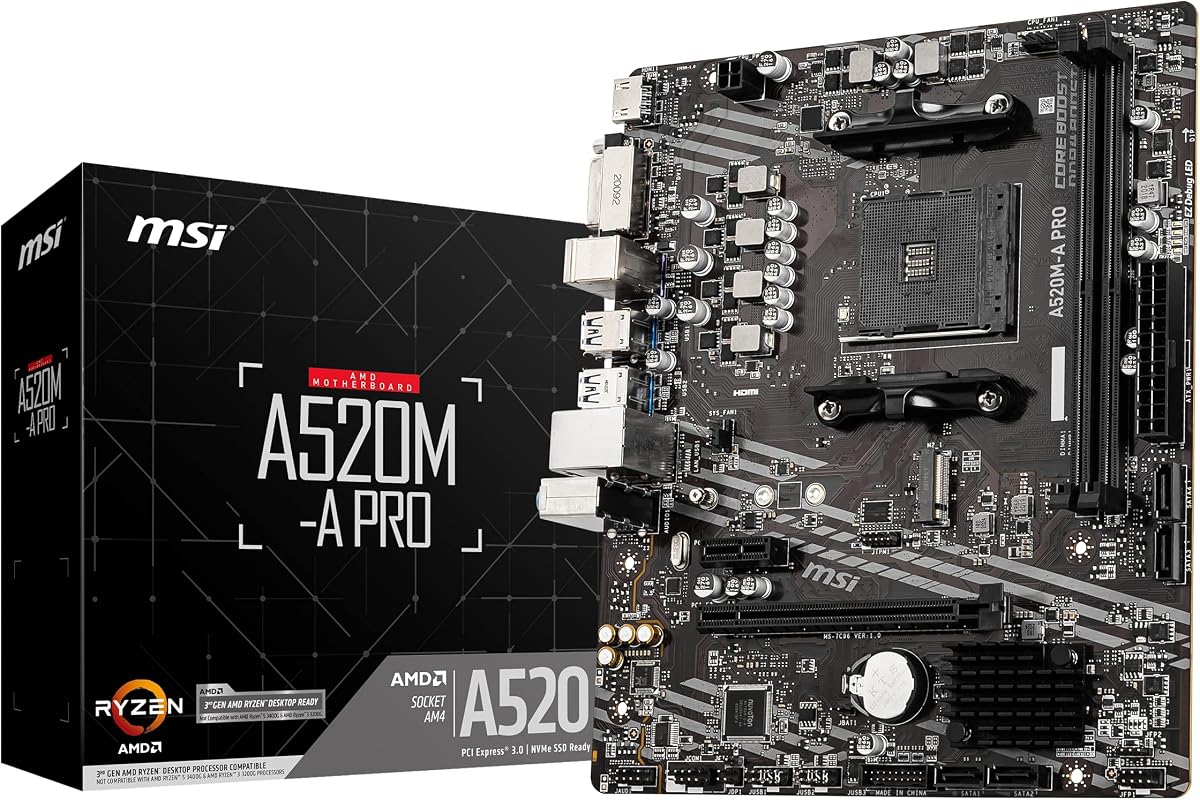
The MSI A520M-A PRO brings affordable gaming features to AM4 builds. It supports Ryzen 5000 processors and includes a Turbo M.2 slot for fast NVMe SSDs. Its Audio Boost enhances sound quality for immersive games without extra hardware.
We may earn a commission when you buy through this link, at no additional cost to you.
Dragon Center software lets you manage system performance and settings easily. The board supports up to 4600MHz RAM speeds for better system response. HDMI and DVI outputs work well for various monitors or TVs.
Lack of PCIe 4.0 limits GPU bandwidth slightly but is negligible for mid-range cards. USB options are standard for basic needs. These trade-offs make sense for an entry-level board focused on core performance.
Buy this if you want a cheap motherboard for gaming on a budget. It suits those upgrading from older AMD CPUs without high-end VRM requirements. Check CPU compatibility for BIOS updates when using Ryzen 5000.
Audio Boost uses high-quality audio components to reduce noise and deliver clear sound. This gives a competitive edge in games where hearing footsteps matters without investing in external DACs.
Dragon Center integrates performance tuning and monitoring in one user-friendly interface. It helps you optimize fan speeds and system settings without complex third-party software or command lines.
We may earn a commission when you buy through this link, at no additional cost to you.
The ASRock B550M-HDV offers broad video support for office environments. It includes HDMI DVI and VGA outputs for maximum monitor compatibility. The 6 Power Phase design provides stable power for Ryzen CPUs without premium costs.
We may earn a commission when you buy through this link, at no additional cost to you.
Its high-speed memory support reaches 4733MHz for faster data access. Six USB ports allow connecting multiple peripherals without extra hubs. The board supports both NVMe and SATA storage via M.2 and SATA3 ports.
Limited DIMM slots reduce memory expansion to 64GB. This limits future upgrades but suits most office tasks. The design focuses on reliability and display options rather than extreme overclocking.
Choose this for workstations needing multiple displays and stability. It fits users prioritizing connectivity and budget over high-end features. Verify case size compatibility since Micro-ATX may not fit all chassis.
HDMI DVI and VGA outputs ensure you can connect any monitor type. This flexibility is valuable for office setups or legacy systems requiring specific video interfaces.
Gigabit LAN and six USB ports handle all essential peripherals smoothly. Realtek audio provides clear sound for conference calls and media playback without extra sound cards.
We may earn a commission when you buy through this link, at no additional cost to you.
The MSI PRO B550M-P combines value with modern PCIe 4.0 support. It offers Core Boost for stable power delivery and Frozr AI cooling for automated fan management. This board is well-suited for gaming and daily productivity tasks.
We may earn a commission when you buy through this link, at no additional cost to you.
It supports DDR4 memory up to 4400MHz for enhanced performance. Two M.2 slots include Gen4 and Gen3 options for flexible storage setups. USB 5Gbps Type-A ports provide fast data transfer for external drives.
Limited expansion options restrict adding multiple PCIe cards. Audio ports are standard without premium features. These are acceptable for users focused on single GPU and storage needs.
Buy this for a cheap motherboard that balances cost and features. It suits gamers wanting Gen4 speeds without high-end price tags. Check case dimensions as Micro-ATX may need confirmation for fit.
Frozr AI cooling adjusts fan speeds based on CPU and GPU temperatures. This keeps the system quiet during light tasks and cools it during gaming without manual intervention.
Two M.2 connectors support Gen4 and Gen3 NVMe drives for quick load times. This gives you space for an OS drive and a data drive on a budget build.
We may earn a commission when you buy through this link, at no additional cost to you.
The MSI B550M PRO-VDH WiFi integrates wireless connectivity and strong power delivery. It supports Ryzen 5000 CPUs and includes a Flash BIOS Button for easy updates. Audio Boost and thermal features make it ideal for gaming setups.
We may earn a commission when you buy through this link, at no additional cost to you.
Core Boost ensures steady current delivery to the CPU for stability. It supports dual channel DDR4 up to 4400MHz for faster performance. HDMI DP and D-SUB outputs provide broad video compatibility for different monitors.
BIOS updates are needed for latest CPUs but the Flash button makes this easy without extra hardware. No manual is needed for basic setup but drivers must be downloaded. These are minor hurdles for a feature-rich board.
Choose this for a cheap motherboard with Wi-Fi and solid features. It suits home users needing flexible connectivity and reliable performance. Check CPU compatibility before installation for optimal performance.
Integrated Wi-Fi and Bluetooth reduce cable clutter and offer flexible network options. This is essential for rooms without Ethernet ports or for mobile device pairing.
The Flash BIOS Button lets you update firmware without a CPU or memory installed. This reduces risk when upgrading to new processor generations without buying an older CPU first.
We may earn a commission when you buy through this link, at no additional cost to you.
The GIGABYTE B550 Gaming X V2 delivers high power quality for Ryzen CPUs. Its Digital Twin 10+3 Power Phase ensures stable power for overclocking. Integrated I/O Shield simplifies building and protects ports effectively.
We may earn a commission when you buy through this link, at no additional cost to you.
It supports DDR4 Extreme Memory Profiles for fast RAM speeds. RGB Fusion allows customization of lighting to match your build aesthetic. The board includes multiple M.2 slots for storage and USB-C for fast data.
The ATX form factor may not fit smaller cases without verification. Price is higher than mATX boards but justified by better VRM. These trade-offs are acceptable for users seeking performance and stability.
Buy this if you want a cheap motherboard with robust overclocking features. It suits gamers and power users needing reliable power delivery. Check case clearance before purchase to ensure ATX compatibility.
The 10+3 power phase design uses digital control for precise voltage management. This supports higher CPU performance without overheating the VRMs during extended gaming sessions.
Integrated I/O Shield and Q-Flash Plus make assembly and updates simpler. You do not need to align a separate shield or install a CPU just to update BIOS.
We may earn a commission when you buy through this link, at no additional cost to you.
The Gigabyte A520M K V2 is ideal for compact builds. It supports DDR4 memory and provides HDMI and D-Sub outputs. Its simple layout keeps costs low while maintaining basic functionality for daily tasks.
We may earn a commission when you buy through this link, at no additional cost to you.
It includes M.2 and USB 3.2 for standard connectivity. The Micro-ATX size fits smaller cases well for office PCs. Gigabit LAN ensures reliable network connections without extra cards.
Power delivery is basic limiting overclocking capabilities. Expansion slots are limited for additional PCIe cards. These are acceptable for users who do not plan to upgrade hardware often.
Choose this for small form factor systems on a budget. It suits office workers or casual users needing reliable performance. Verify case compatibility as Micro-ATX dimensions vary by manufacturer.
The Micro-ATX format is perfect for smaller cases and tight spaces. It reduces bulk while keeping key features like USB 3.2 and HDMI for everyday use.
HDMI and D-Sub outputs work with various monitors without needing a graphics card. This makes it easy to set up a basic workstation quickly.
We may earn a commission when you buy through this link, at no additional cost to you.
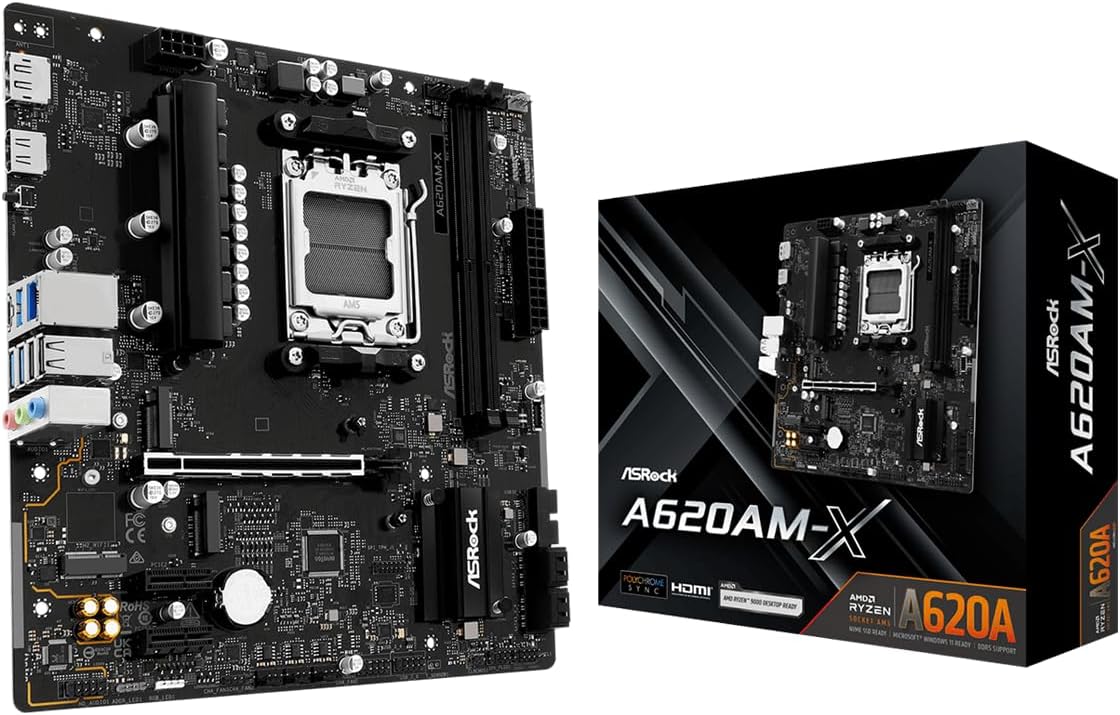
The ASRock A620AM-X brings AM5 to budget builds. It supports DDR5 memory and Ryzen 7000 series CPUs. The 2.5G LAN provides faster network speeds than standard Gigabit connections.
We may earn a commission when you buy through this link, at no additional cost to you.
BIOS Flashback allows updates without CPU installation. This ensures future compatibility with newer Ryzen processors. The board offers two M.2 slots and four SATA ports for storage flexibility.
VRM power is basic limiting high-end CPU use. No USB front headers restrict case customization. These are acceptable for entry AM5 builds where CPU performance is not extreme.
Buy this to enter AM5 platforms without high costs. It suits users planning future upgrades to Ryzen 9000. Verify case clearance before purchase as Micro-ATX may not fit all chassis.
DDR5 support up to 8000MHz allows faster memory speeds. This improves system responsiveness and benefits gaming and content creation tasks significantly.
2.5G LAN delivers faster download and upload speeds than Gigabit. This helps reduce lag in online games and improves file transfers on local networks.
We may earn a commission when you buy through this link, at no additional cost to you.
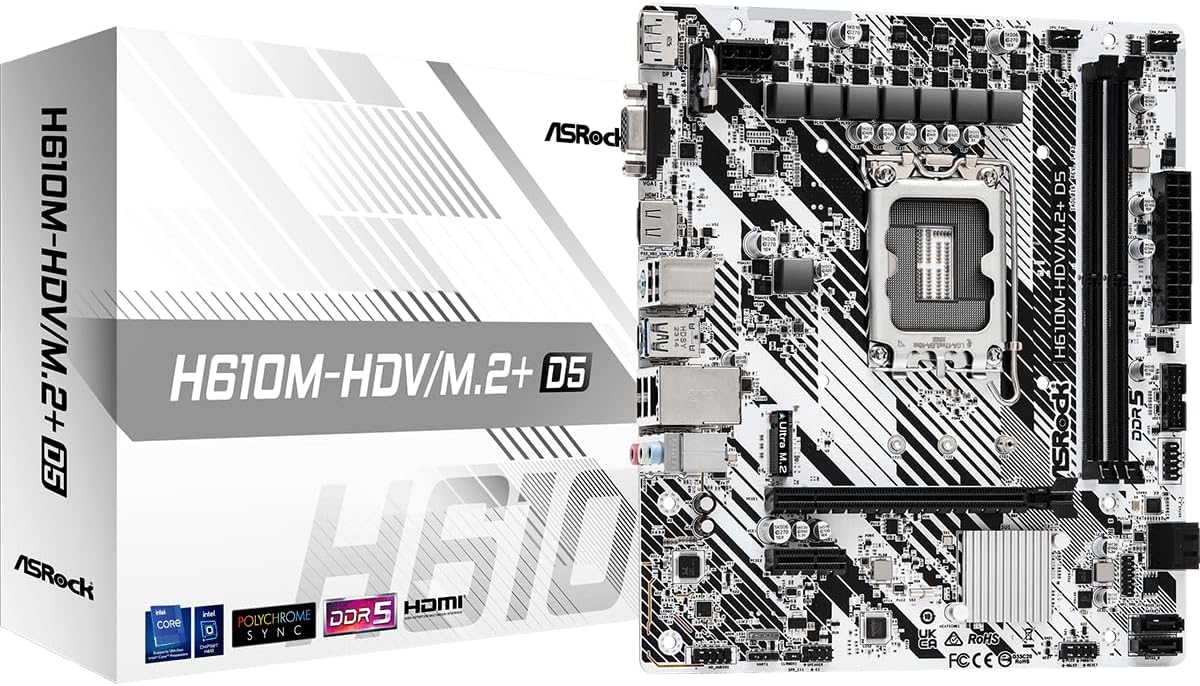
The ASRock H610M-HDV/M.2+ D5 offers Intel 14th Gen support at low cost. It includes DDR5 5600MHz and PCIe 4.0 slots. This board is suitable for modern Intel builds without premium prices.
We may earn a commission when you buy through this link, at no additional cost to you.
It supports HDMI DisplayPort and D-Sub for video. SATA and M.2 ports provide storage flexibility. The Micro-ATX form factor fits most standard cases easily.
Basic power design limits overclocking and high-end CPUs. USB-C options are fewer than needed for some peripherals. These are acceptable for users focusing on productivity and budget.
Choose this for cheap Intel motherboards for daily use. It suits office workers needing modern features. Verify case clearance before purchase to ensure Micro-ATX compatibility.
DDR5 support up to 5600MHz provides faster data speeds. This improves boot times and application loading for better user experience.
Support for 14th Gen Intel Core processors ensures compatibility with latest features. This keeps your system relevant for future software and hardware upgrades.
We may earn a commission when you buy through this link, at no additional cost to you.
Selecting a cheap motherboard requires balancing cost with essential features for your build.
The socket determines which processors your motherboard supports. AMD AM4 works with Ryzen 3000 to 5000 series while AM5 is for newer Ryzen 7000 and above. Intel LGA 1700 supports 12th to 14th Gen Core processors. Check the CPU support list on the manufacturer website before buying.
Match the socket to your processor to avoid compatibility issues. Using the wrong socket will prevent the system from booting.
Motherboards come in ATX and Micro-ATX forms. Micro-ATX fits smaller cases and often costs less than ATX. ATX offers more expansion slots for multiple GPUs or PCIe cards. Verify your case supports the form factor before purchasing.
Choose the size that fits your case and future expansion needs. A mismatch can lead to installation problems.
DDR4 and DDR5 are the two main memory standards. DDR5 is faster but costs more. Motherboards list supported speeds like 5600MHz for DDR5. Ensure the motherboard supports your RAM speed for optimal performance.
Select memory that matches the motherboard to avoid bottlenecks. Mismatched speeds can reduce system performance.
PCIe 4.0 allows faster GPU and storage speeds than PCIe 3.0. M.2 slots provide direct storage connectivity without cables. Higher-end boards offer more slots. Check these based on your GPU and storage needs.
More slots mean more flexibility for future upgrades. Fewer slots may limit your ability to add hardware later.
USB 3.2 Gen 1 ports provide fast data transfer. Some boards offer USB-C ports on the rear panel. Built-in LAN and Wi-Fi affect networking flexibility. Verify ports match your peripherals and network setup.
Enough ports prevent using extra hubs. Missing Wi-Fi means buying a separate adapter.
VRMs supply power to the CPU. Higher phase counts ensure stable power for demanding CPUs. Overclocking needs strong VRMs. Budget boards often have basic VRMs. Match VRM to your CPU to avoid throttling.
Good VRMs ensure stable system performance under load. Weak VRMs may cause crashes or limits.
HDMI and DisplayPort are standard for modern monitors. Some boards offer VGA or DVI for legacy displays. Onboard video requires CPU graphics support. Verify outputs match your monitor without needing a GPU.
The right outputs simplify setup and reduce cable clutter. Missing ports require adapters for older monitors.
Some boards have Flash BIOS buttons for updates without a CPU. This helps when installing newer processors. Check for this feature if you plan to upgrade. BIOS updates are often required for latest CPUs.
Flash BIOS prevents needing an old CPU to update. It reduces risk when upgrading systems.
Install the motherboard in your case using standoffs to prevent short circuits. Connect power and data cables securely to avoid loose contacts. Ensure all screws are tightened properly for stability.
Update the BIOS before installing new CPUs. Use manufacturer tools or USB Flash BIOS if available. Check the CPU support list on the official website first.
Keep the system clean by regularly removing dust from vents. Ensure good airflow to prevent overheating. Monitor CPU temps using software to confirm cooling is working properly.
Yes most budget motherboards are reliable for daily use. They undergo testing by manufacturers to ensure stability. Look for boards with good ratings to confirm quality before purchasing.
Most micro-ATX boards fit standard cases. Check case specs for supported form factors. ATX boards need larger cases. Verify dimensions before buying to avoid fit issues.
Only AM5 and Intel 12th Gen+ boards support DDR5. Others use DDR4. Check the board specs for memory type. Mismatched RAM will not work.
AM4 supports Ryzen 1000 to 5000 series. Check the specific board list for BIOS updates needed. Some boards support 5000 series out of the box.
Most CPUs come with stock coolers but high-end CPUs need better cooling. Check the package contents before purchasing. Verify motherboard headers match the fan connector.
USB-C is less common on budget boards. Look for rear USB-C if needed. Front USB-C requires specific headers. Check specs before buying to confirm availability.
They can last several years with proper care. Keep the system clean and update firmware. Avoid power surges with a surge protector to extend lifespan.
Most manufacturers offer 3-year warranties. Check the product page for warranty details. Register your product to activate warranty support.
These ten motherboards offer reliable choices for budget builds. Each balances cost with essential features like PCIe 4.0 or DDR5 support. Select based on your CPU and case needs.
Prioritize compatibility and power delivery for stability. Avoid boards with limited VRMs for demanding processors. Check connectivity to match your peripherals.
Prices change regularly so review current listings before buying. Use the product links to verify availability and specs. This ensures you get the best value for your setup.