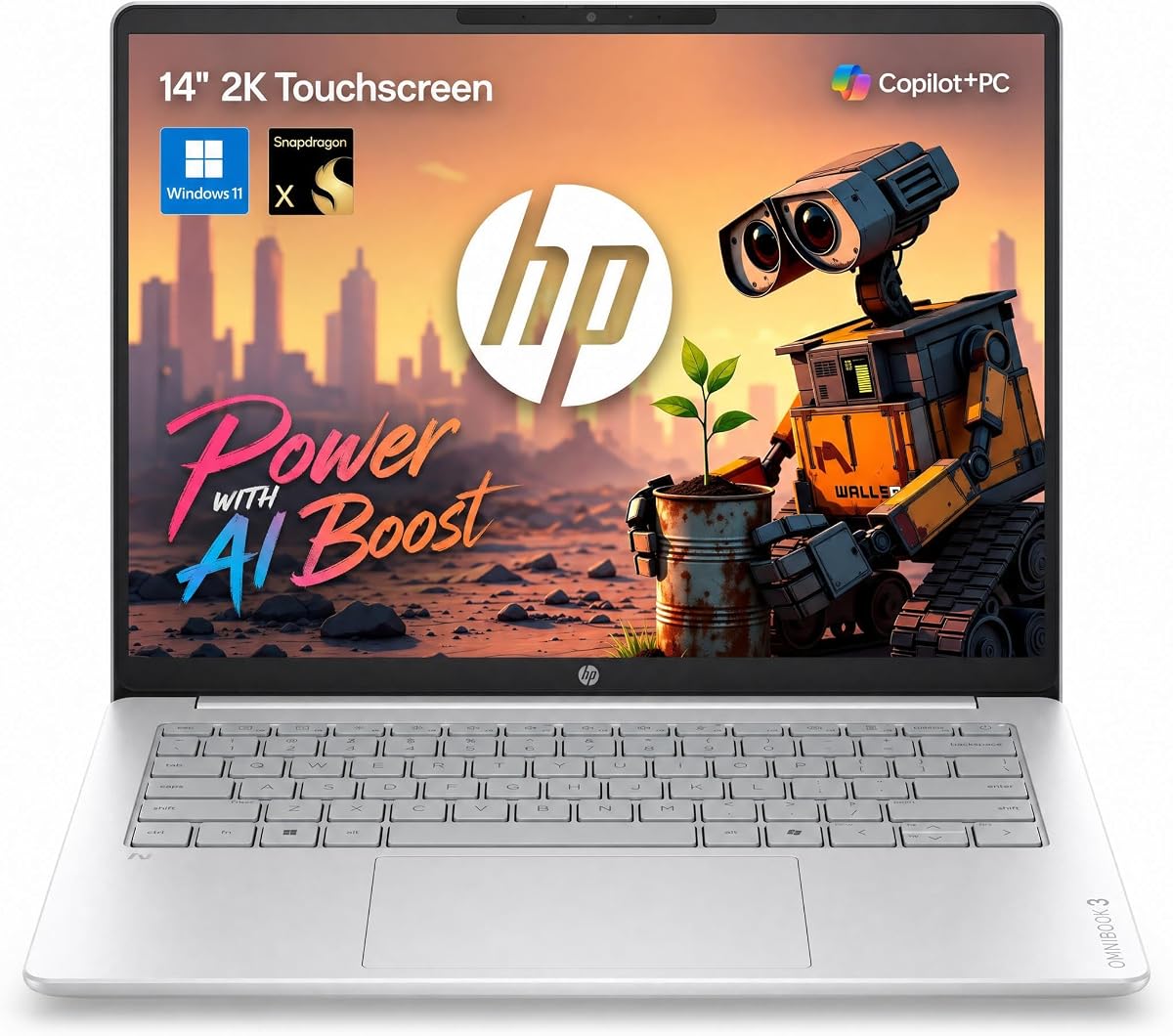
HP OmniBook 3 14
4.6Editor score
Snapdragon X processor
30 hour battery life
Lightweight 3.13 lbs
Artificial intelligence is transforming how we work and create, making NPUs essential for modern laptops. These dedicated chips handle AI tasks efficiently, offering faster performance and longer battery life without cloud dependence.
We evaluated ten leading models based on processor power, display quality, and real-world AI capabilities. Our analysis focuses on how each device handles local AI workloads, multitasking, and daily productivity tasks effectively.
Each recommendation highlights specific strengths for different users, from budget buyers to professionals needing premium power. Please note that availability and specifications may vary, so verify details before purchasing.
4.6Editor score

5.0Editor score

4.6Editor score
As an Amazon Associate we earn from qualifying purchases.
This table provides a side-by-side comparison of all ten featured AI laptops. It highlights key specifications to help you quickly identify the model that best fits your performance and budget requirements.


The ASUS Vivobook S16 stands out with its powerful AMD Ryzen AI 9 processor and stunning OLED display. It delivers smooth performance for creative tasks and AI workloads alike.
We may earn a commission when you buy through this link, at no additional cost to you.
Its 50 TOPS NPU ensures fast local AI processing, while 32GB RAM handles heavy multitasking effortlessly. The 16-inch OLED screen provides vivid colors and deep contrasts.
While the price is higher than budget options, the premium build and display quality justify the investment. Port selection is adequate but lacks some legacy connections.
Ideal for creatives and power users seeking a balance of performance and visual quality. This model is highly recommended for those prioritizing screen fidelity and AI speed.
The OLED panel offers true blacks and vibrant colors, perfect for media consumption and photo editing tasks.
The dedicated NPU accelerates AI tasks without draining the battery, ensuring long-lasting productivity on the go.
We may earn a commission when you buy through this link, at no additional cost to you.
The HP OmniBook 3 14 offers excellent value with its Snapdragon X processor and efficient NPU. It is a lightweight machine suitable for travel and everyday tasks.
We may earn a commission when you buy through this link, at no additional cost to you.
Battery life is exceptional at up to 30 hours, making it ideal for long commutes. The 2K touchscreen provides sharp visuals for the price range.
Potential buyers should note ARM architecture limitations for some legacy software. The 16GB RAM is sufficient for general use but may limit heavy multitasking.
Perfect for students and budget-conscious users needing reliable AI features. This laptop prioritizes efficiency and portability over raw computing power.
With up to 30 hours of video playback, you can work all day without searching for a power outlet.
Weighing only 3.13 pounds, this laptop is easy to carry in a backpack for daily travel.
We may earn a commission when you buy through this link, at no additional cost to you.
The NIMO 16 is a powerhouse designed for developers and heavy AI workloads. Its massive 128GB RAM eliminates bottlenecks for running large models locally.
We may earn a commission when you buy through this link, at no additional cost to you.
Features like OCuLink allow external GPU expansion, adding versatility for rendering tasks. The 165Hz display ensures smooth visuals for gaming and creative editing.
The price point is significant, targeting professionals who need maximum performance. Weight and battery life may be concerns for extended mobile use.
Best suited for advanced users who require desktop-level power in a portable form. This model is unmatched for local AI development and data processing.
The OCuLink port supports high-speed external connections, enabling advanced GPU setups for heavy compute tasks.
With 128GB of unified memory, multitasking with large datasets becomes seamless without slowdowns.
We may earn a commission when you buy through this link, at no additional cost to you.
The Acer Aspire 14 AI balances performance and efficiency well for everyday users. It features a Core Ultra 7 processor with decent NPU capabilities for local tasks.
We may earn a commission when you buy through this link, at no additional cost to you.
Battery life reaches up to 22 hours, offering excellent endurance for daily use. The display is clear though brightness levels are average for outdoor visibility.
Graphics performance is adequate for general use but not heavy gaming. The chassis feels durable yet light enough for frequent travel.
A reliable choice for business professionals needing consistent performance and long battery life. It is a practical option for office work and content consumption.
The processor integrates CPU and GPU tasks efficiently, ensuring smooth workflow without excessive power draw.
The 180-degree hinge allows versatile screen positioning, making it easy to share your workspace.
We may earn a commission when you buy through this link, at no additional cost to you.
The Acer Aspire 16 AI stands out with its 120Hz display and Snapdragon X processor. It offers smooth visuals for scrolling and media consumption.
We may earn a commission when you buy through this link, at no additional cost to you.
Wi-Fi 7 ensures fast connectivity for modern environments. The color accuracy is strong for creative work on a budget.
Storage is limited at 512GB which may require cloud reliance. Build quality is decent but not premium compared to competitors.
Ideal for users who value smooth motion and fast connectivity. This model offers great value for general multimedia and productivity.
The 120Hz refresh rate makes animations and scrolling feel fluid, reducing motion blur during use.
Wi-Fi 7 support ensures you are prepared for the latest high-speed wireless networks.
We may earn a commission when you buy through this link, at no additional cost to you.
The ASUS Zenbook A16 delivers the highest NPU performance in this list with 80 TOPS. This ensures fast local AI processing for complex tasks.
We may earn a commission when you buy through this link, at no additional cost to you.
The 3K OLED touchscreen provides exceptional clarity and touch interaction. Windows 11 Pro adds enterprise security features for professional use.
Cost is a barrier for many buyers. ARM architecture may limit some legacy Windows applications availability.
Recommended for those needing top-tier AI speed and display quality. It is a standout choice for business and creative professionals.
The Snapdragon X2 Elite Extreme processor powers advanced AI tasks efficiently without lag.
Touchscreen support makes navigation intuitive and allows direct drawing or gesture input.
We may earn a commission when you buy through this link, at no additional cost to you.
The NIMO 17.3 offers a large workspace with a 17.3-inch display. Its 144Hz rate ensures smooth visuals for gaming and media.
We may earn a commission when you buy through this link, at no additional cost to you.
It includes expandable memory and storage slots for future upgrades. USB 4.0 provides high-speed data transfer capabilities.
The size makes it less portable for frequent travelers. Resolution is standard FHD rather than higher density options.
Best for stationary workstations or users prioritizing screen real estate. It is a solid choice for gaming and multitasking.
Dual slots allow you to upgrade RAM and storage as your needs grow over time.
USB 4.0 offers fast data transfer rates for external drives and docks.
We may earn a commission when you buy through this link, at no additional cost to you.
The HP Omnibook 16 is built for data-heavy users with 2TB storage. It handles large datasets and media files with ease.
We may earn a commission when you buy through this link, at no additional cost to you.
With 32GB RAM it ensures smooth multitasking across many applications. The NPU provides adequate speed for daily AI tasks.
Battery life is reasonable but not exceptional compared to others. Build quality is solid for office environments.
Ideal for users who need significant local storage capacity. This is a strong choice for content creators and analysts.
With 2TB space you can store extensive media libraries without relying on external drives.
Windows 11 Pro offers enhanced security and management tools for business environments.
We may earn a commission when you buy through this link, at no additional cost to you.
The Dell 16 Plus focuses on business needs with vPro platform security. It offers strong protection for sensitive corporate data.
We may earn a commission when you buy through this link, at no additional cost to you.
Wi-Fi 7 ensures fast connectivity in modern offices. NPU performance is robust for professional AI tasks.
Price is high compared to consumer laptops. Fingerprint sensor placement may be less intuitive for some users.
Recommended for business professionals needing security and performance. It is a reliable investment for corporate environments.
vPro platform provides advanced security features and remote management capabilities.
Wi-Fi 7 offers low latency and high throughput for seamless collaboration.
We may earn a commission when you buy through this link, at no additional cost to you.
The HP 16 AI Laptop emphasizes modern connectivity with Wi-Fi 7 and Bluetooth 6.0. This ensures stable and fast wireless connections.
We may earn a commission when you buy through this link, at no additional cost to you.
It provides ample USB-C ports with Power Delivery for versatile charging. The touchscreen is responsive and clear for navigation.
Port selection is limited which may require adapters for legacy peripherals. Battery life is average for all-day use.
Ideal for tech-savvy users prioritizing wireless speed. This model is a good choice for home offices with modern networks.
Wi-Fi 7 and Bluetooth 6.0 provide reliable connections for smart devices.
At 3.61 pounds, it is easy to carry for daily work or travel.
We may earn a commission when you buy through this link, at no additional cost to you.
Selecting the right AI laptop involves understanding your performance needs and usage scenarios. This guide breaks down key factors to consider.
The Neural Processing Unit handles local AI tasks efficiently. Look for models with at least 45 TOPS for smooth Copilot+ features.
Higher NPU power ensures faster responses for AI apps and tools.
RAM is crucial for multitasking and running local models. Aim for at least 16GB for general use and 32GB for heavy workloads.
More memory helps maintain performance without constant swapping.
A good display is vital for content creation and viewing. OLED or high IPS panels offer better colors and contrast.
Higher resolution screens provide more workspace for complex tasks.
Portable work requires long battery duration to last all day. Aim for models claiming at least 20 hours of video playback.
Efficient processors like Snapdragon or Core Ultra often provide better endurance.
Select a processor that fits your OS requirements. ARM-based chips offer efficiency while Intel provides broader compatibility.
Ensure the CPU supports your intended software applications effectively.
Check for modern ports like USB4 and Wi-Fi 7 for fast speeds. These ensure future-proofing for peripherals and networking.
Adequate port selection reduces the need for extra adapters.
Durable materials protect your investment during travel. Aluminum chassis often offer better cooling and longevity.
Solid hinges and keyboard quality improve long-term usability.
Ensure the device supports your OS version for AI features. Windows 11 is required for Copilot+ PC functionality.
Regular updates keep your AI capabilities secure and current.
To maximize NPU efficiency, keep your system drivers updated regularly. This ensures AI features like Recall and Studio Effects run smoothly without glitches.
Maintain battery health by avoiding extreme temperatures and deep discharges. Use the provided adapter and avoid leaving the device plugged in unnecessarily.
Clean the screen and keyboard gently with a soft, dry cloth. This prevents dust buildup that could interfere with performance or display quality.
An NPU is a dedicated processor for neural network tasks. It handles AI functions like background blur and voice separation efficiently without using the main CPU.
Copilot+ PCs enable exclusive AI features like Recall and advanced search. They ensure your device can run local AI tools smoothly.
Most models listed have soldered RAM which means they cannot be upgraded later. Choose your capacity carefully before purchasing.
They offer integrated graphics suitable for light gaming and media playback. For heavy gaming, consider dedicated GPU models instead.
AI features are optimized to be power-efficient. You can expect near advertised battery life even with background AI tasks running.
Most modern apps work well on ARM chips via translation layers. Legacy software may have limited support so check requirements.
The ASUS Vivobook S16 leads the list with its balanced performance and display quality. It is a top choice for most creative and professional users.
For budget buyers, the HP OmniBook 3 14 offers incredible battery life and portability. It is ideal for travel and general productivity.
Always verify current availability and details before purchasing as tech specs change often. Choose the model that best fits your specific needs.