
Dell Precision 3581 Workstation
Intel Core i7-13800H CPU
32GB DDR5 Memory
15.6 Inch FHD Display
Finding the right laptop for CAD Work requires balancing powerful hardware with portability. Professionals need machines that handle complex 3D modeling, rendering, and simulations without lagging. This guide explores the best options available today.
We evaluated these laptops based on processor speed, graphics capabilities, memory capacity, and display accuracy. ISV certifications and build quality were also key factors in our selection process for these professional workstations.
Each pick highlights specific strengths for different workflows, from budget-conscious engineers to architects needing top-tier performance. Note that prices and availability can change frequently, so verify details before purchasing.

4.4Editor score

5.0Editor score
As an Amazon Associate we earn from qualifying purchases.
The following table provides a side-by-side comparison of all ten selected workstations. It highlights key specifications like processor type, memory size, and graphics capabilities to help you quickly identify the best fit for your specific CAD applications.




The Dell Precision 7680 stands out as the premier choice for demanding CAD Work professionals. With a 4.4 rating and flagship specifications, it delivers the reliability needed for complex engineering and architectural projects without compromising on performance.
We may earn a commission when you buy through this link, at no additional cost to you.
Its Intel Core i9-13950HX processor paired with 32GB of DDR5 RAM ensures smooth multitasking across heavy applications like AutoCAD and SolidWorks. The dedicated NVIDIA graphics provide accelerated rendering capabilities essential for detailed 3D modeling tasks.
While it comes with a premium price tag, the ISV certifications and MIL-STD-810H durability testing justify the investment for professionals who rely on their machine daily. The expandability options also future-proof your setup for years to come.
This laptop is ideal for architects and engineers who need maximum performance in a mobile form factor. If you require top-tier speed and reliability for professional CAD Work, this model offers the best balance of power and portability.
Designed specifically for advanced workflows including CAD design, 3D rendering, and simulation tasks.
Features Thunderbolt 4 and HDMI ports to support up to three external monitors for expanded workspace.
We may earn a commission when you buy through this link, at no additional cost to you.
This variant of the Dell Precision 7680 offers a compelling entry point into professional workstations. Rating 4.3, it balances cost and capability well for students or junior engineers starting their CAD Work journey.
We may earn a commission when you buy through this link, at no additional cost to you.
The NVIDIA RTX 1000 Ada GPU provides certified stability for design software, while 32GB of RAM allows for comfortable multitasking. The high-performance SSD ensures rapid file access which is critical when working with large project files.
Trade-offs include a slightly less powerful processor compared to the i9 model, which may limit performance in extremely heavy rendering scenarios. However, for standard drafting and moderate simulation tasks, it remains highly capable and efficient.
Ideal for professionals needing ISV certification without the highest price tag. If you need a reliable machine for daily CAD Work and occasional rendering, this model delivers strong value and consistent performance.
ISV certifications ensure dependable compatibility with professional applications like AutoCAD and Revit.
CAMM RAM design allows for thinner profiles while maintaining high speed and performance.
We may earn a commission when you buy through this link, at no additional cost to you.
The HP ZBook 8 G1i stands out with its exceptional memory configuration. With 64GB of DDR5 RAM and a 2TB SSD, it offers the storage and multitasking capability needed for complex CAD Work without needing immediate upgrades.
We may earn a commission when you buy through this link, at no additional cost to you.
Powered by the Intel Core Ultra 7 processor and NVIDIA RTX 500 Ada GPU, this machine handles graphics-intensive workloads efficiently. The touchscreen display adds a layer of interaction useful for designers and creative professionals.
While the GPU is less powerful than top-tier models, the sheer amount of RAM makes it excellent for managing large datasets and multiple virtual environments. It is a solid choice for architects needing storage and memory headroom.
This laptop is best for users who prioritize storage and memory capacity over raw graphical rendering speed. If you work with massive files and need a versatile workstation, the HP ZBook provides a robust platform for CAD Work.
Paired with 64GB DDR5 RAM and a 2TB SSD for seamless multitasking and ultra-fast data access.
Includes HP Wolf Pro Security and IR privacy-shutter webcam for secure facial recognition and calls.
We may earn a commission when you buy through this link, at no additional cost to you.
This renewed Dell Precision 3581 offers an accessible entry into professional CAD Work. While it lacks the latest premium features, its Core i7-13800H processor and 32GB of RAM provide sufficient power for standard drafting and modeling tasks.
We may earn a commission when you buy through this link, at no additional cost to you.
The RTX A500 GPU is certified for stability, ensuring your design software runs without unexpected crashes. The renewed status allows for a lower price while still providing critical warranty coverage and professional-grade hardware components.
Users should be aware that GPU VRAM is limited compared to higher-end models, which may impact complex rendering. However, for students or budget-conscious firms, this machine delivers essential workstation capabilities at a fraction of the cost.
Ideal for those needing a reliable, certified machine without breaking the bank. If you require a cost-effective solution for daily CAD Work and occasional rendering, this renewed unit offers excellent performance and value.
Comes with a 2-year warranty with on-site Next Business Day service ensuring professional support.
Fourteen cores on the Core i7-13800H processor allows for exceptional multitasking capabilities.
We may earn a commission when you buy through this link, at no additional cost to you.
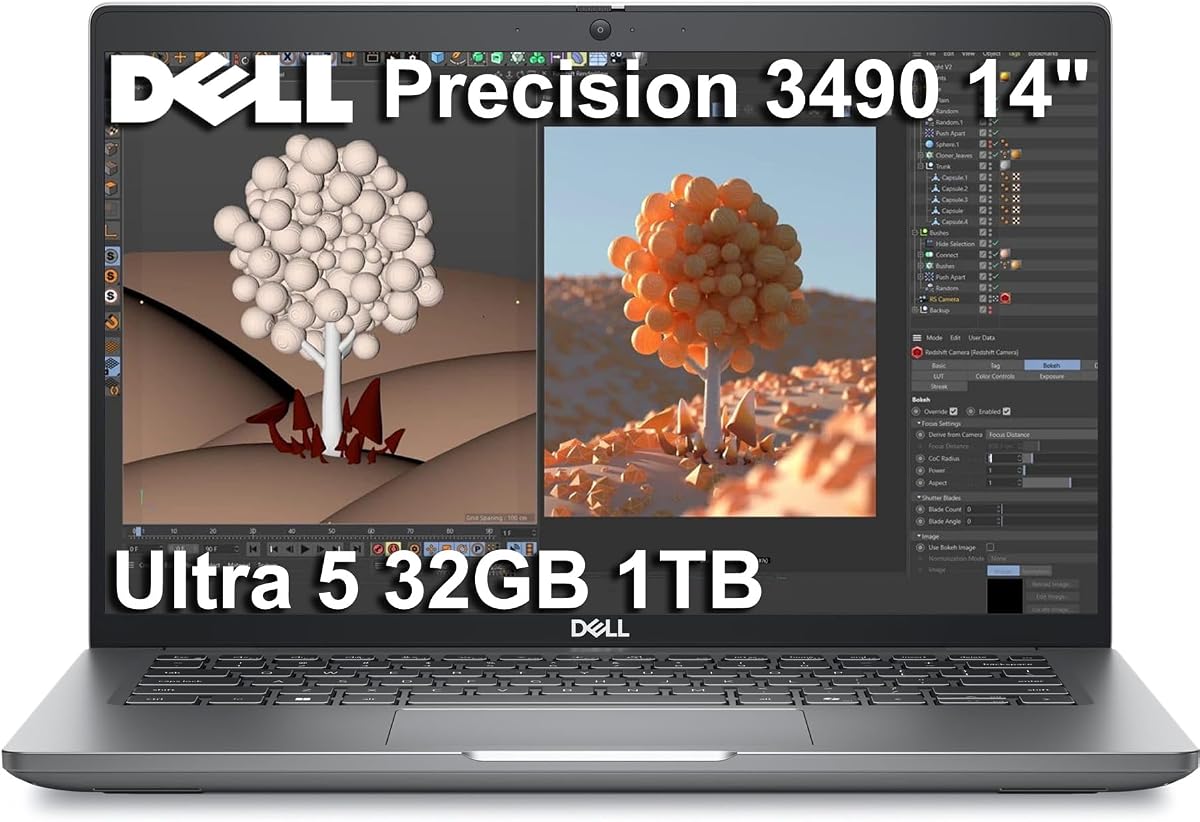
The Dell Precision 3490 is a top choice for professionals who prioritize mobility. Weighing only 3.09 lbs and tested to military standards, it delivers robust power in a compact form factor perfect for frequent travel.
We may earn a commission when you buy through this link, at no additional cost to you.
Powered by the Intel Core Ultra 5 processor and 32GB of DDR5 RAM, it handles everyday professional tasks smoothly. The integrated graphics support basic modeling needs while maintaining battery life for long work sessions.
While it lacks dedicated GPU power for heavy rendering, its balance of weight and performance is unmatched. For engineers and architects who move between sites, this machine ensures productivity without the burden of a heavy desktop replacement.
Best for mobile professionals needing reliability on the go. If you value portability and build quality over raw graphical power, this model provides a seamless CAD Work experience for field work and travel.
Hits the sweet balance: delivering robustness and power for demanding applications sans excessive heft.
Equipped with Thunderbolt 4, HDMI, and Ethernet to ensure fast wireless connectivity and compatibility.
We may earn a commission when you buy through this link, at no additional cost to you.
The Dell Precision 7780 is a powerhouse designed for high-end workflows. With a 5.0 rating and premium components, it delivers exceptional performance for complex CAD Work that demands maximum computational resources.
We may earn a commission when you buy through this link, at no additional cost to you.
Its NVIDIA RTX 4000 Ada GPU with 12GB of VRAM handles large scale rendering and simulations effortlessly. The 17.3-inch display offers ample screen real estate for detailed design work and multi-window productivity.
While it is expensive and heavier than compact models, its workstation-class capabilities justify the size. For professionals who need desktop-level power in a mobile unit, this laptop provides unparalleled speed and visual clarity.
Ideal for architects and engineers working on complex projects daily. If you need the fastest rendering speeds and largest screen available, this model offers the best premium experience for professional CAD Work.
99% DCI-P3 color gamut and 500-nit brightness deliver sharp, vivid visuals for professional work.
Powered by Intel Core i9-13950HX for superior efficiency and speed in demanding applications.
We may earn a commission when you buy through this link, at no additional cost to you.
This Dell Precision 7680 model offers a balanced set of features for CAD Work. While the rating is moderate, the hardware specifications provide solid stability for design and engineering applications requiring certified compatibility.
We may earn a commission when you buy through this link, at no additional cost to you.
The RTX 2000 Ada GPU ensures reliable performance for 3D modeling and rendering tasks. With 32GB of DDR5 RAM and a powerful i7 processor, this machine handles multitasking effectively for daily professional workflows.
Some users may find the performance adequate but not outstanding for very heavy workloads. However, the build quality and certifications ensure it remains a dependable tool for standard architectural and engineering needs.
Suitable for professionals who value stability over raw speed. If you need a reliable workstation for everyday CAD Work and occasional simulations, this model provides consistent performance and professional support.
ISV certifications ensure dependable compatibility with professional applications and critical software.
Designed for advanced professional workflows including CAD design, 3D rendering, and video editing.
We may earn a commission when you buy through this link, at no additional cost to you.
This high-end configuration of the Dell Precision 7780 provides massive resources for CAD Work. With 128GB of RAM and a powerful GPU, it excels at handling complex simulations and large datasets without any lag.
We may earn a commission when you buy through this link, at no additional cost to you.
The 17.3-inch display offers excellent clarity for detailed work, supported by a 24-core processor that ensures smooth operations even under heavy loads. This machine is built for those who need extreme power in a mobile form.
Trade-offs include the high cost and relatively smaller SSD capacity compared to RAM and GPU. However, for users managing multiple heavy virtual machines or large CAD files, the RAM capacity is a standout feature.
Ideal for power users needing maximum resources. If you require extreme performance for complex modeling and rendering, this configuration offers the best capability for professional CAD Work available today.
128GB Up to 5600MHz DDR5 Non-ECC CAMM Module ensures rapid task switching and multitasking.
500-nits brightness and 99% DCI-P3 color gamut provide accurate visuals for professional design work.
We may earn a commission when you buy through this link, at no additional cost to you.
This Dell Precision 7680 model offers an excellent balance of performance and capacity. With 64GB of RAM and a robust GPU, it supports heavy multitasking and reliable performance for daily CAD Work and rendering tasks.
We may earn a commission when you buy through this link, at no additional cost to you.
The RTX 2000 Ada GPU ensures certified compatibility with professional software like SolidWorks and AutoCAD. The high-performance processor and DDR5 RAM allow for seamless workflow across multiple complex design applications.
While it is heavier than ultraportables, the performance gains justify the weight for professional use. This machine is built to handle intensive tasks with speed and reliability without needing frequent hardware upgrades.
Ideal for engineers and architects needing high capacity without top-tier GPU costs. If you prioritize memory and stability for complex models, this model delivers a reliable and efficient workstation for professional CAD Work.
Ideal for technical users handling demanding tasks such as CAD design, simulation, and software development.
ISV certifications ensure dependable compatibility with professional applications across office and studio environments.
We may earn a commission when you buy through this link, at no additional cost to you.
The Lenovo ThinkPad P16s combines a larger workspace with a more portable design than heavier workstations. Rated 4.0, it is ideal for professionals who need CAD capabilities on the move without sacrificing build quality.
We may earn a commission when you buy through this link, at no additional cost to you.
Powered by the Intel Core Ultra 7 processor, it handles multitasking and application loading swiftly. The 16-inch display provides ample real estate for reviewing technical drawings and managing documents efficiently.
While it lacks dedicated graphics, it supports professional CAD applications well for standard drafting. It is a balanced option for those who need a reliable machine that can handle everyday professional work without bulk.
Best for mobile professionals and generalists. If you need a portable laptop for technical tasks and document management, this model offers a balanced mix of mobility and workstation-class capability.
Combines the larger workspace of a 16-inch display with a more portable design than heavier units.
Enhance security with a built-in Fingerprint Reader and work comfortably with a Backlit Keyboard.
We may earn a commission when you buy through this link, at no additional cost to you.
Choosing the right laptop for CAD Work involves evaluating several critical factors to ensure your hardware meets the demands of professional software.
CAD applications often rely heavily on single-core speed for drawing and multi-core performance for rendering. Look for high-end Intel Core i7 or i9 processors that can sustain high clock speeds without throttling.
Prioritize processors with multiple cores to handle background tasks and complex calculations efficiently.
Professional GPUs with ISV certifications ensure stability and compatibility with software like AutoCAD and SolidWorks. Dedicated VRAM is essential for handling complex 3D models and high-resolution textures.
Choose a laptop with a certified NVIDIA RTX professional GPU to avoid crashes and rendering errors.
CAD Work often involves working with large assemblies and multiple applications simultaneously. 32GB of DDR5 RAM is generally recommended to ensure smooth performance without slowdowns during heavy usage.
Opt for laptops with at least 32GB of RAM to maintain productivity during intensive modeling sessions.
Accurate color reproduction and high resolution are crucial for design work. Look for displays with high color gamut coverage and anti-glare technology to reduce eye strain during long hours.
Select a screen with at least 16 inches and 1080p resolution for comfortable viewing of detailed plans.
Fast storage is vital for loading large project files and system boot times. PCIe NVMe SSDs provide the necessary speed to keep your workflow uninterrupted and responsive.
Ensure your laptop includes at least 1TB of SSD storage to accommodate large design files.
Workstations should be built to withstand travel and rigorous use. Military-grade certifications like MIL-STD-810H indicate that the device has passed tests for durability and reliability.
Prioritize laptops with robust chassis construction to protect your investment over time.
Professionals often need to connect to external monitors and peripherals. Look for Thunderbolt 4 and HDMI ports to support high-resolution external displays for extended workspace setups.
Verify that the device has sufficient ports to connect to your existing office peripherals.
ISV certifications guarantee that the hardware has been tested for compatibility with specific CAD software. This reduces the risk of driver conflicts and software instability during critical projects.
Choose models that explicitly list ISV certifications for the applications you use most.
To maximize battery life and performance, adjust your power settings to prioritize performance when plugged in for CAD work. This ensures your processor and GPU run at full capacity without unnecessary throttling.
Regularly clean your keyboard and ports to prevent dust buildup which can affect cooling and functionality. Use compressed air to clear vents and maintain optimal airflow for thermal management.
Install updates for your CAD software and operating system to ensure security and performance improvements. Keeping your drivers current helps maintain stability during intensive tasks and rendering processes.
For standard CAD Work, 16GB is the absolute minimum, but 32GB is highly recommended to handle complex models and multitasking efficiently. More RAM ensures your system does not slow down when working with large files.
Yes, a dedicated professional GPU with ISV certification is essential for stability and performance in CAD software. Integrated graphics may struggle with 3D rendering and complex modeling tasks.
A touch screen is not strictly necessary but can be beneficial for specific design tasks and quick annotations. Most CAD professionals prefer a traditional trackpad or mouse for precision control.
Look for high-end Intel Core i7 or i9 processors with high clock speeds and multiple cores. These processors provide the necessary power for both single-threaded drawing and multi-threaded rendering tasks.
ISV certification is crucial because it guarantees that the hardware works reliably with professional CAD software. It minimizes the risk of crashes and compatibility issues during critical project work.
While gaming laptops have powerful specs, they lack professional GPU drivers required for stability in CAD applications. Professional workstations are designed specifically to support CAD software stability and performance.
Our top picks highlight the balance between performance and portability, with the Dell Precision 7680 leading as the best overall choice for professional users.
Prioritize models with at least 32GB of RAM and ISV certified GPUs to ensure your machine handles complex workflows without interruption or stability issues.
Remember to check current prices and availability before purchasing, as deals and stock levels change frequently in the market.