
Guermok Video Capture Card
4.4Editor score
USB 3.0 connectivity
1080p at 60fps
Ultra-low latency design
Finding the right HDMI recorder can transform how you capture gameplay, lectures, and live events. These devices allow you to save high-definition video directly to storage without relying on a computer.
We evaluated ten top models based on resolution support, recording features, and ease of use. Our list includes standalone units and USB capture cards for different streaming and archiving needs.
Each pick highlights key strengths like 4K support or analog conversion. Prices and availability change frequently, so check the latest details before you decide which model fits your setup best.
4.4Editor score
4.0Editor score

4.1Editor score
As an Amazon Associate we earn from qualifying purchases.
This side-by-side comparison covers all ten models we reviewed. It highlights key technical specifications and unique capabilities to help you choose the right device for your specific video capture needs.





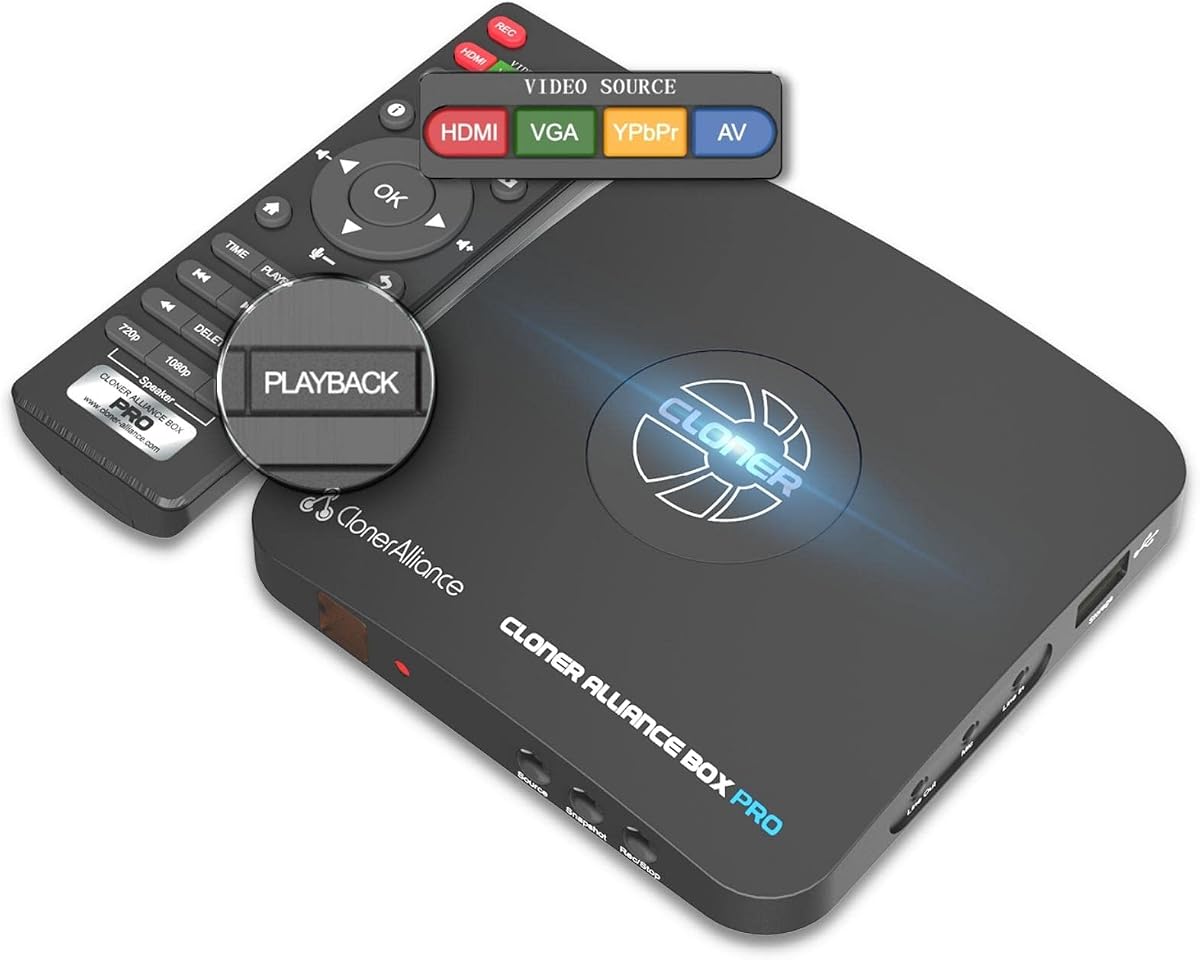
The ClonerAlliance Box Pro stands out as a versatile standalone device for capturing video without a computer. It supports 1080p recording at 60fps and handles various inputs from HDMI to VGA. This makes it ideal for archiving old tapes or capturing gameplay. The included remote simplifies playback directly on a TV. Users appreciate the ease of connecting legacy devices like VCRs. Its reliable performance ensures smooth capture sessions. The device converts analog signals effectively for digital storage. It is a strong choice for home archivists or streamers.
We may earn a commission when you buy through this link, at no additional cost to you.
Key strengths include its broad compatibility with older consoles and VHS players. The schedule recording feature allows automatic capture of shows or matches. You can save recordings directly to USB drives or SD cards. The device maintains low latency so playback feels instant on screen. File formats are widely supported including MP4 which works on most computers. The build quality is solid for daily use. You do not need to install drivers or software. Just plug it in and start recording. This simplicity saves time and technical hassle.
However, the Box Pro does not support HDCP protected content like some modern streaming boxes. This is a common limitation across standalone recorders due to copyright rules. Also, while it handles many formats, very large storage drives might need formatting checks. Users should ensure their drives use compatible file systems. The included software is Windows only which might limit Mac users. Despite these minor drawbacks, the unit performs its core function well. It offers great value for those needing analog to digital conversion.
This device is perfect for anyone wanting to digitize old home movies or capture console games. If you need a simple solution that works without a PC setup, this is a top pick. The remote control makes navigation easy on a TV screen. It is also great for live streaming setups that need a backup recorder. For educators or archivists, the schedule feature adds significant utility. We recommend this for general use and legacy media conversion tasks.
Connects easily to old VHS tapes or camcorders for modern file storage.
Automatically starts recording at set times so you never miss content.
We may earn a commission when you buy through this link, at no additional cost to you.
The Guermok Video Capture Card offers an affordable entry point for content creators needing reliable capture. It handles HDMI signals well and outputs clear 1080p video at 60fps. This makes it suitable for gaming streams or video calls. The USB 3.0 connection ensures fast data transfer to your PC. Users find it easy to set up with software like OBS. The small form factor makes it highly portable. You can take it to events or LAN parties. It supports various operating systems including Windows and Mac. This versatility adds to its appeal.
We may earn a commission when you buy through this link, at no additional cost to you.
Its key strengths lie in its performance relative to cost. The low latency ensures your stream matches your game play without lag. You can capture directly to your hard drive while streaming. The aluminum housing helps with heat dissipation during long sessions. It works with most common consoles and cameras. The package includes a USB C adapter for broader compatibility. Setup is truly plug and play requiring no technical knowledge. This saves time and avoids driver installation issues. It is a solid choice for beginners starting out.
One drawback is the need for a USB C adapter on some systems. You may need to flip the card to get USB 3.0 speed properly. Also it does not support HDCP protected sources which limits some apps. Video capture software must be installed to record. It does not function as a standalone recorder without a PC. These points are common for this price tier. Despite them the capture quality is excellent for the money. It delivers smooth video for most online platforms.
We recommend this card for budget conscious streamers or remote workers. If you need to connect a camera or console to a laptop, this works well. It is particularly useful for teaching or remote meetings. The portability makes it great for travel. While not standalone, it excels in PC based setups. For those starting a channel, this provides high value. It is an essential tool for modern digital creators.
Delivers smooth 1080p streams without lag on OBS or Twitch.
Starts working immediately upon connection with no software install.
We may earn a commission when you buy through this link, at no additional cost to you.
The ClonerAlliance UHD Pro delivers high-end performance for those needing 4K capture without a PC. It records in H.265 format which saves space while keeping quality. The 4K passthrough ensures your display shows the full resolution while recording. This is vital for modern gaming or 4K media. The unit supports standalone operation so you can archive content easily. Users appreciate the pause and resume feature for editing on the fly. It works with various storage options including TF cards. The device is designed for reliability in professional settings. It handles cinematic frame rates well too.
We may earn a commission when you buy through this link, at no additional cost to you.
Its premium status comes from supporting high resolution inputs properly. The H.265 codec is efficient for large video files. You can capture 4K at 30fps or 1080p at higher rates. The interface is simple with a remote control included. Schedule tasks help automate your recording needs. This is useful for capturing sports or lectures. The build quality feels sturdy for daily use. It connects easily to consoles or PC. The latency is low enough for gaming without issues. This makes it a top choice for enthusiasts.
Like other standalone units it struggles with HDCP protected sources. Some streaming services will show a black screen. The price is higher than basic USB cards which may deter some. But for those needing standalone 4K this is a strong option. It avoids the need for a powerful PC to capture. The file management is straightforward on USB drives. You get high quality output directly to storage. These trade-offs are worth it for the convenience it offers.
We suggest this for gamers or creators needing high fidelity records. If you want to record 4K content without complex PC setups, this fits well. The pause feature allows you to edit clips as you record. It is also great for archiving 4K media discs. For professionals needing a portable recorder this is excellent. We recommend it for those prioritizing quality over budget.
Uses H.265 to keep 4K file sizes manageable on your drive.
Instantly pause recording to skip breaks or save file space.
We may earn a commission when you buy through this link, at no additional cost to you.
This generic capture card provides a solid solution for PC based video capture. It handles 1080p at 60fps smoothly which is great for gaming. The loop out feature lets you play without lag while streaming. This is a key benefit for competitive gamers. It includes a microphone input for adding commentary. The USB 3.0 connection ensures fast data transfer. Users find it compatible with most streaming software. It works with various consoles and cameras. The setup is simple and requires no drivers. This makes it accessible for all skill levels.
We may earn a commission when you buy through this link, at no additional cost to you.
Its strengths lie in its versatility and reliability. You can connect multiple devices including DSLRs or consoles. The loop out ensures your gameplay remains smooth on your monitor. The mic input allows direct audio mixing during recording. It works on both Windows and Mac systems. The small size makes it easy to store or travel with. It supports high resolution inputs up to 4K. While it captures at 1080p it maintains quality well. It is a great tool for streamers.
The main limitation is that it requires a PC to function. It cannot record standalone without a computer connected. Some users may find the lack of advanced features restrictive. But for basic streaming and recording it performs well. The driverless design reduces setup time. It is also affordable compared to branded models. These points make it a strong value option for beginners.
We recommend this card for streamers who need a reliable USB solution. If you want to add a camera or console to your PC stream, this works. It is particularly good for those new to streaming. The mic input adds flexibility for voice commentary. It is a dependable choice for daily use.
Loop out ensures your game plays smoothly while you broadcast.
Built-in mic jack lets you add voice without extra hardware.
We may earn a commission when you buy through this link, at no additional cost to you.
The Audio Express AXHDCAP is an economical choice for those needing basic video capture. It supports HDMI input up to 4K at 30Hz but outputs at 1080p. This makes it suitable for video conferencing and meetings. The USB 2.0 connection keeps power draw low. Users appreciate its small size and lightweight design. It works on Windows Mac and Linux easily. The setup is truly plug and play. It is great for teachers or remote workers. The price point is very competitive for home users.
We may earn a commission when you buy through this link, at no additional cost to you.
Its key strengths are simplicity and cost effectiveness. It captures video efficiently for streaming or recording. The aluminum housing helps with cooling during use. You can connect DSLRs or webcams easily. It works with common software like OBS and Zoom. The latency is low for standard usage. It handles audio and video together well. It is perfect for non-demanding tasks. This makes it a reliable option for daily use.
Limitations include the USB 2.0 interface which caps bandwidth. You cannot capture full 4K at 60fps. Some users may find the output maxes at 1080p. But for general calls and recordings this is acceptable. The device is designed for longevity and stable performance. It avoids complex setups which is a plus. These constraints do not hinder basic functionality much.
We suggest this for budget conscious users needing a simple capture device. If you need to connect a camera to your laptop for meetings, this fits. It is also good for simple game streaming. The low cost makes it a great backup tool. We recommend it for those starting out.
Ideal for streaming video to Zoom or Teams without delays.
Works seamlessly on Windows, Mac, and Linux systems easily.
We may earn a commission when you buy through this link, at no additional cost to you.
This generic capture card is designed for portability and ease of use. It supports 1080p recording at 60fps for smooth video. The USB 3.0 connection provides stable data transfer. Users find it compatible with modern consoles like PS5. It has a sleek compact design that fits anywhere. It works with popular streaming software instantly. The setup requires no drivers. This is great for travelers. It captures high quality video consistently.
We may earn a commission when you buy through this link, at no additional cost to you.
Its main benefit is its reliability for daily streaming. It connects to most devices easily including DSLRs. The passthrough feature helps monitor gameplay without lag. It handles various resolutions well up to 4K input. The build quality is sturdy for its size. You can use it with Streamlabs or OBS easily. It supports multiple systems like Windows and Mac. This makes it flexible for home and office. The price is also reasonable for buyers.
The lack of manual controls is a minor drawback. You rely on software for settings adjustments. It requires a PC which limits standalone use. But for those with a laptop this is a plus. The device is well built and reliable over time. It does not heat up excessively during use. These points make it a solid choice for streamers.
We recommend this for creators needing a portable capture solution. If you travel often or switch setups, this card is practical. It works well for remote teaching or gaming. The high frame rate ensures smooth capture. It is a reliable tool for your gear.
Fits easily in any laptop bag for on the go recording.
USB 3.0 ensures fast data for high frame rate video.
We may earn a commission when you buy through this link, at no additional cost to you.
The 4K60 Video Capture Box is a professional grade device for multi-source recording. It supports two HDMI inputs allowing simultaneous capture. The built-in 7 inch screen lets you preview content. This is useful for events or presentations. It offers PIP and POP features for layout options. Users appreciate the battery option for portability. It connects to various devices like consoles or PCs. The recording quality is high at 1080p 60fps. It is ideal for professional broadcasters.
We may earn a commission when you buy through this link, at no additional cost to you.
Its strengths include the dual input and display features. You can switch between sources or combine them. The screen means no need for an external monitor. It works on Linux Windows and Mac. The power options allow long recording sessions. You can store video on USB or SD. The latency is low for live use. It handles 4K inputs well. This makes it a powerful tool for events.
However the price is higher than most other units. Also it struggles with protected content from some providers. The setup is more complex than simple cards. But for pros this is expected. The build is robust and reliable. It delivers consistent performance for work. These points make it a niche choice.
We suggest this for event production or broadcast needs. If you need to mix multiple cameras or sources, this works well. It is great for conferences or live streams. The screen and dual inputs add significant value. It is a strong choice for pros.
Captures two HDMI feeds to mix during live events easily.
7 inch LCD lets you see footage without a TV.
We may earn a commission when you buy through this link, at no additional cost to you.
The ZowieREC 4K Recorder stands out for its premium design and standalone function. It records 4K video without needing a computer. The aluminum body is durable and looks professional. Users can set schedules for automatic recording. It supports pause and resume for editing ease. It works with many devices like PCs or consoles. The low latency ensures smooth playback on screen. It is great for home use or travel. The storage options are flexible for users.
We may earn a commission when you buy through this link, at no additional cost to you.
Its design is a key strength for home studios. It handles 4K inputs at high frame rates well. The scheduling feature saves manual effort daily. You can capture matches or shows automatically. The interface is simple for all users. It connects easily to HDMI sources. It supports multiple storage mediums. This adds flexibility for any setup. The build is sturdy for daily use.
Limitations include the lack of HDCP support for streaming content. It also has a lower user rating compared to some competitors. But for offline capture it is reliable. The price is reasonable for 4K standalone. It avoids software dependency which is a plus. These points make it a good choice for archivists.
We recommend this for those needing a stylish standalone recorder. If you want high quality recording without a PC, this fits. It is great for game capture or TV shows. The schedule feature adds significant utility. We recommend it for home use.
Premium aluminum casing fits well in home studio gear.
Set start times to record shows without manual help.
We may earn a commission when you buy through this link, at no additional cost to you.
The ClonerAlliance ViewPro offers a portable solution with a built-in screen. It records 1080p at 60fps for clear video. The 7 inch LCD allows instant playback anywhere. This removes the need for a TV. It supports various inputs including VGA. The schedule recording is helpful for set times. Users find it great for travel or field use. It works with cameras and consoles easily. It is a reliable standalone recorder.
We may earn a commission when you buy through this link, at no additional cost to you.
Its key strengths are the screen and portability. You can capture and view immediately on site. The analog inputs help with legacy gear. It is easy to carry in a bag. The remote control simplifies navigation. It supports HDMI VGA and composite inputs. This versatility makes it useful for events. It works well for teaching or presentations. The build is solid for daily use.
Like others it does not support protected content via HDCP. The unit is heavier than a simple USB card. But for standalone use this is normal. It offers great value for the features it has. The battery option adds further portability. These points make it a strong portable option.
We suggest this for field workers needing a self-contained recorder. If you need to preview footage while out, this fits. It is great for presentations or events. The screen and schedule feature add utility. We recommend it for portable recording.
Portable design works well for teaching or events anywhere.
7 inch screen lets you check clips right after recording.
We may earn a commission when you buy through this link, at no additional cost to you.
The Blackmagic UltraStudio is a professional SDI capture device. It handles high data rates for studio quality video. The loop output ensures monitoring without delay. Users find it compatible with professional editing software. It supports 3G SDI for stable transfer. The build is robust for heavy use. It works well for live broadcasts. It requires a PC to record. It is a top choice for broadcasters.
We may earn a commission when you buy through this link, at no additional cost to you.
Its strengths lie in professional performance. It connects to cameras with SDI outputs. The loop out is essential for real-time monitoring. It supports various resolutions for work. It is reliable for daily broadcast use. It connects to computers easily. It is ideal for high end setups. This makes it a standard in the field. It delivers consistent quality for professionals.
It is not suitable for home users without SDI gear. The cost and complexity are higher than HDMI units. But for pros this is the standard. It avoids common HDMI issues. It is built for longevity. These points make it a niche but essential tool.
We recommend this for professional broadcast environments. If you work with SDI cameras, this is a top option. It is essential for live TV or production. The performance is unmatched in class.
Handles SDI inputs for studio grade video capture.
Loop output ensures zero delay for live production.
We may earn a commission when you buy through this link, at no additional cost to you.
Choosing the right HDMI recorder depends on your specific needs. We break down key factors to help you find the best fit for your setup.
Check if the device supports 1080p or 4K. If you need high fidelity, look for 4K input and output. Most budget units cap at 1080p.
Prioritize devices with 4K support if your source is high resolution. This ensures future proofing for your recordings.
Decide if you need a standalone unit or a PC card. Standalone units work without a computer. PC cards require a system to function.
Choose standalone for simplicity and portability. Choose PC cards if you need editing or streaming control.
Ensure the device matches your source ports. Look for HDMI VGA RCA or SDI inputs. This ensures compatibility with your gear.
Verify input types before buying. Mismatched inputs can prevent your device from working correctly.
Check supported storage types like USB drives or SD cards. Some units support high capacity drives. Others may have limits.
Pick a unit that matches your storage needs. Ensure you have enough space for long sessions.
Look for 60fps support for smooth action. Lower rates like 30fps may cause blur. This is key for gaming or sports.
Select 60fps if you record fast motion. This ensures your footage stays sharp.
Consider USB 3.0 for fast data transfer. Some units use 2.0 which is slower. This affects your recording speed.
Choose USB 3.0 for best performance. This reduces lag and transfer time.
Look for plug and play features. Drivers simplify setup. Remote controls help with navigation.
Select devices that offer simple interfaces. This saves time for daily use.
Check build quality for travel or heavy use. Metal housing helps with heat. This ensures longevity.
Pick sturdy units for professional needs. This prevents failures during important sessions.
Connect your HDMI source to the recorder input. Ensure the output connects to your display. This sets up the signal path correctly.
Format your storage drive to a compatible file system. This ensures the device writes files correctly. Use FAT32 or NTFS for best results.
Clean the ports with a dry cloth to avoid dust. Store the unit in a cool place. This maintains performance and longevity over time.
Most standalone HDMI recorders cannot record protected content from services like Netflix due to HDCP. This is a legal and technical restriction. You will typically see a black screen. You would need to disable protection settings which is often impossible.
Not all. Standalone units work without a computer. They save files directly to storage. USB capture cards require a PC to record. Check the specific product details before buying.
Most units support FAT32 or NTFS. These are common and easy to manage. If using large drives, ensure they are formatted correctly. This prevents errors during recording.
Yes many USB capture cards work well for streaming software. They send video to your PC for broadcasting. Standalone units typically record to storage. They may not support direct streaming.
Some models support 4K input. However many output at 1080p. Check the specs carefully. 4K input does not always mean 4K recording.
Most modern devices have low latency. There may be slight lag but it is minimal. Look for 'ultra low latency' models for best results. This is key for gaming.
We have reviewed ten top models ranging from budget cards to professional units. The ClonerAlliance Box Pro stands out for its standalone versatility. The Guermok Card offers great value for budget users. The UHD Pro leads in premium 4K performance.
Consider your needs for resolution and setup. If you need to archive old tapes or record without a PC, standalone units work best. For streaming PC cards are ideal. Match the inputs to your gear.
Prices and stock change often. Always check the latest listings before buying. This ensures you get the best deal. We hope this guide helps you find the right recorder.