
TP-Link Ethernet Splitter 1 to 2
4.6Editor score
1 to 2 Port Expansion
1000Mbps Gigabit Speed
Compact Aluminum Housing
USB Power Cable Included
This guide compares the top internet splitter models for home and office networks, evaluating speed, port count, build quality, and compatibility to help you
Modern homes and offices often require multiple wired connections but lack sufficient ports on routers. An internet splitter allows you to expand a single Ethernet port into several active connections, enabling stable network access for multiple devices without complex cabling.
We evaluated ten top-rated splitters based on speed, port count, build quality, and ease of use. Our analysis considers gigabit performance, power requirements, compatibility with various cable types, and real-world reliability for home and office environments.
Each pick highlights key strengths, trade-offs, and ideal use cases. Prices and availability change frequently, so check current listings before purchasing. This guide ensures you select the right splitter for your specific network expansion needs.
4.6Editor score

4.7Editor score

4.3Editor score
The following table provides a side-by-side comparison of all ten selected internet splitters. Review port counts, speed ratings, compatibility, and key features to find the model that best fits your network expansion requirements.


This LIEZHUA Ethernet Splitter offers a cost-effective way to expand a single network port into two. With a 4.3-star rating, users appreciate its efficiency in enabling simultaneous data transfer at speeds up to 1,000 Mbps.
We may earn a commission when you buy through this link, at no additional cost to you.
The device features a PCB circuit board and aluminium alloy casing for durability. Six LED indicators help users quickly identify which connected device is running, simplifying network management without complex software.
While it requires a 5V/1A power source, the included USB cable makes setup straightforward. Some users note that it cannot function without power connected, which is a standard limitation for powered splitters.
Ideal for home offices needing two wired connections, this splitter balances performance and price. Its universal compatibility with Cat5 through Cat8 cables ensures it fits most existing network environments.
Expands one port to two simultaneously, eliminating the need for extra cabling or complex switch setups.
Aluminium alloy casing and integrated mechanical soldering ensure long-term reliability in various environments.
We may earn a commission when you buy through this link, at no additional cost to you.
The TP-Link TL-SG105 stands out as a robust solution for expanding networks up to five devices. With a 4.7-star rating, it combines switch functionality with splitter simplicity, offering reliable Gigabit connectivity.
We may earn a commission when you buy through this link, at no additional cost to you.
Its fanless metal design ensures quiet operation while maintaining durability. Energy-efficient technology reduces power consumption, making it suitable for continuous use in homes or small offices without noise concerns.
Advanced software features like Port-based 802.1p/DSCP QoS prioritize traffic, ensuring smooth video or voice transmission. The 3-year warranty provides peace of mind for long-term network investments.
Ideal for users needing multiple connections without complex configuration, this switch-simpl hybrid delivers performance. Its plug-and-play setup means no drivers are required for immediate network expansion.
Supports 10/100/1000Mbps speeds with Auto Negotiation for seamless connection to various devices.
Shielded ports and metal casing protect against interference and physical damage over time.
We may earn a commission when you buy through this link, at no additional cost to you.
This TP-Link splitter expands one Gigabit Ethernet port into two active ports with a 4.6-star rating. Its compact aluminum alloy housing makes it portable, ideal for travel or tight spaces behind TVs.
We may earn a commission when you buy through this link, at no additional cost to you.
Supporting up to 1000Mbps total bandwidth, it ensures smooth data transmission without crosstalk. Backward compatibility with 100Mbps networks allows flexibility across older devices. Security is prioritized as a CISA Secure-by-Design signatory.
While bandwidth is shared when two devices connect, performance remains stable for streaming and gaming. The included USB-C power cable simplifies setup, requiring no software configuration.
Perfect for home and office setups needing reliable dual connections, this splitter balances portability and performance. Its durability ensures long-term use in various network environments.
Built with security as a core requirement, meeting advanced standards for network safety.
Lightweight design fits easily in laptop bags for flexible network expansion on the go.
We may earn a commission when you buy through this link, at no additional cost to you.
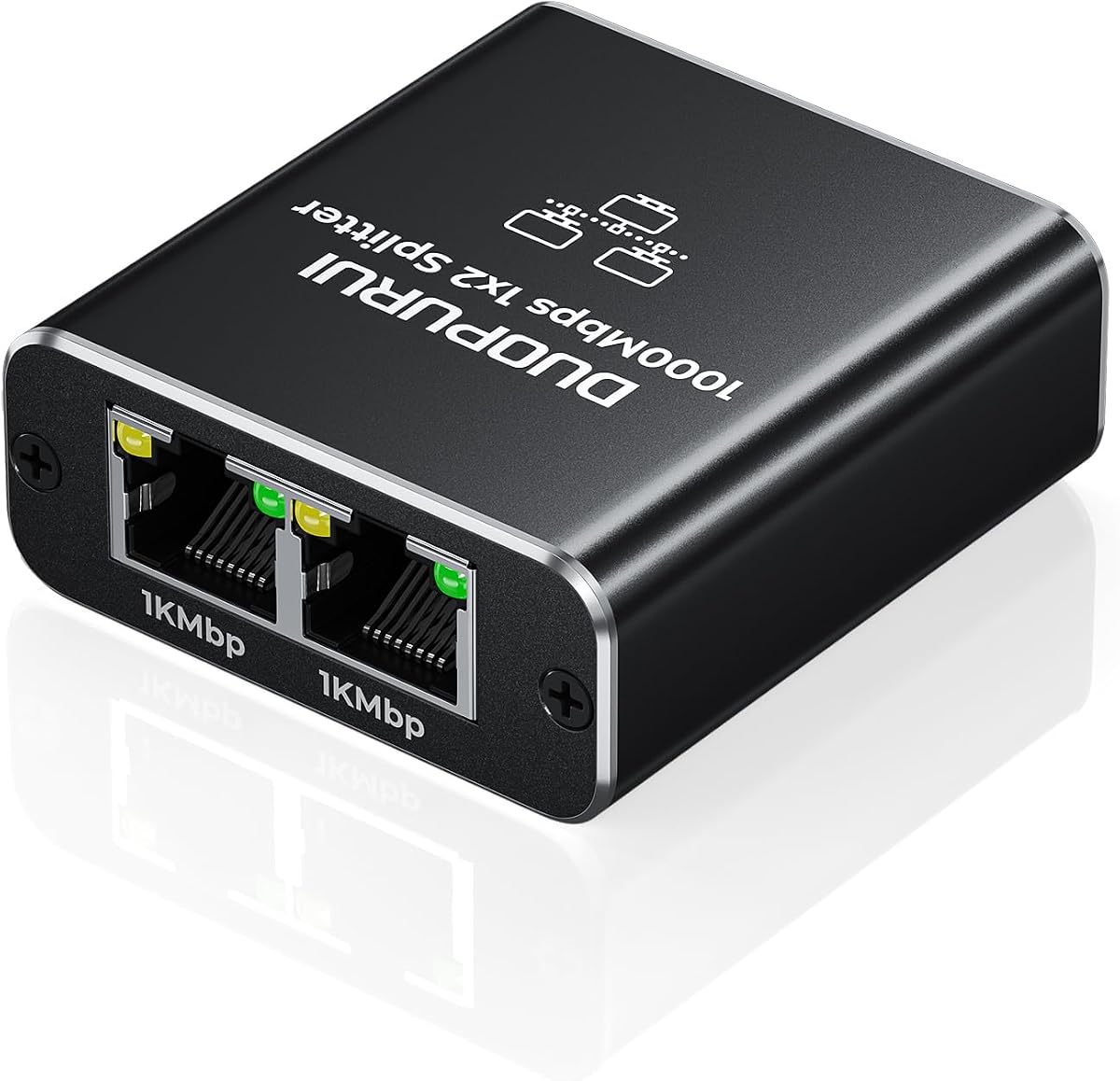
The DUOPURUI splitter expands one Gigabit signal into two independent outputs with concurrent rates up to 1000Mbps. Rated 4.4 stars, it solves insufficient port issues effectively for gaming and streaming needs.
We may earn a commission when you buy through this link, at no additional cost to you.
Its alloy shell and high-performance circuit board ensure stable signal transmission with strong anti-jamming ability. Compatible with all mainstream cable types, it connects seamlessly to routers, computers, and smart TVs.
Plug-and-play functionality removes driver installation steps. For best stability, a dedicated USB power adapter is recommended over laptop ports. This ensures the device operates reliably under high load.
Ideal for users needing quick dual connections without complex setups, this splitter delivers consistent performance. Its rugged design safeguards data security across various complex use scenarios.
Supports 4K HD video and large file transfers with adaptive matching for 10/100Mbps networks.
No drivers required; just connect device and power to start enjoying high-speed connectivity.
We may earn a commission when you buy through this link, at no additional cost to you.
Connecting one Ethernet port to four devices, this LIEZHUA splitter provides fast stable connections for all. With a 4.4-star rating, it supports ultra-fast transfer speeds up to 1000Mbps for media and gaming.
We may earn a commission when you buy through this link, at no additional cost to you.
Universal compatibility with Cat5 through Cat8 network cables ensures flexibility across various setups. Its lightweight design makes it easy to carry, allowing network creation anywhere for home or travel.
Setup is simple; plug in the Ethernet and USB power cord. No complicated configuration is needed, making it accessible for non-technical users needing immediate multi-device access.
Ideal for small offices needing four wired connections, this splitter balances speed and portability. Its included LAN cable adds value, streamlining the initial installation process.
Provides stable network connection for streaming media and large file transfers across four devices.
Compact design allows easy carrying for network connection anytime, anywhere without bulk.
We may earn a commission when you buy through this link, at no additional cost to you.
This internet splitter expands one input into four RJ45 output ports with speeds up to 1000Mbps. Rated 4.4 stars, it offers maximum flexibility for network setups using Cat5 through Cat8 cables.
We may earn a commission when you buy through this link, at no additional cost to you.
Data transfer speeds are fast and reliable for multiple devices simultaneously. The included USB-C power cable ensures stable operation without external adapters. No configuration is required for plug-and-play use.
Four devices can be connected simultaneously to expand wired network connections effectively. This helps solve issues where limited ports restrict multiple device access in homes or offices.
Ideal for users needing four connections from one source, this splitter delivers consistent performance. Its simplicity and speed make it a practical choice for network expansion without complexity.
Features 4 RJ45 output ports perfect for expanding wired network connections seamlessly.
Includes USB-C power cable for reliable stable operation without external adapters.
We may earn a commission when you buy through this link, at no additional cost to you.
This adapter expands network connectivity allowing up to 1000Mbps speeds on each port simultaneously. With a 4.3-star rating, it ensures uninterrupted internet access for two devices using advanced chip technology.
We may earn a commission when you buy through this link, at no additional cost to you.
High-quality lightweight plastics provide excellent heat dissipation. Eight nickel-plated jacks ensure stable signal transmission over distances up to 100 meters. LED indicators clearly display working status for each port.
Compatible with most Ethernet cables including Cat5e to Cat8, it works with various devices like routers and TVs. Plug-and-play installation ensures long-lasting performance without complicated setup.
Ideal for users needing two reliable wired connections, this splitter balances speed and durability. Its wide compatibility and included Cat6 cable make setup straightforward for immediate use.
Offers maximum transfer rate of 1000Mbps per cable for fast efficient data transmission.
LED indicators clearly display the working status of each connected port.
We may earn a commission when you buy through this link, at no additional cost to you.
This mini splitter supports three devices sharing a single line at rates up to 1000M. Rated 4.5 stars, it solves insufficient cabling issues for homes needing more ports than available.
We may earn a commission when you buy through this link, at no additional cost to you.
Three devices can share bandwidth independently without interfering. The compact lightweight design fits any laptop travel bag, making it ideal for hotels or office use where portability matters.
No reboot or configuration is needed for plug and play functionality. LEDs show active devices. Aluminum metal material ensures stability and efficient heat dissipation during prolonged use.
Ideal for users needing three connections from one source, this splitter offers reliable performance. Its small footprint and aluminum build make it a practical addition to any network setup.
Fits any laptop travel bag, suitable for home, office, and hotel environments.
No reboot needed; simply plug in the network cable to connect devices immediately.
We may earn a commission when you buy through this link, at no additional cost to you.
Three devices share a single Ethernet line effectively solving connection issues with this splitter. Rated 4.5 stars, it ensures stable reliable data transfer at rates up to 1000Mbps for consistent performance.
We may earn a commission when you buy through this link, at no additional cost to you.
Supporting LAN cables up to 100 meters, it meets needs across different locations. Lightweight compact design fits home, office, and industrial environments. Aluminum material ensures durability and efficient heat dissipation.
No configuration or reboot is needed for plug-and-play. Setup takes minutes. Compatibility with Cat5 to Cat8 cables ensures it works seamlessly with various network devices and adapters.
Ideal for users needing three wired connections from one source, this splitter delivers reliability. Its durable build and simple setup make it a strong choice for expanding networks.
Compatible with various Ethernet cables and devices including routers, computers, and smart TVs.
Compact and portable design offers greater flexibility for network expansion plans.
We may earn a commission when you buy through this link, at no additional cost to you.
This UGREEN splitter divides a one-gigabit network into two simultaneously enabling speeds up to 1000Mbps. Rated 4.5 stars, it solves insufficient wiring issues with a sleek space grey design.
We may earn a commission when you buy through this link, at no additional cost to you.
Aluminum alloy material ensures signal stability and durability. Gold-plated pin cores prevent interference. No crosstalk between signals ensures fast stable transmission speeds for large data transfers.
Plug-and-play functionality means no drivers are needed. Just connect the 5V power. Lightweight design makes it highly portable for business trips or travel setups.
Ideal for users needing two reliable wired connections, this splitter delivers consistent performance. Its build quality and compact size make it an attractive choice for modern networks.
Aluminum alloy and gold-plated pins ensure no signal crosstalk and interference.
Lightweight and portable design fits easily in laptop bags for business trips.
We may earn a commission when you buy through this link, at no additional cost to you.
Selecting the right internet splitter depends on understanding your specific network needs and environment. This guide breaks down the critical factors to consider before making a purchase.
The number of output ports determines how many devices you can connect simultaneously. Some splitters offer 1-to-2 configurations, while others provide up to four ports. For multiple devices, consider a model with more outputs to avoid bottlenecks and ensure all devices have dedicated access to the network.
Choose a splitter with enough ports to meet current needs while leaving room for future expansion without replacing hardware.
Ensure the splitter supports the speeds your network requires. Gigabit Ethernet splitters support up to 1000Mbps, which is ideal for streaming, gaming, and large file transfers. Some models share bandwidth among ports, while others allow simultaneous transmission. Check if the splitter is backward compatible with older 100Mbps networks.
Select a Gigabit splitter to match modern internet speeds and avoid bottlenecks during high-bandwidth activities.
Many internet splitters require external power to function properly. Typically, these use USB cables with 5V adapters. Ensure you have an accessible USB power source near your router. Passive splitters might not need power but are limited in speed or reliability. Powered models offer better stability and performance.
Verify power needs and ensure you have a reliable USB power source near your network setup.
Construction materials affect longevity and performance. Aluminum alloy casings provide better heat dissipation and durability than plastic. Look for gold-plated pins and shielded ports to minimize signal interference. A sturdy build ensures the device lasts through regular plugging and unplugging.
Opt for metal casings and gold-plated connectors to ensure long-term reliability and signal integrity.
The splitter must work with your existing Ethernet cables. Most support Cat5 through Cat8. Check the specifications to confirm compatibility. Using mismatched cables can limit speeds or cause connectivity issues. Ensure the splitter is rated for the cable type you plan to use.
Ensure compatibility with your Cat5 to Cat8 cables to maintain optimal network speeds.
Plug-and-play functionality is crucial for convenience. Avoid models requiring complex drivers or software configurations. A good splitter should work immediately upon connection. Clear LED indicators help identify active ports and connection status quickly.
Choose plug-and-play models with clear indicators to simplify installation and troubleshooting.
If you travel or need flexible placement, compact and lightweight designs are essential. Look for splitters that fit easily in laptop bags. Small form factors allow placement behind TVs or in tight spaces without obstructing other equipment.
Select compact models with lightweight designs for flexible placement and travel convenience.
A reliable warranty indicates manufacturer confidence in the product. Look for offerings of at least one year. Good customer support helps resolve setup issues. Checking reviews regarding support responsiveness can guide your decision.
Prioritize models with solid warranties and responsive support for long-term peace of mind.
First, connect one end of an Ethernet cable to your router or modem and the other to the input port of the splitter. Ensure the splitter is powered via its USB connection before plugging in devices. This sequence prevents connection errors.
Next, connect your devices like computers or consoles to the output ports using additional Ethernet cables. Check the LED indicators to confirm active connections. If a device shows no link, reseat the cable or try a different port.
To maintain performance, keep the splitter in a well-ventilated area to avoid overheating. Avoid bending cables sharply near the jacks. Dust the exterior occasionally to prevent debris buildup that could block ports.
An internet splitter typically uses one input to share a signal across multiple outputs, often requiring power for Gigabit speeds. A switch, like the TP-Link TL-SG105, manages traffic more intelligently between ports, offering better performance for multiple devices. Splitters are simpler and often cheaper, while switches are more robust for heavy network use.
Not all, but many Gigabit splitters do. Powered models ensure stable data transmission and support simultaneous high-speed connections. Passive splitters may work without power but usually have limited speed capabilities. Always check product specifications for power requirements before purchasing to ensure compatibility with your setup.
Yes, splitters work with most routers that have Ethernet ports. They expand the number of wired connections available from the router. However, they do not convert a wireless signal to wired; you still need a physical Ethernet connection from the router to the splitter for wired devices.
It depends on the splitter type. Some models share total bandwidth among devices, meaning speeds may decrease as more devices connect. Others allow full Gigabit speed on each port. Choose a splitter that supports your required speeds to avoid performance degradation.
Yes, most internet splitters are compatible with consoles like PlayStation and Xbox that use Ethernet. Ensure the splitter supports the required speeds for online gaming, typically Gigabit. This provides a stable connection without latency issues common with wireless.
Yes, many models support cascading to expand further. For example, connecting one splitter to another increases available ports. Ensure each splitter supports cascading and you have sufficient bandwidth to avoid bottlenecks.
Choosing the right internet splitter depends on your specific needs. The TP-Link TL-SG105 offers robust performance for multiple devices. The TP-Link 1-to-2 model balances compactness and speed. For budget options, the LIEZHUA Gigabit Splitter provides essential features without high cost.
Prioritize speed, port count, and build quality. Ensure your setup supports external power if needed. Look for models with clear indicators and simple setup for hassle-free installation. Consider future needs to avoid replacing hardware soon.
Prices and availability change frequently. Always check current listings and user reviews before purchasing. This guide provides a starting point for finding a reliable splitter that meets your network expansion needs efficiently.