
Redragon K617 HE
4.3Editor score
Hall Effect switches
8000Hz polling
Compact 60% layout
Discover the top 10 keyboards for CS2 optimized for Rapid Trigger and low latency to improve your movement and aiming precision in competitive matches.
Finding the right keyboard for Counter-Strike 2 is crucial for competitive success. Players need responsive inputs and precise actuation to execute quick movements and accurate shots without delay or hesitation during intense rounds.
We compared ten top gaming keyboards featuring Hall Effect magnetic switches and optical technology. Our analysis focuses on polling rates, actuation customization, durability, and form factors tailored specifically for FPS enthusiasts seeking an edge.
Each pick highlights specific strengths like budget value, premium build, or specialized features. Note that pricing and availability change frequently so check the current listings before making your final decision on which model suits your setup best.
4.3Editor score
4.4Editor score
4.5Editor score
This side-by-side comparison evaluates all ten selected keyboards across critical performance metrics including switch technology, polling rates, actuation range, build quality, and layout options to help you find the perfect match for your gameplay style.



The Redragon K617 HE offers exceptional value for gamers seeking Hall Effect technology without breaking the bank. With a rating of 4.3 stars this keyboard delivers reliable rapid trigger capabilities essential for Counter-Strike 2 movement mechanics.
We may earn a commission when you buy through this link, at no additional cost to you.
Its hall Effect magnetic switches provide 10 times faster response than traditional boards allowing precise control over key actuation. The 8000Hz polling rate ensures inputs register instantly which is vital for peek-and-fire moments in competitive matches.
While the software lacks advanced features the ability to adjust actuation from 0.1mm to 3.4mm allows customization for any playstyle. The 60% form factor maximizes desk space giving your mouse room to maneuver freely during low sensitivity aim training.
This keyboard is ideal for budget-conscious players who prioritize performance over aesthetics. If you need a responsive tool for CS2 without spending premium prices this model provides the necessary speed and customization for serious gameplay.
Rapid Trigger allows keys to reset immediately upon lifting enabling faster counter-strafing and movement adjustments critical in high-speed FPS scenarios.
The 60% layout removes non-essential keys freeing up significant desk space for wider mouse movements which many CS2 pros prefer for precise aiming.
We may earn a commission when you buy through this link, at no additional cost to you.
The Redragon K686 HE combines magnetic precision with a unique floating structure that dampens noise. Rated 4.4 stars it appeals to players who want a quiet yet fast keyboard for late-night CS2 sessions.
We may earn a commission when you buy through this link, at no additional cost to you.
UltraMag POM magnetic switches ensure keypresses are detected without physical contact reducing wear and increasing response speed. The dedicated control knob simplifies volume and backlight adjustments so you stay focused during intense competitive matches.
Despite the quiet operation the keyboard maintains high performance with 8000Hz polling and rapid trigger logic. The dual-module floating design gives a soft bounce feel that some users prefer over harsh clacks found on standard mechanical boards.
Choose this model if you value sound dampening alongside competitive features. It bridges the gap between budget and premium offering solid speed and customization in a package that remains easy on the ears during marathon gaming sessions.
The anti-wobble switch-plate design paired with dampening layers creates a softer tactile experience that reduces auditory fatigue during long practice routines.
Having a physical knob for volume and media control means you can adjust audio on the fly without interrupting your game or fumbling with key combos.
We may earn a commission when you buy through this link, at no additional cost to you.
The Redragon K673 HE stands out with its noise dampening layers and one-knob simplicity. Rated 4.1 stars it offers a reliable platform for FPS gamers needing quick inputs without sacrificing comfort during long CS2 sessions.
We may earn a commission when you buy through this link, at no additional cost to you.
Its magnetic switches operate without physical contact providing a consistent feel that resists degradation over time. The floating structure design minimizes wobble ensuring every keypress registers accurately even during rapid directional changes in gameplay.
Users appreciate the ability to tune actuation points via software allowing personalized sensitivity settings for different keys. The media knob simplifies control over volume and brightness so you can manage environment settings without leaving your game window.
This keyboard is a strong contender for those seeking balanced performance and comfort. While the software may have minor glitches the hardware provides the speed and stability needed to compete effectively in online ranked matches.
The dual-module floating structure provides a Hi-Fi bounce that feels smoother than typical rigid mechanical switches reducing finger fatigue over time.
Software-powered tuning allows you to save multiple actuation profiles ensuring your setup stays consistent across different game titles or play sessions.
We may earn a commission when you buy through this link, at no additional cost to you.
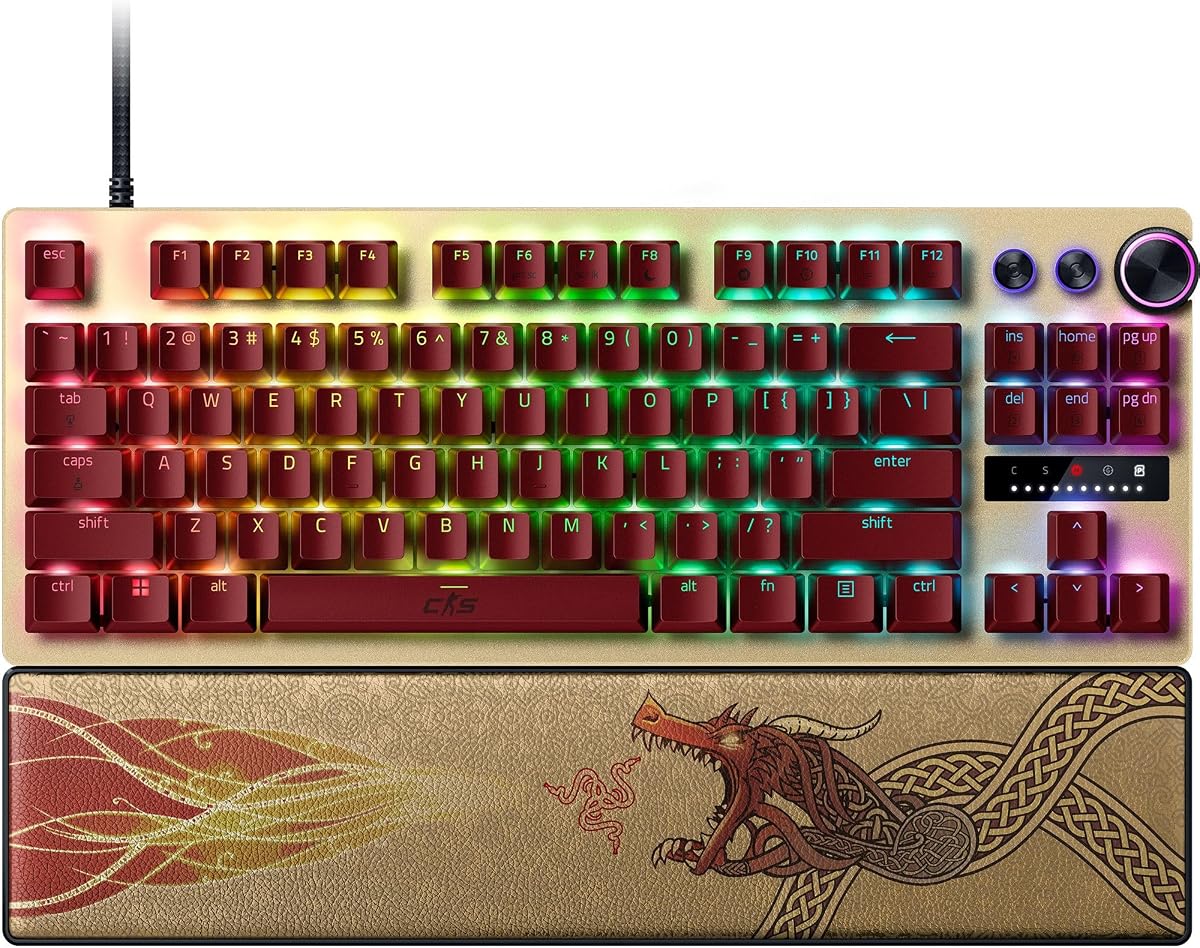
The Razer Huntsman V3 Pro TKL Counter-Strike 2 Edition is engineered for elite competitive play. Rated 4.4 stars it integrates industry-leading technologies like Rapid Trigger and Snap Tap to give players an unbeatable edge in movement mechanics.
We may earn a commission when you buy through this link, at no additional cost to you.
Its Analog Optical Switches Gen 2 allow for ultra-fast repeated inputs with an adjustable actuation range from 0.1mm to 4.0mm. The Snap Tap feature prioritizes the latest input between two keys enabling near-instant directional changes without lifting fingers completely.
Onboard LED adjustments let you tweak actuation height or Rapid Trigger sensitivity without opening software which is vital for tournament scenarios. The textured double-shot PBT keycaps and magnetic leatherette wrist rest ensure durability and comfort during intense training sessions.
Invest in this keyboard if you demand the absolute best performance and customization. While it comes at a premium price the specialized features and build quality justify the cost for serious competitors aiming to maximize their potential in CS2.
Snap Tap allows instant counter-strafing by prioritizing the most recent key input reducing the time needed to switch directions during combat encounters.
Onboard adjustments mean settings can be saved directly to the keyboard allowing you to bring your exact profile to any LAN event or competition.
We may earn a commission when you buy through this link, at no additional cost to you.
The Corsair Clipper PRO MINI delivers advanced Hall Effect control in a compact 60% frame. Rated 4.4 stars it excels with ultra-fast 8000Hz polling and SOCD logic that ensures cleaner directional inputs for sharper counter-strafing.
We may earn a commission when you buy through this link, at no additional cost to you.
Its MGX Hyperdrive switches offer adjustable actuation from 0.2mm to 3.8mm with zero drift and 100M keystroke durability. The IP57 rating provides water and dust resistance protecting the keyboard from accidental spills during long gaming sessions.
Dual-layer sound dampening keeps keystrokes quiet and distraction free while maximizing mouse space for low sensitivity aiming. Smart Tap and Tap Lock features help reduce finger fatigue and streamline play for consistent execution under pressure.
This keyboard is perfect for those wanting durability and high speed in a small footprint. If you value resilience against damage and precise movement logic this model offers a robust solution tailored specifically for competitive FPS environments.
FlashTap SOCD technology ensures that conflicting directional inputs are handled cleanly preventing sticky keys or unintended movements during rapid directional swaps.
With IP57 water and dust resistance you can focus on the game without worrying about accidental liquid spills damaging your expensive gear during intense play.
We may earn a commission when you buy through this link, at no additional cost to you.
The Redragon K745 HE delivers reliable Rapid Trigger and high polling speeds at a competitive price point. While rated 3.9 stars it provides the essential magnetic switch performance needed for fast-paced Counter-Strike 2 gameplay.
We may earn a commission when you buy through this link, at no additional cost to you.
Five-layer noise dampening paired with an anti-wobble switch-plate design ensures that keystrokes feel smooth and consistent. The magnetic switches detect inputs without physical contact reducing latency and enhancing the responsiveness of your movements.
Dynamic key activation cuts redundant keystrokes during quick direction changes allowing for cleaner inputs during rapid strafing. You can fine-tune actuation profiles via software to suit your specific gaming preferences and typing needs.
Choose this model if you want essential Hall Effect features without spending heavily. While build quality may vary slightly the core performance capabilities meet the demands of FPS players looking to improve their reaction times and movement precision.
The multiple dampening layers create a softer tactile feel that reduces the harsh clack of standard switches making it more comfortable for shared spaces.
Dynamic key activation helps eliminate redundant keystrokes ensuring that your inputs translate directly to in-game actions without unnecessary delays.
We may earn a commission when you buy through this link, at no additional cost to you.
The Keychron C0 HE is a specialized one-handed keypad designed to optimize FPS movement control. Rated 4.2 stars it features 8000Hz polling and magnetic switches to ensure instant key reset for precise movements in titles like CS2.
We may earn a commission when you buy through this link, at no additional cost to you.
Its 35-key layout keeps essential commands within reach allowing you to keep your left hand on the WASD keys while managing complex macros. The web-based configurator means you can customize mapping and lighting without installing heavy software.
Inputs are detected based on real-time key travel rather than fixed points enabling finer control and consistent performance during rapid high-frequency inputs. This is particularly useful for streamers who need quick access to OBS or push-to-talk functions.
This keypad is ideal for players wanting to offload secondary commands to a secondary device. If you have enough desk space and want to minimize hand movement for critical actions this tool provides efficient control for your gaming setup.
Triggering OBS scenes or managing push-to-talk with one hand allows you to focus on the game while maintaining seamless stream control without breaking flow.
Browser-based configuration ensures you can access your settings from any system without installing drivers which is helpful for multi-system setups or tournament travel.
We may earn a commission when you buy through this link, at no additional cost to you.
This renewed version of the Razer Huntsman V3 Pro TKL offers access to high-end analog optical switches at a lower cost. Rated 3.5 stars it provides the same Rapid Trigger and Snap Tap technology found in the brand new units.
We may earn a commission when you buy through this link, at no additional cost to you.
The optical switches allow for ultra-fast repeated inputs with adjustable actuation from 0.1mm to 4.0mm. You can make on-the-fly adjustments to sensitivity or actuation height using the onboard LED array without needing software.
The tenkeyless form factor gives more room to maneuver your mouse while the solid aluminum top plate ensures stability during intense play. A magnetic leatherette wrist rest provides ergonomic support vital for long periods of training and competition.
Consider this option if you want premium features but have budget constraints. While there is more risk than buying new the underlying hardware capabilities remain intact for those willing to accept the trade-offs of a renewed product.
Choosing a renewed unit lets you access flagship gaming technology like Snap Tap and Analog switches without the full retail price tag of a new device.
The onboard LED visual aid helps you tune actuation height precisely so you can find the perfect balance between accidental triggers and responsive inputs.
We may earn a commission when you buy through this link, at no additional cost to you.
The Corsair K55 RGB PRO is a membrane keyboard that offers reliable basic functionality for budget setups. Rated 4.4 stars it focuses on comfort and durability with spill resistance and dedicated macro keys to enhance gameplay usability.
We may earn a commission when you buy through this link, at no additional cost to you.
Six dedicated macro keys allow you to activate functions or streaming commands in just one stroke. The detachable palm rest reduces stress on your hands allowing you to play longer in comfort with a textured surface to prevent slipping.
While it lacks the advanced speed of magnetic switches the IP42 rating guards against accidents so your gameplay can continue uninterrupted. RGB lighting effects can be customized through CORSAIR iCUE software to match your desk setup.
This keyboard is best suited for casual players or those just starting out. It provides a comfortable and durable platform for learning the game without requiring a significant investment in premium switch technology or specialized features.
IP42-rated protection guards against dust and minor spills ensuring that accidental liquid spills do not immediately disable your keyboard during intense gaming sessions.
The soft rubber palm rest reduces stress on your hands which is helpful during long practice sessions where wrist fatigue can lead to performance dips.
We may earn a commission when you buy through this link, at no additional cost to you.
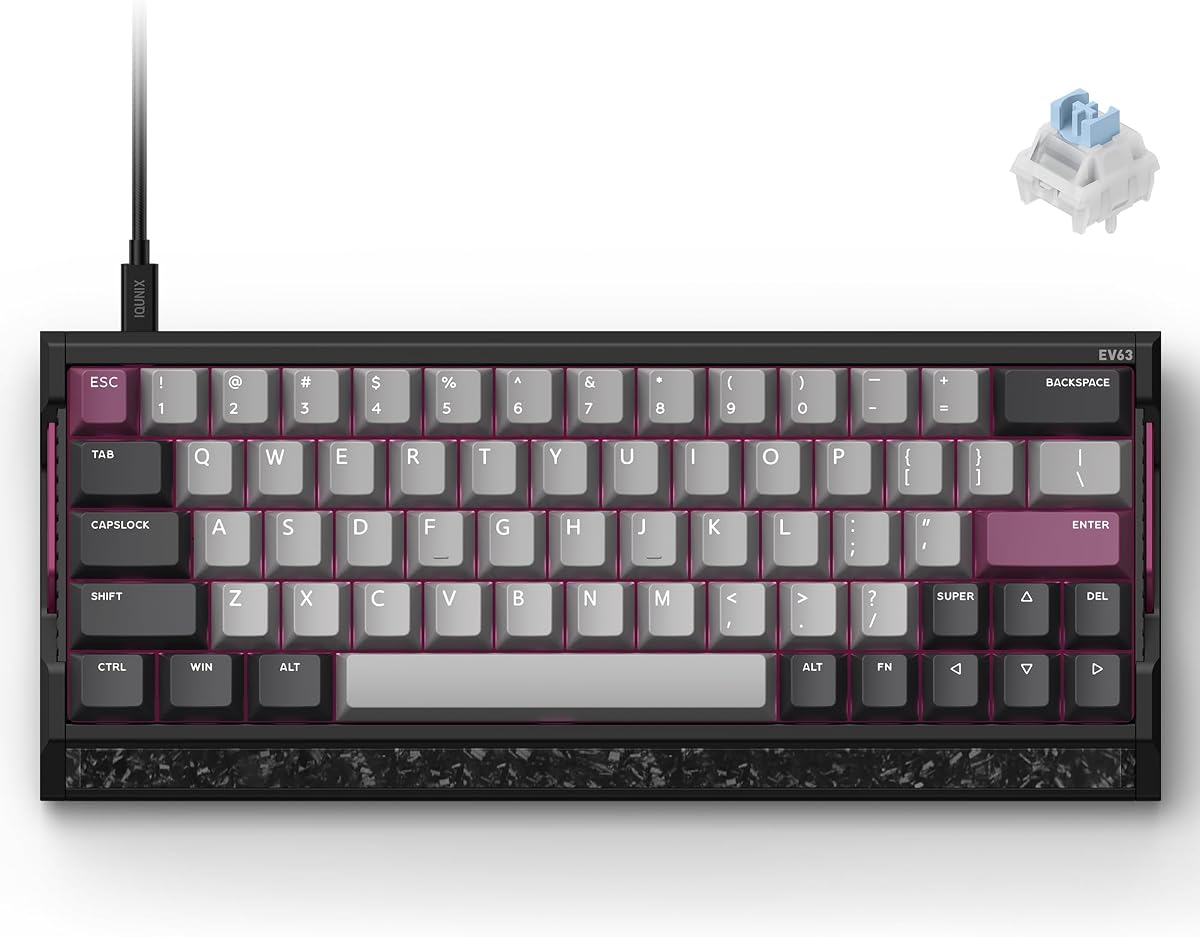
The IQUNIX EV63 represents the pinnacle of Hall Effect technology with premium build materials and specialized FPS algorithms. Rated 4.5 stars it offers 0.01mm Rapid Trigger and 0.125ms latency to minimize missed inputs during high-speed movement.
We may earn a commission when you buy through this link, at no additional cost to you.
Its aircraft-grade CNC aluminum case paired with a real forged carbon front plate provides significant weight and stability. This reduces unwanted desk movement and case vibration giving a solid custom-like feel essential for precise aiming in CS2.
The EV Driver 3.0 software includes pro-tuned FPS presets based on champion settings allowing quick profile switching. Magnetic X Ultra switches ensure smooth full travel with factory lubrication and a 100M+ keystroke durability rating.
Choose this model if you want the most robust and precise hardware available. The heavy chassis and refined magnetic logic make it ideal for players who value stability and advanced tuning capabilities over portability or lightweight design.
The M.A.T. 2.0 Magnetic Auto-Tune checks each key in real time to maintain consistent sensing and reduce unintended triggers during fast-paced gameplay.
Forged carbon and aluminum construction provide a premium feel that resists vibration and keeps the keyboard firmly planted even during aggressive play.
We may earn a commission when you buy through this link, at no additional cost to you.
Choosing a keyboard for Counter-Strike 2 requires understanding specific technologies that impact movement and aiming. This guide outlines the key factors to consider for optimizing your competitive setup.
Hall Effect magnetic switches and optical switches are essential for modern competitive play. They eliminate physical contact wear and allow for adjustable actuation points which is crucial for fine-tuning sensitivity to your specific style.
Look for keyboards that offer adjustable actuation and zero drift features to ensure consistent performance over long periods of use.
A higher polling rate means your keystrokes are sent to the computer more frequently reducing latency. For FPS games like CS2 rates of 8000Hz or higher provide near-instant input registration which can be the difference between winning and losing a duel.
Prioritize models with high polling rates to ensure your movements are registered instantly without delay.
Rapid Trigger technology allows a key to reset immediately when lifted rather than waiting for a full return. This enables faster counter-strafing and movement adjustments which are critical mechanics for high-level players in CS2.
Ensure your chosen keyboard supports Rapid Trigger to maximize movement efficiency and reaction speed.
The layout of your keyboard determines how much space you have for your mouse. A 60% or Tenkeyless (TKL) layout removes the numpad to free up desk space allowing for wider and more precise mouse movements during low-sensitivity aiming.
Consider a compact layout to maximize mouse room and improve ergonomic positioning.
Long sessions require durable keycaps and robust construction. Look for PBT double-shot keycaps which resist shine and wear better than ABS. Materials like aluminum or carbon plates also reduce vibration and enhance stability.
Select keyboards with PBT keycaps and sturdy frames to ensure longevity under daily use.
Software allows you to save profiles and adjust actuation points easily. Onboard memory is valuable for LAN events where you may not be able to install drivers. Compatibility with your operating system is also key for seamless setup.
Check that the software is user-friendly and supports profile saving without requiring constant internet access.
Prices range from affordable options to premium models. While budget boards may offer speed they sometimes lack build quality. Investing in a reliable model can save money long-term by avoiding frequent replacements.
Balance your budget with the necessary performance features to ensure a cost-effective investment.
Comfort is vital for marathon sessions. Wrist rests and ergonomic angles reduce strain on your hands. Some keyboards come with magnetic rests that attach securely providing consistent support during matches.
Choose models with ergonomic features like wrist rests to prevent fatigue during extended play.
Begin by installing the manufacturer software to configure your actuation points. Set different profiles for typing and gaming to ensure the right sensitivity for each context. Save these profiles to onboard memory for safekeeping.
Clean your keyboard regularly using compressed air to remove dust from the switches. This ensures magnetic sensors remain accurate and prevents debris from interfering with rapid trigger functions.
Avoid excessive liquid spills by using a protective mat or keeping drinks away. For spills wipe immediately with a soft cloth and let it dry fully before resuming use to protect internal components.
Hall Effect switches use magnets instead of physical contacts allowing for adjustable actuation points. This means you can set keys to register at a fraction of a millimeter making your inputs much faster and more responsive than standard mechanical switches.
Yes rapid trigger allows keys to reset the moment you lift your finger. This enables instant switching between movement keys like A and D which is critical for stopping your character quickly to shoot accurately in Counter-Strike 2.
A polling rate of 8000Hz is ideal for competitive play. It ensures that inputs are sent to the computer eight thousand times a second reducing latency so your movements are registered immediately without delay.
While not mandatory a 60% layout frees up valuable desk space. This allows you to use a lower mouse sensitivity which is preferred by many pros for more precise aiming without hitting the edge of your mousepad.
Most competitive keyboards allow you to save settings directly to the onboard memory. This means you can bring your custom actuation and lighting profiles to a tournament without needing to install software on the LAN machine.
Both optical and magnetic switches are extremely fast with minimal latency. Optical switches use light beams to detect presses while magnetic uses magnets. Both are superior to traditional mechanical switches for CS2 performance.
The top picks for Counter-Strike 2 include the Razer Huntsman V3 Pro for its exclusive CS2 features and the IQUNIX EV63 for its premium build. For budget players the Redragon K617 HE offers solid Hall Effect performance without the high cost.
Prioritize features like Rapid Trigger and 8000Hz polling to ensure your inputs are registered instantly. A compact layout can also significantly improve your aim by providing more room for mouse movement during low sensitivity setups.
Remember to check current prices and availability as these models may update frequently. Investing in the right keyboard can significantly improve your competitive edge and overall enjoyment of the game.