
Rongta Thermal Portable Printers Wireless for Travel
4.0Editor score
Affordable thermal printing
Bluetooth and USB support
Compatible with US Letter
Travelers and professionals need reliable printing without the mess of ink cartridges. Inkless portable printers offer a clean, wireless solution for documents on the go. These devices use thermal technology to produce clear black and white prints directly from your smartphone or laptop.
We compared ten leading models based on connectivity options, battery capacity, paper compatibility, and ease of use. Our analysis focuses on how each printer performs in real-world travel scenarios like airports, client sites, or remote workspaces. We evaluated build quality, app functionality, and support features.
Each pick highlights specific strengths such as touchscreen interfaces, compact sizing, or multi-size paper support. While we researched these models thoroughly, prices and availability change frequently. Always check current listings before purchasing to ensure you get the best value for your specific travel needs.
4.0Editor score

4.6Editor score
4.1Editor score
As an Amazon Associate we earn from qualifying purchases.
This table provides a side-by-side overview of key specifications for all ten reviewed printers. Compare dimensions, connectivity types, supported paper formats, and battery capacities to find the model that fits your specific workflow and travel style.






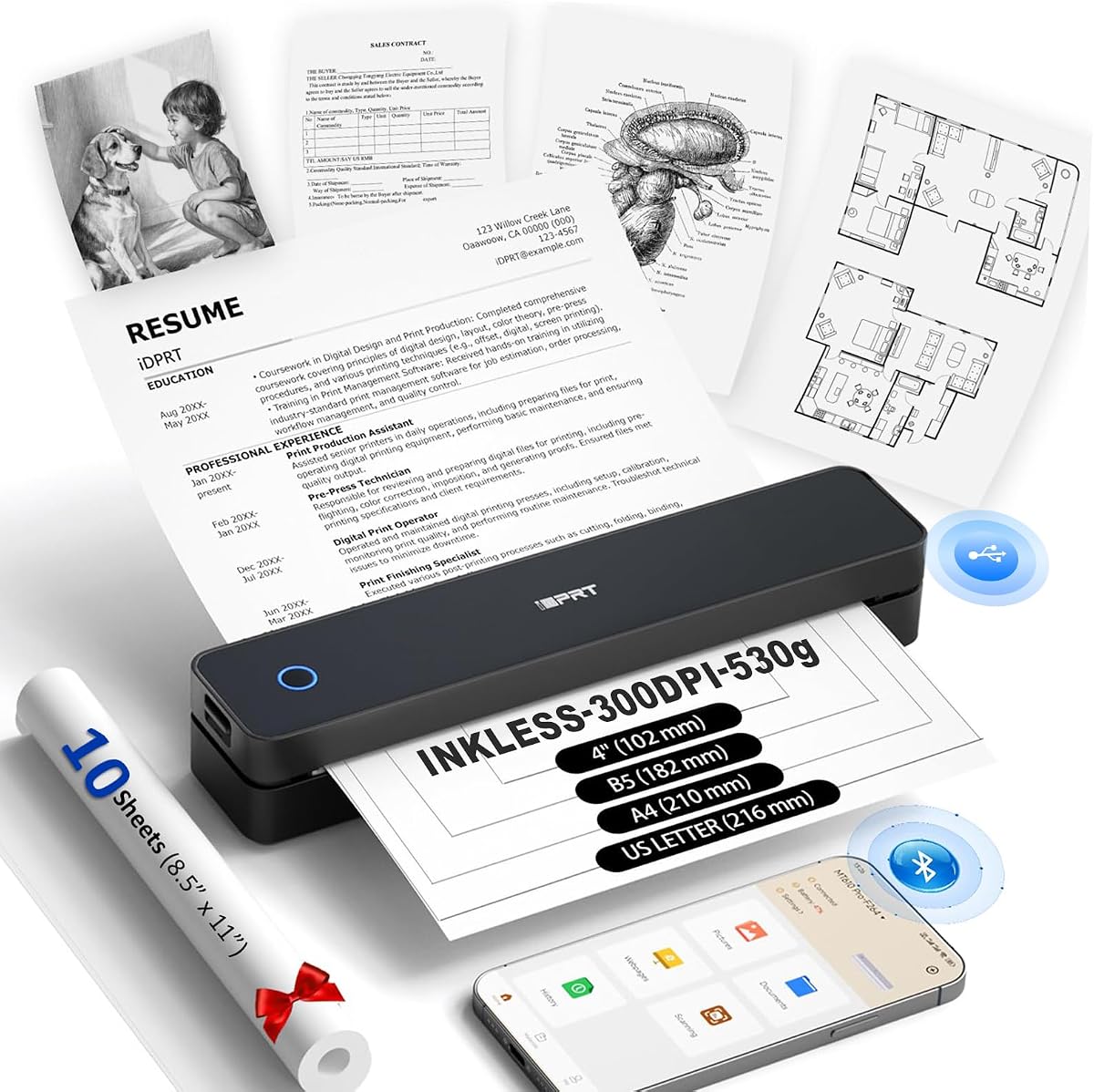
The MT610Pro stands out as a top choice for travelers seeking a lightweight yet capable thermal printer. Its compact size and strong battery life make it ideal for business trips or fieldwork where desk access is limited. Users appreciate the clean thermal technology that eliminates messy ink cartridges.
We may earn a commission when you buy through this link, at no additional cost to you.
Key strengths include its 300 DPI resolution which ensures charts and text remain sharp even on small thermal paper. The device connects easily via Bluetooth to iOS and Android devices or through USB-C for desktop computers. This flexibility allows professionals to print contracts or notes quickly during meetings or in transit.
While the printer requires specific thermal paper and offers black and white output only, these trade-offs are acceptable for its portability. The included thermal sheets get you started, though you must purchase refills separately. The lightweight chassis may feel less sturdy than larger desktop models but remains sufficient for travel.
Anyone needing reliable on-the-go printing without heavy equipment should consider this model. It fits easily into backpacks or briefcases, making it a practical gift for students or remote workers. The combination of speed, connectivity, and minimal maintenance makes it a standout in the portable category.
At just 1.2 pounds, this printer slides effortlessly into standard carry bags without adding significant bulk.
Advanced thermal printing means no ink clogs or ribbons to replace ensuring consistent performance in any environment.
We may earn a commission when you buy through this link, at no additional cost to you.
The D90E delivers a unique advantage by supporting standard 8.5 by 11 inch thermal paper in a portable frame. This capability is rare among compact printers and appeals to users who need full size documents like contracts or forms while traveling. It balances portability with professional output quality effectively.
We may earn a commission when you buy through this link, at no additional cost to you.
Connectivity options include Bluetooth for mobile devices and USB for computers running Windows or macOS. The included travel case protects the device during transit which adds value for field professionals. Setup requires downloading the Labelnize app for mobile use and drivers for PC connections to ensure smooth printing workflows.
Though slightly heavier than other models in this list, its weight supports the larger paper mechanism and sturdy build. Users should note that it does not work with Chromebooks and requires specific thermal paper types. The paper jam eject button simplifies troubleshooting without needing tools or opening the casing.
This printer is ideal for teachers, notaries, or business travelers who need legal size copies on site. The ability to print full pages makes it more versatile than smaller format options. Despite its weight it remains a practical choice for those prioritizing document standards over extreme lightness.
Unlike many mini printers this model handles standard US Letter paper allowing for proper professional document formatting.
A dedicated travel case is included to keep the printer safe from scratches and bumps during daily commutes.
We may earn a commission when you buy through this link, at no additional cost to you.
The Gloryang printer offers a complete kit that includes three rolls of thermal paper and a carry case right out of the box. This setup reduces initial costs and gives users a head start without buying extra supplies separately. The design supports full 8.5 by 11 inch thermal paper for broader document needs.
We may earn a commission when you buy through this link, at no additional cost to you.
Bluetooth connectivity via the Jadens Printer app allows seamless mobile printing on iOS and Android devices. Laptop users can connect via USB after installing drivers for reliable desktop support. The built-in paper bin keeps the workspace tidy by catching printed sheets directly without needing an external holder.
Weighing 1.75 pounds it is manageable for travel but slightly heavier than the lightest competitors. Users should stick to Gloryang thermal paper to avoid quality issues though this ensures optimal print performance. The unit is designed for clarity on photos and text making it useful for creative or study projects.
This model suits students or professionals who want an all-in-one package with immediate usability. The included accessories save time and money compared to buying separately. While it lacks color printing its reliability and full page support make it a strong contender for everyday mobile printing tasks.
Receiving three paper rolls and a case ensures you can print immediately upon arrival at your destination.
The integrated paper bin collects output neatly preventing clutter during busy work sessions on the go.
We may earn a commission when you buy through this link, at no additional cost to you.
The N80 distinguishes itself by supporting tattoo transfer paper in addition to standard thermal documents. This unique feature makes it valuable for artists or event professionals who need temporary designs on skin. It maintains a slim profile and lightweight build suitable for carrying in a backpack or toolkit.
We may earn a commission when you buy through this link, at no additional cost to you.
Mobile users connect via the Nada Print app on smartphones to send PDFs images or web pages easily. Laptop users must connect via USB cable as Bluetooth is not available for computers. The battery provides enough power for over 160 sheets ensuring it lasts through extended work sessions or events.
Print clarity is decent for text and line drawings though resolution is lower than premium models. Users need to adjust the paper size switch within the app to ensure correct scaling for A4 or US Letter. While limited to monochrome output it handles various formats well for creative applications.
Artists and travelers looking for a versatile printer with special paper compatibility will find this useful. It offers an affordable path into thermal printing without sacrificing core functionality. Just remember to bring the USB cable for computer printing as wireless options are restricted to mobile devices.
The ability to print on tattoo transfer paper adds a niche capability not found in standard office printers.
Designed primarily for smartphone use it streamlines mobile workflows with intuitive app controls and direct Bluetooth pairing.
We may earn a commission when you buy through this link, at no additional cost to you.
The A285M offers exceptional flexibility by supporting five different thermal paper widths ranging from narrow rolls to full letter size. This adaptability makes it suitable for diverse tasks like invoices receipts or contracts without needing multiple printers. Its small footprint ensures it fits easily into car glove boxes or laptop bags.
We may earn a commission when you buy through this link, at no additional cost to you.
Bluetooth pairing is straightforward for mobile users through the provided app while computers connect via USB cable. The built-in bin helps keep prints organized without requiring external trays which is helpful in cramped spaces. Setup instructions are clear helping new users get started quickly with their specific paper size.
Users should be aware that only thermal paper works with this unit and regular paper will cause jams. The printer relies on a specific driver for computer use which must be downloaded beforehand. Despite these minor setup steps it delivers consistent results for on-the-go documentation needs.
This model is perfect for mobile notaries truck drivers or students who need varied print formats. Its versatility in handling different widths reduces the need to carry multiple devices. Focus on its adaptability and compact build to maximize efficiency during travel or field work.
Handling five paper widths lets you switch between receipts and full documents seamlessly without changing hardware.
The built-in paper bin catches outputs directly keeping your workspace clear and professional even in tight areas.
We may earn a commission when you buy through this link, at no additional cost to you.
The Rongta F11A presents an affordable entry into portable thermal printing without sacrificing essential features. It supports common paper sizes including US Letter and A4 making it suitable for general office needs. Its sleek design and low price make it accessible for students or startups on a tight budget.
We may earn a commission when you buy through this link, at no additional cost to you.
Setup involves downloading the RONGTA app to pair via Bluetooth on phones or tablets. For laptops connect using the USB cable to Windows or macOS systems for stable printing. The printer handles basic documents well though you must avoid normal copy paper to prevent jams.
Bluetooth pairing requires going through the app which can be an extra step compared to direct system pairing. However this method ensures consistent connection quality for mobile users. The unit is light and easily fits into bags for students or professionals needing temporary printing solutions.
Anyone seeking a cost-effective mobile printer for occasional use should consider this model. It provides reliable black and white output at a fraction of premium prices. Just ensure you have the app installed and drivers ready for computers to avoid setup delays.
Its lower price makes thermal printing accessible to students and budget-conscious travelers without major compromises.
Using the dedicated app for Bluetooth connections maintains stable links even in areas with many wireless signals.
We may earn a commission when you buy through this link, at no additional cost to you.
The M832D introduces a smart digital display that simplifies monitoring battery status and paper placement. This touchscreen interface allows first-time users to adjust settings without opening menus on a phone. It enhances usability for seniors or those who prefer direct physical control over app-based navigation.
We may earn a commission when you buy through this link, at no additional cost to you.
Bluetooth connects fast to mobile devices while USB-C handles laptop connections for full computer access. The motor design reduces noise significantly which is ideal for quiet offices or libraries. The 2600mAh battery supports long printing sessions making it reliable for busy travel days.
While excellent for mobile pairing it does not support direct Bluetooth for computers which can limit some setups. Users must use USB cables for desktop printing ensuring a stable wired connection when needed. The unit supports multiple paper sizes to accommodate diverse printing requests efficiently.
This printer suits users who value intuitive controls and low noise operation during work. The touchscreen adds a modern touch that improves workflow speed. Consider it if you want a balance of high resolution and user-friendly interaction in a compact device.
Adjusting print settings directly on the device screen speeds up workflow without switching between apps.
Refined motor algorithms reduce printing noise making it suitable for shared workspaces or study halls.
We may earn a commission when you buy through this link, at no additional cost to you.
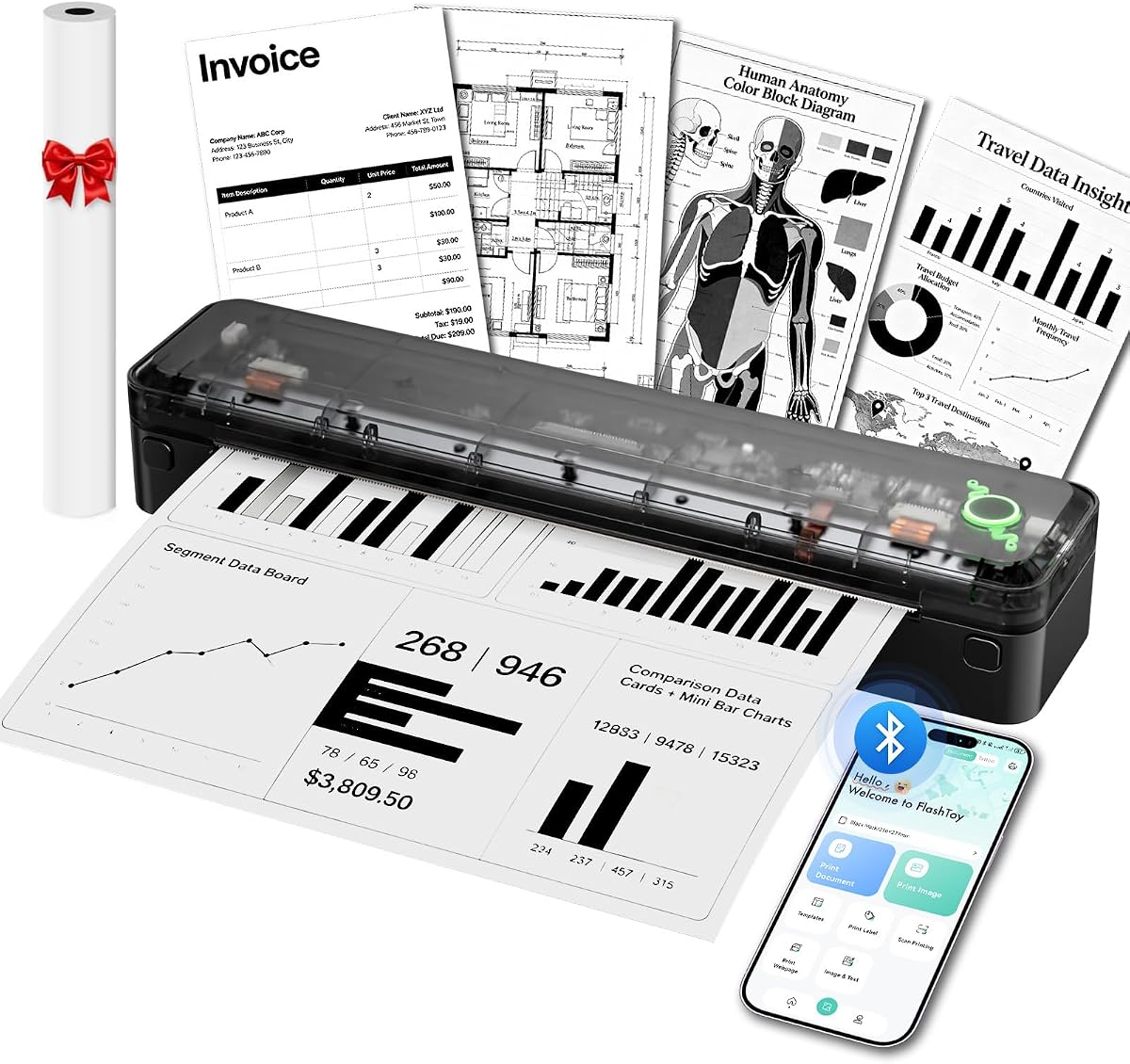
The A8 features a distinctive frosted graphite translucent top cover that reveals internal circuitry for a futuristic look. This design adds a tech-forward aesthetic ideal for modern workspaces or creative offices. Beyond style it supports standard A4 and US Letter thermal paper for practical document output.
We may earn a commission when you buy through this link, at no additional cost to you.
Mobile users connect through the Flashtoy app while laptops use USB cables or Bluetooth after driver installation. The 3000mAh battery offers robust power allowing over 200 pages per charge which is among the highest in this list. A built-in paper compartment keeps prints tidy without extra accessories.
The charger is not included in the package so you must provide your own adapter for charging. Also note that Bluetooth on computers requires specific driver setup. Despite these minor details the printer delivers clear text and charts suitable for business and personal use.
If design appeal matters alongside utility this model offers a unique visual experience. Its battery life supports heavy usage without frequent charging. Consider it for those who want a stylish device that performs well during frequent travel or remote work.
The translucent cover offers a glimpse of internal components adding a modern high-tech look to any desk.
A large 3000mAh battery ensures you can print hundreds of pages without carrying extra chargers on trips.
We may earn a commission when you buy through this link, at no additional cost to you.
The M85 represents the premium tier of portable printers with a large touchscreen for direct template management. This interface lets users preview and print directly from the device streamlining workflows for creative professionals. Its build quality and extensive paper support make it versatile for diverse tasks.
We may earn a commission when you buy through this link, at no additional cost to you.
Connectivity includes optimized Bluetooth for fast mobile pairing and USB-C for computer support across Windows Linux or macOS. The massive 3500mAh battery ensures you can print over 200 pages on one charge without anxiety. It supports five paper widths giving you flexibility for receipts or large documents.
While more expensive than other models the feature set justifies the cost for power users. You must upload templates via the app before using the touchscreen for printing. The included case provides protection which adds value for frequent travelers carrying the unit.
This printer is best for those who want the best performance and convenience in a mobile device. It balances high-end features with portability for demanding users. Consider it if budget allows and you need maximum versatility in a professional travel setup.
With a 3500mAh battery you can rely on it for entire workdays without searching for power outlets.
The 300 DPI printhead ensures text and images look crisp and professional for client-facing documents.
We may earn a commission when you buy through this link, at no additional cost to you.
The MUNBYN printer measures roughly the size of a water bottle making it exceptionally compact for tight travel. Its adjustable paper slot accommodates A4 and US Letter thermal paper for standard document output. This extreme portability allows you to set up a mobile office instantly in vehicles or small spaces.
We may earn a commission when you buy through this link, at no additional cost to you.
Mobile users benefit from a self-developed app that supports PDF Word and template libraries for varied tasks. Windows users can pair via Bluetooth while macOS requires a USB connection for compatibility. The company provides responsive technical support to resolve any setup or connection issues quickly.
Note that macOS users must connect via USB cable rather than Bluetooth. Also regular copy paper will not work so you need to purchase thermal refills. The unit delivers clean black and white prints suitable for invoices or school assignments without clutter.
This model is perfect for those prioritizing size above all else in a portable solution. It fits in glove boxes or small bags while still handling standard office needs. Choose it if you need a discreet printer that slips into any bag or pocket.
Sliding into a glove box or small pouch ensures you always have printing available without bulk.
Technical support is available via phone or email to help troubleshoot any connectivity or printing problems.
We may earn a commission when you buy through this link, at no additional cost to you.
Selecting the right portable printer involves weighing several technical and practical factors to match your specific travel needs. Understanding these elements helps you avoid compatibility issues and ensures reliable performance wherever you work.
Check whether the printer supports full US Letter or A4 sheets versus smaller label formats. Full page capability is vital for professional documents like contracts or forms. Smaller sizes are better for receipts or notes but may limit utility for official tasks.
Look for Bluetooth to enable smartphone pairing or USB-C for computer connections. Some models only allow Bluetooth with phones meaning you need a cable for laptops. Confirming compatibility with your devices prevents frustration during urgent printing moments.
A battery capacity of 2000mAh or more ensures you can print over 150 pages on one charge. This is crucial for long trips where power outlets are scarce. Consider how many pages you typically need before recharging to select the right runtime.
Higher DPI ratings like 300 DPI provide clearer text and diagrams than lower 203 DPI models. This difference matters if you print charts or small fonts regularly. Better resolution improves professional quality but may be unnecessary for simple text receipts.
Lighter printers around 1.2 pounds fit more easily into day bags than heavier units near 2 pounds. Consider the space available in your luggage or backpack before purchasing. Compact models save room but sometimes sacrifice battery or paper width options.
All thermal printers require special thermal paper which may be specific to a brand. Ensure you can easily source refills during travel to avoid downtime. Using non-thermal paper can damage the print head or cause jams inside the mechanism.
The companion app determines how easily you can preview templates and adjust settings on your phone. Some apps offer rich template libraries while others are basic. A well-designed app simplifies your workflow and reduces setup time on the road.
Sturdier housings withstand drops or bumps common during travel better than fragile plastic shells. Look for models with protective cases included in the package. Durability ensures the device lasts longer through regular movement and varying environmental conditions.
Start by downloading the official mobile app from your device's app store and installing computer drivers if needed. Connect the printer to your device via Bluetooth or USB cable and confirm pairing status before loading paper.
Open the app or document file and select the desired paper size to match the loaded roll. Send the print command and wait for the thermal paper to feed through. Remove finished pages gently to avoid tearing them as they are sensitive to heat and friction.
Keep the printer stored in its case when not in use to protect it from dust and scratches. Store thermal paper in a cool dry place to prevent spontaneous darkening or curling. Clean the print head occasionally with a soft cloth to maintain consistent print quality.
No these printers use direct thermal technology that requires special heat-sensitive paper. Regular copy paper lacks the coating to react with the print head and will cause jams. You must use compatible thermal rolls for safe and effective operation.
Most models support both iOS and Android via Bluetooth pairing through their dedicated apps. You simply download the app and allow Bluetooth permissions to connect. Always check the product details to ensure your specific device OS version is supported.
Standard thermal printers only produce black and white output using heat on sensitive paper. There are no ink cartridges for color printing in this category. If color is essential you will need a traditional inkjet or laser portable printer instead.
Battery life varies by model but most offer between 150 to 200 pages per charge. Heavier usage or larger paper sizes may reduce this runtime. Carrying a USB cable allows you to print while plugged in if needed during travel.
These printers rely on direct Bluetooth or USB connections rather than Wi-Fi or internet. Once paired with your phone or computer you can print offline without data. This makes them ideal for remote areas with no network access.
Most units have an eject button or automatic feed feature to clear jams safely. Avoid forcing the cover open as it may damage the internal print head. Use the official thermal paper that lays flat to prevent curling issues.
Connect your laptop via USB cable after downloading the required drivers from the manufacturer's site. Some models support Bluetooth on Windows but not on macOS or ChromeOS. Always follow the specific pairing instructions provided in the manual.
Maintenance costs are low because there are no ink cartridges or toner to replace. The main ongoing cost is purchasing thermal paper rolls periodically. This makes them economically friendly for regular use compared to standard office printers.
Our top picks highlight the Phomemo M85 for its touchscreen versatility and the MT610Pro for lightweight efficiency. The D90E stands out for full page printing while the MUNBYN offers unmatched compactness for travelers with minimal space. Each model balances size speed and cost differently.
Prioritize battery life and paper size based on your typical document needs before deciding. If you print full contracts daily choose a model with US Letter support. For quick notes on receipts a smaller format unit may suffice for your workflow.
Remember to check current availability and any updated accessories before purchasing as listings change often. Ensure you have the necessary cables and app access ready to start printing immediately. With the right device you can handle any paperwork task efficiently while on the move.