
Marspark 2 Pcs Heated Mouse Pad USB Hand Warmer Plush Wrist Rest
3.6Editor score
USB powered heating element
Includes detachable wrist rest
Plush soft touch surface
Explore our expert comparison of the top hand warmer mouse pads for winter desk comfort. We analyze heating modes, safety features, and ergonomic design to
Cold hands can ruin productivity and comfort during long work sessions. A hand warmer mouse pad provides consistent heat directly under your palm and fingers. The best models offer adjustable temperatures and safety features to ensure safe use throughout the day.
We evaluated ten leading heated desk accessories based on heating technology, build quality, and user feedback. Our analysis focuses on PTC ceramic elements, auto shut-off timers, and ergonomic designs that support natural wrist positioning during extended computer use.
Each selection below highlights specific strengths like portability, quiet operation, or large surface area for keyboard and mouse. Prices and availability change frequently so please check current listings before making your final purchase decision for this winter season.
3.6Editor score

4.2Editor score
4.5Editor score
This side by side comparison details key specifications for every model reviewed. We highlight power requirements, heating ranges, safety certifications, and physical dimensions so you can quickly identify which device fits your desk setup and comfort preferences.


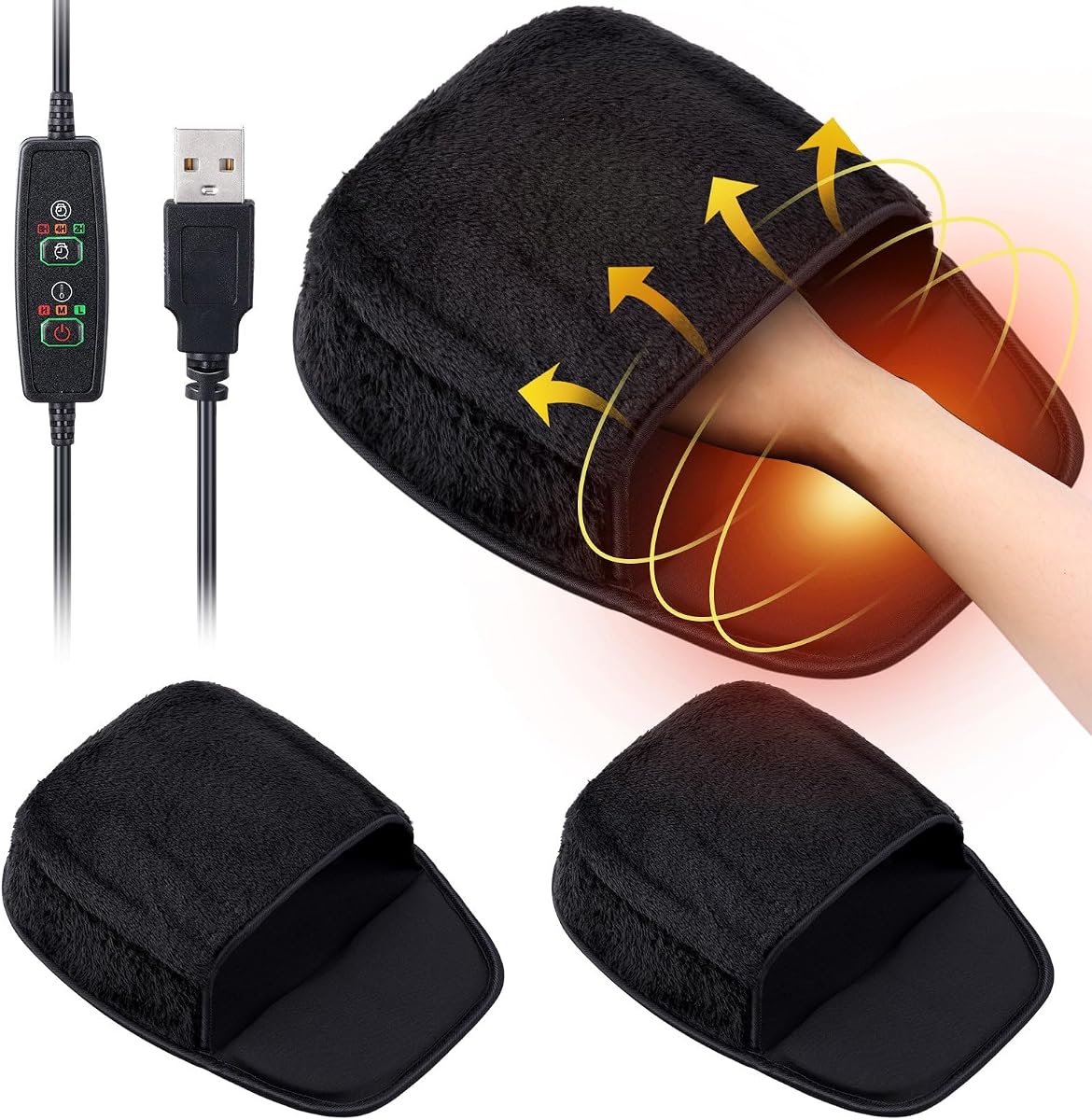

This device stands out as our top pick for its unique enclosed cocoon design that wraps your hand in warmth rather than just heating a flat surface. With a solid rating of 4.2 stars it balances performance and comfort effectively for daily office or gaming use.
We may earn a commission when you buy through this link, at no additional cost to you.
The PTC heating element distributes heat evenly across your palm fingers and knuckles while the three temperature levels let you choose between gentle warmth or intense heat. The included controllers and auto shut-off timers provide peace of mind during long work sessions.
Some users may find the cocoon shape restrictive if they have larger hands or prefer more mouse movement space. However the detachable heating element makes cleaning simple and the non-slip rubber base keeps the mat secure on any desktop surface.
Anyone who works at a computer in cold environments will benefit from this model. It is an ideal gift for remote workers or students who struggle with icy fingers during winter months while maintaining a neutral wrist position.
The soft insulated neoprene shell wraps around your entire hand ensuring consistent heat reaches your fingers and knuckles not just your palm or wrist area.
Built-in auto shut-off timers for two four or eight hours prevent overheating and save energy while the UKCA and CE certifications confirm compliance with safety standards.
We may earn a commission when you buy through this link, at no additional cost to you.
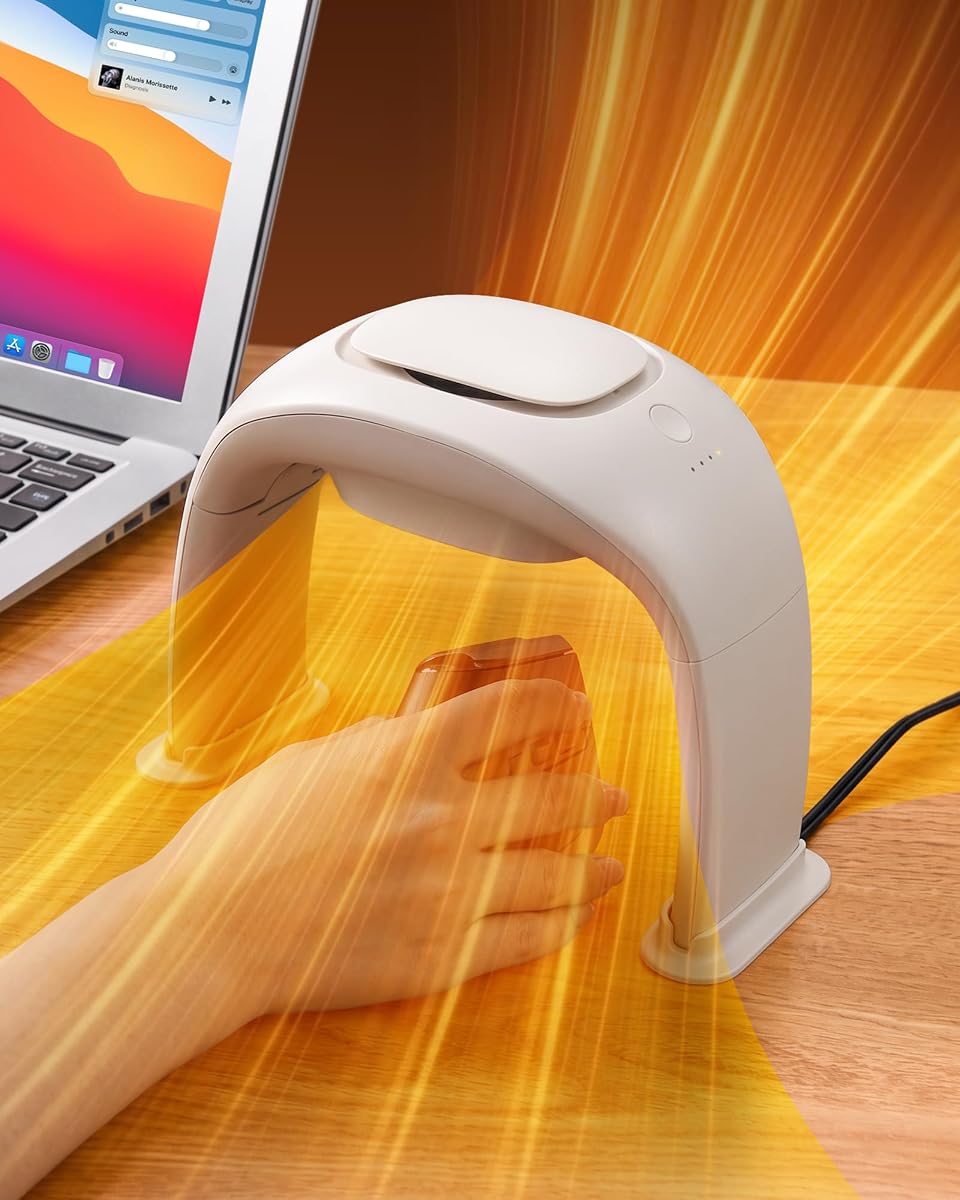
This model offers premium features with its 100-watt power output and advanced PTC ceramic heating elements that deliver fast consistent warmth. A high rating of 4.5 stars reflects user satisfaction with its quiet operation and effective heat distribution across the desk surface.
We may earn a commission when you buy through this link, at no additional cost to you.
The unique over-mouse design creates a warm tunnel for your hand without restricting movement allowing 360-degree access to your mouse. Three heating modes cycle intelligently to maintain set temperatures while reducing power consumption once the target is reached.
Unlike USB models this unit needs a standard 110-volt outlet which limits placement to desks near power strips. The white plastic construction is flame retardant and the foldable legs make storage easy when the device is not in active use.
Ideal for home offices or dedicated gaming stations where power access is plentiful. Its silent operation ensures it does not disturb concentration during meetings or immersive gameplay while keeping hands comfortable throughout extended sessions.
This technology uses ceramic elements that generate heat efficiently and safely allowing for rapid warm-up times and consistent temperature maintenance without energy waste.
Engineered with advanced ball bearings and turbine design this unit operates at less than 20 decibels ensuring it does not interrupt focus or video calls.
We may earn a commission when you buy through this link, at no additional cost to you.
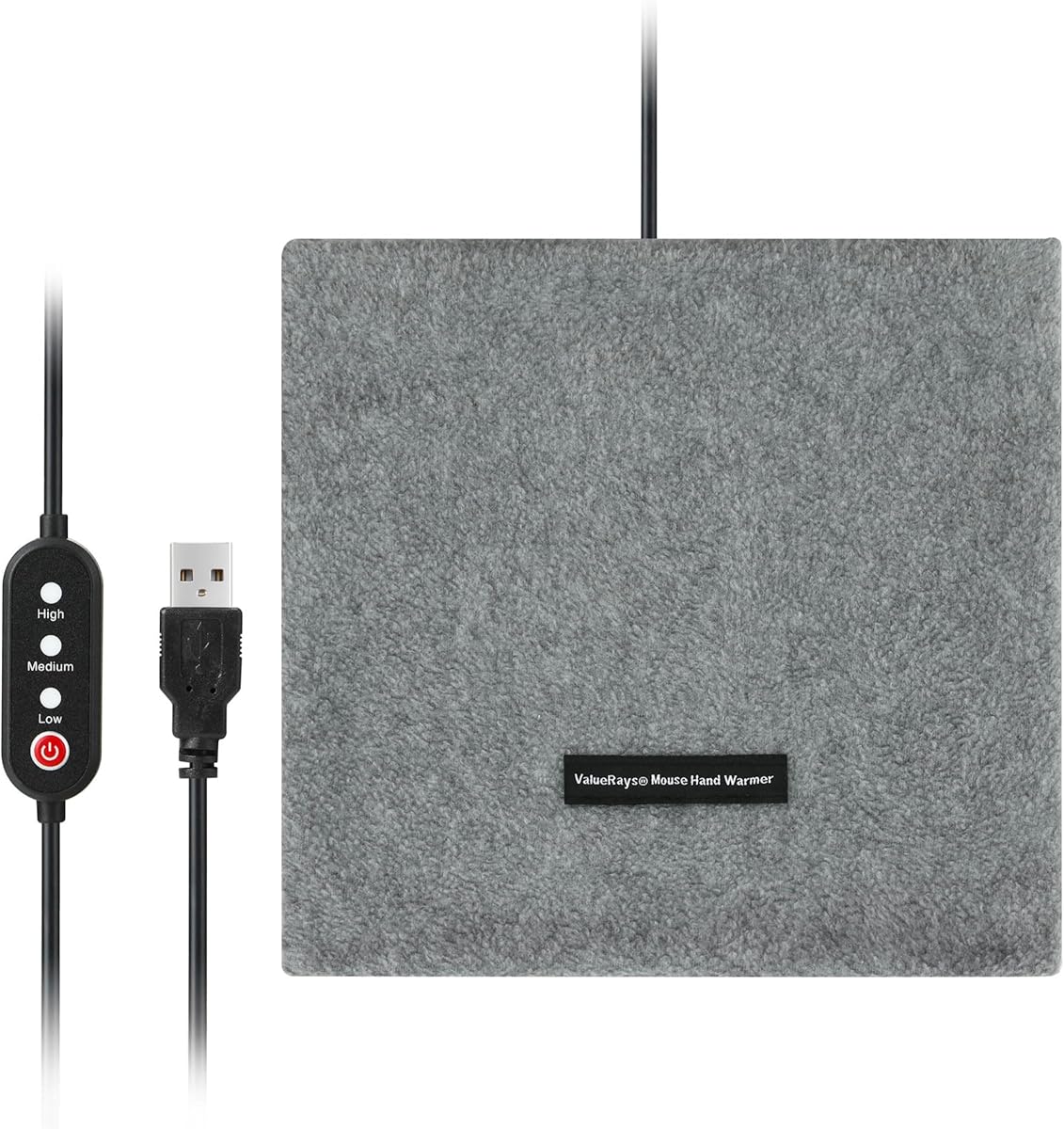
For budget-conscious buyers this two-pack provides excellent value by offering heated mouse pads with detachable heating elements and plush wrist rests. While the rating sits at 3.6 stars the low price point makes it an accessible entry into heated desk accessories.
We may earn a commission when you buy through this link, at no additional cost to you.
The 11×9 inch size offers ample space for mouse movement without consuming too much desktop real estate. Each pad includes a separate heater that connects via USB making it easy to warm hands during work or gaming without buying a full desk mat.
The plush surface feels soft under the hand but durability may vary with frequent washing or heavy use. The heater element can be removed for cleaning or storage which extends the life of the outer pad material over time.
This set is perfect for users who want to try heated mouse technology without a large investment. It works well as a backup option at home or office and the simple design requires no complicated setup or software drivers to function.
The outer layer features soft plush material that feels comfortable against skin and provides a smooth surface for mouse tracking without causing friction or irritation.
Heating elements are separate from the mouse pad surface allowing you to use the pad normally or engage heat as needed and making washing easier.
We may earn a commission when you buy through this link, at no additional cost to you.
This two-pack option is similar to the Marspark model but offers a slightly higher rating of 3.8 stars due to consistent warmth and soft material quality. It provides a practical solution for keeping hands warm during daily computer use without complex features.
We may earn a commission when you buy through this link, at no additional cost to you.
Each pad measures 11×9 inches providing a comfortable footprint for most desktop setups. The detachable heating element allows you to unplug it when not needed and ensures the pad can be wiped or washed without damaging internal components.
The plush construction is skin friendly and comfortable to touch but may require careful handling to maintain texture over time. Users note that unplug the after use extends service life and prevents unnecessary heat exposure when away from the desk.
Ideal for households with multiple users or offices with shared desks where two pads are useful. The simplicity of the design means no troubleshooting is required making it a reliable choice for those who prioritize warmth over adjustable temperature settings.
The device draws power directly from any standard USB port on a computer or power bank allowing for easy setup and use without needing a wall outlet.
The outer fabric is made of thick plush that feels pleasant to the touch and provides a comfortable surface for resting hands during long work sessions.
We may earn a commission when you buy through this link, at no additional cost to you.
This model distinguishes itself with a foldable design and impressive safety features including tip-over and overheat protection. With a rating of 4.3 stars it offers reliable warmth and peace of mind for users concerned about device safety during unattended operation.
We may earn a commission when you buy through this link, at no additional cost to you.
MCH and PTC ceramic heating technologies ensure fast and even heat distribution across the surface. The temperature range sits between 100 and 150 degrees Fahrenheit providing enough options to find comfort in most indoor environments without risking burns.
The anti-skid silicone base keeps the unit stable on any surface while the noise level stays under 15 decibels so it does not interfere with work or games. However the one-button operation may limit granular control for users who want precise heat settings.
Perfect for travelers or small desk setups where space is limited. The foldable legs allow it to be stored away in a drawer when not in use making it a versatile option for dorm rooms or mobile office environments.
The unit folds neatly after use allowing it to be stored in small drawers or bags without taking up valuable desk space during warmer months.
Tip-over protection cuts power if the unit falls and overheat protection stops heating if temperature exceeds safe limits ensuring safe unsupervised operation.
We may earn a commission when you buy through this link, at no additional cost to you.
This model shares premium features with the Desk Hand Warmer Over Mouse but offers a slightly different configuration. Rated at 4.3 stars it delivers consistent warmth with its 100-watt output and advanced PTC heating ceramics for reliable performance.
We may earn a commission when you buy through this link, at no additional cost to you.
The activity space of 8.1 by 6.3 inches allows flexible mouse movement for both left and right handed users. Intelligent energy-saving chip reduces power once the target temperature is reached helping to maintain constant warmth without wasting electricity.
While the unit is foldable and portable it relies on a standard 110-volt outlet which may limit placement options on desks far from power strips. The white color is sleek but may require occasional cleaning to maintain its appearance over time.
Best suited for fixed desks where power access is convenient and high output is desired. It is a great gift for anyone who needs reliable hand warmth and values features like ultra-quiet operation and portable design for home or office.
The smart chip monitors temperature and automatically reduces power when the set value is reached maintaining warmth without continuous full power consumption.
The generous opening allows free movement for mouse and hand ensuring you are not restricted while trying to stay warm during work or gaming.
We may earn a commission when you buy through this link, at no additional cost to you.
This model provides full desk coverage with a large 31.5 by 13-inch surface that accommodates both keyboard and mouse. With a high rating of 4.5 stars it is praised for its durable PU leather surface and quick heat-up performance.
We may earn a commission when you buy through this link, at no additional cost to you.
The control box is located at the left corner making it easy to switch between three heat levels without interrupting work. A four-hour auto shut-off feature ensures safety by preventing the pad from staying on unintentionally throughout the night.
Waterproof PU material makes cleaning simple as spills can be wiped away easily without damaging the heating elements underneath. The dull black finish blends well with most desk setups and resists visible wear over time compared to lighter colors.
Ideal for users who want a unified solution for warming both hands and arms during long work sessions. It acts as a multifunctional mat that can be used as a standard desk pad when heating is turned off keeping it versatile year round.
At 31.5 inches wide this pad covers most of your desk allowing you to rest your keyboard and mouse on a warm surface for total comfort.
The material resists spills and stains so you can wipe away liquid quickly and keep the mat clean without worrying about damage to the heating components.
We may earn a commission when you buy through this link, at no additional cost to you.
This basic model focuses on simplicity with a manual control switch and USB power making it easy to set up and use. While specific details are limited it offers infrared heating technology that provides warmth without complex digital controls.
We may earn a commission when you buy through this link, at no additional cost to you.
The compact design makes it suitable for small desks or laptop setups where space is at a premium. Users can plug it directly into their computer and rely on the switch to toggle heating on or off as needed.
Lack of detailed temperature settings means users must test to find the ideal warmth level. However for those who want a no-fuss solution to cold hands this device delivers consistent warmth without needing additional ports or drivers.
Best for users who prefer straightforward functionality and have limited power outlets. It serves as an affordable entry point into heated mouse accessories and works well in home offices or study rooms with minimal tech requirements.
The manual switch allows you to turn heating on or off quickly without navigating digital menus or adjusting multiple settings.
Power is drawn from a standard USB port eliminating the need for extra wall adapters and making it easy to use with laptops.
We may earn a commission when you buy through this link, at no additional cost to you.
This two-pack offers a unique benefit with a built-in wrist cushion designed to reduce strain during long typing or gaming sessions. Rated at 3.4 stars it balances comfort and warmth with multiple temperature modes to suit different preferences.
We may earn a commission when you buy through this link, at no additional cost to you.
The non slip rubber base keeps the pad firmly in place even during quick mouse movements ensuring stable control without the pad sliding around. Three temperature modes and auto-off timers provide flexibility and safety for users who worry about overuse.
While the wrist cushion adds comfort it may raise hand height slightly which some users might need to adjust for. The USB power design makes it portable and easy to take between home and work without extra cables.
Ideal for users who value ergonomics alongside warmth. It is a thoughtful gift for colleagues or friends who spend hours at computers and want to reduce wrist fatigue while staying comfortable in colder environments.
The cushion follows the natural curve of your wrist to reduce pressure and fatigue during extended work or gaming sessions.
The thick rubber bottom grips your desk surface securely so the pad does not slide even during fast or precise mouse movements.
We may earn a commission when you buy through this link, at no additional cost to you.
This model offers a large 31.5-inch surface with a premium PU leather finish designed for durability and easy cleaning. While new to the market with no ratings yet it promises versatile use as a desk mouse keyboard pad and even under-desk foot warmer.
We may earn a commission when you buy through this link, at no additional cost to you.
The three temperature switch settings are cycled via a simple press system offering low medium and high heat options. A non-slip leather bottom ensures the mat stays in place during intense gaming or typing without shifting around on the desk.
As a new product it lacks user reviews so buyers should expect to verify performance based on product specs alone. However its multifunctional nature and sturdy construction make it an interesting option for those seeking a premium look and feel.
Best for users who want one mat that serves multiple purposes. It is an ideal upgrade for a desk setup where aesthetics and practicality are both important and the large size ensures full coverage for all your peripheral needs.
High-quality PU leather provides an elegant look while offering durability and ease of cleaning to keep your workspace pristine.
The large size and heating function allow you to use it as a desk pad keyboard pad or foot warmer depending on your needs.
We may earn a commission when you buy through this link, at no additional cost to you.
Choosing the right heated mouse pad depends on your power options safety needs and comfort preferences. Consider these factors to find a device that fits your desk and usage habits.
Most models are USB powered for portability and simple connection to laptops or desktops. Others use 110-volt wall outlets for higher wattage and faster heating. Consider where your power outlets are and whether you need mobility or consistent strong heat.
Choose USB for laptop use and wall power for fixed desks where higher wattage is beneficial.
PTC ceramic elements are common and provide efficient safe heat with built-in temperature regulation. Infrared technology is also available in some models. Ensure the heating element is distributed evenly to avoid hot spots that could feel uncomfortable.
PTC ceramic heating is the most reliable choice for consistent and safe warmth across the pad surface.
Look for auto shut-off timers and tip-over protection especially if you leave the device on while working or sleeping. Overheat protection is another critical feature that cuts power if temperatures get too high. Certifications like UL or CE confirm compliance with safety standards.
Prioritize models with multiple safety features if you plan to use the pad for long periods without supervision.
Some pads include built-in wrist rests to reduce strain during long sessions. Others have enclosed cocoon designs that wrap your hand for full warmth. Choose a shape that supports your natural hand position without restricting mouse movement.
Ergonomic supports help prevent wrist fatigue and improve comfort during extended computer use.
Plush surfaces feel soft but may be harder to clean. PU leather is durable and waterproof making it easy to wipe down. Consider how much you need to clean the pad and what texture feels best for your mouse tracking.
Choose PU leather for durability and cleaning or plush for a softer comfortable feel.
Standard mouse pad sizes work for most desks but larger mats cover more surface area. Foldable models are great for travel or storage. Measure your desk to ensure the pad fits without crowding your workspace.
Select a size that matches your desk footprint and consider foldable options if you need to store it often.
Look models offer one setting while others have adjustable levels and digital displays. More control lets you tailor heat to your preference. Manual switches are simpler and less prone to failure.
Decide if you need precise temperature adjustment or if a simple on-off switch is enough.
Prices range from basic single pads to two-packs with extra accessories. Higher prices usually mean more features and better materials. Evaluate what you need and avoid paying for features you will not use.
Set a budget and choose the best value within that range based on your feature priorities.
Connect the pad to a compatible power source and place it on a flat stable desk surface. Ensure the heating element is positioned correctly according to the manual and let it warm up for a few minutes before use.
If your model is washable remove the heating element before cleaning. Use a damp cloth to wipe the surface and allow it to dry fully before reattaching the heater. This prevents water damage to electrical components.
Unplug the pad when not in use to save energy and extend the heating element lifespan. Avoid leaving it on unattended for extended periods even with auto shut-off features for optimal safety.
While most modern models have auto shut-off timers it is generally safer to unplug them when not in use. Tip-over protection and overheat safeguards add security but human oversight is still recommended for extended unattended periods.
Yes most heated pads work with optical and laser gaming mice. Ensure the surface is smooth enough for your mouse sensor to track properly and avoid enclosed designs if you need wide movement range.
They can provide warmth in cold indoor offices but rely on ambient room temperature. Some models have higher wattage to compensate for colder settings so check power specs if working in unheated spaces.
Durability depends on frequency of use and care. Most last several years with regular cleaning and proper storage. Detachable heating elements often have a lifespan limit but replacement parts may be available from the manufacturer.
No most models are plug and play with physical switches or buttons. They do not require drivers or software installation and work with any USB or outlet power source.
Yes sizes range from small mouse pads to full desk mats. Check product specs for dimensions to ensure the pad fits your desk and accommodates your mouse keyboard setup comfortably.
No the heating element should never be submerged. Only wash the outer cover if it is detachable and follow manufacturer instructions to avoid damaging internal components or electrical connections.
Yes they work with wireless Bluetooth and wired mice alike. The heating function does not interfere with wireless signals but ensure the pad surface does not block your mouse receiver port.
We highlighted the top three picks including budget and premium options that suit different needs. Whether you prefer a simple USB solution or a high wattage desk heater there is a model on this list to keep hands warm.
Prioritize safety features and ergonomic comfort when choosing a model. Look for auto shut-off timers and wrist supports if you plan to use the pad for many hours during work or gaming sessions.
Remember that prices and availability change often so check current listings before purchasing. We hope this guide helps you find the perfect heated mouse pad to improve your workspace comfort this winter.