
Ostrich Charger Compatible with Dell
4.5Editor score
65W round tip adapter
Safety tested certified
Fits most Dell laptops
Compare top battery backup for Dell laptop options including UPS units and power banks to ensure uninterrupted power and data safety for your devices.
Finding the right battery backup for Dell laptop users is essential for protecting your hardware and ensuring work continuity during unexpected power outages or travel disruptions.
We compared ten top-rated products based on compatibility, output power, battery capacity, and user feedback to help you find the most reliable power solution for your needs.
Each pick highlights key strengths and limitations so you can choose wisely. Note that product availability and pricing may change over time without prior notice or update.
4.5Editor score

4.3Editor score

4.4Editor score
This side-by-side comparison helps you evaluate the top ten battery backup and power solutions for Dell laptops based on their key technical specifications and capabilities.




This UGREEN power bank stands out as a top contender for laptop users seeking portable battery backup solutions. With a 25000mAh capacity and 145W output, it delivers substantial power to high-demand devices like Dell XPS laptops.
We may earn a commission when you buy through this link, at no additional cost to you.
The device supports PD3.1 and QC3.0 protocols, allowing it to deliver up to 140W from a single USB-C port. This means it can charge a 16-inch MacBook Pro to 56 percent in just 30 minutes, and similarly fast rates apply to compatible Dell models.
A key benefit is the bi-directional technology, which allows simultaneous fast charging of both the power bank and connected devices. The digital display also provides clear visibility of remaining battery life, ensuring you always know your power status.
Ideal for professionals traveling frequently, this power bank offers reliability and speed. While it requires a higher wattage charger for its own recharge, the performance justifies the cost for those needing robust portable power.
With 25000mAh, this power bank can fully recharge laptops up to 1.3 times and mobile devices up to 5.2 times, ensuring long-lasting support.
It works seamlessly with Dell XPS, HP Spectre, MacBook, iPhone, Galaxy S24, and many more, making it a versatile choice for any tech setup.
We may earn a commission when you buy through this link, at no additional cost to you.
The Ostrich Charger offers a reliable and affordable solution for Dell laptop users needing a replacement power adapter. It is specifically designed to match the power requirements of many Dell Inspiron, XPS, and Vostro series laptops.
We may earn a commission when you buy through this link, at no additional cost to you.
Safety is a major highlight here, as the product is listed by a leading American consumer product testing laboratory. It includes mechanisms to protect against short circuits, overvoltage, overcurrent, and internal overheating, giving you peace of mind.
The charger supports both 65W and 45W models, and includes a converter cable for 7.4mm x 5.0mm connector laptops, adding versatility. The 30-day return policy and lifetime exchange guarantee further enhance its value proposition.
For those on a tight budget who need a trustworthy charger, this Ostrich adapter is an excellent pick. It delivers consistent power without compromising on safety features or compatibility with key Dell models.
Listed by testing labs for electrical safety, this adapter ensures your laptop is protected from potential electrical hazards during use.
With the included adapter cable, it supports both 4.5mm and 7.4mm connectors, broadening its compatibility across various Dell models.
We may earn a commission when you buy through this link, at no additional cost to you.
The CyberPower EC850LCD Ecologic UPS provides comprehensive power protection for home office setups involving Dell laptops. It combines battery backup with surge protection and advanced features to ensure uninterrupted operation during power outages.
We may earn a commission when you buy through this link, at no additional cost to you.
Equipped with 12 outlets, it can power a laptop, monitor, router, and other peripherals simultaneously. The ECO mode outlets automatically shut off power to peripherals when the computer is off, reducing unnecessary energy usage.
A multifunction LCD panel gives immediate and detailed information on battery status and power conditions, allowing you to stay informed at a glance. The unit comes with a three-year warranty including the battery and offers a connected equipment guarantee.
While it is designed for stationary use rather than travel, this UPS is ideal for safeguarding your workspace. It is a robust choice for anyone needing reliable, long-term power security for their Dell laptop and accessories.
The ECO mode automatically reduces power consumption by cutting off peripherals when the computer is inactive, saving energy and lowering costs.
An LCD panel displays detailed battery and power conditions, helping you track the UPS health and remaining runtime effectively.
We may earn a commission when you buy through this link, at no additional cost to you.
The Omni 20C+ is a versatile portable power bank that serves multiple devices, including Dell laptops. Its 100W USB-C output can power most smart devices and laptops like MacBook Pro or Wacom Mobile Studio Pro.
We may earn a commission when you buy through this link, at no additional cost to you.
It features an all-in-one design that includes wireless charging for smartphones and a USB hub mode to connect accessories. This makes it an excellent solution for travelers who want a single device to manage power for all gadgets.
With pass-through charging, you can charge the power bank and your devices at the same time. The high-efficiency design ensures safe and fast charging, maintaining device health while providing reliable power.
Although the wall charger is not included, this power bank offers exceptional flexibility. It is a solid investment for those needing a compact, multi-functional power source for work and travel.
The built-in wireless pad allows you to charge Qi-enabled devices without cables, adding convenience to your charging setup.
USB Hub mode lets you connect USB devices via the power bank, turning it into a portable docking solution.
We may earn a commission when you buy through this link, at no additional cost to you.
This genuine Dell AC adapter provides a reliable power solution for various Latitude and XPS models. As an original OEM product, it ensures compatibility with the manufacturer's specifications for optimal charging performance.
We may earn a commission when you buy through this link, at no additional cost to you.
It supports multiple output voltages including 65W, 45W, 27W, and 15W, making it adaptable to different power needs. The USB-C tip fits newer Dell laptops that use Type-C charging standards.
While the packaging is non-retail, the product itself is new and includes a power cord for immediate use. It is a direct replacement for original chargers, ensuring safety and performance match Dell expectations.
For users needing an authentic replacement, this adapter is a safe choice. It delivers consistent power and protects your laptop from potential damage caused by inferior third-party chargers.
As a genuine Dell adapter, it offers the same reliability and safety standards as the original charger that came with your laptop.
The adapter supports multiple wattages, making it versatile for different laptop power requirements within the Dell ecosystem.
We may earn a commission when you buy through this link, at no additional cost to you.
While not a battery backup itself, this external DVD RW drive enhances your Dell laptop's functionality. It is a slim, USB-powered device that allows you to play or burn CDs and DVDs without needing extra power.
We may earn a commission when you buy through this link, at no additional cost to you.
Designed for portability, it weighs only 200g and is just 14mm thin, making it easy to carry in a bag. It is compatible with Ultrabooks and notebooks, offering versatility for media playback and data installation.
The drive comes pre-loaded with CyberLink Media Suite, enabling you to manage discs easily. Its elegant design complements contemporary notebooks and integrates well into any workspace setup.
For users needing optical drive capabilities, this is a dependable addition. It pairs well with battery backup solutions to ensure full system functionality during long sessions or power outages.
Simply plug the drive into a USB port and it is ready to use without any additional software or drivers installation.
Its lightweight and slim form factor makes it perfect for traveling, ensuring you can access media anywhere.
We may earn a commission when you buy through this link, at no additional cost to you.
This 65W AC charger is tailored for Dell Inspiron series laptops, offering a reliable power source for daily use. It supports both 4.5×3.0mm and 7.4×5.0mm sockets, ensuring broad compatibility within the Inspiron lineup.
We may earn a commission when you buy through this link, at no additional cost to you.
The charger includes an 8.8-foot cord, providing flexibility in placement without needing an extension. It is certified with CE and FCC safety standards, ensuring it meets required safety benchmarks.
Its output is maxed at 19.5V 3.34A, matching the power needs of many 11, 13, 15, and 17-inch Inspiron models. It is a straightforward solution for users needing a replacement adapter.
For budget-conscious buyers, this charger delivers consistent performance. It is a solid backup option to pair with a larger battery pack for extended mobility.
With an 8.8-foot cable, you have plenty of reach to find a convenient power outlet without moving your laptop.
The adapter includes CE and FCC certificates, ensuring electrical safety and protection against hazards.
We may earn a commission when you buy through this link, at no additional cost to you.
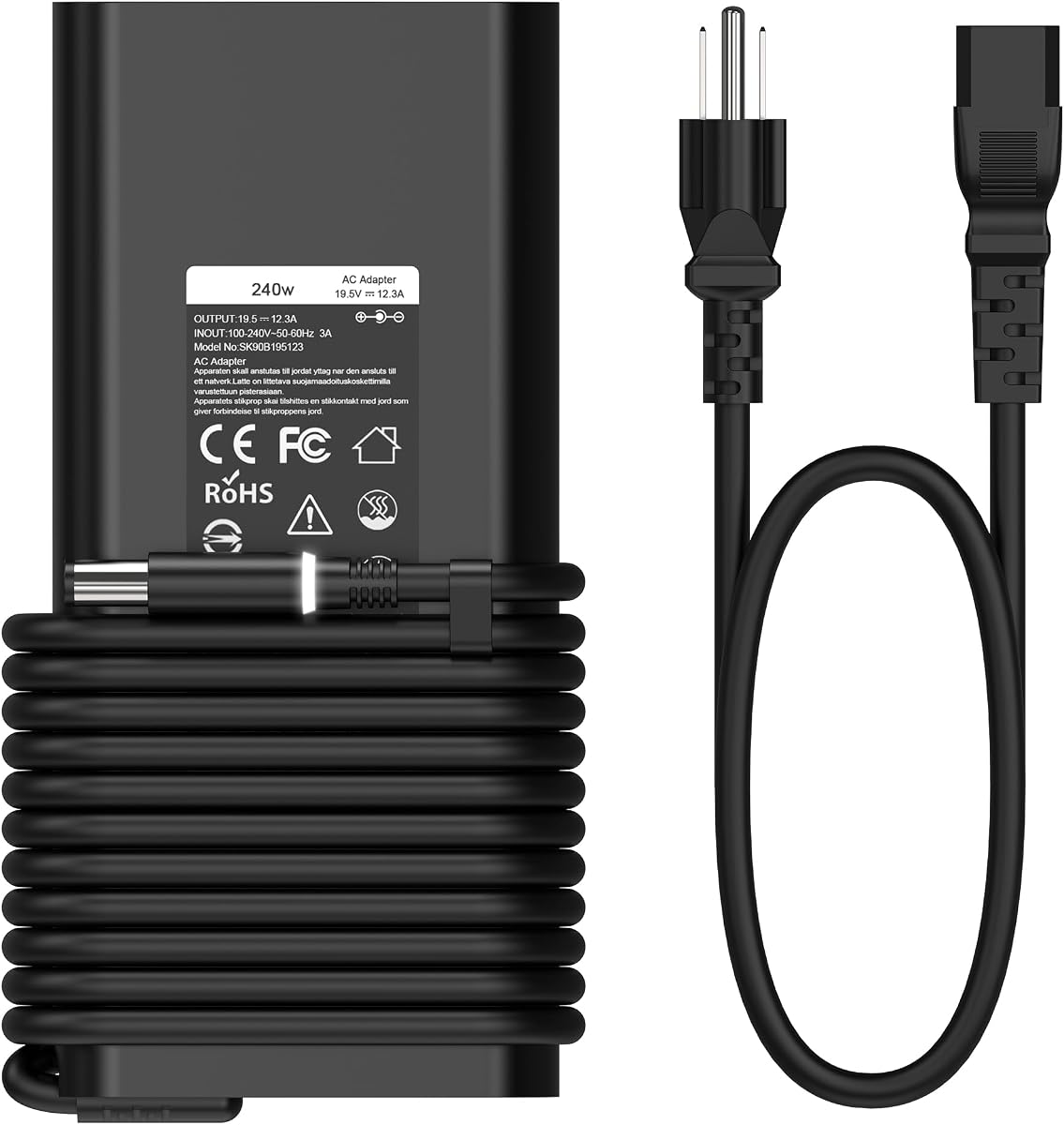
This high-wattage charger is designed for demanding Dell Alienware and Precision laptops. It provides up to 240W output, which is necessary for high-performance models with powerful processors and graphics.
We may earn a commission when you buy through this link, at no additional cost to you.
It is backward compatible with 180W devices, making it versatile for various laptop configurations. The charger ensures stable power to prevent performance throttling during intensive tasks like gaming or video rendering.
The package includes a power cord and offers a 12-month warranty through the seller. This adds value for users investing in high-end laptop hardware that requires substantial power.
For owners of Alienware or Precision machines, this charger is essential. It ensures your laptop can run at full potential without power limitations during heavy workloads.
With high wattage support, this adapter prevents your CPU and GPU from throttling, ensuring smooth performance during intense tasks.
The charger works with 180W devices as well, offering flexibility across different laptop models and power requirements.
We may earn a commission when you buy through this link, at no additional cost to you.
This 330W charger is built for extreme performance Dell Alienware laptops that demand massive power input. It delivers a stable output of 19.5V at 16.92A to ensure consistent performance.
We may earn a commission when you buy through this link, at no additional cost to you.
The charger is specifically compatible with Alienware M16 and M18 series, as well as other high-end models. It prevents thermal throttling and frame drops during gaming or rendering sessions.
Safe backward compatibility means it also works with devices requiring 180W or 240W, adding versatility. The lower operating temperature helps prolong the lifespan of the adapter.
For users with high-end gaming or workstations, this charger is a top choice. It ensures your hardware receives the power it needs to perform at its peak capabilities.
The design reduces operating load and heat generation, helping the charger run cooler and last longer.
By delivering full-rated power, it eliminates stuttering and lag, ensuring a seamless gaming or editing experience.
We may earn a commission when you buy through this link, at no additional cost to you.
This adapter kit offers a universal charging solution by converting USB-C PD power to various laptop jack plugs. It includes 15 different connector sizes to fit almost any laptop brand including Dell.
We may earn a commission when you buy through this link, at no additional cost to you.
The kit supports up to 100W PD output and includes an E-mark intelligence chip to adjust current automatically. It ensures safe and stable charging currents for your device without data syncing.
It is ideal for travelers who want one cable to charge multiple devices. Just pair it with a portable battery or PD wall charger for a complete universal power setup.
While it requires an external power source, its versatility makes it a valuable accessory. It is a smart choice for those owning multiple devices with different charging port needs.
The built-in E-mark chip ensures safe charging by automatically adjusting the current to match your device requirements.
With 15 different connector sizes, this kit can adapt to almost any laptop model including Dell, HP, Lenovo, and more.
We may earn a commission when you buy through this link, at no additional cost to you.
Selecting the right battery backup involves understanding your laptop's power requirements and usage scenarios to ensure seamless connectivity and safety.
Ensure the backup solution provides sufficient wattage to power your specific Dell model. High-performance machines may need 130W or more while standard ultrabooks often require 65W.
Check your laptop's original adapter specs to match the output requirements accurately.
Verify that the backup or charger uses the correct connector type such as USB-C, round tip, or specific Dell proprietary ports.
Mismatched connectors can prevent charging or damage your device.
For portable power banks, look at mAh ratings which indicate how many times you can recharge your laptop on the go.
Higher capacity means longer runtime but usually adds weight and size.
Support for PD or QC fast charging protocols can significantly reduce the time needed to charge your laptop or the backup itself.
Faster charging improves usability when you are in a hurry.
Look for features like overvoltage protection, short circuit protection, and temperature control to safeguard your laptop.
Certified products ensure compliance with electrical safety standards.
Consider the weight and dimensions if you plan to carry the backup daily. Compact designs are better for travel while larger units suit home use.
Balance capacity with portability needs based on your lifestyle.
A solid warranty and responsive customer support can save you from unexpected failures. Many manufacturers offer one to three year warranties.
Check the seller's policy on returns and exchanges before purchasing.
Advanced backup units may include ECO modes or digital displays to monitor power usage and remaining capacity.
These features help optimize battery life and provide peace of mind.
Always connect your Dell laptop to the backup device before unplugging from a wall outlet. This prevents sudden shutdowns and data loss.
Regularly recharge your power bank or UPS to maintain battery health. Avoid letting the battery drain completely before the next use.
Store the backup in a cool dry place away from direct sunlight. Extreme temperatures can degrade battery cells and reduce performance.
Yes many portable power banks with sufficient wattage can act as a wall charger for your Dell laptop. Ensure the power bank has at least 65W output for standard models and supports the right charging protocols.
A 25000mAh power bank can typically charge a Dell XPS laptop one to two times depending on the model's battery capacity. The exact runtime varies based on usage intensity and screen brightness settings.
Most newer Dell laptops including XPS and Latitude models support USB-C charging. You can use PD-compatible power banks or chargers with USB-C to power your laptop efficiently.
A UPS provides surge protection and backup for desktops or laptops plugged into AC outlets while a power bank is portable and designed for on the go charging without needing an outlet.
Third-party chargers are safe as long as they meet the voltage and wattage specifications of your Dell laptop. Look for safety certifications and reputable brands to avoid damage.
Check the label on your original power adapter. If it states 65W that is your requirement. For high-performance models like Alienware you may need 180W or 240W.
A UPS acts as a battery backup when plugged into AC outlets. It protects your laptop from power outages and surges ensuring continuous operation until you can save work.
Universal adapter kits are safe if you choose the correct tip and the power source meets your laptop's wattage requirements. Always verify compatibility before use.
We reviewed ten top options ranging from portable power banks to full desktop UPS units. Each solution offers unique benefits depending on whether you prioritize mobility or comprehensive power protection.
Consider your laptop's specific wattage needs and connector type before making a decision. Safety features and warranty support should also influence your final purchase.
Prices and availability change frequently. Be sure to check current stock and offers on the product links to ensure you get the best deal.