
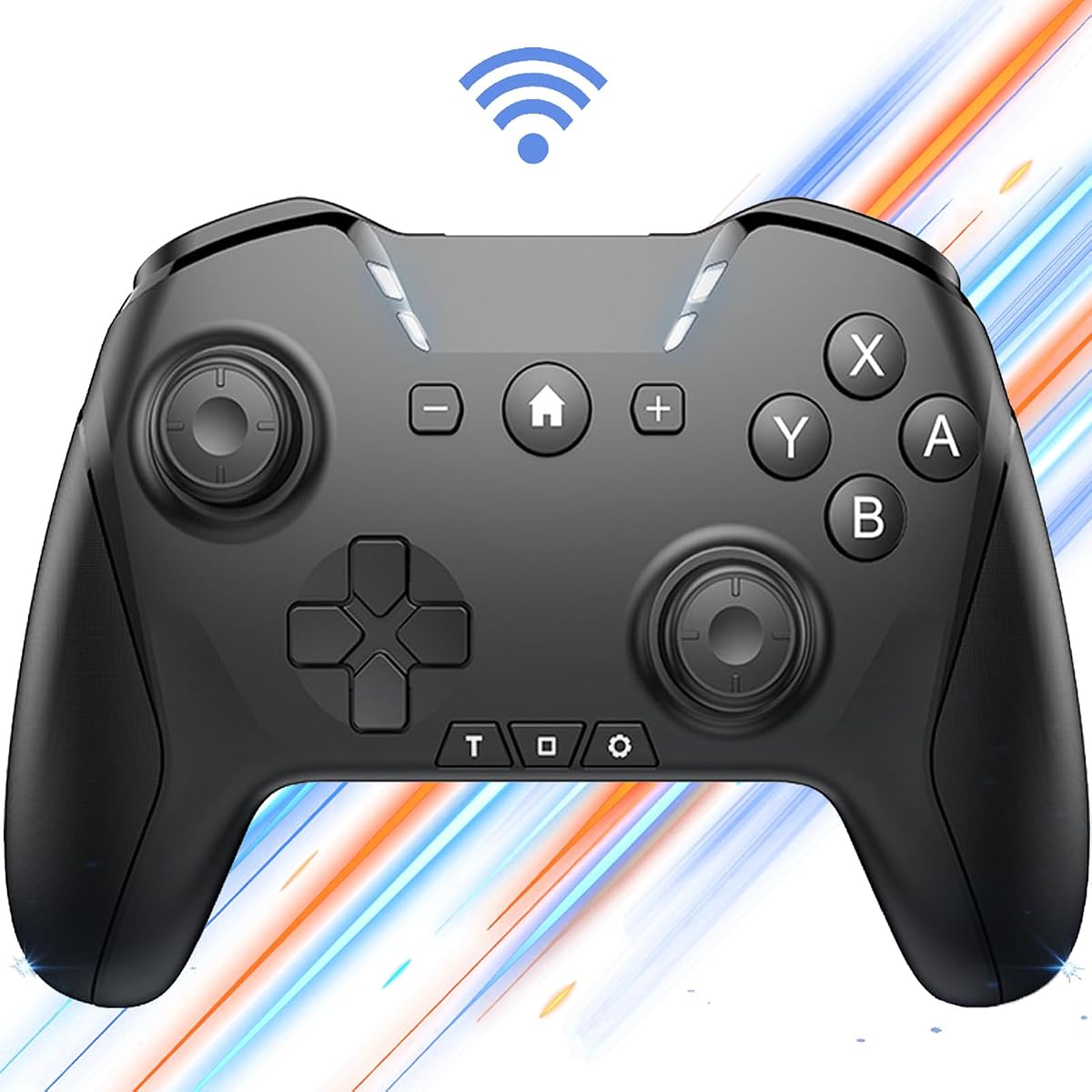
VOYEE Switch Controller
4.4Editor score
RGB Lighting Modes
Programmable Buttons
One-Key Pairing Wake Up
This guide compares the best Gaming Controller for Apple TV models for October 2026 focusing on compatibility, battery life, and performance for iOS and tvOS
Finding the right Gaming Controller for Apple TV transforms your living room into a powerful gaming hub. You need wireless connectivity, precise controls, and long battery life to enjoy Apple Arcade and streaming services without interruptions or lag.
We evaluated ten top models based on build quality, platform support, and user feedback. Each product offers unique features like Hall Effect joysticks, programmable buttons, or extended battery life. Our list covers options ranging from budget-friendly picks to premium licensed controllers.
Each pick highlights specific strengths and potential limitations to help you decide. Prices and availability can change frequently on Amazon, so please verify current listings before purchasing. These models represent the most reliable choices for enhancing your Apple TV gaming experience.
4.4Editor score

4.7Editor score

4.0Editor score
This side-by-side comparison highlights key specifications and features across all ten selected controllers. Use this table to quickly identify which model matches your specific needs for connectivity, battery, and control precision.



This controller aims to support a vast range of devices including Apple TV. It features a 4.0 rating and offers extensive customization options like macros and turbo functions.
We may earn a commission when you buy through this link, at no additional cost to you.
Users can program their own operations and interchange button functions easily. The 650mAh battery supports up to 15 hours of playtime which is sufficient for most sessions.
While highly versatile, the setup requires following the user manual carefully to ensure correct connection methods. The weight might feel heavy during extended use for some players.
It is best for gamers who need one controller for multiple systems. The wake-up function and macro support make it a strong choice for repetitive tasks.
Program up to 30 seconds of operations and interchange stick positions to match your habits.
A large capacity battery ensures you can game for up to 15 hours on a single charge.
We may earn a commission when you buy through this link, at no additional cost to you.
The SteelSeries Nimbus+ stands out as an Apple-licensed controller designed specifically for iOS and tvOS. It holds a 4.0 rating and promises over 50 hours of battery life on a single charge.
We may earn a commission when you buy through this link, at no additional cost to you.
Its tactile D-pad buttons and clickable joysticks offer precise input options across various games. The official license ensures seamless compatibility with Apple Arcade and supported tvOS titles.
While the battery life is exceptional, the price is higher than many third-party alternatives. Some users may prefer a different button layout for retro games.
It is the top choice for those prioritizing official support and long playtime. The reliability and optimization for Apple devices justify the investment for serious gamers.
Works with all Apple products including iOS iPads and tvOS devices with wireless connectivity.
A built-in rechargeable battery allows for 50 plus hours of play on a single charge.
We may earn a commission when you buy through this link, at no additional cost to you.
This VOYEE controller offers a high 4.4 rating at a budget-friendly price. It features RGB lighting and programmable keys that enhance the gaming experience on Switch and PC.
We may earn a commission when you buy through this link, at no additional cost to you.
It supports one-key pairing and wake up for the console. The 6-axis gyro sensor and vibration feedback provide responsive controls for sports games.
PC compatibility is limited to wired connections which restricts wireless use on desktops. The build quality is functional but may not match premium brands.
It is ideal for gamers seeking value and visual flair. The programmable buttons and turbo support add extra functionality at a low cost.
Choose from 4 light modes including RGB strobe and solid lights to match your setup.
Program buttons and use 3 speeds of turbo to maximize your gameplay efficiency.
We may earn a commission when you buy through this link, at no additional cost to you.
The 8Bitdo SN30 Pro is highly rated at 4.7 for its retro design combined with modern features like Hall Effect joysticks. It officially supports iPhone iPad macOS and Apple TV now.
We may earn a commission when you buy through this link, at no additional cost to you.
It includes a full button set with clickable joysticks and motion controls. The Hall Effect technology offers higher precision and sensitivity for long-lasting performance.
The compact size makes it easy to carry but might feel small for large hands. It lacks some ergonomic features found in larger controllers like trigger locks.
It is the best pick for retro gaming fans who need Apple TV compatibility. The build quality and precision justify its position as a top-rated option.
Upgraded Hall Effect joysticks are robust long-lasting and offer higher precision and sensitivity.
Compatible with Switch PC Windows and Apple TV officially supported for broad device use.
We may earn a commission when you buy through this link, at no additional cost to you.
This renewed version of the SteelSeries Nimbus+ offers Apple TV compatibility at a lower price point. It has a 3.6 rating which reflects varied user experiences with renewed products.
We may earn a commission when you buy through this link, at no additional cost to you.
The controller is professionally inspected tested and cleaned to meet Amazon Renewed quality standards. It provides a stable wireless connection for responsive gameplay without cables.
Users should expect potential cosmetic wear compared to new units. The lower rating suggests quality might not be consistent across all batches.
It is a good choice for budget-conscious buyers who need official Apple support. Just ensure you check the item condition upon arrival.
Professionally inspected tested and cleaned to meet Amazon Renewed quality standards for reliability.
Compatible with iPhone iPad iPod touch Apple TV and supported Apple devices seamlessly.
We may earn a commission when you buy through this link, at no additional cost to you.
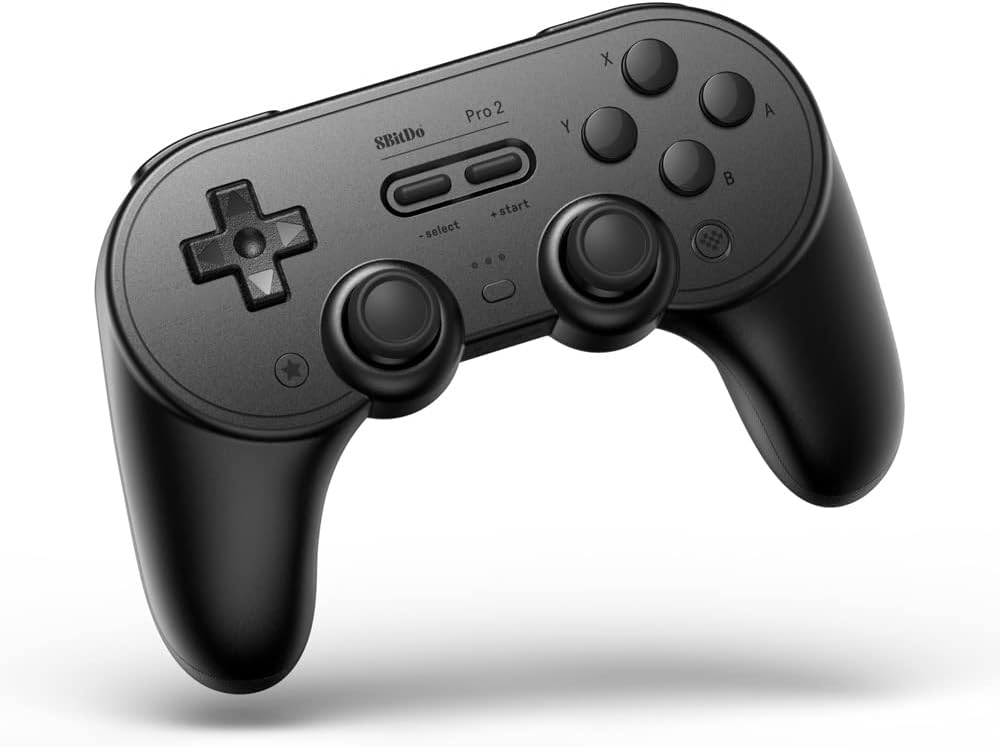
The 8BitDo Pro 2 is rated 4.5 and offers extensive features like programmable back buttons and custom profile switching. It supports Apple TV iPhone iPad and macOS officially.
We may earn a commission when you buy through this link, at no additional cost to you.
It includes ultimate software for PC Android and iOS to customize controls and profiles. The 20-hour rechargeable battery ensures long sessions without frequent recharging.
The software can be complex for casual users who just want plug-and-play functionality. The price is higher than many third-party alternatives on the market.
It suits gamers who want advanced customization across multiple platforms. The back buttons and profile switching add significant value for serious players.
Ultimate software available on PC Android and iOS allows custom profile switching and grip enhancement.
Enjoy 20 hours of play on a single charge with wireless Bluetooth connectivity options.
We may earn a commission when you buy through this link, at no additional cost to you.
This standard SteelSeries Nimbus+ model is rated 4.1 and focuses on reliable wireless performance for Apple devices. It is a rechargeable controller designed for iPhone iPad and Apple TV.
We may earn a commission when you buy through this link, at no additional cost to you.
It offers a clean design with responsive buttons and triggers for precise control. The compatibility with supported Apple devices ensures a smooth connection experience.
It lacks advanced features like programmable back buttons found in other models. The feature set is basic compared to more customizable controllers.
It is a solid pick for those who want a simple reliable controller. The brand reputation ensures a stable connection for Apple TV gaming.
Provides a stable wireless connection for responsive gameplay without cables on supported devices.
Compatible with iPhone iPad iPod touch Apple TV and supported Apple devices for versatility.
We may earn a commission when you buy through this link, at no additional cost to you.
The AceGamer Aurora II is rated 4.2 and features upgraded Hall Effect joysticks for precise input. It supports iOS and includes customizable back keys for enhanced convenience.
We may earn a commission when you buy through this link, at no additional cost to you.
It has a large 1000mAh battery for extended playtime and strong connectivity via 2.4G wireless or Bluetooth. The upgraded receiver helps reduce drift for better accuracy.
PC pairing requires a specific sequence involving buttons which might confuse some users. The setup process is more involved than standard plug-and-play controllers.
It is best for gamers who want Hall Effect precision on a budget. The back keys and battery capacity make it a strong contender for long sessions.
Hall Effect joysticks provide precise and reliable input detection for smooth and accurate in-game movement.
The 1000mAh upgraded battery provides extra-long playtime on a single charge without interruptions.
We may earn a commission when you buy through this link, at no additional cost to you.
The Official Luna Wireless Controller is rated 4.4 and offers unique Cloud Direct technology for low-latency gameplay on Amazon Luna. It supports multi-platform connectivity including Bluetooth and USB.
We may earn a commission when you buy through this link, at no additional cost to you.
It allows seamless screen switching so you can pause on one screen and pick up on another. The offset thumbsticks and precise triggers are built for gaming comfort.
Its primary optimization is for the Luna service which might limit its utility for other native apps. Native tvOS support depends on Bluetooth compatibility which varies by title.
It is ideal for cloud gamers using Luna but may lack specific native tvOS features. The screen switching feature adds unique value for multi-device players.
Connects directly to Amazon's custom game servers using Cloud Direct technology for low-latency gameplay.
Works across your devices including iPhone iPad Android and more with Bluetooth connectivity.
We may earn a commission when you buy through this link, at no additional cost to you.
The GMBACK Wireless Switch 2 Controller is rated 4.1 and features a unique Loop Macro function for automated button sequences. It supports Apple TV and devices with one-click screenshot functionality.
We may earn a commission when you buy through this link, at no additional cost to you.
It offers a 15-20 hour battery life and customizable turbo settings. The macro loop feature is ideal for grinding and farming in games.
Programming macros requires holding specific buttons and may have a learning curve. The brand is less recognized compared to major tech companies.
It is perfect for gamers who want automated tasks on their controller. The wake-up functionality and screenshot tool add convenience for daily gaming.
Record custom button sequences and replay them automatically for grinding and repeated tasks.
Enjoy up to 15-20 hours of gameplay with one-click screenshot and wake-up functionality.
We may earn a commission when you buy through this link, at no additional cost to you.
Choosing the right controller involves considering compatibility features and build quality. Use this guide to understand key factors that impact your gaming experience on tvOS and iOS devices.
Ensure the controller supports tvOS via Bluetooth. Check if the manufacturer explicitly lists Apple TV or iOS compatibility to avoid connection issues.
Verify Bluetooth pairing steps and firmware update requirements before purchasing.
Look for controllers with at least 10 hours of battery life for uninterrupted sessions. Longer battery capacities reduce interruptions during gameplay.
Prioritize models with USB-C charging for faster recharge times and modern standards.
Consider the size and shape to ensure comfort during long sessions. Thumbstick placement and button layout should match your hand size naturally.
Opt for textured grips to prevent slipping during intense gaming moments.
Analog triggers provide more precision for racing and action games. Vibration motors enhance immersion by providing haptic feedback in games.
Check if the controller offers adjustable vibration intensity for customization.
Back buttons allow extra actions without removing thumbs from sticks. Programmable macros can automate complex sequences for efficiency.
Look for controllers that support button remapping via apps or on-device settings.
Controllers with official Apple licensing ensure seamless integration with Apple Arcade. Third-party controllers may require extra steps or software updates.
Choose licensed options for guaranteed stability on tvOS devices.
Hall Effect joysticks reduce drift and extend the controller's lifespan. Metal or reinforced components often indicate better long-term durability.
Check warranty terms to protect against hardware failures over time.
To pair your controller, enable Bluetooth on your Apple TV and press the pairing button. The controller should appear in the settings menu as an available device.
Keep the controller charged using the provided cable to ensure consistent performance. Avoid leaving it unused for long periods to maintain battery health.
Clean the buttons and joysticks with a dry cloth to remove dust. Store it in a cool dry place to prevent damage to the internal components.
Not all Bluetooth controllers are compatible with tvOS. You need a controller that explicitly supports Apple devices. Check the product details for official Apple certification or iOS support lists before buying.
Yes controllers designed for iOS often work on tvOS as well. Look for models that mention support for tvOS or Apple TV in their compatibility list to ensure they function correctly.
Most controllers require a companion app or desktop software for updates. Download the manufacturer's software and follow the instructions to connect and update the firmware.
Interference from other devices can cause disconnections. Move your controller closer to the Apple TV and ensure no other devices are pairing during your session.
Wired connections reduce latency but require a physical link to the device. Apple TV supports Bluetooth natively so wireless is standard for most modern controllers and games.
Yes several budget models offer basic features at lower prices. However ensure they support tvOS before purchasing to avoid compatibility issues that might affect gameplay.
Our top picks highlight the SteelSeries Nimbus+ for official support and the 8Bitdo SN30 Pro for retro precision. Each model offers unique strengths to match different play styles and budgets.
Prioritize compatibility and battery life to ensure a smooth experience. Features like Hall Effect joysticks and programmable buttons add extra value for serious gamers.
Always check current prices and availability on Amazon before making your purchase. Prices change frequently so verifying listings ensures you get the best deal possible.