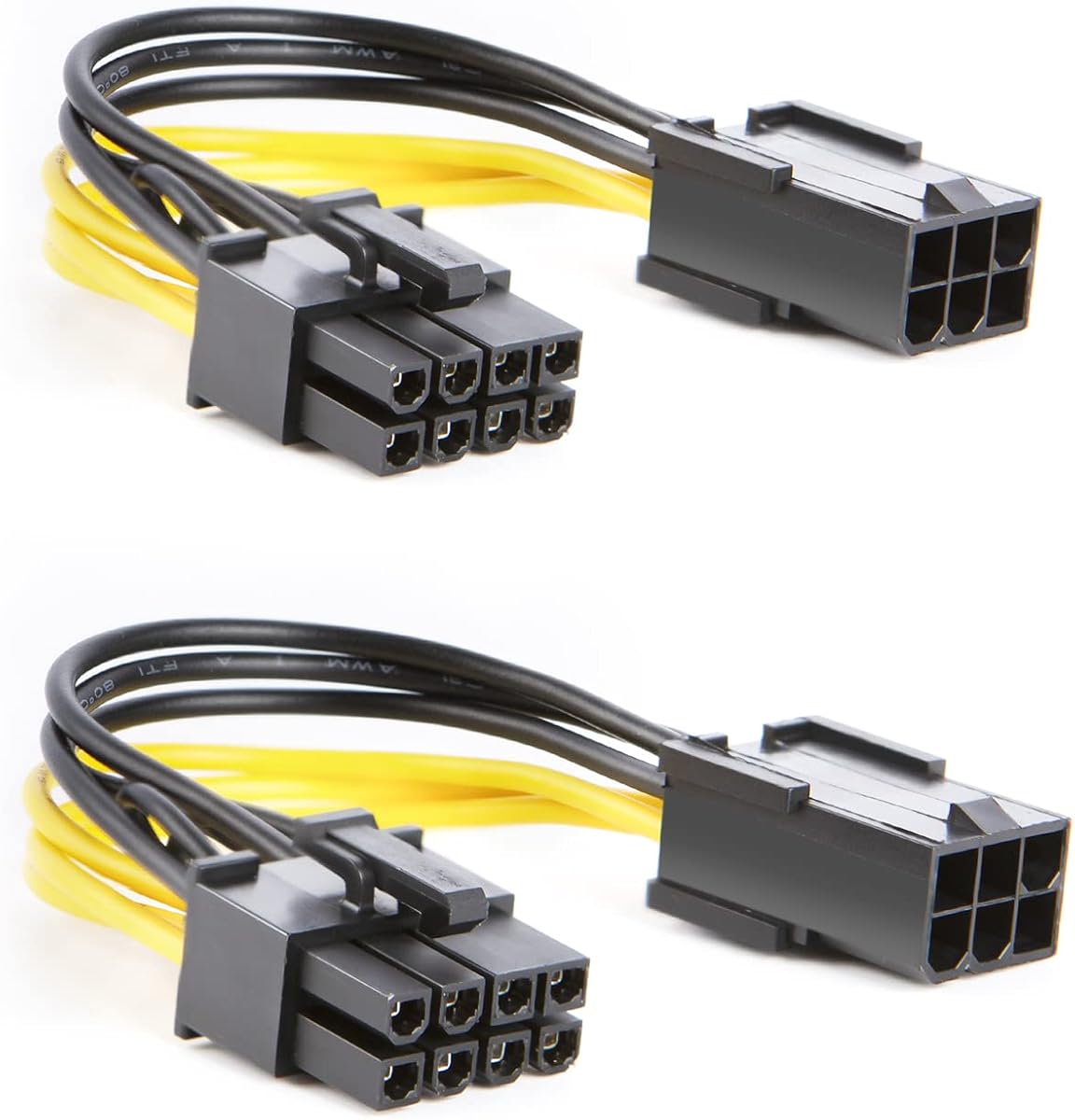
CableCreation 6-Pin to 8-Pin PCIe Express Power Adapter Cable 2-Pack
4.7Editor score
Cost effective solution
Durable 18AWG copper
Wide manufacturer compatibility
This guide compares the top GPU power adapters for 2026 focusing on compatibility safety and performance for modern graphics cards including RTX 40 and 50
GPU power adapters are essential components for modern computer builds that require specific power connectors for high performance graphics cards. These cables ensure stable power delivery and prevent overheating issues during intense gaming sessions or professional workloads.
We evaluated ten top rated products based on build quality connector compatibility and safety features. Each adapter was assessed for its ability to handle high wattage outputs while maintaining reliable connections under demanding operating conditions.
Each selection highlights unique strengths for different system configurations and budget constraints. Please note that product availability and pricing may change over time so always verify current details before making your purchase decision.
4.7Editor score

4.7Editor score

4.2Editor score
The following table provides a side by side comparison of all ten selected GPU power adapters highlighting their key specifications and intended use cases.


The Cable Matters adapter cable ranks high due to its secure design and reliable performance for legacy graphics cards needing an 8-pin input. Its rating reflects user satisfaction with the locking mechanism that prevents accidental disconnection.
We may earn a commission when you buy through this link, at no additional cost to you.
This adapter connects a 6-pin male PCIe plug to an 8-pin GPU input ensuring stable power delivery. The keyed housing on the 6-pin side supports proper alignment while the 8-pin side features a locking latch for added security.
The main trade-off is that it does not increase PSU wattage making it unsuitable for bypassing GPU power requirements. Users must confirm their power supply provides sufficient current before installation to avoid system instability.
Ideal for builders with existing PSUs lacking 8-pin outputs this adapter offers a cost-effective solution for compatible GPUs. Always verify your specific card requirements before purchasing to ensure full functionality.
The locking latch on the 8-pin male connector and keyed housing on the 6-pin female connector prevent accidental disconnection and ensure proper alignment.
Coming in a 2-pack allows users to outfit multiple systems or keep a spare on hand which adds significant value compared to single cable purchases.
We may earn a commission when you buy through this link, at no additional cost to you.
This 16-pin adapter cable is designed for GPUs with 12VHPWR ports like the RTX 4070 series offering a 90-degree angle to improve airflow and reduce strain. The 13-inch length provides ample room to bend in smaller cases.
We may earn a commission when you buy through this link, at no additional cost to you.
Built with 16AWG tinned copper wire and alloy copper terminals the cable ensures stable voltage transmission and higher currents. The flexible protective sleeve and nylon braided fiber protect against wear while keeping the look clean.
The 90-degree design prevents excessive bending that can cause overheating or loose connections over time. Cable combs included help users manage the extension cord for a tidy system appearance.
Recommended for owners of RTX 4070 or 4070 Ti cards this adapter replaces stiff factory cables effectively. Ensure your power supply has the correct 8-pin connectors for proper function before purchase.
The 90-degree connector solves overheating issues caused by adapters bending too much or frequently becoming loose which protects your graphics card.
With 13 inches of length the adapter enables more room to route cables neatly in tight or smaller cases for a cleaner system build.
We may earn a commission when you buy through this link, at no additional cost to you.
The NZXT adapter cable delivers up to 600 watts to NVIDIA 40 series GPUs using dual 8-pin inputs from NZXT ATX 2.X PSUs. Its compact design replaces the bulky standard adapter included with NVIDIA cards.
We may earn a commission when you buy through this link, at no additional cost to you.
Designed specifically for NZXT C-Series Gold PSUs this adapter ensures reliable compatibility without requiring an ATX 3.0 power supply. The 12+4-pin connector matches the GPU port directly for stable power delivery.
While it offers high power the compatibility is limited to NZXT power supplies which may not suit all users. The compact size reduces clutter but limits flexibility for non-NZXT systems.
Best for NZXT power supply owners upgrading to 40 series GPUs this cable simplifies the installation process. Verify your PSU model before purchasing to ensure full support.
This adapter is guaranteed to work with all NZXT C-Series Gold ATX 2.X PSUs ensuring reliable operation without needing ATX 3.0 hardware.
Rated for 600 watts this adapter supports high-end graphics cards delivering the necessary power to handle demanding workloads efficiently.
We may earn a commission when you buy through this link, at no additional cost to you.
Fasgear adapter supports up to 600W output and features 16AWG tinned copper wire for stable voltage transmission. Its terminals are made of alloy copper and tinned material to bring stable currents.
We may earn a commission when you buy through this link, at no additional cost to you.
The 16pin (12+4) male connector connects to dual 8-pin female ports on the PSU offering better compatibility for RTX 4090 and 5070 Ti models. The cable length helps route power neatly without forcing connectors.
It requires two unoccupied 8-pin PCIe ports on the power supply to function properly. Connecting fewer may cause damage so verify your PSU has the necessary outputs before installation.
This adapter is ideal for high-end GPUs requiring significant wattage and clean builds. Always confirm your GPU model is compatible and your power supply meets the requirements.
Supporting up to 600W this adapter meets the demands of high-performance graphics cards ensuring reliable power delivery during intense usage.
The 16AWG tinned copper wire prevents oxidation over time which extends the lifespan and maintains electrical conductivity of the cable.
We may earn a commission when you buy through this link, at no additional cost to you.
This conversion cable connects 12VHPWR PSU outputs to 8pin GPU ports with a 6.8-inch length ideal for compact builds. It supports up to 600W ensuring stable power for mid to high range cards.
We may earn a commission when you buy through this link, at no additional cost to you.
It works with PSUs that have original 12VHPWR/12V-2X6 output cables such as Corsair ATX 3 series. The 16AWG copper wire ensures reliable transmission while keeping the cable compact and manageable.
The main limitation is that it is not a modular cable and only works with GPUs having 8pin/6pin connectors. High-end models needing 12pin connectors will not be compatible with this adapter.
For users with ATX 3.1 power supplies this adapter offers a flexible routing solution. Verify your PSU and GPU connector types before purchase to ensure compatibility.
With a length of only 6.8 inches this adapter fits neatly into small cases without adding unnecessary bulk to your build.
Designed for PSUs with 12VHPWR outputs this adapter works with the latest Corsair and Seasonic models featuring ATX 3 standards.
We may earn a commission when you buy through this link, at no additional cost to you.
Designed for RTX 4070 and 4070 Ti models this adapter cable features a 16pin connector and dual 8pin female ports. The 13-inch length allows for neat cable routing in tight cases.
We may earn a commission when you buy through this link, at no additional cost to you.
With 16AWG tinned copper wire and alloy terminals the cable ensures stable voltage transmission up to 450W peak power. The flexible protective sleeve reduces strain and keeps the build looking clean.
This adapter is not compatible with 12pin GeForce RTX 3090 series GPUs which have different power requirements. Verify your specific card model before purchase to avoid compatibility issues.
For owners of 4070 series cards this extension provides reliable power delivery without risking overheating. Check your GPU interface before ordering to ensure the connector types match.
Supporting peak power up to 450W this adapter handles demanding GPUs ensuring stable voltage transmission during intensive sessions.
With a 13-inch length and included cable combs this adapter helps create a tidy computer system with better airflow management.
We may earn a commission when you buy through this link, at no additional cost to you.
CableCreation offers an affordable solution for users needing to convert 6-pin to 8-pin connectors for their graphics cards. This 2-pack provides great value for building multiple systems or keeping a spare.
We may earn a commission when you buy through this link, at no additional cost to you.
The adapter uses 18AWG pure copper conductor for safe and superior performance with RoHS certification ensuring it meets safety standards. It supports up to 36W which is suitable for low to mid range cards.
The main trade-off is the limited power capacity making it unsuitable for high-end GPUs requiring substantial wattage. Always check your card requirements before purchase to ensure sufficient power delivery.
Ideal for budget builds this adapter eliminates the need for a full PSU upgrade. Verify your specific card needs before purchasing to ensure compatibility and reliable performance.
This adapter eliminates the expense of upgrading a computer power supply solely for compatibility with a newer video card.
RoHS certification ensures the cable meets safety standards providing peace of mind for users concerned with compliance.
We may earn a commission when you buy through this link, at no additional cost to you.
Corsair adapter is designed for PCIe 5.0 12VHPWR GPUs with a tight 180-degree bend to route power cleanly against the side panel. It withstands temperatures up to 105C ensuring reliable operation.
We may earn a commission when you buy through this link, at no additional cost to you.
This adapter prevents power cables from pressing against the side panel of the case providing a cleaner build without stress on components. The thermal endurance allows it to handle power-hungry graphics cards effectively.
The adapter is only for use with PCIe 5.0 12VHPWR GPUs limiting its compatibility. Users must verify their GPU generation before purchase to avoid fitting issues.
Ideal for premium builds this adapter offers clean cable management and robust thermal performance. Ensure your GPU supports 12VHPWR ports before purchasing this specific cable.
Capable of withstanding temperatures up to 105C this adapter provides reliable performance even with the most demanding graphics cards.
This adapter prevents power cables from pressing against the side panel of the case for a cleaner build and reduced component stress.
We may earn a commission when you buy through this link, at no additional cost to you.
EVGA PowerLink supports a wide range of NVIDIA Founders Edition and EVGA GeForce cards offering improved cable management for older GPUs. It features integrated solid state capacitors for power filtering.
We may earn a commission when you buy through this link, at no additional cost to you.
The adapter includes adjustable spacing to fit various PCI-E connections easily. Installation is straightforward ensuring users can upgrade cable layouts without complicated steps.
While it supports many models it is not designed for the latest RTX 40 series GPUs. Verify your specific card compatibility before purchase to ensure the adapter will work properly.
For users with mid-range legacy GPUs this adapter offers a practical solution for cleaner builds. Confirm your card model matches the supported list before buying.
This adapter dramatically improves cable management offering adjustable spacing to fit various PCI-E connections for a cleaner system.
Integrated solid state capacitors give you power filtering ensuring stable power delivery to your graphics card.
We may earn a commission when you buy through this link, at no additional cost to you.
This adapter connects 16pin power modular connectors to three ATX 8pin ports for broad system compatibility. It delivers up to 600W of stable power for next-generation graphics cards.
We may earn a commission when you buy through this link, at no additional cost to you.
The 90-degree angled connector enables clean cable routing reducing port strain and improving airflow in compact builds. It is available in Type A and Type B layouts to accommodate various chassis.
The 16pin connector must match the specific Type A or Type B layout on your PSU which requires verification before purchase. Ensure your power supply has the necessary outputs for this adapter.
Best for modular PSU owners needing higher wattage this adapter offers stable power delivery and clean aesthetics. Check your PSU layout carefully to ensure compatibility.
Engineered to deliver up to 600W this adapter meets the high power demands of modern graphics cards for sustained performance.
The 90-degree angled connector reduces port strain and improves airflow ensuring clean cable routing in compact builds.
We may earn a commission when you buy through this link, at no additional cost to you.
Choosing the right GPU power adapter requires careful consideration of connector types power capacity and build quality to ensure system stability.
Check both your GPU and power supply connector types before purchasing an adapter. Most modern adapters support 6-pin to 8-pin or 16-pin configurations but mismatched connectors can cause damage.
Always verify your card's specific power requirements to ensure the adapter supports the necessary inputs without risking instability.
The adapter must support the wattage required by your graphics card to prevent power drops or overheating. High-end cards may need adapters rated for 600W while others only need 36W.
Select an adapter that meets or exceeds your card's maximum power draw to maintain reliable performance under load.
Look for adapters made with solid copper conductors and protective sleeves to ensure durability and heat resistance. Tinned copper helps prevent oxidation and maintains electrical conductivity over time.
Robust materials and certified safety standards like RoHS ensure the adapter performs reliably without posing risks to your system.
Longer cables with right-angle designs help reduce strain on connectors and improve airflow within the case. Consider the size of your case and GPU position when choosing length.
Adapters with 90-degree or 180-degree bends can significantly improve cable management especially in smaller or compact systems.
Ensure your power supply has the necessary unused ports to support the adapter configuration. Some adapters require two 8-pin ports while others need specific modular outputs.
Verify your PSU wattage and port availability before purchasing to avoid compatibility issues or power shortages.
Secure locking mechanisms and keyed housings prevent accidental disconnection which protects against hardware damage. Look for adapters designed with safety certifications.
Properly designed connectors ensure the power stays connected during high-demand operations reducing the risk of unexpected shutdowns.
Some adapters come in 2-packs offering better value for users with multiple systems or those wanting a spare cable. Consider the price relative to performance and safety features.
Buying in packs can save money over time and ensure you have replacements available if needed in the future.
Choose adapters from reputable brands known for quality cables and customer support. Established manufacturers often provide better warranties and compatibility guarantees.
Reading reviews and checking brand history can help you avoid products that may fail under heavy use or cause system issues.
Begin by checking your power supply and GPU ports to ensure the adapter connector types match the required inputs for your specific hardware configuration.
Connect the adapter to the power supply first then to the GPU ensuring all connections are fully inserted and secured before powering on your system.
Regularly inspect the cables for signs of wear or overheating and ensure the connections remain tight to prevent accidental disconnection during use.
Yes you can use an adapter if your PSU has a compatible connector type but the adapter cannot increase the power capacity of the supply. Always confirm your PSU has sufficient wattage and the correct available ports before installation.
No adapters simply convert connector shapes and do not increase the wattage capacity. The maximum power depends on your power supply's output capacity not the adapter itself.
RTX 40 series cards often use 16-pin 12VHPWR connectors requiring specific adapters like 16-pin to dual 8-pin cables. Verify your card model for exact requirements before purchasing.
16AWG copper has thicker strands allowing for higher current capacity and better voltage stability than 18AWG. This reduces heat and ensures reliable performance under high power demands.
Use adapters with flexible sleeves and avoid bending cables too tightly. Proper routing and secure connections help heat dissipate effectively and reduce the risk of overheating.
Yes right-angle adapters reduce bending stress and improve airflow in tight spaces. They provide more room to route cables cleanly which helps maintain system stability and cleanliness.
Yes older GPUs that need 8-pin power can use 6-pin to 8-pin adapters if your PSU has the correct ports. Always check the adapter's wattage rating matches your card's needs.
Adapter connectors must match the pin layout of your GPU exactly. Mismatched layouts can cause damage or prevent proper power delivery so verify compatibility before purchasing.
This guide highlighted ten reliable GPU power adapters ranging from budget-friendly options to high-performance premium cables suited for RTX 40 and 50 series cards.
Prioritize compatibility power capacity and build quality when selecting an adapter to ensure your graphics card performs safely and reliably over time.
Remember that availability and pricing may change so always check current product details and specs before finalizing your purchase decision.