
Hamile Keyboard Case
4.5Editor score
400mAh battery life
3 viewing angles
Detachable magnetic keyboard
Finding the right keyboard case for your 8th Generation iPad can transform your tablet into a productive laptop-like device. A good option should offer solid protection, comfortable typing, and seamless connectivity to ensure you can work or create anywhere with confidence.
We have carefully evaluated ten top-rated keyboard cases available on the market to help you make an informed decision. Our comparison considers key factors such as battery longevity, backlight options, trackpad capabilities, and overall durability to find the best fits.
Each pick below highlights specific strengths and weaknesses based on verified product data and user feedback. Please note that product availability and pricing can change frequently, so always verify current details before making your final purchase decision.
4.5Editor score

4.4Editor score

4.3Editor score
As an Amazon Associate we earn from qualifying purchases.
The following table provides a side-by-side comparison of the top ten keyboard cases, highlighting their unique features, compatibility details, and key specifications to help you quickly identify the best fit for your needs.


The TUNKARMOR Keyboard Case stands out as a versatile and practical solution for iPad users seeking a complete typing and navigation experience. With a solid rating of 4.4 stars, this case offers a combination of protection, functionality, and style that appeals to a broad range of users.
We may earn a commission when you buy through this link, at no additional cost to you.
One of its strongest features is the inclusion of a rechargeable Bluetooth mouse alongside the magnetic detachable keyboard. This setup allows for precise cursor control without constantly tapping the screen, making document editing and web browsing significantly more efficient. The keyboard itself features 7 customizable backlight colors, ensuring visibility in low-light environments.
The case also utilizes a honeycomb grid pattern on the inner layer, which aids in heat dissipation and helps prevent the tablet from overheating during extended use. While the added components like the mouse increase the overall weight slightly, the convenience and comprehensive feature set justify this trade-off for many professionals and students.
This product is best suited for users who want an all-in-one solution without purchasing accessories separately. If you prioritize versatility and want a reliable setup for both work and entertainment, the TUNKARMOR case delivers excellent value and performance.
The inclusion of a mouse transforms the iPad into a more laptop-like workstation, allowing for precise cursor control during multitasking.
The honeycomb grid pattern inside the case helps dissipate heat effectively, protecting the tablet during long work sessions.
We may earn a commission when you buy through this link, at no additional cost to you.
The Hamile Keyboard Case is an excellent choice for budget-conscious users who do not want to compromise on essential features. Boasting a high rating of 4.5 stars, this case offers a reliable typing experience and robust protection for the 8th Generation iPad.
We may earn a commission when you buy through this link, at no additional cost to you.
Its standout feature is the 400mAh battery which supports up to 180 hours of usage on a single charge. This longevity means less frequent charging interruptions and more time spent on tasks. The keyboard features laser-etched backlit keys with 7 vibrant colors, ensuring you can type comfortably even in dim lighting conditions.
While it does not include a trackpad or mouse, the magnetic detachable design allows for flexibility in how you use the device. You can remove the keyboard for a lighter experience or attach it securely when typing. The case also includes a pencil holder, making it easy to carry your stylus alongside your tablet.
This option is ideal for students or casual users who need a durable and efficient typing solution without spending extra on advanced features. The combination of affordability and solid performance makes it a top contender in the budget category.
With up to 180 hours of battery life, you can work for days without needing to recharge the keyboard.
The detachable keyboard allows you to switch between typing mode and lightweight reading mode easily.
We may earn a commission when you buy through this link, at no additional cost to you.
The Dexnor Floating Stand Case represents a premium approach to iPad accessories with its robust construction and advanced features. Rated at 4.3 stars, it appeals to users who want a high-quality build and a laptop-like experience without carrying extra peripherals.
We may earn a commission when you buy through this link, at no additional cost to you.
Its aluminum alloy hinge ensures a sturdy magnetic connection that transforms the tablet into a stable laptop instantly. The built-in precision trackpad supports multi-finger gestures, enabling smooth cursor control and navigation that feels intuitive and responsive. This feature is particularly useful for productivity tasks like spreadsheet editing or web browsing.
The battery capacity is also impressive at 650mAh, providing up to 200 hours of working time on a single charge. While the device is heavier than some competitors due to the metal hinge and extra features, the stability and performance it offers are worth the added weight for professional users.
If you are looking for a durable and feature-rich case that enhances productivity significantly, the Dexnor is a strong candidate. Its premium build quality and functional design make it a worthwhile investment for those who rely on their iPad daily.
The integrated trackpad allows for smooth cursor movement and multi-gesture control without touching the screen.
The aluminum alloy hinge provides durability and stability, ensuring the keyboard remains securely attached during use.
We may earn a commission when you buy through this link, at no additional cost to you.
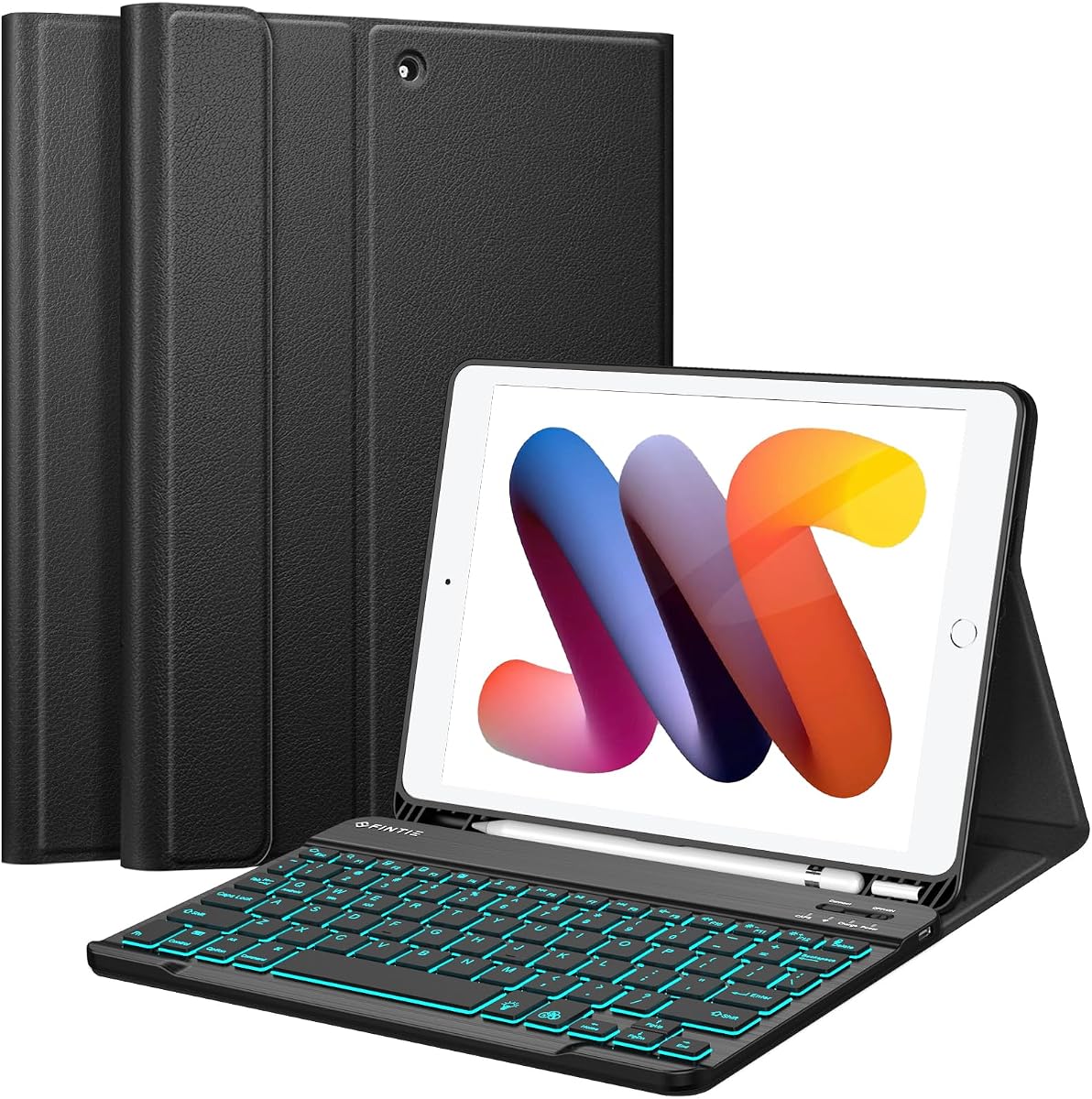
The FINTIE Backlit Keyboard Case is designed for users who prioritize battery life and a comfortable typing experience. With a rating of 4.5 stars, this case is known for its energy-efficient design that delivers up to 230 hours of continuous use.
We may earn a commission when you buy through this link, at no additional cost to you.
The built-in 420mAh battery ensures that you can work for extended periods without interruptions. Additionally, the Type-C fast charging capability fully powers the keyboard in just 2 to 3 hours, reducing downtime significantly. The mechanical scissor keys provide a rebound feature that reduces noise and enhances comfort during long typing sessions.
This case also offers dual protection with a durable PU leather cover and a soft flexible TPU back shell. This combination shields the iPad from shocks, drops, and impacts while maintaining a slim profile that does not add unnecessary bulk. The magnetic detachable keyboard allows for versatile use cases.
If long battery life and reliable protection are your main concerns, the FINTIE case is an excellent choice. Its practical design and efficient power management make it a reliable companion for students and professionals on the go.
The energy-efficient design supports up to 230 hours of usage, ensuring you can work uninterrupted for days.
Mechanical scissor keys with rebound features reduce noise and enhance comfort during prolonged typing.
We may earn a commission when you buy through this link, at no additional cost to you.
The typecase Touch Keyboard Case offers a unique 360-degree rotating hinge that provides unparalleled versatility in how you use your iPad. With a rating of 4.4 stars, this case is ideal for users who want to transition seamlessly between typing and viewing modes.
We may earn a commission when you buy through this link, at no additional cost to you.
The patented hinge is stress-tested for 20,000 cycles, ensuring durability over time. It allows you to use the iPad in various modes, including typing, watching videos, or using the tablet in its native form. The precision trackpad enhances navigation, allowing you to edit documents and browse the web efficiently.
Typing is further enhanced by laser-etched keys that allow a 10-color RGB LED backlight to shine through, providing a visually appealing and functional lighting experience. While the price is higher than some competitors, the innovative design and build quality justify the investment for many users.
This case is best suited for creative professionals and users who need flexibility in how they interact with their device. If you value a multi-functional design that adapts to different tasks, the typecase case is a compelling option.
The 360-degree hinge lets you switch between typing, reading, and native tablet modes effortlessly.
The stress-tested hinge ensures long-term reliability and smooth rotation for various usage scenarios.
We may earn a commission when you buy through this link, at no additional cost to you.
The Divufus Keyboard Case is designed with versatility in mind, offering compatibility with iOS, Android, and Windows systems. With a rating of 4.4 stars, this case is suitable for users who work across multiple platforms and need a flexible keyboard solution.
We may earn a commission when you buy through this link, at no additional cost to you.
The magnetic wireless keyboard can be removed from the case freely, providing convenience for different use cases. Full shortcut keys are customized for iPads, giving you efficient access to common commands. The keyboard also features a long-life battery that works for over 80 hours on a single charge.
Protection is ensured by a durable PU leather cover with a safety magnetic buckle and a non-slip rubber lining. The honeycomb grid design on the back helps prevent overheating, extending the service life of your tablet. This practical design makes it a reliable choice for everyday use.
If you need a keyboard case that works seamlessly across different operating systems, the Divufus is an excellent option. Its balance of functionality and protection makes it a strong contender for practical users.
Compatible with iOS, Android, and Windows systems, making it versatile for diverse device ecosystems.
Full shortcut keys optimized for iPad use enhance productivity and streamline your workflow.
We may earn a commission when you buy through this link, at no additional cost to you.
The Logitech Slim Folio is a trusted option known for its reliability and ergonomic design. With a rating of 4.4 stars, this case is favored by users who value comfort and long-term durability in their accessories.
We may earn a commission when you buy through this link, at no additional cost to you.
It uses 2 replaceable coin cell batteries that provide up to 4 years of use on a single set based on daily usage. This longevity eliminates the need for frequent charging or battery replacements, adding to its convenience. The keyboard features large well-spaced keys stretched edge-to-edge, preventing hand crowding during extended typing sessions.
A full row of iOS shortcut keys provides one-tap access to media volume controls and other functions, enhancing efficiency. The lightweight frame and keyboard module provide structural integrity without adding significant weight to the iPad. While it lacks a trackpad, its focus on typing comfort and battery efficiency makes it a strong choice.
If you prioritize comfort and battery longevity over advanced features like a trackpad, the Logitech Slim Folio is an excellent option. Its reputation for quality and practical design makes it a reliable companion for daily tasks.
Large, well-spaced keys reduce hand fatigue and enhance comfort during long typing sessions.
Coin cell batteries provide up to 4 years of power, reducing maintenance and charging needs.
We may earn a commission when you buy through this link, at no additional cost to you.
The KBCASE Keyboard Case is designed for users who value portability without sacrificing protection. With a high rating of 4.5 stars, this case offers an ultra-thin profile that is easy to carry in briefcases or backpacks.
We may earn a commission when you buy through this link, at no additional cost to you.
The detachable Bluetooth keyboard combines industry-leading design with spacious scissor-structure keys, ensuring a relaxed and tactile typing experience. It supports multiple viewing angles to make work and entertainment comfortable. The case also features a built-in pencil holder, making it easy to carry your stylus with your device.
Heat dissipation is managed effectively through a honeycomb grid pattern design, which helps extend the life of your tablet. The solid case and wave shock absorption provide comprehensive protection against scratches and damage. This balance of slim design and robust features makes it a practical choice.
If you need a portable solution that is easy to carry and still offers good typing comfort, the KBCASE case is ideal. Its lightweight design and protective features make it a strong contender for travelers and students.
The ultra-thin profile allows for easy storage in bags without adding unnecessary bulk.
Spacious scissor-structure keys provide a relaxed and tactile feel for prolonged use.
We may earn a commission when you buy through this link, at no additional cost to you.
The INFILAND Keyboard Case is a modern solution that integrates a precision trackpad for seamless navigation. With a rating of 4.5 stars, it appeals to users who want a laptop-like experience without the bulk of external peripherals.
We may earn a commission when you buy through this link, at no additional cost to you.
The magnetic Bluetooth keyboard delivers instant key response with stable and satisfying keystrokes, ensuring no missed inputs. The trackpad supports smooth cursor control and allows you to multitask efficiently. The keyboard features 7 backlight colors and 3 brightness levels to match any environment or mood.
This case offers a multi-mode design that lets you fold the cover into a stand for hands-free viewing or detach the keyboard for a lightweight experience. A built-in pencil holder keeps your stylus secure and within reach. The polished look also makes it a thoughtful gift option.
If you want a stylish and functional case with an integrated trackpad for better control, the INFILAND is a top choice. Its modern design and responsive features make it a strong contender for everyday productivity.
The built-in trackpad enables smooth cursor movement and scrolling without touching the screen.
Multiple modes let you switch between typing, reading, and viewing easily to suit your needs.
We may earn a commission when you buy through this link, at no additional cost to you.
The KBCASE Touchpad Keyboard offers a combination of rotation flexibility and integrated control features. With a rating of 4.4 stars, this case is designed for users who need versatile viewing angles and cursor control.
We may earn a commission when you buy through this link, at no additional cost to you.
The keyboard supports a 360-degree swivel and 180-degree flip, providing multiple comfortable viewing angles for typing or reading. The touchpad keyboard allows you to control the cursor without an additional mouse, using a convenient shortcut switch to toggle between functions. This makes editing documents and browsing the web highly convenient.
The hardshell design protects all sides of your tablet from scratches, dust, and wear. Precise cutouts ensure full access to ports and features. A pencil holder is included to keep your stylus secure, preventing loss. This design balances functionality with robust protection.
If you want a case that offers both rotational flexibility and a built-in trackpad, the KBCASE Touchpad Keyboard is a strong option. Its practical design and versatile features make it a reliable choice for diverse tasks.
The 360-degree swivel allows you to find comfortable angles for any task or setting.
The touchpad keyboard reduces the need for external mice and enhances navigation efficiency.
We may earn a commission when you buy through this link, at no additional cost to you.
Choosing the right keyboard case involves evaluating several key factors to ensure it meets your specific needs and usage patterns.
Always verify the model number of your iPad to ensure the keyboard case fits perfectly. Most cases for the 8th Generation iPad support models A2270, A2428, A2429, and A2430, but some may also fit 7th or 9th Gen models. Checking the specific compatibility list provided by the manufacturer is essential to avoid purchasing the wrong accessory.
Ensure the case matches your specific iPad model number to guarantee proper fit and functionality.
Look for cases with batteries that offer at least 80 hours of usage to minimize frequent charging. Some models provide up to 230 hours on a single charge, which is ideal for travel or extended work sessions. Battery efficiency often depends on backlight usage and standby features like auto sleep.
Prioritize cases with long battery life and auto-sleep features to maximize usage time between charges.
Consider the key mechanism and layout for comfortable typing. Mechanical scissor keys or rebound features reduce noise and improve feedback during long sessions. Backlight options are also important for low-light environments, so check for adjustable colors or brightness levels.
Choose a keyboard with ergonomic keys and backlighting to ensure comfortable and visible typing.
Some keyboard cases include a built-in trackpad which enhances navigation by replacing screen tapping. This is particularly useful for document editing and web browsing. If you need cursor control, prioritize models with precision trackpads that support multi-finger gestures.
Look for integrated trackpads if you want smoother navigation and laptop-like control over your iPad.
A good case should offer full coverage to protect the iPad from drops, scratches, and impacts. Materials like durable PU leather and flexible TPU interiors provide shock absorption. Honeycomb grid designs are also beneficial for heat dissipation during extended use.
Ensure the case provides robust protection with shock-absorbing materials to safeguard your device.
Consider the weight and bulk of the case if you plan to carry it daily. Slimmer cases are easier to transport in bags but may offer less protection than heavier options. Detachable keyboards add flexibility as they allow you to use the iPad as a standalone tablet.
Balance protection and weight based on your portability needs to find a comfortable daily carrier.
If you use an Apple Pencil, a dedicated holder keeps it secure and prevents loss. This feature adds convenience for artists and students who switch between typing and drawing. Ensure the holder is accessible without removing the pencil case.
Check for an integrated pencil holder to keep your stylus organized and within easy reach.
Most cases use Bluetooth for connection, so ensure your iPad supports Bluetooth LE for efficient pairing. Some models offer auto wake and sleep functions when opening or closing the case. This feature helps conserve battery life and simplifies daily use.
Verify Bluetooth compatibility and look for auto wake-sleep functions to enhance convenience and battery efficiency.
Connect the keyboard to your iPad via Bluetooth by following the pairing instructions in the user manual. Ensure the keyboard is charged or has fresh batteries before the first use to establish a stable connection.
Regularly clean the keys and case exterior with a soft, dry cloth to remove dust and debris. Avoid using harsh chemicals that could damage the surface or keyboard coating.
Store the keyboard in a dry place when not in use to prevent moisture damage. If the keyboard is detachable, remove it to reduce stress on the connection points during transport.
Most keyboard cases for the 8th Generation iPad include a dedicated pencil holder to store your Apple Pencil securely. However, check the specific product details as not all cases include this feature. Also note that the Apple Pencil itself is not included with the keyboard case package.
Most modern keyboard cases come with a USB-C or Micro-USB charging cable. Connect the cable to a power source and the keyboard's charging port until the battery indicator shows a full charge. This typically takes between 2 to 3 hours depending on the model.
Yes, many keyboard cases feature a detachable magnetic design that allows you to remove the keyboard for a lighter reading experience. Simply lift the keyboard off the case to use your iPad as a standalone tablet.
Some keyboard cases are designed to be compatible with multiple generations such as the 7th, 8th, and 9th Gen models. However, always verify the compatibility list provided by the manufacturer before purchasing to ensure a proper fit for your specific device.
Many models in this roundup feature adjustable backlit keys with multiple color options. This allows you to type comfortably in low-light environments. Some cases offer 7 colors with brightness levels while others have fixed lighting.
Warranty policies vary by brand but typically range from 60 days to 1 year of manufacturer support. Some premium brands may offer lifetime technical support. Always review the product listing for specific warranty details and return policies.
We have reviewed ten excellent keyboard cases that cater to different needs ranging from budget-friendly options to premium features like trackpads. The TUNKARMOR, Hamile, and Dexnor models stand out for their unique balances of value and functionality.
Consider your priorities such as battery life, portability, or navigation needs before making your final decision. Whether you need a lightweight solution for students or a full laptop experience for professionals there is a case in this list for you.
Remember that prices and availability can change so check the latest offers before purchasing. We hope this guide helps you find the perfect accessory to enhance your iPad experience.