
Arduino UNO R3 [A000066]
4.8Editor score
ATmega328P Microcontroller
16MHz Clock Speed
Compatible with Arduino IDE
This guide compares the top Arduino Uno Q boards and kits for AI robotics IoT and embedded development to help you choose the right hybrid platform for your
The Arduino Uno Q represents a significant leap forward in embedded development by combining high-performance computing with real-time control capabilities. This hybrid board brings together the power of a Qualcomm processor and a traditional microcontroller for advanced projects. It supports Linux Debian OS and AI vision applications while maintaining compatibility with the classic Arduino ecosystem. Whether you are building robotics or smart home systems, this board offers unparalleled versatility for modern makers and engineers.
We have carefully evaluated ten distinct products ranging from the official board to comprehensive starter kits designed for various skill levels and project requirements. Our analysis focuses on processing power, memory capacity, connectivity options, and overall value for money in the current market. Each product was assessed based on its ability to handle complex tasks like machine learning inference and real-time sensor data processing. This ensures you receive accurate information to make an informed decision for your specific needs.
Every recommendation in this list showcases specific strengths whether it is budget-friendly entry points or premium configurations with enhanced accessories and peripherals. You will find detailed breakdowns of specifications pros and cons along with practical advice on how to integrate these boards into your workflow. Please note that prices and availability can fluctuate frequently so always verify the current listing details before finalizing your purchase. This guide serves as a reliable resource to navigate the evolving landscape of Arduino compatible development boards.
4.8Editor score

4.4Editor score
3.7Editor score
The following table provides a side-by-side comparison of all ten products to highlight key specifications and features for easy evaluation. You can quickly identify which board offers the right balance of memory processing power and connectivity for your specific application. This overview helps streamline your decision-making process by presenting critical data points in a clear and organized format.


The Arduino® UNO™ Q 4GB stands out as a revolutionary hybrid development board that merges high-performance computing with real-time control. With a rating of 4.4 stars it has quickly gained popularity among developers working on complex AI and robotics projects. Its standout quality lies in the dual-brain architecture that allows you to run Linux based applications alongside traditional Arduino sketches seamlessly.
We may earn a commission when you buy through this link, at no additional cost to you.
This board leverages the Qualcomm Dragonwing QRB2210 MPU for heavy lifting tasks like image processing and natural language understanding. Simultaneously the STM32U585 MCU handles time-critical operations ensuring precise control over motors and sensors. The inclusion of 4GB RAM and 32GB eMMC provides ample resources for running multiple processes and storing large datasets locally without relying on cloud connectivity.
While the performance is impressive users should be aware that the transition to a Linux based environment may require some adjustment if you are used to the standard Arduino IDE. The higher price point also means this board is better suited for advanced projects rather than simple hobbyist experiments. However the ability to deploy containerized AI models directly on the board justifies the investment for many professional use cases.
If you are building sophisticated robotics or IoT systems that require both edge computing and real-time feedback this board is the ideal choice. It empowers innovators to mix Python scripts with traditional Arduino code in a single interface. We recommend this for developers who need a unified platform to prototype and deploy advanced applications efficiently.
Combines a Qualcomm CPU for high-level tasks and an STM32 MCU for real-time control in one unified board design.
Runs Debian OS to support Python and containerized AI models while maintaining access to the extensive Arduino ecosystem.
We may earn a commission when you buy through this link, at no additional cost to you.
This bundle offers the core capabilities of the UNO Q with the added convenience of a dedicated 45W USB-C power supply. It is designed to ensure reliable operation during heavy workloads which is critical for complex AI applications. The package provides a complete starting point for engineers who need stable power delivery right out of the box.
We may earn a commission when you buy through this link, at no additional cost to you.
The 4GB RAM enables advanced AI models and multitasking capabilities essential for edge computing tasks. By combining the Qualcomm MPU and STM32 MCU it delivers a hybrid processing power that supports real-time control alongside AI acceleration. This makes it suitable for robotics and automation systems where timing and processing power are equally important.
While the bundle is robust the lack of a confirmed rating score means potential buyers should research community feedback before purchasing. The power supply is a significant value add but users should ensure their projects can utilize the full bandwidth of the included connectivity. It represents a strong option for professional development where power stability is a priority.
We recommend this kit for developers building scalable AI or industrial IoT systems that require consistent power and high performance. The included accessories reduce setup time and allow you to focus on coding and integration tasks. It is a practical choice for those who want a reliable foundation for demanding projects.
Includes a 45W USB-C power supply to ensure stable and regulated power for heavy workloads and peripherals.
Combines Qualcomm and STM32 chips for real-time control and AI acceleration in robotics and automation.
We may earn a commission when you buy through this link, at no additional cost to you.
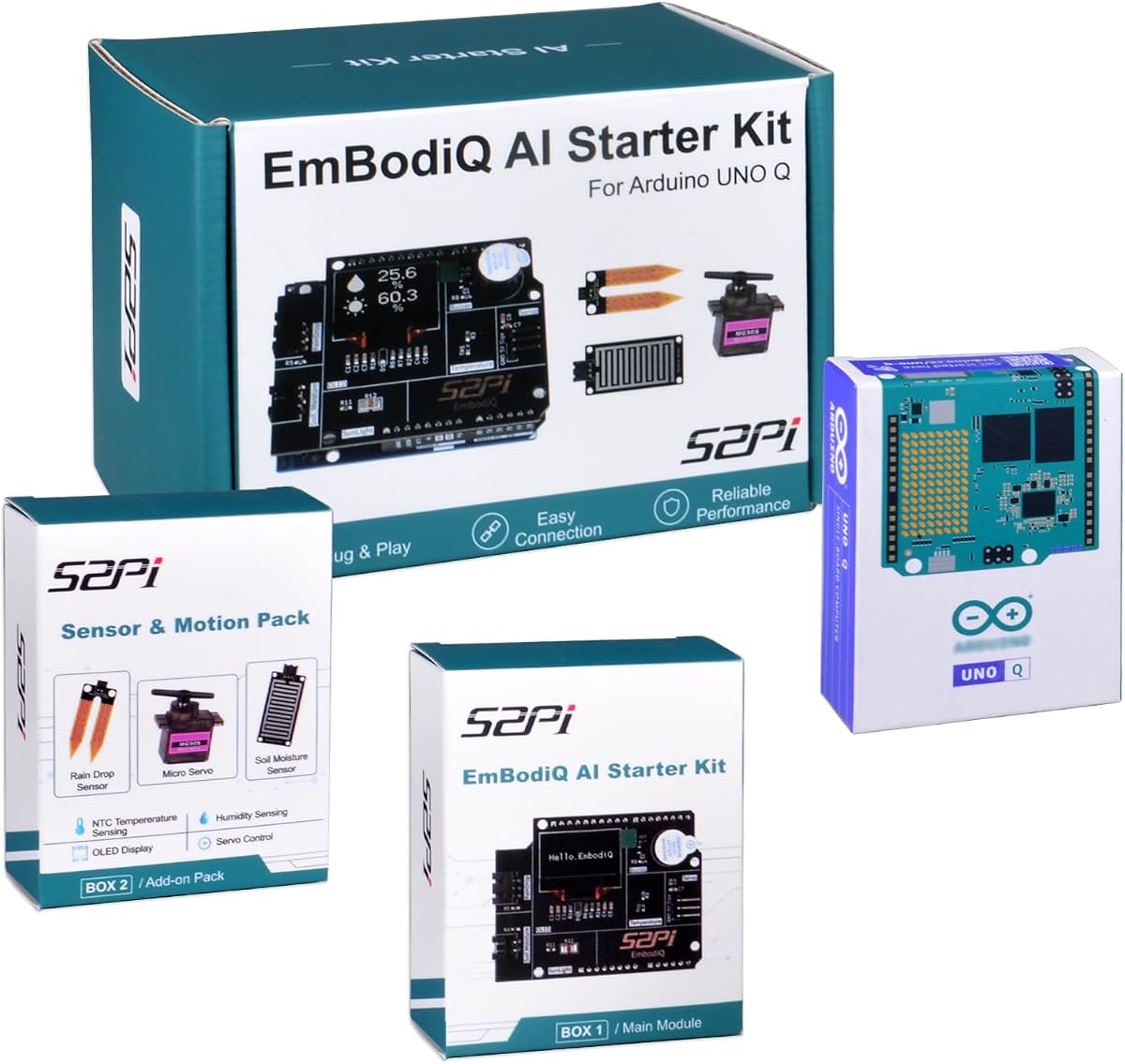
This kit transforms the UNO Q into a voice controlled smart device through the EmbodiQ AI Agent HAT. With a rating of 3.7 it appeals to makers interested in natural language processing and smart home automation. The standout feature is the ability to control hardware using voice commands without complex coding.
We may earn a commission when you buy through this link, at no additional cost to you.
The onboard AI agent enables real-time reasoning and multi-step task execution with conditional logic. You can use soil moisture raindrop and servo sensors to build smart gardening or weather station projects. The kit supports various AI providers allowing you to switch models easily via a web interface or terminal.
Users should note that the reliance on cloud APIs might limit offline capabilities depending on the selected model. The lower rating suggests there may be some learning curve or setup challenges for first-time users. However the ease of control and pre-integrated sensors make it a unique option for AI enthusiasts.
If you want to explore natural language control for hardware this kit offers a ready-to-use solution with minimal coding. It is ideal for educators and makers who want to demonstrate AI capabilities in a tangible way. We recommend it for projects where voice interaction is a central requirement.
Control sensors and displays using natural language without complex coding by telling the AI what you want.
Works with OpenAI and other APIs allowing you to choose your preferred model and switch easily.
We may earn a commission when you buy through this link, at no additional cost to you.
This kit provides a robust environment for the UNO Q with an aluminum case and essential peripherals. With a high rating of 4.6 it is praised for its comprehensive accessory package. It allows the board to function as a standalone single-board computer with monitor and keyboard connections.
We may earn a commission when you buy through this link, at no additional cost to you.
The included USB-C hub with Ethernet port significantly expands connectivity options for professional applications. The aluminum case protects the board from dust and impacts while ensuring efficient heat dissipation during operation. This setup is ideal for deployments where the board needs to run continuously in a protected enclosure.
Users should be aware that this specific kit comes with 2GB RAM and 16GB eMMC which is lower than the standard 4GB configuration. The lack of integrated Wi-Fi means you must rely on the hub for network connections. Despite these differences it remains a strong value for those needing physical protection and connectivity.
If you need a durable and well-connected setup for embedded development this kit offers great value. The included accessories reduce the need to buy extra components separately. We recommend it for projects requiring a compact and protected workstation configuration.
Includes USB-C hub with Ethernet power supply HDMI cable and screw set for immediate professional use.
The sturdy aluminum housing protects the board from dust and impacts while ensuring efficient heat dissipation.
We may earn a commission when you buy through this link, at no additional cost to you.
The Arduino Uno REV3 remains a standard in educational environments and prototyping with an impressive 4.8 rating. It features the ATmega328P microcontroller running at 16MHz which provides ample resources for basic to advanced electronics projects. This board is perfect for those starting their journey into electronics and programming.
We may earn a commission when you buy through this link, at no additional cost to you.
With 14 digital I/O pins and 6 analog inputs it offers flexible options for connecting sensors and motors. The USB port allows for easy programming and serial communication through the Arduino IDE. Its wide use in education ensures that finding tutorials and support is exceptionally easy for new users.
While it lacks the AI capabilities of the UNO Q it excels in simplicity and stability for traditional microcontroller projects. The absence of built-in wireless connectivity means you may need additional modules for IoT tasks. However for learning logic and fundamentals it is unmatched in reliability.
If you are a beginner or need a reliable board for basic robotics this is the ideal choice. Its compatibility with the Arduino IDE and vast community support make it a great tool for learning. We recommend it for educational purposes and simple DIY projects.
Powered by the reliable microcontroller running at 16 MHz with 32KB of flash memory for solid performance.
Full compatibility ensures easy access to a vast array of libraries code examples and community projects.
We may earn a commission when you buy through this link, at no additional cost to you.
The Arduino UNO R4 WiFi brings dual-core processing and integrated wireless connectivity to the classic form factor. With a rating of 4.7 it is highly regarded for IoT and embedded projects that require robust communication. The combination of Renesas RA4M1 and ESP32-S3 offers significant flexibility for developers.
We may earn a commission when you buy through this link, at no additional cost to you.
It includes a 12×8 LED Matrix for displaying visuals and data directly on the board. The 12-bit DAC and OP-AMP provide precise analog signal generation which is ideal for audio and sensor applications. USB-C connectivity ensures efficient power delivery and faster programming compared to older USB types.
While it is not as powerful as the UNO Q in terms of AI processing it excels in standard IoT tasks. The built-in wireless modules reduce the need for extra shields making it cost-effective for remote monitoring projects. The LED matrix adds a unique visual element to your interface.
If you are building wireless sensor networks or interactive displays this board offers great functionality out of the box. It is a perfect choice for projects requiring stable and high-speed wireless connectivity. We recommend it for advanced IoT applications needing dual-core processing.
Equipped with Wi-Fi and Bluetooth 5.0 ensuring robust communication for IoT projects and remote sensors.
Features USB-C port and CAN support for reliable real-time communication in industrial systems.
We may earn a commission when you buy through this link, at no additional cost to you.
This kit is designed to turn code into real-world results through 22+ guided lessons for beginners. With a rating of 4.7 it is a top choice for STEM classrooms and family builds. It includes the UNO R3 controller along with a wide array of sensors and components for diverse projects.
We may earn a commission when you buy through this link, at no additional cost to you.
The project variety in one organized kit allows you to explore LEDs servos motors and displays. Plug-in modules and a solderless breadboard help beginners focus on wiring and code rather than soldering. The illustrated component list makes it easy to find each part quickly.
While it uses a standard UNO R3 which lacks advanced AI capabilities the educational value is unmatched. The lessons help you understand digital and analog logic before creating your own projects. It is excellent for learning the fundamentals of electronics effectively.
If you are new to electronics or looking for a structured learning path this kit is highly recommended. It provides a clear setup support for first-time builders and encourages creativity. We recommend it for educators and families wanting a comprehensive learning experience.
Follow 22+ guided lessons to make LEDs blink read temperature and move motors effectively.
Plug-in modules and pre-soldered LCD help beginners focus on wiring code and testing immediately.
We may earn a commission when you buy through this link, at no additional cost to you.
This board offers a practical controller for maker desks and classrooms with reliable performance. With a 4.7 rating it is appreciated for its clear wiring and USB programming support. It is designed to start coding immediately by connecting the included USB cable and uploading a sketch.
We may earn a commission when you buy through this link, at no additional cost to you.
The ATmega328P core provides a versatile foundation for everyday projects including LEDs and sensors. Clearly labeled headers simplify connections to jumper wires shields and modules for expanded functionality. The board can be powered via USB or external supply for flexible usage scenarios.
While it does not include additional components it serves as a solid base for those who already have parts. The reliability of the ATmega16U2 interface ensures stable communication with your computer. This makes it a practical choice for ongoing projects.
If you need an affordable and reliable board to start building electronics this is a great option. Its compatibility with the Arduino ecosystem allows for easy expansion. We recommend it for individual makers looking for a dependable controller.
The ATmega16U2 USB interface supports sketch uploads and serial communication effectively.
Run the board from USB or external supply then add compatible shields for custom electronics.
We may earn a commission when you buy through this link, at no additional cost to you.
This board features the ATmega328P microcontroller operating at 16MHz for solid performance in basic projects. With a rating of 4.0 it is a standard option for novices and experts alike in robotics and smart home technology. The board is equipped with 32KB of flash memory and 2KB of SRAM for program storage.
We may earn a commission when you buy through this link, at no additional cost to you.
It provides 14 digital input/output pins and 6 analog input pins for versatile connectivity. Integrated communication interfaces including UART SPI and I2C allow for seamless connection with peripherals. The broad compatibility with Arduino IDE and other boards makes it easy to use.
While the rating is lower than other options it still offers a solid foundation for standard electronics tasks. The basic functionality means it lacks advanced features like wireless connectivity or high-speed processing. It is suitable for simple tasks and introductory learning.
If you need a straightforward board for basic prototyping this option delivers on essential requirements. It works well with various sensors and modules for standard applications. We recommend it for users prioritizing simplicity and cost-effectiveness.
Features ATmega328P microcontroller operating at 16MHz for solid project foundations.
Integrated UART SPI and I2C allow seamless connection with a wide range of peripherals.
We may earn a commission when you buy through this link, at no additional cost to you.
This UNO R3 Board offers versatile options for electronics projects with user-friendly development. With a rating of 4.5 it is a solid choice for both beginners and advanced users. It features a high-performance ATmega328P microcontroller with 32KB flash and 2KB SRAM.
We may earn a commission when you buy through this link, at no additional cost to you.
The open-source design allows for customization and seamless integration with the Arduino ecosystem. You can easily prototype and realize your electronic dreams with reliable performance and broad compatibility. It connects to Raspberry Pi systems for extended functionality in hybrid projects.
While it is a standard board it provides a good foundation for creative exploration and learning. The 14 digital I/O pins and 6 analog inputs offer ample connectivity for sensors and modules. It is suitable for home automation and robotics applications.
If you seek a reliable board that integrates well with Raspberry Pi this is a practical choice. It offers endless potential for creating innovative interactive systems. We recommend it for hobbyists and professionals looking for a solid base.
Explore endless possibilities in electronics projects with user-friendly development environment.
Robust interfaces allow connecting with wide range of devices for innovative systems.
We may earn a commission when you buy through this link, at no additional cost to you.
Selecting the right board depends on your project requirements and technical expertise. This guide breaks down key factors to help you make an informed decision.
For advanced AI and robotics projects prioritize boards with higher RAM and storage capacities. The UNO Q offers significant advantages with its hybrid architecture that supports both Linux and microcontroller tasks. Ensure you have enough memory to run your desired models and logs efficiently.
Focus on specifications like RAM size and processor type to determine if the board fits your computational needs.
Consider whether you need a Linux environment or prefer the simplicity of the Arduino IDE. The UNO Q runs Debian OS which allows for Python scripting but requires more setup knowledge. For traditional projects a standard microcontroller board might be more straightforward to configure.
Choose based on your familiarity with different programming environments and operating systems.
Evaluate the available ports and wireless options to match your peripheral requirements. Features like Wi-Fi Bluetooth and USB-C are essential for IoT projects. Some kits include additional sensors or hubs that can save time and money during assembly.
Check for Ethernet ports or specific sensor interfaces if your project requires stable data transmission.
Ensure you have a stable power source that meets the board's voltage and current needs. Higher performance boards may require dedicated power supplies rather than USB power alone. Kits that include power adapters can simplify the setup process significantly.
Look for bundles that include appropriate power supplies to avoid instability during operation.
Check if the board is compatible with your existing shields and libraries. The UNO Q maintains compatibility with classic Arduino shields which is beneficial for expansion. Ensure your preferred tools and resources work seamlessly with the new hardware.
Prioritize boards that support the libraries and extensions you already use in your workflow.
Consider the physical durability of the board especially if it will be used in industrial environments. Aluminum cases or rugged housings can protect against dust and impacts. Good heat dissipation designs ensure reliable performance during extended operation.
Opt for kits with protective cases if you need a portable or durable solution for your project.
A large community and available tutorials can significantly speed up your learning curve. Check if there are sufficient resources for the specific board you are considering. Boards with high user ratings often have more reliable support and troubleshooting guides.
Review community feedback and available documentation before finalizing your purchase decision.
Weigh the cost against the features provided to determine the overall value. Bundles with accessories might offer better value than buying components separately. Consider your budget and the specific features you absolutely need for your project.
Select the option that provides the necessary capabilities without unnecessary extra costs.
To get started with your Arduino Uno Q connect it to your computer using the USB-C cable. Install the necessary drivers and software like Arduino App Lab or the Arduino IDE to begin programming. Follow the quick start guides provided to set up the development environment properly.
When working with Linux capabilities ensure you understand the basic commands and file structure. Use Python scripts for high-level tasks and Arduino sketches for real-time control. Keep your software updated to access the latest features and security patches.
Store your board in a dry and static-free environment when not in use. Use the provided aluminum case if available to protect it from physical damage. Regularly check connections and wires to ensure stable operation over time.
Yes the Arduino Uno Q is designed to maintain compatibility with the Arduino ecosystem. You can use existing libraries and sketches alongside Python scripts and Linux applications. This allows for a seamless transition from standard Arduino boards to more advanced platforms.
Basic knowledge of Linux is beneficial but not strictly required for all projects. You can use the Arduino IDE for simpler tasks without deep Linux integration. However to unlock advanced AI and computing capabilities some familiarity with Debian OS is recommended.
The UNO Q features a Qualcomm processor and runs Linux allowing for complex AI tasks. The UNO R4 has dual-core processing but focuses on standard microcontroller performance. The Q offers higher RAM and storage making it better suited for heavy computing workloads.
Most comprehensive starter kits include essential cables like USB-C and HDMI. It is always best to verify the contents of the specific kit before purchasing. Some kits may require you to buy additional Ethernet or power cables separately.
You can use specific HATs like the EmbodiQ AI Agent to enable natural language control. These modules connect to the board and interpret voice commands to execute actions. You may need to configure API keys and settings through a web interface.
Yes the UNO Q is designed with scalability in mind for industrial IoT systems. Its robust processing and connectivity make it suitable for real-time automation tasks. Using protective cases can further ensure reliability in industrial environments.
We have explored ten top picks ranging from the powerful UNO Q hybrid boards to classic UNO R3 options. Each product offers unique advantages depending on your specific needs for AI robotics or education. The UNO Q stands out for advanced developers needing Linux capabilities.
When making your decision prioritize processing power and connectivity requirements for your specific projects. Consider whether you need a standalone computer mode or a simple microcontroller setup. Matching the board's features to your goals ensures a smoother development experience.
Remember to check current prices and availability as these details can change frequently. We hope this guide helps you find the perfect board for your next innovation. Thank you for reading and happy building.