
HP 15.6 Portable Laptop
4.1Editor score
Intel N200 Quad-Core Processor
8GB RAM and 128GB SSD
Windows 11 Home with 365
Finding the right laptop for heavy data entry or spreadsheet work often requires a dedicated numeric keypad. This guide explores ten top models designed with full-size keyboards to boost your efficiency. Whether you are an accountant, student, or business professional, having immediate access to numbers can save valuable time during daily tasks.
We compared these laptops based on performance, display quality, portability, and overall value. Each model selected offers a reliable numeric keypad integrated into the main keyboard layout. Our analysis focuses on real-world usability, ensuring that the devices listed here meet the demands of modern computing environments across various industries and use cases.
Each pick highlights specific strengths like battery life, processor speed, or screen clarity. You will find detailed breakdowns to help you decide which features matter most for your needs. Please note that prices and availability change frequently, so check current listings before making your final purchase decision to secure the best deal available now.
4.1Editor score

4.8Editor score

4.3Editor score
As an Amazon Associate we earn from qualifying purchases.
This table provides a side-by-side comparison of all ten laptops selected for their numeric keypad capabilities. Review the key specifications to understand how each model differs in processing power, memory, storage, and display options. Use this data to quickly identify the device that best aligns with your specific professional or academic requirements.



This HP business laptop stands out as a top choice for professionals needing a reliable numeric keypad. It earns a high rating due to its balanced performance and robust build quality. The dedicated number pad makes data entry tasks significantly faster compared to laptops without this feature.
We may earn a commission when you buy through this link, at no additional cost to you.
The AMD Ryzen 3 processor provides sufficient power for multitasking and business applications. With 16GB of RAM, you can run multiple browser tabs and office software simultaneously without slowdowns. The 512GB SSD ensures quick boot times and fast file access for your daily documents.
While the battery life is decent, it may not last a full workday under heavy load. However, this is a fair trade-off given the processing capabilities and display quality. The 15.6-inch screen offers enough space to view spreadsheets alongside other applications comfortably.
This device is ideal for accountants, administrators, and students who rely on Excel. It combines productivity features with a durable design. If you need a laptop that handles number-heavy work efficiently, this model is a strong recommendation for your consideration.
The full-size keyboard includes a dedicated numeric keypad positioned on the right side. This layout allows for quick access to numbers and symbols essential for financial or statistical work.
The 15.6-inch Full HD IPS display offers wide viewing angles and accurate colors. This ensures that details in charts and text remain clear during extended work sessions.
We may earn a commission when you buy through this link, at no additional cost to you.
For those on a tight budget, this HP laptop offers essential features including a numeric keypad. It is designed for basic computing tasks and entry-level productivity work. The inclusion of a full-size keyboard with numbers makes it accessible for students and casual users.
We may earn a commission when you buy through this link, at no additional cost to you.
The Intel N200 processor handles everyday applications like web browsing and document editing well. While it is not intended for heavy multitasking, it provides a smooth experience for standard school or home use. The 8GB RAM supports running Windows 11 Home comfortably.
The storage capacity is limited, which may require cloud solutions for larger file needs. The HD display is functional but lacks the crispness of higher-resolution screens. Despite these limitations, the value proposition is strong for its specific target audience.
This laptop is best suited for light users who prioritize cost and portability. If you need a simple machine for writing papers or managing spreadsheets, this option delivers reliable functionality without breaking the bank. It is a practical choice for budget-conscious buyers.
This model includes a one-year subscription to Microsoft 365. This adds significant value by providing access to Word, Excel, and other productivity tools immediately upon setup.
Despite its size, the laptop features HDMI and USB ports for connecting external displays. This expands the utility for presentations or dual-screen setups at home or in the classroom.
We may earn a commission when you buy through this link, at no additional cost to you.
The Lenovo V15 Gen 4 offers a premium experience for business users requiring advanced performance. It features a strong processor and dedicated numeric keypad for professional workflows. The build quality suggests durability for frequent travel and office use.
We may earn a commission when you buy through this link, at no additional cost to you.
Equipped with an Intel Core i5-13420H processor, this laptop handles complex tasks with ease. The 16GB RAM ensures smooth operation when running virtual machines or heavy applications. Windows 11 Pro provides enhanced security and management tools for enterprise environments.
The inclusion of an RJ45 port is a rare and valuable feature for modern laptops. This allows for stable wired internet connections which are crucial for remote work stability. The battery life is adequate for a full workday of standard tasks.
This device is perfect for IT professionals, developers, and power users. If you need reliability and speed alongside a numeric keypad, this is a top contender. Its premium features justify the cost for those who depend on their laptop daily.
Windows 11 Pro offers BitLocker encryption and Remote Desktop capabilities. These features are essential for business users handling sensitive data and requiring remote access to their work machine.
The RJ45 Ethernet port ensures you stay connected even when Wi-Fi is unstable. This is particularly useful for conferences or office desks where a wired connection is preferred.
We may earn a commission when you buy through this link, at no additional cost to you.
This HP model emphasizes portability and battery life alongside a full-size keyboard with numbers. It is a great choice for students or users who need to work for extended periods away from power. The red finish gives it a distinctive look compared to standard black laptops.
We may earn a commission when you buy through this link, at no additional cost to you.
The Intel Processor supports everyday computing tasks smoothly. With 16GB of RAM, you can keep multiple applications open without performance drops. The storage configuration includes a 500GB external drive which offers extra space for backups or media files.
While the external drive adds some bulk, it provides significant value for storage needs. The 10-hour battery claim suggests it can last through a day of lectures or meetings. This reliability makes it a trusted companion for mobile users.
Ideal for general home use and student work, this laptop balances features well. If you need a device that supports a numeric keypad and lasts all day, this is a strong option. It offers practical utility for daily productivity tasks.
The battery life is designed to support long days away from an outlet. This is critical for students moving between classes or professionals traveling for work.
Having a separate external drive allows for quick backups of important documents. This reduces the risk of data loss and helps manage larger files efficiently.
We may earn a commission when you buy through this link, at no additional cost to you.
This laptop features a massive 17.3-inch screen ideal for viewing spreadsheets without external monitors. The large display accommodates the full keyboard and numeric keypad naturally. It is designed for home office users who prefer a desktop-like experience on a laptop.
We may earn a commission when you buy through this link, at no additional cost to you.
The Intel Core 5 10-Core processor ensures efficient handling of office applications. With 16GB RAM and a fast SSD, performance is snappy for document editing and web browsing. The Wi-Fi 6 ensures stable connection for video calls and downloads.
Portability is reduced due to the screen size, making it better for stationary use. However, for a workspace that demands screen real estate, this device excels. The numeric keypad is well-positioned for comfortable typing sessions.
If you spend long hours on Excel or accounting software, this screen size is a benefit. The combination of performance and display quality makes it a great choice for home workstations. Consider this if portability is not your primary concern.
The 17.3-inch screen provides enough space to view multiple windows side by side. This layout is perfect for data entry where you need to reference one sheet while typing in another.
The keyboard layout includes a full numeric keypad on the right side. This ensures that number entry is ergonomic and fast without the need for a separate peripheral.
We may earn a commission when you buy through this link, at no additional cost to you.
The HP Pavilion series is known for reliable performance and sleek design. This model includes a numeric keypad which is often missing in consumer laptops. The Full HD display ensures that text and images are crisp and clear.
We may earn a commission when you buy through this link, at no additional cost to you.
Equipped with the Intel N100 processor, it handles everyday tasks efficiently. The 256GB SSD provides quick startup and sufficient space for essential files. Bluetooth 5.3 and Wi-Fi 6 ensure modern connectivity standards are met.
While not designed for heavy gaming or rendering, it serves daily needs well. The weight is low enough for easy transport to coffee shops or libraries. The keyboard feel is comfortable for extended typing sessions.
This laptop is suitable for casual users and students needing a functional machine. If you require a number pad for basic work and a good screen, this fits the bill. It offers a solid balance of features for its price range.
The 1920×1080 resolution ensures details are sharp even at 15.6 inches. This helps reduce eye strain when reading text or working with detailed documents.
PCIe NVMe SSDs provide much faster data access than traditional hard drives. This means your operating system and apps load quickly, saving time at the start of each work session.
We may earn a commission when you buy through this link, at no additional cost to you.
This HP business laptop packs a Ryzen 7 processor for strong multi-core performance. It includes a numeric keypad and Windows 11 Pro for professional environments. The build quality is designed to withstand the demands of daily business use.
We may earn a commission when you buy through this link, at no additional cost to you.
The 16GB RAM and fast PCIe SSD ensure smooth multitasking. You can run data-heavy applications like accounting software without lag. The display is anti-glare which helps when working in bright environments.
The webcam and Wi-Fi 6 support are essential for remote work requirements. While the display brightness is standard, the anti-glare coating improves usability. This model offers a good mix of performance and business features.
Ideal for corporate users and engineers needing a dedicated number pad, this device delivers. The Ryzen processor handles processing tasks well. It is a reliable choice for those who value speed and efficiency in their daily work.
Windows 11 Pro includes enterprise-grade security tools like BitLocker. This protects your sensitive data from unauthorized access and ensures compliance with security standards.
The AMD Ryzen 7 processor offers high clock speeds for demanding tasks. This ensures that compiling code or running virtual machines is handled efficiently.
We may earn a commission when you buy through this link, at no additional cost to you.
The Dell Inspiron offers a versatile touch experience alongside a traditional numeric keypad. This combination allows for intuitive navigation and efficient data entry. The 10-Core processor handles modern applications with ease.
We may earn a commission when you buy through this link, at no additional cost to you.
Equipped with Windows 11 Home, the user interface is sleek and user-friendly. The AI Copilot helps streamline daily tasks by organizing information. The 8GB RAM supports standard usage patterns well.
While the storage is standard, it is enough for personal files and apps. The touchscreen adds functionality for pinch-to-zoom and scrolling. This is useful for presentations or interactive content.
Best for creative work or presentations, this laptop bridges touch and typing. If you want a number pad with the added flexibility of touch, this model is worth considering. It fits well for general business and home use.
The touchscreen enables intuitive interactions like dragging and dropping files. This can speed up certain workflows that are tedious with just a mouse.
AI Copilot provides assistance for summarizing text and organizing files. This feature helps users focus on creative work rather than administrative tasks.
We may earn a commission when you buy through this link, at no additional cost to you.
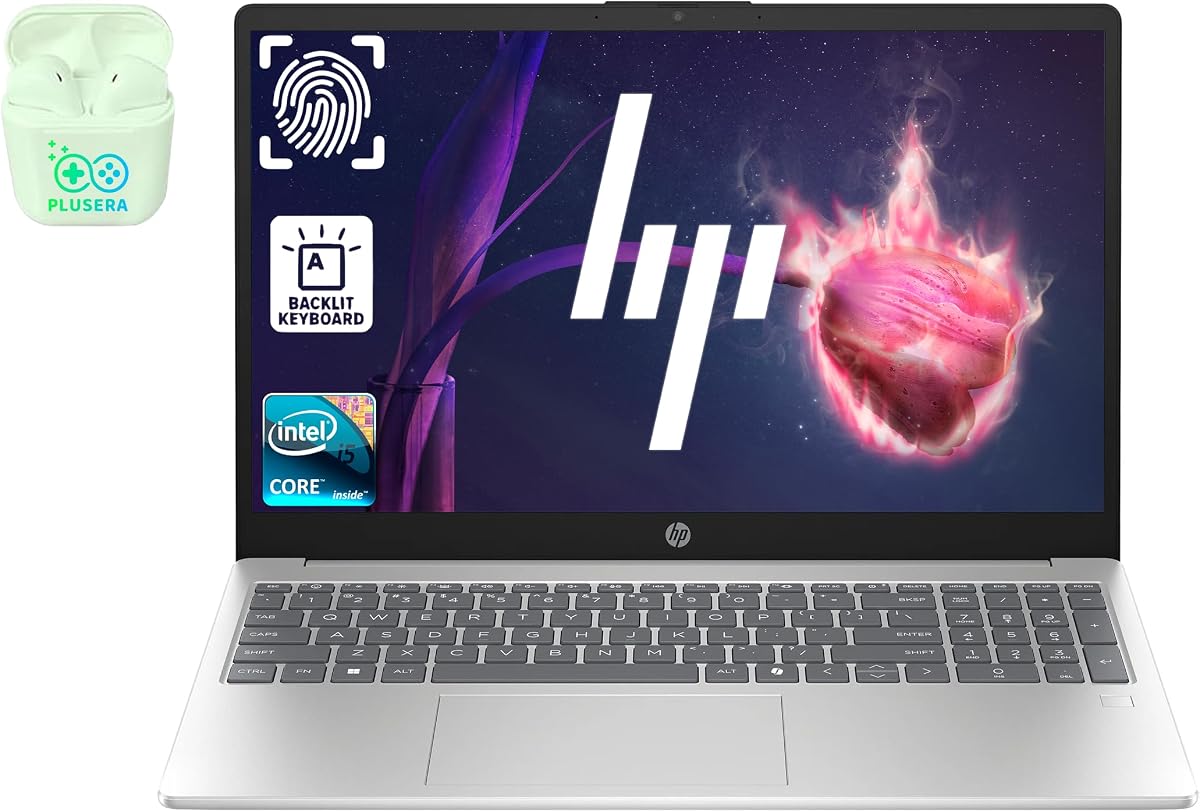
This renewed model provides a cost-effective way to get a premium business laptop. It features a backlit numeric keypad which is rare at this price point. The fingerprint reader adds an extra layer of security for accessing your machine.
We may earn a commission when you buy through this link, at no additional cost to you.
The Intel Core i5 processor delivers strong performance for everyday tasks. With 8GB RAM and a fast SSD, it runs Windows 11 smoothly. The inclusion of earphones adds value to the package immediately.
While it is renewed, the quality is vetted to ensure reliability. The backlit keys allow for typing in dim environments without strain. This is a practical choice for budget buyers needing specific features.
Ideal for students and freelancers looking for reliability, this laptop works well. The security features and backlit keypad make it versatile. It is a strong choice if you want brand features without the new price.
The backlit keyboard allows you to type in dark rooms easily. This is helpful for night shifts or working in dimly lit environments without eye strain.
The fingerprint reader provides quick and secure access to your account. This eliminates the need for passwords and adds a layer of protection against unauthorized use.
We may earn a commission when you buy through this link, at no additional cost to you.
This 2026 edition represents the latest in HP's business laptop lineup. It features a large 17.3-inch screen and a numeric keypad for professional work. The Ryzen 5 CPU ensures it stays relevant for years to come.
We may earn a commission when you buy through this link, at no additional cost to you.
With 16GB RAM and a fast SSD, performance is reliable for business applications. The long battery life supports extended use without needing a charger. Office 365 for Web is included for document creation and editing.
While the laptop is larger, it offers superior viewing for complex tasks. The battery performance is optimized for all-day productivity. The brushed keyboard adds to the premium feel of the device.
Best for professionals needing a large workspace, this model excels. The combination of screen size and numeric keypad makes it ideal for data work. It is a forward-looking choice for business professionals in 2026.
The integration of Office 365 for Web allows for seamless collaboration. You can edit documents in real-time with team members directly from the browser.
The 17.3-inch screen offers an immersive experience for movies and work. This large real estate reduces eye strain and improves overall productivity.
We may earn a commission when you buy through this link, at no additional cost to you.
Choosing the right laptop with a numeric keypad involves evaluating several key factors to ensure it meets your specific workflow needs. This guide breaks down the critical aspects you should consider before making a purchase.
Screen size is crucial when using a numeric keypad because larger laptops can accommodate the numbers without compressing the main keys. A 15.6-inch screen is the minimum recommended size, while 17-inch models offer more workspace for spreadsheets. Look for at least 1080p resolution to ensure text remains clear during long work sessions.
Processing power determines how quickly your laptop responds to input. For heavy Excel work, aim for a Core i5 or Ryzen 5 processor with at least 16GB of RAM. This combination ensures that calculations run smoothly and multiple tabs do not slow down the system.
Storage impacts how fast your system boots and loads files. Always choose a Solid State Drive (SSD) over a traditional Hard Drive (HDD). A capacity of 512GB or more is recommended to store large datasets and local backups without relying heavily on the cloud.
A full-size keyboard is essential for comfortable typing. The numeric keypad should be distinct and responsive. Check reviews to ensure the key travel is adequate and the layout does not feel cramped. Some laptops integrate numbers into the main row which is less efficient for data entry.
If you plan to work away from a desk, battery life is a priority. Look for models that claim at least 8 hours of usage. However, larger screens often mean heavier laptops. Balance the need for screen space with the weight of the device.
Ensure the laptop has enough ports for your peripherals. USB-A and USB-C ports are standard for mice and drives. An Ethernet port is valuable for stable internet connections in offices. Wi-Fi 6 support ensures faster wireless speeds and better performance in crowded areas.
Windows 11 Pro offers features like BitLocker and Remote Desktop which are useful for business. Home editions are sufficient for general use. Consider whether you need enterprise-level security or collaboration tools. The OS should support the software you rely on for daily tasks.
Laptops with numeric keypads range from budget to premium. Determine your price range and prioritize features that matter most. Check the warranty terms to see if RAM or SSD upgrades are covered. A longer warranty can save money on future repairs.
To maximize efficiency, position the laptop on a flat surface and ensure the numeric keypad is accessible. Keep your wrist aligned to prevent strain during data entry. Adjust the brightness to reduce glare and protect your eyes during long sessions.
Clean the numeric keys regularly with a soft cloth to remove dust and oil. A key puller can help clean between the keys without damaging the mechanism. Avoid eating over the keyboard to prevent crumbs from getting stuck under the numeric keys.
Update your drivers periodically to ensure the keyboard functions correctly. If keys become unresponsive, try restarting the device or checking for OS updates. Proper care extends the life of your laptop and keeps the typing experience comfortable.
Most laptops designed with a numeric keypad feature a full-size keyboard. This layout includes a separate row of number keys on the right. Smaller laptops often omit this feature to save space. Always verify the dimensions before purchasing.
For general web browsing, it is not necessary. However, for data entry, accounting, or spreadsheets, it is essential. Using a separate external keypad is an alternative for compact laptops. This helps save desk space while maintaining functionality.
A mid-range processor like the Intel Core i5 or AMD Ryzen 5 is ideal. These chips handle calculations quickly. Avoid entry-level Celeron processors for heavy data tasks. More cores allow for better multitasking with other apps.
Yes, you can connect a USB number pad to any laptop with a USB port. This is a cost-effective solution for ultrabooks. Wireless pads are also available for a cleaner setup. Ensure compatibility with your operating system.
Larger screens naturally accommodate a full numeric keypad. In smaller laptops, the keys may be smaller and harder to press. A 17-inch display allows for a spacious layout. This reduces errors during long data entry sessions.
MacBook Air and Pro laptops do not include physical numeric keypads. You can buy an external Magic Number Pad for Mac. These connect via Bluetooth or USB. Using an external accessory is the standard solution for Apple users.
Windows 11 supports numeric keys fully for data entry. Some features require you to enable the keypad. This is easily done in the settings. It allows for full functionality across all apps.
Business laptops generally feature durable numeric keypads. They are tested for millions of keystrokes. The materials used are often high quality. Check the specific warranty details for keyboard support.
We have reviewed ten excellent laptops that include a dedicated numeric keypad for productivity. From the HP 255 G10 to the Dell Inspiron, there are options for every budget. The top picks offer a balance of performance, size, and value for users who prioritize data entry.
When choosing, prioritize screen size and keyboard comfort. A 15.6-inch or larger display is ideal for comfortable work. Ensure the processor is powerful enough to handle your specific software. These factors will dictate how enjoyable your daily tasks are.
Prices for laptops fluctuate often so always check the current listings. The models listed here are current as of November 2026. Investing in a device with a numeric keypad now can save you time in the long run.