
Replacement Remote for Dish Upgraded Network 54.1 54.2 54.3 54 Series UHF
4.5Editor score
Voice search support
UHF pairing
Durable build
Easy setup
This guide compares the top Dish Network Replacement Remote options for 2026. Find the perfect match for your Hopper or legacy receiver with our expert
Finding a reliable Dish Network Replacement Remote can be challenging when your original device stops working. We have reviewed the market to identify options that offer seamless pairing and robust functionality for modern and legacy systems.
Our team evaluated each candidate based on compatibility, build quality, and user feedback. We focused on models that support voice search, infrared signals, and universal control to ensure you find a solution that fits your specific setup.
Each pick highlights key specifications and performance metrics to help you decide quickly. Please note that pricing fluctuates frequently, so verify the current offer before finalizing your purchase to secure the best deal available today.
4.5Editor score

4.6Editor score

4.6Editor score
We have compiled a comprehensive side-by-side comparison of the top ten replacement remotes available today. This table helps you quickly identify the right model for your specific Dish Network receiver or legacy system.


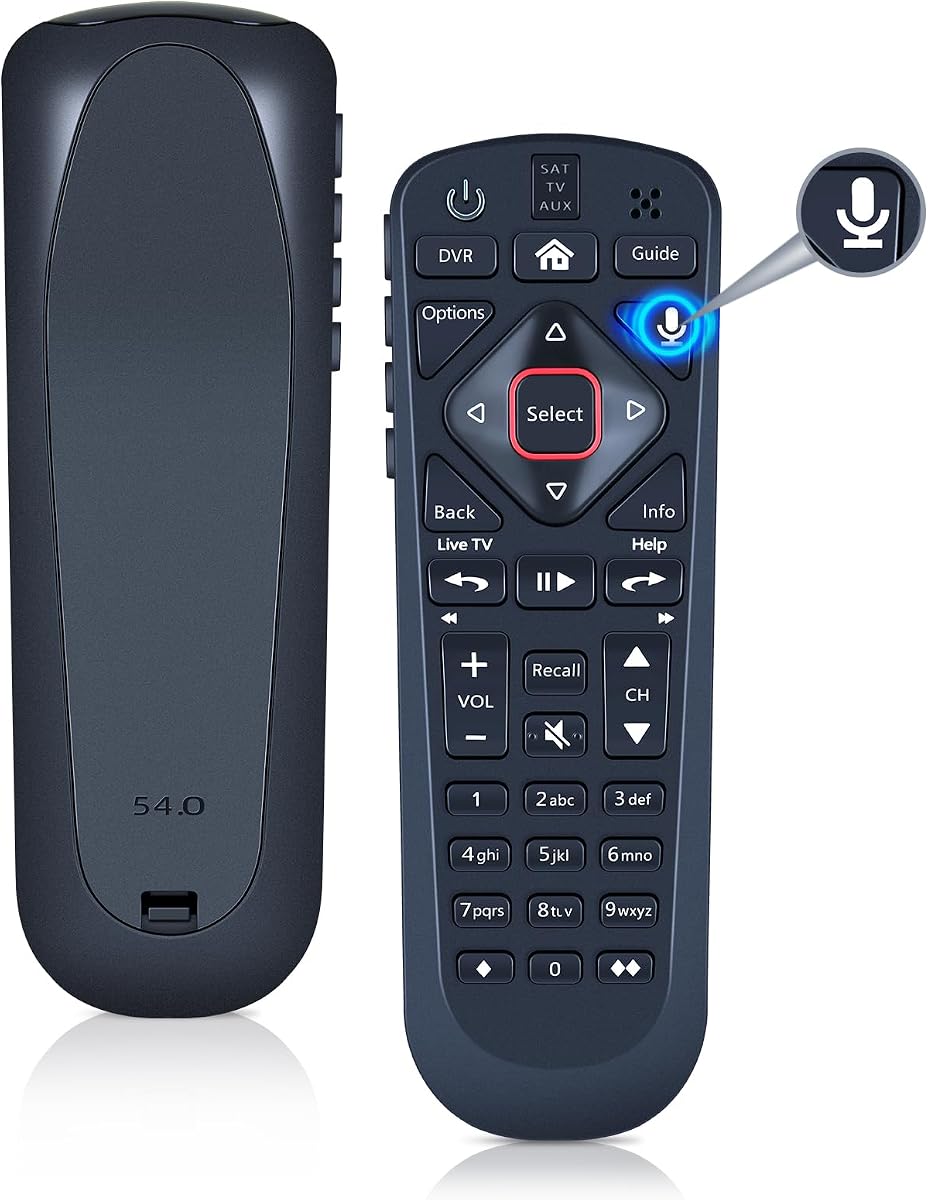


This replacement remote offers an excellent entry point for users needing a quick fix for their Dish network system. It supports the 54 series and includes voice search capabilities which are rare at this price point. The UHF connection ensures reliable signal transmission even through obstacles.
We may earn a commission when you buy through this link, at no additional cost to you.
The pairing process is straightforward and allows you to connect the remote to your receiver using the SAT button method. Users appreciate the responsive keys and the ability to control auxiliary devices like Blu-ray players. The build quality feels sturdy enough for daily use.
While it lacks some premium features found in official remotes, the trade-off is a significantly lower cost. It does not work with Hopper 3 receivers which limits its scope but covers many common setups. The voice search function works well for navigating guides.
Anyone looking for a cost-effective solution for their upgraded network receiver should consider this model. It balances functionality and price better than most alternatives on the market. We recommend keeping extra batteries on hand for continuous use.
The built-in microphone allows you to find shows and channels quickly without typing manually. This feature enhances the user experience significantly during late night viewing.
Using UHF technology means you do not need line of sight to operate the receiver. This is ideal for setups where the DVR is hidden inside a cabinet.
We may earn a commission when you buy through this link, at no additional cost to you.
This remote is designed specifically for the Hopper family of receivers including Joey and Wally units. It features an automatic backlight that activates when you pick it up which is great for dark rooms. The voice search capability allows you to browse your guide effortlessly.
We may earn a commission when you buy through this link, at no additional cost to you.
Personalization is a strong suit as you can program hot keys to launch apps or turn on closed captioning instantly. The remote locator function is a standout feature that helps you find the device when it goes missing. It integrates deeply with the Dish ecosystem.
Internet connectivity is required for full search functionality which might be a limitation for some users. The price is higher than generic replacements but the extra features justify the cost for many households. The build quality is robust and feels like an original unit.
If you own a Hopper receiver this is likely the best replacement option available. It offers a seamless user experience with advanced features that generic remotes lack. We recommend it for anyone wanting an authentic feel and function.
The keypad illuminates automatically whenever you pick up the remote in a dark setting. This prevents fumbling in the dark and protects your eyes from bright screens.
You can program custom hot keys to launch specific apps or record shows instantly. This customization saves time and streamlines your viewing habits significantly.
We may earn a commission when you buy through this link, at no additional cost to you.
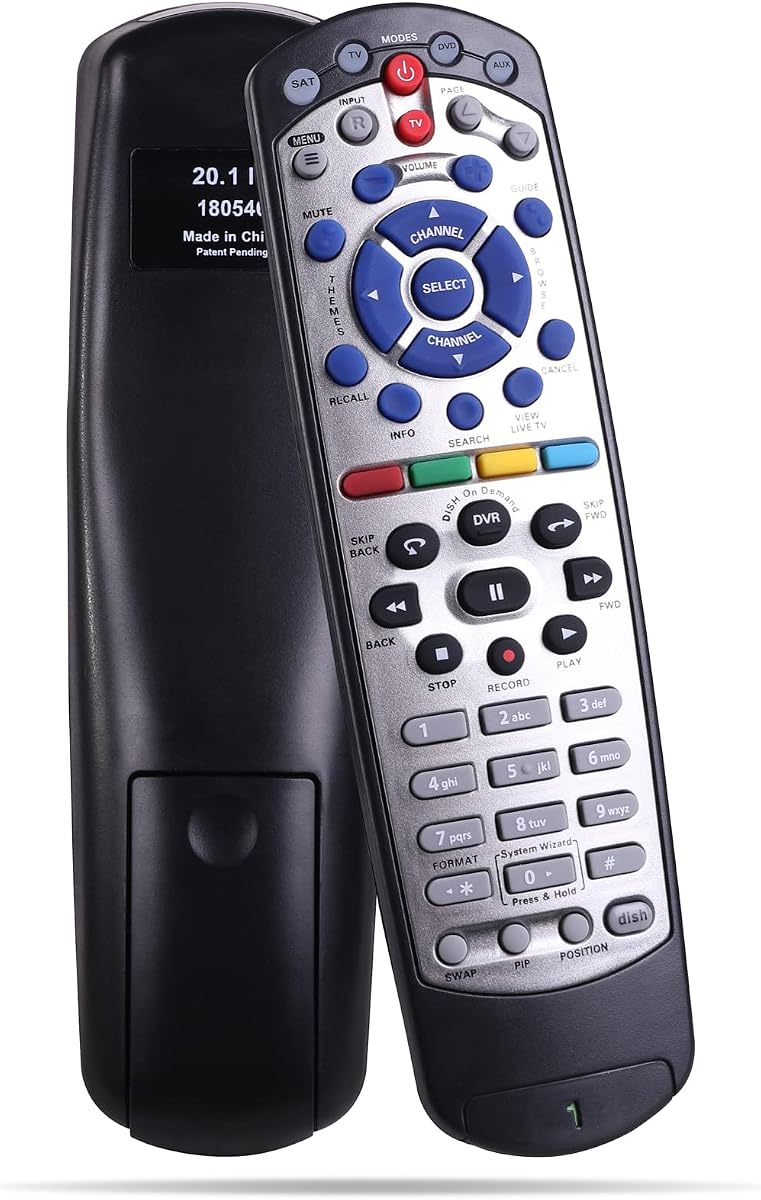
This infrared remote is a straightforward replacement for users with older Dish Network 20.1 satellite receivers. It is not a learning remote so it does not have advanced Bluetooth capabilities. The setup requires you to choose the correct code for your TV brand during programming.
We may earn a commission when you buy through this link, at no additional cost to you.
The build quality is adequate for basic functions and it comes with a one year warranty for peace of mind. Users find it comfortable to hold and it covers all the essential functions of the original device. It is a budget friendly option for those who need immediate replacement.
Since it lacks learning functions you cannot program it to control other devices like your TV directly without specific codes. The infrared technology requires line of sight which may be inconvenient in some layouts. Overall it is a reliable workhorse for basic control needs.
Anyone with a 20.1 receiver looking for a cheap fix will find this useful. It is not the most advanced remote but it gets the job done without breaking the bank. We suggest it for secondary locations or budget constraints.
You must follow the manual to pair the remote and select the correct TV code. This ensures the device communicates correctly with your television display.
The remote carries a one year warranty that protects against defects and malfunctions. Contact customer service for timely support if you encounter issues with the unit.
We may earn a commission when you buy through this link, at no additional cost to you.
This replacement remote targets the upgraded 54 series of Dish Network receivers with voice search features. It uses UHF pairing which allows for flexible placement of your receiver without line of sight requirements. However it is explicitly not compatible with Dish Hopper 3 receivers.
We may earn a commission when you buy through this link, at no additional cost to you.
The setup process involves pressing the SAT button to establish pairing with your receiver. You can also pair it with auxiliary devices like stereo systems or Blu-ray players. Customer support is available to help resolve any connection issues you might encounter.
The remote offers a good range of features for its price but it is critical to check your receiver model before buying. If you have a Hopper 3 this unit will not work for you. For other 54 series users it provides solid functionality.
We recommend this for users with 54.0 to 54.3 receivers who want voice capabilities. Ensure you have the right model to avoid returns. It is a functional option with voice support at a reasonable cost.
Built-in voice search helps you find shows faster without typing. This enhances navigation speed significantly for busy users.
The UHF technology allows you to control the receiver even through walls or doors. This is perfect for hidden DVR setups.
We may earn a commission when you buy through this link, at no additional cost to you.
This voice remote is compatible with Dish Network Upgraded 54 series receivers and offers a built-in microphone for search. It supports UHF pairing which ensures stable connectivity even if your receiver is not in direct view. The setup is simple and requires standard AAA batteries.
We may earn a commission when you buy through this link, at no additional cost to you.
You can pair this remote with auxiliary devices such as your stereo or media player for centralized control. The seller offers a six month warranty and a flexible exchange or refund policy if the equipment does not match. This provides confidence in the purchase for hesitant buyers.
The remote is designed to streamline your viewing experience by reducing the need for manual typing. It works well with the 54 series family but you must confirm compatibility with your specific receiver model. The voice feature is responsive and effective for channel surfing.
For users seeking a replacement with voice capabilities this unit is a strong contender. It balances cost and functionality well for the 54 series ecosystem. We suggest verifying your receiver model to ensure a successful setup.
The six month warranty covers quality problems and includes free exchange options. Contact the seller for prompt resolution if issues arise.
You can pair the remote with auxiliary devices to control them from one unit. This reduces clutter and simplifies your remote management.
We may earn a commission when you buy through this link, at no additional cost to you.
This remote supports DISH TV receivers with the 21.1 model and offers both infrared and UHF PRO technology. It is designed to control multiple TV locations including TV1 and TV2 setups for whole home viewing. The universal nature allows it to work with various devices effectively.
We may earn a commission when you buy through this link, at no additional cost to you.
The dual mode support provides flexibility depending on your setup needs and signal strength. Users appreciate the ability to manage two different TV locations from one central remote. The build quality is consistent with professional grade universal remotes for Dish systems.
While it is specific to the 21.1 receiver it covers a wide range of functionality for users with that model. The interface is straightforward and does not require complex programming for basic functions. It is a dependable choice for households with multiple zones.
If you are running a multi-zone setup with TV1 and TV2 this remote handles the switching well. We recommend it for 21.1 receivers needing robust signal coverage. It ensures consistent performance across your entire home entertainment system.
This remote manages both TV1 and TV2 locations effectively for whole home systems. It streamlines control across multiple rooms for your viewing needs.
Supporting both infrared and UHF PRO ensures you have flexible signal options for your receiver. This dual capability improves reliability in various home layouts.
We may earn a commission when you buy through this link, at no additional cost to you.
This replacement remote for Dish Network 20.1 requires no programming or pairing before use. You simply install two new AAA batteries and it is ready to operate your receiver. The sensitive keys and comfortable grip make it easy to use during long viewing sessions.
We may earn a commission when you buy through this link, at no additional cost to you.
It stores receiver settings in the remote and remote settings in the receiver for a seamless connection. The remote is compatible with a wide range of codes including VIP and HD PVR models. It acts as a universal IR remote for various Dish network setups.
While it lacks advanced Bluetooth features it excels at providing a plug and play experience. The high quality construction ensures it feels substantial in hand and does not slip. Users find it reliable for basic channel changing and navigation tasks.
For anyone needing a quick swap without technical steps this is an ideal choice. It eliminates the frustration of code searching and pairing issues immediately. We recommend it for straightforward replacements where ease is a priority.
Just install new batteries and you are good to go without setup. This saves time and reduces frustration for impatient users.
The remote supports a wide array of device codes for various receiver models. This ensures broad compatibility across many Dish network devices.
We may earn a commission when you buy through this link, at no additional cost to you.
This two pack offers excellent value for households needing replacements for multiple rooms or backups. Each remote is designed for the Dish Network 20.1 IR satellite receiver and supports TV and VCR functions. The compact size makes them easy to hold and less prone to slipping.
We may earn a commission when you buy through this link, at no additional cost to you.
Both units are rigorously quality tested before shipment to ensure they operate like the original remote. A detailed instruction sheet is included to guide you through the setup and model number selection. You simply insert new AAA batteries to get them working.
The remote covers all functions of the original device and offers a long transmitting distance for flexible use. The black color blends well with most furniture and electronics. Having two remotes ensures you always have a backup ready when one is misplaced.
We recommend this pack for families or multi room setups needing consistent control. It is a cost effective way to get two reliable remotes at once. The one year warranty adds significant peace of mind for your investment.
Getting two remotes at once saves money and ensures you have a spare. This is perfect for households with multiple living areas.
Every item is inspected before shipment to guarantee perfect performance on arrival. This reduces the risk of defects and returns.
We may earn a commission when you buy through this link, at no additional cost to you.
This IR remote is designed to replace the original controller for Dish Network 20.1 satellite receivers. You must finish the setup process using the manual to pair it and choose the correct TV code. Once set up it performs just like your original unit.
We may earn a commission when you buy through this link, at no additional cost to you.
The remote relies on standard 2x AAA batteries to operate and is ready to use immediately after setup. It comes with a one year warranty that covers defects and issues during normal use. Support is available if you have questions after receiving the unit.
The design is basic and focuses on essential functions without unnecessary complexity. It is a reliable choice for users who need a straightforward replacement. The transmission is stable and covers typical living room distances effectively.
We suggest this remote for 20.1 users seeking a dependable alternative. It may require a few minutes for setup but works well thereafter. It is a solid choice for keeping your viewing experience uninterrupted.
The manual guides you through pairing and choosing the right code for your TV. Follow the steps to ensure perfect connectivity.
The remote carries a one year warranty for reliable support. Contact customer service for any quality issues after receiving it.
We may earn a commission when you buy through this link, at no additional cost to you.
This premium remote works with all Hoppers Joeys and Wally receivers providing a high quality replacement option. The backlit keys illuminate automatically whenever you pick up the remote in a dark setting for easy use. It also features a remote finder button that locates the device instantly.
We may earn a commission when you buy through this link, at no additional cost to you.
You can program hot keys to launch services like Netflix or turn on closed captioning with a single press. The personalization features allow you to tailor the remote to your specific viewing habits. The build quality is excellent and feels robust in hand.
The remote finder function is particularly useful for households where remotes often get lost between cushions. It works reliably with the Hopper ecosystem to maintain your existing experience without extra steps. The keypad is responsive and durable.
We recommend this for Hopper users wanting an official feel and advanced features. It is the best premium option for those who value convenience and design. We suggest it for users who want the most comprehensive replacement available.
The keypad lights up automatically when you pick it up in the dark. This ensures easy visibility without needing to turn on lights.
Simply push a button on your DVR and the remote will beep and blink. This helps you locate the device quickly in dark rooms.
We may earn a commission when you buy through this link, at no additional cost to you.
Selecting the right replacement remote depends heavily on your specific receiver model and desired features. We break down the key factors to help you make an informed decision without unnecessary complexity.
The most critical factor is ensuring the remote matches your specific Dish Network receiver model. Remotes for Hopper 3 are different from those for the 54 or 20.1 series. Always check the product details against your receiver number before purchasing.
Verify that the remote supports your exact model to avoid pairing issues. Mismatched remotes may not work or may require complex workarounds.
Infrared remotes require a direct line of sight to work which means your receiver must be visible. UHF remotes can transmit signals through walls and doors allowing for hidden receivers. Consider where your DVR is located when choosing a technology type.
If your receiver is inside a cabinet UHF technology is usually the better choice for consistent performance.
Many modern remotes include built-in microphones for voice search capabilities. This allows you to speak channel names or show titles instead of typing with arrow keys. It significantly speeds up navigation and improves the user experience.
Ensure your remote supports this feature if you want to search by voice. It is becoming a standard expectation for newer replacements.
Backlit keys illuminate automatically when you pick up the remote in a dark setting. This helps you find the right buttons without needing a flashlight or room light. It is a premium feature that adds convenience for evening viewing.
Look for models that specify auto-backlit capability if you often watch TV in low light. It prevents eye strain and frustration when pressing buttons.
Most remotes use standard AAA batteries but it is important to check the number required per unit. Some remotes come with batteries while others do not which affects the total initial cost. Consider the battery life based on your usage frequency.
Check the packaging details to see if batteries are included. Having spares on hand ensures uninterrupted use when the current ones run out.
Some remotes require complex pairing and code entry while others are plug and play. Universal remotes often need you to enter a code for your TV brand. Simplified remotes come pre-configured to work with specific Dish systems.
Choose a remote with an easy setup process if you are not technically inclined. Look for models that do not require programming to start working.
A good replacement remote should come with a warranty to cover defects or malfunctions. Look for at least a one year warranty to ensure you can get a replacement if the unit fails. Some sellers offer extended warranties for extra peace of mind.
Check the warranty terms and how to claim them before purchasing. A solid warranty indicates confidence in the product quality.
Many replacement remotes can control auxiliary devices like stereo systems or Blu-ray players. This allows you to use a single remote for multiple components in your entertainment center. It reduces clutter and simplifies your viewing routine.
Look for universal features if you want to control other devices. Check the compatibility list to ensure it supports your specific equipment.
To start using your replacement remote insert two new AAA batteries and ensure the power is on. Follow the pairing instructions provided with the specific model to connect it to your receiver. This usually involves pressing a combination of buttons like SAT and SYS INFO.
Keep the infrared sensor clean and free of dust to ensure reliable signal transmission. Wipe the remote gently with a dry cloth periodically to remove fingerprints and grime. Avoid using harsh chemicals that might damage the plastic or buttons.
Store the remote in a cool dry place when not in use to prevent battery corrosion. Remove batteries if you plan not to use the remote for an extended period. This helps maintain the device's condition and prolongs its usable life.
Most remotes require you to press the SAT button on the side of the remote. Open the front panel of your receiver and press the SYS INFO button to initiate pairing. You will hear beeps indicating the remote has successfully paired with your receiver.
No remotes are model specific. You must ensure the remote supports your receiver version like 20.1 54 series or Hopper. Check the product title and specifications to confirm compatibility before buying.
Some universal remotes allow you to control your TV by entering a specific code during setup. Check the product details to see if it supports TV codes and follows the pairing steps in the manual.
Most Dish remotes run on two AAA batteries which are usually not included. You will need to purchase batteries separately to power the remote after you install them in the battery compartment.
IR remotes require line of sight to work while UHF remotes can send signals through walls. UHF is better for hidden receivers whereas IR is cheaper but requires a direct path to the device.
Ensure you are using the correct battery type and have inserted them correctly. You may need to unpair previous remotes or reset the receiver if the new one fails to connect. Check the manual for specific error steps.
No Hopper remotes like the 54.0 are specific to Hopper receivers. Using a Hopper remote on a 54 series will not work. You must use a remote designed for your exact receiver family.
Voice search remotes save time by allowing you to speak commands instead of typing. If you frequently navigate your guide they are worth the investment. However basic remotes work fine for simple channel changing.
We have explored the top ten options to help you find the right replacement for your system. From the versatile 54 series remotes to the reliable 20.1 models there is something for every setup. Our top picks balance features like voice search and backlit keys effectively.
When making your final decision prioritize compatibility and signal technology first. Ensure the remote matches your receiver model to avoid frustration. Consider features that fit your lifestyle like backlit keys or voice search.
Remember that prices may change over time so check the current deal before buying. Verify your receiver model one last time to ensure a smooth setup experience. With the right replacement you can enjoy uninterrupted viewing in no time.