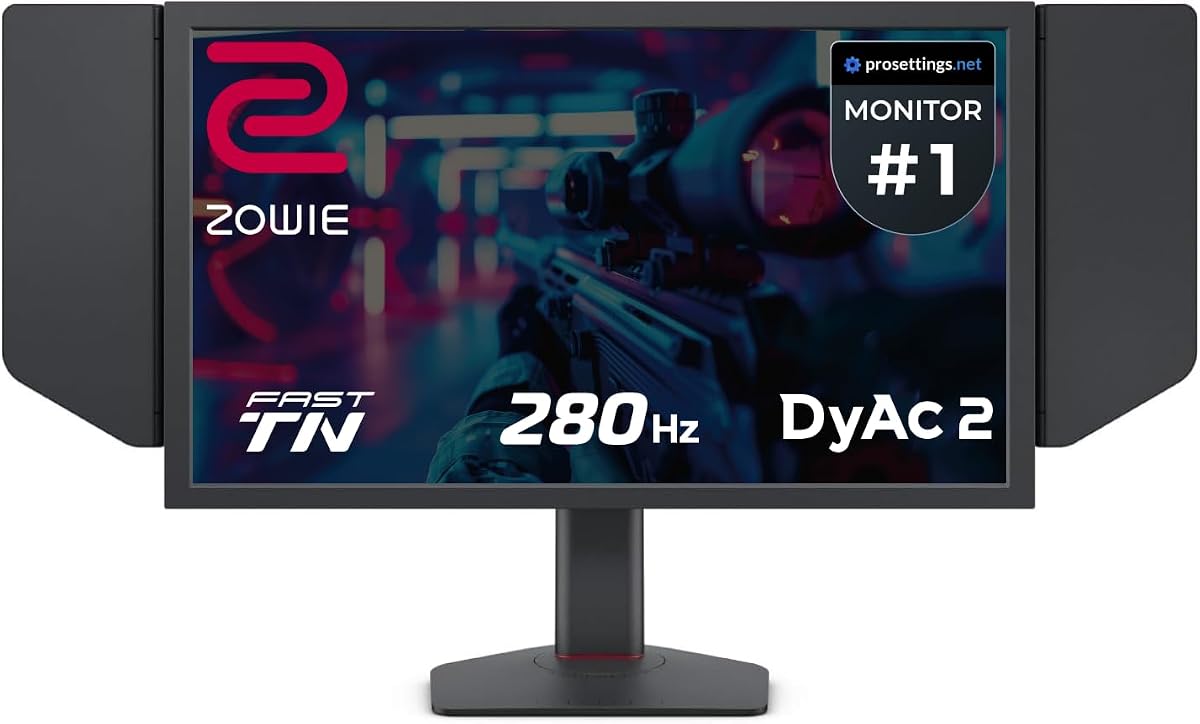
BenQ Zowie XL2546X+ 24.1 DyAc 2 280Hz Fast TN Gaming Monitor for Esports
4.3Editor score
280Hz refresh rate
DyAc 2 technology
Fast TN panel
Finding the right Benq monitor for gaming can significantly impact your performance and enjoyment. These displays offer specialized features tailored for competitive play and immersive experiences.
We compared ten models based on refresh rates, panel technology, and connectivity options. Our analysis focuses on how each monitor handles fast motion and visual clarity.
Each pick highlights unique strengths for different gaming styles and setups. Please note that specific pricing and availability may change over time.
4.3Editor score

4.3Editor score

4.2Editor score
As an Amazon Associate we earn from qualifying purchases.
Here is a side-by-side look at all ten monitors including their key specifications and target use cases.


This model leads our list with its impressive 400Hz refresh rate and advanced DyAc 2 technology. It is engineered to deliver the best motion clarity available on the market today.
We may earn a commission when you buy through this link, at no additional cost to you.
The Fast TN panel ensures sharp visuals with native FHD resolution that pro players often prefer. Overshoot is significantly reduced through new panel design that improves electrical conductivity.
While color performance is enhanced compared to previous TN panels, it may not satisfy creative professionals needing wide gamut coverage. The design remains utilitarian focusing strictly on performance.
If you prioritize competitive edge and smooth gameplay above all else this monitor is an ideal choice for serious esports enthusiasts seeking top tier performance.
DyAc 2 uses dual backlight technology to enhance blur reduction while offering soft light for eye adaptation during long sessions.
Meticulous redesign enhances hue vibrancy helping players identify enemies more clearly than standard TN displays.
We may earn a commission when you buy through this link, at no additional cost to you.
The XL2546X+ offers nearly identical performance to its higher refresh rate sibling at a competitive price point. It brings the industry leading motion clarity to a wider audience.
We may earn a commission when you buy through this link, at no additional cost to you.
Fast TN panels provide clearer outlines of moving images helping you focus without unwanted afterimage distractions. The panel design improves responsiveness reducing overshoot effectively.
Color performance is better than expected for a TN panel offering vibrant hues for enemy identification. However it lacks the wide gamut needed for design work.
This model is perfect for gamers who want top tier motion performance without paying a premium for ultra high refresh rates beyond 280Hz.
The panel design prioritizes sharp image outlines to help you track enemies quickly during intense gameplay scenarios.
DyAc 2 offers a soft light output that facilitates eye adaptation reducing strain during extended gaming sessions.
We may earn a commission when you buy through this link, at no additional cost to you.
This 27 inch 4K monitor transforms gaming with stunning detail and powerful audio features. It supports HDMI 2.1 and includes built-in eARC for immersive sound systems.
We may earn a commission when you buy through this link, at no additional cost to you.
Color is tailored using AI Detail Enhancement to ensure each game looks aesthetically pleasing. The Pixsoul Engine provides authorized presets for popular titles.
KVM functionality allows seamless connectivity across platforms using USB-C and HDMI ports. However the higher resolution demands a powerful graphics card to run smoothly.
If you want a premium visual and audio setup for single player or console gaming this model offers exceptional versatility and performance.
Built-in eARC supports up to 7.1 channels ensuring your console sound is rich and detailed without extra speakers.
USB-C with 65W PD allows charging your laptop while displaying content making it great for hybrid setups.
We may earn a commission when you buy through this link, at no additional cost to you.
With an incredible 600Hz refresh rate this monitor sets a new standard for speed and motion clarity. It is designed for the fastest competitive players.
We may earn a commission when you buy through this link, at no additional cost to you.
A new vivid color film improves color performance by 35% reducing wash-out and enhancing target visibility. This is a major upgrade over standard TN panels.
The dual backlight technology ensures blur reduction is optimized while keeping the light soft for eye comfort. It is a top tier choice for pro gamers.
If you can afford the premium and need the absolute fastest response this model delivers unmatched performance for high level esports.
The vivid color film significantly reduces wash-out allowing players to distinguish enemies better in dark scenes.
At 600Hz the refresh rate outpaces most competitors offering smoother motion for those with high end systems.
We may earn a commission when you buy through this link, at no additional cost to you.
This 32 inch monitor is specifically tuned for MacBook users offering a perfect match for color accuracy and workflow. It features dual USB-C with 90W power delivery.
We may earn a commission when you buy through this link, at no additional cost to you.
MacBook controls are integrated directly into the keyboard allowing brightness and volume adjustments easily. The P3 wide color gamut ensures vibrant and accurate visuals.
While not designed for competitive gaming it offers excellent eye care and ergonomics for long work sessions. The stand allows height tilt swivel and pivot adjustments.
If you need a large accurate display for productivity or creative work this model provides an ideal experience for Mac users.
BenQs exclusive color tuning ensures the monitor matches MacBook Pro and Air displays perfectly for consistent visuals.
The USB hub and adjustable stand make it easy to organize your desk and maintain a comfortable posture.
We may earn a commission when you buy through this link, at no additional cost to you.
The GW2790Q balances work and play with a 100Hz refresh rate and IPS eye care technology. It offers special modes for coding and reading to reduce eye strain.
We may earn a commission when you buy through this link, at no additional cost to you.
Input Hotkey allows seamless switching between devices with a single click. Brightness Intelligence technology adjusts display performance based on ambient light conditions.
Low Blue Light Plus filters harmful radiation while maintaining vivid colors. The ultra slim bezel enhances immersion for media consumption.
For users who need one monitor for both casual gaming and office tasks this model provides a comfortable and efficient experience.
Coding and ePaper modes ensure effortless readability protecting your eyes during long reading or work sessions.
B.I. Gen2 allows customizable flexibility for brightness adjustments based on your environment.
We may earn a commission when you buy through this link, at no additional cost to you.
This 32 inch 4K monitor delivers unparalleled clarity with a Nano Matte panel that minimizes reflections. It includes specific coding modes with dark and light themes.
We may earn a commission when you buy through this link, at no additional cost to you.
Night hours protection offers minimum brightness technology to protect eyes during dark room usage. MoonHalo backlight ensures optimal focus with customizable color and light.
The 2000:1 contrast ratio provides deeper blacks and high contrast for movies as well. Ergonomic design helps maintain comfort during long development sessions.
If you spend many hours coding this monitor offers features that reduce strain and enhance readability effectively.
Nano Matte Panel diffuses ambient light ensuring color accuracy remains intact without distracting glare.
Night hours protection uses minimum brightness technology for enhanced eye comfort in dark environments.
We may earn a commission when you buy through this link, at no additional cost to you.
This 24 inch office monitor features an edge-to-edge display allowing focus on important tasks. It includes a built-in noise-cancelling microphone for calls.
We may earn a commission when you buy through this link, at no additional cost to you.
USB-C connectivity supports 60W power delivery allowing you to charge devices with a single cable. Eye-Care technology reduces fatigue for extended work periods.
Adaptive brightness optimizes performance to protect vision while maintaining image quality. The stand is height adjustable for ergonomic flexibility.
If you need a reliable display for general office work this model offers convenience and eye protection.
Noise-cancelling microphone reduces background noise making it easier to shift focus during calls.
Single cable USB-C synchronizes images data and power for a tidy desk setup.
We may earn a commission when you buy through this link, at no additional cost to you.
This monitor features factory-calibrated color accuracy with Delta E less than 2 ensuring consistent color matching. It supports 95% P3 and 100% sRGB for precise design work.
We may earn a commission when you buy through this link, at no additional cost to you.
ICCsync automatically matches ICC profiles between Mac and monitor when switching modes. USB-C provides 90W power for seamless image video and data transfer.
Nano matte panel diffuses ambient light to preserve contrast and reduce glare. Ergonomic adjustments ensure comfort during long design sessions.
Designers looking for reliable color consistency and a smooth workflow will find this model exceptionally useful for professional tasks.
Factory calibration ensures Delta E is less than 2 for intuitive color matching across displays.
Nano Matte Panel preserves color accuracy while reducing glare for better eye comfort.
We may earn a commission when you buy through this link, at no additional cost to you.
The Acer Nitro offers a fast 180Hz refresh rate suitable for casual gaming. It features AMD FreeSync Premium to reduce screen tearing during gameplay.
We may earn a commission when you buy through this link, at no additional cost to you.
Zero-Frame design provides an edge-to-edge display that enhances immersion. VESA mounting compliant allows flexible desk setup with ergonomic tilt adjustments.
While the VA panel offers good contrast response times are generally slower than TN panels. This makes it better for casual gamers than competitive esports.
If you seek an affordable option with solid refresh rates this monitor delivers good value for general gaming and media consumption.
AMD FreeSync Premium technology synchronizes refresh rates to minimize screen tearing and stuttering.
HDR Ready ensures better contrast and color depth for compatible games and movies.
We may earn a commission when you buy through this link, at no additional cost to you.
Understanding key factors will help you select a monitor that matches your gaming style and budget.
Refresh rate determines how many times the screen updates per second measured in Hz. Higher rates like 144Hz or 240Hz provide smoother motion essential for competitive gaming. Response time refers to how quickly pixels change color and is often listed as 1ms. Lower response times reduce ghosting and blur ensuring sharp visuals during fast movement.
Look for at least 144Hz refresh rate and 1ms response time for the best competitive experience.
Different panel types offer varying trade-offs in color and speed. TN panels are fast but have limited color accuracy and viewing angles. IPS panels offer better colors and viewing angles but may have slightly slower response times. VA panels provide deeper blacks and higher contrast but can suffer from slower pixel transitions.
Choose TN for speed IPS for balanced quality and VA for deep blacks in dark games.
Resolution affects how sharp your game appears on screen. 1080p is common for fast gaming while 1440p offers a balance of sharpness and performance. 4K provides stunning detail but requires powerful hardware to maintain high frame rates. Screen size typically ranges from 24 to 27 inches for gaming setups.
Prioritize resolution based on your graphics card capability and preferred field of view.
Adaptive sync prevents screen tearing by matching the monitor refresh rate to the graphics card frame rate. AMD FreeSync and NVIDIA G-Sync are the most common technologies used. Some monitors support both options providing flexibility depending on your GPU. This ensures smoother gameplay without visual artifacts.
Ensure your monitor supports the sync technology compatible with your graphics card.
Modern monitors require high bandwidth ports for high refresh rates and resolutions. DisplayPort is often preferred for higher refresh rates while HDMI is versatile for consoles. USB-C connectivity can simplify setups by providing video and power through a single cable. Check for enough ports to connect your devices.
Select a monitor with DisplayPort or HDMI 2.1 for high performance needs.
Extended gaming sessions can cause eye strain and discomfort. Look for features like flicker-free technology and low blue light modes. Adjustable stands allow proper positioning to maintain good posture. Some models include ambient light sensors to adjust brightness automatically.
Choose monitors with proven eye care technologies to reduce strain during long sessions.
An ergonomic stand helps maintain a comfortable viewing position. Height tilt swivel and pivot adjustments allow you to customize the view. VESA mount compatibility lets you attach the monitor to an arm or wall mount. Proper ergonomics are vital for long term comfort.
Ensure the stand offers height and tilt adjustments or supports a VESA mount.
Color accuracy is measured by sRGB or DCI-P3 gamut coverage. High color accuracy is important for immersive visuals and creative work. Some gaming monitors sacrifice color for speed while others balance both. Look for calibration reports if color fidelity is a priority.
For a balanced experience select a model with good color coverage and calibration data.
Begin by connecting your graphics card to the highest bandwidth port available on the monitor. DisplayPort is typically best for high refresh rates while HDMI supports consoles and devices. Ensure all cables are securely seated for stable performance and prevent signal drops.
Calibrate the monitor settings to match your room lighting conditions. Use the OSD menu to adjust brightness and contrast so details are clear without eye strain. Some models include preset game modes that optimize settings for specific game genres.
Clean the screen gently with a microfiber cloth to avoid scratches. Avoid using harsh chemicals or excessive water on the panel. Regularly update the firmware through the manufacturer website to ensure compatibility with the latest devices.
TN panels generally offer faster response times making them ideal for competitive esports where speed is critical. IPS panels provide better color accuracy and wider viewing angles but may have slightly slower response times. For immersive gaming IPS is often preferred while for competitive play TN is chosen.
Yes a 144Hz refresh rate is widely considered the sweet spot for most gamers. It provides smooth motion that is noticeable over 60Hz displays. Competitive players may prefer higher rates like 240Hz but 144Hz is sufficient for enjoyable gameplay.
Most BenQ gaming monitors support AMD FreeSync to reduce screen tearing. Some models also support NVIDIA G-Sync compatibility for broader GPU support. Always check specific product details to confirm which sync technology is supported for your system.
Use eye care features like low blue light and flicker-free technologies built into modern monitors. Adjust brightness to match your ambient lighting and take regular breaks every hour. Proper ergonomics and a comfortable viewing distance also help reduce strain.
1080p is ideal for competitive gaming requiring high frame rates. 1440p offers a good balance of sharpness and performance for single player games. 4K provides stunning detail but demands a powerful graphics card to maintain smooth gameplay.
Some gaming monitors offer good color accuracy but professional displays usually provide better calibration and wider color gamut. If you do color critical work choose a model with specific design features or dedicated calibration support.
We highlighted top picks including high refresh rate TN models for esports and premium 4K options for immersive play. Each monitor serves a specific purpose tailored to different gaming needs and budgets.
Prioritize refresh rate and response time if competitive play is your focus. For creative or immersive experiences color accuracy and resolution become more important factors.
Remember to check current pricing and availability as models and deals change frequently. Choosing the right monitor will enhance your setup and provide lasting enjoyment for all gaming styles.