
Fosmon Fast Charging Station
4.5Editor score
Dual charging slots included
SGS certified safety
Smart charging board
Discover the top controller charging stations for Xbox in October 2026. This guide compares ten best models for performance, battery life, and design to
Finding the right charging solution keeps your Xbox controllers ready for action. A reliable station prevents interruptions during critical game moments and extends battery life significantly.
We evaluated ten leading models based on charging speed, battery capacity, build quality, and compatibility. Each option offers unique features to suit different player needs and preferences.
This list highlights standout picks with detailed reviews and comparisons. Keep in mind that availability and pricing may change over time, so verify current details before purchasing.
4.5Editor score

4.6Editor score

4.4Editor score
The following table provides a side-by-side look at all ten products included in this guide. Compare key specifications and features to identify the model that fits your specific needs.

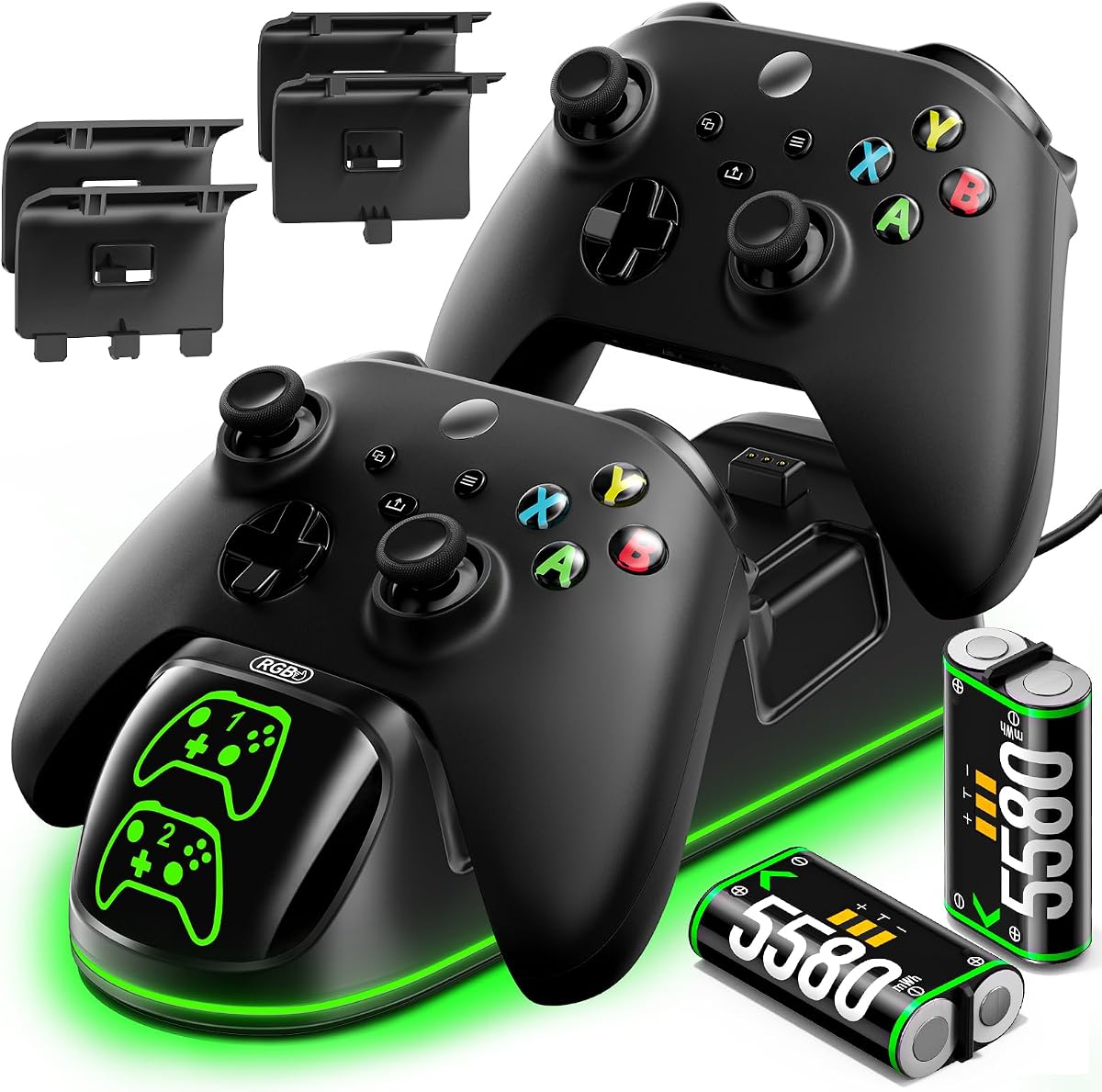


This Upgraded Controller Charger Station stands out with its massive 6200mWh battery capacity. It offers over 18 hours of playtime and includes a smart safety system for reliable performance.
We may earn a commission when you buy through this link, at no additional cost to you.
The dual slots allow simultaneous charging of two controllers. The X shape LED indicators provide clear status updates without distracting during gameplay or rest periods.
While it does not support third-party controllers, the included covers ensure a perfect fit for official Xbox ones. The bottom battery storage keeps spares organized and accessible.
Gamers seeking long sessions and reliable charging will find this kit essential. It balances high capacity with safety features effectively for most Xbox console users.
The high capacity batteries ensure you stay in the game longer without frequent interruptions for recharging.
Built-in protection prevents overcharging and overheating, extending the life of both batteries and controllers.
We may earn a commission when you buy through this link, at no additional cost to you.
Fosmon delivers reliable performance at a competitive price. It offers impressive battery life and a lifetime warranty, ensuring peace of mind for long-term use.
We may earn a commission when you buy through this link, at no additional cost to you.
The dual charging slots use metal conductors for quick alignment. SGS certification confirms the safety of the charging process, reducing risks of damage.
Users should note it does not work with the Elite 2 controller. Otherwise, it is a straightforward solution for standard Xbox One and Series controllers.
Budget-conscious players will appreciate the value here. It combines essential features with a strong warranty to protect your investment effectively.
The limited lifetime warranty adds significant value, offering long-term security for your purchase.
With up to 45 hours of playtime, these batteries outperform many standard options.
We may earn a commission when you buy through this link, at no additional cost to you.
This Razer stand combines premium design with fast charging. Its magnetic system ensures secure connection, and it supports one-handed navigation while docked.
We may earn a commission when you buy through this link, at no additional cost to you.
Universal compatibility covers almost all Xbox controllers, making it versatile. The durable materials match official Xbox colors for a sleek look.
The main trade-off is the single slot limit. Additionally, the price is higher than basic docks, though you pay for quality and features.
If you want a stylish and functional dock, this is ideal. It suits players who value design and convenience in their gaming setup.
Ergonomic design allows you to navigate menus without removing the controller from the stand.
Quick charge capability minimizes downtime, getting you back to gameplay faster.
We may earn a commission when you buy through this link, at no additional cost to you.
PowerA offers an officially licensed solution for Xbox Series and One controllers. Its single slot design keeps things simple and organized for individual players.
We may earn a commission when you buy through this link, at no additional cost to you.
The included 1100mAh battery is standard size but sufficient for casual play. It comes with a two-year limited warranty, which adds reliability to the brand.
However, it lacks the capacity for dual controllers. If you need to charge two at once, this might not be enough for your needs.
For those preferring official accessories, this stand is a solid choice. It provides a clean look and dependable performance for standard use.
Official licensing ensures full compatibility and quality standards expected from first-party accessories.
The straightforward design avoids clutter, fitting well on any desk or shelf.
We may earn a commission when you buy through this link, at no additional cost to you.
OlVO provides a high-speed charging solution with robust batteries. The 2.5-hour charge time is significantly faster than many competitors, reducing wait periods.
We may earn a commission when you buy through this link, at no additional cost to you.
With 3000 recharge cycles, these batteries last longer than average. The kit includes necessary covers and a USB-C cable for modern connection options.
It does not support Elite 2 controllers, so check compatibility before buying. Otherwise, the value and speed make it a strong contender.
Gamers needing quick top-ups will appreciate this dock. It balances speed and capacity well for those who play multiple sessions daily.
The rapid charge time ensures controllers are ready quickly, minimizing gaming interruptions.
High cycle count means the batteries remain effective over years of regular use.
We may earn a commission when you buy through this link, at no additional cost to you.
8BitDo brings its signature magnetic charging style to Xbox. This official dock offers a seamless look that complements your console and controllers well.
We may earn a commission when you buy through this link, at no additional cost to you.
The magnetic connection ensures stable charging without sliding off. It includes an LED indicator to show status clearly without being too bright.
However, it only supports one controller at a time. Also, note that the battery is included but standard size, so expect shorter playtime.
For fans of minimalistic design, this dock is excellent. It provides a reliable and stylish place to park your controller when not in use.
The magnetic system makes docking effortless, ensuring a secure connection every time.
Designed to match Xbox aesthetics, it blends into your setup without standing out.
We may earn a commission when you buy through this link, at no additional cost to you.
This station features a unique robot helmet design with RGB lighting. It offers dual charging slots and includes all necessary covers for a complete kit.
We may earn a commission when you buy through this link, at no additional cost to you.
The LED indicators can be toggled to avoid distraction. Battery storage at the bottom keeps spares organized and out of sight.
Some may find the design busy or distracting in a dark room. However, it adds a fun superhero feel to your gaming atmosphere.
Players who value style and storage will enjoy this option. It balances aesthetic appeal with practical charging functions effectively.
The unique design adds character to your setup, standing out from standard black docks.
Dedicated battery storage prevents losing spare batteries, keeping your desk tidy.
We may earn a commission when you buy through this link, at no additional cost to you.
Nyko provides a budget-friendly dual charging solution with an extra USB port. This extra port can charge other accessories, adding utility to the stand.
We may earn a commission when you buy through this link, at no additional cost to you.
The batteries are standard 1100mAh, offering decent playtime. LED lights clearly indicate when charging is complete, helping you manage your gear.
Quality reports vary compared to premium options. However, the price makes it accessible for those needing multiple slots without a large investment.
Casual gamers needing basic dual charging should consider this. It offers essential features at a lower cost point effectively.
The additional USB port allows charging of headsets or other devices alongside controllers.
Priced lower than many competitors, it is accessible for those on a strict budget.
We may earn a commission when you buy through this link, at no additional cost to you.
This stand matches the Pulse Red controller perfectly with exact materials. It offers one-handed navigation while charging, making it convenient for dashboard use.
We may earn a commission when you buy through this link, at no additional cost to you.
The magnetic contact system ensures secure docking every time. It is officially licensed, ensuring quality standards meet Xbox expectations.
Since it is color-specific, it may not match other setups. Also, it charges only one controller at a time which limits utility for some.
For Pulse Red controller owners, this is a stylish choice. It combines color coordination with practical magnetic charging features well.
Designed to match your controller exactly, it creates a unified and professional look.
Magnetic contact ensures the controller stays in place without slipping during charging.
We may earn a commission when you buy through this link, at no additional cost to you.
This docking station offers 9 RGB lighting modes for customizable atmosphere. It includes high capacity batteries and auto-adjusts power for safe charging of your devices.
We may earn a commission when you buy through this link, at no additional cost to you.
The batteries offer 25 to 30 hours of consistent gaming. A simple touch switch allows you to change colors or turn off lights as needed.
Those who prefer a quiet setup might find the RGB distracting. However, fans of immersive lighting setups will love the customization options here.
If you want style with high capacity, choose this kit. It merges immersive lighting with practical long-duration battery performance well.
Nine modes let you personalize the lighting to match your room or mood.
Automatic power adjustment protects your controller from overcharging or voltage spikes.
We may earn a commission when you buy through this link, at no additional cost to you.
Choosing the right station requires understanding key factors like battery life and safety. This guide helps you evaluate what matters most for your specific gaming setup and needs.
Battery capacity determines how long you can play between charges. Look for packs above 5000mWh for extended sessions. A longer lifespan, measured in cycles, ensures you get your value.
Higher capacity means fewer interruptions during critical game moments. Check the cycle count to ensure durability over years of use.
Charging speed affects how quickly you can return to gaming. Faster docks can fully charge batteries in under three hours. This reduces downtime significantly.
Prioritize models with quick charge times if you play multiple sessions a day. It ensures controllers are always ready when you are.
Not all stations work with every Xbox controller. Verify support for your specific series like Xbox One or Series X. Some models exclude Elite controllers.
Confirm compatibility before purchasing to avoid frustration. It ensures your controller will dock properly and charge without issues.
Safety features like overcharge protection prevent damage to batteries and controllers. Look for certifications like SGS or built-in protection systems. These reduce risks of overheating.
Never leave devices unattended without safety protections. Reliable safety features ensure long-term health of your equipment.
Design impacts how the station fits your space and setup. Magnetic docks offer easy placement, while others use simple slots. Consider storage for spare batteries too.
Choose a design that keeps your area tidy and accessible. Convenience features like LED indicators help you track charging status easily.
A good warranty protects your investment against defects. Look for offers ranging from one year to lifetime coverage. Good support means quick resolution if issues arise.
Always check the warranty terms before buying. It gives you peace of mind knowing you are covered.
Extra features like USB ports or RGB lighting add value. An extra port can charge other accessories simultaneously. RGB modes customize your setup but are optional.
Decide which extras matter to you. Sometimes simple is better, but extra utility can enhance your setup.
Budget varies by included accessories and quality. Kits with batteries cost more but save money on disposables. Balance price with long-term value and durability.
Consider the cost of disposable batteries versus rechargeables. Investing a bit more upfront often saves money over time.
To use, simply place your controller on the dock until it clicks or aligns. The LED indicator will show when charging starts. Avoid forcing the controller into place.
Care for the station by keeping it dry and free of dust. Wipe the metal contacts occasionally to ensure good connection. Do not expose it to liquids.
Store spare batteries in the provided compartment if available. This prevents losing them or mixing them with disposables. Always keep the dock away from direct heat.
Most modern stations allow you to charge the controller with the battery inside. You simply place the controller on the dock. This saves time and reduces wear on battery covers.
Charging times vary by model and capacity. Typically, a full charge takes between two and four hours. Always check the specific manual for accurate estimates.
Some docks require specific battery shapes to fit the contacts. Third-party batteries might not fit properly. Stick to the recommended pack types for safety.
Most quality docks have built-in overcharge protection. This stops power flow once the battery is full. It is generally safe to leave it plugged in.
Some models include a toggle switch to turn off the lights. Others are designed with dim LEDs. Check the product description for lighting control options.
Use a dry microfiber cloth to gently wipe the metal points. Avoid liquids or abrasive cleaners. This ensures a reliable electrical connection.
Most stations list compatibility with Series X and S. However, always verify if Elite controllers are supported. Check the specific product list before purchasing.
Yes, most kits include rechargeable NiMH batteries. These are designed to be recharged many times. Avoid using disposable batteries in rechargeable stations.
We reviewed ten options ranging from budget-friendly to premium choices. Each offers unique benefits to enhance your Xbox gaming experience significantly.
Prioritize battery capacity and safety features when making your choice. These factors ensure your controllers are reliable and ready for any gaming session.
Remember to check current availability and prices as they change. Your perfect setup is within reach with the right station.