
Qanba N3 Drone 2 Wired Joystick
4.5Editor score
Authentic Qanba buttons
Microphone input included
Affordable tournament ready
This guide compares the top 10 Arcade Stick for PS5 options to help you choose the perfect fightstick for competitive gaming on your console.
Finding the right Arcade Stick for PS5 can transform your fighting game experience. A quality stick offers precision control and durability that standard controllers cannot match.
We analyzed ten top-rated models based on build quality, compatibility, and player feedback. Each entry in this list delivers unique features for serious fighters.
Every pick includes detailed specs and pros to help you decide. Prices fluctuate often, so check current listings before purchasing your next controller.
4.5Editor score

4.6Editor score

4.6Editor score
This side-by-side comparison highlights key differences across ten leading fightsticks. Review these specs to find the model that fits your style and budget.




This tournament grade fightstick stands out as the top choice for PS5 players. It holds a strong rating and offers official licensing from Sony for peace of mind.
We may earn a commission when you buy through this link, at no additional cost to you.
The Hayabusa buttons and joystick provide precise input response. The stick opens easily for maintenance. Its construction ensures it stays stable during intense gameplay sessions.
While expensive, the durability justifies the cost for serious players. The weight can make it less portable than lighter options but ensures it won't slide.
Buy this if you want a reliable premium stick. It is the best overall choice for competitive play on the PlayStation 5 console.
Being officially licensed means full compatibility with all PS5 games without extra adapters or drivers.
The proprietary Hayabusa switches offer a crisp tactile feel that many professionals prefer for accuracy.
We may earn a commission when you buy through this link, at no additional cost to you.
The Nacon Daija offers pro features like SANWA parts and full button mapping. It targets serious gamers who want control over their inputs and setup.
We may earn a commission when you buy through this link, at no additional cost to you.
Textured palm rests keep hands comfortable during long matches. You can switch joystick heads for different feel. The audio jack supports direct headset connection.
The customization software adds setup time but allows deep control. It is a heavy unit which is great for stability but harder to move.
Choose this for its pro features and build quality. It is ideal for players who value customization and premium components.
Create custom game profiles to remap buttons for specific games or personal play styles easily.
The 3.5mm jack lets you plug in headphones directly to the stick for clear game audio.
We may earn a commission when you buy through this link, at no additional cost to you.
This F700 model supports PS5 and many other systems. It is a top budget choice because it offers wireless play and broad compatibility out of the box.
We may earn a commission when you buy through this link, at no additional cost to you.
You can connect via Bluetooth or a 2.4G receiver. The receiver hides in a compartment. It works with Sanwa parts for custom upgrades.
Note it does not work directly with Xbox Series. You would need the X model. The wireless feature adds convenience for living room setups.
This is the best pick for versatility and price. Get it if you need wireless play and play on multiple devices.
It works with PS5 Switch and PCs making it a great central controller for mixed gaming setups.
The 2.4G receiver stores inside the unit preventing loss when traveling to tournaments.
We may earn a commission when you buy through this link, at no additional cost to you.
The N3 Drone 2 is an officially licensed peripheral for PlayStation. It provides a full control panel and touchespad for modern game features.
We may earn a commission when you buy through this link, at no additional cost to you.
It uses Qanba B30 buttons and an OMRON joystick switch. These parts are reliable for repeated use. The mic input helps with chat.
The lack of wireless limits some setups but ensures stable connection. It does not open for customization like other sticks. This is a trade off for price.
Buy this if you want a simple licensed stick. It is a great entry point for new players on PS5.
The integrated touchpad allows you to navigate menus or use features in games that require touch input.
The 3.5mm mic input lets you connect a headset for chat during online matches.
We may earn a commission when you buy through this link, at no additional cost to you.
The F700 Elite upgrades the standard model with premium Sanwa buttons and joystick. This ensures precise response and durability. It supports wireless play easily.
We may earn a commission when you buy through this link, at no additional cost to you.
An anti-slip rubber mat keeps it secure. Turbo functions allow quick inputs. The connection options match the F700 standard.
It does not open like the HORI stick. The non-modular top keeps costs down. For players who want pre-installed pro parts this is ideal.
Choose this for performance and stability. It is the best for players wanting Sanwa quality without assembly.
Sanwa parts are industry standard for tournament play due to their fast response and smooth feel.
The included rubber mat prevents the stick from shifting during rapid combos.
We may earn a commission when you buy through this link, at no additional cost to you.
This F500 bundle includes Magic Boots for PS5 compatibility. It stands out for supporting Xbox consoles which most PS sticks do not.
We may earn a commission when you buy through this link, at no additional cost to you.
You can plug and play with the boots. For Xbox you need a wired controller. It supports Xinput for PC games.
The build is standard for the price. It lacks the premium feel of top models. However the Xbox support is a rare feature.
Get this if you need Xbox compatibility. It is a unique choice for gamers with multiple consoles.
The Magic Boots allow the stick to mimic a controller signal on PS5 and PS4 for easy connection.
Most fightsticks do not support Xbox. This model covers Xbox Series and One as well.
We may earn a commission when you buy through this link, at no additional cost to you.
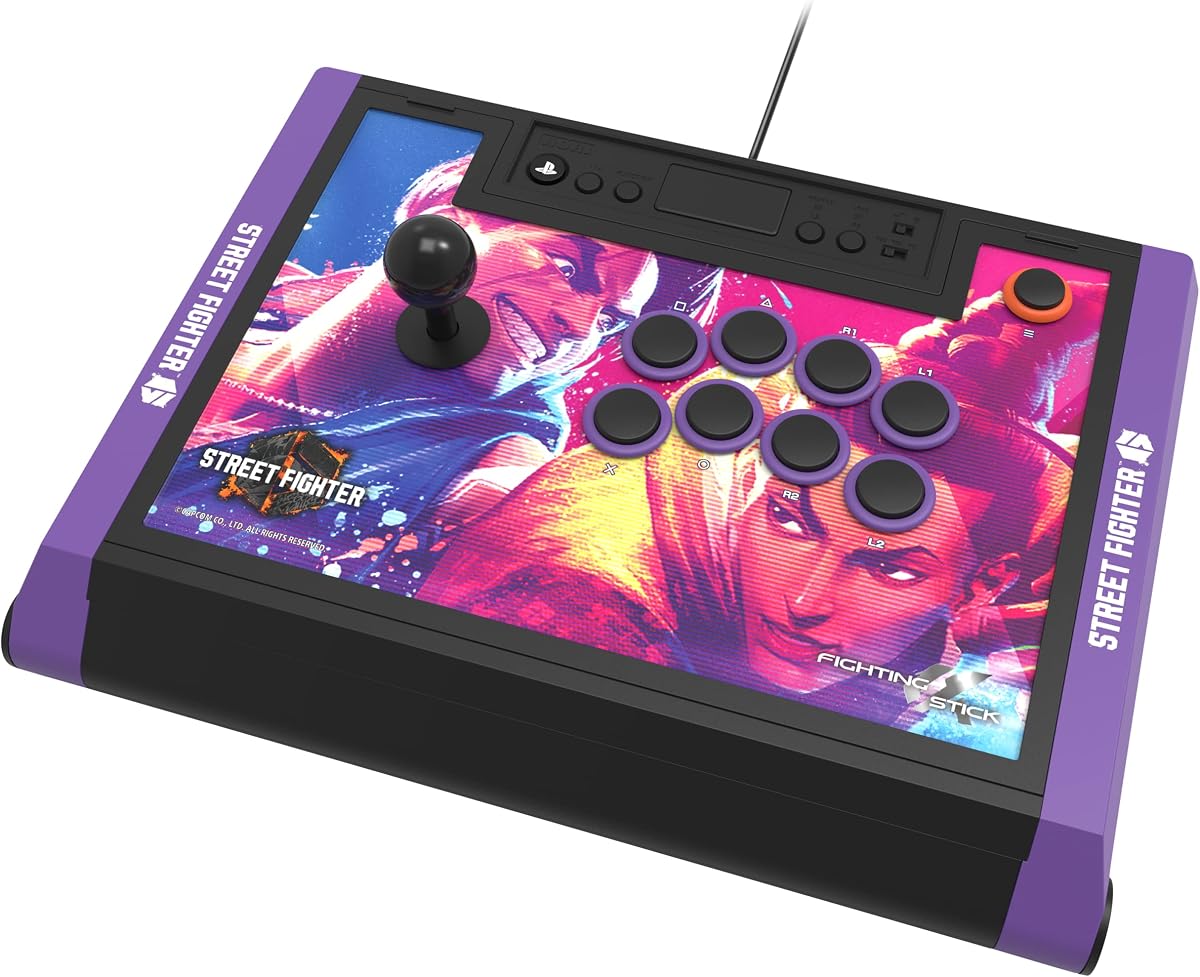
This edition features Street Fighter 6 branding and artwork. It offers the same build quality as the standard Alpha. It is designed for SF fans.
We may earn a commission when you buy through this link, at no additional cost to you.
The stick includes downloadable images for customization. You can swap artwork to keep it fresh. Performance matches the standard model.
The themed look is great for fans but costs more. It is a premium build. Keep in mind resale value might be lower.
Choose this for your love of Street Fighter. It is perfect for SF6 players wanting a licensed stick.
The partnership ensures accurate character art and branding that appeals to serious fans.
The panel opens to accept custom artwork allowing you to express your favorite characters.
We may earn a commission when you buy through this link, at no additional cost to you.
The Q7 Obsidian 2 includes a switch for platform selection. It uses OBSF buttons and a Sanwa joystick. It offers a full panel with touchpad.
We may earn a commission when you buy through this link, at no additional cost to you.
The layout is designed for modern games. It allows swappable joystick tops. The mic input supports chat needs.
It is wired which ensures stability. It does not include tools for panel changes. This is a solid choice for advanced layouts.
Pick this for its advanced features. It suits players who want a touchpad and platform switch.
A physical switch lets you toggle between PS5 PS4 and PC modes quickly without software.
The OBSF buttons are designed for durability and crisp tactile feedback for fast inputs.
We may earn a commission when you buy through this link, at no additional cost to you.
This Alpha edition features Tekken 8 top panel artwork. It delivers the same performance as other Alpha models. It is for Tekken fans.
We may earn a commission when you buy through this link, at no additional cost to you.
Downloadable alternate artwork allows customization. The build is high quality and durable. It holds a high user rating.
The price reflects the theme and quality. It is heavy which helps stability. It is a top choice for Tekken players.
Buy this for Tekken 8 support. It is the best choice for Tekken fans wanting a pro stick.
Official collaboration ensures the art matches the game theme for an immersive experience.
The build meets tournament standards for durability and performance at competitions.
We may earn a commission when you buy through this link, at no additional cost to you.
This is a leverless controller with 18 keys. It offers low latency and hot-swappable switches. It has RGB lighting and an OLED screen.
We may earn a commission when you buy through this link, at no additional cost to you.
The layout reduces input errors by using buttons. The switches have fast response. It supports tournament locks and macros.
Note it requires an adapter for PS5. The design is unique which takes practice. It is ideal for leverless fans.
Choose this for a unique layout. It is great for players who want customization and RGB.
Leverless controllers reduce physical movement to allow faster directional inputs.
You can replace switches without soldering to change the feel of the keys.
We may earn a commission when you buy through this link, at no additional cost to you.
Selecting a fightstick involves considering several key factors to ensure it fits your needs.
Ensure the stick works with your PS5. Some models require adapters. Officially licensed sticks are safest for compatibility.
Check for PC or switch support if you play on multiple systems.
Look for durable materials and heavy bases. Tournament sticks often use wood or thick plastic. Avoid lightweight units that slide.
A solid build ensures the stick stays put during intense combos.
High quality components like Sanwa or Hayabusa are preferred. They offer better feel and durability. Cheaper parts wear out faster.
Pro parts are worth the investment for competitive play.
Decide between wired or wireless. Wired offers stability. Wireless adds convenience. Check for Bluetooth or receiver options.
Wired is best for tournament use to avoid lag.
Some sticks allow panel swaps and part replacements. This helps with repairs and style. Modular sticks are more versatile.
Consider if you want to change the look over time.
Budget sticks offer basic function while premium ones offer pro parts. Set a budget based on your needs.
A stick should fit your budget while meeting performance needs.
Consider the size and grip. Some sticks have palm rests. Make sure it feels good for long sessions.
Comfort is key for playing without fatigue.
Connect the stick via USB or Bluetooth. Ensure the console recognizes it in settings. Some need a controller attached for PS5.
Clean the buttons and joystick regularly. Use compressed air to remove dust. Keep it in a dry place.
Store it properly to avoid damage. If traveling use a case. Check firmware updates for better compatibility.
Not all sticks work directly. You often need an adapter or specific model. Officially licensed sticks usually work out of the box for fighting games.
Wired sticks avoid latency. Wireless offers convenience. For tournaments wired is best. For home use wireless is acceptable.
Sanwa is a brand of high quality arcade parts. They are known for durability and fast response. Many pro players use them.
Most support PC. Check if it needs Xinput or Dinput. Drivers may be needed for some models.
Use compressed air to blow out dust. Wipe the panel with a cloth. Clean around buttons gently to avoid damage.
Yes they prevent accidental button presses. This avoids menu pauses during matches. They are helpful for serious players.
It replaces the stick with directional buttons. It allows fast inputs without moving a lever. It takes practice to master.
Sticks range from budget to high end. Spend based on your level. Beginners can start lower while pros often choose premium.
This list covered the top options for PS5 players. The HORI Alpha leads overall while others offer budget or themed choices.
Prioritize build quality and components when deciding. The best stick supports your style and games.
Check current prices before buying. Deals often appear for these high end peripherals.