
Home Security System Wireless Smart WiFi Alarm System DIY Kit with 120dB Siren
4.3Editor score
Affordable entry level kit
120dB loud indoor siren
Alexa and Google integration
This expert guide compares the top 10 alarm systems without monthly fees to help you choose the best home security option that fits your budget and needs.
Home security is more accessible than ever with alarm systems that eliminate recurring subscription costs. Modern wireless kits offer robust protection through smart sensors and mobile alerts without locking you into long-term contracts. These systems empower homeowners to monitor their properties independently while maintaining high safety standards.
We evaluated ten top-rated models based on connectivity, sensor quality, ease of installation, and user feedback. Each product was analyzed for its ability to deliver reliable security without hidden charges. Our comparison focuses on real-world performance, expandability options, and integration with popular smart home ecosystems.
Every selection below highlights unique strengths suited to different household sizes and security requirements. You will find detailed insights into features like voice control, backup power, and dual-network support. Please note that product availability and pricing may fluctuate over time, so verify details before purchasing.
4.3Editor score

4.3Editor score
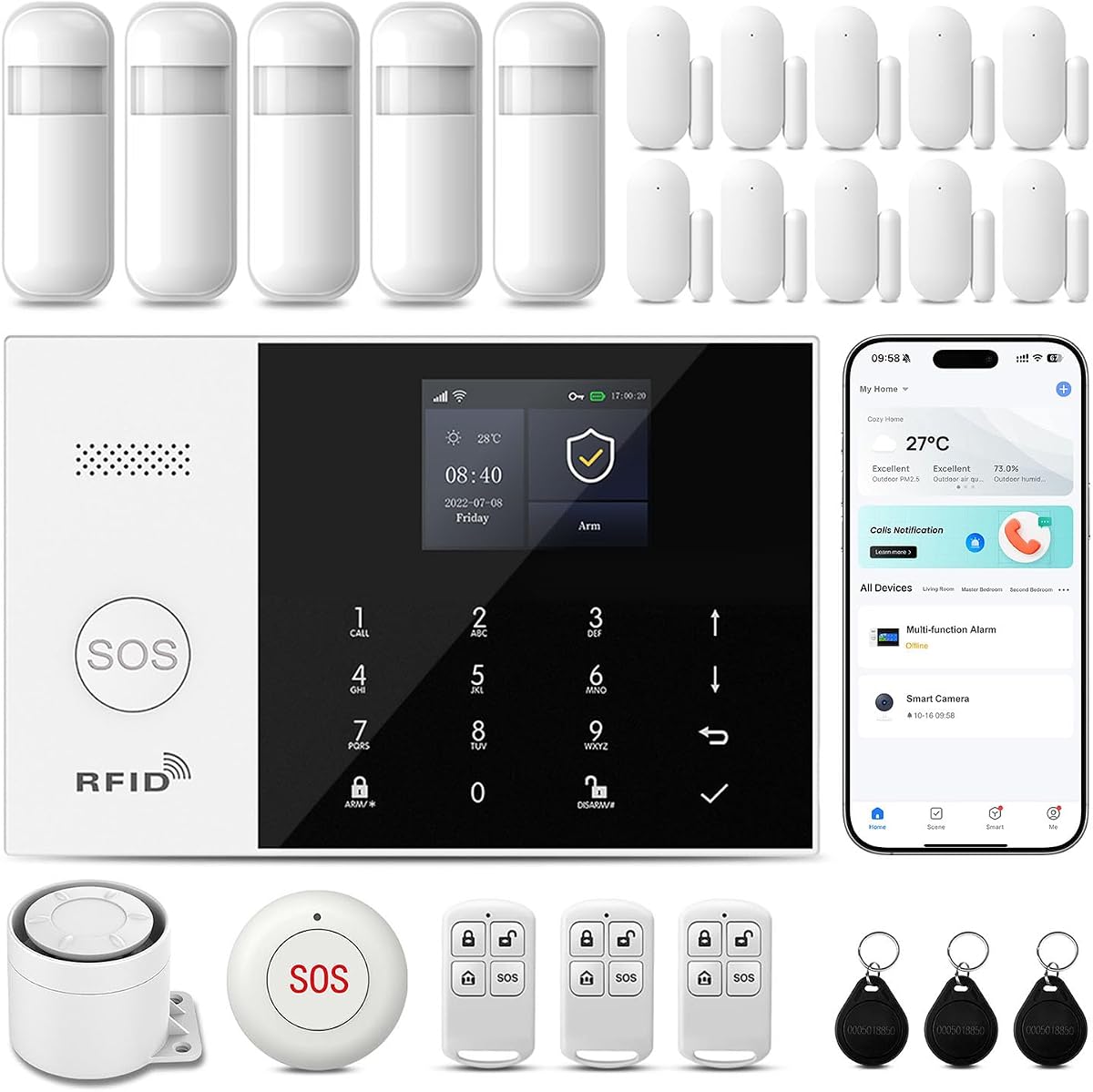
4.8Editor score
The following table provides a side by side overview of all ten selected alarm systems. It highlights key specifications including connectivity options, sensor counts, and unique features to help you quickly identify the model that best matches your specific security requirements.


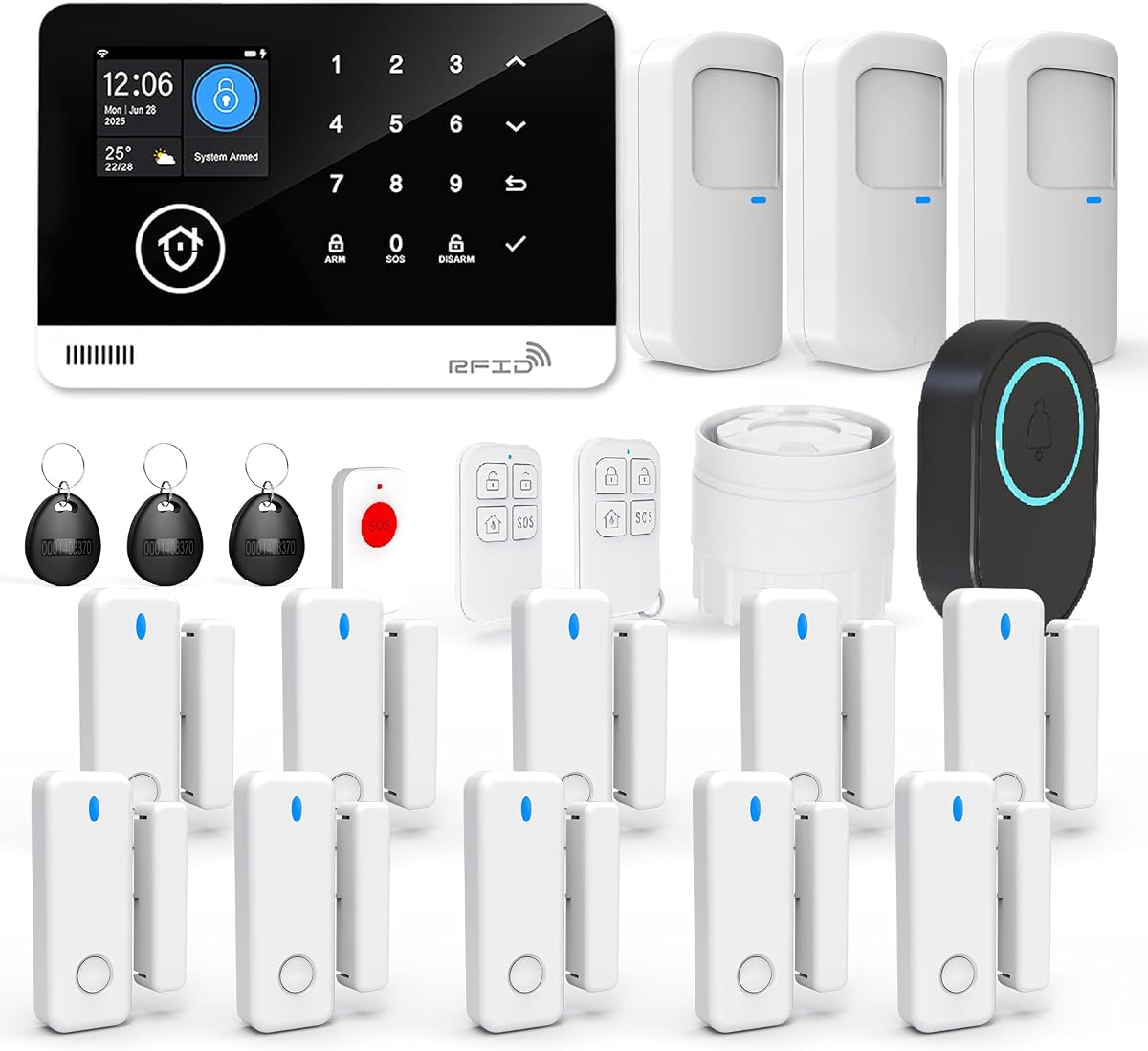
This WiFi alarm system offers a straightforward solution for homeowners seeking reliable protection without monthly costs. It comes with a comprehensive kit including multiple sensors and a loud siren to alert occupants during intrusions. The system focuses on simplicity and immediate setup.
We may earn a commission when you buy through this link, at no additional cost to you.
The 120dB siren ensures that any triggered alarm is heard clearly throughout the property. You receive instant notifications on your smartphone whenever a sensor is activated. The 8 hour backup battery provides resilience during power outages ensuring continuous monitoring.
While the system is highly effective, it relies exclusively on 2.4GHz WiFi which may limit range in larger homes with 5GHz networks. The app functionality is basic compared to more advanced smart home hubs. These limitations are acceptable for users prioritizing cost and ease.
Homeowners looking for an affordable entry point into wireless security will find this system ideal. It works well for apartments and small houses where professional installation is not feasible. The balance of features and price makes it a top contender.
Receive immediate notifications on your phone whenever a sensor is triggered so you stay informed no matter where you are.
The built in rechargeable battery keeps the system running for up to 8 hours during unexpected electrical outages.
We may earn a commission when you buy through this link, at no additional cost to you.
This 15 piece kit provides a solid foundation for wireless home security without recurring charges. It emphasizes convenience through app control and voice assistant compatibility. Users can manage their security status hands free which adds significant value to daily routines.
We may earn a commission when you buy through this link, at no additional cost to you.
The system integrates seamlessly with Alexa allowing for voice commands to arm or disarm the network. Real time alerts keep you updated on any suspicious activity instantly. The siren is loud enough to deter potential intruders effectively during an event.
Setup is straightforward using adhesive pads or screws without professional help. However the reliance on 2.4GHz WiFi means you may face connectivity issues in areas with strong 5GHz signals. The customization options within the app are functional but not extensive.
This kit is best suited for households already invested in the Alexa ecosystem. It offers a cost effective way to upgrade existing security setups. The balance of smart features and simplicity makes it a strong choice for many users.
Control your home security system with ease using the app remote control feature giving you peace of mind even when away.
It supports expansion of up to 20 sensors and 5 remote controls allowing you to grow your security as needs change.
We may earn a commission when you buy through this link, at no additional cost to you.
This system stands out by offering both WiFi and 4G connectivity ensuring you stay connected even if your internet fails. The main unit features a color screen that displays weather status and date making it user friendly for all ages. It supports PGST sensor accessories for customization.
We may earn a commission when you buy through this link, at no additional cost to you.
Voice control allows you to manage the system using smart assistants without touching any buttons. The color screen provides immediate visual feedback on system status. Tamper proof design ensures that unauthorized removal triggers an alarm requiring a security code to disarm.
While the feature set is impressive the setup may take longer than simpler kits. You need to ensure you have a valid SIM card for the 4G functions to work. This adds a small layer of complexity to the initial installation.
Homeowners who prioritize reliability and advanced features will appreciate this dual network capability. It is ideal for remote properties where internet stability might be a concern. The inclusion of an SOS device makes it suitable for families with elderly members.
WiFi and 4G connectivity allows you to insert a SIM card for phone call and SMS alarm functions for constant monitoring.
The main units color screen can display system status weather and date to provide a clear view of your home security.
We may earn a commission when you buy through this link, at no additional cost to you.
This system offers a high degree of customization allowing you to tailor alerts and modes to your specific needs. It supports up to 100 wireless storage locations which is significantly higher than many competitors. The interface is designed to be flexible and adaptable.
We may earn a commission when you buy through this link, at no additional cost to you.
You can set alarm modes and receive notifications based on your preferences. The system supports multi-channel alarm modes including app push SMS and voice monitoring. This ensures you never miss a critical alert regardless of your current connectivity state.
Setup requires careful attention to detail as the host system must be configured manually according to your needs. If you are not tech savvy you may need to rely on the user manual or operation videos. However the payoff is a system that works exactly how you want.
This is an excellent choice for users who want deep control over their security environment. It is ideal for larger homes where different zones need different alert rules. The flexibility offered here is unmatched in this price range.
Preset 5 groups of phone numbers and SMS numbers which can be set separately for SMS on off and voice on off.
Support the name setting of 12 alarm types such as the main door and hall to organize your security zones easily.
We may earn a commission when you buy through this link, at no additional cost to you.
This system is designed for those who need reliable security without breaking the bank. It includes essential components like door and window sensors and a loud siren. The integration with Alexa and Google Home makes it easy to manage from your phone.
We may earn a commission when you buy through this link, at no additional cost to you.
You can arm or disarm the system remotely and receive instant push notifications. The 120dB siren is loud enough to deter intruders and alert neighbors. It is compatible with both Android and iOS devices for broad accessibility.
While it lacks cellular connectivity the 2.4GHz WiFi connection is stable in most homes. The battery backup ensures the system works even during short power outages. These features are sufficient for standard residential security needs.
This kit is ideal for first time buyers or small apartments. It offers a straightforward solution that does not require professional installation. The value proposition is strong for anyone on a tight budget.
Compatible with Alexa and Google Home it supports voice controlled Away Arm Home Arm and Disarm modes for seamless smart home integration.
The alarm hub includes a built-in rechargeable backup battery to keep the system running during unexpected power outages.
We may earn a commission when you buy through this link, at no additional cost to you.
This comprehensive 21 piece kit covers a wide range of entry points for larger properties. It features a long lasting battery backup that provides 48 hours of protection during outages. The color screen allows you to check system status at a glance.
We may earn a commission when you buy through this link, at no additional cost to you.
You can manage your alarm system via Smart Life Tuya app which offers robust customization. The silent alarm mode allows you to alert authorities without alerting intruders. This is a critical feature for safety in certain scenarios.
While the system is powerful it requires a stable 2.4GHz WiFi network to function correctly. The setup process might be slightly more involved due to the number of components. However the peace of mind is worth the effort.
Homeowners with larger homes or multiple entry points will find this kit highly useful. The silent mode feature is particularly valuable for those who want discreet security. The battery backup ensures reliability during unexpected events.
The hub supports a silent alarm mode which avoids alerting intruders while allowing you to take protective measures when an unauthorized break in occurs.
The rechargeable battery provides 48 hours of backup power during outages to ensure uninterrupted protection.
We may earn a commission when you buy through this link, at no additional cost to you.
This system is designed with a large 4.3 inch color touchscreen that makes it easy for all ages to manage. You can adjust settings directly on the hub without needing a smartphone. It supports both WiFi and 4G for reliable alerts.
We may earn a commission when you buy through this link, at no additional cost to you.
The hub allows direct adjustment of the home alarm system via touch control making it easier for the elderly and children to set up. The large screen provides a clear view of the status of all accessories. You can also use voice control via Alexa or Google.
While the setup process can be detailed the interface ensures that daily use is simple. The silent alarm feature allows you to monitor without creating noise. This makes it suitable for families who value ease of use.
This kit is ideal for households with elderly members or those who prefer physical interfaces. The dual connectivity ensures that you stay connected even if one network fails. It offers a blend of technology and accessibility.
The alarm hub allows direct adjustment of the Home Alarm System via touch control making it easier for the elderly and children to set up.
The alarm host can connect to home WiFi or use a SIM card enabling multiple alarm notifications such as App Alerts host alarm and phone notifications.
We may earn a commission when you buy through this link, at no additional cost to you.
This 9 piece kit is tailored for small homes with two to three bedrooms. It includes essential sensors and a keypad for easy management. The automatic switch to 4G ensures you stay online even if WiFi disconnects. Alexa and Google compatibility allows for voice control.
We may earn a commission when you buy through this link, at no additional cost to you.
You can arm and disarm the system using the keypad or mobile app. The system supports different defense modes like stay and away. This flexibility ensures you can adapt the system to your daily routine easily.
While it does not include cameras the system supports building a visual monitoring system by adding separate PGST cameras. The auto alarm dial feature helps you reach out immediately during a breach. This is a cost effective solution for small households.
This kit is ideal for apartments or small houses where extensive equipment is not necessary. The automatic network switch provides reliability without complex configuration. It offers a strong balance of simplicity and functionality.
The system supports 2.4G Wi-Fi and 4G networks and automatically switches to 4G when Wi-Fi disconnects keeping the system online at all times.
You can arm disarm and set different defense modes for the system via the intuitive keypad.
We may earn a commission when you buy through this link, at no additional cost to you.
This system is highly rated by customers for its reliability and comprehensive features. It includes 24 pieces to cover every entry point in your home. The dual network connectivity ensures that you stay protected even if one connection fails. Voice control makes it easy to manage without touching buttons.
We may earn a commission when you buy through this link, at no additional cost to you.
You can set your home security system to automatically arm and disarm at different times via the APP. This eliminates the need for frequent manual operations and prevents the hassle of forgetting to arm or disarm your system. This scheduling feature is particularly convenient for regular schedules.
While the system is robust it requires a valid 4G SIM card to utilize the cellular backup. The price is higher than basic models but the features justify the investment. You can also view alarm logs through the event history.
This kit is ideal for homeowners who want a premium experience without monthly fees. The high satisfaction rating suggests that it meets most users needs effectively. The scheduling and sharing features make it a family friendly choice.
You can set your home security system to automatically arm and disarm at different times via the APP to eliminate manual operations.
You can share system access with other family members so everyone can help monitor and protect your property together.
We may earn a commission when you buy through this link, at no additional cost to you.
This 22 piece kit provides a complete security solution with support for both WiFi and 2G GSM networks. It includes RFID cards for quick access and a doorbell push button. The programmable arming function allows you to avoid repetitive operations daily.
We may earn a commission when you buy through this link, at no additional cost to you.
You can use the GSM when the WiFi is off ensuring you remain connected even if your internet goes down. The system works with 2.4GHz WiFi and 2G SIM card which provides broad coverage. It offers anti-theft protection by sending notifications or making calls.
While 2G is an older standard it ensures connectivity in areas where 4G might not be available. The programmable arming and disarming function helps you avoid repetitive operations. This makes it ideal for users who value reliability over modern features.
This kit is suitable for homes in areas with limited high-speed internet. The inclusion of RFID cards and a doorbell push button adds convenience. It offers a straightforward security solution that works well without subscriptions.
This alarm system only works with 2.4GHz wifi and 2G SIM card. You can use the GSM when the wifi is off.
Easy to install panel with wireless sensors that can be integrated in a short time with automated quick response alarms.
We may earn a commission when you buy through this link, at no additional cost to you.
Choosing the right alarm system requires balancing your home size budget and technical needs. This guide breaks down the essential factors to consider before making a final decision.
Most systems rely on WiFi which is convenient but susceptible to outages. Look for dual network support like 4G to ensure you stay connected when the internet goes down. Always check if the system supports 2.4GHz WiFi which is standard for most smart devices.
Prioritize models with cellular backups if you live in an area with frequent power or internet issues. This ensures your alarm remains active even if your home network is compromised.
The number of sensors a system can support determines how scalable your security is. Ensure the system allows you to add motion detectors and door sensors as your needs grow. Look for compatibility with standard brands to keep future costs low.
Check the wireless protocol used for the sensors. Models that support multiple accessory types allow you to add cameras or leak detectors later without replacing the main hub.
The mobile app is your primary interface for managing alarms and viewing alerts. Look for apps that offer real-time push notifications and the ability to arm or disarm remotely. Some apps also allow you to view event history which is useful for monitoring patterns.
Ensure the app is user-friendly and supports your device operating system. A clunky interface can make it difficult to manage your security effectively in an emergency.
Most no-fee systems are designed for DIY installation with adhesive or screw mounts. Review the package contents to ensure you have all necessary screws and mounts. Consider the time it takes to install if you have many entry points to secure.
Choose a system that is truly wireless to avoid complex wiring. This saves time and allows you to place sensors where they are most effective.
Power outages can disable a system if it lacks a backup battery. Look for models that offer at least 8 hours of battery life to ensure coverage during short power cuts. This ensures your home remains protected even when electricity is lost.
A rechargeable battery is preferable to replaceable ones for convenience. Check the estimated battery life to ensure it meets your needs during emergencies.
Integration with voice assistants like Alexa or Google Home adds significant convenience. Look for systems that allow you to arm or disarm with voice commands. This is particularly useful if you have other smart home devices in your ecosystem.
Ensure the integration is stable and works reliably. Voice control should be an added convenience not a source of frustration during daily use.
A loud siren is critical for deterring intruders and alerting occupants. Look for sirens that produce at least 120dB to ensure the sound carries throughout the property. This volume is generally sufficient to wake sleeping family members.
Verify if the system supports multiple siren types or external sirens. This allows you to extend the warning signal to the entire property or neighborhood.
Consider how easy it is to add more accessories as your needs change. Look for systems that support up to 100 accessories so you can expand without replacing the hub. This ensures long-term value as your security needs evolve.
Check if the system supports adding cameras or water detectors. This allows you to create a comprehensive security ecosystem under one brand.
Begin by setting up the hub in a central location with strong WiFi signal. Connect it to your power source and download the companion app to your smartphone. Follow the on-screen instructions to pair each sensor with the hub one by one.
Test the system by triggering sensors individually to ensure they communicate correctly with the hub. Adjust the placement of any sensors that fail to register to improve signal strength. This initial testing ensures that the system will work reliably during an actual alarm.
Periodically check the battery levels in your backup power unit and replace them as needed. Keep the app updated to ensure you have the latest security patches and features. Clean the sensors gently to avoid dust buildup that might interfere with detection.
No, the systems listed in this guide do not require a monthly subscription fee. You can access all core features like alerts and remote control through free apps. Some optional advanced services might exist but they are not mandatory.
If your internet goes down, systems with cellular backups will switch to 4G networks to send alerts. However, WiFi-only systems will lose connectivity until the internet is restored. Choosing a model with dual network support ensures continuous protection.
Many of these systems support the addition of compatible cameras. You should check the manufacturer's compatibility list before purchasing cameras. Some kits allow you to expand into a full smart home ecosystem.
These systems use encrypted apps to protect your data but security depends on your home network. Always secure your WiFi with a strong password to prevent unauthorized access. Keep your firmware updated to mitigate potential vulnerabilities.
Yes, most of these systems are designed for renters since they use adhesive mounts. You can take them with you when you move without leaving permanent holes. This makes them a flexible choice for temporary housing.
Most systems feature a siren that emits around 120dB of sound. This is loud enough to deter intruders and alert people throughout the home. Some models allow you to adjust the volume if needed.
Yes, 4G models require a SIM card to function. You will need to insert an active SIM card into the hub for cellular connectivity. The card is usually not included in the package.
Yes, many of the selected systems work with Alexa and Google Home. You can use voice commands to arm or disarm the system or check the status. This adds significant convenience to daily use.
Choosing the right alarm system without monthly fees saves money and provides freedom from contracts. The top picks in this guide offer a range of features from basic protection to advanced dual network capabilities. Each option has been selected based on performance and reliability.
Consider your specific home size and tech comfort level when making a final choice. If you need high reliability prioritize models with cellular backups and long battery life. For simpler needs a WiFi-only kit may be sufficient for your peace of mind.
Prices and availability change frequently so always check the current listings before purchasing. Verify the compatibility of your specific network before placing an order to avoid connectivity issues. Your security investment should be a source of comfort not concern.