
acer USB 3.0 HDMI Capture Card
4.4Editor score
Plug and play on Linux
Mic-in for commentary
1080p60 performance
This guide compares the top capture cards for Linux systems to help you find the best device for streaming recording and gaming on your computer.
Finding a reliable capture card for Linux can be challenging due to driver limitations and compatibility issues. This guide helps you select hardware that works seamlessly with open source streaming software and common Linux distributions without extra configuration.
We evaluated ten popular models based on their Linux support, video quality, latency performance, and ease of setup. Our analysis focuses on plug and play functionality, UVC protocol support, and how well each device integrates with OBS Studio and similar tools on the platform.
Each recommendation highlights specific strengths like 1080p60 capture, HDMI loop out, and audio input options. Prices and availability change frequently so check the linked pages for the latest details before making your final purchase decision.
4.4Editor score

4.4Editor score

4.2Editor score
The following table compares all ten models side by side. It highlights key specifications like resolution support, connectivity options, and Linux compatibility to help you quickly identify the right fit for your setup.





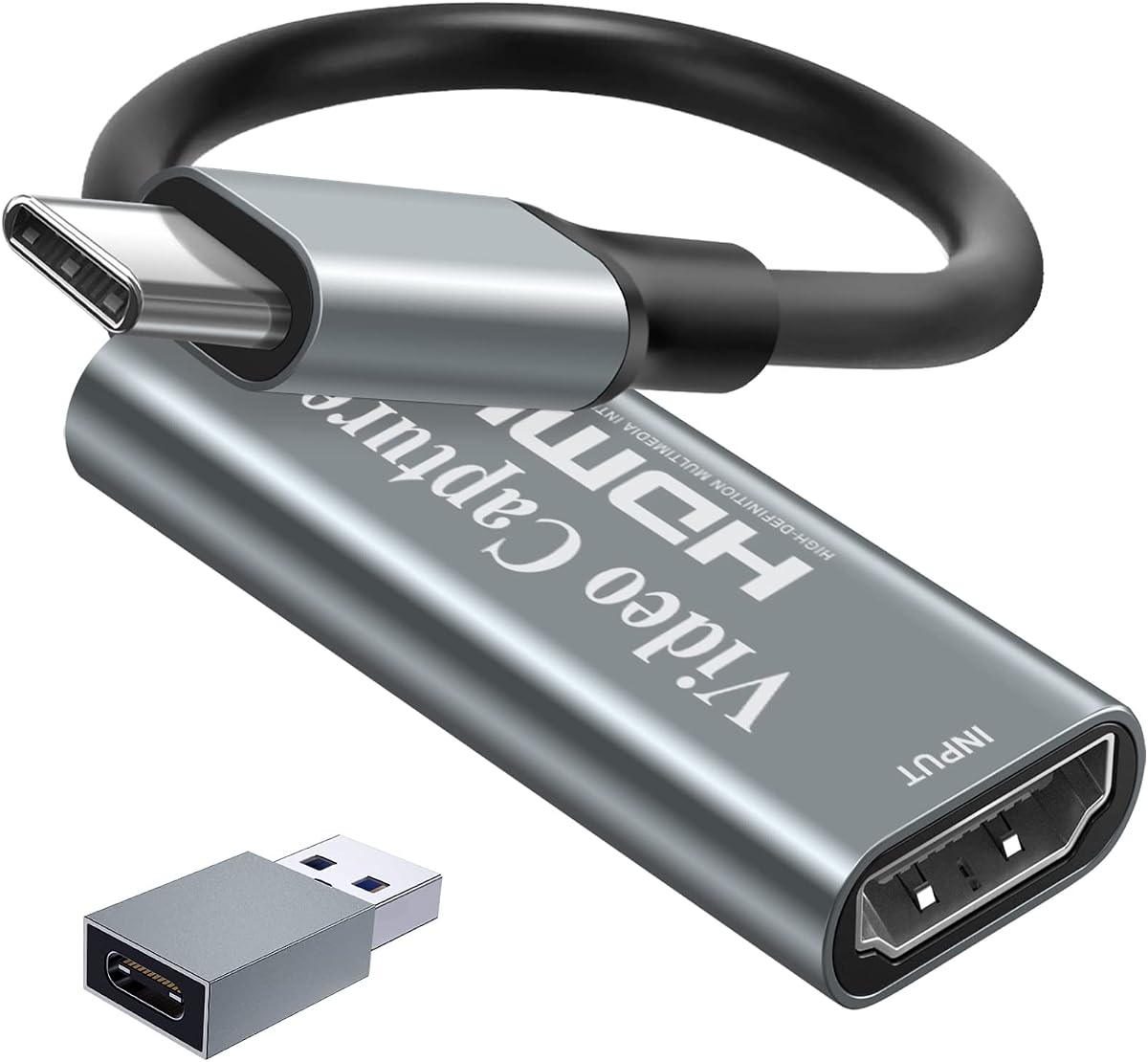
The acer USB 3.0 HDMI Capture Card delivers solid performance for Linux users on a budget. It features a 4K input capacity with smooth 1080p60 output and includes a mic-in port for easy commentary. Linux systems recognize it as a standard UVC device making setup straightforward.
We may earn a commission when you buy through this link, at no additional cost to you.
Its YUY2 technology provides richer colors compared to JPEG options which benefits streaming and recording. The plug and play nature means you avoid installing extra software or drivers on your distro. The compact build fits easily into travel bags for on-the-go content creation.
While it lacks a dedicated loop-out port for zero latency monitoring, the low-latency transmission keeps gameplay synchronized. Some users may find the audio options limited since it only accepts a 3.5mm headset. For basic streaming and recording needs, these trade-offs are acceptable.
This card is ideal for students or casual gamers who want reliable Linux compatibility without spending much. It works well with OBS and similar tools. If you need advanced monitoring features consider upgrading to a model with a loop-out port.
The card uses UVC protocols which Linux natively supports so no driver installation is needed.
YUY2 technology ensures more accurate color reproduction for lifelike live streaming and recording.
We may earn a commission when you buy through this link, at no additional cost to you.
The UGREEN 4K@30Hz Loop Out HDMI Capture Card stands out for Linux users who need flexibility and quality. It supports 4K input with a 1080p60 output and offers both USB-A and USB-C ports for modern laptops. Linux systems detect it instantly without extra configuration.
We may earn a commission when you buy through this link, at no additional cost to you.
Its HDMI loop-out allows real-time monitoring on an external display which is crucial for latency sensitive games. The sturdy aluminum casing aids heat dissipation during long streaming sessions. You can choose between MJPEG and YUY2 formats depending on your bandwidth needs.
One minor limitation is the lack of HDMI audio passthrough which might require separate audio routing. Additionally PlayStation consoles need HDCP disabled to work correctly. These issues are manageable for most users who prioritize reliable capture performance.
This model is a top pick for streamers and content creators who want professional features at a reasonable price. Its broad compatibility and dual interface make it versatile across setups. For Linux workflows it delivers consistent results.
USB-A and USB-C ports ensure compatibility with older and newer laptops and tablets.
The loop-out port enables zero-latency preview on an external monitor while capturing.
We may earn a commission when you buy through this link, at no additional cost to you.
The AVerMedia Live Gamer Ultra S offers premium features for Linux users who demand top-tier video and audio capture. It supports 4K60 HDR passthrough while recording in 1080p60. Linux systems recognize the USB 3.2 connection though advanced workflows may rely on proprietary tools.
We may earn a commission when you buy through this link, at no additional cost to you.
Its 5.1 channel audio capture and support for ultrawide resolutions make it suitable for high-end gaming setups. The build quality is robust with effective heat management. Streaming center software provides enhanced control but basic UVC modes work natively on Linux.
The higher price reflects its advanced capabilities which might not be necessary for casual users. Some features require Windows or macOS software which can limit flexibility on Linux for non-UVC modes. However the core capture performance remains excellent.
This card is ideal for professional streamers or content creators who need maximum fidelity and features. If you need HDR passthrough and advanced audio options it delivers. For general Linux streaming it is a solid investment.
Supports 4K60 HDR passthrough allowing you to enjoy high fidelity gaming on your monitor.
5.1 channel audio capture provides immersive sound for professional streaming setups.
We may earn a commission when you buy through this link, at no additional cost to you.
The Guermok Video Capture Card provides reliable performance for Linux users with a focus on portability. It supports 4K input with 1080p60 output and features both Type-C and USB-A connectors. Linux systems identify it as a standard UVC device without drivers.
We may earn a commission when you buy through this link, at no additional cost to you.
Its aluminum alloy casing ensures effective heat dissipation which maintains stability during long sessions. The low-latency performance helps avoid lag during live gaming. Setup is straightforward though you may need to restart OBS after audio configuration.
The lack of a loop-out port means you cannot monitor gameplay directly on an external display with zero latency. Some users report needing to flip the card to ensure USB 3.0 recognition. Despite these minor quirks it delivers consistent video quality.
This card suits travelers and casual streamers who need a lightweight solution. Its price point makes it accessible for those starting out. For Linux environments it offers dependable compatibility with popular streaming software.
Aluminum alloy casing helps dissipate heat effectively ensuring stable performance during extended use.
Type-C and USB-A connectors allow connection to various devices and adapters easily.
We may earn a commission when you buy through this link, at no additional cost to you.
The Newhope USB 3.0 HDMI Capture Card is designed for simplicity and ease of use on Linux. It supports 4K input with 1080p60 capture and includes a loop-out port for real-time monitoring. Linux systems recognize it instantly via UVC protocols.
We may earn a commission when you buy through this link, at no additional cost to you.
Its microphone input accepts standard 3.5mm headsets for easy commentary without extra adapters. The compact design fits easily into travel bags for on-the-go recording. No external power or drivers are needed which reduces setup complexity.
The audio input only supports TRS headsets which might not fit all gear. Build quality is basic compared to premium models but functional for most users. The low-latency performance ensures smooth gaming and streaming experiences.
This card is a great choice for beginners or those who need a straightforward capture solution. It works well with OBS and other Linux apps. If you need basic features at a low cost it delivers value.
No driver installation or external power supply is needed for instant plug and play functionality.
The HDMI loop-out port allows you to monitor gameplay on an external display simultaneously.
We may earn a commission when you buy through this link, at no additional cost to you.
The Capture Card 4K HDMI Video Streaming provides reliable performance for Linux streamers who need straightforward functionality. It handles 4K input with 1080p60 output and works seamlessly with popular software like OBS and Streamlabs. Linux detection is automatic via UVC.
We may earn a commission when you buy through this link, at no additional cost to you.
Its compact and portable design makes it easy to carry for LAN parties or events. Low-latency performance ensures smooth broadcasting without noticeable delay. Setup is quick as no drivers or external power are required for operation.
The lack of a loop-out port limits real-time monitoring options for competitive gaming. Advanced features like audio mixing or HDR passthrough are not available. However for basic streaming needs it delivers consistent results.
This card is ideal for beginners or budget-conscious creators who want a reliable device. Its compatibility with major platforms simplifies the streaming process. For Linux users it offers an accessible entry into content creation.
Fully compatible with popular streaming software like OBS Studio and Streamlabs for quick setup.
Lightweight and portable design makes it easy to transport for on-the-go recording.
We may earn a commission when you buy through this link, at no additional cost to you.
The UGREEN 2K@30Hz 1080P 60FPS Video Capture Card offers balanced performance for Linux users. It supports 4K input with 1080p60 output and includes both USB-A and USB-C ports for broad device compatibility. Linux systems detect it without extra drivers.
We may earn a commission when you buy through this link, at no additional cost to you.
Its aluminum alloy casing provides durability and effective heat dissipation. The high data transfer speed ensures low latency streaming. It supports a wide range of devices including consoles and cameras making it versatile for various setups.
The absence of a loop-out port means you cannot monitor gameplay directly on an external screen. It only supports HDMI input which limits other connection options. Despite these limitations it delivers consistent quality for most users.
This card is suitable for streamers who want a reliable device without breaking the bank. Its build quality and port selection make it a practical choice. For Linux compatibility it remains a strong contender.
USB 3.0 technology ensures optimal performance and low latency for smooth streaming.
Aluminum alloy casing enhances durability and shields against interference for stable signals.
We may earn a commission when you buy through this link, at no additional cost to you.
The 4K HDMI Capture Card delivers smooth Full HD recording with low latency for Linux users. It supports 4K input with 1080p60 output and includes a 3.5mm mic and headphone for real-time monitoring. Linux recognition is instant via UVC.
We may earn a commission when you buy through this link, at no additional cost to you.
Its plug and play design requires no extra software making setup simple. Compatible with consoles and cameras it offers broad hardware support. The lightweight build is ideal for travel or portable streaming setups.
The lack of HDMI loop-out limits direct monitoring options during gameplay. Audio passthrough features are minimal which may require external audio routing. However the included monitoring ports add value for basic setups.
This card is a good fit for casual streamers who need monitoring without complexity. Its compatibility with major platforms ensures wide use. For Linux users it provides reliable capture functionality.
Built-in microphone and headphone jacks allow real-time audio monitoring and commentary.
No drivers or extra software required for immediate plug and play on Linux.
We may earn a commission when you buy through this link, at no additional cost to you.
The AVerMedia StreamLine MINI+ delivers high quality capture with 4K60 HDR passthrough for Linux users. It records in 1080p60 with ultra-low latency which benefits competitive gaming. Linux detection is supported though advanced features may use proprietary tools.
We may earn a commission when you buy through this link, at no additional cost to you.
Its flexible format options allow users to match workflow needs like NV12 or MJPEG. The streaming center provides a user-friendly interface for quick setups. Compatibility with major platforms ensures seamless streaming to various destinations.
The higher price reflects advanced capabilities which may not be necessary for all users. Some Linux features may rely on workarounds or native UVC modes. However core capture performance remains strong for most needs.
This card is ideal for streamers who want HDR and low latency without compromise. If you need professional features it delivers reliable results. For Linux workflows it balances quality and ease of use.
Near-instant response ensures smooth real-time gameplay for competitive streaming.
Multiple format options allow users to choose the best workflow for editing or streaming.
We may earn a commission when you buy through this link, at no additional cost to you.
The Papeaso Video Capture Card offers reliable entry level performance for Linux users. It supports 4K input with 1080p60 output and connects via USB-C for modern laptops. Linux systems recognize it as a standard UVC device without drivers.
We may earn a commission when you buy through this link, at no additional cost to you.
Its compact design makes it easy to carry for on-the-go content creation. Plug and play setup reduces configuration time significantly. Compatible with consoles and cameras it covers common source devices effectively.
The basic feature set means no loop-out or advanced audio options. Some users may find performance varies with different sources. Despite these limits it provides solid capture functionality for most entry level needs.
This card is suitable for beginners or those who need a simple budget-friendly solution. Its Linux compatibility ensures smooth operation without extra steps. For general recording it delivers consistent results.
No driver installation required for immediate use with OBS and Linux software.
Lightweight design makes it easy to carry for recording in various locations.
We may earn a commission when you buy through this link, at no additional cost to you.
Choosing a capture card for Linux requires attention to protocol support and compatibility. This guide explains key factors to consider so you can make an informed decision.
Ensure the device supports the UVC protocol which allows Linux to recognize it as a webcam without extra drivers. Most modern capture cards work natively but check reviews for specific distribution compatibility to avoid setup issues.
Look for products explicitly mentioning Linux or UVC support in their specifications to streamline installation.
Most budget options cap at 1080p60 which is sufficient for streaming but check if 4K input support matters for post-production. Higher frame rates provide smoother video but demand more system resources during encoding.
Prioritize 1080p60 output for most streaming workflows unless you specifically need higher resolution processing.
Latency affects how quickly video appears on your screen and is critical for competitive gaming. Hardware loop-out ports allow zero latency monitoring independent of the software stack.
If you need real-time monitoring prioritize models with dedicated loop-out ports over software solutions.
Some cards offer mic-in ports for direct commentary while others rely on software mixing. Check if audio passthrough is available for HDMI sources to maintain sound integrity without extra cables.
Verify audio input types match your headset or microphone to avoid compatibility problems.
USB-A vs USB-C interfaces depend on your laptop or PC availability. Dual interface cards offer flexibility when switching between different devices.
Select a card with ports that match your computer's available connections to simplify setup.
Aluminum casings dissipate heat better than plastic which prevents performance drops during long sessions. Durability matters for travel or portable setups.
Choose models with metal housings for improved thermal management and longevity.
Consoles like PS5 or Xbox may require HDCP to be disabled for capture to work. Verify supported sources match your gaming hardware to avoid signal issues.
Confirm HDCP compatibility before purchase if you plan to capture from next-gen consoles.
Entry-level cards often suffice for streaming while premium models offer advanced features like HDR passthrough. Balance your needs against budget to avoid overspending on unused capabilities.
Invest in features you actively need rather than paying for extra capabilities.
Connect the HDMI source device to the capture card and plug the USB cable into your Linux machine. The system should detect it as a webcam immediately. Launch OBS and add a video capture source selecting the card from the list.
Adjust settings in OBS to match your desired resolution and bitrate. For audio routing use ALSA or PulseAudio to capture microphone input from the card. Restart the streaming software if audio appears silent after setup.
Store the card in a cool dry place when not in use to protect against heat damage. Keep firmware updated if manufacturer tools are available. Regularly check for cable wear and replace damaged connectors promptly.
Most modern capture cards work without drivers on Linux because they use UVC protocols. If a model requires drivers check manufacturer support first but plug-and-play is common.
Yes provided you disable HDCP on the console. Most USB capture cards support this if they allow HDMI input. Check device compatibility with PS5 in product specs.
1080p60 offers a good balance between quality and performance for streaming. Higher resolutions like 4K require more powerful systems for encoding and transmission.
Check that the card is connected to a USB 3.0 port and that no other apps are using it. Restart OBS and verify permissions in the system settings.
Some cards include audio input for mic-in but HDMI audio passthrough depends on the model. Verify this in specs if you need synchronized audio.
Most Linux setups take under ten minutes for plug-and-play devices. Install OBS and add the video source then configure audio settings.
USB 2.0 limits bandwidth to around 35 Mbps which may restrict resolution to 720p. USB 3.0 supports higher resolutions like 1080p60 with more headroom.
Yes OBS works with UVC compliant capture cards on Linux. Ensure the card is detected before adding sources and configure video settings accordingly.
We reviewed ten capture cards for Linux from budget-friendly to premium options. The UGREEN 4K@30Hz Loop Out HDMI Capture Card offers the best overall value while the acer USB 3.0 HDMI Capture Card stands out for budget buyers.
Prioritize UVC support and 1080p60 performance for most streaming needs. Consider loop-out ports if you play competitive games that require zero-latency monitoring.
Prices and availability change so check the linked pages for current offers before buying. With the right choice you can enjoy seamless streaming and recording on your Linux system.