
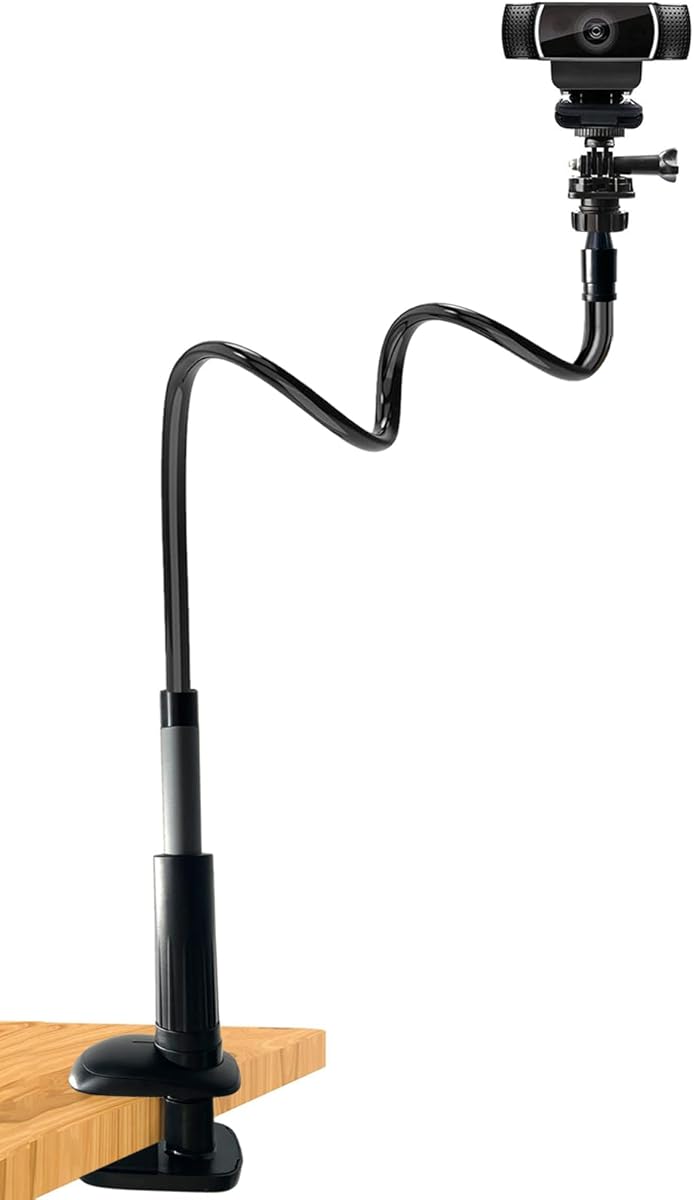
Webcam Stand Camera Desk Mount with Phone Holder for Logitech C922 GoPro
5.0Editor score
Flexible 36.6 inch arm
Universal 1/4 inch thread
Anti-scratch clamp padding
This guide compares the top clamp on webcam arm options for 2026 to help you find the most stable and flexible mounting solution for your workspace.
Finding the right support for your camera is essential for clear video calls and professional streaming. A clamp on webcam arm offers flexibility and saves valuable desk space by securing your device to a surface. These mounts allow you to position your lens at the perfect height and angle without cluttering your workspace.
We analyzed ten top-rated options to determine which models offer the best balance of stability, reach, and ease of use. Our evaluation focused on build quality, load capacity, and compatibility with popular webcams and accessories. This list covers a variety of designs from simple goosenecks to complex magic arm kits.
Each pick includes detailed specifications and real-world performance insights to help you make an informed decision. We highlight the strengths and weaknesses of every model so you can choose the one that fits your specific needs. Please note that availability and pricing may change over time.
5.0Editor score

4.5Editor score

4.4Editor score
The following table provides a side-by-side comparison of all ten models reviewed in this guide. We highlight key specifications and unique features to help you quickly identify the best fit for your setup.




This 30 inch stand is an excellent entry-level solution for users needing flexible positioning without breaking the bank. It holds a strong rating due to its impressive reach and thick clamp base that secures well to desks. The gooseneck design allows for easy adjustments to find the perfect angle.
We may earn a commission when you buy through this link, at no additional cost to you.
The standout quality is its maximum reach of 76 cm which is rare at this price point. You can position your camera high above your desk for overhead work or pull it closer for close-ups. The universal 1/4 inch screw ensures compatibility with most webcams like Logitech C920 and Brio models.
While it offers great value, the load capacity is limited to 0.7 kg. This means it is best suited for lightweight webcams and small action cameras rather than DSLRs. Users should bend the tube into an S shape to minimize wobble during active sessions.
If you need a versatile arm for streaming or video calls on a budget, this is a strong choice. It saves desk space and keeps your camera stable for clear images. Just ensure your desk is steady to prevent any bouncing while filming.
The 30 inch length allows you to position your camera far from the base for overhead or wide shots.
The upgraded thick base provides a secure grip on desks without scratching your furniture with non-slip pads.
We may earn a commission when you buy through this link, at no additional cost to you.
SMALLRIG is known for professional camera accessories and this magic arm delivers on that reputation. It offers a robust aluminum alloy build that feels solid and reliable for long-term use. The design focuses on stability with an anti-deflection 1/4 inch interface that keeps connections secure.
We may earn a commission when you buy through this link, at no additional cost to you.
The key strength lies in the double-ball clamps which allow for independent angle adjustments at each joint. This precision is ideal for content creators who need exact positioning for overhead photography or streaming. The anti-slip silicone pads protect your devices from scratches while ensuring a tight grip.
While it carries a premium price, the quality justifies the investment for serious users. The load capacity of 600 g is sufficient for most webcams and phones but may struggle with very heavy setups. Avoid using it in dynamic situations to prevent slippage.
If you need a high-quality arm for professional streaming or vlogging, this model is top-tier. It provides the stability and control needed for crisp video. Check the current price before buying as it may vary based on promotions.
The double-ball clamps give you independent control over each joint for highly accurate camera positioning.
Silicone pads and rubber rings increase friction to hold devices tight without damaging surfaces.
We may earn a commission when you buy through this link, at no additional cost to you.
This flexible mount offers a simple and affordable way to attach a camera to thin objects like desks or shelves. Its jaw clamp opens up to 1.8 inch which is perfect for narrow edges where larger clamps might not fit. The gooseneck allows for basic adjustments to angle and height.
We may earn a commission when you buy through this link, at no additional cost to you.
The main advantage is its size making it easy to pack for travel or use in small spaces. It comes with a mini tripod head for 360 degree rotation so you can tweak the view quickly. Compatibility includes popular webcams and action cameras like GoPro and DJI OSMO.
Be aware that the reach is limited to 11.6 inches so it is not ideal for wide overhead shots. The load capacity is under 500 grams meaning it works best with lightweight devices. Avoid mounting on surfaces that vibrate to maintain image stability.
If you need a quick setup for a small webcam or phone, this is a great option. It keeps costs low while providing essential flexibility. Just ensure you place it on a stable object to avoid shaky video.
The jaws open to 1.8 inch allowing secure attachment to thin table edges or pipes easily.
Its compact size makes it easy to carry in a bag for on-the-go content creation.
We may earn a commission when you buy through this link, at no additional cost to you.
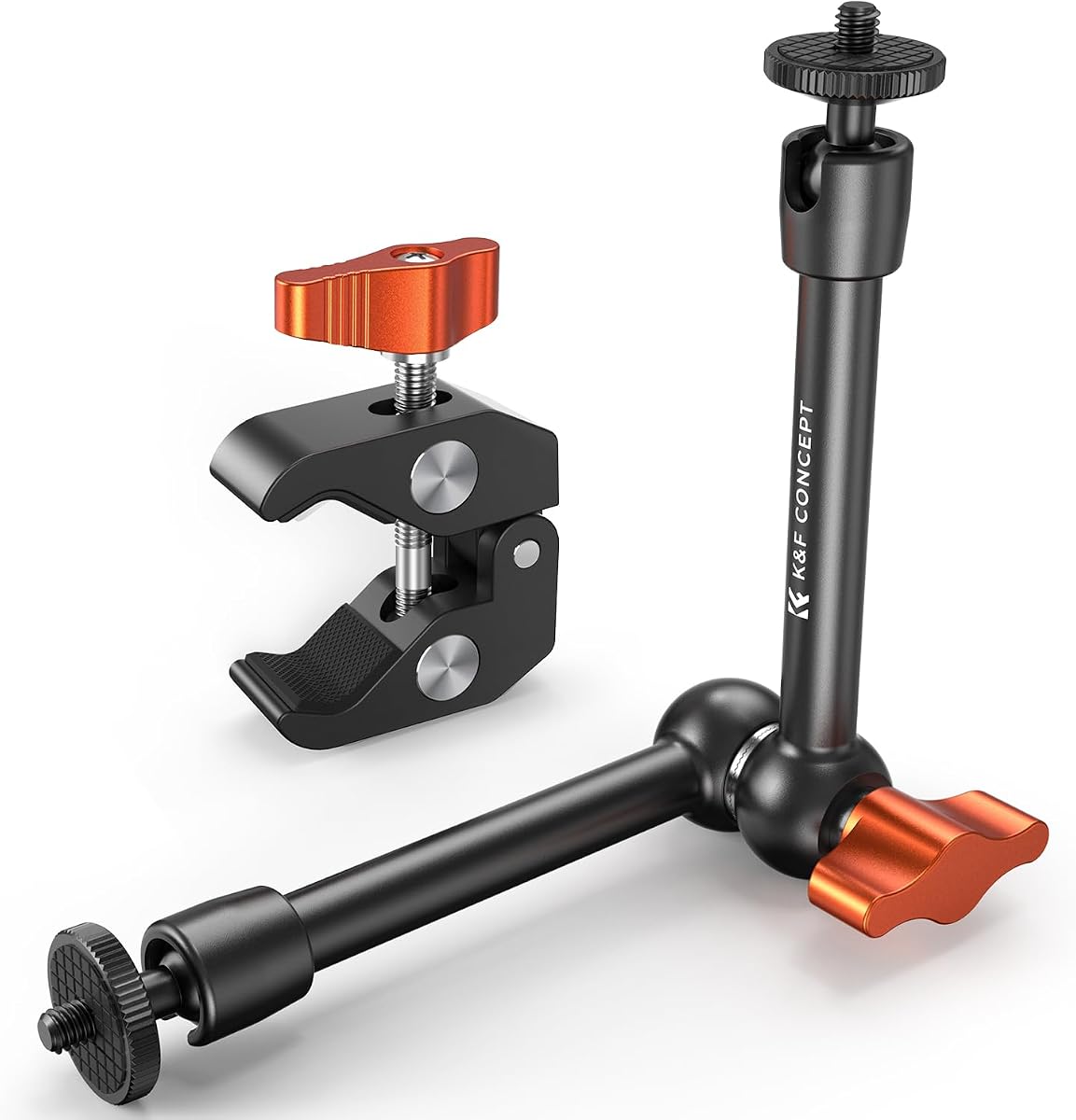
This K&F CONCEPT model is designed with flat desk surfaces in mind offering superior gripping strength for standard offices. The clamp features soft rubber pads that protect your table from scratches while ensuring the mount stays put. Its gooseneck arm holds devices securely without sagging during use.
We may earn a commission when you buy through this link, at no additional cost to you.
The durable aluminum alloy construction makes it sturdy for long-term use. The arm is wrapped in silicone to keep it smooth and prevent debris from falling off. This attention to detail adds to the overall quality and user experience of the product.
It has a wide compatibility with webcams and action cameras thanks to the 1/4 inch screw and expansion holes. You can use it for product photography or live streaming with ease. However it is best suited for flat tables rather than round poles.
If you work from a standard desk and need a reliable mount, this is a solid choice. It balances stability and ease of use well. Just ensure your desk thickness fits the 5 to 45 mm range for optimal security.
Soft rubber pads and silicone wrapping keep your desk free from scratches and debris.
1/4 and 3/8 screw holes allow you to attach lights or mics to your rig easily.
We may earn a commission when you buy through this link, at no additional cost to you.
This magic arm kit offers a high load capacity of 2 kilograms which is impressive for its compact size. It uses an all-metal design that ensures durability and stability during use. The dual ball head allows for full 360 degree rotation to position your device precisely.
We may earn a commission when you buy through this link, at no additional cost to you.
It is designed for static scenes such as photography or video calls where the camera does not need to move often. The anti-slip cushions increase friction and protect your device from wear. You can mount it on poles or tables within a 15 to 55 mm opening range.
The shorter 9.8 inch reach makes it ideal for setups where the mount is close to the subject. However avoid using it in dynamic situations like cycling to prevent movement. The knob screw makes it easy to adjust tension and lock positions quickly.
If you need a small but strong arm for desktop use this is a great pick. It handles heavier loads better than many gooseneck alternatives. Just keep your setup static to get the most out of this model.
Supporting up to 2 kg this arm holds heavier cameras without flexing or drooping.
A single knob lets you lock or loosen the joints for smooth positioning.
We may earn a commission when you buy through this link, at no additional cost to you.
This NEEWER arm is a versatile choice that works well for both flat desks and round poles. Its 22 inch length gives you plenty of reach for overhead shots without taking up too much desk space. The three 360 degree ball heads allow for flexible adjustments to any angle.
We may earn a commission when you buy through this link, at no additional cost to you.
The anti twist pin at each interface ensures that the connections stay secure even if bumped. This design prevents loosening over time which is crucial for maintaining image quality. Padded rings on the ball heads protect your equipment from drops.
It fits a wide range of devices including webcams microphones and phones up to 500 grams. This flexibility makes it suitable for streaming gaming and podcasting setups. The clamp works on surfaces up to 2 inches thick or cylindrical objects up to 1.6 inches.
If you want a reliable arm for multiple uses this is a strong recommendation. It balances cost and features well for most users. Check current pricing and availability before purchasing as it may vary by region.
Mount to flat desks or round poles with equal security using the dual clamp design.
Anti twist pins keep joints locked in place during use.
We may earn a commission when you buy through this link, at no additional cost to you.
This 22 inch kit is built with all-metal components for superior durability and strength. It includes a super clamp that can grip both flat surfaces and cylindrical objects with rotatable blocks. This versatility is ideal for creators who need to mount in various locations.
We may earn a commission when you buy through this link, at no additional cost to you.
The magic arm features non-slip foam padding on the arms to protect your equipment from scratches. This detail is often missing in cheaper models and adds to the professional feel. Anti-twist pins ensure that the connection between the clamp and arm remains secure.
With a load capacity of 1 kg it handles a good range of webcams and small lights. The locking knob makes it easy to secure the position once you have found the right angle. Just avoid using it during dynamic activities to prevent loosening.
If you need a sturdy arm for overhead photography or streaming this is a solid option. It offers more robust features than many basic goosenecks. Verify the current price as it may fluctuate on online stores.
All-metal construction ensures long-lasting use even with frequent adjustments.
Foam padding on the arm keeps your camera safe from scratches.
We may earn a commission when you buy through this link, at no additional cost to you.
This model stands out with a perfect 5.0 rating due to its exceptional reach and flexibility. The 36.6 inch arm is made with a solid aluminum-magnesium alloy core that bends well without drooping. It includes a phone holder so you can mount your device securely for video calls.
We may earn a commission when you buy through this link, at no additional cost to you.
The S or Z curve capability allows for enhanced stability when used on flat surfaces. It fits tables up to 6.5 cm thick and includes silicone padding to prevent scratches. The design is compact enough to save space and tuck behind your computer when not in use.
It is ideal for Zoom meetings and live streaming where eye level positioning is key. The foldable design makes it easy to store or move between locations. However the weight might be a factor for lighter desks that need extra stability.
If you need a long reach stand at a budget price this is highly recommended. It combines practical features with excellent stability. Check availability before buying as high ratings often lead to stock shortages.
The 36.6 inch length lets you position your camera far from your desk surface.
The clamp base folds up to store neatly behind your monitor.
We may earn a commission when you buy through this link, at no additional cost to you.
This kit offers multiple combinations allowing you to create a custom rig for your needs. It includes a holding arm adapter and a 360 degree ballhead for flexible angle adjustments. The desktop stand height can be adjusted from 32.5 cm to 55 cm to suit different rooms.
We may earn a commission when you buy through this link, at no additional cost to you.
It is made of high-quality steel and ABS which provides a sturdy base for your camera. The holding arm is 33 cm long and can connect to ring lights or webcams easily. This makes it perfect for overhead content like makeup tutorials or craft videos.
The max load is 0.5 kg so keep your setup light to avoid strain on the joints. It is compatible with Logitech microphones and various cell phones with the included holder. While setup takes time the result is a versatile overhead solution.
If you need a system that grows with your gear this is a good choice. It supports various accessories and devices effectively. Always ensure your desk is strong enough to handle the total weight of your setup.
Raise the stand up to 55 cm for comfortable viewing angles.
Add lights or mics to the arm to build your ideal studio setup.
We may earn a commission when you buy through this link, at no additional cost to you.
This 11 inch arm is designed for users who need a strong and compact mounting solution. It has a high load capacity of 2 kg which is rare for such a short arm. The super clamp can open up to 55 mm to grip a variety of poles or tables.
We may earn a commission when you buy through this link, at no additional cost to you.
The all-metal design and anti-scratch cushions ensure that your gear stays protected. It includes 1/4 and 3/8 locating holes to attach lights or flashes directly to the base. The knob screw allows for simultaneous tensioning and loosening of the magic arm.
It is suitable for static or mildly dynamic scenarios like desktop recording or close-ups. Avoid using it with heavy cameras during vigorous movement to prevent loosening. The rubber pad at the top of the magic arm adds extra protection for your equipment.
If you need a small but powerful arm for tight spaces this is a great pick. It balances strength and size well for most users. Check current prices before purchasing as it may be subject to discounts.
The super clamp holds objects from 15 mm to 55 mm wide securely.
The 11 inch length provides stability without taking up much space.
We may earn a commission when you buy through this link, at no additional cost to you.
Selecting the right clamp on webcam arm requires considering several factors to ensure stability and compatibility. We break down the key elements you should look for to make an informed choice.
The material used in the arm and clamp determines its durability and ability to hold weight. Aluminum alloy is common in premium models because it is strong yet lightweight. Metal clamps with rubber or silicone pads protect your desk and prevent slipping better than plastic options.
Look for all-metal or aluminum builds with protective padding to ensure long-term use without damage.
Reach refers to how far the arm can extend from the base which is critical for overhead shots. Gooseneck arms offer more flexibility but may sag under weight. Magic arms with ball heads provide precise positioning but require more effort to adjust.
Choose a reach that matches your desk size and the distance you need from your subject.
Every arm has a maximum weight limit that it can safely hold without sagging or slipping. Most webcams weigh less than 500 grams so many models will suffice. However if you plan to attach lights or heavy microphones check the load rating carefully.
Always ensure your device weight is within the arm's specified limit for safe operation.
The clamp mechanism determines how securely the arm attaches to your desk or surface. C-clamps work best on flat desks while crab clamps can grip round poles or pipes. Look for adjustable openings that match your surface thickness to ensure a tight fit.
Check the clamp opening range to make sure it fits your table or stand securely.
Most webcams use a standard 1/4 inch screw thread for mounting which fits most arms. Some models also include 3/8 inch threads for expanded compatibility with tripods and lights. Ensure the mount has the correct screw type for your camera before buying.
Verify the thread size on your camera matches the arm's screw to avoid compatibility issues.
Adjustment knobs and ball heads affect how easy it is to position your camera for the perfect shot. Smooth knobs allow for quick changes while tight ones keep the position locked. Friction-based arms are easier to handle but may loosen over time.
Look for knobs that allow smooth rotation yet lock firmly in place to maintain your angle.
If you move your setup often consider how compact the arm is when not in use. Foldable or short arms take up less space in your bag or desk. Some models come with storage bags or simple designs that are easy to pack.
Choose a design that fits your travel needs and does not clutter your workspace.
Start by attaching the clamp to a flat stable surface like a desk or table edge. Ensure the opening is wide enough to fit the surface thickness and tighten it securely with the screw. Use a hand to hold the arm while tightening to prevent wobbling during setup.
Position your webcam by bending the gooseneck or adjusting the ball heads to the desired angle. Use the knobs to lock the joints in place so the camera does not move during use. Check that the camera is centered and aligned with your view for clear shots.
To clean the arm use a dry cloth to remove dust from the surface and clamp pads. Do not use harsh chemicals that might damage the rubber or silicone parts. Check the tightening screws regularly to ensure they remain secure after frequent adjustments.
A gooseneck arm uses a flexible tube that you bend to position the camera manually. It is simple and affordable but may sag under heavy loads. A magic arm uses ball heads that you rotate and lock for precise positioning and better stability with weight.
Some arms come with crab clamps that can grip round poles or pipes like desk legs. However not all models support this so check the clamp opening shape and size before buying. If your desk leg is round use a model that specifies compatibility with cylindrical objects.
Most webcam arms have a load capacity between 500 grams and 1 kilogram. Light webcams and phones usually fit within this range. For heavier cameras or accessories choose an arm rated for 2 kilograms or more to ensure safety.
Many modern arms include a phone holder or adapter in the box. This allows you to mount a smartphone for video calls or streaming. Check the product details to see if a phone holder is included or if you need to buy one separately.
Movement often happens if the clamp is not tight enough or the desk is not steady. Make sure to tighten the screw firmly and use both hands to adjust the arm. If the arm is too long it might wobble so consider shorter options for stability.
Yes if the arm has 1/4 or 3/8 inch threads it can hold a ring light or microphone. Many models include these threads to expand your setup. Verify the thread size matches your accessory to connect it securely without extra adapters.
We reviewed ten top models ranging from budget goosenecks to premium magic arms to help you find the right fit. Each option offers unique strengths whether you need long reach or strong load capacity. Our picks include the best choices for various needs and budgets in 2026.
When choosing prioritize the load capacity and material quality to ensure your camera stays safe. A sturdy aluminum arm with a good clamp will last longer than a plastic one. Match the reach to your desk size to avoid unnecessary clutter or instability.
Always check the current availability and price before making your final purchase decision. Deals and stock levels may change so act quickly if you find a model that suits your setup. With the right arm your video quality and workspace will improve significantly.