
Logitech Brio 101 Full HD Webcam
4.4Editor score
RightLight auto light balance
Integrated privacy slide cover
Plug and play USB A
Discover the top 1080p webcams for 2026. We compare image quality, microphones, privacy, and compatibility to help you choose the best webcam for work or
In a world where video calls are the norm, having a high quality webcam is essential for professional communication and creative projects. A good 1080p webcam ensures you look sharp and clear whether you are presenting to clients or chatting with friends. The right camera can elevate your presence and make every interaction more engaging and effective for everyone involved.
We have carefully evaluated the leading models on the market based on video clarity, audio performance, ease of use, and build quality. Our team analyzed technical specifications, user feedback, and real world performance to compile this definitive list. Each entry was chosen for its ability to deliver reliable 1080p video and a great experience across various platforms and setups.
Every pick in this guide highlights specific strengths that cater to different needs ranging from budget friendly options to premium business tools. You will find detailed breakdowns of features like autofocus, privacy shutters, and microphone quality to help you decide. Please note that prices and availability can change frequently so check current listings before making your final purchase today.
4.4Editor score

4.6Editor score

4.4Editor score
This side by side comparison highlights the key specifications and features of the top rated 1080p webcams available today. Reviewing these details helps you quickly identify which model fits your specific needs for video conferencing streaming or content creation.




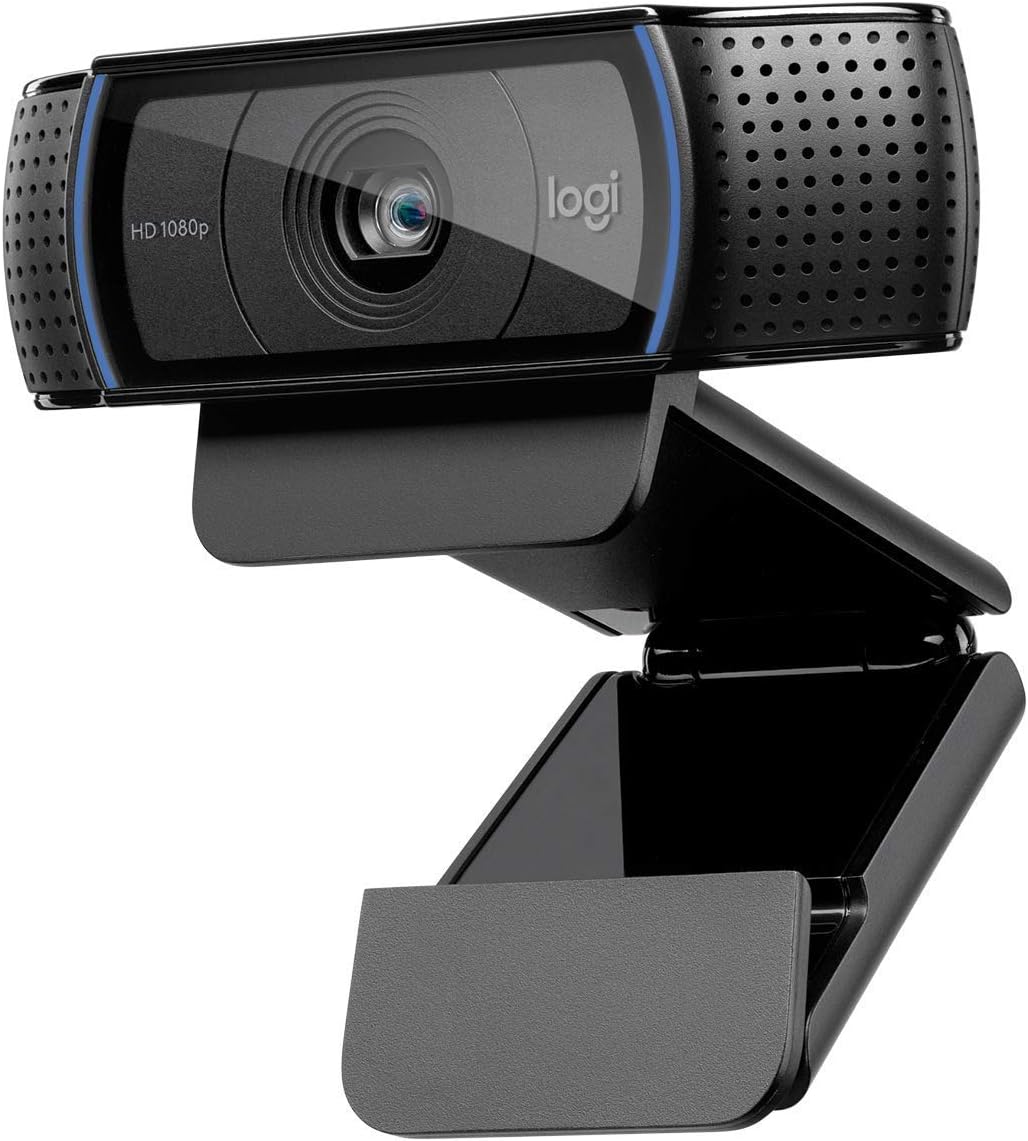


The Logitech C920x HD Pro webcam is a standout performer in the 1080p category with a 4.6 star rating. It delivers sharp video and clear audio making it ideal for professional meetings and casual calls alike. This model builds on a trusted legacy with modern improvements that enhance its reliability and image performance.
We may earn a commission when you buy through this link, at no additional cost to you.
Its autofocus technology ensures you stay in focus even if you move around during a call. The dual microphones capture stereo audio which sounds much better than mono options found on cheaper cameras. Users praise the clarity of the video which looks great even in moderate lighting conditions thanks to automatic light correction.
While it lacks a privacy shutter which some competitors include the image quality and audio performance are hard to beat. The absence of a shutter is a trade-off for a more streamlined design that fits well on any monitor. The clip is robust and mounts securely to prevent wobbling during use.
If you want a dependable webcam that just works without fuss this is the top recommendation. It suits remote workers students and streamers who need clear visuals and sound. Its compatibility with platforms like Zoom and Teams makes it a versatile choice for any setup.
Autofocus keeps your face sharp even when you shift position during long calls. This feature prevents blurry video which can look unprofessional during important meetings.
Dual microphones capture sound from multiple directions reducing the chance of muffled audio. Clear sound ensures your voice is heard without distractions or background noise.
We may earn a commission when you buy through this link, at no additional cost to you.
The Logitech Brio 101 offers excellent value with a 4.4 star rating for users needing a reliable budget option. It provides 1080p video and includes a privacy slide which is a rare feature at this price. The camera is easy to set up and works with most major video calling apps right out of the box.
We may earn a commission when you buy through this link, at no additional cost to you.
RightLight technology adjusts brightness and contrast automatically so you look good even in dim rooms. The privacy slide gives you physical control over when the camera is active enhancing security during work from home. This balance of cost and privacy features makes it highly attractive for home users.
Fixed focus means the image is sharp for typical desk distances but might not adjust if you move closer. The microphone is functional but not as rich as dual mic setups found on higher end models. However for casual calls and meetings these compromises are usually acceptable for the savings.
Choose this camera if you want a simple secure and affordable solution for daily video communication. It is perfect for those who prioritize privacy and ease of use over advanced streaming features. The included USB cable ensures a stable connection to your computer or dock.
The privacy slide allows you to physically block the lens when not in use. This gives peace of mind and ensures no one can see you when you step away.
RightLight boosts brightness and reduces shadows so your face looks natural. You do not need studio lights to look presentable on screen.
We may earn a commission when you buy through this link, at no additional cost to you.
The EMEET S600 brings premium streaming quality with a Sony 4K sensor and a 4.4 star rating. It is designed for creators and professionals who need top tier visuals and advanced autofocus tech. Phase detection autofocus locks on quickly and maintains focus even in dynamic scenes.
We may earn a commission when you buy through this link, at no additional cost to you.
Its noise canceling algorithm filters out background sounds so your voice stays clear. You can adjust the field of view to fit your workspace which adds flexibility for different use cases. The privacy cover is integrated into the lens design making it durable and easy to use.
Using the full potential requires installing the EMEETLINK software which adds a small step to setup. The camera is built solidly with strong joints so it stays stable on your desk. While more expensive than standard 1080p models the video quality justifies the investment for serious users.
If you stream games or create content this camera offers capabilities that exceed typical business webcams. It is also great for high value virtual meetings where image detail matters. The rugged design ensures it will last through daily use and travel.
4K resolution provides more detail and allows for cropping without losing quality. This is essential for creators who want professional looking video output.
PDAF focuses faster and more accurately than contrast based systems. You get sharp video from the moment the call starts without delays.
We may earn a commission when you buy through this link, at no additional cost to you.
The Logitech C920S HD Pro is a refined version of the classic C920 with a privacy shutter and 4.6 stars. It delivers reliable 1080p video and clear stereo audio for all your calls. The shutter adds a layer of physical security that users appreciate for privacy.
We may earn a commission when you buy through this link, at no additional cost to you.
Glass lenses provide better color accuracy and sharpness than plastic alternatives used by some brands. Light correction ensures you look bright and clear even if your room is not perfectly lit. It is a great all around performer for both work and leisure calls.
The shutter slides manually so you need to remember to close it when you hang up. While effective it is not as convenient as a sliding cover on the lens itself. There is no special software included so it relies on system settings for adjustments.
Choose this if you want a trusted name with a privacy feature that does not require power. It is perfect for professionals who value security and image quality equally. The build quality ensures it will handle daily use without issues.
Glass optics reduce distortion and improve light transmission for sharper images. This results in more natural colors and better detail on your face.
Dual mics capture sound from left and right creating a wider audio field. It helps with spatial awareness during group calls or online meetings.
We may earn a commission when you buy through this link, at no additional cost to you.
The Logitech C920e HD is certified for Zoom and Microsoft Teams making it ideal for corporate use. It has a 4.6 star rating and includes a privacy screen for security. The fixed field of view keeps the frame stable which is helpful for consistent meetings.
We may earn a commission when you buy through this link, at no additional cost to you.
Its microphones are optimized for voice capture from up to a meter away ensuring clarity. The attachable privacy screen flips easily to protect your view when not in use. It also mounts on a tripod giving you flexibility in placement beyond just monitors.
The fixed angle means you must sit still for the frame to stay perfect. This can be a limitation for users who move around a lot during calls. The enterprise features may require additional software for advanced device management.
This model is best for organizations that need certified hardware for compliance and reliability. It ensures seamless integration with business tools and stable performance. The sturdy design makes it a long term asset for office environments.
Certification guarantees the camera works flawlessly with specific business platforms. This reduces troubleshooting time and ensures high quality video calls.
A screen over the lens blocks the view without electronic sensors. It is simple to use and confirms visual privacy instantly at a glance.
We may earn a commission when you buy through this link, at no additional cost to you.
The EMEET C960 offers a 90 degree wide angle lens perfect for sharing your workspace. It earns a 4.4 star rating with strong audio from two mics. The wide field of view captures more of your room without needing to move the camera often.
We may earn a commission when you buy through this link, at no additional cost to you.
Auto exposure helps balance images in different lighting conditions automatically. The USB-C adapter ensures compatibility with modern laptops that lack traditional USB ports. It is a versatile option for users who value audio and visual coverage.
Fixed focus works well for desks but may soften faces if you sit too close. It is not compatible with Windows Hello so you will need other login methods. Still these are minor issues given the low price and feature set.
Pick this if you need to show items or colleagues in your frame during calls. It is great for collaborative sessions where more than one person is visible. The included privacy cover adds a necessary layer of security.
A 90 degree view captures more space so you can show products or whiteboards. This is useful for presentations or team discussions at home.
Two mics pick up sound from all directions reducing dead zones. It ensures your voice is clear even if you move around the room.
We may earn a commission when you buy through this link, at no additional cost to you.
The NexiGo N60 is a budget friendly pick with a 4.3 star rating and solid performance. It offers clear 1080p video and includes a privacy cover. The camera works on many operating systems without extra drivers making it easy to start.
We may earn a commission when you buy through this link, at no additional cost to you.
Its noise canceling mic reduces background sounds so your voice stands out clearly. The glass lens provides a crisp image at typical desk distances. It is a great choice for students or casual users who need reliability.
Fixed focus limits flexibility if you move closer than standard ranges. The software is basic which is fine for simple use but lacks advanced controls. Still the core performance matches more expensive models.
Choose this if you need a simple plug and play webcam with privacy protection. It fits well for daily calls and learning sessions. The wide compatibility means it works with most devices you own.
No need to install drivers so it works instantly on most computers. This saves time and reduces technical issues during setup.
The mic filters out fans or chatter so your voice stays clear. It improves the listening experience for everyone on the call.
We may earn a commission when you buy through this link, at no additional cost to you.
The Logitech C920 HD Pro is a classic model with a 4.6 star rating for good reason. It delivers dependable 1080p video and clear audio for all calls. The glass lens ensures sharp images that look professional on screen.
We may earn a commission when you buy through this link, at no additional cost to you.
It handles automatic light correction well so you look bright in varied rooms. The dual mics provide balanced stereo audio. Its wide compatibility means it works with almost any app without issues.
Lacking a privacy shutter is a downside for privacy focused users. The design is older but robust and fits on most laptops or monitors. It remains a top choice for those who value performance over modern extras.
Pick this if you want a trusted workhorse that handles daily calls well. It is great for users who prioritize image quality and sound. The build quality ensures it will last for years of regular use.
Supports widescreen 1080p formats for better viewing on modern screens. This ensures you fill the frame properly during video calls.
Years of updates mean drivers and software are stable. It is a reliable tool for businesses and home users alike.
We may earn a commission when you buy through this link, at no additional cost to you.
The Logitech Brio 105 is certified for Google Meet and earns a 4.4 star rating. It provides a1080p video with a privacy shutter for security. The RightLight balance ensures your face is bright and clear in any lighting.
We may earn a commission when you buy through this link, at no additional cost to you.
It is supported by Logitech Sync for remote deployment which helps IT teams manage devices. The shutter slides easily to cover the lens when not in use. It works well with Chromebooks and Windows machines alike.
Audio is functional but not as rich as models with dual mics. Focus is fixed which is fine for desks but limits flexibility. Still it is a great mid range option for business users.
Choose this if you need a reliable webcam for Google Meet and standard calls. It offers a balance of performance and privacy features. The simplicity of use makes it ideal for non technical staff.
Certification ensures seamless integration with Google Meet features. You get the best performance and no compatibility issues.
RightLight adjusts exposure so you look good in any room. It saves you from worrying about background lighting.
We may earn a commission when you buy through this link, at no additional cost to you.
The Logitech Brio 100 Renewed offers a budget friendly entry with a 4.5 star rating. It delivers 1080p video and is reliable for basic calls. Being renewed means it is inspected and tested which adds confidence at a lower cost.
We may earn a commission when you buy through this link, at no additional cost to you.
The narrow 58 degree field of view focuses on you rather than surroundings. It ensures you stay central in the frame during calls. The built in mic captures clear audio for conversations.
Renewed products are inspected but may lack original packaging. The narrow field of view is fine for solo calls but limits group calls. It is still a solid choice for those watching their budget.
Pick this if you want quality video at a minimal price. It is great for single user calls. The renewed status ensures it works well without the cost of new.
Renewed items are tested for quality and functionality. You get the benefits of a working device at a lower price.
A narrow field of view keeps your focus on your face. It reduces distractions and keeps the call personal.
We may earn a commission when you buy through this link, at no additional cost to you.
Choosing the right 1080p webcam involves understanding key features that impact your video and audio quality. This guide breaks down the essential factors to help you make an informed decision for your setup.
Resolution determines how clear and detailed your image will be on screen. A true 1080p webcam delivers sharp video that makes you look professional during calls. Always verify the specs to ensure you get actual 1080p and not just HD.
Frame rate affects how smooth your video moves during transmission. Standard webcams offer 30fps which is enough for most calls. Higher rates like 60fps provide smoother motion if you move around a lot.
Autofocus keeps your image sharp even if you shift positions during calls. Fixed focus works for static desks but can blur if you lean closer. Models with autofocus ensure consistent quality throughout long meetings.
Light correction adjusts exposure and contrast for better image quality in varied lighting. Good tech helps you look clear even in dim rooms. Look for features like auto light balance for consistent performance.
Dual microphones provide better audio and reduce background noise. They allow for stereo sound which is clearer than single mics. Check if the mic is noise canceling to stay clear in busy rooms.
Field of view defines how much space the camera captures. A 90 degree view is great for sharing space. A 58 degree view keeps focus on you. Choose based on your needs.
Privacy shutters and covers block the lens to ensure security. Physical covers are more reliable than software ones. Having this feature adds peace of mind when not in active calls.
Ensure the webcam works with your operating system and apps. Most support Windows macOS and major conferencing tools. Check certifications for business tools if needed for corporate use.
To start using your webcam simply connect it to a USB port on your computer. The system should recognize it automatically and install drivers if needed. You can test it in your video calling app to ensure it works correctly.
Position the camera at eye level to maintain a natural angle during calls. Adjust the brightness and focus in your software settings for the best image. Proper lighting in front of you will improve video quality significantly.
Keep the lens clean with a soft cloth to avoid smudges and scratches. Store it in a safe place when not in use to prevent damage. If your webcam has a cover close it to protect privacy when idle.
Yes it is generally recommended because it provides clear sharp images that make a better impression. 1080p ensures details are visible and avoids the pixelation common in 720p models. Most platforms support 1080p for smooth performance.
Check your laptop specs to see if it lists HD or Full HD resolution. If you need better quality or a privacy cover a external webcam is a great upgrade. Built in cameras often lack adjustable angles.
Yes many 1080p webcams work well for streaming on platforms like Twitch. Look for models with low latency and good light performance. Some also offer 60fps for smoother video during active sessions.
Place a light source in front of you to evenly illuminate your face. Avoid strong backlighting which can make you look dark. Natural light from a window works well when positioned correctly.
Some models like the C920e have standard 1/4 inch threads for tripods. Others only have clips for monitors so check specs before buying. Tripod mounts offer more flexibility for camera placement.
A dedicated webcam offers better focus stability and audio. Phone cameras are convenient but require mounting for desk use. Webcams are designed for long duration calls and multitasking.
We highlighted top models like the C920x for reliability and the EMEET S600 for premium features. Each webcam offers unique strengths to suit different budgets and needs. Our goal was to help you find the best balance of quality and value.
Focus on what matters most to your daily tasks such as privacy autofocus or audio. Whether you need a budget tool or a business certified device there is a pick for you. Prioritize features that improve your communication experience.
Remember to check current prices and availability before making a purchase. Deals change often and stock varies by region. A quick comparison ensures you get the best price for the webcam you select.