
Dell 24 240Hz Gaming Monitor
4.7Editor score
240Hz refresh rate
0.5ms response time
IPS panel technology
Finding the right display can drastically improve your aim and reaction time in fast-paced shooters like Valorant. High refresh rates ensure smooth motion and reduced input lag which are critical for competitive play.
We evaluated ten leading monitors based on panel technology response times and gaming features. Each model offers unique strengths tailored to different budget levels and setup preferences for serious gamers.
Each pick highlights key specs and real-world performance traits to help you decide. Please note that prices fluctuate frequently so check current listings before making your final purchase decision today.
4.7Editor score

4.6Editor score
4.5Editor score
As an Amazon Associate we earn from qualifying purchases.
The following table provides a side-by-side comparison of all ten monitors to help you quickly identify key differences in size resolution and response times.


This Dell monitor stands out as a top contender for Valorant players seeking a balance of performance and affordability. With a 4.7 star rating it delivers smooth visuals and rapid response times essential for competitive play.
We may earn a commission when you buy through this link, at no additional cost to you.
Its Fast IPS panel ensures excellent color accuracy across wide viewing angles while the 240Hz refresh rate keeps motion crisp. The 0.5ms response time minimizes blur helping you track enemies effortlessly during intense matches.
While it lacks advanced ergonomic adjustments the monitor offers essential tilt functionality and eye comfort certifications. These trade-offs are acceptable given the strong performance metrics and reliable build quality at this price segment.
Ideal for budget-conscious gamers who prioritize fluid gameplay without compromising on color fidelity this monitor provides a solid foundation for competitive setups. Its seamless integration with AMD GPUs ensures tear-free performance right out of the box.
The IPS technology delivers superior color reproduction and viewing angles compared to standard TN panels for a more immersive experience.
TÜV Rheinland 3-star certification reduces blue light emissions protecting your eyes during long gaming sessions without compromising color quality.
We may earn a commission when you buy through this link, at no additional cost to you.
This AOC monitor offers a compelling upgrade for players who want sharper visuals alongside high refresh rates. Its 27-inch QHD panel combined with overclocking capabilities provides a distinct edge in detail and motion clarity.
We may earn a commission when you buy through this link, at no additional cost to you.
The 0.3ms MPRT response time ensures minimal motion blur making it ideal for tracking fast-moving targets in Valorant. Adaptive-Sync support guarantees smooth gameplay regardless of whether you use AMD or NVIDIA graphics cards.
Although it lacks height adjustment the tilt range allows for comfortable viewing angles. The frameless design enhances immersion while the gaming presets simplify tuning for specific game modes without navigating complex menus.
Recommended for gamers with capable GPUs who demand high resolution and responsiveness this monitor blends performance with modern aesthetics. Its versatile connectivity ensures seamless integration into diverse desktop configurations.
The 2560×1440 resolution offers significantly more screen real estate and detail than standard FHD for a competitive advantage.
Custom game modes optimize color and brightness settings to enhance visibility in dark corners and shadow areas during matches.
We may earn a commission when you buy through this link, at no additional cost to you.
SANSUI delivers impressive specs at a highly competitive price point making this model a favorite among budget-conscious Valorant players. The potential to reach 300Hz offers headroom for future upgrades while current performance remains solid.
We may earn a commission when you buy through this link, at no additional cost to you.
With sRGB coverage exceeding 120% this monitor provides vibrant and accurate colors that enhance visual clarity during gameplay. The included DP cable and robust warranty support add significant value to the overall package for new buyers.
While it lacks audio outputs and premium ergonomics the focus on core gaming metrics like refresh rate and response time is clear. These omissions are minor compared to the performance benefits it offers for competitive titles.
Best suited for players prioritizing raw speed and value this monitor ensures smooth visuals without breaking the bank. Its strong customer support commitment provides peace of mind for long-term usage.
Wide sRGB coverage ensures that textures and lighting effects appear vivid and true to life for a more immersive gaming experience.
The ability to overclock up to 300Hz means you can push beyond standard 240Hz limits as your hardware improves.
We may earn a commission when you buy through this link, at no additional cost to you.
This Amzfast monitor introduces a curved design to the 240Hz category offering a unique immersive experience for FPS games. Its ultra-slim base is ideal for tight desks allowing space for keyboards or other peripherals underneath.
We may earn a commission when you buy through this link, at no additional cost to you.
The joystick OSD control streamlines menu navigation so you can adjust settings without interrupting gameplay. High contrast ratios and HDR support contribute to richer visuals helping you spot enemies in shadowed areas more effectively.
While the brand lacks extensive customer feedback the feature set suggests strong value for those seeking curvature and convenience. Eye protection features help reduce strain during marathon gaming sessions ensuring comfort over time.
Recommended for players wanting a distinctive setup with practical desk solutions this monitor balances innovation with performance. It is a compelling choice for those exploring alternatives to traditional flat panels.
The curved panel wraps around your peripheral vision increasing focus and immersion while reducing distractions from the environment.
The ultra-slim base design allows you to slide your keyboard underneath maximizing valuable desktop workspace for your mouse.
We may earn a commission when you buy through this link, at no additional cost to you.
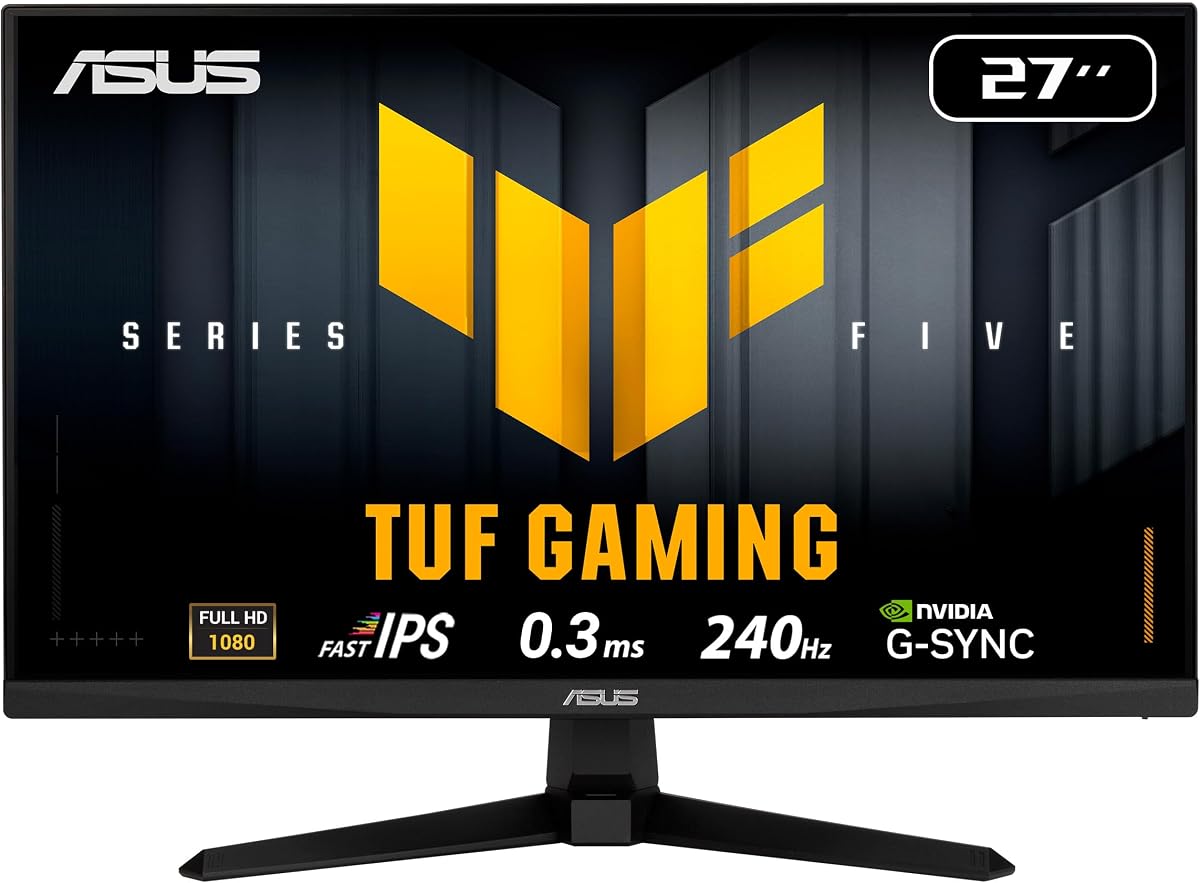
The ASUS TUF VG279QM5A is a powerhouse designed for serious competitive gamers who demand top-tier performance and reliability. Its Fast IPS panel delivers ultra-fast response times ensuring that every action is rendered with precision.
We may earn a commission when you buy through this link, at no additional cost to you.
Advanced features like ELMB SYNC eliminate motion blur while maintaining high refresh rates which is rare in most monitors. AI-enhanced gaming tools help tailor the experience to your specific needs without requiring manual tuning.
The three-year warranty and included Adobe subscription add substantial value beyond the hardware itself. While it carries a higher price tag the comprehensive support and premium features justify the investment for professionals.
Ideal for esports enthusiasts and content creators alike this monitor provides a robust platform for high-performance tasks. Its combination of speed accuracy and extended warranty makes it a standout choice in the premium category.
This proprietary technology reduces motion blur without sacrificing refresh rates ensuring clear visuals even in rapid movement.
A three-year manufacturer warranty provides long-term peace of mind protecting your investment against unexpected hardware failures.
We may earn a commission when you buy through this link, at no additional cost to you.
With a 4.8 star rating this MSI monitor is highly praised for its balance of performance and visual quality. The VA panel offers deep blacks and high contrast making dark scenes in games appear richer and more detailed.
We may earn a commission when you buy through this link, at no additional cost to you.
Its 0.5ms GtG response time is impressive for a VA panel ensuring responsive gameplay without significant ghosting. AI Vision technology automatically adjusts brightness and color saturation to enhance visibility across different lighting conditions.
The inclusion of both HDMI and VGA ports provides versatile connectivity options for older systems or specific setups. While VA panels typically have narrower viewing angles the high resolution ensures central clarity remains excellent for single-player or focused gaming.
Best for gamers who value visual depth and reliability this monitor delivers consistent performance without requiring extensive tweaking. Its strong user feedback confirms it as a dependable choice for daily competitive sessions.
The VA panel technology delivers superior contrast ratios compared to IPS resulting in deeper blacks and richer dark details.
Automated brightness and saturation adjustments help reveal hidden enemies in dark areas improving situational awareness.
We may earn a commission when you buy through this link, at no additional cost to you.
This AOC model excels in offering high refresh rate performance at a reasonable price for 27-inch displays. Its ability to reach 260Hz provides a competitive edge for players with powerful GPUs looking to maximize frame rates.
We may earn a commission when you buy through this link, at no additional cost to you.
The 0.5ms MPRT response time ensures sharp visuals during fast movement while Adaptive-Sync keeps gameplay smooth. Energy-efficient modes help reduce power consumption without sacrificing performance which is beneficial for long gaming sessions.
Setup is straightforward thanks to user-friendly software and simple cable inclusions. While the stand lacks height adjustment the tilt range allows for comfortable positioning and the frameless look fits modern setups perfectly.
Ideal for gamers seeking high refresh speeds without a premium price tag this monitor delivers strong performance across various titles. Its balanced feature set makes it a versatile choice for both casual and competitive players.
Pushing the refresh rate to 260Hz unlocks additional smoothness for high-FPS titles like Valorant and CS2.
Eco Mode reduces typical power usage to 22W making this monitor an energy-efficient choice for large setups.
We may earn a commission when you buy through this link, at no additional cost to you.
Combining affordability with a curved panel this SANSUI monitor offers a unique experience for entry-level competitive players. The 1500R curvature increases immersion making it easier to track targets across the screen during intense firefights.
We may earn a commission when you buy through this link, at no additional cost to you.
With sRGB coverage exceeding 120% colors appear vibrant and accurate enhancing the visual fidelity of the game. Built-in game assistants like crosshair overlays help improve aim accuracy without requiring external software tools or plugins.
The shadow booster feature brightens dark areas improving visibility in low-light scenes which is crucial in tactical shooters. While it lacks advanced ergonomics the tilt range is sufficient for most standard desk setups and viewing preferences.
Recommended for gamers on a budget who want enhanced immersion and practical gaming tools this monitor balances cost and utility effectively. Its strong warranty support adds confidence for those trying a new brand for their setup.
The 1500R curvature matches natural human eye geometry reducing eye strain and increasing focus on the screen content.
On-screen crosshairs and overlays provide quick tools to help improve aiming consistency during ranked matches.
We may earn a commission when you buy through this link, at no additional cost to you.
This ASUS model stands out for its superior ergonomic design allowing height adjustments for a personalized viewing experience. The Fast IPS panel ensures rapid response times essential for competitive shooters like Valorant where every millisecond counts.
We may earn a commission when you buy through this link, at no additional cost to you.
G-SYNC compatibility and ELMB SYNC work together to eliminate tearing and blur providing a clean and fluid image. The DisplayWidget Center simplifies settings adjustments using a mouse which is more convenient than on-screen menu navigation.
Although it comes at a slightly higher price the ergonomic features justify the cost for users who sit for long periods. It is a thoughtful choice for those who prioritize comfort and health alongside high gaming performance.
Best for competitive players seeking comfort and speed this monitor combines top-tier performance with user-friendly design. Its comprehensive warranty ensures long-term reliability making it a solid investment for dedicated gamers.
Height adjustable stand allows you to align the screen with your eye level reducing neck strain during long sessions.
Software control via PC mouse streamlines changes to refresh rates and modes without needing physical buttons.
We may earn a commission when you buy through this link, at no additional cost to you.
The ASUS TUF VG259QM5A offers a 25-inch screen size that strikes a balance between visibility and desk space. Its Fast IPS panel delivers ultra-fast 0.3ms response times ensuring pixel clarity during rapid movement and aiming.
We may earn a commission when you buy through this link, at no additional cost to you.
High color gamut coverage ensures vibrant and accurate colors which enhance visual detail and immersion in modern games. The DisplayWidget Center allows easy control via software making it simple to tweak settings without interrupting gameplay.
While it shares the same premium tier pricing as other ASUS models the performance metrics justify the cost for enthusiasts. It remains a solid choice for those prioritizing color fidelity and speed in a medium-sized form factor.
Ideal for gamers wanting a balanced screen size with high-speed performance this monitor delivers consistent quality for competitive play. Its robust warranty and software tools add value for users seeking a reliable long-term setup.
A 25-inch display offers a practical middle ground allowing full screen coverage without excessive desk footprint.
Vibrant color reproduction helps distinguish enemy models from backgrounds improving situational awareness in crowded maps.
We may earn a commission when you buy through this link, at no additional cost to you.
Selecting the right monitor involves evaluating several key factors that impact performance and comfort during gameplay.
The refresh rate determines how many frames per second the display can show which directly affects motion smoothness. For competitive Valorant aiming for 240Hz or higher ensures minimal blur and faster visual updates during action.
Prioritize monitors with verified refresh rates via DisplayPort rather than relying solely on advertised overclocked capabilities for stable performance.
Response time measures how quickly pixels change color which affects motion blur and ghosting. Look for panels with response times under 1ms to keep moving objects sharp and clear.
Fast IPS or VA panels with 0.5ms or lower response times offer the best balance of speed and visual quality.
IPS panels provide excellent color accuracy and viewing angles while VA panels offer deeper blacks and higher contrast. TN panels are fastest but have poor colors which may not suit content creation needs.
Choose IPS for color fidelity and VA for visual depth depending on your preference for contrast versus color accuracy.
Adaptive sync technologies like FreeSync or G-SYNC eliminate screen tearing by matching the monitor refresh rate to the GPU output. This ensures smoother visuals especially during intense matches with high frame rates.
Ensure your graphics card supports the same sync standard to fully benefit from tearing-free gameplay experiences.
Screen size impacts immersion and how much you need to move your head to see the whole display. Smaller 24-inch monitors are often preferred for FPS games as they allow better peripheral awareness.
Choose a size that fits your desk space and viewing distance to maintain comfort during extended play sessions.
An ergonomic stand allows tilt height and swivel adjustments to maintain a healthy posture. Poor positioning can lead to neck strain during long gaming sessions.
Look for height-adjustable stands if you plan on playing for hours to ensure your screen aligns with your eye level.
Modern monitors require DisplayPort 1.4 to support 240Hz at high resolutions while HDMI may have limitations. Verify ports match your GPU capabilities to unlock full refresh rate potential.
Always check if the monitor includes necessary cables or if you need to purchase them separately for optimal setup.
A longer warranty period indicates manufacturer confidence in build quality and helps protect your investment. Look for at least a one-year warranty with options for extended coverage.
Review warranty terms for coverage on dead pixels and defects to ensure peace of mind after purchase.
To optimize your monitor for Valorant begin by connecting it via DisplayPort to ensure the full refresh rate is utilized. Adjust your GPU control panel settings to match the monitor refresh rate for maximum performance.
Clean the screen regularly using a microfiber cloth to remove dust and fingerprints that can degrade image quality. Avoid using harsh chemicals or spraying liquids directly onto the display to prevent damage to the panel.
Calibrate colors periodically using built-in tools or software to maintain accurate visuals over time. Enabling eye care features like blue light filters can reduce strain during long gaming sessions for better comfort.
While 60Hz monitors work for casual play 240Hz significantly improves motion clarity and input responsiveness. Competitive players benefit greatly from smoother visuals that help track moving targets more easily during intense moments.
You need a GPU capable of outputting high frame rates to fully utilize a 240Hz monitor. Older cards may struggle to maintain high FPS in demanding titles so check your hardware capabilities before purchasing.
Yes different panel technologies have different response times with TN being fastest but IPS and VA offering better visuals. Modern IPS panels now match TN response times making them ideal for competitive gaming with better color accuracy.
Sync technology prevents screen tearing by matching the monitor refresh rate to the GPU output. While not strictly required it significantly improves visual smoothness during matches which is beneficial for competitive performance.
24 to 25-inch monitors are preferred for Valorant as they allow easy scanning of the screen without excessive head movement. This size provides a balanced field of view that keeps enemies within your peripheral vision.
You should clean your monitor weekly or whenever dust and fingerprints accumulate to maintain optimal image quality. Use a dry microfiber cloth and avoid harsh chemicals to protect the screen coating and pixels.
The Dell 24 240Hz Gaming Monitor offers a well-rounded value proposition with excellent color accuracy and smooth performance making it our top overall pick.
Prioritize response time and refresh rate when selecting your display as these factors directly impact your reaction speed and visual clarity during matches.
Always verify current availability and pricing before purchasing since specifications and deals can change frequently across different retail platforms.