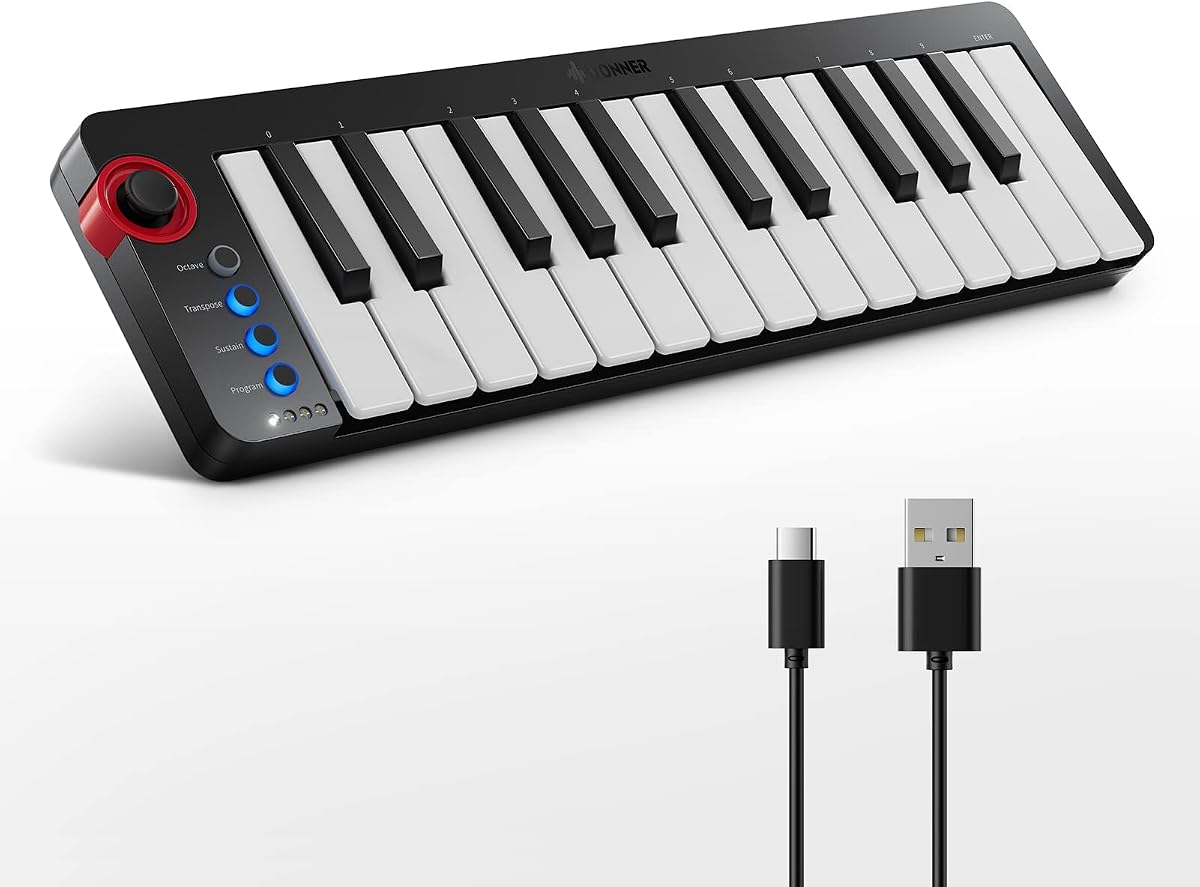
Donner Mini MIDI Keyboard N-25
4.1Editor score
Compact portable design
Light up rocker buttons
40 teaching courses included
Discover the top 25 Key MIDI Controllers for 2026. We compare features, portability, and DAW integration to help you choose the perfect controller for music
Finding the right 25 Key MIDI Controller is essential for modern music production. These compact devices offer portability without sacrificing control over your digital audio workstation. Whether you are a beginner or a pro, the right tool enhances creativity and workflow efficiency.
We evaluated ten top-rated models based on keybed quality, software integration, and build durability. Our analysis focuses on how each controller performs in real-world scenarios across various digital audio workstations. This list covers diverse needs from budget-friendly options to feature-rich professional tools.
Each pick highlights unique strengths like unique pads, knobs, and seamless DAW mapping. Prices and availability change frequently so please verify current details before purchasing. Use this guide to find the model that best fits your specific musical style and production requirements today.
4.1Editor score

4.6Editor score

4.6Editor score
This side by side comparison highlights the core specifications of each controller to help you make an informed decision based on your specific production needs and budget constraints.


The Akai Professional MPK Mini MK3 stands out as a top contender in the 25 key MIDI controller market. With a strong rating of 4.6 stars it delivers reliable performance for producers at various skill levels. Its velocity sensitive keys and responsive pads make it a favorite for beat making and live performance alike.
We may earn a commission when you buy through this link, at no additional cost to you.
This controller offers total control over your production through its innovative 4-way thumbstick for pitch and modulation. The 8 backlit MPC style pads allow for precise drum programming and sample triggering. Additionally the Native Kontrol Standard integration ensures seamless access to a vast library of sounds and presets.
While the keys are compact which may take some getting used to for pianists the overall functionality is outstanding. The arpeggiator provides creative control for generating complex sequences quickly. Some users might find the knob assignment process slightly complex but the included editor software simplifies this significantly.
If you need a versatile and durable controller that integrates well with your DAW this is the ideal choice. It is perfect for songwriters and producers who want professional features in a portable package. The included software bundle adds immense value making it a complete production starter kit.
The MPC style pads are velocity sensitive and backlit allowing for dynamic drum programming and visual feedback during performance.
Includes MPC Beats virtual instruments and access to Splice ensuring you have everything needed to start producing music immediately.
We may earn a commission when you buy through this link, at no additional cost to you.
The Donner Mini MIDI Keyboard N-25 is an excellent entry point for those new to music production. Rated 4.1 stars it offers essential features at a very accessible price point. The inclusion of 40 teaching courses makes it particularly valuable for beginners looking to learn the basics of composition.
We may earn a commission when you buy through this link, at no additional cost to you.
Its compact design features 25 mini velocity sensitive keys that respond well to touch. The light up buttons add a fun visual element that helps users track their playing. You can also connect it to smartphones via an OTG adapter expanding your creativity beyond the desktop setup.
While the build quality is basic compared to premium models it holds up well for casual use. The lack of knobs limits sound tweaking but the basic controls cover essential functions like sustain and octave. The learning resources included are the true highlight here for novice musicians.
This controller is perfect for students or hobbyists who want to start creating music without a large investment. The teaching courses provide a structured path to improve skills while you use the hardware. It is a practical choice for anyone needing a simple portable controller to start their journey.
The 40 engaging lessons cover arrangement essentials to help unleash creativity and teach music theory basics alongside hardware usage.
Easy connection to iPhone and iPad via OTG adapter allows for music creation on the go with mobile apps.
We may earn a commission when you buy through this link, at no additional cost to you.
The Novation Launchkey Mini 25 MK4 sets a high standard for premium 25 key controllers. Its 4.6 star rating reflects its excellent build and feature set designed for serious creators. The FSR pads offer a distinct feel that enhances drum performance and clip launching capabilities significantly.
We may earn a commission when you buy through this link, at no additional cost to you.
One standout feature is the Scale Mode which prevents wrong notes and helps users create lush chords easily. The polyphonic aftertouch adds another layer of expression to your performances. With seamless integration into major DAWs like Ableton and Logic you can control your software deeply and intuitively.
While it is priced higher than budget options the included software like Ableton Live Lite adds significant value. The setup requires some configuration to unlock all the benefits but the workflow gains are worth the effort. Users may need to familiarize themselves with the specific layout to maximize utility.
Choose this if you want professional quality tools that grow with your skills. It is ideal for electronic producers and performers who need responsive controls and advanced features. The combination of hardware and software ensures you have a robust system for producing high quality tracks.
Scale Mode and chord triggers help users create complex harmonies quickly without deep music theory knowledge required.
Full Travel Rubber pads provide a superior tactile experience compared to traditional rubber pads found on other controllers.
We may earn a commission when you buy through this link, at no additional cost to you.
The Akai Professional LPK25 is designed for ultimate portability and simplicity. With a high 4.7 star rating it is beloved by users who need a reliable keyboard for on the go sessions. Its slim profile fits easily into backpacks making it ideal for travel and casual writing.
We may earn a commission when you buy through this link, at no additional cost to you.
It features 25 mini keys that are responsive enough for melody and bass line creation. The built-in arpeggiator adds a layer of creativity without needing complex software settings. A dedicated sustain button and octave controls help expand the range of your instrument significantly.
The trade-off is a lack of knobs or pads which limits control over parameters. It is strictly a keyboard controller which means you rely on your DAW for most tweaking. However for those who just want to input notes quickly this limitation is often acceptable and even preferred.
This is the perfect choice for songwriters who prioritize speed and portability over complex control. It works with all major applications and requires no drivers for setup. If you want to capture ideas quickly without carrying heavy gear this controller delivers exactly that experience.
USB power and plug and play compatibility mean you can start creating music immediately on Mac or PC without drivers.
The built-in arpeggiator and clock allow for creative control of sound sources with a single USB cable connection.
We may earn a commission when you buy through this link, at no additional cost to you.
The Arturia MiniLab 3 offers a distinctive design with a white finish that stands out in any studio. Rated 4.7 stars it combines a sleek aesthetic with practical features like 4 faders and 8 drum pads. This mix allows for hands on control of multiple parameters simultaneously.
We may earn a commission when you buy through this link, at no additional cost to you.
Arturia is known for quality and this controller reflects that with velocity sensitive keys and responsive controls. The ability to control instruments and mute tracks fluidly enhances your production flow. It is designed to help you forget the mouse and focus on the music entirely.
Users should note that it relies heavily on the included software for advanced features. The setup process is straightforward but you may need to install drivers to unlock full functionality. The compact size is perfect for laptops but the lack of dedicated inputs limits expansion options.
Choose this if you value design and a comprehensive software ecosystem. It is a great tool for producers who want a modern controller that integrates well with various digital audio workstations. The included sound packs and tools add significant value to the hardware purchase.
The design allows for fluid control of tracks and faders so you can forget the mouse and make music easily.
Comes with high quality instruments and tools that enhance the value of the hardware for any producer.
We may earn a commission when you buy through this link, at no additional cost to you.
The Rhymo 25 Key MIDI Controller provides excellent value with modern connectivity options. Rated 4.1 stars it appeals to users who want USB-C power and Bluetooth MIDI support at a budget friendly price. These features make it easy to integrate with both computers and tablets seamlessly.
We may earn a commission when you buy through this link, at no additional cost to you.
Its X-Y joystick offers dynamic control for pitch and modulation which is a nice touch for performance. The arpeggiator includes multiple modes and a latch function for creating complex patterns quickly. A sustain pedal interface ensures you can connect external pedals for better expression.
While the build quality is simple it is sufficient for casual and home studio use. The lack of a detailed manual might pose a challenge for some users but the layout is intuitive. It works well with major DAWs and provides a solid experience for beginners and hobbyists.
This is a great choice for those who need wireless capability without breaking the bank. It is suitable for mobile producers who want to connect to tablets without extra cables. The combination of features at this price point makes it a strong contender for value seekers.
USB-C and Bluetooth MIDI support ensure hassle-free on-the-go music production with computers and tablets easily.
X-Y joystick and multiple arpeggiator modes offer flexible performance controls for expressive and creative music creation.
We may earn a commission when you buy through this link, at no additional cost to you.
The M-VAVE 25 Key Controller stands out with its built-in battery and wireless Bluetooth support. Rated 4.5 stars it offers freedom of movement without being tethered to a computer. The 16 hour battery life ensures you can work through long sessions without needing a power outlet nearby.
We may earn a commission when you buy through this link, at no additional cost to you.
It features 8 backlit pads and 8 assignable knobs for comprehensive control over your music. The smart chord function allows for quick sound changes which is useful during performance or practice. This helps users who may not have deep music theory knowledge to still create complex sounds.
The controller is slightly heavier than purely portable options due to the battery but it remains compact. The software compatibility is broad covering major DAWs and systems like Windows and Android. Some users might find the connection setup takes time but the results are generally stable.
Choose this if you need a standalone unit that you can take anywhere. It is ideal for performers and producers who want wireless flexibility and physical controls. The included smart features add a creative edge that sets it apart from standard portable controllers.
Built-in 2000 mAh battery allows for 16 hours of wireless work anywhere from studio to hotel room.
Integrates smart chord function for quick sound changes during performance making complex harmonies accessible to beginners.
We may earn a commission when you buy through this link, at no additional cost to you.
The Akai Professional MPK Mini Play MK3 is unique for its ability to work without a computer. With a 4.5 star rating it includes a built-in speaker and internal sounds that allow you to create music anywhere. This standalone capability makes it perfect for sketching ideas on the go.
We may earn a commission when you buy through this link, at no additional cost to you.
It features 8 backlit pads and an OLED display for clear feedback and easy navigation of sounds. The included software like MPC Beats adds value when you connect to a host computer later. You can also power it with batteries or USB mains for flexible energy options.
While the price is higher due to these added features it offers great value for those needing a standalone solution. The keyboard is dynamic and responsive for quality performance and tracking. Some users may find the internal sounds limited compared to software but they are great for quick inspiration.
This is the best choice for musicians who want a self-contained production tool. It works well for learning and casual use without needing a full setup. If you want to start creating music immediately without a computer this is the ideal device for your needs.
Built-in speaker and internal sounds allow you to make music without needing a computer or external interface.
Includes Melodics educational software and 60 free lessons to improve your skills with the hardware effectively.
We may earn a commission when you buy through this link, at no additional cost to you.
The Akai Professional MPK Mini MK3 in Black offers the same high performance as the white version. With a rating of 4.6 stars it is a favorite for producers who prefer a sleek black aesthetic. It retains all the powerful features including the MPC pads and thumbstick control.
We may earn a commission when you buy through this link, at no additional cost to you.
The features remain identical to the standard model ensuring you get the full benefit of the hardware. The black finish looks great in any studio setup and adds a professional touch to your equipment. It supports NKS and includes extensive software bundles for music production.
If you are choosing between colors this version is ideal for those who like darker gear. The functionality is the same but the visual appeal can influence your buying decision. It is a reliable and consistent tool that meets the needs of various music producers effectively.
This choice is best for users who value the look of their gear as much as the sound. It works seamlessly with your existing software and provides a smooth workflow. The included software ensures you have everything needed to start producing right out of the box.
The black finish provides a sleek professional look that matches well with most studio equipment and setups.
Identical to the white version with all the same pads keys and controls for a consistent user experience.
We may earn a commission when you buy through this link, at no additional cost to you.
The Akai Professional APC Key 25 MK2 is designed specifically for Ableton Live users. Rated 4.4 stars it features 40 RGB pads for launching clips which is a core function in Ableton. This makes it a specialized tool for producers who focus on live performance and electronic music.
We may earn a commission when you buy through this link, at no additional cost to you.
It includes Ableton Live Lite and is pre-mapped for 1-to-1 integration with the software. The directional arrow buttons help you scroll through tracks and scenes quickly during a set. The rotary knobs allow for volume and pan control providing hands on mixing capabilities.
While it is great for Ableton it is less versatile for other DAWs due to its specialized layout. The keybed is compact and designed more for control than traditional playing. Users looking for a general purpose controller might prefer something else but for Ableton fans this is perfect.
This controller is the best choice for anyone deeply invested in the Ableton ecosystem. It simplifies clip launching and track control making live sets much easier to manage. The included software and integration ensure a seamless experience from the start.
40 RGB pads provide visual color feedback for launching clips instantly in Ableton Live.
Arrow buttons allow you to scroll through tracks and scenes easily for efficient live set management.
We may earn a commission when you buy through this link, at no additional cost to you.
Choosing the right 25 key MIDI controller involves evaluating several factors to ensure it meets your specific needs and workflow.
The quality of the keys significantly affects how you perform and play melodies. Look for velocity-sensitive keys that respond to your touch and dynamics for a more expressive experience. Mini keys are portable but may not suit those with larger hands.
Prioritize a keybed that feels responsive and comfortable for long sessions to ensure your performance is accurate and enjoyable.
Compatibility with your DAW is crucial for a smooth workflow. Many controllers offer pre-mapped features for software like Ableton Live or Logic Pro which can save you setup time. Check if the controller comes with bundled software to add value to your purchase.
Ensure the controller supports the DAW you use most to avoid mapping issues and streamline your creative process immediately.
Connectivity determines how you connect the controller to your devices. USB is standard but newer models may offer USB-C or Bluetooth MIDI for more flexibility. Consider if you need MIDI outs for connecting to external hardware synthesizers as well.
Modern connectivity options like Bluetooth or USB-C provide convenience and ensure you can use the controller with various devices easily.
One of the main benefits of 25 key controllers is their small size. Evaluate the weight and dimensions if you plan to travel with your gear often. Lightweight options are ideal for mobile production but ensure they are durable enough for regular use.
Choose a controller that fits easily into your bag without adding bulk so you can create music anywhere with ease.
Additional controls like pads knobs and faders expand your ability to tweak sounds and trigger samples. Look for backlit pads and touch-sensitive knobs if you need visual feedback and precise control. More controls can reduce the need to reach for your mouse.
Select a model with the right amount of hardware controls to suit your mixing and performance needs without clutter.
Prices vary widely from affordable entry-level options to premium models with advanced features. Determine your budget early to narrow down choices that offer the best value. Higher price often correlates with better build quality and more included software.
Balance cost with features to find a controller that fits your financial constraints while meeting your essential functional needs.
Durability is key for a controller that will be used frequently and potentially transported. Look for solid construction and quality materials that withstand wear and tear. Plastic casings are common but check for reinforced parts to ensure longevity.
Invest in a controller with sturdy build quality to ensure it lasts through years of creative use and travel.
Some controllers come with teaching courses or software designed to help beginners learn. These features are valuable for those new to music production who need guidance. Look for included software that offers structured lessons or tools to aid learning.
Prioritize controllers with educational resources if you want to improve your skills alongside your hardware purchase.
Connect your controller to your computer using a USB cable to ensure power and data transfer. Most modern controllers are plug and play meaning you do not need to install extra drivers to start working. Open your preferred digital audio workstation to begin mapping your keys and controls.
Clean your controller regularly with a dry soft cloth to remove dust and oils from the keys and pads. Avoid using liquids or harsh chemicals that could damage the electronics or key surfaces. Store it in a protective bag when not in use to prevent physical damage.
Update your controller firmware regularly to ensure compatibility with the latest software and features. Check the manufacturer website for updates and instructions on how to apply them. Proper maintenance will keep your controller performing well and extend its lifespan significantly.
Most 25 Key MIDI controllers require a computer to function as they send data to a Digital Audio Workstation. However some models like the MPK Mini Play have built-in sounds and speakers allowing standalone use without a computer.
Yes 25 key controllers are excellent for beginners due to their compact size and affordable price. They offer essential features like velocity sensitive keys and basic controls which are perfect for learning music production basics.
Mini keys are smaller and packed tighter to save space making them more portable. Full size keys are larger and easier to play for traditional pianists but take up more room and cost more.
Yes many 25 Key MIDI controllers are compatible with iPad if they support USB or Bluetooth MIDI. You may need a camera connection kit or OTG adapter to connect the USB cable to your iPad.
Many top controllers include a version of Digital Audio Workstation software like Ableton Live Lite or MPC Beats. These bundled versions allow you to start recording music immediately without purchasing additional software.
A MIDI controller does not produce sound on its own but sends signals to a computer or synthesizer to create sound. A synthesizer generates sound internally while a controller is a tool to manipulate sound generated elsewhere.
The Akai Professional MPK Mini MK3 stands out as the top pick for its balanced features and reliability. For those on a tight budget the Donner N-25 offers great value with educational tools included. The Novation Launchkey Mini 25 MK4 is the premium choice for advanced control.
Prioritize features that match your specific workflow such as DAW integration or portability needs. A controller that integrates well with your software will save you time and help you focus on creativity. Consider what extra controls like pads or knobs mean to your production style.
Remember to check current prices and availability as deals change frequently on different platforms. Investing in the right controller early can significantly improve your music creation experience. Use this guide to make a confident decision that supports your musical goals.