
Plaud Note Pro
4.5Editor score
Multimodal input support
Directional AI audio
Ultra-slim credit card size
This guide compares the top ten AI meeting transcription devices to help you choose the right tool for accurate notes and seamless workflow integration.
Modern professionals need reliable tools to capture meeting details without manual typing. AI meeting transcription devices automate recording and summarization to save time and improve accuracy during important discussions.
We evaluated ten top-rated devices based on transcription accuracy, battery life, audio quality, and privacy features. Our analysis focuses on real-world usability for business, legal, and educational environments.
Each pick highlights key strengths and ideal use cases for different workflows. Prices and availability change frequently so verify current details before purchasing to ensure you get the best value today.
4.5Editor score

4.8Editor score

4.4Editor score
This side-by-side comparison highlights the core specifications and unique capabilities of each device to help you decide which fits your specific recording needs.



The Comu Action Pro stands out as a top choice for professionals who need reliable transcription and actionable document generation. With a 4.8 rating and an ultra-long battery life exceeding 70 hours, it is designed for heavy daily use without frequent recharging.
We may earn a commission when you buy through this link, at no additional cost to you.
Its standout feature is the ability to turn conversations into editable presentation slides, emails, and to-do lists automatically. The adaptive six-mic setup captures clear audio even in noisy environments, ensuring transcripts remain accurate. This device bridges the gap between simple recording and advanced project management.
While the price is higher than budget options, the value comes from its ability to reduce manual administrative work significantly. Users report that the AI drafting saves hours of post-meeting processing time. The MagSafe compatibility also adds convenience for iPhone users who want hands-free recording.
Ideal for executives and project managers, this device offers a complete ecosystem that supports complex workflows. If you need more than just transcripts, the Comu Action Pro provides the tools to transform audio into organized business documents efficiently and securely.
The automatic AI document generation feature allows users to convert meeting audio directly into slides and emails without manual prompts. This capability streamlines follow-up tasks and ensures critical action items are captured accurately.
With four omnidirectional mics and one directional mic plus bone-conduction support, the device ensures crystal-clear recordings. This setup is particularly effective for capturing speaker nuances in crowded meeting rooms.
We may earn a commission when you buy through this link, at no additional cost to you.
The Plaud Note Pro distinguishes itself with multimodal input capabilities that let you add images and notes to your audio recordings. Rated 4.5, this device is ideal for users who need rich context alongside their transcripts. Its ultra-slim design and premium aluminum body make it a stylish accessory for daily carry.
We may earn a commission when you buy through this link, at no additional cost to you.
Key strengths include the ability to mark key moments during recording and use the Ask Plaud feature to query your recordings interactively. The directional AI audio minimizes background noise effectively. Security is a major focus with compliance across HIPAA and GDPR standards which is crucial for legal and medical professionals.
Some users might find the premium plan necessary to unlock full transcription potential. However, the Starter Plan offers 300 minutes monthly which is sufficient for casual users. The integration with Apple Find My ensures you never lose the device in a busy office environment.
For professionals who value context and security, the Plaud Note Pro offers a unique blend of hardware and software features. It transforms passive recording into an active note-taking tool that enhances understanding of complex discussions.
By allowing users to snap photos of documents or type notes while recording, the device creates a richer context for AI summaries. This ensures that visual data is not lost when the audio is processed later.
The Ask Plaud feature turns recordings into interactive knowledge bases where you can ask questions to extract specific insights. This approach makes reviewing long meetings significantly more efficient than manual listening.
We may earn a commission when you buy through this link, at no additional cost to you.
The EurekaMind Lite is an exceptional budget option that offers unlimited transcription without hidden fees. With a 4.4 rating and an extremely affordable price point, it is perfect for students and professionals who need frequent recording without subscription stress. Its tiny footprint fits easily into wallets or pockets.
We may earn a commission when you buy through this link, at no additional cost to you.
Key strengths include the built-in web search AI that brings external context to your conversations. The privacy standards are enterprise-level ensuring your data remains protected. Speaker recognition helps organize transcripts by person making review much faster. The free starter plan is generous compared to competitors.
While premium features like calendar sync are optional, the core functionality remains robust. Users may find the physical design too small for some but the trade-off is extreme portability. This device removes financial barriers to adopting AI note-taking technology.
If your priority is cost-effectiveness and unlimited access, this device is a top recommendation. It provides essential transcription and summarization tools that democratize productivity for individuals and small teams who cannot afford expensive monthly plans.
Most competitors limit transcription minutes significantly but this device offers unlimited access via the starter plan. This ensures you can record daily meetings without worrying about running out of quota mid-week.
The ability to search the web during conversations allows the AI to provide deeper insights than just audio analysis. This is particularly useful when discussing industry trends or technical topics requiring external reference.
We may earn a commission when you buy through this link, at no additional cost to you.
The Comulytic Note Pro offers a compelling mix of speed and affordability with its lifetime free transcription plan. Rated 4.4, it is a great choice for users who want reliable notes without paying monthly fees. Its Wi-Fi sync capability is significantly faster than traditional Bluetooth transfer methods.
We may earn a commission when you buy through this link, at no additional cost to you.
Strengths include the 64GB built-in storage which holds thousands of hours of audio. The vertical knowledge base feature ensures accurate transcription for specific industries like law or finance. The device automatically detects call modes so you do not have to manually switch settings.
Users may need to upgrade for advanced analysis tools but basic summaries are free. The battery life of 45 hours is strong for daily use. This device balances professional features with consumer-friendly pricing structures effectively.
It is ideal for professionals who need industry-specific terminology support without subscription costs. The combination of hardware features and free software makes it a strong contender in the crowded market of AI recorders.
The vertical knowledge base allows the AI to recognize specialized terms in fields like insurance and real estate. This reduces errors in transcripts that generic models might make due to jargon unfamiliarity.
Wi-Fi syncing pushes recordings to the cloud up to ten times faster than Bluetooth. This real-time backup ensures your data is safe immediately after recording without interrupting your workflow.
We may earn a commission when you buy through this link, at no additional cost to you.
The RECPOINT Note AI leverages a powerful GPT-5.5 engine to deliver industry-leading 98% accuracy in transcription. Rated 4.5, it is designed for global collaboration with support for 150 languages. This makes it a top pick for international teams and academic researchers.
We may earn a commission when you buy through this link, at no additional cost to you.
Key strengths include a generous package of free monthly AI minutes and a rugged aluminum build that survives drops. The ecosystem includes powerful desktop software for advanced editing. This hardware is suitable for harsh environments where durability matters.
Some users might find the dependency on desktop software inconvenient compared to app-only solutions. However, the offline capabilities are strong for those with connectivity issues. The transparency about privacy is reassuring for enterprise users.
For users prioritizing accuracy and multilingual capabilities, this device offers excellent performance. It provides a complete solution for organizations that need to document conversations across different languages and regions reliably.
The AI engine performs deep conversation analysis to generate structured summaries and mind maps automatically. This goes beyond simple transcription to provide actionable insights that save review time.
Supporting 150 languages ensures no nuance is lost during international meetings. This capability is critical for teams that operate across borders and need precise multilingual transcripts.
We may earn a commission when you buy through this link, at no additional cost to you.
The Pocket Voice Recorder is designed specifically for mobile users who want a dedicated assistant attached to their phone. With a 4.6 rating and MagSafe compatibility, it offers hands-free convenience that is unmatched by generic devices. It acts as a personal assistant for everyday productivity.
We may earn a commission when you buy through this link, at no additional cost to you.
Its strengths include a massive four-day battery life and simple one-tap recording. The structured conversation maps help users review what matters quickly. This device is particularly effective for commuters who need to capture ideas on the go.
Users with Android devices might find the MagSafe feature less relevant. However, the core recording and summary tools work independently of the mounting feature. The price reflects its premium positioning in the mobile accessory market.
For iPhone users seeking a seamless audio experience, this is a top recommendation. It combines hardware convenience with AI intelligence to reduce friction in capturing daily thoughts and meetings efficiently.
Attaching the recorder to your iPhone via MagSafe allows you to keep it in place without holding it. This is ideal for capturing phone calls or in-person conversations while your hands are free.
The AI organizes recordings into clear action items and structured maps. This makes it easier to find specific points without listening through hours of audio linearly.
We may earn a commission when you buy through this link, at no additional cost to you.
The Plaud Note Non-Pro offers many premium features at a lower price point than the Pro version. Rated 4.5, it includes 64GB of local storage allowing secure offline recording without internet dependence. It is a solid choice for users concerned about connectivity.
We may earn a commission when you buy through this link, at no additional cost to you.
Key strengths include access to thousands of professional templates for summaries. The device supports 112 languages and uses top AI models for transcription. Privacy remains a priority with strict compliance standards. This is a great entry point into the Plaud ecosystem.
While it lacks some of the advanced hardware features of the Pro model, the core experience is similar. The battery life of 30 hours is sufficient for most users. You get significant value without the highest price tag.
If you want a premium look and feel without paying for every advanced feature, this is a smart buy. It ensures you can capture and organize conversations effectively while maintaining high security and privacy standards.
The 64GB local storage allows you to record without needing an internet connection. This ensures your data stays on the device until you choose to sync it to the cloud.
Access to over 10000 professional templates helps tailor summaries to specific roles and industries. This flexibility makes the device useful for diverse professional needs.
We may earn a commission when you buy through this link, at no additional cost to you.
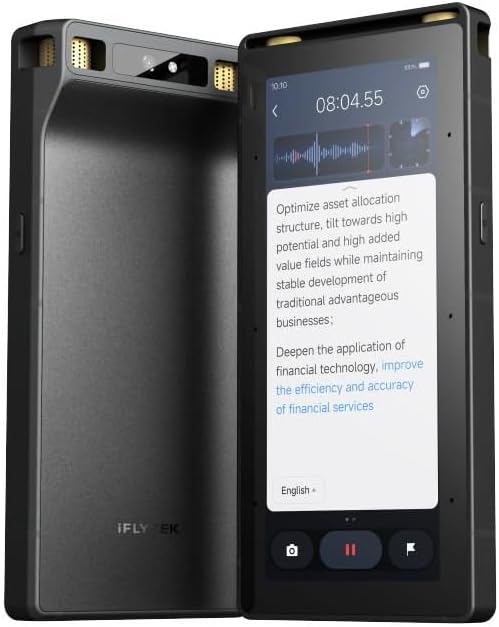
This touchscreen recorder stands out for its ability to transcribe offline without internet dependency. While the rating is not available yet, the hardware specs suggest strong performance for large hall meetings. It includes a five-year membership which adds significant value over time.
We may earn a commission when you buy through this link, at no additional cost to you.
Key strengths include hardware-level security with three tiers of encryption. The eight-microphone array ensures audio capture from up to 20 meters. This makes it ideal for lectures or large conference rooms where standard devices might fail. The live projection feature enhances real-time collaboration.
The price is higher than typical portable recorders but the offline features justify the cost for secure environments. The touchscreen interface makes it easy to navigate without using a separate phone. It is a robust solution for high-security needs.
For government or corporate users who cannot rely on cloud connectivity, this device is the best choice. It balances advanced hardware with long-term software support to ensure reliable service over years.
Processing information without internet ensures confidentiality and speed in secure environments. This allows you to transcribe and translate sensitive data without sending it to external servers.
Wired screen projection displays live transcriptions during meetings which enhances collaborative efficiency. This helps participants follow along with discussions in real time.
We may earn a commission when you buy through this link, at no additional cost to you.
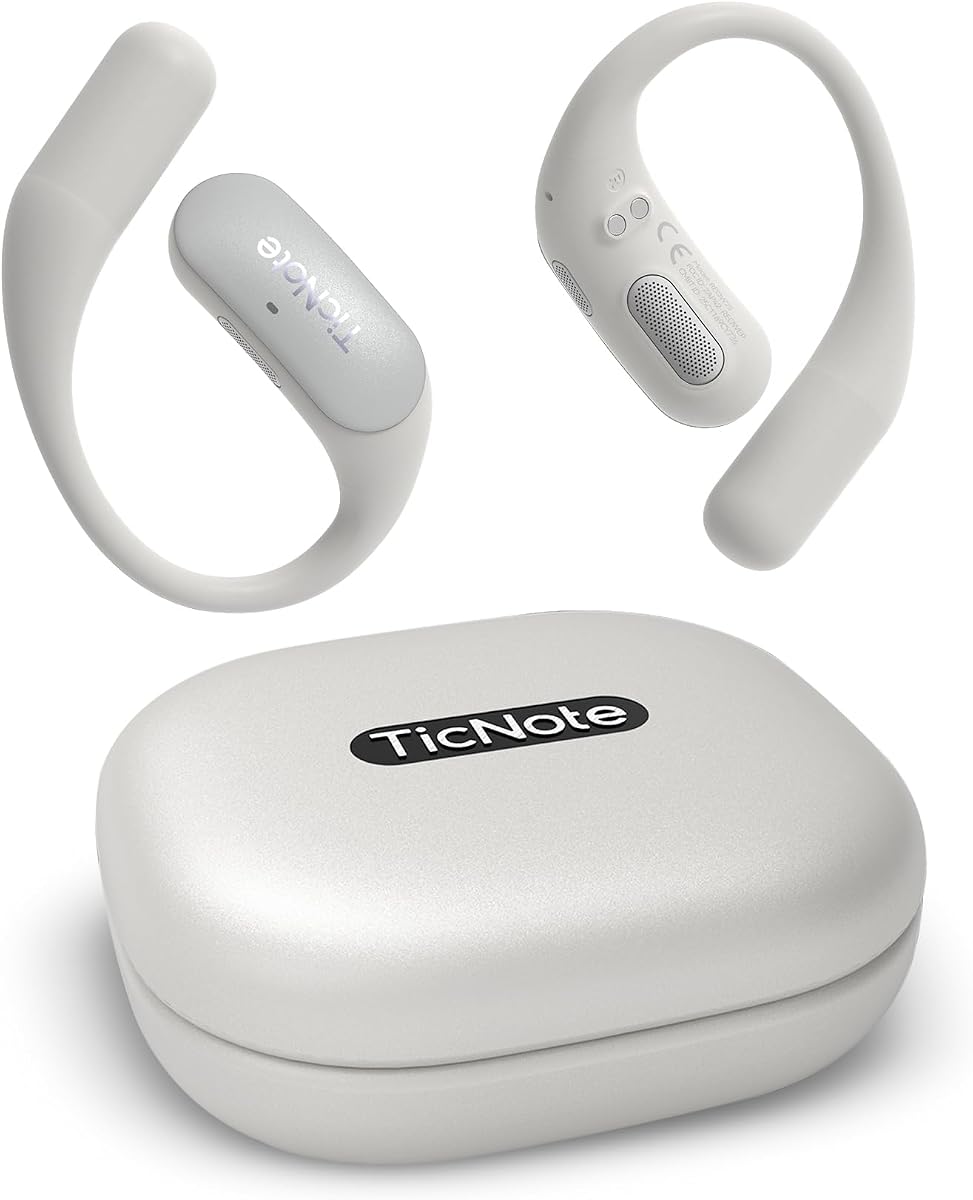
The Mobvoi TicNote Pods are designed for users who work primarily in Wi-Fi environments. With a 4.1 rating and cloud sync focus, this device is ideal for office workers who need instant access to notes. Its compact design fits easily into professional setups.
We may earn a commission when you buy through this link, at no additional cost to you.
Key strengths include encrypted cloud storage and built-in Shadow AI which helps organize information into useful outputs. The 120+ language support makes it versatile for global teams. Voice activated recording ensures you do not have to touch the device to start.
The five-hour battery life is shorter than competitors but acceptable for short meetings. Users may need to charge it daily for all-day use. The lack of manual start adds convenience but limits control.
If you need a lightweight device that integrates tightly with cloud workflows, this is a good choice. It provides a seamless way to capture and share notes within a team environment efficiently.
Encrypted cloud storage allows teams to share notes securely. The system supports collaborative editing which helps keep everyone aligned on next steps.
Automated recording starts when speech is detected so you never miss the beginning of a conversation. This is useful when hands are busy or the device is in a bag.
We may earn a commission when you buy through this link, at no additional cost to you.
The Comulytic Note Pro V2 offers updated connectivity options including Wi-Fi sync for faster transfers. Rated 4.2, it provides a solid experience for users who need reliable transcription and secure data handling. The package includes magnetic accessories to simplify setup.
We may earn a commission when you buy through this link, at no additional cost to you.
Key strengths include the free starter plan that covers unlimited transcription. The vertical knowledge base ensures accurate industry terms. AES encryption protects your data in transit and at rest. This version is versatile for both personal and business use.
While similar to the previous model, the Wi-Fi improvements add practical value. Users may find the design slightly bulky compared to slim credit card alternatives. However, the performance and reliability are consistent with the brand's reputation.
For those who want a reliable device with good support, this is a strong choice. It ensures that your meeting notes are secure and actionable without high subscription costs.
End-to-end AES encryption ensures your files remain private. Compliance with CCPA standards means your data is handled responsibly.
The included magnetic accessories allow you to snap the device onto notebooks or phones. This simplifies the recording process by keeping the device in place automatically.
We may earn a commission when you buy through this link, at no additional cost to you.
Choosing the right device depends on your specific workflow and environment. We break down the key factors to help you find a device that suits your needs.
Accuracy is the most critical factor for these devices. Look for models that claim high rates like 98% accuracy and support multiple languages to ensure your transcripts are reliable. Poor accuracy leads to extra manual editing which defeats the purpose of automation.
Prioritize devices with advanced noise cancellation to ensure clear transcription even in busy environments.
Long battery life ensures you do not miss important meetings because the device died. Devices offering 40 hours or more are ideal for professionals who travel or have back-to-back meetings daily.
Short battery life can interrupt critical recording sessions so check specs before buying.
Multiple microphones with directional audio help isolate voices from background noise. A higher number of mics usually means better pickup range which is essential for large conference rooms.
Look for dual-mic or triple-mic arrays to ensure clarity in noisy settings.
Local storage options like 64GB allow offline recording which is important for secure environments. Wi-Fi sync is generally faster than Bluetooth so prioritize devices with this feature for efficiency.
Ensure the device supports both local storage and cloud backup for safety.
Encryption standards such as AES and compliance with laws like GDPR or HIPAA are essential for handling sensitive data. Check if the device offers end-to-end encryption for maximum security.
Verify the security certifications to ensure your data is protected.
Some devices require monthly subscriptions for full features while others offer lifetime plans. Review the free limits carefully to understand the long-term cost of ownership.
Budget for potential subscription fees if the device lacks a free plan.
A slim and lightweight design ensures you can carry the device everywhere without burden. MagSafe or magnetic options add convenience for hands-free usage during calls.
Check the physical dimensions to ensure it fits in your wallet or pocket.
Advanced features like auto-drafting emails or generating action items can save significant time. Look for devices that offer summaries rather than just raw text.
Prioritize tools that turn audio into actionable business documents.
To use your device effectively, ensure you charge it fully before your first meeting. Start recording before discussions begin to capture context and introductions. Always verify that the microphone is not covered during use.
Regularly sync your recordings to the cloud to prevent data loss. Review the AI summaries to correct any transcription errors manually. This helps the system learn your specific vocabulary over time.
Clean the device gently with a dry cloth to avoid damaging the microphones. Keep firmware updated through the app to benefit from the latest AI improvements. Protect it from extreme temperatures to maintain battery health.
Yes but you should always inform participants before recording. Privacy laws vary by region so ensure you follow local regulations regarding consent for audio recording in meetings.
Most top devices claim around 98% accuracy but results vary based on audio quality and accents. Background noise can affect performance so choose models with strong noise cancellation.
Some devices work offline for basic recording but AI transcription often requires Wi-Fi. Check if the model supports offline processing if you work in low-connectivity areas.
Most devices use Wi-Fi or Bluetooth to sync to a companion app. Once synced you can access your transcripts on your computer or mobile device easily.
Many devices include call modes but some require specific accessories to capture phone lines. Check the product specs to ensure it supports your type of calls.
Reputable devices encrypt your data both in transit and at rest. Look for models that comply with ISO and GDPR standards to ensure your information stays private.
Some devices have free starter plans but premium features may require subscriptions. Always check the pricing model before purchasing to avoid unexpected costs.
Battery life varies from 5 hours to over 70 hours depending on the model. Select a device that matches your daily usage patterns to avoid frequent recharging.
We highlighted top options like the Comu Action Pro for document drafting and the Plaud Note Pro for premium features. Each device offers unique strengths depending on your workflow and budget needs.
Prioritize accuracy and privacy when selecting a device to ensure you get reliable and secure recordings. Consider the battery life and subscription model to find a sustainable solution for your daily work.
Prices and availability change frequently so check current details before purchasing. Investing in the right tool can save hours of manual note-taking and improve your professional productivity.