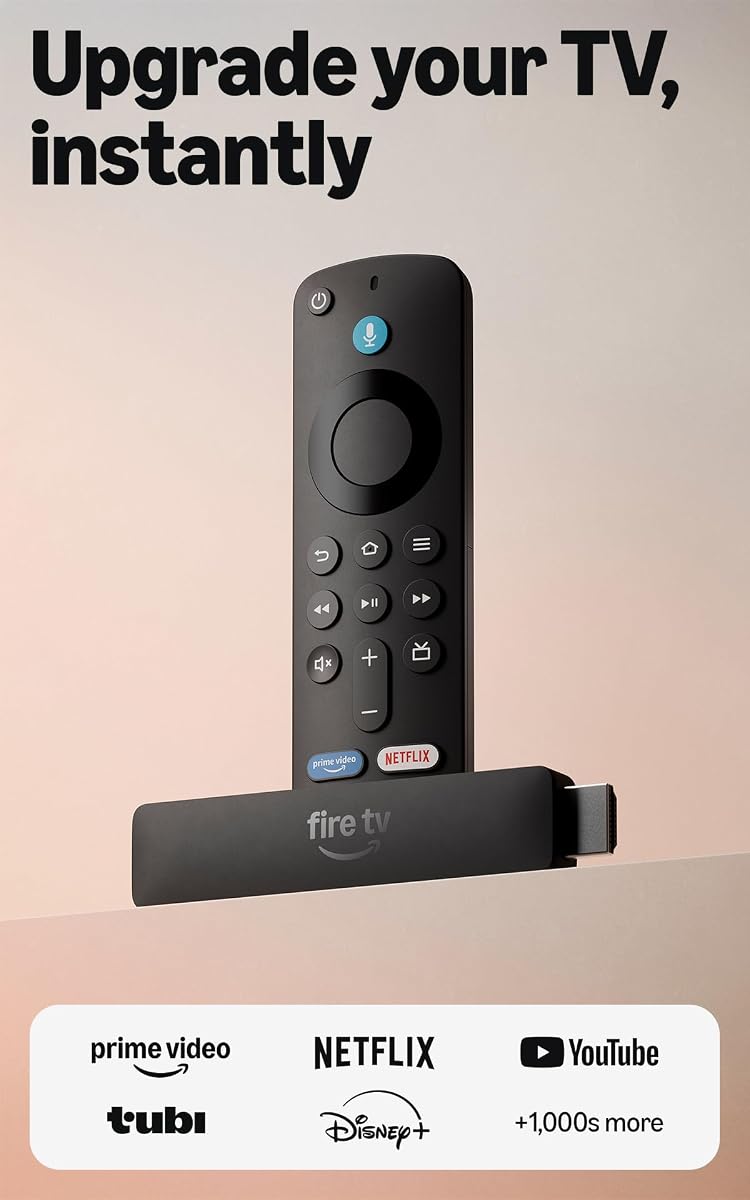
Amazon Fire TV Stick HD
4.1Editor score
Direct power via TV
Full HD streaming support
Alexa Voice Remote included
Finding the right tech during sales events can be overwhelming. This guide highlights the most valuable Amazon Fall Prime Day Tech Deals available right now. We focus on devices that enhance your daily digital life through performance and features.
We compared ten top-rated products based on user feedback, technical specifications, and overall value. Each item was selected for its ability to integrate seamlessly into modern smart homes. Our analysis ensures you invest in reliable technology that stands the test of time.
Every product listing below includes detailed insights into what makes it stand out. Keep in mind that deals fluctuate rapidly during peak shopping seasons. We recommend acting quickly when you find a device that matches your specific needs and budget constraints.
4.1Editor score

4.6Editor score

4.3Editor score
As an Amazon Associate we earn from qualifying purchases.
This comprehensive comparison table outlines the key specifications and features of every selected product. Use this side-by-side view to quickly identify which device best fits your specific home entertainment or automation requirements.






The Amazon Fire TV Stick HD offers a modern take on streaming media for budget-conscious consumers. It brings a refreshed interface and improved performance to your existing television set. The device is designed to integrate seamlessly with Alexa for hands-free operation.
We may earn a commission when you buy through this link, at no additional cost to you.
Its most significant advantage lies in the power delivery system. The included USB-C cable draws power directly from your TV, eliminating the need for a separate wall adapter. This simplifies setup and reduces cable clutter behind your entertainment center. The streamlined navigation jumps straight to your favorite content categories.
While it lacks 4K support, the crisp Full HD resolution ensures a smooth visual experience on standard televisions. The new ultra-portable profile makes it easy to hide behind your TV or take on the go. However, users seeking high-resolution content will need to look at the 4K variants.
This stick is ideal for renters or anyone looking to upgrade an older TV without breaking the bank. It provides access to thousands of apps and streaming services in one place. We recommend it for households that prioritize ease of use and clutter-free installation over raw video resolution.
The Direct Power feature eliminates the wall adapter by running directly off your TV port.
The 2026 experience adds dedicated content categories and personalized recommendations via Alexa+.
We may earn a commission when you buy through this link, at no additional cost to you.
The Amazon Fire TV Stick 4K Select brings true 4K Ultra HD capabilities to the popular streaming lineup. It features High Dynamic Range 10+ support to ensure vibrant colors and deep contrast. This device bridges the gap between standard streaming and high-fidelity entertainment experiences.
We may earn a commission when you buy through this link, at no additional cost to you.
A standout feature is the ability to stream cloud games directly to your TV. Titles like Hogwarts Legacy and Call of Duty are accessible via Xbox Game Pass. This functionality turns your living room into a versatile gaming hub without needing a dedicated console. The AI-powered search helps you find content quickly across multiple apps.
The modern design ensures fast performance and smooth navigation through your favorite apps. However, to fully utilize the gaming features, you need a compatible controller and a separate Xbox Game Pass subscription. This adds an extra layer of cost and complexity for casual users.
This stick is perfect for home theater enthusiasts who want 4K streaming and occasional gaming. It offers a robust set of tools for exploring new shows and managing smart home devices. If you want next-gen visuals and flexibility, this is a compelling upgrade from older models.
Play AAA titles on your TV using Xbox Game Pass and a compatible controller.
HDR10+ support ensures your 4K content looks vibrant and lifelike.
We may earn a commission when you buy through this link, at no additional cost to you.
The Amazon Echo Dot remains a cornerstone of smart home automation. This newest model delivers vibrant sound and enhanced privacy features. It is designed to be placed in bedrooms or offices where its small footprint is essential. The device doubles as a wireless extender for eero networks.
We may earn a commission when you buy through this link, at no additional cost to you.
Its built-in sensors allow for sophisticated automation routines. You can trigger lights to turn on when you enter a room or control fans based on temperature. The eero Built-in feature adds significant value by boosting your Wi-Fi coverage by up to 1,000 square feet. It simplifies the networking layer of your smart home.
While the audio is improved, it may not satisfy audiophiles seeking deep bass. The small size means it cannot fill a large living room with sound like larger speakers. However, for voice interaction and basic media consumption, it performs exceptionally well in smaller spaces.
We recommend this device for anyone starting or expanding their smart home setup. Its ability to extend Wi-Fi and control thermostats makes it incredibly versatile. Whether you need a bedside alarm or a kitchen assistant, the Echo Dot delivers reliable performance and privacy controls.
Doubles as a mesh Wi-Fi extender to add coverage to your home.
Built-in sensors allow routines to trigger based on motion or temperature.
We may earn a commission when you buy through this link, at no additional cost to you.
The Amazon Echo Show 11 redefines the smart display category with its expansive 11-inch screen. It offers 60% more viewing area than previous models, making it ideal for recipes and video calls. The spatial audio technology delivers a wider sound stage and crisper vocals for immersive viewing.
We may earn a commission when you buy through this link, at no additional cost to you.
Powered by the AZ3 Pro chip, the device handles complex tasks with speed. Omnisense technology creates personalized experiences by detecting presence and visual IDs. This allows for intuitive routines that activate based on who is in the room or what the device sees. It eliminates the need for a separate smart home hub.
Video calls feel natural with the centered, auto-framing camera that tracks your movement. The display also functions as a digital photo frame when not in use. While the price is higher than smaller displays, the sheer amount of content it can display justifies the cost.
This device is best suited for central locations like the kitchen or living room. It serves as a command center for family schedules, shopping lists, and entertainment. If you want a premium display that combines utility with high-end visuals, the Echo Show 11 is a top contender.
The 11-inch screen provides ample space for recipes and video calling.
Omnisense technology activates routines based on temperature and visual ID.
We may earn a commission when you buy through this link, at no additional cost to you.
The Amazon Fire TV Stick 4K Plus represents the pinnacle of streaming hardware. It features Wi-Fi 6 support to ensure smooth streaming even when your network is congested. The device is optimized for 4K TVs, delivering vibrant visuals and immersive Dolby Atmos audio.
We may earn a commission when you buy through this link, at no additional cost to you.
The newest Fire TV experience adds a modern design that gets you to entertainment fast. You can pin your favorite apps and browse dedicated content categories easily. Streaming Xbox games via cloud gaming transforms the stick into a portable gaming console. It supports hundreds of thousands of movies and shows.
While the price is higher than the base model, the performance improvements are significant. The remote offers dedicated buttons for top apps and smart home control. However, users with older routers might not fully utilize the Wi-Fi 6 capabilities. It is a premium choice for those who demand the best picture quality.
We recommend this for home theater enthusiasts who prioritize speed and resolution. It balances advanced streaming technology with a user-friendly interface. Whether you are watching movies or gaming, the Fire TV Stick 4K Plus delivers a reliable and high-quality experience.
Enjoy smooth 4K streaming even when other devices are connected.
Support for Dolby Atmos brings cinematic sound to your living room.
We may earn a commission when you buy through this link, at no additional cost to you.
Complete Protect offers a unique safety net for your Amazon tech purchases. It covers both past purchases from the last 90 days and all eligible future items. This plan protects against malfunctions, failures, and accidental spills or drops for portable tech. It simplifies insurance for gadgets.
We may earn a commission when you buy through this link, at no additional cost to you.
Beyond physical protection, the plan includes trusted cybersecurity features. It offers scam detection for emails and texts to safeguard your digital life. Claiming is designed to be easy, allowing you to file online for fast repair or reimbursement. The monthly model ensures ongoing coverage without a large upfront cost.
While the monthly fee might seem small, it adds up over time. It is best suited for heavy Amazon shoppers who want peace of mind across multiple device categories. Commercial use is excluded, so it is strictly for personal household items. The total claim limit is $5,000 per 12-month period.
We recommend this plan if you frequently buy electronics and appliances from Amazon. It covers a wide range of categories including tools and furniture. If you want a unified approach to protecting your tech against both physical and digital threats, this plan is a valuable addition.
Protects eligible tech, tools, and appliances from past and future purchases.
Includes scam detection for emails and texts to protect your accounts.
We may earn a commission when you buy through this link, at no additional cost to you.
The Amazon Fire HD 10 tablet is built for relaxation and everyday media consumption. Its 10.1-inch Full HD display brings brilliant color to all your shows and games. The device offers a 13-hour battery life to support seamless streaming and reading sessions. It is durable and lightweight for easy handling.
We may earn a commission when you buy through this link, at no additional cost to you.
Performance has improved by 25% compared to the previous generation. It supports expandable storage up to 1 TB with a micro-SD card for all your media. You can use the 5 MP front-facing camera to Zoom with family or create content. The Made for Amazon Stylus Pen offers a natural writing experience.
While the stylus is sold separately, it opens up creative possibilities for sketching and note-taking. The tablet includes Amazon Kids for parental controls and family-friendly content. However, it is not designed for heavy-duty gaming or professional creative work. It excels as a media consumption device.
We recommend this tablet for casual users who need a reliable device for reading and watching content. It is portable and durable, making it great for travel or bedside use. If you want a device that balances performance with battery life for media, the Fire HD 10 is a strong choice.
Enjoy up to 13 hours of battery life for binge watching and reading.
Add up to 1 TB of storage for movies and games using a micro-SD card.
We may earn a commission when you buy through this link, at no additional cost to you.
The Amazon Echo Show 5 is a smart display that fits easily on any bedside table. It features a 5.5-inch screen that is perfect for quick checks of weather and news. The device offers deeper bass and clearer sound compared to previous versions. It is designed to keep you connected and informed.
We may earn a commission when you buy through this link, at no additional cost to you.
You can view your family cameras and make video calls with the built-in 2 MP camera. The device also supports a rotating slideshow of your favorite photos when not in use. Privacy is a priority, with a built-in camera shutter and mic/camera off button. It integrates seamlessly with your smart home devices.
While the screen is small, it is ideal for personal spaces like nightstands. The sound quality is a significant improvement, making it a decent speaker for music. However, the display size limits its use for watching full episodes of TV shows. It is best for personal assistants and communication.
We recommend this for anyone who wants a private, compact visual assistant. It serves as a photo frame and a smart clock. If you need a device for quick visual updates and calls without taking up desk space, the Echo Show 5 is an excellent option.
Fits perfectly on a nightstand while providing visual display features.
Built-in camera shutter and mic button ensure your privacy is protected.
We may earn a commission when you buy through this link, at no additional cost to you.
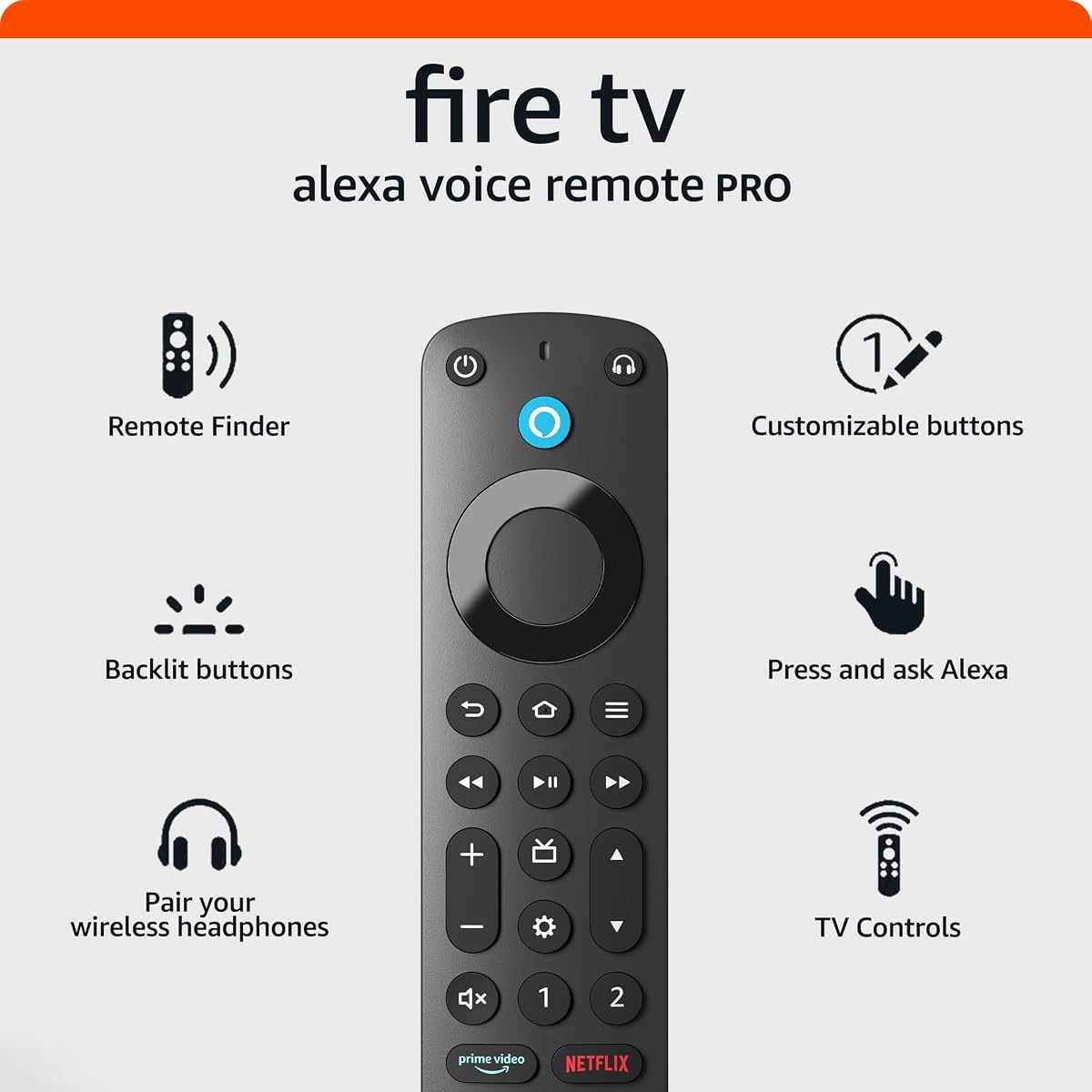
The Amazon Fire TV Alexa Voice Remote Pro solves common control issues with advanced features. It includes a remote finder that emits a ring sound when activated via Alexa. This prevents the endless search for lost remotes in cushions. The motion-activated backlight illuminates buttons in dimly-lit rooms.
We may earn a commission when you buy through this link, at no additional cost to you.
You can control TV power and volume directly from the remote using dedicated buttons. It also features a shortcut to the Bluetooth menu for quick headphone pairing. Two customizable buttons let you create shortcuts to your favorite channels. It offers a premium experience for managing your entertainment.
The device is compatible with most Fire TV streaming players and smart TVs. However, it is not compatible with older generations or specific brand editions like Element or Insignia. You should check your device compatibility before buying to ensure it will work. It upgrades the standard remote significantly.
We recommend this for anyone tired of searching for their remote in the dark. The backlight and remote finder features alone make it worth the upgrade. If you want more control and customization for your streaming setup, this remote provides a tangible quality of life improvement.
Never lose your remote again by asking Alexa to make it emit a ring.
Motion-activated backlight helps you find buttons in the dark easily.
We may earn a commission when you buy through this link, at no additional cost to you.
The Amazon Basics Smart Plug offers a simple way to automate your home. It allows you to schedule appliances like lights and fans to turn on or off automatically. The compact design ensures it fits into a single socket without blocking adjacent outlets. It is a versatile tool for holiday lighting or coffee makers.
We may earn a commission when you buy through this link, at no additional cost to you.
You can set up the device with a zero-touch experience at checkout. It connects directly to your Alexa app without needing any third-party hubs. This simplifies the process of managing connected devices. The plugs operate on 2.4 GHz Wi-Fi to maintain a stable connection.
While it only works with Alexa, this integration is seamless for most users. You can control plugs remotely via the app when you are away. However, if you need Google or Apple home compatibility, you might need a different brand. The 4-Pack offers great value for outfitting multiple rooms.
We recommend these plugs for budget-conscious automators who use an Alexa ecosystem. They are easy to set up and reliable for daily routines. If you want to automate lamps and fans without spending a fortune, these plugs are a practical and efficient solution.
Fits perfectly into one socket leaving remaining outlets free for use.
Schedule devices to turn on at sunrise or sunset using the app.
We may earn a commission when you buy through this link, at no additional cost to you.
Selecting the right tech during a sale requires understanding your specific needs. This guide breaks down the key factors to consider before you buy.
If you have a 4K television, investing in a 4K streaming stick ensures you utilize the screen's full potential. Standard HD devices are sufficient for older TVs or budget setups. Look for HDR10+ support for better color depth.
Prioritize 4K devices if you plan to watch high-definition content regularly.
Ensure that the devices you buy are compatible with your existing smart home setup. Alexa devices work well together, but third-party hubs may be needed for other systems. Check if a hub is required or built-in.
Stick to a single ecosystem to simplify control and automation routines.
Visuals are not the only consideration for streaming devices. Some sticks support Dolby Atmos audio which adds significant value for home theater setups. Smaller speakers like the Echo Dot offer convenience but less power.
Choose devices with robust audio support if sound is a priority for your viewing experience.
Modern networking standards like Wi-Fi 6 are becoming essential for smooth streaming. Ensure your router supports this standard to take full advantage of faster streaming sticks. Check for Bluetooth support for private listening options.
Check your network capabilities before purchasing high-end streaming devices.
Consider where you will place your devices. Smart displays come in various sizes from 5.5 inches to 11 inches. Ensure you have enough space on your desk or nightstand. Tablets need a comfortable grip for handheld use.
Measure your available space to avoid clutter or awkward placement.
The user interface is heavily influenced by the remote provided. Look for remotes with customizable buttons and backlighting. Some remotes offer find-my-remote features which are great for daily use.
A good remote significantly improves the daily user experience.
Always look for physical privacy controls like mic and camera shutters. Devices like the Echo Show series include built-in buttons to disable sensors. This gives you peace of mind regarding personal data.
Prioritize devices with physical privacy switches to keep your data secure.
If gaming is a priority, check if the device supports cloud gaming services. Some streaming sticks allow you to play console games without a dedicated box. Ensure you have the necessary subscription and controller.
Verify cloud gaming support if you want to play games on your TV.
Start by ensuring all devices are connected to your home Wi-Fi network. For streaming sticks, plug them directly into the HDMI port and use the provided cable for power. Follow the on-screen instructions to link your accounts.
Keep your devices in well-ventilated areas to prevent overheating. Avoid placing them near direct heat sources or in enclosed cabinets. Regularly clear dust from ports to maintain connectivity.
Update your device software regularly to access new features and security patches. For smart devices, set up routines early to automate your daily tasks. This maximizes the value of the investment over time.
Yes, Prime Day deals are limited in time and often expire within 48 hours. Prices fluctuate frequently based on demand. Check the current listing before purchasing to secure the deal.
Amazon offers a standard return policy for most items. You usually have 30 days to return devices in their original condition. Check the specific policy for each product before buying.
While you can browse deals without Prime, many exclusive offers require membership. Prime membership offers faster shipping and early access to deals. It is recommended for the best experience.
Yes, Fire TV sticks work with any TV that has an HDMI port. They function independently of the brand. However, advanced controls may require setup with your specific TV.
You can register for warranties or plans like Complete Protect for peace of mind. Most electronics come with a one-year limited warranty. Consider extended protection for expensive devices.
Follow the setup app instructions to link your Alexa account. You will need to enable voice recognition in the app settings. This allows you to control devices hands-free.
Most Alexa devices support thousands of third-party brands. Check the compatibility list for specific hubs like Philips Hue or Ring. It works seamlessly if the brand supports Alexa.
Yes, the Plus model includes Wi-Fi 6 support and Dolby Atmos audio. The Select model is a solid option for standard 4K streaming. Choose based on your audio and network needs.
Our review highlights the Fire TV Stick 4K Plus and Echo Show 11 as top performers. These devices offer the best balance of performance and features for modern homes. They set the standard for entertainment and automation.
Prioritize devices that fit your existing ecosystem for seamless integration. Consider your network strength and space constraints before buying. A cohesive setup makes daily life significantly more convenient.
Always check current prices as deals change rapidly. We recommend acting quickly when you find the perfect item for your home. Our guide aims to simplify your decision process during the shopping frenzy.