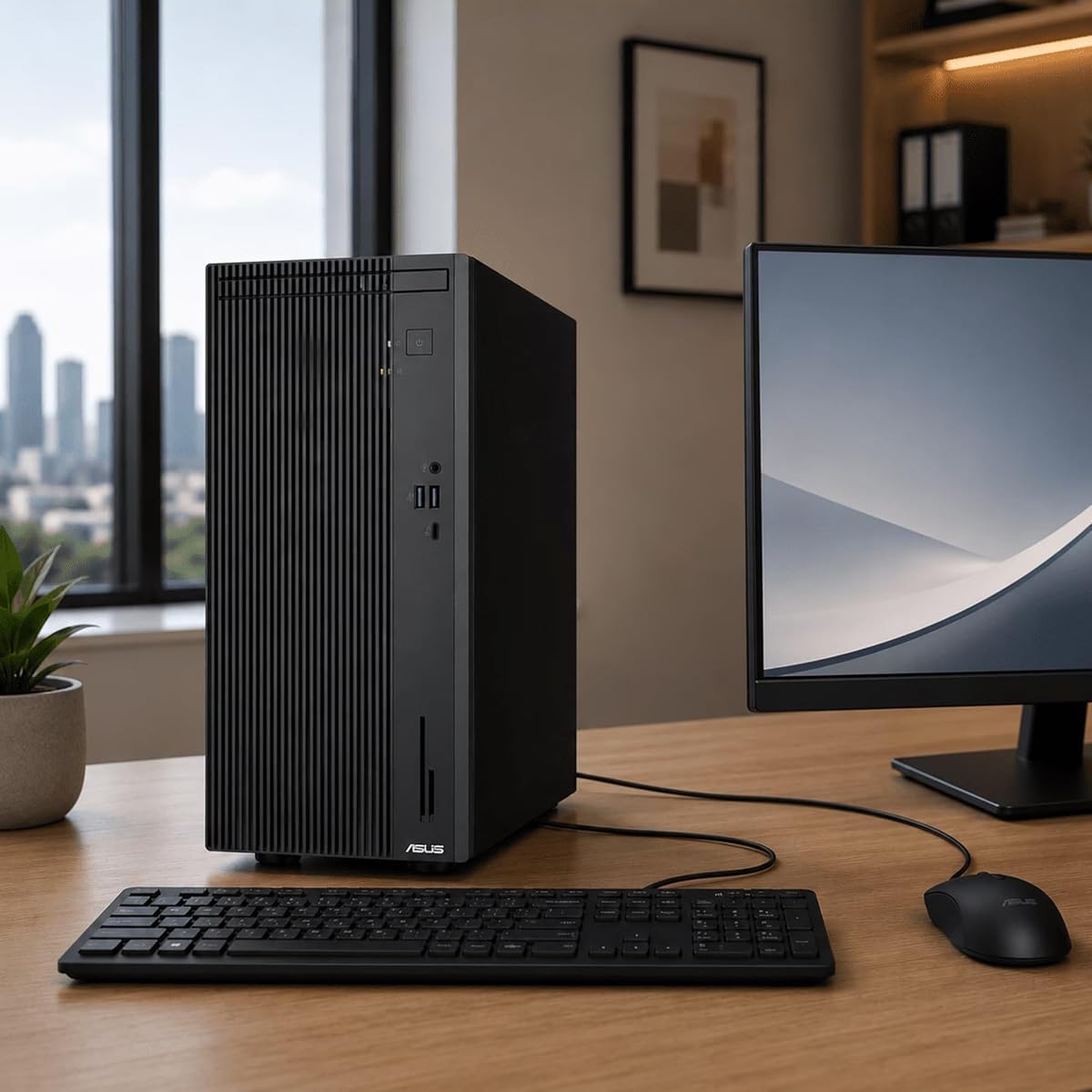
ASUS V500 Business Tower
5.0Editor score
Intel Core i7 13620H Processor
16GB DDR5 RAM Included
1TB Storage Configuration
This guide compares the top ten ASUS Desktop PC models ranging from budget business towers to high performance gaming rigs to help you choose the right system.
ASUS Desktop PCs offer reliable performance for business and gaming. Choosing the right model depends on your specific needs and budget. This guide reviews ten top models to simplify your decision process.
We compared these systems based on processor speed, memory capacity, storage options, and connectivity features. Each entry includes detailed specifications to help you understand exactly what you get with every purchase today.
Every pick highlights key strengths and trade-offs so you can compare easily. Please note that prices fluctuate frequently, so check current listings before finalizing your purchase decision online.
5.0Editor score

4.7Editor score

4.2Editor score
The following comparison table breaks down the key specifications of all ten models so you can quickly identify which system matches your performance requirements and workflow needs.


This ASUS V500 Business Tower delivers robust performance for office environments. With a 10-core i7 processor and DDR5 RAM, it handles multitasking effortlessly while maintaining low power consumption.
We may earn a commission when you buy through this link, at no additional cost to you.
The 1TB storage configuration offers flexibility for file management. You get a fast SSD for your operating system and applications, ensuring quick boot times and responsive software launches.
While the external drive may feel like a compromise compared to an internal drive, it provides removable storage for backups. The included keyboard and mouse bundle add value to the overall package price.
Small businesses or professionals needing reliable computing power should consider this model. It balances cost and performance effectively, making it a smart choice for daily workloads.
The 10-core processor ensures that you can run multiple applications simultaneously without slowdowns or system lag during busy work sessions.
With Wi-Fi 6 and multiple USB ports, connecting peripherals and staying online is seamless and fast for any office setup.
We may earn a commission when you buy through this link, at no additional cost to you.
The ROG G700 stands out with its new Ultra 7 processor and RTX 5060 graphics card. This combination provides excellent performance for 1080p and 1440p gaming with ray tracing enabled.
We may earn a commission when you buy through this link, at no additional cost to you.
Thirty two gigabytes of DDR5 RAM ensure that you can stream, game, and run background tasks simultaneously without hitting memory limits. The 1TB NVMe SSD loads games quickly and efficiently.
The inclusion of a CPS protection plan adds peace of mind for long-term ownership. While RGB accessories are included, they may need replacement if you prefer a different aesthetic style.
Gamers and content creators looking for a pre-built system with modern hardware will appreciate this build. It offers a balance of power and reliability right out of the box.
The Intel Core Ultra 7 265F offers significant improvements in single-core performance which translates directly to better frame rates in modern titles.
RTX 5060 graphics with DLSS technology allow you to enjoy high frame rates while maintaining stunning visual quality in supported games.
We may earn a commission when you buy through this link, at no additional cost to you.
The S501MER brings the latest 14th Gen Core i7 processor to the table. This chip delivers impressive clock speeds and cache sizes for demanding productivity tasks and light gaming.
We may earn a commission when you buy through this link, at no additional cost to you.
Wi-Fi 6E ensures you stay connected with low latency and high throughput. The 1TB PCIe SSD offers plenty of space for large files and fast data transfers across your network.
While it ships with 16GB RAM, the system supports expansion up to 64GB. This flexibility allows you to upgrade memory later as your needs grow over time.
Professionals who need a reliable workstation with future expandability should consider this model. It combines modern connectivity with solid performance for a competitive price point.
The 14th Gen i7 processor provides up to 5.3GHz turbo speeds, making it ideal for rendering, compiling, and heavy multitasking tasks.
With Wi-Fi 6E and Bluetooth 5.3, you get faster wireless speeds and more reliable connections for all your peripheral devices.
We may earn a commission when you buy through this link, at no additional cost to you.
This V500 variant focuses on high capacity memory for smooth multitasking. With 32GB of DDR5 RAM, you can run virtual machines, heavy browser tabs, and video editing tools without lag.
We may earn a commission when you buy through this link, at no additional cost to you.
Dual 4K monitor support makes it perfect for traders or developers who need screen real estate. The integrated Intel UHD graphics handle display output efficiently for everyday computing needs.
The 1TB SSD ensures you have space for all your projects and media files. Fast boot times mean you spend more time working and less time waiting for your system to load.
Home offices looking for a workstation that handles heavy workloads should look at this configuration. It prioritizes RAM and storage speed to maximize productivity.
Running multiple applications at once becomes effortless with 32GB of DDR5 memory, ensuring a responsive system even under heavy loads.
Support for two 4K monitors via HDMI and DisplayPort allows you to expand your workspace for better organization and workflow efficiency.
We may earn a commission when you buy through this link, at no additional cost to you.
The 2026 model of the G700 brings the powerful RTX 5070 and Core Ultra 7KF processor. This pairing ensures high frame rates and advanced graphics features for years to come.
We may earn a commission when you buy through this link, at no additional cost to you.
Tool-less access makes it easy to swap components or upgrade memory without needing specialized tools. The liquid cooling system keeps temperatures low during intense gaming sessions.
The 1TB NVMe SSD provides fast storage for your game library. With triple slot GPU support, you can upgrade to even more powerful graphics cards in the future.
Gamers who plan to keep their rig for five years should consider this premium build. It offers advanced cooling and easy access for maintenance and upgrades.
The quad-fan system combined with a liquid cooler ensures your components stay cool and perform optimally during extended gaming marathons.
Tool-less access panels allow you to upgrade RAM or storage quickly without voiding warranties or dealing with complex screws.
We may earn a commission when you buy through this link, at no additional cost to you.
This model pairs the Ryzen 7 9800X3D with the Radeon RX 9070 XT Prime OC. This combination delivers top-tier performance for gaming and content creation in the AMD ecosystem.
We may earn a commission when you buy through this link, at no additional cost to you.
Two terabytes of PCIe Gen 4 SSD storage ensure you have plenty of room for large game libraries and video files. The fast NVMe drives reduce load times significantly.
Thirty two gigabytes of DDR5 memory supports seamless multitasking. The system is designed to handle streaming and editing while you play modern titles.
Enthusiasts who prefer AMD technology will find this build compelling. It offers a balanced mix of CPU power and storage capacity for demanding users.
The 9800X3D processor excels in gaming scenarios with its advanced cache architecture, delivering smooth frame rates in AAA titles.
With 2TB of fast storage you can install multiple large games and applications without worrying about running out of space.
We may earn a commission when you buy through this link, at no additional cost to you.
This V500 variant ships with Windows 11 Pro, offering advanced security and management tools for business users. The included USB flash drive provides a convenient way to transfer small files.
We may earn a commission when you buy through this link, at no additional cost to you.
You can connect to multiple monitors using HDMI and DisplayPort outputs. This setup helps improve workflow efficiency for data entry or trading tasks.
The warranty is handled by PCOnline US for upgraded components. This means you may have different support channels compared to a standard manufacturer warranty from ASUS.
Small businesses needing Pro features at a lower price point should consider this bundle. It balances performance and OS capabilities for day-to-day office work.
Windows 11 Pro adds BitLocker encryption and remote desktop support which are essential for secure business environments.
The bundle includes a USB drive and keyboard mouse, reducing the need for immediate extra purchases when setting up.
We may earn a commission when you buy through this link, at no additional cost to you.
This Strix model is built for heavy workloads with 128GB of DDR5 RAM. You can edit 4K video, render 3D models, and compile code without worrying about memory limits.
We may earn a commission when you buy through this link, at no additional cost to you.
The 11TB storage includes both SSD and HDD options. This gives you fast access for active projects and large capacity for archiving old files.
The Core Ultra 9 285K processor provides extreme performance for single thread tasks. This helps with applications that do not scale across multiple cores.
Professionals requiring high capacity memory and storage should look at this system. It is designed for those who need raw power for creative workflows.
With 128GB of DDR5 RAM, you can run virtual machines and heavy rendering software simultaneously without any slowdowns.
The 11TB total storage ensures you never run out of space for large media files, backups, and game libraries.
We may earn a commission when you buy through this link, at no additional cost to you.
This V500 variant prioritizes RAM capacity with 64GB of DDR5 memory. It is ideal for users who need to run multiple virtual machines or heavy enterprise applications.
We may earn a commission when you buy through this link, at no additional cost to you.
The processor delivers efficient performance for daily tasks. With a 1TB PCIe SSD, you get fast storage speeds for your operating system and files.
Support for dual 4K monitors allows for a wide workspace. This is useful for spreadsheets, coding, or video editing workflows that require multiple windows.
Users needing maximum memory in a standard tower should consider this option. It provides a balance of storage and RAM for heavy productivity.
Sixty four gigabytes of DDR5 RAM allows you to run memory intensive applications without any performance bottlenecks.
With support for dual 4K displays, you get sharp visuals and plenty of screen real estate for complex tasks.
We may earn a commission when you buy through this link, at no additional cost to you.
The compact tower design saves space on your desk while delivering strong performance. It is perfect for offices where desk space is limited but performance matters.
We may earn a commission when you buy through this link, at no additional cost to you.
With 16GB of DDR5 5600MT/s RAM, you get fast memory speeds for efficient multitasking. The 1TB SSD ensures quick boot times and file access.
Windows 11 Pro provides the necessary tools for business management. You get features like BitLocker and Remote Desktop which are useful for corporate environments.
Businesses needing a space-saving desktop should consider this model. It balances size and power effectively for modern office setups.
The compact tower footprint allows you to maximize desk space while maintaining full performance for office work.
Windows 11 Pro ensures you have the tools needed for secure business operations and remote management.
We may earn a commission when you buy through this link, at no additional cost to you.
Selecting the right desktop requires balancing performance, storage, and budget. This guide explains the key factors to consider.
Processors are the brain of your computer. For business tasks, a 10-core i7 is sufficient. For gaming or rendering, look for Ultra 7 or Ryzen 9 chips.
Always check the clock speed and cache to ensure your tasks run smoothly without lag.
RAM determines how many programs you can run at once. 16GB is standard, but 32GB or more is better for heavy multitasking or video editing.
DDR5 RAM offers faster speeds than DDR4 so ensure your system uses the latest memory standard.
Solid State Drives are essential for speed. Avoid mechanical hard drives for your operating system as they are much slower.
Look for NVMe SSDs which provide the fastest data transfer rates available today.
Integrated graphics work for office work. If you game or edit video, you need a dedicated GPU like the RTX 5060 or higher.
Check if the graphics card supports the display resolutions you plan to use.
Ensure the desktop has enough USB ports for your devices. HDMI and DisplayPort connections allow you to use multiple monitors.
Wi-Fi 6 support is important for fast wireless internet speeds.
Windows 11 Home is standard for most users. Windows 11 Pro adds security features useful for businesses.
Always verify the version included before purchasing to match your needs.
A good cooling system prevents overheating during heavy loads. Air cooling is common, but liquid cooling offers better performance.
Look for models with ample airflow and dust filters for longevity.
Check if the case allows easy access to components. Tool-less designs make it easier to upgrade RAM or storage later.
Ensure there are empty slots for future memory or storage expansion.
Place your desktop on a stable surface with good airflow. Avoid covering the vents to prevent overheating during heavy tasks.
Install all necessary drivers from the ASUS website to ensure hardware works correctly. Regular updates improve performance and security.
Clean dust from the case and fans every few months using compressed air. This helps keep temperatures low and extends the life of your machine.
Most models support up to 64GB of RAM. Check the motherboard manual to confirm slot availability. You can add more modules later if you need extra capacity.
None of the listed models include a monitor. You will need to purchase one separately. Look for HDMI or DisplayPort compatible screens.
Most come with a standard one year manufacturer warranty. Check the product page for extended protection plans to cover future repairs or issues.
Some models ship with Windows 11 Pro. This version includes features for business security. Always verify the OS version in the specs before buying.
Yes, the ROG models have dedicated graphics cards. They are built specifically for gaming and content creation. Check the GPU specs for your target game performance.
Yes all models include an Ethernet port for wired internet. This ensures a stable connection for online gaming or work.
We have reviewed ten top models ranging from budget business towers to high-end gaming rigs. Each system offers distinct advantages depending on your workflow.
Prioritize RAM and storage if you handle heavy workloads. For gaming, focus on the graphics card and processor speed to ensure smooth frame rates.
Prices change frequently so always check current listings before finalizing your purchase. We hope this guide helps you find the perfect ASUS desktop for your needs.