
CyberPower AVRG900LCD
4.6Editor score
Simulated sine wave
Data line protection
AVR technology
This guide compares the top battery backup solutions for gaming laptops to ensure uninterrupted power during outages and protect your valuable equipment from
Gaming laptops require stable power to function correctly during intense sessions. A reliable battery backup ensures your system stays online when the grid fails. This guide explores top options to keep your gaming setup secure and functional.
We evaluated ten leading products based on output capacity, surge protection, and user reliability. Each item was reviewed for compatibility with high-performance gaming laptops and essential features like LCD panels or AVR technology. Our goal is to help you find the perfect match for your needs.
Each selection highlights key strengths, pros, cons, and ideal use cases for gamers. Note that product prices and availability change frequently so check current listings before purchasing. We aim to provide clear, honest insights to simplify your decision process significantly today.
4.6Editor score

4.5Editor score

4.7Editor score
This side-by-side comparison evaluates all ten selected battery backup units to help you choose the best fit for your gaming laptop setup based on power capacity and features.




The CyberPower CP1500PFCLCD stands out as a top choice for gaming laptops due to its pure sine wave output. With a strong rating and robust power capacity, it ensures your sensitive electronics receive clean power even during outages. This model is ideal for gamers who need reliable protection without compromising performance.
We may earn a commission when you buy through this link, at no additional cost to you.
Its 1500VA and 1000W output provides ample power for high-performance gaming laptops and peripherals. The color LCD panel offers immediate insights into battery status and power conditions, allowing users to monitor health easily. Additionally, the inclusion of USB Type-A and Type-C ports adds convenience for charging devices without needing extra adapters.
While the unit is larger than some compact alternatives, its performance justifies the footprint. The pure sine wave technology is crucial for active PFC power supplies found in many gaming PCs. The trade-off is a higher cost and size, but the reliability and equipment guarantee make it a worthwhile investment for serious gamers.
Gamers seeking the highest quality power backup should consider this unit for their setup. It delivers consistent power and safeguards valuable equipment from surges effectively. We recommend it for home gaming rigs where space allows and pure sine wave output is preferred for stability and longevity.
Pure sine wave ensures compatibility with active PFC power supplies often found in modern gaming laptops.
The color LCD provides real-time data on battery health and power conditions to prevent unexpected downtime.
We may earn a commission when you buy through this link, at no additional cost to you.
The CyberPower EC850LCD offers a solid backup solution for gamers focused on energy efficiency. Its ECO mode automatically cuts power to peripherals when the computer is off, reducing waste. With good ratings and essential features, it balances cost and performance well for standard gaming setups.
We may earn a commission when you buy through this link, at no additional cost to you.
This unit provides 850VA capacity suitable for many laptops and monitors. The LCD panel displays battery and power conditions clearly to help users stay informed. The ECO feature is unique for saving energy over time. It protects connected devices from surges and provides reliable backup during short outages.
The wattage might not support high-end desktop gaming rigs but works well for laptops. The simulated sine wave is adequate for most conventional power supplies. Users should note the capacity limits if they plan to add multiple heavy peripherals. Otherwise, it is a smart eco-friendly choice.
Consider this model if you want to reduce power usage without sacrificing protection. It is ideal for smaller gaming stations where energy savings matter. We recommend checking your total power needs before purchase to ensure this capacity meets your specific setup requirements adequately.
ECO mode turns off peripheral power when the computer sleeps to lower energy costs significantly.
Surge protection safeguards your equipment from voltage spikes that could damage sensitive electronics.
We may earn a commission when you buy through this link, at no additional cost to you.
The CyberPower CP1500AVRLCD3 delivers strong performance with Automatic Voltage Regulation to handle fluctuations without battery use. It features a color LCD for easy monitoring and offers ample outlets for extensive setups. This unit is a great balance of power and usability for laptop users.
We may earn a commission when you buy through this link, at no additional cost to you.
With 1500VA capacity it can support gaming laptops and monitors effectively. The AVR corrects minor power issues to extend battery life and protect devices. The color panel alerts you to potential issues before they cause downtime. USB ports allow quick charging of mobile devices alongside your rig.
While it uses a simulated sine wave it remains suitable for most conventional supplies. The weight is considerable which might limit portability but ensures stability. Users should account for the size when placing it in tight gaming spaces. Otherwise, it offers reliable protection and connectivity.
Gamers needing many outlets and voltage stability should look at this model. It suits home offices where multiple devices share one power source. We suggest verifying your equipment power needs to ensure this unit handles peak loads without triggering battery switching unnecessarily.
AVR corrects low or high voltage automatically without switching to battery to extend battery lifespan.
Multiple outlets and USB ports ensure all your gaming gear stays connected and charged during outages.
We may earn a commission when you buy through this link, at no additional cost to you.
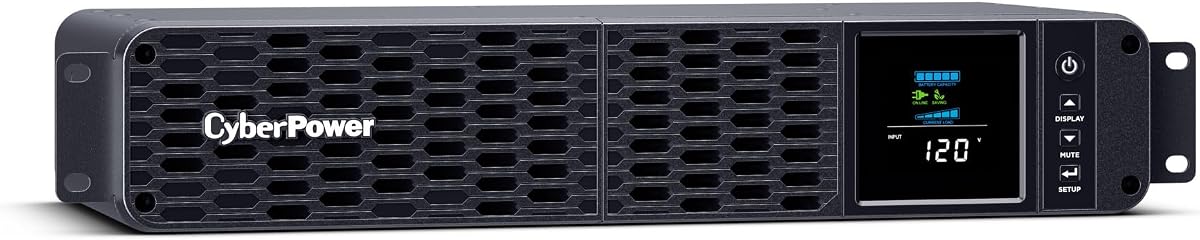
The CyberPower AVRG900LCD is an excellent budget pick for gamers on a tight budget. It includes data line protection which is rare at this price point. With high ratings and AVR technology it provides dependable backup for smaller gaming laptops without breaking the bank.
We may earn a commission when you buy through this link, at no additional cost to you.
Its 900VA capacity is sufficient for laptops and small monitors. The LCD panel shows battery status and power conditions clearly. Data line protection prevents surges from damaging modems or routers connected to the unit. AVR ensures stable voltage without unnecessary battery switching during minor fluctuations.
The lower wattage limits it from powering high-end desktops or heavy peripherals. It is best suited for laptops that consume less power overall. Some users might find the outlet count low if they have many devices to plug in. Still, it offers great value for the cost.
Choose this unit if you need basic protection for a portable gaming setup. It keeps your system safe from outages and surges affordably. We recommend checking your total wattage needs to confirm this fits your specific gaming laptop and accessory requirements perfectly.
Data line protection shields your network devices from surges traveling through telephone lines.
Automatic Voltage Regulation maintains stable power levels to protect your equipment from fluctuations.
We may earn a commission when you buy through this link, at no additional cost to you.
The CyberPower CP1500AVRT offers ten outlets which is ideal for gaming setups with multiple peripherals. It delivers 900W of power to support laptops and monitors efficiently. While it lacks a screen, LED lights provide quick status checks. It is a robust choice for those needing more connection points.
We may earn a commission when you buy through this link, at no additional cost to you.
With 1500VA capacity it handles standard gaming loads well. The AVR feature corrects minor voltage issues without using battery power. LED lights indicate power status and wiring faults at a glance. The connected equipment guarantee adds peace of mind for expensive gaming gear.
The absence of an LCD panel means less detailed info on battery health. Users rely on lights which can be less informative during troubleshooting. The weight makes it less portable but more stable on a desk. Consider these trade-offs when selecting this model for your home office.
Gamers with many accessories will appreciate the ample outlet space. It ensures everything stays powered during outages without needing extra strips. We suggest checking if you need detailed battery metrics before buying since LED indicators are more basic than a display screen.
Ten outlets allow you to connect your laptop monitor speakers and gaming console all at once.
LED lights give immediate visual feedback on power status and wiring conditions without a screen.
We may earn a commission when you buy through this link, at no additional cost to you.
The APC Back-UPS Series provides flexibility with two units offering distinct power levels. It features user replaceable batteries which extend the life of the system. With USB-C charging and ample outlets it is modern and versatile for gaming laptops needing reliable backup solutions.
We may earn a commission when you buy through this link, at no additional cost to you.
This setup offers 1050VA and 500VA options to suit different device needs. USB-C ports allow fast charging for phones and tablets during blackouts. The ability to replace batteries means you do not discard the whole unit when capacity drops. This helps with long-term cost savings.
Splitting outlets across two units might require more space than one box. It lacks specific ratings from users so verification of reliability is wise. Ensure you need two separate units before buying. Still, the brand reputation and coverage make it a strong candidate for varied setups.
Consider this if you want flexibility in powering different parts of your setup. It is great for modular environments where separate power zones help. We recommend checking current stock and reviews to ensure the units match your specific gaming laptop needs accurately.
Replaceable batteries let you swap old ones easily to keep the system running longer.
USB-C ports provide quick charging for modern devices without extra adapters.
We may earn a commission when you buy through this link, at no additional cost to you.
The CyberPower CP1500PFCRM2U is designed for short-depth rack installations where space is tight. It offers pure sine wave output and 1000W capacity to support demanding gaming rigs. This unit is professional grade and ideal for serious gamers with rack-mounted equipment.
We may earn a commission when you buy through this link, at no additional cost to you.
Its short depth makes it fit easily in compact cabinets. The LCD panel and pure sine wave ensure reliability and safety for active PFC supplies. With a strong warranty and equipment guarantee it protects valuable gear well. It suits environments where space efficiency matters.
Installation requires rack mounting which may be complex for casual users. The price is higher than standard desktop units. If you do not have a rack this might be overkill. Otherwise, it provides top-tier protection and connectivity for specialized setups.
Gamers with home servers or rack setups should consider this model. It combines professional features with gaming power needs perfectly. We recommend ensuring your rack is compatible before purchasing to avoid any issues during installation.
This short depth design fits comfortably in small rack cabinets where space is limited.
Pure sine wave output ensures safe power for active PFC power supplies in gaming laptops.
We may earn a commission when you buy through this link, at no additional cost to you.
This 3500W Power Inverter delivers high power for portable gaming outside home outlets. It converts DC to AC with pure sine wave for safe operation. The LED display shows status while dual fans keep it cool during heavy use. It suits camping or emergency gaming sessions effectively.
We may earn a commission when you buy through this link, at no additional cost to you.
With 3500W continuous power it can handle heavy gaming laptops and peripherals. Pure sine wave ensures no interference with sensitive electronics. Built-in protections prevent overheating or overloads to keep gear safe. It is robust for temporary setups where wall power is unavailable.
It requires a 60V DC battery system to function so it is not standalone. You must have compatible batteries for it to work properly. If you lack this setup it may not be practical. However, for RVs or outdoor setups with batteries it is a strong choice.
Outdoor gamers should consider this for remote power needs. It ensures your laptop stays charged and operational without grid access. We recommend verifying your DC battery compatibility before buying to ensure seamless integration.
Pure sine wave output ensures safe and stable power for sensitive gaming electronics.
Dual intelligent cooling fans prevent overheating during extended gaming sessions in hot environments.
We may earn a commission when you buy through this link, at no additional cost to you.
The CyberPower BRG1500AVRLCD2 offers a five year warranty making it the most protected unit here. It has the highest rating and provides ample outlets for large gaming rigs. With smart LCD features it gives detailed power insights for proactive maintenance. It is a premium choice for long-term reliability.
We may earn a commission when you buy through this link, at no additional cost to you.
Its 1500VA capacity supports powerful laptops and peripherals easily. The smart LCD alerts you to issues before they cause downtime. Remote management requires an optional card but adds flexibility for tech savvy users. This unit combines durability with advanced monitoring features perfectly.
The cost is higher due to the extended warranty and features. You need space for its size and weight. Users without remote management needs might find extra features unnecessary. Still, the long warranty coverage offers significant peace of mind.
Gamers prioritizing reliability and warranty should choose this model. It ensures your investment stays safe with excellent support coverage. We recommend reading the warranty terms to understand exactly what is included for your specific setup needs.
A five year warranty covers the unit and battery providing long-term peace of mind.
The smart LCD displays detailed battery health and power conditions for easy monitoring.
We may earn a commission when you buy through this link, at no additional cost to you.
The second 3500W Power Inverter adds a smart screen for better status visibility. It matches the high wattage and pure sine wave specs of its sibling. The screen enhances user experience with clear data during outages or outdoor gaming sessions. It is another strong option for portable power needs.
We may earn a commission when you buy through this link, at no additional cost to you.
It supports 3500W of continuous power ideal for heavy laptops. The smart screen shows real-time load and status for better control. Built-in protections ensure safety during operation. This unit is versatile for RVs or emergencies where you need reliable and visible power.
Like the previous inverter it requires a 60V DC battery to work. Without that source it cannot function as a standalone backup. Ensure you have compatible batteries before purchasing. It is best suited for specialized setups rather than home offices.
Gamers needing smart monitoring for portable power should look here. It offers clear visibility into power status while providing robust protection. We recommend confirming your battery system compatibility to ensure smooth operation during gaming.
A smart screen provides clear and immediate status updates for better power management.
Built-in thermal and overload protections keep your equipment safe from damage during use.
We may earn a commission when you buy through this link, at no additional cost to you.
Choosing the right battery backup involves understanding your power needs and the features that protect your gaming gear effectively.
Power capacity measured in VA and wattage determines how long your device runs during an outage. For gaming laptops look for at least 800W to handle high power draw from GPU and CPU. If you have multiple monitors pick higher wattage like 1000W to ensure safe operation.
Choose higher wattage if your total device draw exceeds lower ratings to avoid overloading the unit.
Pure sine wave output delivers clean power similar to wall outlets. It is ideal for active PFC power supplies found in modern gaming laptops. Simulated sine wave works for conventional supplies but may be less stable for sensitive equipment.
Select pure sine wave for high-end gaming rigs to ensure maximum safety and compatibility.
Runtime depends on your load and battery capacity. A unit with 1500VA may provide 20 to 30 minutes for moderate loads. For gaming you need enough time to save games and shut down safely without losing data.
Look for models that offer sufficient runtime for safe shutdown rather than extended operation.
Gaming setups often include consoles routers and peripherals requiring multiple outlets. Ensure the unit has enough battery-backed outlets for critical devices. Surge only outlets protect non-critical gear like speakers or RGB lights without draining battery quickly.
Count your devices and select a unit with enough battery-backed outlets to cover essentials.
AVR corrects minor voltage fluctuations without draining the battery. This helps extend battery life during brownouts or surges. It ensures stable power delivery to your gaming laptop even when utility power is inconsistent.
Prioritize units with AVR to reduce battery wear during frequent minor power fluctuations.
An LCD panel shows battery health load and estimated runtime. This helps you monitor system status during an outage. Color displays provide alerts for issues before they become critical and help maintain system stability.
Choose models with clear displays to quickly check power status during blackouts.
Warranty length reflects manufacturer confidence. Look for at least three years of coverage including the battery. Connected equipment guarantees also offer insurance against damage from power surges which adds peace of mind.
Opt for longer warranties to protect your investment and ensure long-term support.
Size matters depending on where you place your unit. Compact units fit in small spaces but may have lower capacity. Large units hold more power but require floor space. Consider weight if you plan to move it often for travel.
Select a size that fits your desk or floor space while meeting power needs.
Plug your gaming laptop and essential peripherals into the battery-backed outlets on the UPS. This ensures they stay powered during outages rather than just receiving surge protection. Keep other devices like lamps or chargers on surge-only outlets to save battery capacity.
Test the unit every few months by unplugging it from the wall to verify battery function. Check the LCD panel for any warning signs of battery wear or errors. Replace the battery when capacity drops below 80 percent to maintain reliable performance.
Avoid placing the unit near heat sources or in direct sunlight to prolong battery life. Ensure good ventilation around the unit to prevent overheating during charging. Proper care extends its lifespan and keeps your gaming setup safe from power issues.
Yes modern gaming laptops often have active PFC power supplies requiring pure sine wave for safe operation. Simulated sine wave may work but risks instability. Pure sine wave ensures clean power similar to wall outlets for sensitive components.
Runtime varies by model and load. For gaming laptops expect around 20 to 30 minutes to save work. It is not for long-term use but gives time to shut down safely during unexpected outages.
Yes as long as total wattage stays within limits. Count your laptop and monitor power draw and choose a UPS with enough capacity to handle all devices during blackouts safely.
The unit may still function as a surge protector. Battery failure reduces runtime so replace the battery promptly. Some units have alarms or lights to alert you when replacement is needed for safety.
Not always but higher VA means longer backup time for same load. Match VA to your total device wattage for best efficiency. Too much capacity may cost more without adding value.
Yes consoles benefit from surge protection and short backup. Connect consoles to battery outlets for safe shutdown during power loss. Ensure total wattage stays within unit limits to avoid overloading.
Batteries typically last 3 to 5 years. Replace them when runtime drops significantly or alerts appear. Regular testing helps track battery health and ensure reliability for gaming needs.
Yes a UPS protects against outages and surges. It saves your progress during blackouts and prevents hardware damage. It is a cost-effective insurance for expensive gaming equipment.
We reviewed ten top battery backups for gaming laptops each offering unique strengths for different needs. The CyberPower CP1500PFCLCD leads with pure sine wave and high capacity for serious gamers. The CyberPower AVRG900LCD offers a budget-friendly option with essential protection.
Prioritize pure sine wave if your laptop has active PFC supplies for maximum safety. Consider AVR and LCD features to monitor battery health easily. Match wattage to your total setup to avoid overloads and ensure reliable operation during outages.
Prices and availability change so check current listings before purchasing. We hope this guide simplifies your choice and helps you find the perfect backup for your gaming laptop. Stay safe and powered up during every session.