
CMTECK USB Computer Microphone G009
4.5Editor score
Crystal Clear Audio Quality
Active Noise Cancelling
Mute Button With Indicator
Finding a reliable audio tool does not require breaking the bank. A good cheap desk microphone delivers clear sound for meetings and content creation without expensive gear.
We compared ten highly rated USB microphones based on audio clarity, build quality, and ease of use. Each option offers unique features suitable for different budgets and needs.
Each pick highlights key strengths and potential trade-offs to inform your decision. Remember that prices and availability can change frequently, so verify current details before purchasing.
4.5Editor score

4.4Editor score

4.4Editor score
As an Amazon Associate we earn from qualifying purchases.
The following table provides a side-by-side overview of all ten products. It highlights key specifications to help you quickly identify which microphone fits your specific setup requirements.
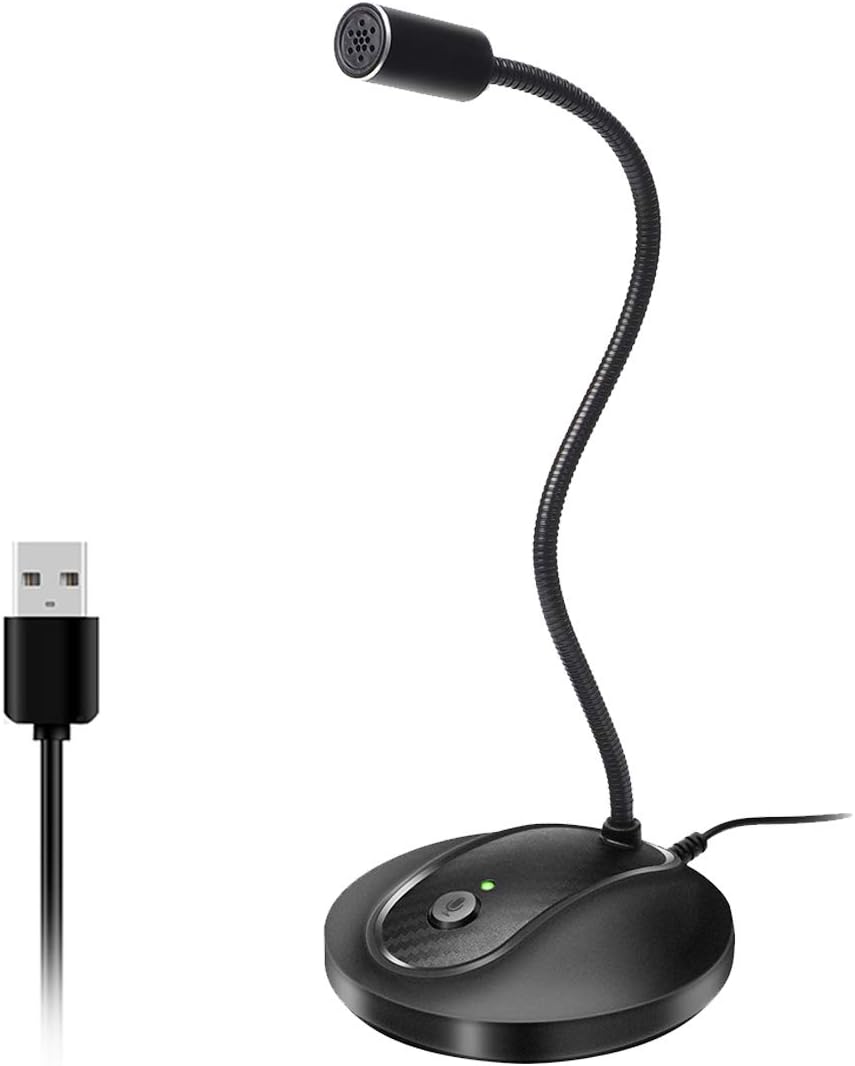



The CMTECK G009 stands out as a top contender for those seeking affordability without sacrificing too much quality. With a solid 4.5 rating, it delivers crystal clear audio suitable for online classes and casual streaming.
We may earn a commission when you buy through this link, at no additional cost to you.
Its active noise-cancelling technology uses a smart chip to block background noise effectively. The pop filter ensures your voice is the only thing heard, while the LED indicator clearly shows when you are muted or connected.
While it lacks compatibility with Linux systems, the universal support for Windows and Mac covers most users. The gooseneck design allows you to position the mic exactly where you need it for optimal sound capture.
If you need a reliable microphone for daily tasks like Zoom meetings or YouTube comments without spending much, this is an excellent choice. It balances performance and cost better than many competitors in this price range.
The CCS2.0 smart chip actively filters out background noise like fans or keyboards, ensuring your voice remains the primary focus during calls or recordings.
You do not need any drivers or software installation. Simply plug the USB into your device and start recording immediately, making it ideal for non-technical users.
We may earn a commission when you buy through this link, at no additional cost to you.
This USB microphone offers a robust build quality that feels durable for daily use. Its intelligent noise-canceling technology ensures your voice comes through clearly even in noisy environments, making it great for home offices.
We may earn a commission when you buy through this link, at no additional cost to you.
The omnidirectional pickup allows sound to be captured from any angle, which is useful if you move around while speaking. The one-click mute button provides quick access to silence your mic during interruptions without fumbling with software.
While the 6-foot cable is standard, some users might prefer a longer reach for larger desks. Additionally, the lack of Xbox compatibility limits its use for console gamers, but it works well with PC and mobile setups.
For users prioritizing build quality and reliable noise rejection, this model is a fantastic choice. It strikes a balance between functionality and durability, ensuring your audio setup remains stable over time.
The use of premium metal pipes and heavy-duty ABS materials ensures the stand remains steady even when adjusted frequently, preventing accidental knocks during use.
Advanced tech reduces echo and background sounds, allowing for clearer conversations and recordings without the need for external software processing.
We may earn a commission when you buy through this link, at no additional cost to you.
With a near perfect rating, this microphone impresses with its exceptional sound quality and thoughtful design features. The inclusion of windproof fluffy caps helps reduce plosive noise, resulting in smoother and more professional recordings.
We may earn a commission when you buy through this link, at no additional cost to you.
Its multifunction use case covers everything from gaming to court reporting, thanks to its sensitive pickup pattern. The non-slip silicone pad ensures the base stays fixed on your desk even during active streaming sessions.
However, the lack of a physical volume knob means you must adjust settings through software, which might slow down quick adjustments. The compact size is great for travel but requires care to prevent tipping if bumped.
If you need a portable solution that delivers high-quality audio without software complexity, this is a strong contender. It offers excellent value for creators who value convenience and clarity in equal measure.
The fluffy caps reduce breath and wind noise significantly, ensuring your voice sounds natural and clear even when speaking closely to the mic.
The compact and lightweight design makes it easy to pack in a backpack for remote work, while the plug-and-play nature ensures quick setup anywhere.
We may earn a commission when you buy through this link, at no additional cost to you.
Amazon Basics delivers a premium feel with this condenser microphone, offering high sensitivity and low distortion. The cardioid pickup pattern is key here, isolating your voice and rejecting background noise effectively for professional recordings.
We may earn a commission when you buy through this link, at no additional cost to you.
A built-in shock absorber helps minimize vibrations from your desk, ensuring clean audio even if you type heavily while recording. The silicone boot protects the mic and adds to the overall stability during long use.
While the price is slightly higher than budget options, the features justify the cost for serious users. However, the weight might make it less portable if you frequently move your setup around between locations.
This is an ideal choice for home studios or podcasters who need consistent, high-quality audio without the hassle of complex setups. It combines reliability with essential features that enhance sound quality immediately.
The pattern focuses on sound from the front, significantly reducing ambient noise from sides and rear for clearer vocals and voiceovers.
The shock absorber and silicone boot work together to dampen mechanical noise, ensuring that clicks and thuds do not ruin your audio tracks.
We may earn a commission when you buy through this link, at no additional cost to you.
The ZealSound K66 offers the most comprehensive feature set in this list, making it a favorite for podcasters and streamers. Its real time zero-latency monitoring allows you to hear exactly what is being recorded without annoying delays.
We may earn a commission when you buy through this link, at no additional cost to you.
Physical knobs for gain, volume, and echo give you instant control without digging through software settings. This is especially useful for live streams where quick adjustments are often necessary to maintain audio quality.
The compatibility with mobile devices via adapters extends its usability beyond just computers. However, the physical footprint is larger than gooseneck mics, which might clutter smaller desks if you lack space for it.
If you need full control over your sound signature and plan to record across multiple devices, this is the top pick. It bridges the gap between entry-level and professional gear with impressive functionality.
The headphone jack with volume control lets you listen to your audio feed instantly, helping you catch issues before they ruin a recording session.
Included adapters allow seamless connection to iPhones and Android phones, making it versatile for content creators who film on both computers and phones.
We may earn a commission when you buy through this link, at no additional cost to you.
Designed specifically for meetings, the TONOR G11 offers a wide pickup range that can capture voices from multiple participants comfortably. This makes it ideal for small conference rooms or group calls where distance varies.
We may earn a commission when you buy through this link, at no additional cost to you.
The omnidirectional pattern ensures that sound is picked up from all directions equally. The nylon shielded wire helps eliminate signal interference, maintaining a clean audio signal even over longer distances or around power sources.
However, the wide range means it may pick up more background noise compared to directional mics, so a quiet room is essential. Without a volume knob, you must rely on software controls for sensitivity adjustments.
For business users or educators needing to capture multiple speakers without moving the mic, this model is highly practical. It simplifies the meeting experience by ensuring everyone is heard clearly.
The design prioritizes capturing voices from a wide area, making it easier for everyone at a table to speak without leaning close to a single point.
The shielded wire construction minimizes electrical noise, ensuring that the audio signal remains clean and consistent throughout long calls.
We may earn a commission when you buy through this link, at no additional cost to you.
This microphone stands out for its sleek aesthetics, featuring customizable breathing lights that enhance your gaming or work setup. The sound quality is equally impressive, delivering loud and powerful audio suitable for streaming platforms.
We may earn a commission when you buy through this link, at no additional cost to you.
The high-grade metal gooseneck offers durability and smooth adjustment, allowing you to position the mic with precision. The weighted base ensures stability, so it does not wobble during intense streaming sessions or live broadcasts.
While the ambient lighting is a nice touch, it may not be desirable in all professional settings, though it can be turned off. The neck length is shorter than some competitors, which might limit reach on very large desks.
If you value style alongside functionality, this mic is a great addition to your setup. It combines modern design with reliable performance to keep your audio looking and sounding great.
The breathing lights add a modern tech feel to your desk, which can elevate the visual appeal of your gaming or streaming environment.
The metal gooseneck and weighted base combination ensures the mic stays in place and maintains its shape over years of frequent adjustment.
We may earn a commission when you buy through this link, at no additional cost to you.
The LIANGSTAR mic offers excellent value with built-in sound card functionality, eliminating the need for external hardware. Its CCS3.0 smart chip effectively reduces background noise, ensuring your voice comes through naturally and clearly.
We may earn a commission when you buy through this link, at no additional cost to you.
The inclusion of a volume control knob allows for easy adjustment of input levels, which is often missing in budget microphones. This feature adds a layer of convenience that simplifies your daily workflow during long recording sessions.
While the design is straightforward and functional, it lacks some of the premium aesthetics of higher-end models. However, the quick customer service response time adds peace of mind in case you encounter any technical issues.
This is a reliable everyday workhorse for creators who need solid performance without breaking the budget. It covers all the essentials well, making it a safe choice for general use.
Adjusting input levels directly on the mic saves time and ensures you maintain consistent volume across different recording or call sessions.
The smart chip actively works to suppress noise, helping to deliver a cleaner vocal track that requires less editing during post-production.
We may earn a commission when you buy through this link, at no additional cost to you.
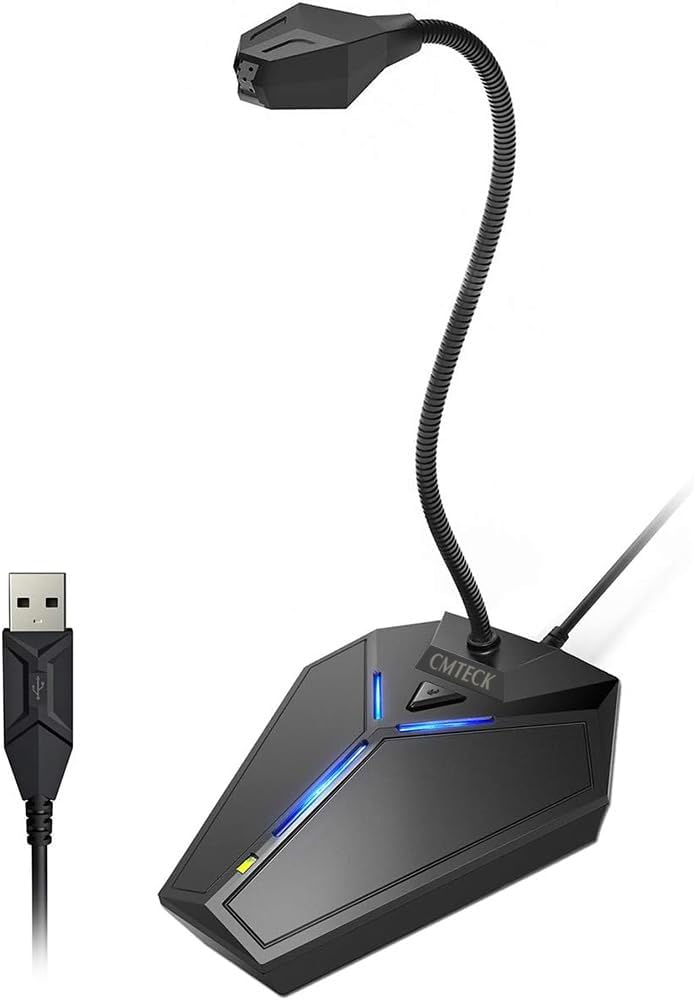
This model from CMTECK delivers studio-quality performance at a budget-friendly price. The high-performance SMART CHIP suppresses background noise, ensuring your voice sounds crisp and clear for calls and content creation.
We may earn a commission when you buy through this link, at no additional cost to you.
The metal gooseneck provides durability and flexibility, allowing you to angle the mic perfectly for your voice. A unique feature is the blue LED light, which can be switched on or off to match your setup preferences.
The mute button with a clear LED indicator ensures you never transmit audio accidentally. While the cable length is standard at 6 feet, it might feel slightly short if you sit far back from your computer.
Ideal for gamers and streamers who need a simple yet effective tool, this mic offers a balance of style and function. It is a trusted option for those looking for quality without the premium price tag.
The blue LED light adds a stylish touch to your setup and can be toggled off if you prefer a cleaner, distraction-free look during recordings.
The quick mute button allows for instant silence during interruptions, with a clear indicator so you know exactly when you are muted or active.
We may earn a commission when you buy through this link, at no additional cost to you.
KLIM offers a professional microphone designed for durability, backed by an impressive five-year warranty. The patented audio filter helps record only your voice, providing clarity for colleagues and teammates during calls.
We may earn a commission when you buy through this link, at no additional cost to you.
Its lightweight yet stable design ensures it stays put on your desk without taking up too much space. The aerodynamic curves give it a unique look that stands out in any home office environment.
While the mute button is simple, it serves its purpose well for quick silencing. The warranty is a major selling point, offering long-term security that many cheaper brands do not provide to their customers.
If you are looking for a microphone that will last a long time and perform consistently, this is a wise investment. It balances robustness with practical features for daily professional use.
The five-year assurance reflects the build quality and reliability of the product, giving you confidence in a long-term purchase.
The balanced stand and lightweight materials ensure the mic remains stable during use while keeping the desk footprint minimal.
We may earn a commission when you buy through this link, at no additional cost to you.
Choosing the right microphone involves balancing several factors to ensure you get clear audio without overspending.
Condenser microphones are most common in this category. They use a diaphragm to capture sound with high sensitivity, making them great for studio-like audio.
Choose a condenser mic if you want detailed sound for recording.
Omnidirectional mics pick up sound from all directions, ideal for group meetings. Cardioid mics focus on the front, reducing background noise.
Select cardioid for solo work and omni for conversations.
USB is standard for cheap desk mics, offering plug-and-play simplicity. Avoid 3.5mm jacks which require extra adapters and sound cards.
Always choose USB for ease of use and compatibility.
A physical mute button with an LED indicator prevents accidental audio leaks. It is essential for professional calls and live streams.
Ensure your mic has a visible mute switch for safety.
Look for metal goosenecks and weighted bases. Plastic stands may wobble or break over time. Durability ensures your mic lasts longer.
Prioritize metal components for stability and longevity.
Active noise reduction helps filter out fans and typing. This improves call clarity without needing software adjustments.
Check for smart chips or active noise features.
A cable between 6 to 10 feet allows flexibility in positioning. Short cables restrict where you can place the mic on your desk.
Ensure the cable reaches comfortably from your PC.
Most work with Windows and Mac. Check for specific exclusions like Linux or Xbox before buying to avoid issues.
Verify system requirements match your setup.
Start by plugging the USB cable directly into your computer. Wait for the system to recognize the device before opening your recording software.
Position the microphone about 6 to 12 inches from your mouth. Adjust the neck to point the capsule directly at your lips for best results.
Clean the mic occasionally with a soft dry cloth. Keep it away from liquids to prevent internal damage and ensure a long lifespan.
Most USB microphones in this guide are fully compatible with macOS. They use standard USB audio protocols that work without drivers. Always check the product details for specific version requirements before purchasing.
Background noise often comes from fans or keyboards. Look for a mic with active noise cancellation. Also, position the mic away from noisy sources and lower your computer volume during recording.
Yes, USB mics have built-in audio interfaces that simplify setup. They offer better sound quality and compatibility compared to analog jacks that need extra hardware.
Absolutely, many models on this list are designed specifically for podcasting. They offer clear voice capture and features like mute buttons essential for content creation.
Echo usually happens when your speaker plays back the mic audio. Use headphones while recording or enable echo cancellation in your conferencing software settings.
Most are plug-and-play and work immediately without drivers. Some offer optional software for advanced settings, but basic recording functions are native to your system.
With proper care, these microphones can last several years. Avoid drops, keep them dry, and handle the cables gently to extend their usable life.
We have reviewed ten top options ranging from budget-friendly picks to feature-rich choices. Whether you need a simple meeting tool or a podcasting rig, there is something here for you.
Prioritize features like noise cancellation and mute buttons for daily use. Build quality and compatibility should also guide your final decision to ensure satisfaction.
Prices fluctuate often, so verify current deals and availability before ordering. A reliable microphone is an investment in your communication quality that pays off daily.