
Ocean C 64GB+4GB 7 inch
4.5Editor score
7-inch Kaleido 3 screen
Android multitasking
Affordable price point
Color E Ink Tablets have revolutionized how we consume digital content by offering a paper-like experience with vibrant hues. These devices reduce eye strain and provide long battery life, making them ideal for readers and professionals who need focus.
We evaluated ten leading models based on display technology, performance, stylus accuracy, and ecosystem support. Our analysis covers everything from compact 7-inch readers to large 11-inch tablets, ensuring you find the right fit for your workflow.
Each pick highlights key strengths, potential trade-offs, and specific use cases to guide your decision. Prices and availability can change frequently, so check the current listings before purchasing to ensure you get the best deal available today.
4.5Editor score

4.3Editor score

4.2Editor score
As an Amazon Associate we earn from qualifying purchases.
The following table provides a side-by-side comparison of all ten Color E Ink Tablet models, highlighting their key specifications and unique selling points to help you make an informed decision.



The Amazon Kindle Scribe Colorsoft 64GB stands out as a leading choice for those seeking a versatile Color E Ink Tablet. With a 4.3 rating, it offers a unique blend of reading and writing capabilities that few other devices can match today.
We may earn a commission when you buy through this link, at no additional cost to you.
Its custom-built Colorsoft display delivers high-contrast, paper-like color that is easy on the eyes without distracting flashes when writing. The textured surface and responsive display create a smooth writing experience, enhanced by an included pen that never needs charging and has a built-in eraser.
While the device excels in focus and clarity, it is purpose-built for reading and writing rather than general media consumption. Users should note that the lack of distractions is a strength, though it may limit those needing a full Android app environment.
This tablet is ideal for students and professionals who want to organize notes, convert handwriting to text, and review documents without printing. The integration with cloud services like Google Drive and Microsoft OneDrive makes it a powerful tool for productivity.
The built-in AI tools allow you to find information, ask questions about what you have written, and generate summaries, streamlining your study or work process significantly.
The 11-inch Colorsoft display provides a large canvas that feels natural to write on, reducing eye strain during long sessions compared to traditional LCD or OLED screens.
We may earn a commission when you buy through this link, at no additional cost to you.
The reMarkable Paper Pro with Marker Plus is the ultimate paper tablet for those who prioritize writing quality above all else. It has a 4.2 rating and represents a significant leap forward for color e-ink technology in professional settings.
We may earn a commission when you buy through this link, at no additional cost to you.
For the first time on a reMarkable paper tablet, you can write, sketch, and read in color on a full-size 11.8-inch display. The included Marker Plus offers precise control, incredible responsiveness, and all-day comfort, delivering realistic friction and natural writing feel.
While the device is expensive and locked into a specific ecosystem, the trade-off is a highly focused environment free from notifications and distractions. This makes it perfect for deep work sessions where clarity and organization are paramount.
This tablet is best suited for creatives and executives who need to annotate PDFs, manage notes efficiently, and work comfortably in various lighting conditions. The adjustable reading light ensures you can continue working even when the lights go out.
The 11.8-inch Canvas Color display offers an ultra-slim and portable design that still provides a full-size writing area, making it easy to carry while maintaining productivity.
Sort your notes and documents with folders and tags, and instantly convert handwriting to typed text for seamless integration with other digital workflows.
We may earn a commission when you buy through this link, at no additional cost to you.
The Ocean C 64GB+4GB 7-inch Color eBook Reader offers an impressive balance of features and affordability, earning a 4.5 rating from users. It provides a glare-free touchscreen experience perfect for comics, manga, books, and magazines.
We may earn a commission when you buy through this link, at no additional cost to you.
With a powerful Octa-core processor and 4GB RAM, this device runs Android for seamless multitasking. The stylus pen syncs perfectly with the flexible screen, mimicking paper texture for natural control, though the pen must be purchased separately.
While the screen is smaller than high-end models, it remains highly portable and efficient for daily reading and note-taking. The adjustable brightness and color temperature settings ensure comfort for both day and night usage.
This tablet is an excellent choice for budget-conscious readers and students who need a capable device without breaking the bank. It supports a wide range of file formats and offers long battery life for extended use on the go.
The Android OS allows for third-party app support, giving you flexibility to customize your reading and note-taking environment to suit your specific needs.
Supports diverse formats including image, book, font, audio, and office documents, making it a universal reader for various content types.
We may earn a commission when you buy through this link, at no additional cost to you.
The BOOX Tablet Go Color 7 Gen II is a compact E Ink Tablet that supports Active Stylus InkSense technology. With a 4.0 rating, it is designed for users who value portability and a wide range of document formats.
We may earn a commission when you buy through this link, at no additional cost to you.
Its 7-inch Kaleido 3 screen offers 4096 colors with a flat cover-lens and resolution optimized for both reading and color content. The front light includes warm and cold settings to help achieve a better reading experience in various conditions.
While the color resolution is lower than black and white, this is characteristic of current color e-ink technology. The device includes features like an OTG USB-C port, built-in speaker, and microSD slot for expanded storage and versatility.
This tablet is ideal for travelers and commuters who need a lightweight device for reading and light note-taking. The support for third-party apps and various formats makes it flexible enough for most general usage scenarios.
Select Refresh Mode to reduce ghosting with options like HD, Balanced, Fast, Ultrafast, and Regal modes tailored for different content types.
Supports extensive document and image formats, ensuring you can read almost any file type you encounter in your digital library.
We may earn a commission when you buy through this link, at no additional cost to you.
The reMarkable Paper Pro with Marker Plus and Basalt Book Folio bundle offers a complete package for digital note-taking and reading. With a 4.2 rating, it includes all essential accessories to enhance the user experience from day one.
We may earn a commission when you buy through this link, at no additional cost to you.
This bundle features the 11.8-inch Canvas Color display with Marker Plus, which delivers precise control and all-day comfort. The included Book Folio provides a stylish protective cover in premium Mosaic weave, ensuring durability and style.
While the bundle price is higher, the inclusion of a high-quality folio adds value for those seeking a protected and organized workflow. The device allows you to write directly on PDFs and convert handwriting to text efficiently.
This bundle is perfect for professionals who want a ready-to-use solution without purchasing accessories separately. The combination of hardware and protection makes it a robust choice for daily professional use and travel.
The Basalt Book Folio adds a layer of premium protection to your device, ensuring it remains safe during transport and daily handling.
With Marker Plus and Folio included, you have everything needed to start organizing your work and notes immediately upon purchase.
We may earn a commission when you buy through this link, at no additional cost to you.
The BOOX Note Air 5 C features a 10.3-inch Kaleido 3 display with high-resolution black and white and standard color performance. With a 3.8 rating, it offers substantial hardware specs including 6GB RAM for smooth Android operation.
We may earn a commission when you buy through this link, at no additional cost to you.
This device supports the latest Android 15 OS and includes a fingerprint recognition power button for secure access. The large screen is ideal for documents and multitasking, though color content has inherent limitations compared to B/W content.
While the device supports many apps, some may not be optimized for e-ink screens leading to occasional interface issues. Refresh modes like Regal help reduce ghosting to maintain a better viewing experience for color content.
This tablet is best for power users who need a large screen and high RAM for running multiple Android apps. It serves well for document review and writing tasks where screen size is critical.
Regal Mode provides a solution with less ghosting and better display quality especially optimized for color e-ink models.
With 6GB RAM and 64GB storage, you can handle multiple documents and apps simultaneously without performance bottlenecks.
We may earn a commission when you buy through this link, at no additional cost to you.
The Penstar eNote Pro C updates the screen with Kaleido 3 color full-size 10.3-inch display for a more vivid reading experience. With a 4.0 rating, it focuses on smart workflow and organization powered by AI features.
We may earn a commission when you buy through this link, at no additional cost to you.
It includes a high-precision Digital Stylus B6 with 8192 levels of pressure sensitivity and zero lag. The device allows for voice-to-text, handwriting recognition, and note summarization to boost productivity during meetings or study sessions.
While the e-ink technology is not optimized for video or fast scrolling, the AI tools provide a unique advantage for organizing notes efficiently. The built-in camera and microphone array further enhance interaction capabilities for recording sessions.
This tablet is ideal for professionals and students who want advanced note-taking tools in a paper-like format. The inclusion of the pen and accessories makes it ready to use out of the box.
Boost productivity with real-time voice-to-text and note summarization that automatically organizes your thoughts into structured documents.
Exclusive 8192 levels of pressure sensitivity ensure precise control and incredibly responsive feedback for natural writing.
We may earn a commission when you buy through this link, at no additional cost to you.
The BOOX Tablet Go Color 4G offers the same compact design as its non-4G counterpart but adds 4G LTE connectivity for constant internet access. With a 3.7 rating, it supports Active Stylus InkSense for writing capabilities.
We may earn a commission when you buy through this link, at no additional cost to you.
Its 7-inch Kaleido 3 screen allows for reading and writing with adjustable warm and cold front light. The device runs Android 13 and supports extensive document formats, making it versatile for different content types.
While the stylus is not included and color refresh rates are slower than conventional screens, the portability and connectivity make it a strong choice for travel. Users can access content anywhere without relying on Wi-Fi.
This tablet is best for users who need internet access on the go combined with a distraction-free reading and writing experience. The OTG and microSD features add further flexibility for file management.
The 4G LTE connectivity ensures you stay connected anywhere, making it ideal for travelers and remote workers.
Active Stylus InkSense support allows for precise note-taking though the pen must be purchased separately.
We may earn a commission when you buy through this link, at no additional cost to you.
The reMarkable Paper Pro Move is a smaller version of the full-size tablet designed for portability and focused work. With a 3.9 rating, it features a 7.3-inch Canvas Color display that looks, feels, and sounds like paper.
We may earn a commission when you buy through this link, at no additional cost to you.
It includes Marker Plus for handwriting to typed text conversion and organized tags and folders for finding your work quickly. This device is smaller than a paperback making it easy to slip into a bag or jacket pocket.
While the screen is smaller than other models, it remains highly capable for quick notes and reading during travel. The distraction-free design ensures you can focus on your thoughts without interruptions from notifications.
This tablet is ideal for commuters and travelers who want a lightweight digital notebook that syncs to the cloud. It balances size with functionality effectively for on-the-go productivity.
Carry all your ideas in a digital notebook that is smaller than a paperback ready to capture inspiration whenever it strikes.
Your notes are synced to the cloud ready in mobile and desktop apps when you need them for seamless accessibility.
We may earn a commission when you buy through this link, at no additional cost to you.
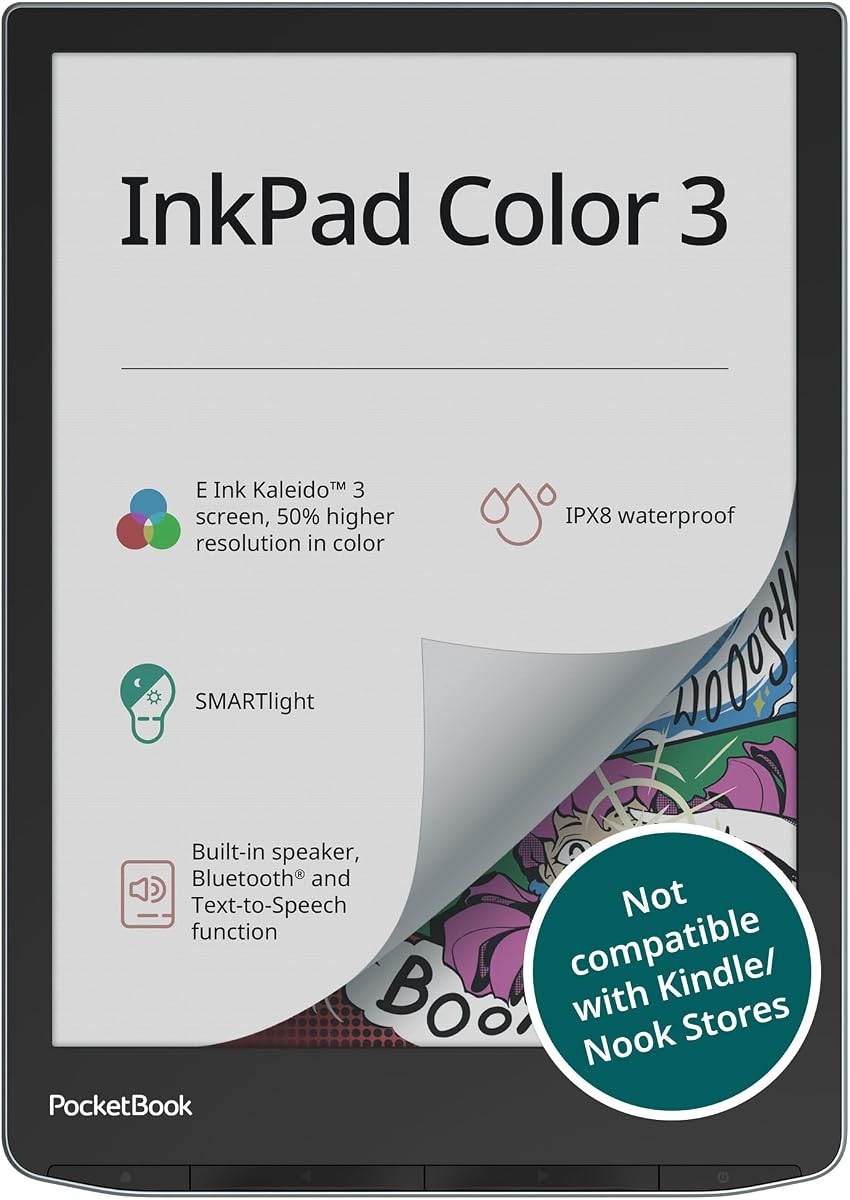
The PocketBook InkPad Color 3 features an enhanced 7.8-inch Color E-Paper display designed for eye-friendly reading and audiobook integration. With a 4.0 rating, it is waterproof with IPX8 protection making it suitable for outdoor or bath reading.
We may earn a commission when you buy through this link, at no additional cost to you.
It includes built-in speaker and Bluetooth for listening to audiobooks and using text-to-speech features. The SMARTlight ensures comfortable reading at any time of day with adjustable frontlight to reduce eye strain.
While the device focuses more on reading than writing, it supports thousands of ebooks and documents with external memory options. The combination of audio features and waterproofing makes it a versatile entertainment device.
This tablet is best for avid readers who enjoy audiobooks or listen to text read aloud. Its durability and audio capabilities set it apart from standard reading devices.
Listen to stories or have text read aloud through built-in speaker or wireless headphones using supported audio formats and multiple languages.
Water resistant design with IPX8 protection makes it ideal for travel or outdoor reading where water exposure is a risk.
We may earn a commission when you buy through this link, at no additional cost to you.
Choosing the right Color E Ink Tablet requires understanding the trade-offs between color technology and performance to find a device that matches your daily needs.
Most color e-ink tablets use Kaleido 3 technology which provides 4096 colors but often has a lower resolution for color content compared to black and white. This can result in a darker or grayer screen than LCDs but is acceptable for focused reading and writing.
Look for devices with adjustable front lights including warm and cold settings to reduce eye strain in different lighting conditions.
If note-taking is important verify whether the device supports an active stylus and if it is included in the box. Some budget models require purchasing the pen separately which adds to the total cost.
Ensure the stylus offers sufficient pressure sensitivity and responsiveness for a natural writing feel that mimics paper.
Android devices allow third-party app installation offering flexibility for reading different ebook formats and note-taking tools. Proprietary systems focus on stability and distraction-free work but limit software choices.
Consider whether you need general Android functionality or a specialized environment for deep focus and writing.
Smaller 7-inch tablets are portable and ideal for books and quick notes while larger 11-inch options provide more space for complex documents and sketching.
Choose a size that fits your typical usage scenario whether you read mostly on the go or at a desk.
E-ink devices generally offer weeks of battery life on a single charge because the display consumes power only when refreshing content.
Check battery capacity and usage expectations to ensure the device can last through your longest travel or work days.
A robust tablet should support common document and ebook formats such as PDF EPUB MOBI and DOCX to ensure you can read your existing library without conversion.
Check compatibility with specific file types you use regularly such as comics or specialized technical documents.
Built-in storage ranges from 32GB to higher capacities allowing you to store thousands of books and documents locally.
Devices with microSD slots offer expandable storage for those with large digital libraries.
IPX8 rated tablets can withstand accidental splashes or submersion making them suitable for reading in the bath or outdoors.
If you plan to use your device near water prioritize models with waterproof design for peace of mind.
To get the most out of your device use the refresh modes provided by the system to reduce ghosting and improve color visibility. Different content types like text or images may require specific refresh settings for optimal clarity.
Charge the tablet using the provided USB-C cable and avoid extreme temperatures that can damage the battery. Keep the screen clean with a soft dry cloth to maintain visibility and prevent scratches.
Organize your files regularly using folders and tags if supported by the system. This helps you find notes and documents quickly and keeps your digital workspace tidy for better productivity.
Yes it is generally better for reading because the e-ink display reflects light like paper reducing eye strain and glare. It also offers significantly longer battery life and focuses on content without distracting notifications.
Not all tablets support all styluses. Check if the device supports active stylus technology and if a compatible pen is included. Some models require purchasing a specific branded pen separately.
Most models support common formats like PDF EPUB MOBI TXT and DOCX. Some also support image and audio files. Check the specific device specifications for detailed compatibility lists.
Battery life varies by usage but most Color E Ink Tablets last several weeks on a single charge. This is due to the low power consumption of e-ink technology when displaying static images.
Some models like the PocketBook InkPad Color 3 offer IPX8 waterproofing allowing them to withstand accidental splashes or submersion. Always check the device rating before using near water.
Android-based tablets allow you to install apps from the Google Play Store which expands functionality. Proprietary systems do not support this and are limited to built-in features and supported file formats.
Color e-ink screens are not as vibrant as LCDs but they are easier on the eyes and better for focused reading. They are optimized for static content rather than video or fast animations.
Some bundles include the pen while others do not. Verify what is included in the box before purchasing if you plan to take handwritten notes or annotate documents.
The Amazon Kindle Scribe Colorsoft reMarkable Paper Pro and Ocean C offer top-tier choices depending on your needs for writing quality performance and budget. Each provides unique strengths for focused reading and note-taking.
Prioritize features like screen size stylus inclusion and operating system based on your typical workflow. A larger screen benefits document review while a smaller device suits portability.
Prices and availability may fluctuate so check the current listings on Amazon before making a final purchase decision. Staying updated ensures you get the best value and model for your requirements.