
SMSL PS100 Digital to Analog Audio Converter
4.2Editor score
HDMI ARC support
192kHz max resolution
Compact portable design
This guide compares the top ten DAC for PS5 models based on audio fidelity, connectivity, and gaming performance for immersive console experiences.
Finding the right DAC for PS5 can transform your gaming audio experience. These devices convert digital signals into crisp sound for your headphones or speakers.
We compared ten top models based on audio quality, connectivity options, and value. Each pick serves different setups from budget gamers to audiophiles.
Each entry shows key specs and real-world performance insights. Note that prices change frequently so check current listings before purchasing.
4.2Editor score

4.7Editor score

4.5Editor score
This side-by-side comparison highlights the core capabilities of each unit to help you choose the right fit for your PS5 audio setup.




The Fosi Audio K7 stands out as a top choice for gamers seeking premium sound. It handles high resolution files with ease.
We may earn a commission when you buy through this link, at no additional cost to you.
Its AK4493S DAC ensures crystal clear audio. Bluetooth and optical inputs offer flexibility for PS5 users.
While it costs more than basic units the performance justifies the expense. It drives even difficult headphones with power.
Buy this if you want a versatile audio hub. It is perfect for serious gamers and music lovers alike.
Supports up to 384kHz PCM for audiophile quality sound during gameplay.
Includes USB Bluetooth optical and coaxial inputs for seamless PS5 integration.
We may earn a commission when you buy through this link, at no additional cost to you.
The K5 Pro is an excellent entry point for PS5 owners. It offers solid performance at a budget friendly price.
We may earn a commission when you buy through this link, at no additional cost to you.
It supports optical and coaxial inputs. The included mic interface is great for chat clarity.
Do not expect audiophile grade power here. It works best with standard gaming headsets.
Choose this if you need a simple affordable upgrade. It improves console audio significantly.
Provides a noticeable audio boost without breaking the bank for casual gamers.
Built in microphone support keeps chat and game audio balanced easily.
We may earn a commission when you buy through this link, at no additional cost to you.
The C3 focuses on giving you a competitive edge. Its StepSense technology highlights enemy movements effectively.
We may earn a commission when you buy through this link, at no additional cost to you.
You get native 7.1 surround sound. Custom EQ presets help tailor audio to your hearing.
Setup is needed for full feature access. Some users might prefer plug and play simplicity.
Ideal for FPS players seeking an advantage. It enhances spatial awareness in games.
Enhances footsteps while balancing loud explosions for better tactical awareness.
Reduces background noise for clearer voice chat during intense gaming sessions.
We may earn a commission when you buy through this link, at no additional cost to you.
The GameDAC Gen 2 is a powerful tool for multi-system setups. It allows switching between PC and console easily.
We may earn a commission when you buy through this link, at no additional cost to you.
AI noise cancellation keeps chat crystal clear. 360 degree spatial audio adds immersion.
It is pricier than others with similar features. Users may find setup complex at first.
Pick this if you switch between PC and console. It offers robust multimedia capabilities.
Switch between two consoles like PC and PS5 instantly with a button.
Powerful algorithms filter out background noise for professional sounding chat.
We may earn a commission when you buy through this link, at no additional cost to you.
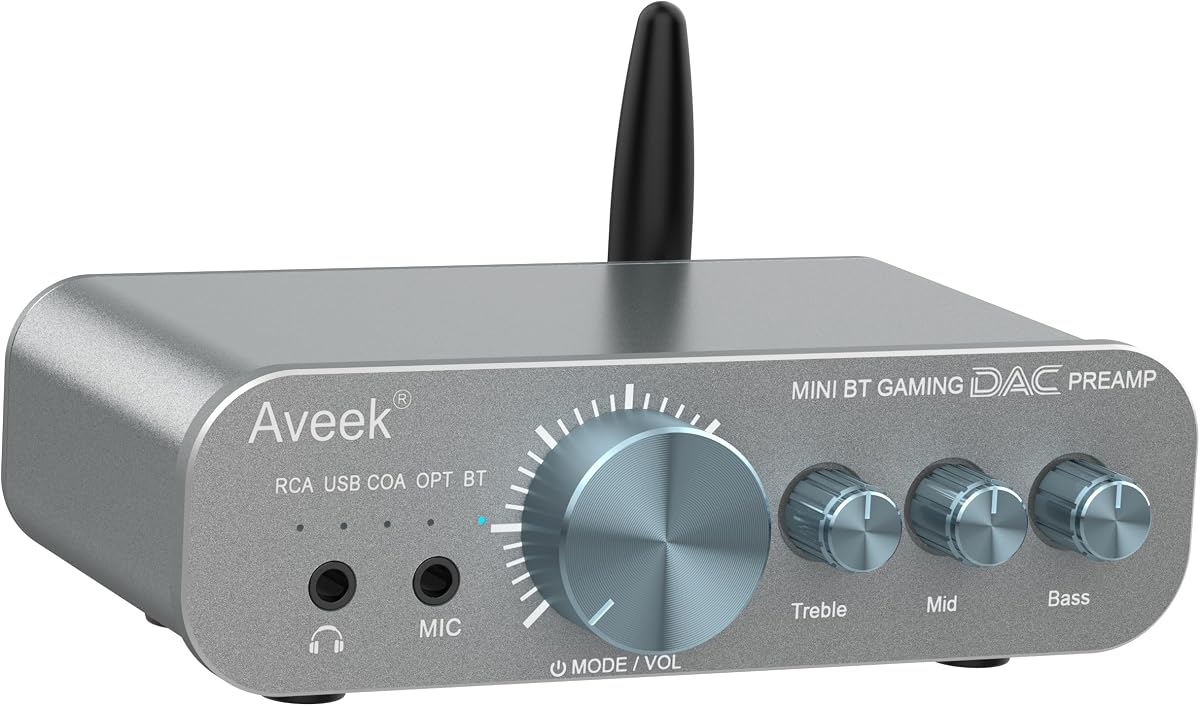
The Aveek DAC combines multiple audio features in one unit. It handles games music and streaming tasks.
We may earn a commission when you buy through this link, at no additional cost to you.
Five inputs allow connecting TV phone and console. The EQ controls are precise.
Bluetooth adds convenience but might lag for gaming. Build is light but adequate.
Great for users who want one device for everything. It simplifies your audio setup.
Acts as a DAC amp and preamp to unify your home audio sources.
Adjust bass mid and treble independently for tailored sound preferences.
We may earn a commission when you buy through this link, at no additional cost to you.
The DX1 II delivers audiophile grade sound for gaming. Its ESS chip ensures pure signal processing.
We may earn a commission when you buy through this link, at no additional cost to you.
Fully balanced architecture drives headphones with power. Noise floor is nearly zero.
Custom EQ is powerful but takes time to set up. It is best for detail lovers.
Choose this if quality is your top priority. It turns standard games into immersive experiences.
Ultra-low noise floor reveals subtle details in music and game audio.
Precise parametric EQ lets you sculpt sound exactly to your tastes.
We may earn a commission when you buy through this link, at no additional cost to you.
The PO100 PRO is a digital converter ideal for high res streams. It supports MQA natively.
We may earn a commission when you buy through this link, at no additional cost to you.
Its USB interface is easy to use. Optical output connects to amps or speakers.
It does not amplify headphones directly. It converts signals so use an external amp.
Perfect for streamers needing high res conversion. It keeps your setup portable.
Handles Master Quality Authenticated files without extra software required.
Compact enough to fit in a backpack for on the go audio.
We may earn a commission when you buy through this link, at no additional cost to you.
The DS3 offers high end performance in a tiny package. It fits on any USB-C port.
We may earn a commission when you buy through this link, at no additional cost to you.
XMOS powered engine ensures stable audio. Hardware spatial audio boosts immersion.
It may get warm during heavy use. Being small it can be lost easily.
Use this for travel or desk minimalism. It gives rich sound in a small form.
Converts 7.1 audio into 360 surround without needing drivers.
Dual-core engine provides stable lossless streaming to your headphones.
We may earn a commission when you buy through this link, at no additional cost to you.
The G8 allows two USB devices at once. Great for mixing game audio and chat.
We may earn a commission when you buy through this link, at no additional cost to you.
Xamp bi-amplifier drives left and right independently. Dynamic range is huge.
Software may require updates for best performance. It is a premium device.
Ideal for streamers or dual console users. It handles complex audio tasks well.
Stream audio from two sources simultaneously for seamless mixing.
Individual channel drivers provide exceptional clarity and detail.
We may earn a commission when you buy through this link, at no additional cost to you.
The PS100 is a simple converter for PS5 HDMI audio. It uses HDMI ARC for easy connection.
We may earn a commission when you buy through this link, at no additional cost to you.
Supports up to 192kHz resolution. RCA outputs connect to speakers or amps.
It does not have a headphone jack. Needs external hardware for listening.
Best for connecting PS5 to home stereo systems. It keeps your setup clean.
Connect directly to TV HDMI port for simple audio extraction.
Small design lets you hide it behind your console or TV.
We may earn a commission when you buy through this link, at no additional cost to you.
Choosing the right DAC requires understanding your audio goals. This guide breaks down key factors to consider before buying.
Ensure the DAC can drive your headphones. Look for milliwatt ratings at your headphone impedance.
Higher power means better control over demanding headphones.
Check if the DAC supports your PS5 output. USB optical and coaxial options offer flexibility.
Match inputs to your console capabilities for best compatibility.
Higher sample rates like 192kHz offer better detail. PS5 supports high res audio.
Look for DACs that support rates above 48kHz for quality.
Metal chassis reduce interference. Plastic units are cheaper but may pick up noise.
Solid build ensures longevity during daily use.
Some DACs include EQ or spatial audio. Decide if you need extra processing or raw sound.
Extra features add value but may require setup.
Balanced outputs like 4.4mm provide cleaner signals. 3.5mm is standard for most headsets.
Choose outputs that match your gear.
Budget DACs are affordable but lack features. Premium models offer audiophile sound.
Pick a DAC that fits your budget and needs.
Desktop units offer more power. Dongles are portable but less powerful.
Choose size based on your setup style.
Connect the DAC to your PS5 via USB or optical cable. Ensure the console audio settings match your input type.
Use high quality cables to avoid interference. Keep the DAC in a well ventilated spot to prevent overheating.
Clean dust from ports regularly with compressed air. Avoid spilling liquids near the unit.
A DAC improves audio quality beyond the built-in console audio. It reduces noise and supports high resolution formats. If you use high-end headphones a DAC is worth the investment.
Yes the PS5 supports USB audio devices. You can connect a USB DAC directly to the console for improved sound. Ensure it is recognized in the audio settings.
A DAC converts digital audio to analog. An amplifier boosts that signal to drive headphones. Some devices combine both functions for convenience.
A balanced output reduces noise but requires compatible headphones. For most gamers a standard 3.5mm output is sufficient and easier to use.
Most DACs connect to the console not the controller. You may need a splitter for chat audio but the console handles primary audio routing.
Look for DACs with spatial audio features. The Fosi Audio C3 is ideal as it highlights footsteps and enemy positions clearly.
HDMI ARC is useful for TV sound. For headphones optical or USB is better for low latency and direct audio.
Most PS5 DACs work plug and play. You may need drivers for PC features but not for console use.
We reviewed ten top DACs for PS5 each offering unique benefits. The Fosi K7 stands out for performance while the Aveek offers affordability.
Prioritize features like sample rate and power based on your headphones. A good DAC elevates your entire gaming experience.
Always check current listings for the best deals. Prices fluctuate so compare options before finalizing your purchase.