
Rongta Bluetooth Shipping Label Printer
4.0Editor score
Automatic label identification
Wireless Bluetooth connectivity
Compact portable design
Compare the top Dhl Label Printer models for shipping efficiency. This guide reviews features, connectivity, and compatibility to help you choose the right
Finding the right Dhl Label Printer is crucial for smooth shipping operations. A good printer offers speed, reliability, and easy integration with your existing platforms to keep orders moving quickly without errors.
We compared ten top models based on connectivity, print quality, and platform support. Each option was evaluated for its ability to handle high volumes and integrate seamlessly with Dhl and other major carriers.
Each pick shows key strengths and ideal use cases for your business. Prices change frequently, so check current listings for the latest deals and availability before making your final purchasing decision today.
4.0Editor score

4.4Editor score

4.1Editor score
This side-by-side comparison highlights the key specifications of each top-rated Dhl Label Printer model. Review these details to find the perfect fit for your shipping volume and technical requirements.






The JADENS Bluetooth Thermal Shipping Label Printer stands out as a top choice for small businesses needing reliable Dhl Label Printer capabilities. With a 4.4 rating, it combines high-tech performance with user-friendly operation for efficient shipping workflows.
We may earn a commission when you buy through this link, at no additional cost to you.
Its Japanese high-tech thermal print head ensures 203 DPI quality, delivering crisp labels that scan easily. It works seamlessly with major platforms like Amazon, eBay, and Dhl, supporting both fanfold and roll labels for versatile use.
While Bluetooth printing on phones requires the Jadens app, USB connectivity offers stable direct printing for Windows and Mac. Users should note that label size calibration is needed when changing label types, which adds minor setup time.
Ideal for online sellers seeking durability and connectivity, this printer offers one-year warranty and remote support. Its balance of speed, quality, and compatibility makes it a smart investment for growing shipping operations.
The Japanese print head delivers 203 DPI resolution for clear barcodes and text essential for Dhl shipments.
Compatible with Dhl, Amazon, and eBay via direct integration or PDF import for smooth label generation.
We may earn a commission when you buy through this link, at no additional cost to you.
This Thermal Shipping Label Printer offers exceptional speed and efficiency for high-volume Dhl Label Printer needs. Its 4.4 rating reflects strong performance in handling busy shipping schedules with minimal downtime during peak hours.
We may earn a commission when you buy through this link, at no additional cost to you.
The direct thermal technology enables 150mm/s printing, producing sharp 203 DPI labels that scan reliably. It supports major platforms like Dhl and Shopify via the FlashLabel Pro app, which stores templates offline for quick access.
Though it prints in black and white, the included labels and compact design make it ready out of the box. Users should ensure Bluetooth pairing uses the app, as direct device connections may not work for mobile printing.
For businesses prioritizing speed and cost savings, this printer reduces maintenance and ink costs. Its durable build and offline capabilities make it ideal for consistent, reliable printing in small office or warehouse settings.
150mm/s speed delivers up to 72 labels per minute, accelerating Dhl shipping workflows efficiently.
FlashLabel Pro app allows local design storage, reducing cloud wait times for busy shipping periods.
We may earn a commission when you buy through this link, at no additional cost to you.
The KNAON Bluetooth Thermal Shipping Label Printer excels as a portable Dhl Label Printer solution for small businesses. With a 4.4 rating, it offers robust features like 180mm/s speed and vast template options for diverse labeling tasks.
We may earn a commission when you buy through this link, at no additional cost to you.
Its FlashLabel Pro app supports Dhl, Amazon, and Shopify via PDF import, ensuring compatibility across platforms. The compact 7.17-inch design fits easily on desks, while built-in USB drive simplifies setup with drivers and tutorials.
Users should note that DHL labels require saving as PDF before import into the app, adding a step. Bluetooth connections rely on the app rather than direct pairing, which may affect some mobile workflows initially.
For sellers needing mobility and customization, this printer balances performance with space-saving design. Its speed, template variety, and multi-system support make it a practical choice for on-the-go or home office shipping.
Compact 7.17×3.9×3.43-inch size allows easy storage and transport for flexible labeling anywhere.
Over 3000 templates and 5000 icons enable personalized labels beyond standard shipping for branding.
We may earn a commission when you buy through this link, at no additional cost to you.
The Rollo USB Shipping Label Printer earns a 4.6 rating as a reliable Dhl Label Printer for commercial use. Its USB connectivity ensures stable connections, ideal for consistent shipping without wireless interference or drops.
We may earn a commission when you buy through this link, at no additional cost to you.
With 203 DPI resolution and 150mm/s speed, it produces clear labels for Dhl and other platforms. The complimentary Rollo Ship app provides discounted rates, adding value beyond basic printing needs for cost-conscious sellers.
While it lacks wireless features, the USB connection offers rock-solid performance for desktop setups. The commercial-grade build supports long hours of printing, though the price is higher than budget alternatives.
Best for businesses prioritizing reliability and volume, this printer handles heavy-duty tasks with ease. Its combination of speed, clarity, and app integration makes it a strong choice for serious shipping operations.
Built for high-volume use, this printer withstands daily shipping demands without performance degradation.
Free app provides exclusive shipping rates across major carriers including DHL for direct savings.
We may earn a commission when you buy through this link, at no additional cost to you.
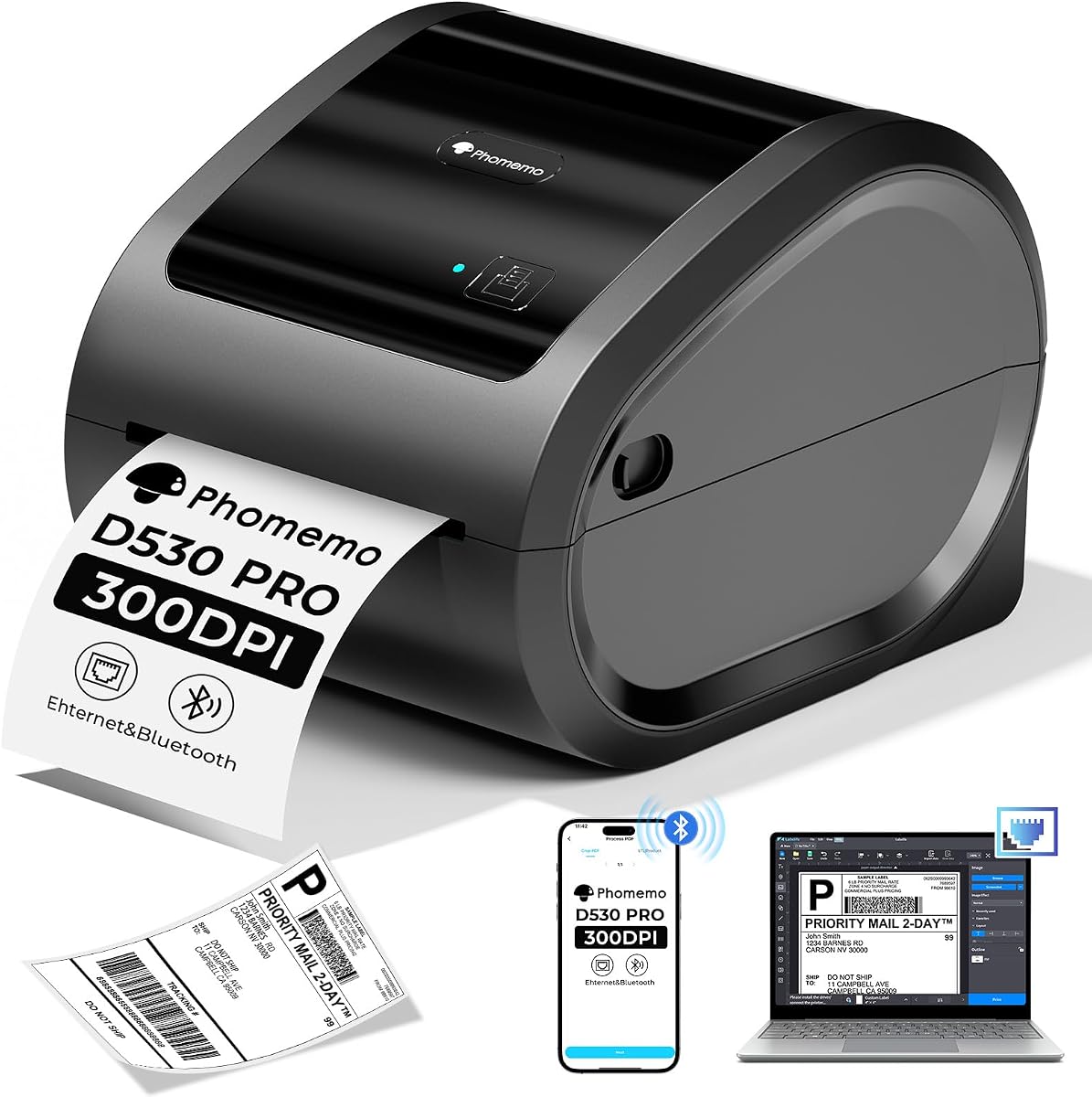
The Phomemo 300DPI Ethernet Thermal Label Printer offers exceptional clarity for detailed Dhl Label Printer requirements. With a 4.1 rating, its 300 DPI resolution stands out among competitors for producing sharp text and barcodes.
We may earn a commission when you buy through this link, at no additional cost to you.
It supports Ethernet, Bluetooth, and USB connections, ensuring flexibility for different network setups. The built-in paper bin holds up to 500 rolls, reducing space needs and keeping desks organized during busy shipping periods.
While the Ethernet connection may require network configuration, it provides stable wired printing. Users should note the 4.1 rating suggests occasional usability issues compared to higher-rated models.
Ideal for businesses needing high-resolution labels, this printer balances performance with storage solutions. Its speed, multiple connection types, and compatibility with Dhl and other platforms make it a versatile choice.
300 DPI resolution delivers ultra-clear print quality essential for small text and precise barcodes.
Built-in paper slot holds 500 rolls, eliminating extra holders for a cleaner workspace.
We may earn a commission when you buy through this link, at no additional cost to you.
The MUNBYN Bluetooth Thermal Label Printer focuses on precision and quiet operation for office Dhl Label Printer use. Its 4.2 rating reflects solid performance, highlighted by DAC Dynamic Algorithm Tech that auto-calibrates to reduce misalignment.
We may earn a commission when you buy through this link, at no additional cost to you.
With a near-zero jam rate and 0.1 mm legibility, it ensures flawless labels for Dhl and other shipments. The whisper-quiet 60 dB operation makes it suitable for shared workspaces without disrupting focus or meetings.
The 970000 label lifespan offers long-term value, reducing replacement frequency and costs. Users should expect Bluetooth to work via app, which may require setup before initial printing on mobile devices.
Best for environments prioritizing precision and noise levels, this printer delivers reliable accuracy. Its auto-calibration and long life make it a smart investment for consistent, professional-quality shipping labels.
4-inch DAC chip auto-calibrates to minimize label misalignment and ensure precise printing every time.
60 dB operation is quieter than typing, ideal for quiet offices and libraries.
We may earn a commission when you buy through this link, at no additional cost to you.
The Rollo Wireless Shipping Label Printer offers driverless Wi-Fi printing, ideal for flexible Dhl Label Printer setups. Its 4.1 rating highlights strong performance, featuring AirPrint for direct printing from iPhone, iPad, and Mac.
We may earn a commission when you buy through this link, at no additional cost to you.
It connects via Wi-Fi or USB, providing versatility for different office networks. The complimentary Rollo Ship Manager app offers exclusive shipping rates, enhancing value for high-volume sellers using multiple carriers.
The printhead lasts 650,000 labels, 4x more than average, ensuring long-term reliability. Users should note initial Wi-Fi setup may require network access but eliminates ongoing driver installations for most devices.
Best for businesses needing wireless freedom, this printer streamlines printing across mobile and desktop. Its compatibility with Dhl and other platforms makes it a top choice for modern, mobile-friendly shipping.
Print directly from iPhone and iPad without drivers, simplifying mobile label generation.
650000 label life offers 4x durability, reducing long-term replacement costs.
We may earn a commission when you buy through this link, at no additional cost to you.
The Nelko Bluetooth Thermal Shipping Label Printer offers a compact design ideal for small spaces needing Dhl Label Printer functionality. With a 4.3 rating, it balances performance with size, delivering 150mm/s speed for fast label production.
We may earn a commission when you buy through this link, at no additional cost to you.
It supports Windows, Mac, and Chrome OS via USB or Bluetooth, using the NELKO app for mobile printing. The 203 DPI resolution ensures clear barcodes and text for reliable Dhl and Amazon shipments.
Mac users may face Bluetooth limitations, requiring USB as backup for stable connections. The U-Disk includes drivers and videos for easy setup, though PDF import is needed for some shipping platforms.
Best for sellers with limited desk space, this printer maintains efficiency without bulk. Its speed, compatibility, and compact footprint make it a practical option for home-based or small business shipping.
Smaller than traditional printers, it fits in small spaces for flexible placement.
150mm/s speed produces 72 labels per minute, accelerating shipping workflow significantly.
We may earn a commission when you buy through this link, at no additional cost to you.
The Rongta Bluetooth Shipping Label Printer provides excellent value as a budget-friendly Dhl Label Printer. With a 4.0 rating, it offers essential features like automatic label identification and 150mm/s speed for basic shipping needs.
We may earn a commission when you buy through this link, at no additional cost to you.
Its compact 10.2×7.4×5.3-inch design makes it portable, ideal for travel or small spaces. Compatibility with iOS, Android, Windows, and Mac ensures broad use via the RONGTA app, keeping setup straightforward.
The automatic feed eliminates manual adjustments, saving time for high-volume tasks. Users may find fewer advanced features compared to premium models, but it covers core Dhl and platform requirements effectively.
Best for startups or occasional shippers, this printer delivers reliable performance at a lower cost. Its simplicity and portability make it an accessible entry point for Dhl and general shipping label printing.
Auto-detection grabs and feeds labels automatically, reducing manual setup time.
Small dimensions allow easy storage and transport for shipping on the go.
We may earn a commission when you buy through this link, at no additional cost to you.
The DYMO LabelWriter 550 Series offers unique benefits for specific Dhl Label Printer use cases. With a 3.6 rating, it features automatic recognition and low waste design but restricts labels to authentic DYMO branded options.
We may earn a commission when you buy through this link, at no additional cost to you.
Its direct thermal printing eliminates ink needs, and FSC certified paper supports eco-friendly choices. The plastic-free packaging and optimized thermal process aim to reduce environmental impact while delivering reliable labels.
However, the restriction to DYMO labels limits flexibility and may increase long-term costs. Users seeking broad third-party label compatibility may find this model less versatile than other Dhl Label Printer options.
Best for those prioritizing brand consistency and sustainability, this printer delivers clean, low-waste printing. Its automatic recognition simplifies setup, but users should weigh the label exclusivity against their shipping volume.
Automatic recognition identifies label size for seamless printing without manual configuration.
FSC certified paper and plastic-free packaging reduce environmental footprint of printing.
We may earn a commission when you buy through this link, at no additional cost to you.
Selecting the right Dhl Label Printer depends on several key factors. This guide helps you understand what matters most for your shipping needs and business scale.
Connectivity determines how you interface with your computer or mobile devices. Bluetooth offers wireless freedom, USB ensures stability, and Wi-Fi enables multi-device access. For Dhl Label Printer use, check if your devices support the required connections and if drivers are available.
Choose based on your office setup and device compatibility. Stable connections prevent printing delays during critical shipping windows.
Resolution impacts label clarity, especially for barcodes and addresses. Most Dhl Label Printer models offer 203 DPI, sufficient for standard shipping. Higher resolutions like 300 DPI provide extra sharpness for detailed labels.
Higher DPI ensures reliable scanning by carriers like Dhl. Prioritize clarity to avoid delivery issues caused by unreadable labels.
Speed affects how fast you can process orders. Many Dhl Label Printer options print at 150mm/s, producing up to 72 labels per minute. Faster speeds reduce bottlenecks during peak shipping periods.
Choose speed that matches your order volume. High-volume businesses benefit from faster throughput to keep up with demand.
Compatibility ensures seamless integration with carriers like Dhl and marketplaces like Amazon. Check if the printer supports direct platform integration or requires PDF import. Apps like FlashLabel Pro or NelKO facilitate cross-platform printing.
Verify your shipping workflow supports the printer's integration method. Direct integration simplifies printing, while PDF import adds a step.
Most Dhl Label Printer units handle 4×6 standard labels. Ensure the printer also supports other sizes like 1.57 to 4.2 inches for varied needs like returns or inventory.
Versatile size support reduces the need for multiple printers. Confirm width range before purchase to match your label types.
Durability impacts long-term reliability. Look for commercial-grade builds or high label life counts like 970,000. Dhl Label Printer devices with robust printheads minimize downtime.
Higher build quality withstands frequent use. Consider expected label volume to choose a model that won't wear out quickly.
Quick setup minimizes initial hassle. Check if drivers are preloaded, or if videos are provided. Bluetooth pairing via app is common but may require additional steps.
User-friendly setup saves time. Review included resources and support options to ensure smooth deployment.
Price varies significantly across models. Budget options around $40-50 work for occasional use, while premium Dhl Label Printer units cost more but offer advanced features.
Balance cost with features needed. Calculate long-term label costs too, as some printers require specific branded labels.
Set up the printer by connecting via USB or Bluetooth per instructions. Install drivers and apps like FlashLabel Pro to enable Dhl Label Printer compatibility.
Load labels correctly by aligning them with the feed path. Use the calibration button if your model auto-detects sizes to prevent jams.
Maintain performance by keeping the printhead clean and storing in cool, dry places. Regularly update apps to ensure continued Dhl Label Printer platform support.
Dhl Label Printer units use direct thermal technology for labels without ink, optimized for shipping sizes. They integrate better with Dhl systems and offer higher speed for bulk labels. This makes them more efficient than standard printers for packaging needs.
Most Dhl Label Printer models work with third-party thermal labels, but check compatibility. Some brands require authentic labels for optimal performance. Verify width range and label type before buying to ensure proper fit.
Drivers are usually required for Mac unless using AirPrint support. Apps like FlashLabel Pro simplify the process for Bluetooth or USB. Check the product's Mac compatibility before purchase.
Save your Dhl label as a PDF from their platform, then import it into the printer app. Direct integration may allow one-click printing depending on the model's compatibility with Dhl.
Jamming often results from improper label alignment or worn components. Calibrate the printer when changing labels and ensure the printhead is clean. High-quality thermal paper also reduces jams.
Bluetooth works well for mobile Dhl Label Printer but requires app support like NelKO or FlashLabel Pro. Stability depends on device compatibility. USB may be more reliable for consistent desktop printing.
The JADENS Bluetooth, Phomemo, and Rongta models represent top choices for Dhl Label Printer needs. Each offers unique strengths in speed, clarity, and budget-friendly options for varied business sizes.
Prioritize compatibility with Dhl and your existing platform. Consider how much volume you handle to decide on speed and durability needs.
Always check current pricing and availability. Dhl Label Printer products evolve, so ensure you're getting the latest features before buying.