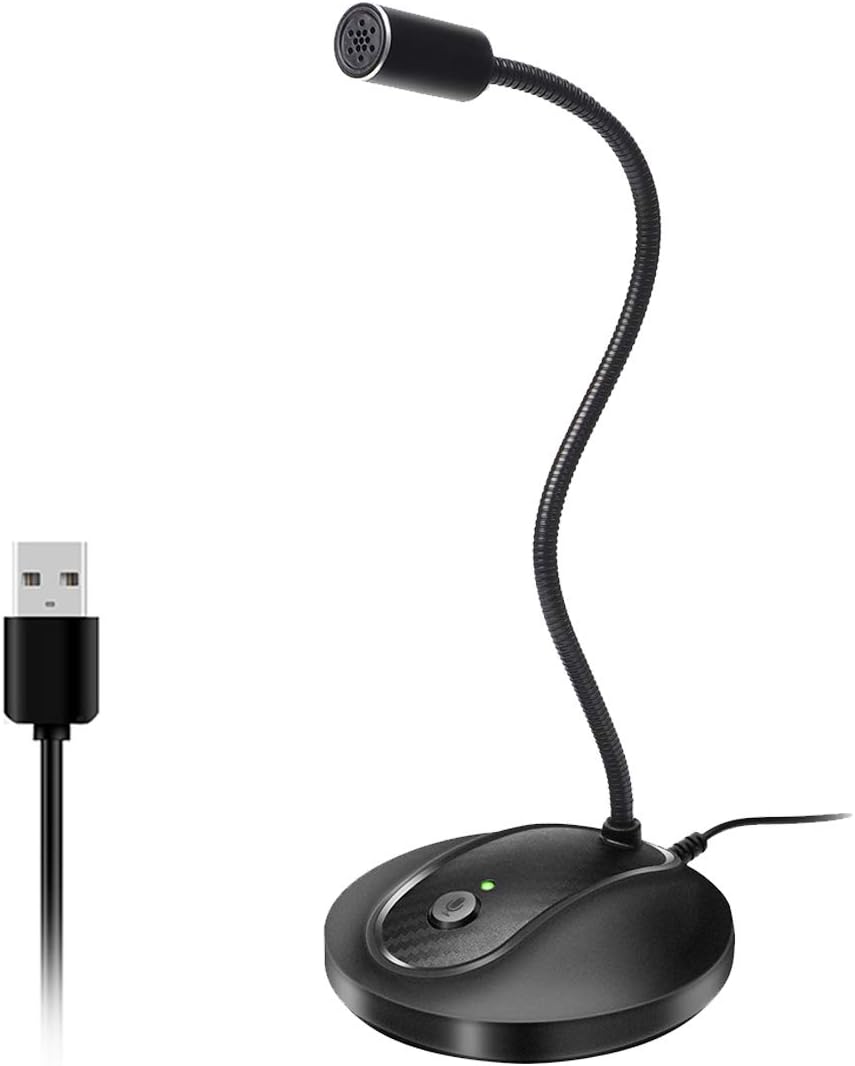
USB Microphone with Gooseneck
4.4Editor score
360 degree adjustable design
Noise canceling technology
Plug and play setup
This guide compares the top 10 best dictation microphone for computer options to help you choose the right device for speech recognition and recording needs.
Finding the right dictation microphone for computer use is essential for professionals who rely on speech recognition software. A high-quality mic ensures accurate transcription and smooth workflow integration. Whether you need a budget-friendly option or a premium tool, there are several excellent choices available.
We compared ten real products based on build quality, sound clarity, compatibility with software like Dragon, and ease of use. Each entry in this list offers unique features tailored to different user needs and budgets. Our analysis focuses on practical performance rather than marketing hype.
Every pick below highlights specific strengths and weaknesses to help you make an informed decision. Prices fluctuate frequently so always check current listings before purchasing. This guide aims to save you time and money by pointing you toward the best options for your setup.
4.4Editor score

4.6Editor score

4.2Editor score
The following table provides a side-by-side comparison of all ten selected products. It highlights key specifications and features to help you quickly identify which model fits your requirements best.




This USB microphone offers an excellent entry point for users seeking a reliable dictation microphone for computer systems. With a rating of 4.4 stars it has satisfied many buyers looking for basic voice capture capabilities. The 360 degree adjustable gooseneck allows for precise positioning which is crucial for clear audio input.
We may earn a commission when you buy through this link, at no additional cost to you.
Its standout feature is the intelligent noise canceling technology which helps reduce background noise during recording sessions. This ensures that your voice comes through clearly without excessive interference from ambient sounds. The one click mute button with LED indicator provides convenient control over when the mic is active without needing software interaction.
While the construction uses metal pipe and ABS stand it may not feel as premium as higher end models. However for the price it delivers solid performance for everyday dictation tasks or casual voice recordings. It is not compatible with Xbox or Android devices which limits its versatility for gaming setups.
If you need a straightforward plug and play solution for Dragon voice dictation or similar software this model is a strong candidate. It works well with Windows and macOS without requiring drivers. We recommend it for budget conscious users who prioritize functionality over luxury build quality.
The adjustable gooseneck lets you move the mic closer to your mouth for better signal capture without moving your desk setup.
Built-in noise canceling tech minimizes echo and background sounds improving transcription accuracy for speech recognition software.
We may earn a commission when you buy through this link, at no additional cost to you.
The Philips LFH3500 is designed specifically for professional dictation workflows requiring high precision. It receives a solid 4.2 rating from users who appreciate its detailed audio capture capabilities. The free floating decoupled microphone ensures that physical handling noise does not interfere with the recorded voice signal.
We may earn a commission when you buy through this link, at no additional cost to you.
Its built-in motion sensor allows for device control through gestures which can significantly speed up your workflow. Combined with freely configurable function keys you can set up shortcuts for common tasks like pausing playback or starting new files. The optimised grille structure contributes to crystal clear sound reproduction during playback.
Although it is a premium option it might be overkill for casual users who only need occasional dictation. The price reflects its targeted use case in legal or medical transcription where accuracy is paramount. It requires specific software integration to fully leverage its motion sensor features which adds a learning curve.
This microphone is ideal for professionals who spend hours dictating documents daily and need reliability. If you work in an environment where every word counts this tool offers the precision required. Consider whether its advanced features align with your daily tasks before purchasing.
Motion sensors and configurable keys let you control software functions without touching the keyboard or mouse during dictation.
The decoupled microphone design eliminates handling noise ensuring your transcription software hears only your voice.
We may earn a commission when you buy through this link, at no additional cost to you.
FIFINE offers a mini gooseneck microphone that balances portability with functionality for computer users. Rated at 4.3 stars it appeals to those who need a compact solution for limited desk spaces. The 5.7 inch flexible gooseneck can be adjusted to fit various comfort levels for speakers.
We may earn a commission when you buy through this link, at no additional cost to you.
It includes a windscreen to reduce background noise and improve sound quality which is helpful in noisy environments. The 6.56 foot cable provides ample length to position the mic optimally without stretching your desk space. It is compatible with speech recognition software like Dragon NaturallySpeaking for seamless dictation.
While it features a sturdy metal base it may not withstand heavy handling compared to professional models. However for everyday use it holds position well thanks to the anti-slip rubber pad. It is not designed for phones or Xbox which keeps its focus on PC and laptop applications.
This microphone suits users who want an affordable and reliable tool for online communication or voice notes. Its plug and play setup makes it easy to start using immediately. If you value flexibility in positioning without taking up too much space this is a practical choice.
The tiny footprint allows you to place the mic close to your mouth without cluttering your work area.
Optimized for Dragon NaturallySpeaking and similar tools ensuring accurate text conversion from voice input.
We may earn a commission when you buy through this link, at no additional cost to you.
The Logitech Blue Yeti stands out as a versatile choice that excels in dictation as well as streaming. With a high 4.6 rating it delivers professional grade audio quality suitable for critical voice tasks. Its custom three-capsule array ensures clear and powerful sound capture for any scenario.
We may earn a commission when you buy through this link, at no additional cost to you.
The Blue VO!CE software enhances your recordings with clear vocal sound and advanced modulation effects. You can choose from four pickup patterns to suit different recording needs whether you are alone or in a group. Onboard audio controls let you adjust gain and mute instantly without software menus.
While it is a robust unit it requires a stable surface due to its size. The adjustable desktop stand helps but you may need a boom arm for optimal positioning in smaller spaces. It is plug and play so installation is minimal across both Mac and PC systems.
This microphone is perfect for users who want a single solution for dictation and other audio projects. If you value versatility and high fidelity sound the Blue Yeti is a worthwhile investment. It remains a top choice for those willing to spend more for premium performance.
Switch between cardioid and omni modes to optimize sound capture based on your room acoustics.
The specialized capsule array focuses on voice quality ensuring transcription software hears distinct audio.
We may earn a commission when you buy through this link, at no additional cost to you.
TONOR designed this microphone for conference calls but it works well for individual dictation too. It holds a 4.3 rating thanks to its ability to capture subtle sounds from 360 degrees. This omnidirectional pattern makes it easy to place the mic in a central spot on your desk.
We may earn a commission when you buy through this link, at no additional cost to you.
With a pickup distance of 11.5 feet it ensures loud and clear transmission even if you move around. The built-in blue indicator light helps you check the status at a glance. It connects via a nylon shielded wire that eliminates signal interference for consistent recording results.
The metal construction provides durability but it might be heavier than needed for personal use. You can use it for remote training or business negotiations where multiple voices need to be heard. The mute button allows quick control without fumbling through system settings.
If you need a mic for team dictation sessions or large meeting rooms this is a strong option. For solo work it may be more than necessary. Check if the omnidirectional pattern fits your workflow before buying.
Captures sound from all directions making it ideal for multi-person dictation environments.
Shielded wiring prevents signal noise keeping your audio clean during long recording sessions.
We may earn a commission when you buy through this link, at no additional cost to you.
The ZealSound K66 brings studio-quality sound to desktop users looking for a versatile tool. It has a 4.4 rating and features intelligent noise reduction to filter out fan noise and keyboard clicks. This ensures a clean recording that speech recognition software can process accurately.
We may earn a commission when you buy through this link, at no additional cost to you.
Real-time zero-latency monitoring through the headphone jack allows you to hear exactly what is being recorded. Physical knobs for mic volume and echo adjustment give you quick control without opening apps. The 360 degree rotatable top-addressed design helps you find the best angle for your voice.
Echo control can be a double-edged sword; it adds depth but might interfere with dictation clarity if left on. The metal base offers stability but it is designed to be used upright on a desk. Compatibility with mobile devices adds extra value for cross-platform creators.
This microphone is suitable for users who want creative control over their voice output. If you are doing solo dictation you may prefer to turn off echo features. It is a solid choice for those who appreciate physical controls and mobile flexibility.
Noise reduction mode actively suppresses ambient sounds for cleaner input into transcription tools.
Monitor your voice in real time to catch distortion before it affects your final text output.
We may earn a commission when you buy through this link, at no additional cost to you.
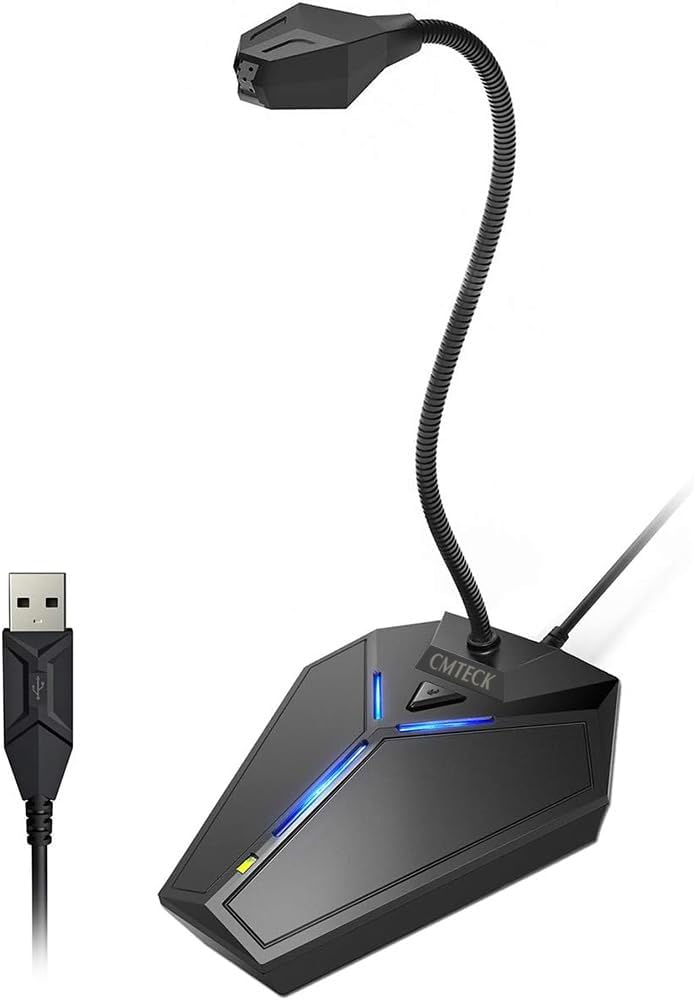
CMTECK provides a straightforward USB microphone with studio-quality audio for calls and creation. With a 4.4 rating it uses a high-performance SMART CHIP to suppress background noise effectively. This ensures your voice comes through crisp which is vital for accurate dictation.
We may earn a commission when you buy through this link, at no additional cost to you.
The flexible gooseneck design allows you to position the mic exactly where you need it. A unique blue LED light adds a visual effect though you can switch it off. The mute button gives an indicator light to show if you are muted or connected.
While it is built for durability with an ABS shockproof base it may not be adjustable enough for all desk heights. The USB cable length is 6 feet which offers decent reach. It works with Windows macOS and PS4 so it is versatile beyond just recording.
This option is great for users who want reliable noise suppression without complex setup. If you dislike bright lights ensure you can turn off the LED before using. It is a cost-effective way to get clear audio for daily tasks.
Smart chip technology filters out interruptions ensuring your dictation software receives clean input.
LED lights let you see if the mic is active without looking at system icons.
We may earn a commission when you buy through this link, at no additional cost to you.
The Nuance PowerMic III is a specialized tool for users of Dragon speech recognition software. It scores 4.2 stars for combining a robust USB microphone with full PC mouse capabilities. This eliminates the need to switch between mouse and keyboard during dictation.
We may earn a commission when you buy through this link, at no additional cost to you.
Its ergonomic thumb control lets you manage dictation and speech recognition functions easily. The unidirectional microphone with noise cancellation ensures high accuracy even in noisy environments. It has a 9-foot cord which gives you freedom to move away from your computer.
It is not compatible with Dragon Home 15.0 which is an important check before buying. The mouse function might be unnecessary if you do not need hands-free cursor control. This adds to the cost making it less attractive for casual users.
For professionals who rely heavily on Dragon medical or legal software this microphone is invaluable. If you need to control your computer entirely by voice it fits the bill. Ensure your software version is compatible before investing.
Integrated mouse keys let you navigate your screen without touching a mouse during dictation.
Noise cancellation ensures Dragon software hears your words clearly reducing transcription errors.
We may earn a commission when you buy through this link, at no additional cost to you.
The Philips LFH3200 is designed for professional PC dictation workflows with Dragon Naturally Speaking. It holds a 4.3 rating for its accurate speech recognition results and clear playback. The push button operation allows quick control over recording tasks without navigating menus.
We may earn a commission when you buy through this link, at no additional cost to you.
Noise canceling technology helps ensure precise results even in environments with some background noise. The advanced speaker design provides crystal-clear playback so you can review transcripts easily. It is Energy Star compliant which means it uses less power during operation.
This mic is sold separately from the software which means you need to purchase Dragon if you do not own it. The focus on professional use cases makes it less flexible for general home users. It is a dedicated tool for transcriptionists and legal professionals.
If you work in a field that relies on Dragon this is a proven and reliable choice. Check compatibility with your current software version before ordering. Its specialized design is worth the cost for those who dictate frequently.
Push buttons let you start stop and control recording with a single touch.
Advanced speakers make it easier to listen back to your dictations accurately.
We may earn a commission when you buy through this link, at no additional cost to you.
The Olympus RecMic II offers a wired USB microphone with a trackball for speech recognition control. It has a 4.0 rating and includes Dragon preset button assignments for Windows users. The trackball functionality has improved to allow smooth navigation during dictation.
We may earn a commission when you buy through this link, at no additional cost to you.
Silent keys minimize annoying contact noise which helps keep your recording clean. Two microphone systems are available for recording in noisy environments ensuring better accuracy. The smooth UV coating provides a comfortable feel during extended use.
While functional it may lack the modern refinements found in newer models. The trackball might take some getting used to if you are not familiar with it. It is a dedicated device for those who need hardware control over their software.
If you prefer physical trackball controls over digital mouse emulation this model fits well. Ensure it integrates with your specific dictation software before buying. It remains a niche option for users with specific hardware preferences.
Trackball allows cursor movement without touching a mouse keeping your hands on the mic.
Silent keys prevent click sounds from interfering with your voice recordings.
We may earn a commission when you buy through this link, at no additional cost to you.
Selecting the right dictation microphone requires understanding your specific needs and environment. This guide outlines key factors to consider before making a purchase.
You will encounter omnidirectional unidirectional and cardioid patterns. Cardioid mics focus on sound from one direction which is ideal for single user dictation. Unidirectional mics also target specific sources and reduce noise from the sides. Omnidirectional mics pick up sound from all directions and are better for group sessions.
Choose a cardioid or unidirectional mic if you are dictating alone to minimize background noise.
Ensure the microphone works with your operating system and dictation software. Most USB mics work with Windows and macOS but some specialized tools like Dragon require specific hardware. Check if you need drivers or if it is plug and play for ease of use.
Always verify software compatibility to avoid setup issues after purchase.
Microphones with metal bases and reinforced cables last longer and withstand frequent use. Gooseneck designs offer flexibility but should be sturdy enough to hold position. Plastic construction may feel lighter but can be more prone to damage over time.
Prioritize metal construction if you plan to move the mic often.
Background noise can confuse speech recognition software. Look for microphones with built-in noise cancellation or smart chips that filter out ambient sounds. This ensures the software captures your voice clearly which improves accuracy significantly.
Noise cancellation is critical for dictation in offices or shared spaces.
A longer cable gives you the freedom to place the mic close to your mouth without moving your desk. Most options range from 6 to 9 feet. If you have a large desk or plan to move around ensure the cable reaches your USB port comfortably.
Select a cable length that allows optimal mic positioning.
Prices vary from affordable budget options to premium professional tools. Decide how much you spend to dictate daily. Higher end models offer specialized features like mouse control but might not be necessary for casual use.
Balance cost with the features you actually need.
Comfort is key if you use the mic for long periods. A comfortable shape and adjustable stand reduce fatigue. Thumb controls and buttons should be easy to reach without interrupting your flow.
Choose a mic that fits your natural desk setup for better workflow.
Some mics include extra functions like volume knobs or mute indicators. These can add convenience but may increase complexity. Evaluate if you need these features or if basic recording is sufficient for your needs.
Focus on features that solve a real problem in your workflow.
To start using your microphone plug it into a USB port and wait for the system to recognize it. If it does not work immediately check your sound settings to select the mic as the input device. This simple setup ensures you can begin dictating right away.
Position the microphone about 6 to 12 inches from your mouth for the best audio quality. Avoid placing it too close to speakers or air vents which can introduce noise. If your mic has a stand ensure it is on a stable surface to prevent vibrations.
Clean the microphone regularly using a soft dry cloth to remove dust and oils. Avoid using harsh chemicals that might damage the grille or coating. If it comes with a windscreen wash it gently to maintain sound clarity.
Most USB microphones work without extra software but dictation software like Dragon may need to be purchased separately. Ensure the mic is compatible with your speech recognition tool before buying.
Cardioid and unidirectional patterns are best for single user dictation as they focus on your voice. Omnidirectional patterns are better for group meetings or conference calls.
Yes many standard USB mics work with Dragon but professional models may offer better accuracy and control. Check your Dragon version for specific hardware requirements if you want advanced features.
Choose a mic with built-in noise cancellation and place it away from fans or noisy devices. You can also use acoustic treatments like a foam panel behind you to improve sound quality.
Most microphones in this guide work with both Windows and macOS. Always check the product details to confirm compatibility with your specific version of the operating system.
Ensure your microphone is selected as the default input device in system settings. Check if you have a mute button enabled or if the cable is securely plugged into the port.
Yes most USB microphones listed are compatible with Zoom and other video conferencing software. They can be used for both dictation and online meetings with the same device.
With proper care a quality microphone can last several years. Avoid dropping it and keep cables away from sharp objects to maintain functionality over time.
We reviewed ten excellent options ranging from budget friendly to professional grade. Each offers distinct advantages depending on your needs and software requirements. The top picks highlight versatility and precision for different work environments.
Prioritize compatibility and noise cancellation when making your final decision. These features have the biggest impact on transcription accuracy and daily satisfaction. Also consider the build quality to ensure your investment lasts.
Remember that prices change so check current listings for the best deal. We hope this guide helps you find the perfect dictation microphone for computer. Happy transcribing.