
TERRAMASTER D8 Hybrid
5.0Editor score
4 HDD plus 4 NVMe bays
1020 MB/s read speeds
TPM power management mode
Direct attached storage provides a fast and reliable way to expand your computer storage without network complexity. It connects directly via USB or Thunderbolt, offering high speed and simplicity for professionals and enthusiasts.
We evaluated ten leading DAS enclosures based on speed bays connectivity and build quality. Our analysis covers everything from entry-level four-bay units to advanced hybrid solutions supporting both HDDs and NVMe SSDs.
Each selection highlights specific strengths like hardware RAID support cooling efficiency or hot-swap convenience. Prices and availability change frequently, so verify current details before purchasing to ensure the best fit for your workflow.
5.0Editor score

4.2Editor score

4.3Editor score
As an Amazon Associate we earn from qualifying purchases.
The following table compares key specifications across all ten reviewed DAS units. Use this overview to quickly identify bays speeds and interface types that match your storage needs.


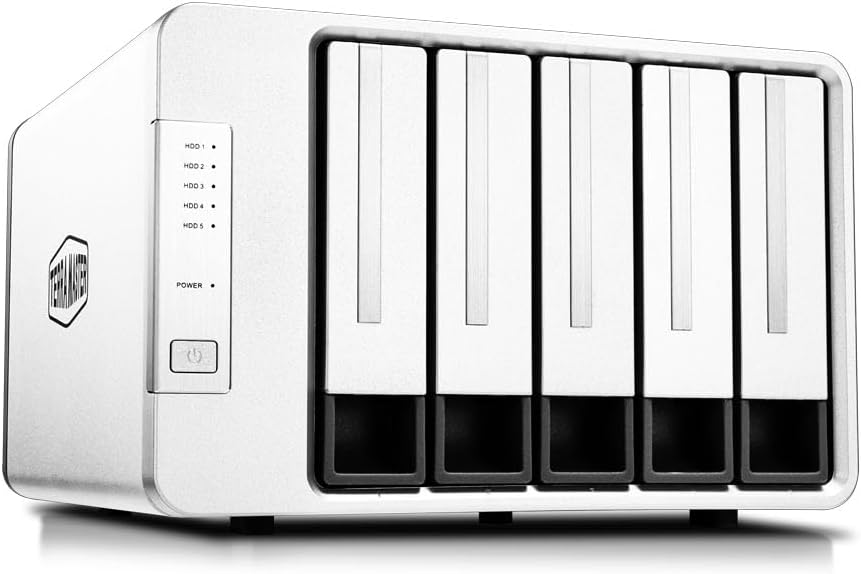


The TERRAMASTER D4-320 stands out as a top direct attached storage solution for users seeking speed and simplicity. With a 4.2 rating it delivers reliable performance through its USB 3.2 Gen2 interface supporting up to 10Gbps data transfer rates.
We may earn a commission when you buy through this link, at no additional cost to you.
Its standout quality is the tool-free push-lock design which secures drives without screws. This ensures hot-swappable convenience and efficient heat dissipation via an intelligent fan that reduces noise significantly during operation.
While it lacks hardware RAID support which may limit redundancy options the high throughput makes it ideal for single-drive users or those managing independent volumes. The 120TB total capacity supports massive storage needs effectively.
Editors recommend this enclosure for creative professionals needing fast access to large files without network latency. Its balance of speed usability and build quality justifies its leading position in the direct attached storage market today.
The USB 3.2 Gen2 protocol enables read speeds reaching over 1000MB/s with multiple drives ensuring rapid file transfers.
Specialized sound-absorbing panels and temperature-controlled fans maintain low noise levels below 21dB in standby mode.
We may earn a commission when you buy through this link, at no additional cost to you.
The QNAP TR-004 offers robust direct attached storage features with integrated hardware RAID capabilities. Rated 4.2 it provides reliable data protection options like RAID 0 1 and 5 making it a strong choice for redundancy seekers.
We may earn a commission when you buy through this link, at no additional cost to you.
It functions seamlessly as external storage for QNAP NAS systems expanding capacity without complex network setups. The USB Type-C interface ensures modern connectivity while lockable bays protect drives from accidental removal or theft.
However compatibility is restricted to specific QNAP models updated to QTS 4.3.6 or later. Users should verify their NAS compatibility before purchasing to avoid limitations in storage pool integration or application support.
This device is ideal for QNAP ecosystem users needing secure expansion. Its hardware RAID and Type-C features deliver flexibility and security unmatched by many standard DAS enclosures in this category.
Built-in hardware RAID supports multiple modes ensuring data redundancy and performance without relying on software solutions.
Lockable drive bays add physical security ensuring drives remain safely in place during transport or operation.
We may earn a commission when you buy through this link, at no additional cost to you.
The TERRAMASTER D8 Hybrid delivers a unique mix of storage types with four HDD and four NVMe SSD bays. Rated 3.5 it targets users needing both massive capacity and extreme speed in one direct attached storage enclosure.
We may earn a commission when you buy through this link, at no additional cost to you.
Its innovative design allows separating hot and cold data across different drive types. NVMe SSDs handle frequent access while HDDs store archive files maximizing efficiency and workflow speed for professional environments.
The hybrid nature requires careful planning but offers unmatched flexibility. Power-on recovery ensures uptime after glitches while intelligent cooling manages heat from both drive types effectively during intensive operations.
Ideal for power users managing large video or data sets this enclosure bridges the gap between standard storage and high-performance needs. Its unique configuration justifies the complexity for specific workflows.
Users can tailor storage by placing frequently accessed files on NVMe and bulk data on SATA drives.
Power-on recovery features maintain unattended operation reliability by rebooting safely after abnormal power loss.
We may earn a commission when you buy through this link, at no additional cost to you.
The CENMATE 4 Bay enclosure offers excellent value as a direct attached storage option. With a 4.3 rating it balances affordability with solid features like aluminum construction and flexible USB connectivity.
We may earn a commission when you buy through this link, at no additional cost to you.
Its dual USB A and C compatibility ensures broad device support without adapters. The aluminum body and built-in fan help dissipate heat effectively though some users may notice fan noise around 40 to 50 decibels.
Stable power delivery comes from an included 12V adapter ensuring reliable performance during transfers. Tool-free hot-swap functionality makes drive management simple for home and small business users alike.
This unit is perfect for budget-conscious buyers needing reliable expansion. Its practical design and compatibility make it a strong contender for those prioritizing function over advanced RAID features.
Supports both USB A and C cables providing versatility for older and newer computer ports without adapters.
High-quality aluminum alloy material combined with active fan cooling maintains safe operating temperatures efficiently.
We may earn a commission when you buy through this link, at no additional cost to you.
The SABRENT DS-SC5B provides reliable direct attached storage with independent controllers for each bay. Rated 4.1 it offers robust stability for users needing consistent performance across five drives without interference or bottlenecks.
We may earn a commission when you buy through this link, at no additional cost to you.
Its unique feature is the daisy-chain capability allowing other peripherals to connect via the rear USB-C port. This reduces cable clutter while maintaining high-speed 10Gbps transfer rates for all connected storage.
Cooling is managed by a quiet PWM fan that adjusts based on drive temperature ensuring silent daily use. Tool-free hot-swapping adds convenience for frequent drive changes without powering down the system.
This enclosure suits power users needing granular control over drive performance. Its independent controllers and daisy chain support make it a versatile tool for expanding workstation storage efficiently.
Each bay gets a dedicated controller ensuring stable connections and preventing one drive from slowing others.
Intelligent PWM fan control reduces noise by only ramping up when drives generate significant heat.
We may earn a commission when you buy through this link, at no additional cost to you.
The TERRAMASTER D8 Hybrid 2 stands out as a top-tier direct attached storage device with a perfect 5.0 rating. It combines HDD capacity with NVMe speed offering a sophisticated solution for demanding professional workflows.
We may earn a commission when you buy through this link, at no additional cost to you.
Its TPM power management technology optimizes efficiency by switching between power save and active modes. This feature ensures faster wake-up times while maintaining energy efficiency for always-on storage configurations.
Read speeds reach over 1000MB/s with M.2 SSDs making it ideal for video editing and large file handling. The hybrid layout allows independent management of drives for maximum flexibility and maintenance ease.
Editors recommend this premium unit for users seeking the highest performance. Its innovative power management and speed justify the investment for professional environments requiring reliable high-speed storage.
TerraMaster Power Management optimizes safety and efficiency ensuring rapid response during daily tasks.
NVMe SSDs enable read speeds up to 1020 MB/s significantly improving workflow and multitasking efficiency.
We may earn a commission when you buy through this link, at no additional cost to you.
The TERRAMASTER D5-310 offers robust direct attached storage with true hardware RAID capabilities. Rated 3.6 it uses a physical knob to switch modes ensuring superior data reliability compared to software-based RAID solutions.
We may earn a commission when you buy through this link, at no additional cost to you.
Its hot spare disk feature automatically replaces failed drives in RAID 1 5 or 10 configurations. This minimizes downtime and data loss risks making it a strong choice for critical data storage.
Despite being limited to 5Gbps speeds via USB 3.1 Gen1 it supports up to 120TB capacity. Cross-platform compatibility with macOS Windows and Linux ensures flexible use across different operating environments.
This unit is ideal for users prioritizing data security over raw speed. The hardware RAID and hot spare features provide peace of mind for important data workflows and backup systems.
Dedicated hardware RAID controlled by a physical knob ensures stable data protection and performance modes.
Hot spare disks automatically replace failures ensuring continuous operation and minimal data loss risk.
We may earn a commission when you buy through this link, at no additional cost to you.
The WAVLINK 4-Bay direct attached storage offers a unique HDMI interface for video output alongside storage functions. Rated 4.0 it serves both as a powerful drive dock and a display dock for modern workflows.
We may earn a commission when you buy through this link, at no additional cost to you.
It supports 4K@60Hz resolution enabling seamless multimedia use directly from connected drives. The 10Gbps USB-C port ensures fast data access while aluminum construction and dual fans maintain safe temperatures.
Independent power switches allow hot swapping without shutting down the system. Users should note that host USB-C support for video output is required to utilize the HDMI feature fully.
Ideal for media creators needing quick access to footage on external displays this enclosure adds display versatility. Its multi-function design makes it a standout choice for digital entertainment and editing.
HDMI interface supports up to 4K@60Hz enabling direct playback from storage without extra adapters.
Dual built-in fans activate automatically at 48 degrees Celsius to keep drives cool during intensive tasks.
We may earn a commission when you buy through this link, at no additional cost to you.
The ORICO 5 Bay enclosure provides reliable direct attached storage with magnetic chip technology for quick setup. Rated 4.0 it features a screwless cover that simplifies drive installation significantly for home and business users.
We may earn a commission when you buy through this link, at no additional cost to you.
It supports up to 110TB total capacity ensuring ample space for media and documents. Transfer speeds reach up to 5Gbps via USB-C enabling efficient file movement across compatible systems.
Built-in multi-protection designs prevent overvoltage and short circuits to safeguard data integrity. Indicator lights provide clear status monitoring making maintenance and troubleshooting straightforward for everyday tasks.
This enclosure is great for users wanting fast easy setup without tools. Its capacity and safety features offer solid value for general storage expansion needs.
Magnetic chips on the cover eliminate screws allowing tool-free drive recognition within seconds.
Multiple protections against overvoltage and short circuits ensure secure and stable data transmission.
We may earn a commission when you buy through this link, at no additional cost to you.
The QNAP TR-002 is a compact direct attached storage unit designed for flexible expansion. Rated 4.0 it supports hardware RAID and connects via USB-C providing reliable backup and storage for desktop workflows.
We may earn a commission when you buy through this link, at no additional cost to you.
Lockable drive bays ensure physical security while supporting both 2.5 and 3.5 inch drives. Users can expand existing QNAP NAS capacity or use it as standalone external storage with RAID protection.
Its 2-bay design keeps costs and footprint low while still offering RAID 0 and 1 options. This makes it ideal for small businesses or individuals needing redundancy without large storage demands.
Editors suggest this for those already in the QNAP ecosystem or needing simple secure storage. Its compact size and hardware RAID features deliver efficient protection for essential data files.
Lockable drive bays prevent unauthorized drive removal ensuring secure storage during daily use.
Expand QNAP NAS capacity easily with compatible models ensuring seamless storage pool management.
We may earn a commission when you buy through this link, at no additional cost to you.
Choosing the right DAS involves understanding bays speed interface and RAID needs. This guide breaks down essential factors to ensure compatibility and performance for your workflow.
The number of bays determines total capacity and redundancy options. Four-bay units offer great capacity while two-bay models suit smaller needs.
Choose bays based on how many drives you plan to use and your total storage requirements.
Interface speed directly impacts file transfer rates. USB 3.2 Gen2 offers 10Gbps while USB 3.0 offers 5Gbps. Check your computer ports match the enclosure type.
Prioritize USB-C or Thunderbolt for fastest modern transfer speeds and compatibility.
Hardware RAID offers better performance and reliability than software RAID. Look for enclosures with physical RAID knobs or dedicated controllers for data protection.
Select RAID 0 for speed or RAID 1/5 for redundancy depending on your data safety needs.
Effective cooling prevents drive failures. Look for temperature-controlled fans and aluminum chassis to manage heat efficiently.
Check noise levels especially for quiet workspaces to ensure fans do not disrupt your environment.
Hot-swap allows changing drives without powering down the device. This is crucial for continuous operation and rapid data management.
Choose enclosures with tool-free hot-swap designs for maximum convenience and uptime.
High-speed transfer requires stable power. External DC adapters ensure consistent energy delivery preventing data corruption.
Verify that the power adapter matches your voltage requirements for safe operation.
Ensure the enclosure works with your OS like Windows Mac or Linux. Some units require specific drivers or firmware updates.
Check product details for OS support to avoid compatibility issues after purchase.
Enclosures support different drive sizes like 8TB or 20TB per bay. Verify max capacity matches your drive plans.
Plan for future expansion by checking the max supported size for each bay.
Connect the DAS to your computer using the provided USB or USB-C cable. Ensure the power adapter is connected securely to prevent unexpected power loss during transfers.
Install necessary drivers or software if prompted by your OS. Most modern systems recognize the drives automatically but updates may improve performance.
Regularly clean the enclosure vents to maintain optimal cooling. Avoid placing the device in humid or dusty environments to prolong drive life.
DAS connects directly to a computer via USB while NAS connects over a network. DAS offers faster speeds but NAS provides access for multiple users simultaneously.
New drives usually require formatting. Check the enclosure manual for recommended file systems like exFAT for cross-platform compatibility.
Most enclosures support both but performance may vary. Check specific product details for hybrid support before purchasing mixed drives.
Hardware RAID uses a dedicated controller for better reliability and speed. It offloads processing from your CPU and offers consistent performance.
Overheating often results from blocked vents or poor fan function. Ensure the device has ample airflow and clean dust regularly.
Yes most DAS units support macOS but verify specific model compatibility. Apple systems may require formatting to APFS or exFAT.
The ten options reviewed cover various needs from budget-friendly four-bay units to hybrid premium solutions. Select the one that matches your speed capacity and redundancy requirements.
Prioritize interface speed and cooling features to ensure long-term performance. Check your computer port compatibility before finalizing any purchase.
Remember that prices and availability change regularly. Verify current model details and reviews before making your final decision.