
Sonnet Breakaway Box 850 T5
4.5Editor score
Includes 850W power supply unit
Features Thunderbolt 5 peripheral port
Supports triple wide GPU installations
This comprehensive guide compares the top ten Egpu Enclosures for laptops and handhelds, evaluating performance, connectivity, and build quality to help you
External GPU enclosures transform thin laptops into powerful desktop workstations by connecting discrete graphics cards via high speed cables. These devices enable immersive gaming, fast video editing, and complex AI workloads that mobile processors cannot handle alone. Selecting the right enclosure depends on your specific hardware, bandwidth needs, and desired feature set for seamless integration.
We evaluated ten distinct models based on bandwidth capabilities, power delivery options, chassis design, and port selection. Our analysis focuses on real-world performance potential, compatibility with modern Thunderbolt and USB4 standards, and build quality. Each entry offers unique advantages, from compact portable designs to robust workstation enclosures with extensive connectivity options for diverse professional and gaming needs.
Each product pick highlights key specifications, standout features, and ideal use cases to simplify your decision process. We provide detailed reviews and comparison data to ensure you understand the trade-offs between price, power, and performance. Please note that availability and pricing may fluctuate, so verify current details before purchasing to secure the best value for your specific requirements today.
4.5Editor score

4.0Editor score
5.0Editor score
This table provides a side-by-side overview of ten leading external GPU enclosures available in November 2026. It highlights core specifications including bandwidth, power supply capacity, physical dimensions, and interface options to help you quickly identify the model that best fits your laptop or handheld gaming system requirements.


The Razer Core X V2 stands out as a top-tier choice for users seeking high bandwidth connectivity and robust build quality. With support for Thunderbolt 5 speeds up to 80Gbps, it ensures minimal bottlenecking for demanding applications and gaming. Its ability to house four-slot wide GPUs makes it versatile for a wide range of hardware configurations.
We may earn a commission when you buy through this link, at no additional cost to you.
This enclosure features a modular design that allows users to swap out power supplies or graphics cards using tool-free thumbscrews. The included 140W power delivery ensures your laptop stays charged while running external graphics. Active cooling via a 120mm fan helps maintain performance during heavy loads without excessive noise.
While it excels in performance and build, it does not support Mac devices with M1 chips or later. Additionally, you must purchase the graphics card and power supply separately. These limitations are acceptable for Windows users prioritizing maximum flexibility and future proofing in their setup.
Buyers looking for a premium, durable enclosure that supports the latest connectivity standards should consider this model. It is ideal for creators and gamers needing significant graphical power on the go. Its modular nature ensures longevity even as hardware evolves over time.
Thunderbolt 5 support ensures this enclosure remains viable for years as bandwidth demands increase.
Easy tool-free installation allows for quick upgrades without requiring technical expertise or special tools.
We may earn a commission when you buy through this link, at no additional cost to you.
The Sonnet Breakaway Box 850 T5 delivers near-desktop power with an included 850W power supply tailored for modern GPUs. It supports Thunderbolt 5 bandwidth ensuring data transfers and rendering tasks are incredibly fast. Its design accommodates triple wide cards allowing for massive graphical performance in a compact footprint.
We may earn a commission when you buy through this link, at no additional cost to you.
Beyond GPU support, this unit functions as a dock with Thunderbolt 5 peripheral ports, USB Type A ports, and Gigabit Ethernet. This reduces cable clutter and simplifies your workspace setup significantly. The variable speed fan ensures quiet operation while keeping your hardware cool under sustained loads.
While powerful, it carries a premium price compared to basic enclosures. It is also optimized for Windows systems, which may limit Mac users. However, for professionals needing maximum power and connectivity options in one unit, these trade-offs are often justified.
Select this enclosure if you require a complete solution with high wattage power and extensive ports. It is perfect for video editors and 3D artists needing stable performance. Its certification ensures reliable operation with Intel based systems.
Integrated ports eliminate the need for separate hubs keeping your desk organized and efficient.
The 850W PSU supports high end GPUs right out of the box without extra purchases.
We may earn a commission when you buy through this link, at no additional cost to you.
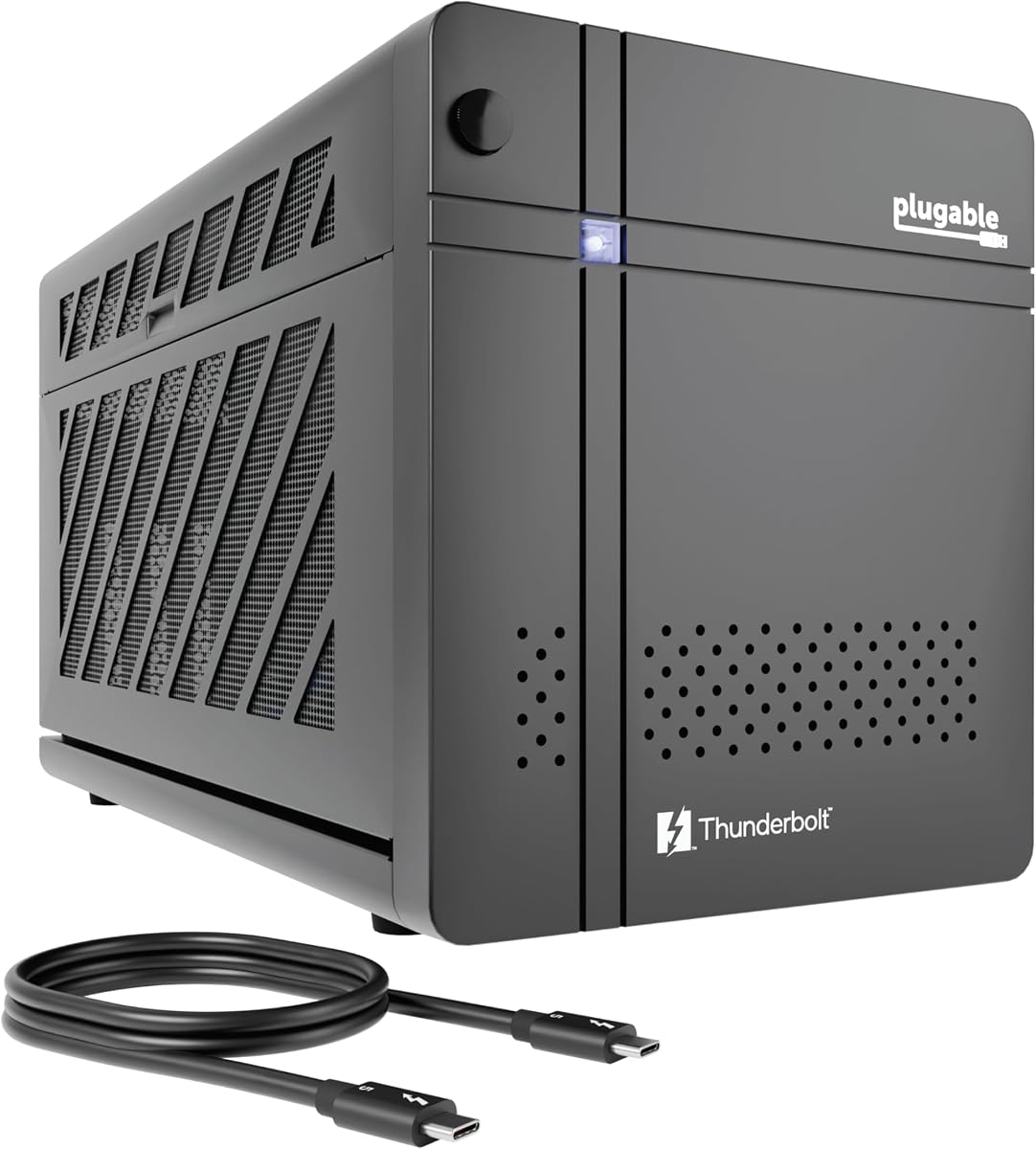
This enclosure is uniquely optimized for AI enthusiasts wanting to run local language models securely. It features an 850W PSU and Thunderbolt 5 connectivity ensuring your AI workloads run smoothly. The privacy focused design keeps data local without relying on cloud subscriptions or external risks.
We may earn a commission when you buy through this link, at no additional cost to you.
Support for Ollama, LM Studio, and other tools makes it versatile for developers and researchers. It also functions as a robust dock with Ethernet and USB ports for general use. TAA compliance ensures it meets deployment standards for IT departments requiring certified hardware.
The main limitation is its lack of macOS support. However, for Windows users focused on AI development, it offers exceptional value. The lifetime support adds significant value by ensuring you have expert help whenever issues arise.
Choose this if you are building a privacy focused AI workstation or need enterprise grade support. It provides the performance needed for complex tasks while offering security. Its robust connectivity ensures it serves as a central hub.
Run sensitive models locally keeping your data within your control without cloud exposure.
Access expert assistance indefinitely ensuring your setup remains functional and optimized over time.
We may earn a commission when you buy through this link, at no additional cost to you.
This kit offers a complete solution with a 240W power supply and carrying case included. It supports Thunderbolt 4 and 3 connections making it versatile for various laptop models. Its compact aluminum design makes it easy to transport for travelers or commuters.
We may earn a commission when you buy through this link, at no additional cost to you.
The enclosure supports most standard graphics cards under 205mm in length. It includes a DP port and Thunderbolt ports with PD charging to keep your device powered. Linux support adds versatility for users preferring open source operating systems.
It may not accommodate larger GPUs which limits high end performance potential. The lack of Ethernet is a minor drawback for network heavy workflows. However, for portable setups needing reliable connectivity, it delivers well.
Ideal for users needing a ready to use kit with portability in mind. It fits well for casual gaming or light creative work on the go. The included case ensures your gear stays protected during transit.
Everything needed for setup is included minimizing extra purchases and setup time.
Lightweight aluminum shell and case make it easy to carry in a backpack daily.
We may earn a commission when you buy through this link, at no additional cost to you.
This enclosure is optimized for handheld consoles like ROG Ally X providing portable performance boosts. It supports Thunderbolt 3 and 4 allowing compatibility with many laptops and PCs. The 85W PD charging enables Turbo Mode on handhelds for better sustained performance.
We may earn a commission when you buy through this link, at no additional cost to you.
Support for ATX SFX and DC power gives users flexibility in choosing power supplies. Multiple ports allow connecting additional peripherals making it a versatile hub. It works across Windows Linux and macOS for broad device compatibility.
Bandwidth is limited to 40Gbps which may bottleneck the newest GPUs. Power supply is sold separately adding to initial cost. Yet for handheld gamers, this unit offers a unique portable expansion solution.
Best suited for handheld console users wanting desktop graphics on the move. Its flexible power design lets you choose based on portability needs. It bridges the gap between mobile and desktop gaming.
Designed to work seamlessly with gaming handhelds offering a complete portable gaming solution.
Supports multiple power types allowing you to choose based on your setup preferences.
We may earn a commission when you buy through this link, at no additional cost to you.
This enclosure supports a broad range of graphics cards including RTX 50 series for future proofing. It uses a high grade PCB ensuring stable data transfer and long term durability. Dual Thunderbolt ports allow for both GPU connection and daisy chaining devices.
We may earn a commission when you buy through this link, at no additional cost to you.
A unique feature is support for TinyGPU enabling AI development on Apple Silicon Macs. This opens new possibilities for local machine learning projects. The included 85W PD keeps laptops charged during intensive workloads without extra adapters.
TinyGPU capabilities are strictly for development not gaming. Users need to purchase power supply separately. Despite these limits, it is a solid choice for hybrid users needing AI and graphics.
Developers seeking AI tools alongside graphics will find this useful. It offers flexibility in both OS support and GPU compatibility. Its build quality ensures reliable performance for long projects.
Enable local AI training and inference on Mac using TinyGPU without cloud services.
ENIG PCB ensures better conductivity and resistance to oxidation over time.
We may earn a commission when you buy through this link, at no additional cost to you.
Sonnet is a trusted name offering stable performance for creative workflows. This model includes a 750W power supply ready for most modern graphics cards. Ethernet connectivity provides reliable network access essential for file sharing or online collaboration.
We may earn a commission when you buy through this link, at no additional cost to you.
Multiple USB ports make it act as a hub for printers or drives. It supports Mac systems with older chips though M1 is excluded. The PSU ensures headroom for future hardware upgrades without replacing the enclosure.
Thunderbolt 3 offers lower bandwidth than newer versions which can limit peak GPU performance. Mac support is also limited compared to PC. Still, for those with compatible hardware, it remains a dependable workstation choice.
Choose this if you value brand reputation and need integrated networking. It fits existing Mac setups with Thunderbolt 3 ports well. Its power supply provides peace of mind for upgrades.
Gigabit Ethernet port ensures stable networking without requiring a separate dongle.
High wattage PSU supports professional GPUs needed for rendering and editing tasks.
We may earn a commission when you buy through this link, at no additional cost to you.
This compact unit fits small workspaces while supporting standard GPUs with proper power. It includes TB3 pass-through enabling you to connect other devices downstream. USB A and TB ports add flexibility for peripherals or drives.
We may earn a commission when you buy through this link, at no additional cost to you.
Support for SFX and ATX PSUs lets you select power based on space. It requires checking your system controller compatibility before purchase to ensure proper function. A one year warranty offers protection against manufacturing defects.
Setup demands some DIY knowledge which may deter non technical users. Power supply is not included. Yet for budget conscious users willing to assemble, it offers solid value.
Suitable for tinkerers needing a portable expansion with minimal footprint. It allows customization of power based on needs. Its pass-through port simplifies cable management for desktops.
Thunderbolt 3 pass-through allows connecting more devices without extra laptop ports.
Small footprint saves desk space while still supporting standard graphics hardware.
We may earn a commission when you buy through this link, at no additional cost to you.
This dock features dual interfaces allowing switch between Thunderbolt and OCuLink for optimized performance. OCuLink offers lower latency ideal for gaming where response time matters. The M.2 NVMe slot stores models or files directly on dock for quick access.
We may earn a commission when you buy through this link, at no additional cost to you.
Built-in signal booster ensures stable data transfer reducing dropouts. Single cable setup handles power and data simplifying your workflow. It supports universal power supplies offering flexibility in power configurations.
OCuLink support depends on host device compatibility which may limit usage. The interface switch requires manual selection. Yet for power users, this flexibility provides unmatched adaptability.
Perfect for users wanting both docking and raw performance modes. Storage slot keeps files synchronized across devices. It balances connectivity and storage well for hybrid workflows.
Switch between Thunderbolt for docking and OCuLink for low latency gaming instantly.
Store project files on M.2 slot for faster access across multiple hosts.
We may earn a commission when you buy through this link, at no additional cost to you.
This kit provides all essential components including a 240W PSU and carrying case. It supports Thunderbolt 4 and 3 making it compatible with most modern laptops. Its anodized aluminum shell protects hardware while keeping weight low for travel.
We may earn a commission when you buy through this link, at no additional cost to you.
Multiple ports allow charging and display output from one cable. It supports most cards under 205mm in length for standard use cases. The included case ensures your setup stays safe during transport.
Power and bandwidth may limit extreme performance but fit most needs well. It is ideal for casual users seeking plug and play functionality. The price point offers strong value for a complete package.
Buyers seeking a hassle free solution should consider this model. It covers basics effectively for gaming or light editing. The carrying case adds value for mobile use.
Everything required to start is included simplifying initial setup and use.
Anodized aluminum and custom case protect your gear from travel wear and tear.
We may earn a commission when you buy through this link, at no additional cost to you.
Choosing the right eGPU enclosure requires careful consideration of several key factors. This section outlines the most important aspects to evaluate before purchasing to ensure compatibility and performance.
Bandwidth determines how fast data flows between GPU and host impacting performance. Thunderbolt 4 supports 40Gbps while Thunderbolt 5 reaches 80Gbps reducing bottlenecks. Ensure your laptop supports the required standard to avoid compatibility issues.
Always verify your device supports the correct protocol before purchase.
High end graphics cards require substantial wattage to operate efficiently. Enclosures range from 240W to 850W power supplies affecting which GPUs fit. Check your GPU power requirements to avoid overloading the unit.
Select an enclosure with enough wattage for your chosen graphics card.
Physical dimensions dictate which graphics cards fit inside the chassis. Most enclosures specify maximum length height and width. Measure your GPU before buying to prevent installation issues or return hassles.
Check dimensional limits against your GPU specifications carefully.
Ports like USB Ethernet and display outputs add utility beyond graphics. Some units function as docks allowing more connections without extra hardware. Evaluate if you need these extra ports for peripherals or networking.
Choose a model with necessary ports to reduce cable clutter.
Windows Mac and Linux have different compatibility standards. Mac M1 chips generally lack full support. Ensure the enclosure explicitly supports your system to avoid driver headaches.
Confirm OS compatibility to ensure smooth setup and updates.
Chassis materials and fans affect durability and noise levels. Steel or aluminum shells protect better than plastic. Active cooling fans are essential for sustained GPU performance during heavy loads.
Look for solid materials and active cooling for reliability.
Some enclosures allow swapping power supplies or GPUs easily. Modular designs extend product life as hardware evolves. Tool free installation features simplify maintenance and upgrades.
Prioritize models with modular design for long term flexibility.
Technical issues can arise with eGPU setups. Brands offering lifetime or extended support help resolve compatibility or driver problems quickly. Check warranty terms before buying to ensure peace of mind.
Choose a vendor with responsive technical support teams.
Begin by installing the graphics card into the enclosure following manufacturer guidelines. Secure the GPU using provided screws or tool free clips. Connect the power supply cable to the card and ensure all connections are tight.
Connect the enclosure to your laptop via a certified Thunderbolt or USB4 cable. Wait for system detection and install latest drivers for your GPU model. Verify functionality using system settings or device manager.
Keep vents clear of dust to maintain cooling efficiency. Avoid placing the enclosure near heat sources. Unplug when not in use to preserve power supply longevity and ensure safe shutdowns.
Yes, most enclosures do not include graphics cards. You must purchase a compatible desktop GPU separately. This allows you to choose specific performance levels for your needs.
Macbooks with Intel chips generally work well but newer M1 M2 chips have limited support. Check manufacturer compatibility lists carefully before buying to avoid issues with macOS integration.
Thunderbolt 5 offers up to 80Gbps bandwidth compared to 40Gbps on Thunderbolt 4. This higher speed reduces bottlenecks for demanding tasks like 8K editing or AAA gaming on high end GPUs.
Your laptop must support Thunderbolt 3 Thunderbolt 4 or USB4 protocols for eGPU use. Standard USB C ports without these protocols will not work. Verify your port specs in system documentation.
OCuLink offers lower latency and higher bandwidth than Thunderbolt for specific gaming scenarios. It is ideal when maximum performance is needed and host device supports this connection type.
Compare your GPU physical dimensions with the enclosure specs. Enclosures list maximum length width and height. Also check power requirements to ensure the internal PSU meets your card needs.
The Razer Core X V2 Sonnet Breakaway Box 850 T5 and Plugable Thunderbolt 5 AI lead as top choices for performance and versatility. Each offers unique strengths tailored to different workflows from gaming to AI development.
Consider your specific needs such as port selection power requirements and OS compatibility when making your decision. Investing in a high quality unit ensures stability and longevity for your setup.
Always verify current availability and pricing before purchase as these details can change. With the right enclosure you can transform your laptop into a capable workstation ready for any task.