
Upgraded Watt Power Meter Plug
4.6Editor score
Clear LCD display
Overload protection feature
Adjustable backlight time
Discover the top energy consumption monitors for PC to track usage and cut bills. Our guide compares real-time data accuracy, app features, and ease of setup
Monitoring your computer energy usage is essential for saving money and reducing waste. The right monitor helps you understand how much power your PC and peripherals consume daily.
We compared ten top-rated products based on accuracy, features, and ease of use. This list includes plug-in meters, whole-home systems, and smart plugs tailored for PC setups.
Each pick highlights specific strengths like real-time tracking or cost alerts. Prices and availability change frequently, so verify the latest details before making your final purchase today.
4.6Editor score

4.6Editor score

4.3Editor score
This side-by-side comparison helps you choose the right monitor for your PC setup based on specific needs.


The Emporia Vue 3 stands out as the most comprehensive home energy monitoring solution available today. With a 4.6 rating, users trust its safety and accuracy. It tracks power usage in real time via a reliable mobile app.
We may earn a commission when you buy through this link, at no additional cost to you.
Its safety certification ensures peace of mind during installation. The system supports solar net metering which is perfect for modern homes. You get granular insights into how much power your PC and household appliances actually consume.
While it relies on a WiFi connection for data, this requirement ensures you have real-time access. The retention policy keeps detailed data for analysis without cluttering local storage. This balance offers long-term value for energy conscious users.
If you want to see exactly where your electricity goes, the Vue 3 is the top recommendation. It helps you identify hidden energy drains in your home setup quickly and effectively.
UL certification means every component meets rigorous safety standards to prevent hazards.
Track solar production and net metering to maximize your renewable energy savings.
We may earn a commission when you buy through this link, at no additional cost to you.
This meter offers incredible value for those who need basic tracking without smart features. Users love the clarity of the upgraded LCD display which works even in low light. It plugs directly into your outlet for immediate testing.
We may earn a commission when you buy through this link, at no additional cost to you.
The adjustable backlight saves energy while keeping data visible. Overload protection keeps your PC safe from unexpected power surges. You can easily calculate how much your gaming setup costs to run over time.
Memory functions ensure you do not lose data when unplugging. However, manual tracking is required since there is no app. This makes it best for spot checks rather than continuous monitoring.
For a quick way to check PC energy usage, this is the best budget option. It gives you the critical numbers you need to save money without any fuss.
A large screen with backlight ensures data is readable from any angle day or night.
Overload warnings protect your devices from drawing too much current.
We may earn a commission when you buy through this link, at no additional cost to you.
The Meross system offers a premium experience for those who prioritize privacy. It stores data locally and integrates with Home Assistant for advanced automation. Users appreciate the detailed charts showing energy usage over months.
We may earn a commission when you buy through this link, at no additional cost to you.
Its solar features are unmatched in this category. You can automate devices to run when solar power is available. This reduces reliance on the grid and lowers costs significantly over time.
Setup requires some technical knowledge but pays off in control. The lack of cloud lock-in ensures your data remains yours. Alerts help you catch unusual spikes immediately without needing a subscription.
If you want total control over your energy data, the Meross monitor is the best choice. It balances powerful features with privacy in a way few other products do.
All energy data stays local ensuring no delays or privacy concerns with cloud services.
Detect solar surplus and automatically power high-use appliances like water heaters.
We may earn a commission when you buy through this link, at no additional cost to you.
This watt meter is designed for those who value space saving. The compact shape leaves the lower outlet accessible for other devices. It provides accurate readings across a wide voltage range globally.
We may earn a commission when you buy through this link, at no additional cost to you.
The built-in battery backup ensures you do not lose data during outages. This is vital for long-term monitoring of appliances like PC servers. Cost tracking helps you budget effectively for electricity.
While it lacks smart features, its simplicity is its strength. You get precise numbers without complex setup. The reset button makes it easy to start fresh for new testing sessions.
For a simple reliable way to measure outlet power, this is a solid pick. It keeps your desk or wall area organized while delivering the data you need.
The design leaves the lower wall outlet accessible when plugged into the upper outlet.
Data is stored for up to 90 days even during power outages or unplugged periods.
We may earn a commission when you buy through this link, at no additional cost to you.
This system shines for shared living spaces like apartments or multi-tenant homes. The 16 sensors allow you to track power usage for each bedroom separately. This ensures fair billing without installing multiple meters.
We may earn a commission when you buy through this link, at no additional cost to you.
Users love the customizable billing rates that match their utility tariffs. It helps landlords calculate costs accurately. The app history gives tenants transparency into their consumption habits.
Setup requires some effort but pays off in management. The MQTT privacy mode ensures data stays on your local network. This is ideal for those who want to avoid third-party servers.
For shared households needing detailed circuit tracking, SEM-Meter is the best solution. It brings fairness and transparency to energy costs in complex living situations.
Track power usage for each room without installing multiple electricity meters.
Run without cloud access using your own MQTT server for total privacy.
We may earn a commission when you buy through this link, at no additional cost to you.
The HBN meter prioritizes ease of reading with a wide viewing angle display. This is great when the outlet is low or hard to reach. The backlight turns off automatically to save power.
We may earn a commission when you buy through this link, at no additional cost to you.
It cycles through nine types of data easily. You can see voltage, current, and cost instantly. This is useful for troubleshooting issues with high energy devices like PCs.
Data storage ensures you keep cumulative stats. However, you need to read values manually. It is a straightforward tool for those who want visibility without apps.
For a plug-in meter with clear visuals, this is a top choice. It helps you see energy numbers clearly to optimize your device usage efficiently.
A 160 degree wide viewing angle ensures clear data from any angle day or night.
9 display modes include power frequency current and electricity cost.
We may earn a commission when you buy through this link, at no additional cost to you.
This meter offers quick access to parameters with one-click switching. The high rating reflects its user friendly interface and reliability. Overload protection ensures your devices are safe during use.
We may earn a commission when you buy through this link, at no additional cost to you.
Cost alarms alert you when bills exceed your budget. This helps keep spending in check. It is ideal for monitoring gaming setups or servers that run continuously.
Data retention protects your stats during outages. While it lacks smart features, it delivers accurate core tracking. The reset function makes it simple to track new appliances easily.
For reliable monitoring with safety features, the KETOTEK meter is a strong choice. It balances cost tracking with protection effectively for everyday household use.
One-click switching allows you to quickly access different parameters like kWh or Watts.
Overload protection warns you when load power exceeds your set value.
We may earn a commission when you buy through this link, at no additional cost to you.
Buying two meters at once saves time for checking multiple devices. The ABS material ensures durability and safety against fire. You get all the key features like backlight and overload protection.
We may earn a commission when you buy through this link, at no additional cost to you.
The two pack is perfect for checking your PC and another appliance. It gives flexibility without extra cost. Data memory saves stats so you can compare usage easily.
Resetting is easy without tools. While you cannot sync data to an app, having two units helps you cross-reference energy draws. This is practical for multi-device households.
For a practical two pack to measure outlets, this is the best deal. It helps you compare energy costs across multiple devices efficiently and affordably.
The two pack value gives you flexibility to monitor multiple devices at once.
High-quality ABS material makes the monitor long-lasting and fireproof.
We may earn a commission when you buy through this link, at no additional cost to you.
The Kill A Watt is a classic device trusted by many users. It connects directly to your outlet and measures usage immediately. The large LCD makes it easy to see consumption clearly.
We may earn a commission when you buy through this link, at no additional cost to you.
It is compatible with inverters which is great for off-grid setups. The interface is straightforward for beginners. You can see costs by day or week with ease.
While it lacks modern app features, its accuracy remains solid. It is perfect for those who want a simple tool without connectivity. You can rely on it for quick checks anytime.
For a proven simple monitor, the Kill A Watt is the best classic pick. It delivers the essential data you need to manage electricity usage.
Designed for use with AC 115-volt appliances and compatible with inverters.
Four settings let you monitor usage by day, week, month, or year easily.
We may earn a commission when you buy through this link, at no additional cost to you.
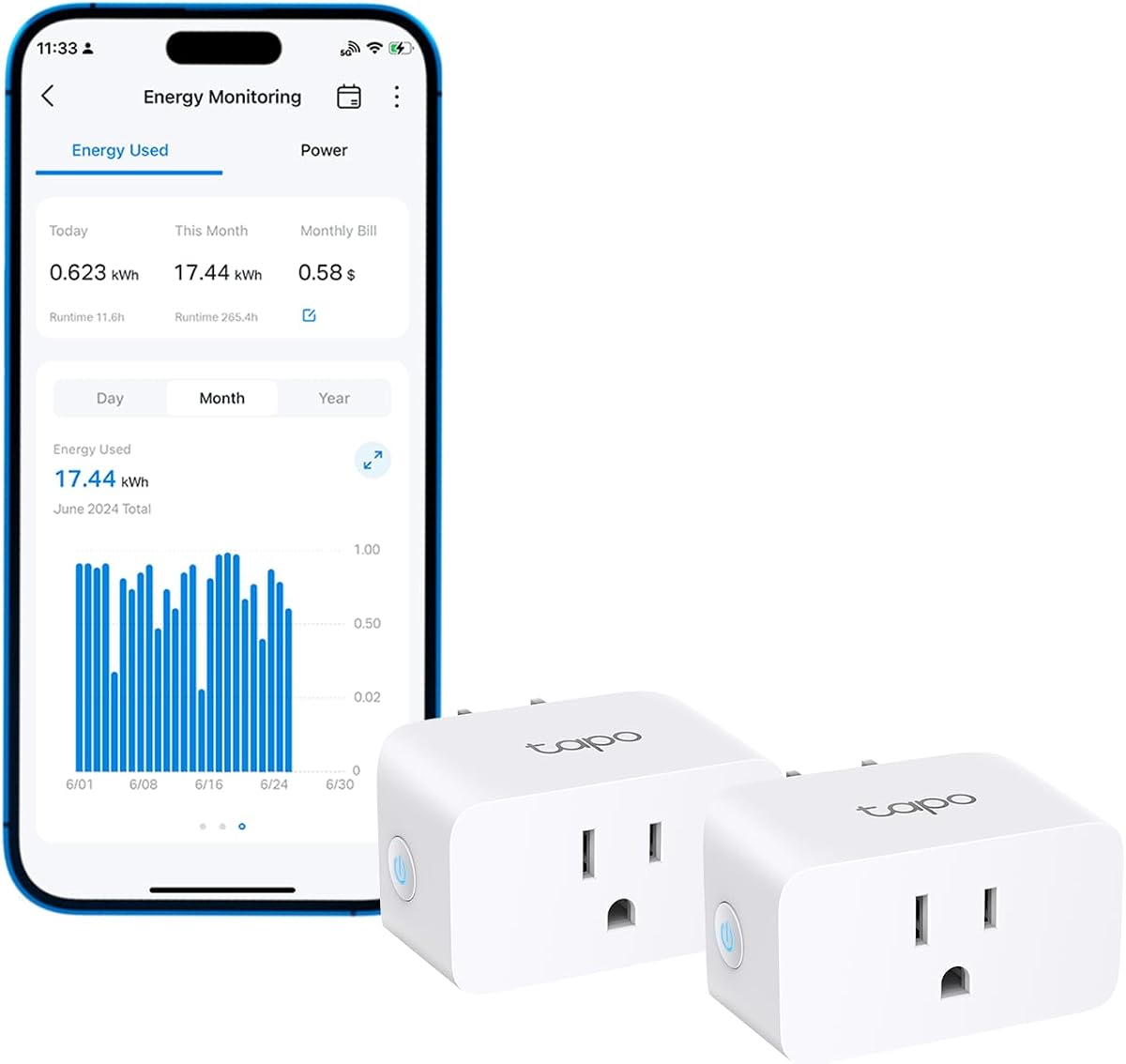
This smart plug combines energy monitoring with remote control features. It connects via WiFi to give you app access from anywhere. Scheduling helps you run devices during cheaper hours.
We may earn a commission when you buy through this link, at no additional cost to you.
Auto shutoff prevents electrical overload which adds safety. You can visualize costs clearly in the app. This is a smart solution for monitoring PCs without hardwiring.
While it is limited to 15A, it covers most standard devices. The remote control is convenient when you are away. It integrates well with voice assistants for easy management.
For smart energy tracking with remote control, the Tapo P115 is the best plug choice. It helps you optimize power usage with scheduling and alerts.
Manage devices from anywhere with the user-friendly Tapo app and voice control.
Programmable scheduling allows automatic operation during off-peak hours.
We may earn a commission when you buy through this link, at no additional cost to you.
Choosing the right monitor depends on whether you want a plug-in device or a whole-home solution.
Plug-in meters are best for testing specific devices like your PC or monitor. Whole-home systems measure the entire electrical panel but require installation. Decide if you need isolated data or household trends.
Choose plug-in for single device checks and whole-home for complete household analysis.
Accuracy matters for billing insights. Look for monitors that claim within 2% accuracy for reliable numbers. Cheaper models may have higher margins of error.
Prioritize monitors with stated accuracy ratings of 2% or better for trust.
WiFi enabled models offer real-time data on apps. Bluetooth models need proximity. Non-connected models require manual checks. Decide if remote access is worth the cost.
Select WiFi models for continuous remote tracking of your PC power usage.
Check how long data is stored. Cloud models keep records for months. Local models may need manual exports. Long-term storage helps identify usage trends.
Ensure the monitor keeps data long enough to analyze weekly usage patterns.
Look for UL or ETL certification. These ensure the monitor is safe for use. Unverified devices might pose fire risks when connected continuously.
Always choose monitors with recognized safety certifications like UL or ETL.
Advanced features include cost tracking and overload warnings. Basic models only show power watts. Decide which data points you need to manage bills.
Prioritize cost tracking and alerts to effectively manage energy spending.
Ensure the monitor works with your voltage. Most US devices use 120V. Global users may need 220V options. Check the range before purchasing.
Match the voltage range to your region to ensure accurate operation.
Plug-in models are ready to use. Whole-home systems require panel installation. If you rent, plug-in is often the only option available.
Choose plug-in monitors if you cannot install a whole-home system.
Plug the monitor into your outlet before connecting your PC. Ensure the device supports your wattage to avoid overload errors. Read the display to see real-time usage.
Calibrate your monitor by checking against your utility bill periodically. Reset the data counters when you start a new billing cycle. This ensures your cost estimates remain accurate over time.
Keep the monitor away from moisture and dust. Wipe the screen gently if it gets dirty. Store it safely if you plan to move it between outlets frequently.
Yes, most modern monitors can detect standby power when your PC is off. They show minimal wattage used even when devices are sleeping. This helps identify hidden drains on your electricity bill.
Yes, they require opening your electrical panel. This work should be done by a licensed electrician. Plug-in monitors offer an easier alternative for simple PC testing.
Most desktop PCs use between 300 to 500 watts under load. Gaming setups may exceed this depending on your components. Monitors help you verify this usage accurately.
Many apps support exporting data to CSV or PDF. This allows you to analyze usage trends over time. Check the specific model support before purchasing.
Yes, most smart plugs support standard PC wattage. However, high-end gaming PCs may exceed limits. Check the amp rating before plugging in.
Weekly checks help you spot sudden increases in energy. This ensures your setup is running efficiently. Adjust habits if you see unexpected rises.
An overload warning means your device uses too much power. Reduce load by turning off components. Ensure the monitor supports the full wattage range.
The top picks offer a range of options from simple plug-in meters to smart systems. Choose based on your privacy needs and budget. Safety features are vital for peace of mind.
Prioritize accuracy and ease of use for daily tracking. Smart features add value for long-term management. Plug-in models work best for rental properties.
Always check current prices before purchasing to ensure the best deal. This guide helps you find the perfect tool for managing your PC energy efficiently.