
Ajazz AK820 Pro
4.7Editor score
TFT interactive display
75% compact design
South-facing RGB LEDs
This guide compares the top Epomaker Keyboards for gaming and work, evaluating features like wireless connectivity, hot-swappable switches, and sound dampening
Epomaker Keyboards have rapidly evolved to meet the needs of modern enthusiasts seeking premium typing experiences. From gasket-mounted designs to integrated screens, these boards offer versatility for both office productivity and intense gaming sessions across various budgets.
We analyzed ten top models based on build quality, wireless performance, switch options, and user feedback. Each product was evaluated for latency, battery life, and customization potential to ensure you find the perfect match for your specific workflow and aesthetic preferences.
Every selection highlights unique strengths such as tri-mode connectivity, QMK/VIA support, or innovative displays. While prices fluctuate daily, these picks represent the current best value and performance available to help you make an informed purchasing decision today.
4.7Editor score
4.7Editor score
4.5Editor score
The following table provides a side-by-side comparison of all ten selected keyboards. It highlights key specifications including layout size, connectivity options, battery capacity, and unique features to help you quickly identify the model that best fits your specific requirements.


The EPOMAKER TH108 PRO stands out as a top-tier choice for users wanting a full-size keyboard with advanced customization features. Rated highly for its build quality and performance, this model integrates a smart screen and rotary knob that offer practical utility beyond simple typing.
We may earn a commission when you buy through this link, at no additional cost to you.
Its standout features include a massive 10,000mAh battery that supports weeks of use without charging and a sophisticated gasket mounting system. The keyboard delivers a satisfying acoustic profile with layered foam padding and supports hot-swappable switches for endless customization options.
While the weight exceeds one kilogram which ensures stability it may not suit portable setups. The software is web-based which avoids bloat but requires an internet connection for initial setup. These minor trade-offs are acceptable given the premium hardware and long battery life.
This keyboard is ideal for desktop enthusiasts who value tactile feedback and visual customization. Whether you need a reliable office tool or a gaming centerpiece, the TH108 PRO delivers consistent performance and a premium feel that justifies its investment.
The integrated screen allows you to upload GIFs or monitor system status directly from the keyboard.
Tri-mode connectivity ensures seamless switching between devices while maintaining low latency for gaming.
We may earn a commission when you buy through this link, at no additional cost to you.
The EPOMAKER X Aula F75 MAX offers a compact 75% layout that retains essential keys while freeing up desk space. It appeals to users seeking a balance between functionality and portability without sacrificing build quality or typing comfort.
We may earn a commission when you buy through this link, at no additional cost to you.
This model features a customizable TFT screen and rotary knob for easy access to volume and backlight settings. The gasket-mounted structure and flex-cut PC plate provide a soft, bouncing typing feel that reduces fatigue during long sessions.
The absence of a numpad may be a drawback for those entering numbers frequently. The software offers basic remapping but lacks advanced macro features found in higher-end models. These limitations are minor for casual users prioritizing style and ergonomics.
Ideal for gamers and writers needing a sleek desk setup, this keyboard delivers a creamy sound profile and reliable wireless performance. Its ergonomic kickstands and comfortable profile make it a strong choice for extended daily use.
Adjustable kickstands allow you to find the perfect typing angle to reduce wrist strain.
Silicone sandwiching and foam layers eliminate hollow sounds for a refined auditory experience.
We may earn a commission when you buy through this link, at no additional cost to you.
The EPOMAKER Galaxy100 QMK brings a premium aluminum build to the mass market with full QMK and VIA compatibility. This model is engineered for enthusiasts who demand deep customization options and a distinct typing experience that stands out from standard plastic boards.
We may earn a commission when you buy through this link, at no additional cost to you.
Its aluminum shell provides rigidity and weight ensuring stability during intense use. The gasket-mounted design paired with sound dampening layers creates a deep thocky sound that many users find deeply satisfying for both typing and gaming scenarios.
The learning curve for QMK/VIA might be steep for beginners. The price is higher than plastic alternatives but the build quality justifies the cost for long-term use. These factors are acceptable for users invested in customization.
Best suited for power users and gamers who want full control over key mappings and macros, this keyboard offers unmatched versatility. Its robust construction and reliable wireless performance make it a lasting addition to any high-end setup.
QMK and VIA support allow for layer changes and complex macro programming across devices.
The aluminum case combined with gasket mounting delivers a stable yet flexible typing experience.
We may earn a commission when you buy through this link, at no additional cost to you.
The EPOMAKER TH108 V2 PRO builds on the success of its predecessor with refined software and better integration. It remains a top contender for those seeking a full-size board with advanced display capabilities and robust build quality.
We may earn a commission when you buy through this link, at no additional cost to you.
Key strengths include a 1000Hz polling rate for competitive gaming and a versatile rotary knob that can be remapped for various functions. The web-based driver simplifies updates and avoids heavy installations making it accessible across different operating systems.
The board is heavy and large which may limit portability. Some users report occasional software hiccups though updates have improved stability. These issues are minor compared to the overall feature set and performance reliability.
If you need a keyboard that supports complex workflows and gaming alike, the TH108 V2 PRO is an excellent choice. Its blend of performance and customization makes it a versatile tool for any desk environment.
The software allows for detailed macro recording and screen customization to match your workflow.
Low latency and high polling rates ensure precise input during fast-paced gaming scenarios.
We may earn a commission when you buy through this link, at no additional cost to you.
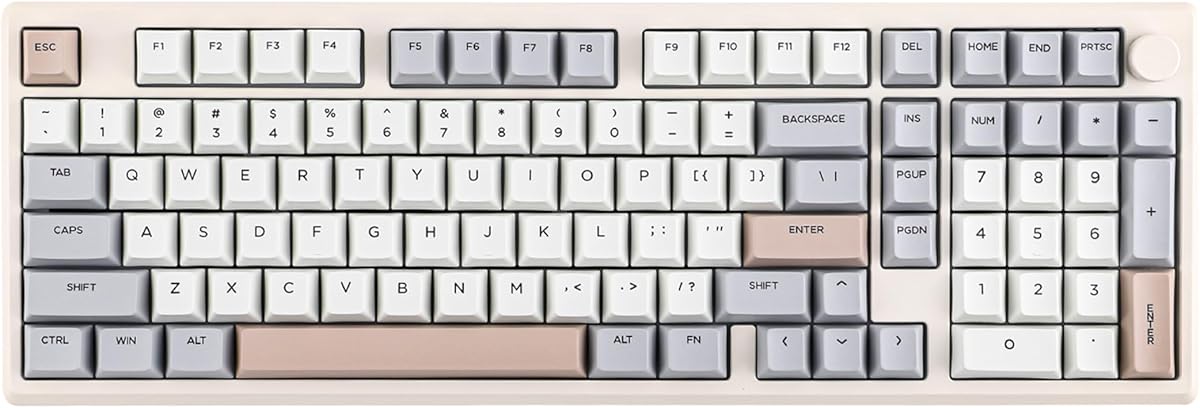
The EPOMAKER TH99 PRO delivers a rich feature set at a competitive price point. It combines the functionality of a full keyboard with the space-saving benefits of a 96% layout making it a practical choice for diverse users.
We may earn a commission when you buy through this link, at no additional cost to you.
With a massive 10,000mAh battery and gasket mounting it offers performance that rivals more expensive boards. The rotary knob and screen add a premium touch that enhances usability without complicating the interface.
The plastic body feels lighter than aluminum options which some may prefer for portability. The compact size might reduce space for mouse movement for some gamers. These trade-offs are balanced by the value and versatility offered.
For users wanting a do-it-all keyboard without breaking the bank, the TH99 PRO is a standout option. It balances essential features with modern conveniences to deliver a strong typing experience for work and play.
The 96% layout retains a numpad while saving desk space for larger mouse movements.
Premium features like gasket mounting and screens are available at a budget-friendly price.
We may earn a commission when you buy through this link, at no additional cost to you.
The EPOMAKER TH108 provides a classic full-size mechanical keyboard experience with modern wireless capabilities. It is designed for users who prefer a traditional layout but want the reliability and convenience of wireless connectivity.
We may earn a commission when you buy through this link, at no additional cost to you.
Its 10,000mAh battery ensures long uninterrupted usage while the gasket mounting adds a layer of comfort to typing. The double-shot PBT keycaps resist shine and wear ensuring the keyboard looks new for years of use.
The design is straightforward which may lack the customization of higher-end models. The driver is functional but lacks advanced scripting features. These aspects make it a solid choice for general use over niche applications.
Ideal for general users seeking a reliable and comfortable typing tool the TH108 delivers consistent performance. Its balance of build quality and battery life makes it a dependable choice for daily tasks and gaming.
Tri-mode connectivity ensures you stay connected across multiple devices with minimal input lag.
The gasket mount and soft internal padding reduce fatigue during long writing or gaming sessions.
We may earn a commission when you buy through this link, at no additional cost to you.
The EPOMAKER G84 HE introduces Hall Effect technology to the mainstream with adjustable actuation points. This model is built for competitive gamers who need precise control over input timing and rapid response from their hardware.
We may earn a commission when you buy through this link, at no additional cost to you.
Its 8K polling rate and customizable travel distance allow for tailored performance that can improve reaction times. The gasket mounting adds a layer of comfort so that precision does not come at the cost of ergonomics.
The switches are magnetic and non-standard which may limit replacement options. The software is feature-rich but requires configuration to unlock full potential. These steps are worth the effort for serious competitive players.
For esports enthusiasts and speed typists the G84 HE offers a technological edge. Its advanced features and responsive design make it a top choice for those aiming to maximize performance in high-stakes environments.
Adjustable actuation points let you customize key sensitivity to match your play style perfectly.
The 8K polling rate ensures every keystroke is registered instantly for competitive accuracy.
We may earn a commission when you buy through this link, at no additional cost to you.
The EPOMAKER TH99 is designed for productivity with a compact layout that retains essential numbers keys. It serves as a reliable office tool that supports efficient data entry while maintaining a sleek and modern aesthetic.
We may earn a commission when you buy through this link, at no additional cost to you.
Its 8000mAh battery and wireless options reduce desk clutter and allow for seamless device switching. The Cherry-profile keycaps provide a comfortable typing angle that helps prevent strain during long work hours.
The build is lighter than premium aluminum options which suits portability but may feel less substantial. Software features are limited to basic remapping which is sufficient for office tasks but not for gamers. These trade-offs fit its intended role well.
Best for administrative tasks and general office work this keyboard offers a balance of comfort and function. Its ergonomic design and reliable battery life make it a solid choice for daily productivity.
The compact layout keeps key functions accessible without taking up too much desk space.
Adjustable kickstands and Cherry-profile keycaps support comfortable typing throughout the day.
We may earn a commission when you buy through this link, at no additional cost to you.
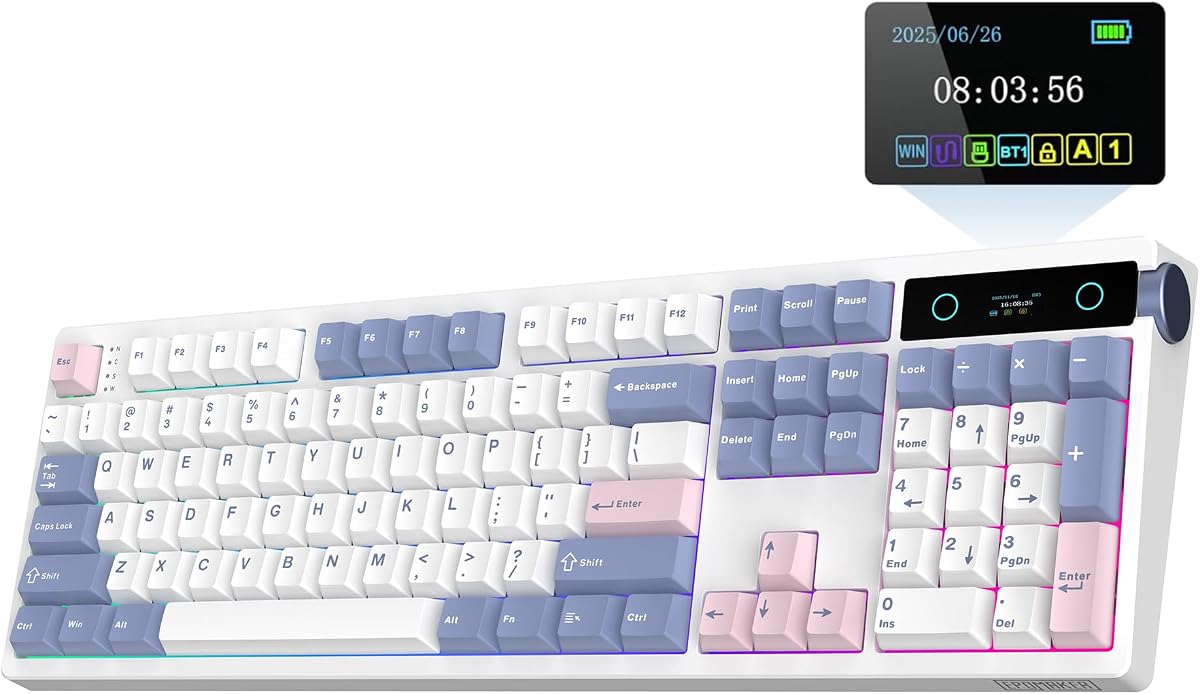
The EPOMAKER Ajazz AK820 Pro brings visual customization to a budget-friendly price. It features a compact design that fits well in smaller spaces while offering a TFT display for status monitoring and personal expression.
We may earn a commission when you buy through this link, at no additional cost to you.
Its RGB lighting and screen allow for personalization that is usually reserved for high-end models. The flex-cut plate and gasket mount ensure a satisfying typing experience that exceeds expectations for this price point.
The battery life is shorter than larger models but adequate for typical use. The switches are decent but may require swapping for enthusiasts seeking specific feedback. These minor limitations do not detract from the overall value.
Ideal for students or home users wanting a stylish and functional keyboard this model offers great bang for buck. Its blend of visual features and solid performance makes it a top contender in the budget category.
The TFT screen allows you to display system status or custom GIFs for added desk flair.
The 75% layout keeps essential keys while saving space for larger mouse movements.
We may earn a commission when you buy through this link, at no additional cost to you.
The EPOMAKER x Aula F99 balances price and performance with a functional 96% layout. It offers a complete typing solution with essential keys and modern wireless capabilities that suit both work and leisure environments.
We may earn a commission when you buy through this link, at no additional cost to you.
Its 8000mAh battery ensures long operation without frequent charging while the hot-swappable PCB allows for switch customization. The sound absorption layers dampen noise making it suitable for quiet office environments.
The software is limited compared to premium models which may restrict advanced features. The design is practical but lacks the unique flair of other boards. These aspects make it a solid choice for those prioritizing function over form.
Best for those seeking a reliable and affordable wireless keyboard this model delivers consistent performance. Its practical layout and solid battery life make it a dependable tool for daily productivity tasks.
The large battery capacity ensures weeks of usage between charges for uninterrupted productivity.
Hot-swappable sockets allow you to change switches easily to customize your typing feel.
We may earn a commission when you buy through this link, at no additional cost to you.
Selecting the right keyboard involves balancing layout needs, connectivity options, and build quality. This guide outlines key factors to consider so you can find a model that fits your workflow and budget perfectly.
Layout size determines how much desk space a keyboard occupies and which keys are available. Full-size boards include a numpad and function row which is ideal for data entry while compact layouts like 75% or 65% save space for mouse movement.
Choose a layout based on your primary use case to ensure efficiency without sacrificing essential functionality.
Wireless flexibility depends on available modes like Bluetooth, 2.4GHz, and wired USB-C. Tri-mode keyboards offer the most versatility allowing seamless switching between devices with low latency for gaming or work.
Prioritize tri-mode connectivity if you frequently switch between multiple devices during your day.
Battery capacity impacts how often you need to recharge your wireless keyboard. Models with 8000mAh or 10000mAh batteries can last weeks on a single charge even with RGB lighting enabled.
Look for higher mAh ratings to minimize interruptions and maintain a wireless setup that remains clean.
Switches define the tactile and auditory experience of typing. Linear switches offer smooth quiet strokes tactile switches provide bump feedback and clicky switches add sound. Hot-swappable boards let you change switches easily.
Select switches that match your preference for feedback and noise level to ensure typing comfort.
Build materials affect durability and typing stability. Aluminum shells are sturdy and heavy while plastic bodies are lighter and more portable. Gasket mounts provide a flexible typing feel compared to traditional tray mounts.
Invest in robust materials like aluminum or gasket mounts if you value premium feel and long-term use.
Advanced software allows you to remap keys record macros and customize RGB lighting. QMK and VIA support offer deep customization for enthusiasts while proprietary software provides ease of use for casual users.
Check for software compatibility and features that match your level of technical interest and workflow needs.
Extras like TFT screens volume knobs and dedicated media keys enhance user experience. These features can add utility or visual flair depending on your personal preferences and setup requirements.
Consider if added features justify the cost and complexity for your specific use case and enjoyment.
Price varies widely based on materials and features. Entry-level models offer essential functions while premium boards include advanced tech like Hall Effect switches or customizable screens.
Determine your budget and prioritize features that will most improve your daily workflow or gaming experience.
To get started install the manufacturer software or connect via Bluetooth to pair your device. Familiarize yourself with the software interface to customize key mappings and RGB effects for a personalized experience.
Regular maintenance involves gently cleaning the surface with a soft cloth and compressed air to remove dust. For gasket-mounted boards avoid excessive force to preserve the flexible typing feel and internal structure.
Charge your battery before storing the keyboard for extended periods and avoid extreme temperatures. Proper care ensures longevity and consistent performance so your keyboard remains functional for years to come.
Most Epomaker models include dedicated Mac keys or support for Mac OS within their software. You may need to switch the OS mode via a keyboard shortcut to ensure all function keys work correctly.
Battery life varies by model and usage. Larger batteries like 10000mAh can last over 100 hours with RGB off while smaller batteries may last around 40 hours with full lighting enabled.
Many Epomaker Keyboards are hot-swappable allowing you to change switches without soldering. Check the specific model details to confirm compatibility with 3-pin or 5-pin mechanical switches.
Yes most models feature RGB backlighting with software controls to adjust colors effects and brightness. Some higher-end models offer per-key customization and dynamic animations for more advanced lighting effects.
A gasket mount isolates the PCB from the case using flexible materials to create a softer more bouncy typing feel. This design reduces harsh vibrations and improves sound quality for a premium acoustic experience.
Compact models like 75% or 60% layouts usually exclude the numpad to save space. However 96% layouts often retain the numpad while keeping a smaller footprint than full-size boards.
Firmware updates are typically handled through the manufacturer website software or web-based driver. Follow the official instructions to avoid errors ensuring you back up your settings before proceeding.
Most models use PBT keycaps which are resistant to shine and wear over time. Double-shot legends ensure the symbols remain clear and legible even after extensive daily use and typing.
The top picks highlight the diversity within the Epomaker lineup from budget-friendly displays to premium aluminum builds. Whether you prioritize battery life customization or sound quality there is a model designed to meet your specific needs.
Focus on layout size and connectivity options that align with your daily workflow. A well-chosen keyboard can significantly improve comfort and productivity while adding a stylish touch to your desk setup.
Prices and availability may change so verify current offers before purchasing. Investing in a quality keyboard today ensures you enjoy a reliable and satisfying typing experience for years.