
MNN 15.6" FHD 60Hz Portable Monitor
4.3Editor score
Full HD 1080P IPS screen
Dual USB-C ports for easy connection
Lightweight design for travel use
Finding the right external monitor for your MacBook Neo can transform your workflow and boost productivity significantly. Whether you are traveling, working from home, or needing extra screen space for creative projects, a portable display offers versatility and convenience. The best options provide crisp visuals, easy connectivity, and a lightweight design that fits seamlessly into your mobile lifestyle.
We have carefully selected and evaluated ten standout models that cater to diverse needs and preferences. Each product was chosen based on key factors such as resolution, refresh rate, connectivity options, and overall build quality. Our goal is to provide you with a comprehensive overview that highlights the strengths and potential trade-offs of each monitor.
Each pick in this guide showcases specific features that make it suitable for different use cases, from budget-friendly options to high-performance displays. Keep in mind that availability and details may change over time, so always verify the latest information before making a final decision. This curated list aims to simplify your search and help you find the ideal companion for your MacBook Neo.
4.3Editor score

4.8Editor score
4.8Editor score
As an Amazon Associate we earn from qualifying purchases.
Here is a side-by-side comparison of all ten external monitors selected for this guide. Each entry highlights the key specifications and unique selling points to help you quickly identify the model that best suits your specific requirements and usage scenarios.


The VisionOwl Portable Monitor stands out as the top choice for MacBook Neo users seeking a premium portable display. With a 4.8 rating from users, it delivers exceptional performance that balances productivity and entertainment needs effectively.
We may earn a commission when you buy through this link, at no additional cost to you.
Its 16:10 aspect ratio matches MacBook screens perfectly, eliminating black bars during mirroring. The 2.5K resolution and 144Hz refresh rate ensure crisp text and fluid motion, making it ideal for creative work and gaming alike.
While the price is higher than basic models, the superior panel quality and included accessories justify the investment. The build quality feels robust, and the included cables mean you can start using it immediately without extra purchases.
If you want the best all-around experience for your MacBook Neo, this monitor is the clear recommendation. It offers the right blend of resolution, speed, and compatibility that professionals and enthusiasts will appreciate.
The 16:10 ratio ensures seamless mirroring with MacBooks without losing screen real estate to black bars.
With 144Hz refresh, scrolling and video playback feel incredibly smooth and responsive for all tasks.
We may earn a commission when you buy through this link, at no additional cost to you.
The MNN 15.6 inch Portable Monitor offers incredible value for budget-conscious MacBook Neo users. With a solid 4.3 rating, it proves that you do not need to spend a fortune to get a reliable second screen experience.
We may earn a commission when you buy through this link, at no additional cost to you.
Its dual USB-C ports allow for versatile connectivity options, making it easy to plug in and get started. The lightweight design ensures it fits easily into backpacks for travelers and students on the go.
While it lacks the high refresh rate of premium models, the 60Hz performance is adequate for most work and media consumption tasks. The included smart cover adds a layer of protection that enhances portability significantly.
For those looking to expand their workspace without breaking the bank, this monitor is an excellent starting point. It delivers core functionality effectively and remains a strong contender in the budget category.
Two full feature Type-C ports provide flexibility for power and video transmission with just one cable.
The slim profile and included cover make it exceptionally easy to pack for daily commutes or trips.
We may earn a commission when you buy through this link, at no additional cost to you.
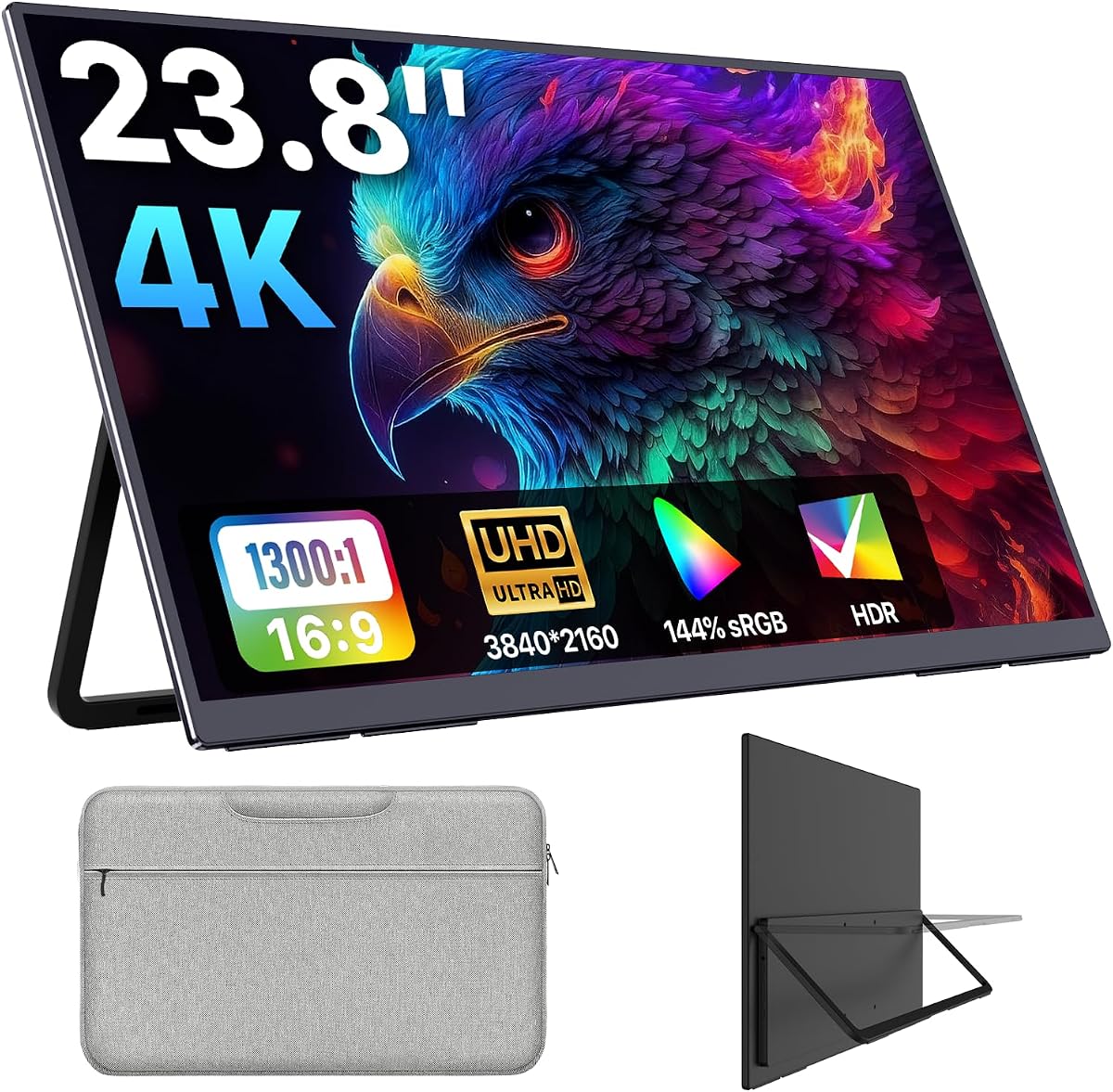
The Upperizon Portable Monitor brings a large 23.8 inch 4K display to the portable market, appealing to users who prioritize screen real estate. Its 4.8 rating reflects strong satisfaction with its visual fidelity and build quality.
We may earn a commission when you buy through this link, at no additional cost to you.
The 4K resolution provides stunning clarity for detailed work, while the 144% sRGB coverage ensures colors are vibrant and accurate. This makes it a standout choice for designers and content creators who need precise color reproduction.
Though it is heavier than 15 inch options, the larger screen offers a more immersive experience for video calls and presentations. The anti-glare coating helps maintain visibility even in bright environments like cafes or offices.
If you need a desktop-like experience on the go, this monitor is the best premium option available. It balances size, resolution, and color performance better than most competitors in its class.
The 3840×2160 resolution delivers sharp text and intricate image details for professional workflows.
With 144% sRGB coverage, creative projects look their best with accurate and vibrant color representation.
We may earn a commission when you buy through this link, at no additional cost to you.
The ASUS ZenScreen MB16ACV is a robust choice for business travelers and professionals who value reliability. With a 4.5 rating, it is known for consistent performance and durability in demanding environments.
We may earn a commission when you buy through this link, at no additional cost to you.
Its TÜV Rheinland-certified Eye Care features make it comfortable for long work sessions, reducing flicker and blue light. The hybrid-signal solution ensures it works seamlessly with laptops that have USB-C or Type-A ports.
The kickstand design allows for flexible viewing angles, which is useful during meetings or when working from different locations. While it may not be the slimmest option, its build quality inspires confidence.
For those who need a dependable monitor for business trips, this ASUS model delivers peace of mind. Its focus on eye health and connectivity compatibility makes it a practical choice for daily office use.
TÜV Rheinland certification ensures the display minimizes eye strain during extended usage periods.
Supports power and video transmission, allowing compatibility with a wide range of laptop ports.
We may earn a commission when you buy through this link, at no additional cost to you.
The InnoView Portable Monitor combines affordability with practical features like built-in speakers, making it an all-rounder. Users appreciate the simplicity of plug-and-play connectivity without needing extra peripherals or drivers.
We may earn a commission when you buy through this link, at no additional cost to you.
The built-in speakers add convenience for media consumption and video calls, removing the need to carry external speakers. The case included protects the screen during transport, ensuring it arrives undamaged after travel.
While the audio quality is typical for portable devices, it is sufficient for basic needs. The IPS screen provides good viewing angles, and the compatibility with consoles and phones adds extra versatility beyond just laptops.
If you want a simple solution that includes audio and a case, this monitor is a great option. It balances cost and features well, making it suitable for students and casual users alike.
Integrated speakers reduce the need for external audio devices when watching videos or in meetings.
Supports USB-C and HDMI, making it compatible with laptops, phones, and gaming consoles easily.
We may earn a commission when you buy through this link, at no additional cost to you.
The cocopar Portable Monitor delivers high performance with a metal chassis and fast refresh rate that appeals to gamers and creatives. A 4.8 rating shows strong approval for its balance of quality and portability.
We may earn a commission when you buy through this link, at no additional cost to you.
Its 144Hz refresh rate ensures smooth motion, which is rare in portable monitors at this price point. The metal construction adds durability and a premium feel, protecting the internal components during travel.
The 110% sRGB color gamut ensures colors are vibrant and true to life, making it suitable for photo editing and design tasks. At just 1.5 pounds, it remains easy to carry in a backpack for daily use.
For users who want performance without heavy weight, this monitor is a fantastic choice. It brings desktop-level specs to a portable form factor, making it versatile for both work and entertainment.
The full metal chassis provides better durability and heat dissipation than standard plastic alternatives.
110% sRGB coverage ensures accurate color reproduction for creative and media work.
We may earn a commission when you buy through this link, at no additional cost to you.
The InnoView 15.6 inch Portable Monitor prioritizes portability with an ultra-slim design that fits easily into any bag. With a 4.4 rating, users find it reliable for everyday tasks on the go.
We may earn a commission when you buy through this link, at no additional cost to you.
Its integrated stand allows for quick angle adjustments without needing extra accessories, which adds convenience during travel. The protective sleeve ensures the screen is safe from scratches while packed in a backpack.
The slim profile reduces the burden on your carry-on, making it ideal for frequent flyers. HDR support helps improve image quality, making videos and photos look better on this compact screen.
If carrying weight is a primary concern, this model offers one of the lightest options available. It provides all the essential features needed for a second screen in a minimal and stylish package.
At only 0.25 inches thick, it slides effortlessly into tight spaces in your travel gear.
Built-in stand allows for quick angle adjustments without needing external accessories or props.
We may earn a commission when you buy through this link, at no additional cost to you.
The KEFEYA Laptop Screen Extender offers a unique dual-screen solution that clips directly onto your MacBook Neo. With a 4.5 rating, it is highly praised for increasing productivity without taking up desk space.
We may earn a commission when you buy through this link, at no additional cost to you.
Its 14-inch screen expands your workspace horizontally, allowing you to view documents or chat windows side-by-side. The plug-and-play feature ensures you can start using it immediately without installing drivers.
Because it attaches to your laptop, it is ideal for situations where setting up a separate monitor is inconvenient. However, users should ensure their laptop size is compatible before purchasing to guarantee a proper fit.
For travelers who want to maximize screen space without extra setup, this extender is a brilliant choice. It transforms a single laptop into a dual-screen workstation instantly, boosting efficiency on the go.
Expand your viewing area horizontally to multitask without needing a separate external monitor.
No drivers needed; just connect and use immediately for instant productivity boosts.
We may earn a commission when you buy through this link, at no additional cost to you.
The kksmart Portable Monitor provides a larger 18.5 inch screen in a frameless design that looks modern and clean. A 4.8 rating indicates strong user satisfaction with its visual quality and build.
We may earn a commission when you buy through this link, at no additional cost to you.
Its frameless design maximizes screen real estate and provides a cinematic viewing experience, making it great for media consumption. The 100Hz refresh rate adds smoothness to scrolling and gaming, which is a nice bonus.
Despite the larger size, it remains lightweight enough for travel, offering a balance between screen space and portability. The included kickstand ensures stable placement on tables or desks during work sessions.
If you prefer a bigger screen for movies or work, this model is an excellent choice. It combines style and function with a large display that stands out among standard 15-inch portable options.
Four-side frameless design creates an immersive viewing experience with minimal bezel distraction.
100Hz refresh rate ensures smooth motion for gaming and general usability on the go.
We may earn a commission when you buy through this link, at no additional cost to you.
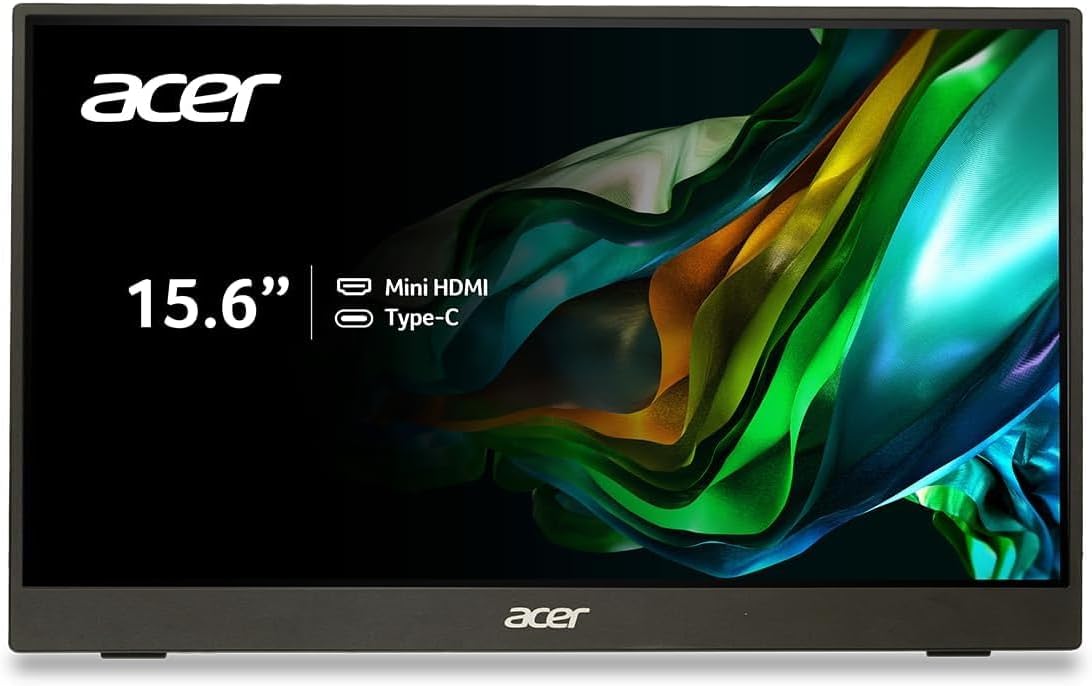
The Acer PM161Q is a straightforward portable monitor that delivers essential features without unnecessary extras. With a 4.3 rating, it is valued for its reliability and simple operation for daily tasks.
We may earn a commission when you buy through this link, at no additional cost to you.
Its slim design makes it easy to carry, and the VESA compliance allows for flexible mounting options when needed. The IPS screen provides good color and viewing angles for a basic external display experience.
While it lacks speakers and advanced features, it serves its purpose well for expanding your workspace. Users looking for a no-frills solution will find it functional and consistent for standard workloads.
If you need a simple and reliable monitor for travel or meetings, this Acer model fits the bill. It offers solid performance at a reasonable cost for those who do not need high-end specs.
Focuses on core display performance without extra features, ensuring stable and simple operation.
VESA mounting compatibility offers flexible setup options for arms or stands when needed.
We may earn a commission when you buy through this link, at no additional cost to you.
Selecting the right external monitor involves considering several key factors that impact your daily workflow. This guide breaks down the essential elements to help you make an informed decision.
Resolution determines how sharp your text and images appear on the screen. For MacBook Neo users, higher resolutions like 1440p or 4K provide clearer visuals for design work or coding. Look for IPS panels which offer better color accuracy and viewing angles compared to TN panels.
Higher resolution ensures sharp text and vibrant colors. Always check for IPS technology to avoid eye strain and maintain color consistency.
Since you are likely buying this for travel or remote work, weight and size matter significantly. Monitors under 2 pounds are ideal for backpacks, while larger screens may offer better viewing but add bulk. Consider how often you plan to move the monitor.
Lighter monitors make commuting easier. Aim for under 2 pounds for frequent travel to avoid unnecessary strain on your bag.
MacBooks primarily use USB-C, so ensure the monitor supports USB-C video output. HDMI is a good backup option for older devices. Check if the monitor supports power delivery so you can use a single cable for both video and power.
USB-C with power delivery simplifies your setup. A single cable solution keeps your desk clean and reduces cable clutter.
A standard 60Hz refresh rate is sufficient for office work and web browsing. However, if you enjoy gaming or watch fast-paced video, a higher refresh rate like 144Hz provides smoother motion and reduces motion blur.
Standard 60Hz is enough for work. Gamers should look for 120Hz or 144Hz to ensure smooth visuals during gameplay.
Most laptops use a 16:9 aspect ratio, but some newer MacBooks use 16:10. Choosing a monitor with a matching aspect ratio ensures seamless mirroring without black bars. This improves the overall viewing experience significantly.
Matching aspect ratios like 16:10 prevent black bars. It creates a more uniform and immersive dual-screen layout.
For creative professionals, color accuracy is crucial. Look for monitors with high sRGB or Adobe RGB coverage percentages. A wide color gamut ensures that your designs look consistent across different screens.
High sRGB coverage is vital for designers. It ensures your creations appear vibrant and accurate on all devices.
Durability is important for portable devices that travel with you. Metal chassis generally offer better protection and cooling than plastic. Also, check if the monitor includes a protective case or cover for added safety.
Metal build lasts longer during travel. A sturdy frame protects the screen from minor impacts and scratches in your bag.
Some monitors come with built-in speakers, eye-care technologies, or adjustable stands. While not essential, these features can add convenience. Decide which extras align with your needs before purchasing.
Extra features like speakers save carrying extra items. Eye-care tech helps reduce strain during long working hours.
To connect your monitor, simply plug the USB-C or HDMI cable into your MacBook Neo and the monitor. If your MacBook supports Thunderbolt or DP Alt Mode, a single USB-C cable can handle both video and power, keeping your setup minimal and clean.
Once connected, go to your System Settings to adjust the display resolution and arrangement. You can choose to mirror your screen or extend your desktop to increase your workspace. Arrange the screens in the settings to match their physical layout for a seamless experience.
To maintain the monitor, use a soft microfiber cloth to clean the screen gently. Avoid using harsh chemicals that could damage the coating. When not in use, store it in the provided case to prevent scratches and ensure it remains in good condition for travel.
If your monitor has a USB-C port with DisplayPort Alt Mode, you can connect directly with a single USB-C cable. However, if your monitor only uses HDMI, you will need a USB-C to HDMI adapter to establish a connection with your MacBook.
Yes, many portable monitors support high refresh rates like 144Hz which are excellent for gaming. Ensure your MacBook Neo can handle the resolution and refresh rate for a smooth gaming experience without lag or stuttering.
Most modern MacBook models support video output via USB-C. Check your specific model's technical specifications to confirm Thunderbolt or USB-C DP Alt Mode support to ensure compatibility with portable monitors.
Some monitors draw power directly from your MacBook via USB-C. Others may require a separate power adapter if your laptop does not provide enough power, so always check the power requirements of your chosen monitor.
Yes, provided you choose a monitor with high color accuracy and a wide color gamut. Look for IPS panels with high sRGB coverage to ensure your photos look vibrant and true to life during editing.
Many portable monitors include VESA mounting holes which allow them to be attached to monitor arms or wall mounts. Check the product specifications to confirm VESA compatibility if you plan to use a mounting solution.
We have explored ten top-tier external monitors that cater to various needs ranging from budget-friendly options to high-performance displays. Whether you choose the VisionOwl for its perfect aspect ratio or the MNN for its affordability, there is a suitable option for every user.
When prioritizing your choice, consider what matters most to your workflow. If you value portability, look for lightweight models. If color accuracy is key, focus on high sRGB monitors. Balancing these factors will help you narrow down your list efficiently.
Remember that prices and availability can change over time, so always check current listings before purchasing. We hope this guide helps you find the perfect companion to boost your productivity and enhance your MacBook Neo experience.