
ARCTIC Case Fan Hub
4.7Editor score
Ten PWM ports available
SATA power input included
Synchronous fan control
This guide compares the top 10 Fan Control Hub for PC options to help you manage airflow and RGB lighting efficiently with reliable SATA power and flexible
Modern PC builds often require more cooling fans than your motherboard can handle alone. A dedicated fan control hub solves this by centralizing connections and managing power distribution effectively. These hubs simplify cable management and ensure every fan runs smoothly without overloading your system headers.
We evaluated ten top-rated fan hubs based on port count, power delivery, and ease of installation. Each model was reviewed for stability under load and compatibility with standard PWM and ARGB devices. Our analysis focuses on real-world performance and user feedback from verified buyers.
Each selection in this list highlights unique strengths like magnetic mounting or remote control features. Prices and availability change frequently so always check the latest offers before buying. Use these insights to choose the right hub for your specific case layout and cooling needs today.
4.7Editor score

4.7Editor score
4.6Editor score
The following table provides a side-by-side comparison of all ten fan hubs reviewed in this guide. It highlights key specifications like port count and mounting methods to help you quickly identify the best fit for your build requirements.


This Thermalright fan hub offers excellent value for builders needing eight ports. It maintains stable output under high load and supports both ARGB and PWM fans easily. The magnetic mounting makes installation quick without drilling holes.
We may earn a commission when you buy through this link, at no additional cost to you.
Key strengths include its robust SATA power direct input which avoids voltage loss. The strong double-sided sticker or magnets ensure it stays fixed inside your case. Users appreciate how it keeps cables neat while supporting light bars.
Trade-offs involve the lack of an included SATA cable and 12V RGB support. These are acceptable given the low cost and focus on 5V ARGB. Just check your plug direction to avoid damage.
Ideal for budget builds with mixed fans and RGB strips. If you need eight ports and reliable power delivery, this is a top recommendation.
The hub consolidates multiple connections into one neat setup reducing clutter inside your case.
Direct SATA power ensures fans run smoothly without drawing power from motherboard headers.
We may earn a commission when you buy through this link, at no additional cost to you.
The ARCTIC Fan Controller stands out with individual PWM control on all ten ports. It supports both Windows and Linux systems and delivers strong current for reliable fan operation. Magnetic mounting adds convenience for installation.
We may earn a commission when you buy through this link, at no additional cost to you.
Its ability to move beyond limited hub signals allows deep customization for your setup. The zero cable chaos feature simplifies builds by eliminating Y-splitters. You get four point five amps total which powers many fans safely.
Downsides include needing specific software for full control and lack of RGB features. However these do not matter if you prioritize airflow management over lighting. The price makes it accessible for most.
Perfect for users who want precise fan control on a budget. Choose this if you need ten ports and system compatibility without paying extra.
Native driver support ensures it works seamlessly with popular operating systems like Linux.
Independent control lets you optimize each fan speed for your specific cooling needs.
We may earn a commission when you buy through this link, at no additional cost to you.
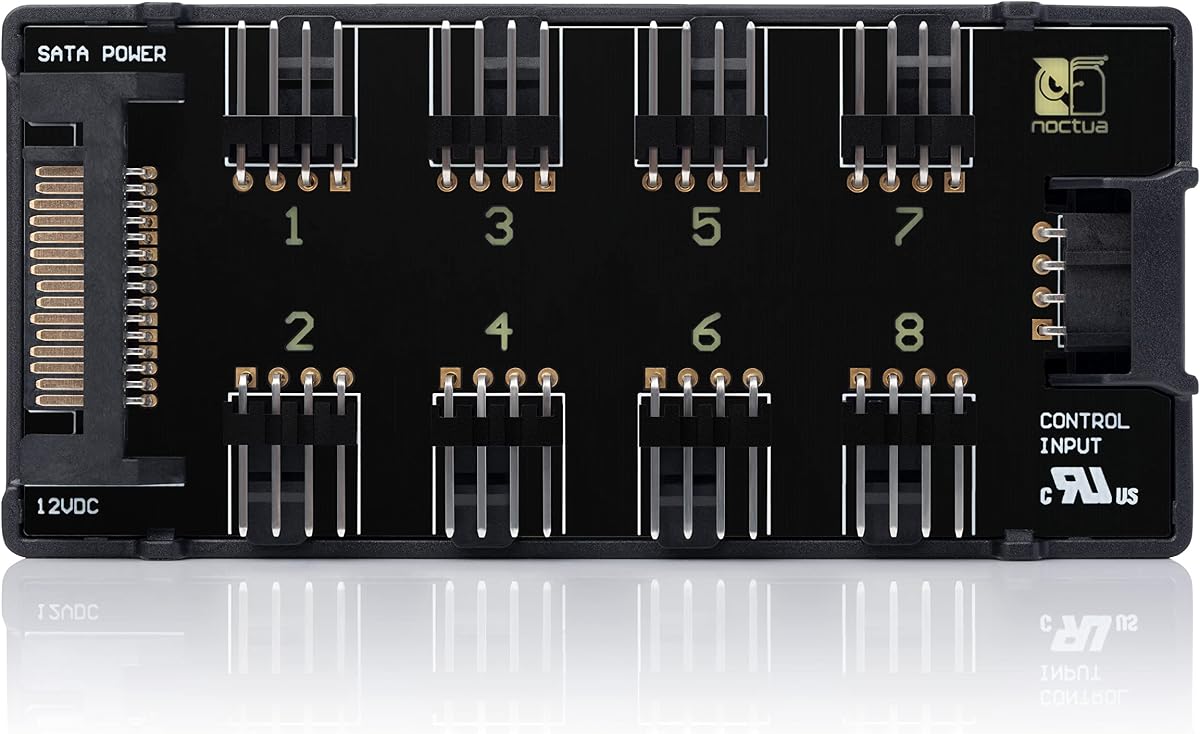
Noctua delivers top tier build quality with this eight port hub. Short circuit protection and safety fuses ensure safe operation. The six year warranty backs its renowned quality for long term use.
We may earn a commission when you buy through this link, at no additional cost to you.
It supports up to fifty four watts via SATA and twenty four via four pin. This power distribution is ideal for high performance fans. Strong magnets keep it fixed on steel panels easily.
The main drawback is the higher cost compared to generic hubs. It also lacks RGB support which might be needed for some builds. But safety and durability are worth the investment.
Recommended for users who prioritize safety and longevity over cost. If you want peace of mind with your cooling setup this is the best choice.
Safety fuses protect your components from overcurrent and short circuits effectively.
The six year warranty ensures you are covered for years of reliable use.
We may earn a commission when you buy through this link, at no additional cost to you.
This ARCTIC hub is a simple solution for expanding fan ports to ten. It uses synchronous control which is easy to set up. External SATA power ensures smooth operation without voltage loss.
We may earn a commission when you buy through this link, at no additional cost to you.
Its compact size makes it easy to hide inside your case. You can do without many additional cables thanks to this central unit. The black color blends in well with most builds.
Synchronous control means you cannot adjust fans individually but they run together efficiently. This is fine for most standard setups. The price is also very low for the port count.
Best for users who want a straightforward expansion without complex features. It gets the job done reliably at a low cost.
Direct SATA connection prevents voltage drops even when all fans run at full speed.
Small dimensions allow you to place it anywhere without blocking other components.
We may earn a commission when you buy through this link, at no additional cost to you.
The X12 model supports twelve groups of fans and RGB lights simultaneously. It connects directly via SATA to maintain stable output under high loads. The white finish offers a nice aesthetic alternative to black units.
We may earn a commission when you buy through this link, at no additional cost to you.
You get both PWM and ARGB connectors on both sides for easy routing. Plug and play setup keeps cables neat without needing complex configurations. It solves insufficient header issues effectively.
Trade-offs involve the need to buy a SATA cable separately. Also 12V RGB devices are not supported so check compatibility before buying. But it handles standard ARGB well.
Great for large cases needing many lights and fans. If you need capacity and style this is a solid option.
Twelve ports allow you to cool large chassis with multiple high speed fans easily.
The white color matches light themed builds better than standard black hubs.
We may earn a commission when you buy through this link, at no additional cost to you.
This hub stands out with a remote control for lighting effects. It supports nine ports and uses magnetic mounting to stick to metal surfaces. The front panel syncs with fans for a coordinated look.
We may earn a commission when you buy through this link, at no additional cost to you.
You get a complete kit with cables for plug and play setup. Stable high power output ensures reliability even at full load. It simplifies RGB management without needing software.
The remote limits full motherboard sync but is convenient for quick changes. This trade-off is acceptable for casual users. Just ensure you have room for the remote.
Perfect for builds that need lighting control without software. If you want a remote for quick adjustments this is a great pick.
The included remote lets you change colors without opening software or BIOS.
All necessary cables are included to get you started immediately.
We may earn a commission when you buy through this link, at no additional cost to you.
This integrated hub provides stable output even when all fans run at high speed. It supports ten groups and uses SATA direct input for efficiency. The compact body keeps cables in order easily.
We may earn a commission when you buy through this link, at no additional cost to you.
Strong double-sided sticker allows easy placement on the chassis. It maintains stable performance during high load tasks which is crucial for gaming. Users find it reliable and straightforward to use.
Downsides include the need to buy a SATA cable and basic RGB options. These are minor issues given the price and performance. Just check your requirements before buying.
Ideal for builders prioritizing stability and affordability. It works well for standard cooling setups needing extra ports.
The hub maintains stable fan speeds even during intense system loads.
Strong adhesive ensures the hub stays fixed without moving or falling.
We may earn a commission when you buy through this link, at no additional cost to you.
The X8 hub supports eight ARGB and eight PWM fans at once. It fits in tight spaces and keeps cables tidy easily. The overall black color ensures stable functionality in any build.
We may earn a commission when you buy through this link, at no additional cost to you.
It connects via SATA for stable output under high load conditions. Strong double-sided stickers allow safe installation at your chosen position. It solves interface issues without needing complex setups.
The SATA cable not being included is a minor inconvenience. But the price and dual function make it a strong choice for many. Ensure your connectors match the hub.
Recommended for small cases needing efficient management. If you want a compact solution this hub is a great option.
The compact size fits in tight spots without blocking other components.
Supports both lighting and cooling needs with one central unit.
We may earn a commission when you buy through this link, at no additional cost to you.
This hub offers both RF remote and chassis key control for lights. It supports ten groups and uses magnetic suction to install easily. The small size keeps internal wiring tidy.
We may earn a commission when you buy through this link, at no additional cost to you.
Fans are input directly from power supply via SATA for efficiency. The hub prevents stray currents and ensures smoother operation. You get reliable power for all connected devices.
Limitations involve needing a motherboard PWM interface for fan speeds. This is standard for hubs but worth noting. Just connect the correct headers to avoid issues.
Best for those wanting control options beyond software. If you like remotes and physical keys this is a strong choice.
You can change lighting effects using either a remote or physical chassis button.
Direct power input avoids voltage loss for smoother fan operation.
We may earn a commission when you buy through this link, at no additional cost to you.
This ARGB X8 hub is an affordable way to expand cooling and lights. It supports eight groups and uses direct SATA power for stability. The engraved logo shows quality on the top surface.
We may earn a commission when you buy through this link, at no additional cost to you.
You can connect fans and ARGB lights to keep cables tidy. Stable output ensures reliable performance during high load use. Strong stickers allow safe installation anywhere you need.
It lacks speed or color adjustment features which is expected. Just ensure you connect power to the correct motherboard headers to avoid damage. Otherwise it works well for its price.
Great for budget builds needing extra ports. If you want simplicity and reliability this hub is a good pick.
This hub provides eight ports at a low cost for budget builds.
Direct SATA input ensures your fans get stable power without drops.
We may earn a commission when you buy through this link, at no additional cost to you.
Selecting the right fan hub requires understanding your cooling needs and available ports. This guide outlines key factors to consider before making your purchase.
Determine how many fans and RGB strips you plan to connect. Most hubs support between eight and ten ports. Ensure the hub meets your needs to avoid overloading connections.
Choose a hub with enough ports for current and future upgrades.
SATA power is the standard for these hubs and provides stable voltage. Check if the SATA cable is included or needs separate purchase. Stable power prevents fan noise and flickering.
Prioritize hubs with SATA direct input for best performance.
Look for magnetic or adhesive options to save case space. Steel cases benefit most from magnetic mounts. Adhesive stickers are common and work well on smooth surfaces.
Ensure the mounting method fits your case interior shape.
Confirm the hub supports PWM fans for speed control. Some hubs read only one fan speed via a special port. Check if this meets your monitoring needs.
Select a hub with clear PWM support for accurate control.
Most hubs support 5V ARGB but not 12V RGB. Mixing them can cause damage so check labels carefully. Syncing with motherboard headers ensures proper lighting effects.
Choose a hub matching your RGB standard to avoid compatibility issues.
Some hubs offer remotes or software for extra features. Others rely on motherboard control for simplicity. Decide if you need extra features beyond basic operation.
Prioritize hubs with features that match your workflow.
Look for features like short circuit protection and warranties. Noctua offers six years while others may vary. High build quality ensures longevity and safety.
Invest in hubs with safety features for peace of mind.
Prices range from under ten dollars to premium options. Set a budget based on your needs and prioritize essentials. Basic hubs work well for standard cooling setups.
Choose a hub that fits your budget without compromising safety.
Install the hub in an accessible area inside your case. Use the included magnets or stickers to secure it firmly. Ensure cables reach easily for clean routing.
Connect the hub to the motherboard using one fan header. This allows speed monitoring for all connected fans. Make sure the hub receives power from the SATA connector.
Keep the hub free from dust to ensure longevity. Periodically check connections for stability. If issues arise check wiring direction for RGB devices.
No most hubs draw power directly from your PSU via SATA. This prevents overloading motherboard headers. The motherboard header is only for PWM signals and monitoring. This is safer for system components.
No mixing these can damage the hub and your devices. Always check the label on your RGB devices. Most hubs support only 5V ARGB. Ensure you use the correct standard for safety.
A standard SATA connector can handle multiple fans safely. Most hubs are designed for ten fans total. Always check the hub current rating before connecting. This prevents power loss and issues.
Not most most RGB hubs sync with motherboard headers. A remote offers convenience but is optional. Decide if you need extra features beyond syncing. Most users prefer software control.
Non magnetic cases can use the adhesive stickers included. These are strong and secure the hub well. Check the hub surface for compatibility. Stickers are designed for plastic and smooth surfaces.
Most hubs work with standard four pin headers. Check your motherboard manual for compatibility. Some software may be needed for advanced control. Basic operation works universally.
Align the arrow on the RGB plug with the hub pin. Reversed direction can damage components instantly. Double check wiring before powering on. Proper installation ensures safety.
Yes hubs are easy to install after building. Just ensure you have space and a SATA connector. Re-routing cables might be needed. This is a simple upgrade for cooling.
This guide highlighted ten top fan hubs for various needs. Our top picks like the ARCTIC Controller and Noctua NA-FH1 offer value and quality. Each option serves different budgets and feature needs.
Prioritize port count power stability and mounting style when choosing. Ensure compatibility with your RGB standards to avoid damage. The right hub simplifies your build and enhances performance.
Remember to check current prices and stock before buying. Prices change frequently and availability varies. Use these insights to make a confident decision for your PC today.