
Redragon K585 Wired One-Handed RGB Gaming Keypad
4.4Editor score
42-key tactical layout
Hot-swappable switches
USB pass-through port
Compare the top gaming keypads of October 2026. This guide reviews features, ergonomics, and performance for MMO, MOBA, and FPS players seeking one-handed
Gaming keypads offer specialized one-handed control for optimized gameplay. These compact devices feature programmable keys, ergonomic designs, and RGB lighting to enhance your gaming experience significantly.
We evaluated ten top models based on switch type, customization, and comfort. Our comparison covers wired and wireless options ranging from budget-friendly to premium competitive-grade hardware for all players.
Each pick highlights key strengths and ideal use cases. Note that prices fluctuate frequently so verify current listings before purchasing to ensure you get the best value available today.
4.4Editor score

4.3Editor score

4.3Editor score
This side-by-side comparison outlines the core specifications and unique features of each model to help you identify the perfect one-handed solution for your specific gaming needs.




The Razer Tartarus V2 is a standout left-handed gaming keypad that combines comfort with high performance. With a 4.3 rating from users, it delivers tactile feedback through its mecha-membrane switches, offering a hybrid experience between mechanical and membrane keys.
We may earn a commission when you buy through this link, at no additional cost to you.
Its standout feature is the 8-way directional thumbpad, which provides natural movement controls for console-style players. You can program all 32 keys and their combinations via Razer Hypershift to execute complex macros efficiently. The Chroma RGB lighting adds immersion by syncing with over thirty partners including Philips Hue.
While powerful, it requires Razer Synapse software for deep customization which may be a hurdle for some users. The fixed braided cable ensures reliability but limits placement flexibility compared to wireless options.
This keypad is ideal for gamers who prioritize ergonomics and deep integration into a Razer ecosystem. It is perfect for MMO and MOBA players needing many hotkeys on their non-dominant hand.
The 8-way directional thumbpad allows for precise analog movement, making it easier to navigate maps without taking your fingers off the keyboard.
Razer Hypershift lets you layer key combinations, effectively expanding the number of usable inputs far beyond the physical 32 keys available.
We may earn a commission when you buy through this link, at no additional cost to you.
The Redragon K585 offers exceptional value for budget-conscious gamers needing a dedicated one-handed input device. With a 4.4 rating, users praise its tactical layout and ability to bind commands across four profiles without breaking the bank.
We may earn a commission when you buy through this link, at no additional cost to you.
Its key feature is the hot-swappable socket design which accepts almost any 3-pin or 5-pin switch. This lets you tune the feel of your keypad to match your main keyboard easily. The USB pass-through port also declutters your desk by letting you plug in a mouse or headset directly.
While the software allows deep macro customization it can be slightly complex for beginners to set up initially. The wired connection ensures zero latency but restricts how far you can place it from your PC.
This model is a top choice for those wanting premium features like hot-swap capabilities at an entry-level price. It suits MMO players who need reliable macro execution without spending heavily.
Hot-swappable sockets allow you to change the tactile feel of every key without soldering giving you ultimate flexibility in typing feel.
The USB pass-through port reduces cable clutter by allowing your mouse or headset to plug directly into the keypad instead of your PC.
We may earn a commission when you buy through this link, at no additional cost to you.
The AZERON Gaming Keypad stands out as a premium option designed for righties who need precise analog movement. Its Hall Effect thumbstick eliminates stick drift and supports WASD or 360-degree analog movement making it ideal for immersive games.
We may earn a commission when you buy through this link, at no additional cost to you.
Each of the 30 mappable inputs connects individually avoiding matrices to ensure every button press registers accurately. You can store six control layouts directly on the device and manage others via intuitive software. The 3D printed body offers adjustability to fit hand sizes from 6.3 to 7.5 inches.
Its high cost is a consideration for many buyers but the unique analog capabilities justify it for specific needs. The learning curve for using the thumbstick as a movement tool can be steep at first.
This keypad is best for enthusiasts seeking a controller-like experience with keyboard precision. It is perfect for FPS and RPG players who want analog movement controls on their left hand.
The Hall Effect thumbstick uses magnets for movement detection which eliminates mechanical wear and drift ensuring consistent performance over time.
Store up to six control layouts directly on the keypad so you can switch setups instantly without relying on computer software.
We may earn a commission when you buy through this link, at no additional cost to you.
The Redragon K585 PRO Wireless brings the versatility of its wired sibling to a wireless format. With a 4.2 rating, it offers untethered placement allowing you to set the keypad anywhere on your desk for optimal comfort.
We may earn a commission when you buy through this link, at no additional cost to you.
It features 7 onboard macro keys that bind multiple commands to 4 profiles so you can execute complex combos with a single press. The hot-swappable socket accepts most switches so you can customize the feel. It runs for 15 to 20 hours on a single charge.
The battery life is adequate for most sessions but may require frequent charging if you use RGB heavily. The magnetic wrist rest is convenient for cleaning but may detach accidentally if bumped.
This is the ideal choice for gamers who prefer a clean desk setup without cables. It works well for MMO players needing mobility and flexibility during long gaming sessions.
Wireless connectivity lets you position the keypad closer to your mouse or body reducing hand strain during long periods of play.
Seven macro keys let you trigger entire ability rotations instantly freeing up mental focus for gameplay strategy instead of key combos.
We may earn a commission when you buy through this link, at no additional cost to you.
The RedThunder One Handed Gaming Keyboard is designed for portability and ease of use. It features a built-in game chip that ensures a 3ms response speed making it fluent for fast-paced gaming environments.
We may earn a commission when you buy through this link, at no additional cost to you.
It has macro recording keys that you can set using simple FN combinations without needing software. The 35 keys support anti-ghosting so multiple presses register accurately. RGB backlit supports breath and static modes with seven colors to choose from.
Lack of dedicated software limits customization depth but simplifies the experience for casual users. The design is simple and lacks ergonomic curves found on higher-end models.
This is best for gamers on a tight budget or those who need a portable option for LAN parties. It offers essential features without unnecessary complexity.
Plug and play compatibility means you can use it on Windows Mac Linux or other systems without installing any drivers or software.
Record macros directly on the keypad using FN combinations so you can execute complex commands with a single button press.
We may earn a commission when you buy through this link, at no additional cost to you.
The Keychron C0 HE 8K is built for high-level FPS gameplay with an 8K polling rate and Rapid Trigger Hall Effect magnetic switches. These features provide ultra-low latency and instant key reset for precise movement control.
We may earn a commission when you buy through this link, at no additional cost to you.
Each key supports adjustable actuation with 0.01mm precision allowing inputs based on real-time travel rather than fixed points. A web-based configurator lets you customize mapping and RGB without installing software. This ensures full compatibility with both Windows and macOS systems.
The Rapid Trigger feature requires a shift in thinking compared to traditional switches so some users may need practice. The wired connection ensures stability but lacks the convenience of wireless.
This keypad is perfect for competitive players needing every possible advantage in reaction time. It is highly recommended for Valorant and CS2 enthusiasts.
Rapid Trigger resets keys instantly when lifted allowing for faster counter-strafing and movement mechanics in competitive shooters.
The browser-based tool allows full customization without driver installation keeping your system clean and simplifying cross-device use.
We may earn a commission when you buy through this link, at no additional cost to you.
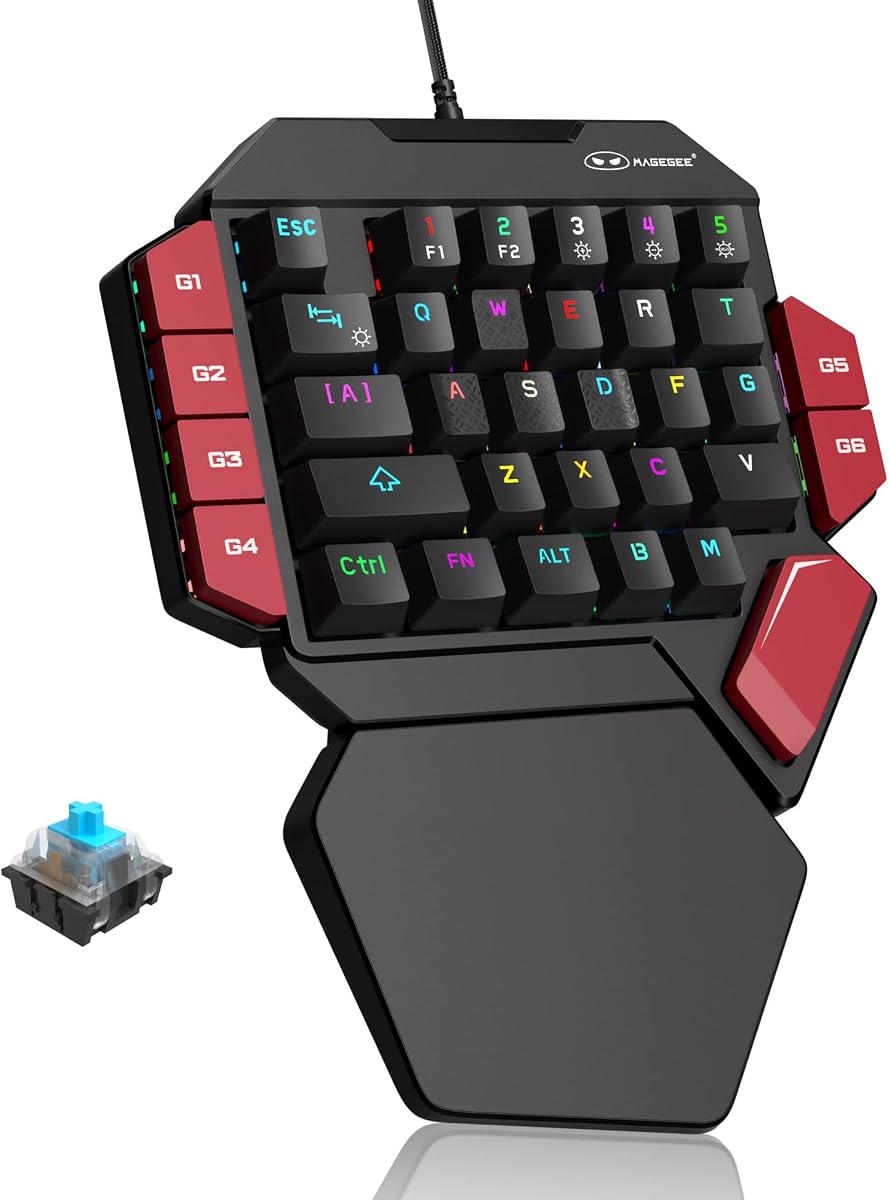
The MageGee One Handed Professional delivers a genuine mechanical typing experience with all 35 keys featuring loud clicky blue switches. It offers precise tactile feedback and strong mechanical feel ideal for users who enjoy distinct key presses.
We may earn a commission when you buy through this link, at no additional cost to you.
It supports 6 macro recording keys using FN combinations to capture sequences. RGB backlit modes allow customization for static and dynamic effects. A large palm rest provides ergonomic support to reduce wrist fatigue during long gaming sessions.
The noise from blue switches may disturb others nearby or be too loud for some environments. Software features are non-existent so all customization happens directly on the device.
This model is ideal for those who prefer tactile mechanical feedback on a budget. It is a great secondary input for typists and gamers alike.
The blue switches provide strong tactile feedback that makes every keypress distinct and satisfying for both gaming and typing.
Six macro keys let you record sequences quickly to execute complex commands with a single press during intense moments.
We may earn a commission when you buy through this link, at no additional cost to you.
The AJAZZ AK029 offers a unique ultra-compact 29-key design that saves 60% desk space freeing your mouse for low-sensitivity play. It features Hall Effect magnetic switches for zero dead zones and no debounce delay ensuring instant input registration.
We may earn a commission when you buy through this link, at no additional cost to you.
With an 8KHz polling rate and Rapid Trigger support it delivers tournament-grade performance. The web-based driver lets you remap keys and save profiles directly to onboard memory. Its aluminum-reinforced build provides stability without sacrificing responsiveness.
The reduced key count may limit complex macros compared to 40 key layouts. However for pure FPS precision the compact size is a significant benefit.
This is the perfect choice for gamers prioritizing desk space and high-speed input. It is a strong contender for competitive FPS titles.
Its compact footprint reduces desk clutter and allows for larger mouse movements which is vital for accurate low-sensitivity aiming.
A web-based driver allows full customization without downloads keeping your system clean and making switching between PCs simple.
We may earn a commission when you buy through this link, at no additional cost to you.
This variant of the Razer Tartarus V2 emphasizes ergonomic comfort with soft-cushioned membrane rubber dome switches suitable for long sessions. It offers tactile feedback similar to mechanical keys but with softer impact.
We may earn a commission when you buy through this link, at no additional cost to you.
It includes the 8-way thumbpad for natural movement controls and fully programmable macros via Hypershift. The Chroma lighting syncs with popular games and partners for immersive effects. It remains a reliable option for those preferring soft keys over hard mechanical clicks.
It lacks analog movement capabilities found in premium competitors and may offer less customization value at this price point. However comfort remains its primary selling point.
This model is ideal for users seeking ergonomic comfort over technical precision. It suits MMO players who prioritize wrist health during extended play.
The membrane rubber dome switches provide a soft landing that reduces finger fatigue and strain during long gaming sessions.
Chroma RGB lighting allows synchronized effects with your other gear creating a visually cohesive and immersive gaming environment.
We may earn a commission when you buy through this link, at no additional cost to you.
The Redragon RM104 is a full keyboard option with specialized features like a smart control knob and tri-mode wireless connectivity. It offers seamless switching between Bluetooth 2.4GHz and USB-C ensuring flexible use across different setups.
We may earn a commission when you buy through this link, at no additional cost to you.
The multifunction knob allows volume adjustment and RGB cycling without leaving your game. A 4000mAh battery ensures long uptime while powerful software support enables deep customization. Its pink aesthetic appeals to users seeking a specific look.
While not a dedicated one-handed keypad it serves as a versatile wireless alternative for general computing. Its size does not save desk space like compact keypads.
This is best for users needing a full keyboard with wireless convenience and unique controls. It is great for streamers needing quick audio adjustments.
The control knob lets you adjust volume and mute instantly making audio management effortless during gameplay or streaming.
Three wireless modes offer compatibility with multiple devices allowing you to switch between PC and tablet easily.
We may earn a commission when you buy through this link, at no additional cost to you.
Selecting the right gaming keypad depends on your genre and desk setup. We break down key factors to consider before making your final decision.
Switches determine feel and speed. Mechanical switches like blue or brown offer tactile feedback and durability. Mecha-membrane switches blend mechanical feel with soft cushioning for comfort. Hall Effect switches use magnets for adjustable actuation and rapid trigger features ideal for competitive play.
Key count ranges from 29 to 42 keys. More keys allow deeper macro chains and complex skill rotations. Fewer keys save desk space and reduce clutter for FPS players who need more mouse room. Choose based on your need for macros versus mouse freedom.
Comfort is crucial for long sessions. Look for padded wrist rests and angled designs. Thumbpads add analog movement controls which can improve immersion but require learning. Adjustable bodies like those on AZERON fit different hand sizes.
Wired connections guarantee zero latency and no charging. Wireless options clean your desk but add battery dependency. Ensure your choice has enough battery life or wired reliability for your session lengths.
Software controls macros and RGB. Full suites like Razer Synapse offer deep features but require installation. Web-based drivers save space and ensure cross-platform ease. Consider if you need complex profiles or basic plug-and-play functionality.
Materials affect durability. Metal plates add stability while plastic keeps costs low. Hot-swappable sockets let you replace switches without soldering. Check for durable keycaps that resist wear from frequent use.
Lighting enhances immersion. Look for per-key customization and synchronization with games. Some brands offer ecosystem sync where your headset and mouse match your keypad colors. This aesthetic choice can elevate your battlestation setup.
Price varies from budget friendly to premium. Set a budget but consider longevity. Investing in adjustable switches or analog features may pay off in longevity. Ensure you get enough features for your specific gaming genre.
Start by placing the keypad on a flat surface within reach of your mouse. If it is wireless connect via Bluetooth or 2.4GHz dongle. If wired plug it into your PC USB port.
Install the companion software if your model requires deep customization. Use it to map macros or adjust RGB colors. Test key presses to ensure all inputs register correctly.
Clean regularly with compressed air and a microfiber cloth. Store it in a dry place away from dust to extend switch life and prevent debris buildup.
Yes especially for MMO and MOBA players needing many hotkeys. They provide dedicated macro execution and reduce hand strain. For FPS players compact models can save desk space.
Most models offer onboard recording via FN keys. Others use software to assign key combinations. Record the sequence then assign it to a specific key for instant execution.
Most support macOS but check driver availability. Some web-based configurators are more compatible than full software suites. Verify compatibility before buying for Mac environments.
Hall Effect switches use magnets instead of contact points. This allows adjustable actuation and rapid reset. It eliminates debounce delay for cleaner competitive inputs.
Yes they can improve productivity. Map complex shortcuts to single keys. They reduce finger movement and speed up repetitive tasks like video editing.
Wireless models typically last 15 to 20 hours. RGB usage can reduce this time. Keep a charging cable handy for long sessions.
We reviewed ten standout models from budget to premium each offering unique features. The Razer Tartarus V2 leads in ergonomics while the Redragon K585 offers great value.
Prioritize ergonomics and key count based on your genre. Competitive FPS players should consider Hall Effect switches while MMO gamers need macro depth.
Prices change frequently so check current listings before purchasing. Ensure you get the best value for your specific needs today.