Garmin Dash Cam Mini 3
4.0Editor score
Ultracompact key-sized design
1080p HD video recording
Voice control for hands-free use
This guide compares the top Garmin Dash CAM models for 2026, evaluating resolution, features, and connectivity to help drivers choose the perfect recording
Selecting the right dash camera is crucial for modern drivers seeking safety and documentation on the road. A quality device captures high-definition video, offers reliable storage, and integrates seamlessly with smart features for peace of mind.
We have analyzed ten leading models based on video quality, connectivity options, ease of use, and advanced safety alerts. Our comparison highlights the strengths of each unit to help you find the ideal fit for your vehicle needs.
Each pick below showcases key specifications, real-world performance insights, and unique capabilities tailored to different driving scenarios. Please note that availability and pricing may fluctuate, so always verify current details before making a purchase decision.
4.0Editor score

4.2Editor score

3.8Editor score
The following table provides a side-by-side overview of the ten top-rated Garmin Dash CAM units available this year. Review each modelâ core specifications, video capabilities, and standout features to determine which aligns best with your specific driving and recording requirements.
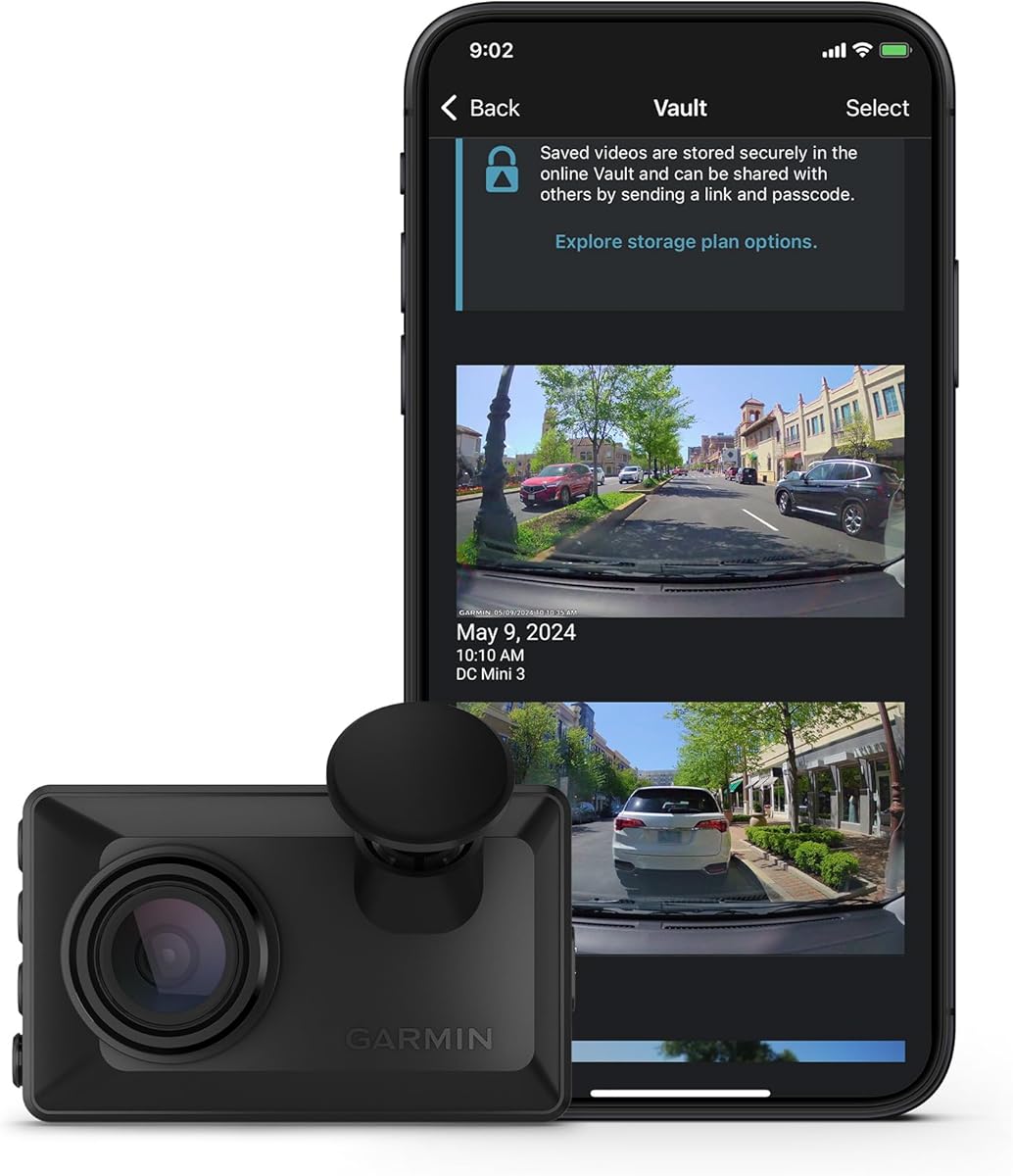


The Garmin Dash Cam Mini 3 is a highly compact recording tool designed to blend seamlessly into any vehicleâ windshield. With a 4.0 rating, it delivers reliable 1080p HD video and automatic incident detection for essential documentation.
We may earn a commission when you buy through this link, at no additional cost to you.
Its ultracompact form factor ensures minimal visual obstruction while the built-in polarizer lens reduces glare for clearer details. Voice commands allow hands-free operation, and the Garmin Drive app facilitates easy sharing of saved clips via the online Vault.
While it lacks a built-in screen, the focus on simplicity and cloud integration makes it accessible for users who prefer phone-based management. The subscription requirement for advanced live view is a trade-off for the deviceâ minimal size and cost.
Ideal for drivers seeking a discreet, affordable dash camera with solid core functionality, this unit offers peace of mind without cluttering your dashboard. It is a strong entry point for those prioritizing size and essential recording features.
The key-sized form factor keeps the camera nearly invisible, ensuring it does not block your view or attract unwanted attention while driving.
Automatic uploading to the online Vault allows you to access critical footage remotely through the Garmin Drive app without manual file transfers.
We may earn a commission when you buy through this link, at no additional cost to you.
The Garmin Dash Cam X310 is a premium recording device that emphasizes ultra-high-definition capture with its 4K video capabilities. Although it holds a 3.8 rating, its technical features aim to provide superior detail and advanced driver assistance for safety.
We may earn a commission when you buy through this link, at no additional cost to you.
The 2.4-inch LCD touchscreen makes navigating settings and reviewing clips straightforward without needing a smartphone. Integrated safety alerts like forward collision and lane departure warnings add an extra layer of awareness, while the polarizer lens enhances clarity in bright conditions.
Users may find the reliance on a subscription for live view and parking guard features limiting if they prefer standalone functionality. The lower rating suggests potential usability challenges or connectivity issues that could affect overall satisfaction with the device.
For drivers who prioritize video sharpness and in-camera control, the X310 offers a compelling blend of resolution and convenience. It suits those willing to invest in a high-spec unit for enhanced visual evidence and safety monitoring.
Capturing footage in 4K Ultra HD ensures that license plates and road signs are clearly visible even when zooming in during playback.
The built-in display allows for quick setting adjustments and immediate video playback without requiring a connection to a mobile device.
We may earn a commission when you buy through this link, at no additional cost to you.
The Garmin Dash Cam X110 is a solid mid-range option that balances resolution and usability with its 1440p HD video recording. Boasting a 4.3 rating, it performs well in capturing clear footage while offering convenient features like an on-device LCD display.
We may earn a commission when you buy through this link, at no additional cost to you.
Its 2.4-inch screen makes reviewing clips and adjusting settings easy without relying solely on a smartphone. Integrated safety alerts enhance driver awareness, and voice control allows for hands-free operation, making it practical for daily commutes and longer trips.
Like other Garmin models, advanced connectivity features such as remote live view require a paid subscription and Wi-Fi connection. This dependency might be a drawback for users who prefer completely offline operation or minimal ongoing costs.
Drivers looking for a reliable, well-rated dash camera with good visual clarity and safety features will appreciate the X110. It offers a balanced mix of performance and convenience suitable for various driving environments.
The 1440p HD resolution provides sharper images than standard 1080p, ensuring critical details remain clear during playback and analysis.
An LCD display built into the camera allows for quick video review and menu navigation directly from the device without extra steps.
We may earn a commission when you buy through this link, at no additional cost to you.
The Garmin Dash Cam 67W stands out for its extra-wide 180-degree field of view, capturing more of the road environment than most competitors. With a 4.2 rating, it delivers sharp 1440p HD video and includes essential features like voice control and parking guard monitoring.
We may earn a commission when you buy through this link, at no additional cost to you.
Its pocket-sized form ensures it remains discreet on the windshield while the Garmin Clarity HDR optics maintain detail in various lighting conditions. Voice commands simplify operation, and the online Vault allows for secure storage and sharing of important incidents through the Drive app.
The lack of a built-in screen means all viewing must happen via a smartphone, which might inconvenience users without a mobile device nearby. Subscription services for advanced features like live view add to the long-term cost of ownership.
For drivers seeking a balance of wide coverage, high video quality, and discreet design, the 67W is an excellent choice. It provides robust protection and clear documentation for both road travel and parked vehicle monitoring.
A 180-degree lens captures significantly more of the surrounding area, reducing blind spots and ensuring comprehensive video coverage.
Hands-free voice commands allow drivers to save clips or control recording without taking their hands off the wheel or eyes off the road.
We may earn a commission when you buy through this link, at no additional cost to you.
This 3-channel dash camera offers complete vehicle coverage with front and rear 4K recording plus a 1080P cabin camera. Its impressive 4.8 rating highlights strong performance in night vision and connectivity, supported by a free 128GB memory card.
We may earn a commission when you buy through this link, at no additional cost to you.
The dual-band Wi-Fi 6 ensures fast file transfers, while 4 IR lights provide clear interior footage even in total darkness. GPS integration tracks speed and location directly in the video, adding valuable context to each recorded journey.
Installation can be complex due to the multiple camera setup, and parking mode requires a separate hardwire kit for continuous monitoring. Users must manage more cables and components compared to single-camera units which may deter simpler setups.
Drivers needing total protection including passenger monitoring will find this unit unmatched in versatility and detail. It is ideal for rideshare operators or families wanting full visibility inside and outside the vehicle.
Front, rear, and cabin cameras work together to capture every angle, ensuring no critical event goes unrecorded from any perspective.
Enhanced AProX HD technology combined with IR lighting delivers clear images in low-light environments for reliable night recording.
We may earn a commission when you buy through this link, at no additional cost to you.
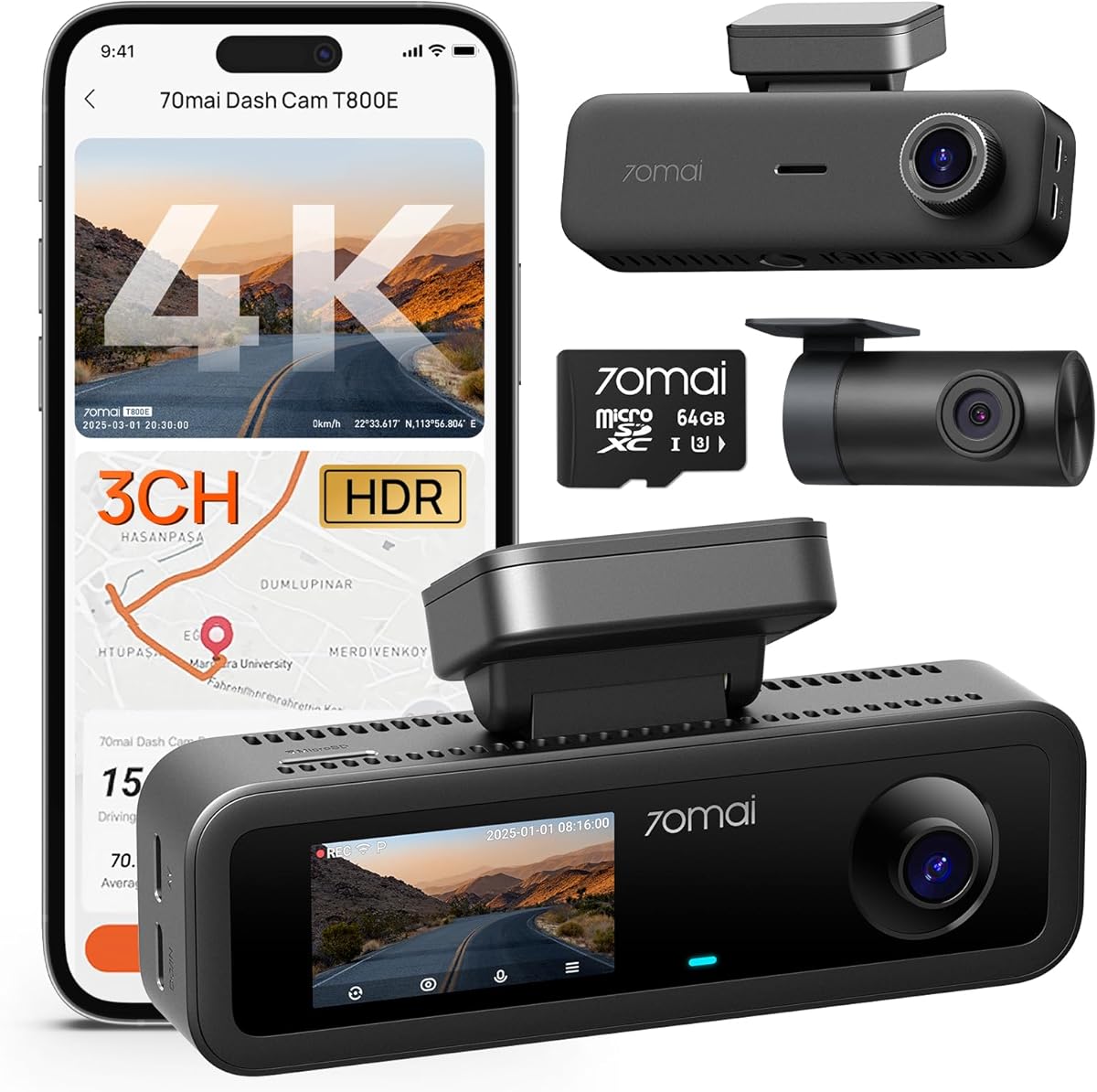
The 70mai T800E provides versatile coverage with 4K front, 1080P rear, and interior cameras designed for detailed recording. With a 4.5 rating, it combines HDR night vision, Wi-Fi 6 speed, and a super capacitor to ensure reliable operation in extreme temperatures.
We may earn a commission when you buy through this link, at no additional cost to you.
Switchable IR allows control over interior lighting, making it suitable for rideshare needs without unnecessary light distraction. The app supports OTA updates and settings management, keeping the device current and user-friendly over time.
Parking surveillance requires a separate hardwire kit for continuous power, and the lack of 4G connectivity means remote viewing depends on local Wi-Fi access. These limitations can reduce convenience for those wanting always-on remote monitoring features.
Ideal for families and rideshare drivers, this unit offers comprehensive protection and smart features at a competitive value. Its robust construction and clear video make it a reliable choice for daily use.
Advanced HDR imaging captures sharp details even in challenging low-light conditions, ensuring clear footage day and night.
A super capacitor replaces traditional batteries to withstand extreme heat and cold, ensuring consistent performance and longevity.
We may earn a commission when you buy through this link, at no additional cost to you.
The galphi 4K Dash Cam delivers high-resolution recording in a minimalist package designed to stay out of sight. Its 4.4 rating reflects satisfaction with its 4K video quality, fast 5GHz Wi-Fi connectivity, and screen-free design that reduces driver distraction.
We may earn a commission when you buy through this link, at no additional cost to you.
Voice control and easy setup make it accessible for first-time users, while WDR technology ensures balanced exposure in varying light. The included memory card allows immediate use out of the box without additional purchases or setup delays.
Without a screen, all adjustments must be made via the app, which can be inconvenient if a phone is not handy. Parking mode also requires a hardwire kit that is not included in the standard package.
Drivers looking for an affordable and high-quality recording solution with minimal fuss will appreciate this model. It is well-suited for those prioritizing video clarity and ease of use over advanced display features.
Removing the display minimizes visual clutter on the windshield, helping drivers keep their focus on the road while recording.
The 5GHz band enables rapid file transfers, significantly reducing download times compared to standard 2.4GHz connections.
We may earn a commission when you buy through this link, at no additional cost to you.
The 70mai A800SE offers a comprehensive recording setup with 4K front and 1080P rear cameras plus a built-in 3-inch IPS screen. Its 4.4 rating highlights strong performance in video clarity, safety alerts, and seamless integration with the 70mai app.
We may earn a commission when you buy through this link, at no additional cost to you.
ADAS features provide real-time warnings for lane departure and forward collisions, enhancing driver awareness. The included 128GB card and loop recording ensure continuous coverage without manual intervention or storage management.
While parking monitoring is available, it requires a hardwire kit for constant power, adding to the installation effort. Users may also find the rear camera setup slightly complex compared to simpler front-only units.
This unit is ideal for drivers wanting detailed rear and front footage alongside safety alerts and a local display. It combines high resolution with smart features to deliver a complete protection system.
A 3-inch IPS display allows for immediate video review and settings adjustment directly on the camera without needing a phone.
Real-time voice warnings for collisions and lane departures help drivers stay alert and avoid potential road hazards safely.
We may earn a commission when you buy through this link, at no additional cost to you.
The Garmin Dash Cam Live is an always-connected device that offers real-time access to your vehicle via an active LTE subscription. While it has a 3.5 rating, it delivers 1440p HD video, continuous monitoring capabilities, and instant incident notifications.
We may earn a commission when you buy through this link, at no additional cost to you.
Key features include live view, location tracking, and theft alerts, which provide unmatched security for parked vehicles. Voice commands and cloud storage enhance usability, making it a robust tool for remote surveillance and safety.
However, the mandatory LTE subscription adds to long-term costs, and the lower rating suggests potential connectivity or usability issues for some users. Those wanting offline independence may find this model less suitable for their needs.
Ideal for security-conscious drivers needing real-time monitoring and remote alerts, this unit offers a premium level of connectivity. It is best for those who value constant access over standalone simplicity.
Built-in LTE ensures the device remains connected even without Wi-Fi, allowing instant access and notifications from anywhere.
Instant notifications for incidents and theft help you react quickly to protect your vehicle and gather evidence immediately.
We may earn a commission when you buy through this link, at no additional cost to you.
The Garmin Dash Cam X210 combines compact design with 1440p HD video quality for sharp recording on the road. With a 3.8 rating, it includes useful features like an LCD touchscreen, voice control, and integrated safety alerts to enhance driving awareness.
We may earn a commission when you buy through this link, at no additional cost to you.
The 2.4-inch screen makes reviewing clips easy without needing a phone, and voice commands offer hands-free convenience. Safety alerts warn drivers of potential hazards, adding a proactive layer of protection during daily commutes.
However, advanced features like remote live view depend on a paid subscription and Wi-Fi connection, which might be restrictive. The lower user score suggests potential issues with reliability or ease of use that may affect satisfaction.
For drivers seeking a balance of high resolution and onboard controls in a small unit, the X210 is a strong contender. It offers practical safety tools and clear video at a competitive price point.
Capturing footage at 1440p ensures detailed images for better evidence and clear visibility of road features during playback.
A built-in touchscreen allows for easy navigation and quick playback without needing to connect to a mobile device.
We may earn a commission when you buy through this link, at no additional cost to you.
Choosing the right Garmin Dash CAM involves evaluating resolution, connectivity, and features that suit your driving habits. This guide outlines key factors to consider for making an informed decision.
Higher resolution like 1440p or 4K ensures clearer footage of license plates and road signs, which is vital for insurance claims. Look for cameras with HDR or polarizer lenses to improve performance in varying lighting conditions.
Prioritize units offering at least 1440p for reliable evidence and better detail in critical moments.
A wider field of view, such as 180 degrees, captures more of the road environment to reduce blind spots. This is especially useful in busy traffic or complex driving situations where surrounding vehicles matter.
Select a model with an extra-wide lens to maximize your recording coverage and protection.
Modern dash cams integrate with smartphone apps for easy file sharing and settings control. Wi-Fi 6 or dual-band support speeds up transfers, while built-in LTE offers always-on access without needing a phone connection.
Ensure the device supports your preferred app ecosystem and provides fast connectivity options for smooth operation.
Parking guard or surveillance features monitor your vehicle when parked and alert you to impacts or movement. Some models support 24/7 recording or time-lapse modes to extend battery life and storage efficiency.
Verify if a hardwire kit is needed for continuous monitoring if you plan to use this feature regularly.
A compact and discreet design prevents obstruction of your view and blends into the vehicle interior. Simple adhesive mounts and plug-and-play setups allow for quick DIY installation without professional help.
Choose a unit that is easy to mount and configure to minimize setup time and hassle.
Support for high-capacity memory cards ensures extended recording without manual file management. Loop recording overwrites old footage automatically, while G-sensor locking protects critical clips from being deleted.
Look for models that support large card sizes and reliable locking mechanisms to preserve important video.
Integrated ADAS features like forward collision and lane departure warnings add a proactive layer of safety. Voice control allows for hands-free operation which keeps your focus on the road while driving.
Opt for cameras with smart alerts if you want additional safety tools beyond basic video recording.
Consider ongoing costs such as subscription fees for cloud storage or live view features. Some models work fully offline while others rely on paid services for advanced capabilities.
Ensure the pricing model fits your budget and that necessary features are accessible without hidden fees.
Install the device on your windshield near the rearview mirror for an optimal view of the road. Ensure the lens is clean and not obstructed by stickers or debris to maintain clear video quality.
Use the companion app to configure settings like loop recording time and sensitivity. Regularly update the firmware to benefit from performance improvements and new features added by the manufacturer.
Keep the memory card healthy by replacing it every year to avoid data corruption. Check the device periodically for firmware updates and ensure the parking mode is properly set up if using it.
Basic recording functions work without any subscription fee. However, advanced features like live view and cloud storage typically require a paid plan or active Wi-Fi connection to function properly.
Remote viewing depends on the model. Units with LTE or Wi-Fi and a subscription allow live access through the app. Others only enable viewing when you are near the camera with a local connection.
Most models support cards up to 512GB but usually include a smaller card out of the box. Choose a Class 10 or higher card to ensure smooth video recording and fast transfer speeds.
Yes many models support parking guard or surveillance. Continuous monitoring often requires a constant power source via a hardwire kit to avoid draining the vehicle battery.
Voice control is available in several languages including English, German, French, Spanish, Italian, and Swedish. This allows drivers to use spoken commands for saving video and starting recording easily.
Videos can be transferred via the built-in Wi-Fi connection using the Garmin Drive app. The online Vault also allows automatic storage and access to clips through the cloud when connected.
We have reviewed ten top Garmin Dash CAM models ranging from compact entry-level units to high-end 4K systems with advanced alerts. Each offers unique strengths in resolution, design, and connectivity tailored to different driver needs.
When making your decision, prioritize video clarity and essential features like parking guard or app integration. Consider your budget and whether you need always-on connectivity versus simple offline recording capabilities.
Always verify current availability and pricing before purchasing to ensure you get the best value. These dash cameras provide valuable peace of mind and reliable documentation for every journey on the road.