
HDMI Tester Portable High Definition Network Cable Tester Checker
4.4Editor score
Supports HDMI 1.2 to 2.0
Tests RJ45 network cables too
Compact main and remote unit design
This guide compares the top HDMI Signal Tester models for reliability, feature depth, and portability to help professionals choose the right diagnostic tool.
Finding a reliable HDMI Signal Tester is crucial for technicians and enthusiasts who need to verify cable integrity and signal quality. These devices help diagnose connectivity issues quickly, ensuring that your high-definition setups perform at their peak without frustrating downtime.
We evaluated ten leading models based on their testing capabilities, build quality, and ease of use. Our comparison covers everything from basic continuity checkers to advanced analyzers that support 4K and 8K resolutions, giving you a clear view of the market options available.
Each selection highlights specific strengths to match different user needs, whether you require a pocket-sized tool or a professional-grade analyzer. Please note that product availability and specifications may change over time, so always verify details before making a final purchase decision.
4.4Editor score

4.5Editor score

4.5Editor score
The following table provides a side-by-side overview of all ten models selected for this guide. We highlight key specifications and unique features to help you quickly identify which device aligns best with your technical requirements.


This Monoprice unit serves as a reliable tool for generating specific HDMI signals or analyzing display inputs. It holds a solid rating among users who need a straightforward way to verify cable and device compatibility without complex interfaces.
We may earn a commission when you buy through this link, at no additional cost to you.
The device allows you to select video resolutions using physical DIP switches, making it easy to target specific outputs like 4K at 60Hz with 4:4:4 chroma subsampling. It also supports different HDCP versions, which is essential for testing content protection protocols on modern displays.
While the lack of a visual screen means you rely on the connected display to see results, this keeps the unit compact and focused on signal integrity. For technicians who already have monitoring setups, this tool provides the necessary control without unnecessary bulk.
Choose this model if you need a dedicated signal source that integrates well into existing test benches. It is particularly useful for setting up home theater systems or commercial installations where specific signal parameters must be met.
The DIP switches allow exact configuration of resolution and HDCP settings for targeted testing.
Operate as a generator to send signals or an analyzer to check display emulation capabilities.
We may earn a commission when you buy through this link, at no additional cost to you.
The Parts Express HDMI Cable Signal Tester is designed for quick diagnostics in the field. Its compact form factor makes it ideal for installers who need to check cable integrity without lugging heavy equipment around every job site.
We may earn a commission when you buy through this link, at no additional cost to you.
This tool helps identify common issues like color shifts, sparkles, or missing pictures by displaying the status of individual signal components. You can connect it at either the source or display end of the system to isolate where the fault lies within the connection.
Because it focuses on continuity and basic signal health, it does not generate complex test patterns or high-resolution video. This limitation keeps it affordable and simple, but it may not be sufficient for deep analysis of bandwidth issues.
It is a great choice for general maintenance tasks where you need to confirm that a cable is physically sound. Keep one in your toolkit for rapid troubleshooting when a display refuses to signal or shows artifacts.
Pin-level status indicators help you quickly see which wires are failing to transmit data.
Can be used at the source or display end to pinpoint connection problems effectively.
We may earn a commission when you buy through this link, at no additional cost to you.
This budget-friendly tester offers impressive versatility by supporting both HDMI and standard network cables. With a strong rating for its price class, it serves as an excellent entry-level tool for verifying basic connectivity in mixed media environments.
We may earn a commission when you buy through this link, at no additional cost to you.
The main and remote unit design allows you to test cables that are already installed or running through walls. It scans up to 19 wires to detect shorts, opens, or miswiring, providing immediate visual feedback via LED lights on both units.
Power flexibility is a key benefit here, as you can run it on a simple AAA battery or a phone charger. However, the reliance on basic LEDs means you won't see detailed video quality reports, just connection status.
Select this unit if you want a multi-purpose tester that handles both home theater and networking needs without breaking the bank. It is perfect for quick checks on new cables before installation or verifying existing runs.
Supports both HDMI Type A/C and RJ45 connectors for broader application across cables.
Separate remote unit makes it easy to test long cables without reaching both ends.
We may earn a commission when you buy through this link, at no additional cost to you.
The STEREN handheld tester stands out for its integrated HD LCD display, allowing you to view video and audio directly on the device. This feature eliminates the need for an external monitor when checking set-top boxes or other source devices.
We may earn a commission when you buy through this link, at no additional cost to you.
Constructed with a ruggedized housing, this unit is designed to withstand drops and harsh environments. It includes three HDMI ports for flexible continuity testing and has a long-lasting battery that supports hours of continuous use on a single charge.
While it is more expensive and heavier than simple continuity testers, the visual confirmation it provides is invaluable for ensuring signal quality before final installation. The scratch and shatter-resistant screen adds to its durability in demanding field conditions.
This device is ideal for professional installers who need to guarantee both video and audio output in situ. It pays for itself by reducing callbacks due to installation errors or faulty cabling.
The LCD screen displays full-color audio and video to confirm signal integrity immediately.
Silicone rubber and plastic construction resists water, dust, and physical shocks.
We may earn a commission when you buy through this link, at no additional cost to you.
This advanced analyzer supports the latest HDMI 2.1 specifications, including 8K resolution and high bandwidth requirements. It is a comprehensive tool for professionals who need to verify complex signal parameters in cutting-edge AV setups.
We may earn a commission when you buy through this link, at no additional cost to you.
With 64 resolutions and 33 built-in test patterns, you can stress-test cables and displays under various conditions. It also verifies HDCP and audio standards, ensuring full compatibility with modern content sources and protected media.
Features like EDID read/write and CEC control allow for deep configuration of connected devices. While this power makes it an industry-standard choice, it comes with a steep learning curve and significant cost compared to simpler testers.
Choose this if you work with high-end home theaters or professional AV systems that demand precise signal validation. It provides the depth needed to troubleshoot issues that basic continuity testers cannot detect.
Handles 8K 60Hz and HDR signals to test the limits of modern HDMI hardware.
Built-in patterns help identify specific artifacts or timing issues in video transmission.
We may earn a commission when you buy through this link, at no additional cost to you.
This generator focuses on 2K and 4K resolutions, offering a solid balance between performance and cost. It is well-suited for testing UHD setups where 8K is not yet a requirement but reliable high-definition performance is essential.
We may earn a commission when you buy through this link, at no additional cost to you.
The device supports 18Gbps bandwidth, ensuring it can handle the full data rate of 4K signals. It also includes scaling features that allow you to test how a system handles lower resolution inputs on higher resolution displays.
HDCP compliance and EDID management are handled effectively, making it useful for verifying authentication and handshake processes. However, it lacks the advanced pattern generation found in higher-end models, limiting its diagnostic depth.
Select this unit for professional installations involving standard 4K displays. It offers the necessary throughput and features without the premium price tag of 8K-specific gear.
Supports full 18Gbps bandwidth required for uncompressed 4K video signals.
Converts 4K signals to 1080p to test compatibility with older display hardware.
We may earn a commission when you buy through this link, at no additional cost to you.
This portable checker supports both HDMI and RJ45 cables, making it a versatile companion for general cabling tasks. It offers a fast scan mode and a full display mode, giving you options based on how detailed you need the test to be.
We may earn a commission when you buy through this link, at no additional cost to you.
The auto shut-down function helps conserve battery life during periods of inactivity. This is particularly useful when working in environments where access to power might be limited during the day.
While it provides standard connectivity checks, the lower rating suggests some users may find it less consistent than dedicated-only testers. It remains a convenient tool for quick verification but might not replace professional gear.
Use this for general maintenance or when you need to test both network and HDMI cables on the same device. It is best suited for basic continuity checks rather than deep signal analysis.
Auto shut-down saves battery power after ten minutes of inactivity during use.
Choose between fast scan or full display for different levels of testing detail.
We may earn a commission when you buy through this link, at no additional cost to you.
The Jonard Tools HDMI-100 is designed for testing various HDMI versions and lengths. Its standout feature is the detachable remote, which makes it easier to test cables installed in walls or long runs without needing two people.
We may earn a commission when you buy through this link, at no additional cost to you.
It supports cable lengths up to 500 meters, which is excellent for large-scale installations. The unit can display connections in a scan mode or full display mode, giving you flexibility in how you view the results.
While it requires a standard 9V battery, the reliability it provides for continuity testing is high. It covers a range of HDMI types, including Mini HDMI, ensuring compatibility with diverse devices.
Pick this model if you frequently work with long or installed cables where access to both ends is difficult. The remote unit feature solves a common logistical problem for installers efficiently.
Detachable remote allows testing of installed cables without physical access to both ends.
Capable of testing cables up to 500 meters for large venue installations.
We may earn a commission when you buy through this link, at no additional cost to you.
This UT681 model is praised for its lightweight design, making it easy to carry in a small toolkit. It supports a wide range of HDMI versions and interfaces, including micro and mini types, ensuring broad compatibility with various devices.
We may earn a commission when you buy through this link, at no additional cost to you.
The LED indicator zones provide clear visual feedback for faults like shorts or open circuits. It also features intelligent power consumption, automatically shutting off after ten minutes to preserve battery life.
Despite its small size, it is rated highly for accuracy in basic testing. It is ideal for technicians who move between sites frequently and need a tool that fits easily in a pocket.
Choose this for its portability and high user satisfaction rating. It is an excellent choice for routine checks where detailed analysis is not required.
Weighs only 175 grams, allowing for easy transport during field work.
Light zones make it simple to identify where a cable fault is located.
We may earn a commission when you buy through this link, at no additional cost to you.
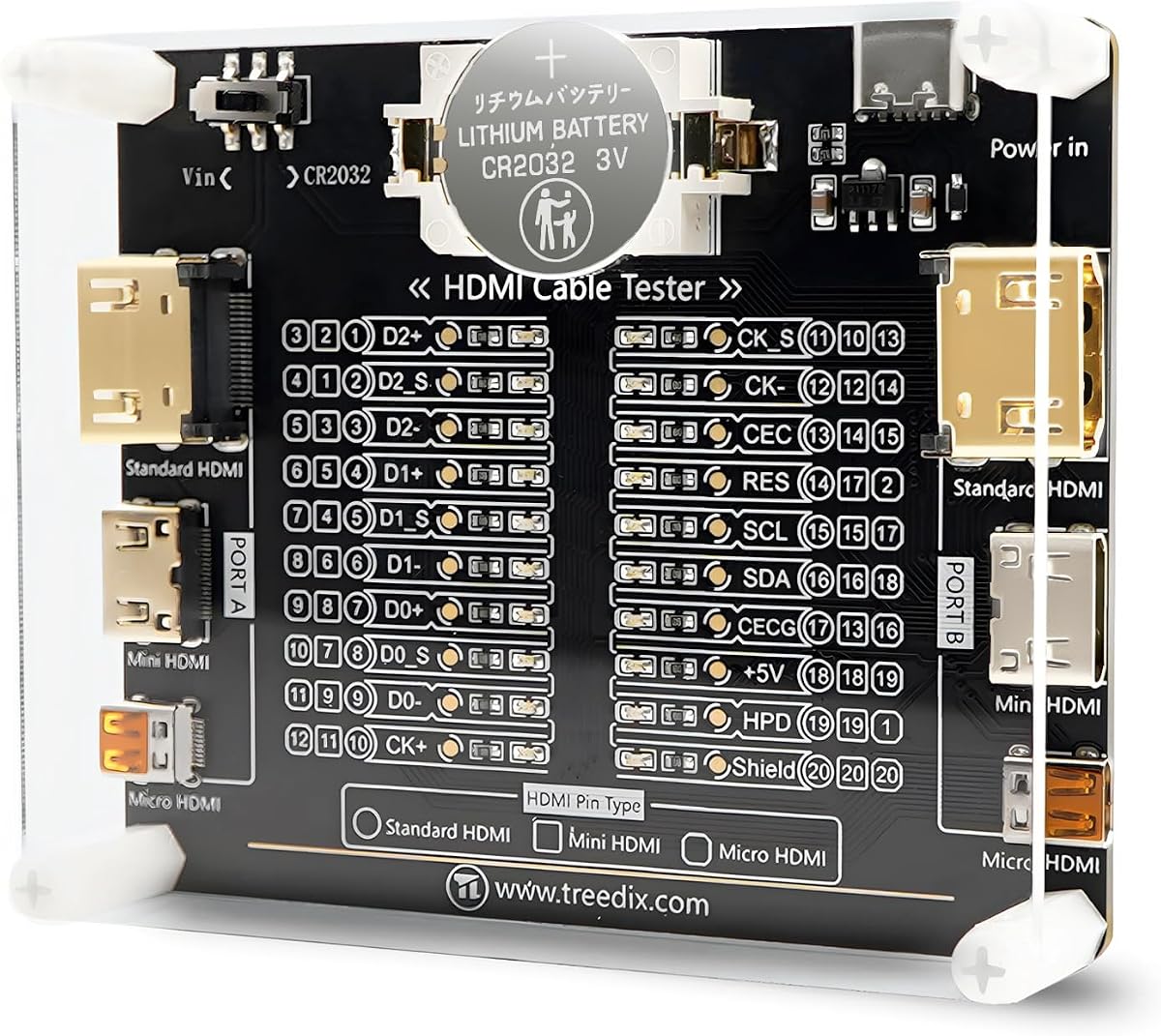
This tester board uses 20 LED indicators to show the status of each pin on an HDMI cable. Its straightforward design makes it easy to interpret results quickly, even for those new to HDMI cable testing.
We may earn a commission when you buy through this link, at no additional cost to you.
It supports a wide range of HDMI versions, ensuring compatibility with most standard cables. The acrylic housing provides protection against dust and minor impacts, keeping the board in good condition over time.
While it lacks the ruggedness of handheld devices, it is an excellent option for bench testing or quick checks. It can run on battery or external power, offering flexibility in different environments.
Select this board if you need a simple and effective way to verify pin connections. It is perfect for basic continuity checks in repair shops or home workshops.
Each pin has a dedicated LED to show connection status clearly at a glance.
Acrylic housing keeps the circuit board safe from damage during regular use.
We may earn a commission when you buy through this link, at no additional cost to you.
Selecting the right HDMI Signal Tester involves understanding your specific needs, from basic continuity checks to advanced signal analysis. This section outlines key factors to consider before making your purchase.
Determine whether you need simple continuity checks or advanced signal analysis. Basic testers check for shorts and opens, while generators can produce test patterns to verify bandwidth and resolution.
Choose a model that supports the specific tasks you encounter most often in your work.
Check the maximum resolution supported by the tester, such as 4K or 8K. If you work with newer displays, ensure the device can handle the required bandwidth and refresh rates.
Higher resolution support ensures future compatibility with evolving HDMI standards.
Consider how often you need to carry the device. Handheld units are great for fieldwork, while bench tools are better for stationary testing. Look for rugged housings if working in tough environments.
A durable design protects your investment during regular travel and use.
Look at how the device is powered. Some use standard batteries, while others have rechargeable internal cells. Battery life is crucial for long days without access to power outlets.
Ensure the power source matches your typical working schedule and environment.
Some testers have LCD screens to display video, while others rely on LED indicators. Visual displays make it easier to troubleshoot issues without a connected monitor, but they add to the cost.
Decide if a visual display is worth the extra cost for your workflow.
Prices vary significantly based on features. Basic testers are affordable, while advanced analyzers can be expensive. Balance your budget with the necessary features to avoid overpaying.
Focus on value by prioritizing features that directly impact your daily tasks.
Verify that the tester supports your specific cable types, such as standard, mini, or micro HDMI. Compatibility with different versions ensures you can test a wide range of devices.
Universal support prevents the need for multiple tools for different cable types.
Check if the manufacturer offers support or warranty coverage. Good service can be valuable if you encounter issues with the device or need help interpreting results.
Look for brands with a reputation for reliable customer service and clear documentation.
Start by identifying the specific task you need to perform, such as checking continuity or generating a test pattern. Ensure both the source and display are powered off before connecting the tester to prevent electrical issues.
Insert the HDMI cable into the appropriate ports on the tester. For continuity tests, simply observe the LED indicators to see if all pins are making a connection. If using a generator, select the desired resolution and pattern settings.
After testing, disconnect the cables carefully and power down the device if it does not have auto shut-down. Store the tester in a protective case to avoid damage from drops or dust when not in use.
An HDMI tester checks the integrity of existing cables and connections. A generator creates specific signals to verify that a display can handle certain resolutions or features. Some devices combine both functions for versatility.
For standard cables, a basic continuity tester is usually sufficient to ensure all pins connect. However, if you suspect signal degradation due to length or shielding issues, a bandwidth tester can help confirm performance.
Some advanced models can verify audio channels and formats. Basic testers typically focus on video signal paths but may include checks for audio data lines. Check the specs to ensure audio verification is included.
Error codes often indicate which specific pins are failing. Consult the manual to interpret these codes, as they can help you pinpoint shorts, opens, or wiring order problems in the cable.
Yes, advanced testers support 8K resolutions and the required bandwidth. Ensure the model specifically lists 8K capability if you plan to use it with next-generation displays and cables.
Most standard testers do not require calibration as they rely on simple continuity checks. Higher-end analyzers may need periodic calibration for accurate signal measurements. Refer to the manufacturer guidelines for maintenance schedules.
We reviewed ten top models ranging from budget-friendly continuity checkers to professional-grade signal analyzers. The selection includes options that suit everyone from casual home users to expert installers.
When choosing, prioritize the features that match your daily work. If you need to verify 8K signals, an advanced analyzer is worth the investment. For simple checks, a portable tester will serve you well.
Please remember to verify current availability and product details before purchasing. Specifications and stock can change, so always check the latest information to ensure the model meets your needs.