
YPbPr to HDMI Converter
4.2Editor score
HDMI V1.4 compliance
Supports 1080p output
Compact plug and play design
This guide compares the top HDMI to Component Converter models for connecting modern HDMI devices to older Component displays with accurate video signal
Connecting modern HDMI devices to older Component displays requires a reliable converter. These adapters bridge the gap between digital and analog video signals ensuring compatibility for legacy TVs and projectors.
We evaluated ten leading HDMI to Component Converter models based on resolution support, audio handling, and build quality. Our comparison focuses on performance reliability and ease of use for various home theater setups.
Each pick highlights specific strengths like scaler functions or compact designs to help you choose wisely. Remember that product availability and specifications may change over time so verify details before purchasing.
4.2Editor score

4.0Editor score

4.2Editor score
This side by side comparison outlines key specifications and features across all ten selected HDMI to Component Converter models to help you identify the right fit for your setup.


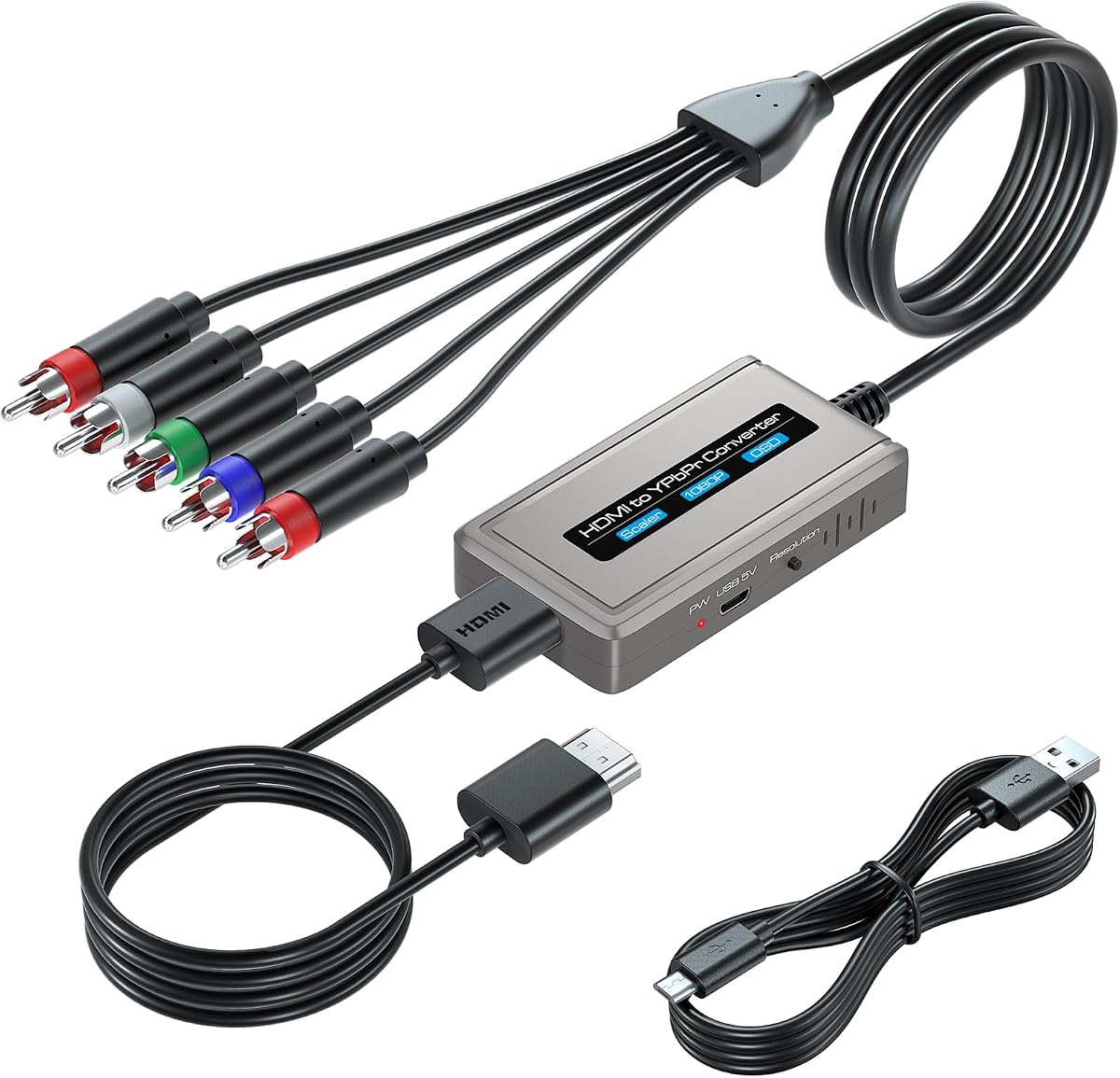


This HDMI to Component Converter offers a reliable way to connect modern HDMI sources to legacy displays. It maintains signal integrity while supporting a wide range of resolutions up to 1080p.
We may earn a commission when you buy through this link, at no additional cost to you.
The device features an On-Screen Display that allows users to verify input and output resolutions instantly. This transparency helps troubleshooting connection issues quickly without guesswork.
While it lacks scaling capabilities which may limit use on older low-res TVs the direct conversion ensures minimal latency. Users should ensure their display supports the source resolution for best results.
It is an excellent choice for connecting game consoles or streaming sticks to older projectors. The straightforward design ensures reliable performance for media centers needing analog video outputs.
Compatible with MacBooks Blu-Ray players and gaming consoles for versatile connectivity options.
On-Screen Display provides immediate feedback on signal status for easier setup.
We may earn a commission when you buy through this link, at no additional cost to you.
This converter is designed for users needing to bridge older Component outputs to modern HDMI displays. It supports up to 1080p resolution ensuring crisp visuals for media playback.
We may earn a commission when you buy through this link, at no additional cost to you.
Built with HDMI V1.4 compliance it handles HDCP protected content smoothly. This makes it suitable for streaming devices or protected media players connected to older sources.
The unit is strictly one way meaning it cannot convert HDMI to Component. Users must verify their source has Component output before purchasing to avoid compatibility issues.
Ideal for budget-conscious buyers it delivers consistent performance without complex settings. It is a solid choice for connecting DVD players or retro consoles to new monitors.
Delivers 1080p resolution for clear and detailed video playback on modern screens.
HDCP 1.4 compliance ensures protected content plays without interruption on supported devices.
We may earn a commission when you buy through this link, at no additional cost to you.
This HDMI to Component converter stands out with its built-in scaler function allowing it to adjust signal resolutions automatically. This is crucial for connecting modern devices to older displays with limited resolution support.
We may earn a commission when you buy through this link, at no additional cost to you.
The package includes both HDMI and Component cables which adds significant value. Users save time and money by not needing to source extra cables separately for installation.
While the price is higher than basic models the functionality justifies the cost. It handles 1080p inputs effectively making it versatile for various setups from gaming to media.
It is best suited for users needing to adapt high-definition sources to legacy hardware. The included cables and scaler features make it a comprehensive solution for complex home theaters.
Built-in scaler adjusts output resolution to match older display capabilities seamlessly.
Includes HDMI and Component cables for immediate use without extra purchases.
We may earn a commission when you buy through this link, at no additional cost to you.
Portta offers a trusted Component to HDMI conversion solution with robust build quality. It supports uncompressed 2 Channel LPCM audio ensuring high fidelity sound alongside video signals.
We may earn a commission when you buy through this link, at no additional cost to you.
The device includes a five year warranty which indicates manufacturer confidence in durability. This adds peace of mind for buyers investing in home theater hardware.
It supports resolutions up to 1080p though it does not scale signals. Users with older Component devices can connect to new HDMI displays without issues.
This model is ideal for gamers using PS2 or PS3 consoles wanting modern display connections. The audio fidelity and warranty make it a dependable long-term investment.
Supports uncompressed LPCM audio for clear and immersive sound output.
Five year warranty covers manufacturing defects ensuring buyer confidence over time.
We may earn a commission when you buy through this link, at no additional cost to you.
This kit combines a high-quality converter with a HDMI cable for immediate setup. It is designed to bridge Component video sources to HDMI displays effectively.
We may earn a commission when you buy through this link, at no additional cost to you.
Supporting up to 1080p at 60Hz it ensures smooth motion for video playback. The included cable reduces the need for additional accessory purchases.
It works seamlessly with various gaming consoles like Xbox 360 and PS3. The connection remains stable during extended use which is vital for gaming sessions.
Buyers looking for a complete kit will find this highly convenient. The value is enhanced by the included cable making it ready to use out of the box.
Includes HDMI cable alongside converter for hassle-free setup and installation.
Supports 60Hz refresh rate for fluid video playback without screen tearing.
We may earn a commission when you buy through this link, at no additional cost to you.
This adapter is engineered specifically for devices with female component ports. The male connector design simplifies cabling when connecting to set-top boxes or DVD players.
We may earn a commission when you buy through this link, at no additional cost to you.
It maintains the original resolution of the content ensuring authentic visuals. This is beneficial when watching classic movies or old TV broadcasts without unnecessary interpolation.
The compact and lightweight design makes it easy to transport. Users can bring it on trips to connect to different HDMI displays easily.
Ideal for users with specific female component outputs this model offers targeted utility. The preservation of original quality ensures a faithful viewing experience across devices.
Male connector design fits devices with female component output ports directly.
Preserves original resolution without scaling to maintain video quality accuracy.
We may earn a commission when you buy through this link, at no additional cost to you.
This converter features a robust scaler engine that allows users to match display capabilities easily. It handles both up-scaling and down-scaling for flexible compatibility.
We may earn a commission when you buy through this link, at no additional cost to you.
A switch button on the device lets you select the desired output resolution quickly. This manual control ensures you can optimize the signal for any connected monitor.
The metal casing helps dissipate heat ensuring stable operation during long sessions. It also feels durable against physical bumps or knocks during installation.
Users needing to connect modern sources to older analog displays will find this very useful. The flexibility in resolution selection makes it adaptable to many legacy setups.
Physical switch allows quick selection of output resolution for optimal display.
Metal casing aids in heat dissipation for consistent performance over time.
We may earn a commission when you buy through this link, at no additional cost to you.
This adapter accepts standard RCA composite inputs making it versatile for older devices like VCRs. It converts these analog signals to a modern HDMI 1080p output.
We may earn a commission when you buy through this link, at no additional cost to you.
Supporting NTSC and PAL formats ensures it works globally across different regions. This is essential for users importing old media players from other countries.
The price point is very competitive for a composite to HDMI converter. It delivers reliable performance without complex configuration steps for home users.
Best for those with VHS or classic gaming systems needing modern display connections. The compatibility with multiple TV standards makes it a robust solution for older tech.
Supports NTSC and PAL formats for worldwide use with old devices.
Powered via USB cable for easy connection to standard power adapters.
We may earn a commission when you buy through this link, at no additional cost to you.
This model is built with a sturdy aluminum alloy body that resists physical damage. It is designed to handle regular use in home entertainment centers.
We may earn a commission when you buy through this link, at no additional cost to you.
The built-in scaler engine allows for flexible resolution adjustments. This ensures that high-definition sources can be downscaled for older televisions without signal loss.
An On-Screen Display helps users confirm the current resolution settings. This visual feedback simplifies the setup process significantly compared to blind adjustments.
It is an excellent choice for users needing both durability and performance. The combination of metal build and scaler functionality offers long-term reliability for complex setups.
Aluminum alloy body provides strong protection against physical damage or wear.
On-Screen Display confirms settings instantly reducing setup time and errors.
We may earn a commission when you buy through this link, at no additional cost to you.
This converter offers robust resolution support with its built-in scaler engine. It allows modern HDMI sources to connect to older Component displays seamlessly.
We may earn a commission when you buy through this link, at no additional cost to you.
The aluminum construction adds a premium feel and helps with heat dissipation. It is a solid unit that can withstand the demands of frequent use.
Users benefit from the clear resolution switch that allows easy configuration. This feature is vital when switching between different display devices regularly.
Ideal for users managing multiple displays with different technical requirements. The versatility and build quality make it a reliable choice for demanding environments.
Aluminum casing ensures physical durability and better heat management during use.
Clear resolution switch allows quick adaptation to different display devices easily.
We may earn a commission when you buy through this link, at no additional cost to you.
Choosing the right HDMI to Component Converter involves evaluating several critical factors to ensure your devices communicate effectively.
Ensure you select a converter that matches your source and display ports. Some convert HDMI to Component while others do Component to HDMI and swapping them will not work.
Check the input and output labels on the product carefully before purchasing to match your hardware needs accurately.
Look for converters that support your source device's output resolution. If you are sending 1080p from a console the converter must handle that signal without loss.
Verify the display supports the same resolution to avoid compatibility issues or black screens during playback.
Models with built-in scalers can adjust resolution to match older TVs that cannot handle high inputs. This is essential if your legacy TV only supports 480p or 576p.
Choose a scaler model if you need to downscale high-definition signals for older hardware compatibility.
Most converters require external USB power to function correctly. Ensure you have a USB port available on your TV or a power adapter nearby.
Check the power cable length to confirm it reaches your available power source without stretching across the room.
Aluminum alloy bodies dissipate heat better than plastic casings making them more durable over time. This is vital for devices running for hours during movies.
Prioritize models with metal housings if you plan to leave the device connected continuously.
Some kits include HDMI or Component cables while others require you to buy them separately. Check the package contents to avoid extra shipping costs.
Selecting a bundle with cables saves time and money when setting up your system immediately.
Verify that the converter supports uncompressed audio formats like LPCM for high fidelity sound. This ensures your audio setup works smoothly with your video.
Look for stereo audio output options if your receiver relies on separate analog connections for sound.
Choose brands that offer multi-year warranties and responsive customer service. This protects your investment against manufacturing defects or technical issues.
Review return policies to ensure you can exchange the item if it does not fit your setup.
Connect your HDMI source to the input port and the Component cables to the output ports. Ensure the red green and blue connectors match their corresponding slots on the display.
Plug the USB power cable into a reliable 5V power source before turning on the device. This ensures the converter receives enough energy to process the video signal.
Keep the converter in a well-ventilated area to prevent overheating. Regularly check cables for damage and avoid bending them sharply near the connector tips.
No these converters are unidirectional devices. A HDMI to Component converter cannot convert Component to HDMI and vice versa so you must verify the correct direction for your setup.
These devices are plug and play so no driver installation is required. Simply connect the cables and power supply and the signal will transmit automatically to your display.
A black screen usually means the resolution is unsupported by the display. Ensure your source is outputting a resolution the TV supports or use a scaler model to adjust it.
Most HDMI to Component converters do not support 4K inputs. They are typically limited to 1080p max resolution and may not display 4K signals correctly.
They generally use a USB cable for power which should be plugged into a 5V adapter or a USB port on your TV. Do not expect it to power off the HDMI port alone.
Most support standard stereo PCM audio which works well with most receivers. However they may not support advanced surround formats so check your receiver capabilities.
Yes you can connect consoles like PS3 or Xbox 360 to modern TVs. Ensure the console outputs a resolution the converter and TV both support for best results.
Use a scaler if your display cannot accept high resolutions like 1080p. Without one you may get no signal if the source resolution exceeds the display capabilities.
We have reviewed ten models offering different features like scaling compatibility and build quality. Each has strengths depending on whether you need budget convenience or advanced features.
Prioritize a converter with scaler functions if your display is older and limited in resolution support. This ensures smooth playback without signal dropouts or compatibility errors.
Remember to check current availability and specifications before purchasing as tech models evolve quickly. Always match your specific source and display needs to the converter type accurately.