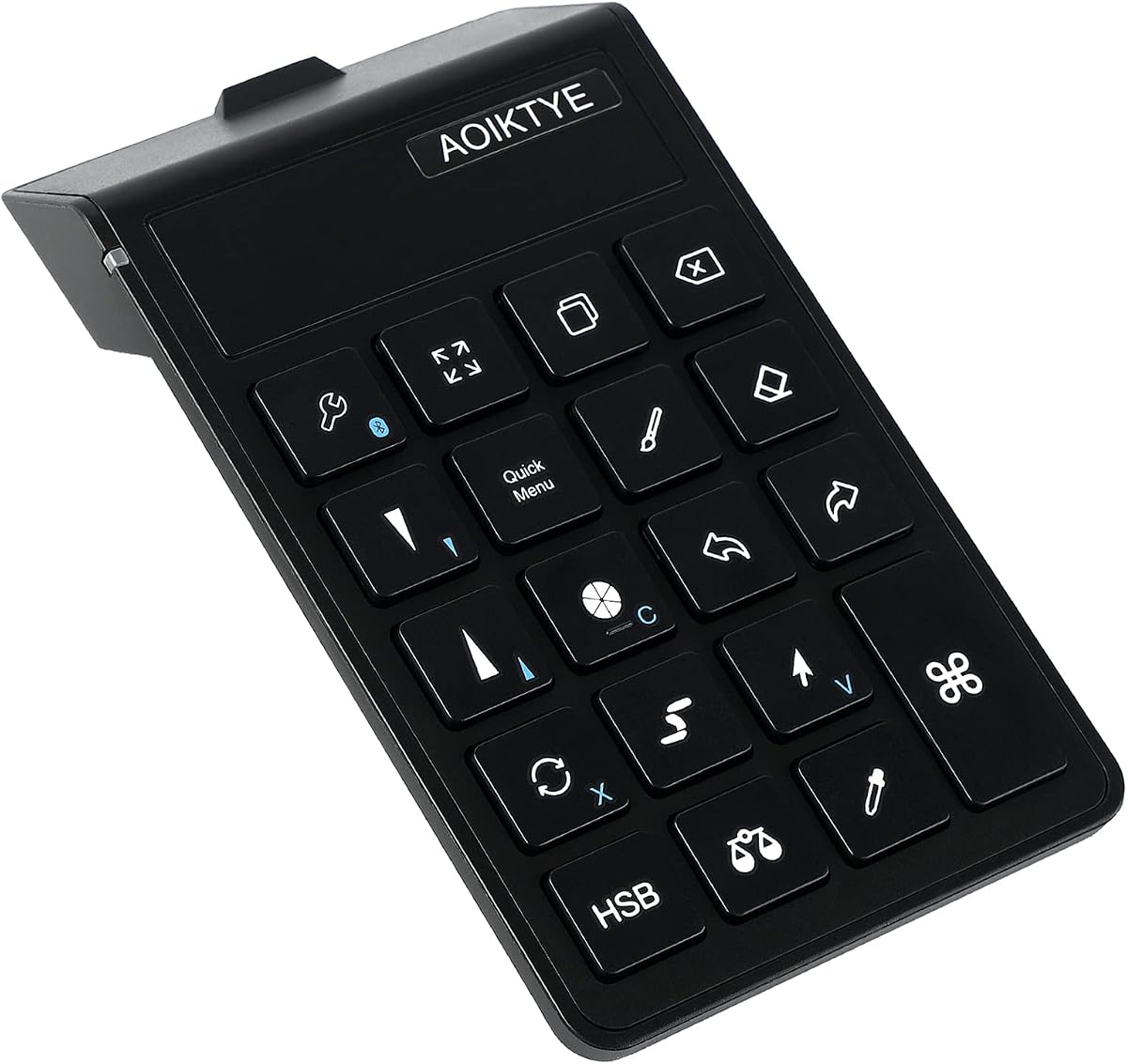
AOIKTYE Procreate Keyboard
4.5Editor score
22 dedicated shortcut keys
84 hours battery life
Optimized for Procreate app
This guide compares the top 10 iPad Drawing Bluetooth Controller options for digital artists seeking enhanced workflow efficiency and precision control on
Digital artists constantly seek tools that streamline their creative process without sacrificing precision or comfort. An iPad Drawing Bluetooth Controller offers a tangible way to access shortcuts and controls while keeping your focus on the canvas. These devices transform your workflow by allowing one-handed operation of complex software functions.
We evaluated ten leading models based on connectivity stability, customization depth, ergonomic design, and software compatibility. Our analysis focuses on how each controller integrates with popular drawing apps like Procreate and Photoshop. We considered battery life, build quality, and the ease of setting up custom shortcuts for daily use.
Each pick highlights specific strengths such as budget-friendly pricing or advanced dial controls for brush management. Remember that availability and pricing fluctuate regularly so verify current details before purchasing. We aim to help you select the controller that best fits your specific artistic needs and device ecosystem.
4.5Editor score

4.2Editor score

5.0Editor score
This side-by-side comparison details the specifications and capabilities of each selected controller to help you make an informed decision based on your specific drawing needs.


The HUION Keydial Mini stands out as a versatile tool for digital artists seeking efficiency without clutter. With a solid 4.2 rating from users, this device offers a reliable Bluetooth connection and extensive customization options. Its compact form factor ensures it fits easily on any desk setup while providing access to essential shortcuts.
We may earn a commission when you buy through this link, at no additional cost to you.
This keypad features 18 programmable keys that can be assigned to almost any shortcut within supported software like Photoshop or Clip Studio Paint. The included dial controller allows for intuitive adjustments to brush sizes or timeline navigation. Users appreciate the anti-ghosting technology which ensures reliable multi-key input during complex workflows.
While the device is excellent, note that full customization requires installing the HUION driver on your device. iPad users specifically need to download the Shortcut Remote app to configure settings properly. Some users find the dial function less responsive without driver software which limits immediate out-of-box utility for advanced controls.
Artists looking for a balance between affordability and functionality will find this keypad highly suitable for daily creative work. It bridges the gap between basic keyboards and expensive dedicated controllers by offering significant workflow improvements. We recommend it for those willing to invest a few minutes in setup for long-term gains.
The ability to map complex commands to single presses saves significant time during detailed illustration sessions.
Its thin design and long battery life make it easy to take to cafes or mobile workstations without hassle.
We may earn a commission when you buy through this link, at no additional cost to you.
AOIKTYE has created a specialized keyboard tailored for Procreate users who want direct access to essential functions. With a high 4.5 rating, this device is praised for its long battery life and intuitive layout. It simplifies tasks like adjusting color balance or managing layers without requiring keyboard lookups.
We may earn a commission when you buy through this link, at no additional cost to you.
This keyboard features 22 shortcut keys strategically placed for frequent use in digital painting. The battery supports up to 84 hours of continuous use ensuring you can work for days on a single charge. The OTA upgrade function allows for future improvements to key mappings and performance as the software evolves.
While it works with other painting software its primary optimization is for Procreate which may limit flexibility for multi-app artists. The key layout is less extensive than full-sized models but remains effective for standard drawing tasks. Some users note that the height adjustment adds bulk compared to ultra-thin alternatives.
Budget-conscious artists who primarily use Procreate on an iPad will find this device offers exceptional value. It eliminates the need to remember complex combinations while keeping your right hand free for drawing. We consider it the best entry point for those wanting a dedicated controller without a steep price tag.
Key functions align directly with common Procreate gestures saving you from switching between touch and keyboard inputs.
The extended battery life reduces interruption allowing for uninterrupted creative sessions over multiple days of use.
We may earn a commission when you buy through this link, at no additional cost to you.
The DIGIDRAW K30 represents the pinnacle of compact control with a perfect 5.0 rating from satisfied users. Its dual dial system offers granular control over brush sizes and zoom levels without interrupting your workflow. The build quality is exceptional with a lightweight design that fits naturally in one hand.
We may earn a commission when you buy through this link, at no additional cost to you.
This controller includes 11 programmable keys and two precision dials for comprehensive workflow management. Tactile markers on each key allow for blind operation keeping your eyes focused on the canvas during critical drawing moments. The battery life supports 40 hours of continuous use with a fast USB-C charging option.
The premium price tag may be a barrier for casual artists but professionals will appreciate the build quality and precision. It requires driver downloads for full customization which adds a setup step before optimal use. The dual dial feature is unique in this category and offers a level of control that single-dial models lack.
Artists who prioritize precision and ergonomics should consider this device as a long-term investment for their toolkit. It reduces hand strain by allowing quick access to frequently used functions without complex gestures. We recommend it for those seeking a top-tier experience with no compromises on functionality.
Two separate dials allow independent control of zoom and opacity ensuring fluid movement across the canvas.
Raised markers ensure you never lose your place even when working in low light or focusing deeply on art.
We may earn a commission when you buy through this link, at no additional cost to you.
ShanWan offers a controller designed for gaming but adapted for drawing control via custom mapping. With a 3.4 rating, it shows promise in versatility but requires careful setup for creative tasks. The analog sticks and triggers can be mapped to brush movements or zoom functions in supported apps.
We may earn a commission when you buy through this link, at no additional cost to you.
This device connects wirelessly with a range up to 10 meters allowing flexibility in where you place your iPad. The ergonomic design supports long sessions without hand fatigue. However users often report that mapping drawing controls requires third-party apps or specific configurations which adds complexity.
The experience is less seamless than dedicated drawing peripherals due to the primary focus on gaming input. Some users find the analog sticks imprecise for fine details compared to a stylus or keyboard shortcuts. It serves better for broad gestures than for detailed stroke control or layer management.
If you already own this controller for gaming it may suffice for basic drawing needs without extra cost. New buyers focused purely on art should consider dedicated tools for a more tailored experience. It is a decent secondary option for casual users comfortable with technical setup.
Seamless switching between PC and iPad allows one device to serve both entertainment and creation needs.
Advanced users can configure buttons to replicate complex keyboard shortcuts through external software tools.
We may earn a commission when you buy through this link, at no additional cost to you.
The TNP Remote Control is primarily designed for media and system navigation but can assist with basic drawing tasks. It offers a trackpad to move cursors on compatible apps which simplifies canvas navigation. With a 3.6 rating it is reliable for general utility rather than specialized creative control.
We may earn a commission when you buy through this link, at no additional cost to you.
This device connects via Bluetooth 5.0 to ensure a stable link with your iPad or other devices. The built-in trackpad allows for zooming and panning without touching the screen directly. Users appreciate the Home button integration which aids in switching between apps quickly during multitasking.
It lacks dedicated drawing shortcuts or brush controls which limits its utility for serious artists. The trackpad can sometimes lag compared to native touch inputs in high-performance drawing apps. It is better suited for presentations or general media control than for intensive illustration work.
If you need a device to manage presentations and light drawing navigation this remote is a practical choice. It reduces physical strain on the screen by allowing indirect control. We recommend it for those who value general system control over dedicated artistic features.
The trackpad enables smooth panning and zooming which helps keep your stylus on the canvas during drawing.
Siri and Home buttons allow rapid app switching without breaking your creative flow on the device.
We may earn a commission when you buy through this link, at no additional cost to you.
XPPen provides a compact controller that balances size with functionality for digital artists. The ACK05 model features a dial and ten keys designed to streamline editing tasks. With a 4.3 rating users value its long battery life and robust build quality for daily use.
We may earn a commission when you buy through this link, at no additional cost to you.
This device supports Bluetooth 5.0 and offers alternative connection methods like USB cable for flexibility. The 1000 mAh battery ensures continuous operation for approximately 300 hours which is impressive for its size. The dial provides clear click feedback aiding in precise adjustments without visual confirmation.
iPad users must install a specific app to configure settings fully which adds a dependency before full use. While the anti-ghosting feature ensures reliable inputs the limited key count may restrict complex workflows. Some users report that the driver software can be inconsistent on certain iOS versions.
Creators who prefer a small footprint and high portability will appreciate this device on the go. It fits easily in a bag without taking up much space while still offering essential controls. We suggest it for artists who prioritize battery life and compact design over extensive key customization.
The large battery capacity supports weeks of occasional use or days of continuous work on a single charge.
Distinct click sounds on the dial ensure you know exactly how much you are adjusting brush sizes.
We may earn a commission when you buy through this link, at no additional cost to you.
TourBox Lite offers a refined design for creative professionals who need a unified control scheme. Its 8-key layout is streamlined to reduce clutter while maintaining access to essential functions. With a 4.4 rating it is recognized for its build quality and ergonomic comfort during long sessions.
We may earn a commission when you buy through this link, at no additional cost to you.
The device uses Bluetooth to connect seamlessly with macOS and Windows systems allowing flexibility in workspace setup. TourBox Console software detects active apps automatically which saves time on manual configuration. The knob and wheel allow for quick adjustments to parameters like opacity or hue.
The price is higher than many competitors reflecting the premium build and specialized software integration. Setup requires installing the console software which may be unnecessary for simple workflows. Some users find the layout too minimal compared to larger keypads that offer more direct access to shortcuts.
Artists working across multiple creative applications will benefit from the consistent interface and app detection features. It reduces cognitive load by providing a single control solution for diverse tasks. We recommend it for professionals who value design and consistency in their creative toolkit.
Switching between Photoshop and Clip Studio Paint requires no reconfiguration ensuring smooth transitions between tasks.
The shaped grip reduces hand strain during extended editing sessions allowing for more comfortable workflow.
We may earn a commission when you buy through this link, at no additional cost to you.
This controller is optimized for tablets with a durable build and Hall Effect switches for longevity. With a 5.0 rating users appreciate its precision and adaptability across various tablet sizes. It is primarily gaming hardware but can be mapped for drawing controls in compatible apps.
We may earn a commission when you buy through this link, at no additional cost to you.
The Hall Effect technology ensures precise stick movement without wear over time. Motion sensing and vibration add depth to interactive applications including certain drawing programs. Compatibility covers a wide range of devices including iPad Pro and various Android tablets.
Drawing support relies on external mapping tools which may not be as integrated as native controllers. Some features like vibration are unused for art work reducing overall efficiency. The price is high for a device not purpose-built for creative tasks which limits its value proposition.
Gamers who also draw may find this versatile enough to serve dual purposes without needing two devices. It offers a robust experience for those who can handle the configuration complexity. We recommend it primarily for gaming with art as a secondary use case.
Gyroscope features allow for tilt-based controls which can be mapped for pressure or angle adjustments.
Bluetooth pairing remains stable even with larger tablets ensuring consistent input without dropouts.
We may earn a commission when you buy through this link, at no additional cost to you.
Tabmate 2 is designed exclusively for Clip Studio Paint making it a niche but effective tool. It offers direct access to frequently used operations which accelerates production speed. With a 4.0 rating it is appreciated for its simplicity and focus on specific software needs.
We may earn a commission when you buy through this link, at no additional cost to you.
The Bluetooth 5.1 connection ensures low latency which is critical for responsive drawing. It is compact enough to hold in one hand while drawing with the other. Users note that the dedicated buttons eliminate the need to navigate menus for common tasks like layer management.
Its strict limitation to Clip Studio Paint makes it useless for artists using other software. The requirement for AA batteries is inconvenient compared to rechargeable models available in the market. This adds ongoing maintenance and potential disruption if batteries run out unexpectedly.
Exclusive Clip Studio Paint users who want a simple add-on will find this device very useful. It is a streamlined solution that avoids complex setups and software installations. We recommend it for those fully invested in the Clip Studio ecosystem looking for a basic shortcut tool.
Pre-mapped buttons allow immediate access to layers and brushes without interrupting the creative process.
Bluetooth 5.1 ensures fast data transmission reducing the lag between button press and action.
We may earn a commission when you buy through this link, at no additional cost to you.
While technically a tablet rather than a controller the Wacom Intuos Small offers a complete drawing solution. It provides industry-standard pen performance with battery-free technology that feels natural on paper. With a 4.4 rating it is a trusted choice for professionals and students alike.
We may earn a commission when you buy through this link, at no additional cost to you.
This device connects wirelessly allowing flexible placement on any desk setup. It includes software licenses which add value to the initial purchase. The tracking precision is superior to most stylus alternatives ensuring high fidelity for detailed illustrations.
It does not function as a shortcut controller but rather as the primary input device. This changes the workflow significantly compared to keypads which supplement an iPad. Users must manage two drawing surfaces which might complicate a simple iPad-only setup.
Artists needing a dedicated high-precision input tool will find this tablet offers unmatched value. It replaces the need for a separate stylus and controller for many tasks. We recommend it for those willing to adopt a traditional tablet workflow for maximum quality.
The EMR technology ensures high accuracy and responsiveness for professional-grade digital artwork.
Included software licenses allow immediate start on projects without additional costs or subscriptions.
We may earn a commission when you buy through this link, at no additional cost to you.
Selecting the right controller involves evaluating compatibility customization and ergonomics to match your specific creative workflow and device setup.
Ensure the controller supports your primary drawing software such as Procreate Clip Studio Paint or Adobe Photoshop. Some devices offer native integration which simplifies setup and functionality.
Check for driver requirements and app support on your specific iPad model to avoid configuration issues after purchase.
Bluetooth connectivity provides a cable-free experience which is essential for portable setups. Look for versions like Bluetooth 5.0 or higher for improved range and stability.
Consider models that offer USB-C wired options as backups to ensure connectivity if the wireless link fails during critical work.
The number of programmable keys determines how many shortcuts you can access instantly. More keys allow for complex workflows without needing to switch menus or layers.
Evaluate if the customization software is intuitive and supports multiple profiles so you can switch tasks easily.
A comfortable grip and balanced weight reduce hand fatigue during long drawing sessions. Look for textured buttons or raised markers to prevent mispresses.
Check the materials and durability to ensure the device withstands daily travel and regular use in various environments.
Long battery life ensures you can work for days without interruption. Aim for devices that offer at least 40 hours of continuous use.
Fast charging capabilities like USB-C are preferable for quick top-ups between sessions without needing a full charge cycle.
A compact design is crucial for mobile artists who carry their setup in a bag. Ensure the device fits well in your workspace without taking up too much space.
Consider the layout density to ensure keys are not too small or crowded which can lead to accidental inputs during active drawing.
Balance the cost with the features offered to find a controller that fits your budget without sacrificing essential functionality. Premium models often offer better build quality but budget options can be sufficient for beginners.
Look for bundled software or accessories that add value to the purchase price to maximize your investment.
A physical dial allows for precise adjustments of brush size or zoom without lifting your hand from the device. This feature is valuable for maintaining flow during detailed work.
Check if the dial supports multiple functions or requires driver configuration to unlock its full potential for your specific tasks.
Start by charging the device fully via USB-C or the provided cable before first use. Pair it with your iPad through the Bluetooth settings menu by enabling discovery mode on the controller. Ensure your iPad OS is updated to the latest version for optimal connectivity stability.
Install any required companion apps or drivers from the manufacturer website. Open the app and assign your most frequently used commands to the keys using the provided interface. Test each key immediately to confirm the correct function is triggered without delay.
Keep the controller clean by wiping it with a soft dry cloth regularly. Avoid exposing it to direct sunlight or extreme heat which can affect battery health. Store it in a protective case when traveling to prevent physical damage to buttons or dials.
Most controllers require a companion app or driver on the iPad to enable full customization. Without this software many keys work as basic media buttons rather than custom shortcuts. Always check the product description for specific software requirements before purchasing.
Many devices support multiple applications like Photoshop Clip Studio Paint or Lightroom. However some budget models are specifically optimized for one app. Check compatibility lists to ensure your primary software is supported.
Battery life varies by model ranging from 40 hours to over 80 hours on a single charge. Usage intensity affects duration so expect shorter times with continuous wireless transmission. Most devices include USB-C charging for convenient power top-ups.
Most modern controllers support older iPads as long as they run a compatible OS version. Check for Bluetooth requirements like Bluetooth 5.0 which may not be available on older devices. Always verify the minimum iOS requirement on the product page.
Bluetooth 5.0 typically offers a range up to 10 meters in open spaces. Walls or interference from other electronics can reduce this distance slightly. Keeping the controller close to the iPad ensures the most stable connection.
Most models support pass-through charging allowing you to use the device while plugged in. However continuous use while charging may generate heat which could affect battery longevity. It is best to use battery power for short sessions and charge during breaks.
Most reputable brands offer a one-year warranty covering manufacturing defects. Read the warranty terms carefully to understand coverage for physical damage or connectivity issues. Registering the product on the manufacturers website often helps with warranty claims.
There is typically a short learning curve to map keys effectively for your workflow. Most manufacturers provide presets for common software which reduce the initial setup time. Practice mapping your most used commands to maximize efficiency quickly.
We have reviewed ten diverse options ranging from the HUION Keydial Mini to the Wacom Intuos Small. Each device offers unique strengths suited to different artistic preferences and software needs.
Prioritize software compatibility and ergonomics to ensure the device feels natural during long sessions. A well-matched controller significantly enhances productivity by reducing repetitive gestures and menu navigation.
Remember that prices and availability can change rapidly so verify current details on the product page. Choose the model that best aligns with your specific creative workflow to enjoy a smoother drawing experience.