
QUI Presentation Clicker with Volume Control
4.3Editor score
Affordable price with full controls
328 feet wireless range coverage
Includes pocket clip for portability
This guide compares the top 10 laser pointer for presentations including budget and premium models to help you choose the right remote clicker for your needs.
Finding the right laser pointer for presentations can transform how you engage with your audience during meetings or lectures. A reliable remote allows you to move freely while controlling slides and highlighting key points without being tethered to a computer desk or podium setup.
We evaluated ten top-rated wireless presenters based on visibility, range, battery life, and ease of use. Our comparison covers red and green laser options, rechargeable models, and devices with extra features like volume control or timer alerts for professional settings.
Each pick highlights specific strengths and trade-offs to help you match a device to your presentation style. Prices and availability may change over time so check the latest offers before purchasing to ensure you get the best value for your budget.
4.3Editor score

4.6Editor score

4.6Editor score
The following table offers a side-by-side look at the key specifications and capabilities of each presenter clicker to help you compare features like laser type, battery system, and connectivity options at a glance.




This wireless presenter stands out with a bright green laser that remains visible even on projection screens and whiteboards. It holds a strong rating from teachers who need reliability in classrooms. The device eliminates the need to hunt for AAA batteries by offering a USB-C rechargeable system.
We may earn a commission when you buy through this link, at no additional cost to you.
The green light operates at 532nm which cuts through ambient lighting better than standard red pointers. You get full control over slides with dedicated buttons for hyperlinks and volume adjustments. The magnetic receiver snaps into the back of the clicker so it never gets lost between meetings.
While it lacks some advanced software features like timers the plug and play nature makes it instantly ready on Mac or Windows systems. Users find the button layout intuitive for daily use without needing to consult manuals during a presentation. The cost is slightly higher but the rechargeable aspect saves money over time.
It is ideal for educators and professionals who present frequently and need a dependable tool. If you prioritize visibility and battery convenience this clicker delivers excellent performance for a wide range of presentation environments.
The green laser ensures your pointer remains clear even when projectors are used or when the room is brightly lit.
A single one hour charge powers weeks of daily classroom presentations reducing waste and saving money.
We may earn a commission when you buy through this link, at no additional cost to you.
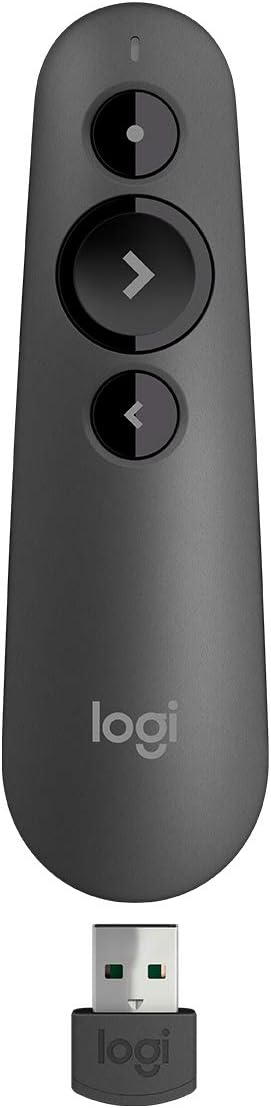
The Logitech R400 is a classic choice for those seeking a straightforward wireless presenter. It features a built-in red laser that works well against most backgrounds. The device maintains a high rating due to its ease of use and dependable wireless connection.
We may earn a commission when you buy through this link, at no additional cost to you.
Its touch keys make it easy to navigate slides without looking down. The wireless range allows you to move about fifty feet away from your computer. The receiver docks neatly inside the clicker which keeps your desk tidy when not in use.
You will need to source AAA batteries for operation which can be a minor inconvenience compared to rechargeable options. The range is adequate for most rooms but falls short for very large halls. Despite this it remains a solid workhorse for regular office use.
This model suits users who prefer simplicity and brand trust over advanced features. It is a safe pick for standard meetings where you need a reliable tool without setup hassles or complex configurations.
Touch keys allow for smooth slide control without needing to look at the device during a talk.
The docking bay stores the USB receiver inside to keep it safe and prevent loss.
We may earn a commission when you buy through this link, at no additional cost to you.
This presenter offers a surprising range of features at a budget-friendly price. It includes volume control and hyperlink navigation which are rare at this tier. The red pointer is bright enough for standard projectors and the range allows ample movement during talks.
We may earn a commission when you buy through this link, at no additional cost to you.
The device features a one piece magnetic USB storage so the receiver is unlikely to be misplaced. Bumped buttons help you identify slide controls by touch which improves flow during a speech. The rubber buttons provide a comfortable grip for extended use.
While it runs on an AAA battery not included the auto sleep function helps preserve power over weeks. The red light is not recommended for LED or TV screens which may limit use in modern conference rooms. Still it delivers strong value for the cost.
It fits well for users needing extra controls like volume without spending much. If you have standard projectors and need a versatile remote this model covers most daily needs effectively.
Features like volume and hyperlink buttons add functionality typically found in more expensive units.
One piece magnetic storage ensures the tiny USB receiver stays attached to the clicker.
We may earn a commission when you buy through this link, at no additional cost to you.
The R800 elevates the presentation experience with a built-in LCD display and timer. This helps speakers manage their time without glancing at a wall clock. The green laser ensures high visibility and the wireless range supports movement across large auditoriums.
We may earn a commission when you buy through this link, at no additional cost to you.
Silent vibration alerts let you know when time is running out without interrupting your flow. The receiver stores inside the presenter to keep it safe during travel. The smooth contours and intuitive layout make it comfortable to hold throughout long sessions.
The main trade-off is the price which is higher than basic models. It also relies on replaceable batteries rather than USB recharge which some may find less convenient. However the time management features justify the cost for professional speakers.
Choose this if you need precise timing control during critical talks. The combination of a strong green laser and vibration alerts makes it a top tier tool for impactful presentations.
The LCD timer with vibration alerts helps you stay on schedule without breaking your focus.
The green laser is powerful enough to be seen even on LCD and plasma displays.
We may earn a commission when you buy through this link, at no additional cost to you.
This R500s offers dual connectivity via USB receiver or Bluetooth which adds flexibility. It is optimized for a wide range of software including PowerPoint and Google Slides. The device includes smart battery management that alerts you when the level gets low.
We may earn a commission when you buy through this link, at no additional cost to you.
The presentation app allows customization of button functions though it requires installation on Mac or PC. The receiver docks inside the unit for easy packing and transport. Battery life extends up to 12 months on a single AAA with power saving mode active.
Bluetooth connectivity is useful for devices without USB-A ports but the app adds a setup step. The 65 feet range is good for medium rooms but not for very large venues. It balances well between simplicity and smart features.
It works well for users who want Bluetooth options or app customization. If you present across different systems this flexibility ensures the clicker adapts to your tech setup.
Connect via USB receiver or Bluetooth low energy to suit different computer ports.
Smart battery management extends life by disabling the laser when power is low.
We may earn a commission when you buy through this link, at no additional cost to you.
This clicker provides a massive wireless range at a very low price. The volume control allows you to adjust audio during talks without touching the computer. The bright red pointer helps highlight key points clearly for the audience.
We may earn a commission when you buy through this link, at no additional cost to you.
A pocket clip makes it easy to attach to a notebook or pocket for quick access. The device works across systems like Mac and Windows without any driver software. It supports many apps including PowerPoint and Google Slides.
The build is basic but functional with a simple button layout. The red light is not recommended for LED screens so check your display type before buying. The range is impressive and lets you roam large halls freely.
It is perfect for tight budgets where range and volume controls matter most. If you need a no frills remote that reaches far this option delivers practical value.
Reach up to 328 feet to move freely around the entire hall or room.
Dedicated volume keys let you manage sound without stopping to use the keyboard.
We may earn a commission when you buy through this link, at no additional cost to you.
The Norwii N95 features a bright green pointer that stands out on screens. It supports both USB-A and USB-C connectivity making it versatile for older and newer devices. The rechargeable battery lasts weeks on a full charge.
We may earn a commission when you buy through this link, at no additional cost to you.
You can remap button functions via the Norwii Presenter app to suit specific needs. The control range reaches up to 100 meters which is ideal for auditoriums or large churches. A low power alert blinks to warn you before the battery dies.
The charging cable is not included in the package which may delay first use. Remapping buttons requires software installation on your computer. Despite these small hurdles the green laser and range are strong selling points.
This fits well for users with mixed device types who need green visibility. If you have a large venue and want to save on batteries this is a solid choice.
Connect to Mac laptop or iPad with a single receiver supporting USB-A and USB-C.
Customize button functions via software to match your presentation workflow.
We may earn a commission when you buy through this link, at no additional cost to you.
This remote focuses on ergonomics with a high quality rubber feel that is comfortable to hold. The compact size fits easily in a pocket or laptop bag for transport. The red light highlights points clearly on most backgrounds.
We may earn a commission when you buy through this link, at no additional cost to you.
The USB receiver is stored under the battery cover which keeps it secure. It supports many systems including Windows Linux and Android. Setup is straightforward without needing to download extra software.
The range is about 49 feet which is fine for small to medium rooms. Mac users might need to complete a quick setup step before it works fully. It is a reliable tool for casual users.
Ideal for those who value comfort and portability over long range. If you need a lightweight clicker for occasional slides this is a practical option.
Ergonomic design with rubber material makes holding the device comfortable for long talks.
The receiver stays tucked under the battery cover to prevent misplacing during travel.
We may earn a commission when you buy through this link, at no additional cost to you.
This clicker solves the dongle hunt by featuring both USB-A and USB-C connectors in the receiver. It offers a long wireless range and volume control for dynamic presentations. The ergonomic body with soft touch coating feels comfortable in the hand.
We may earn a commission when you buy through this link, at no additional cost to you.
The magnetic slot at the bottom holds the receiver securely so it does not get lost. It works seamlessly with Mac and Windows without driver installation. The auto sleep technology helps preserve battery life during periods of inactivity.
You will need to supply AAA batteries which is common for this category. The receiver size may feel small for some users but the magnetic hold is effective. It is a strong contender for multi device setups.
Best for users who switch between old PCs and new Macs often. The built-in receiver saves space and ensures you can plug in anywhere immediately.
Built-in USB-A and USB-C connectors work instantly with any computer type.
A magnetic slot securely holds the receiver at the bottom to prevent loss.
We may earn a commission when you buy through this link, at no additional cost to you.
This lightweight clicker is designed for comfort with a cool ergonomic shape. It runs on a single AAA battery that lasts about two months with regular use. The red laser pointer is clear and helps guide the audience effectively.
We may earn a commission when you buy through this link, at no additional cost to you.
The dongle stores inside the battery compartment for easy carrying. It supports systems like Windows and Mac as well as software like Google Slides. The wireless control distance reaches 100 feet for freedom of movement.
It lacks volume control or window switching which may limit complex presentations. The dark gray buttons on a black body offer a simple aesthetic. It is very light at just 38 grams.
Pick this for simple talks where weight and battery life matter most. It is an excellent teaching essential for daily classroom use without extra features.
Weighing only 38 grams it feels light in hand during extended speaking sessions.
A single AAA battery can last about two months on standard classroom use.
We may earn a commission when you buy through this link, at no additional cost to you.
Selecting the right presenter requires balancing several factors to match your specific environment and needs.
Green lasers are significantly more visible than red ones especially on projection screens or in brightly lit rooms. If you frequently present on large displays or outdoors invest in a green model. Red lasers work well for standard projectors but may disappear on white surfaces.
Look for models that specify their visibility features. Green options ensure your audience can always follow the pointer regardless of the screen type.
Rechargeable models with USB-C ports eliminate the hassle of buying AAA batteries. They are cost effective and reduce waste over time. However traditional battery models often have longer run times and are easier to swap during urgent events.
Consider how often you present and whether you can charge frequently. If you present daily rechargeable is better but for occasional use AAA models last months without a charge.
Wireless range determines how far you can move from your computer. Standard ranges are around fifty feet which suits most conference rooms. For large auditoriums check for models offering 100 feet or more to ensure freedom of movement.
Always verify the range specification against your room size. A longer range prevents signal dropouts in spacious settings.
Most clickers use a USB receiver but some offer Bluetooth for computers without USB-A ports. Ensure the device is compatible with your operating system including Mac or Windows. Some models include USB-C adapters for newer laptops.
Check port compatibility before purchasing. USB-A and USB-C support ensures your clicker works with any machine.
Advanced models include volume control hyperlink navigation or timer alerts. These features enhance your control without touching the computer. Volume keys are useful for multimedia slides while timers help manage speaking time.
Decide if you need these extras. Basic slide control works for simple talks but extra buttons improve complex presentations.
A comfortable grip reduces hand fatigue during long sessions. Look for soft touch buttons and contoured bodies. Portability matters if you travel often so check the weight and whether the receiver docks inside.
Try to handle the device before buying if possible. A lightweight unit fits easily in a pocket or bag.
Plug and play devices work without installing drivers which saves time. Some advanced units require software to unlock customization features like button remapping or timers. Decide if you prefer simplicity or advanced tweaks.
Stick to plug and play for ease of use. Avoid apps if you present on shared or locked down computers.
Well known brands often provide better support and durability. Trusted names have a history of quality control and spare part availability. Cheaper options may lack support but can still work well for casual use.
Prioritize known names for critical presentations. They often offer warranties and reliable customer service.
Start by inserting batteries or charging the device fully before your first use. Plug the receiver into a free USB port on your computer and ensure the device is paired or recognized by the system.
Press the forward or backward buttons to navigate slides. Use the laser button only when necessary to draw attention to key points on the screen to avoid distracting the audience.
Store the receiver inside the clicker or a magnetic slot when not in use to prevent loss. Keep the device in a dry place away from direct sunlight to protect the lens and battery life.
Green pointers used in these devices are typically Class 2 or safe for eye exposure when used responsibly. They are designed for pointing and should not be shone directly at eyes for extended periods.
Most models work with tablets that support USB-A or USB-C connections. Check the compatibility list for specific iOS or Android support before purchasing for mobile devices.
Yes the USB receiver works with any computer that has a USB port. You can move the receiver between devices but ensure each computer recognizes it as a standard HID.
Ensure there are no obstructions between the clicker and receiver. Move closer to the USB port or remove USB hubs to improve signal stability during use.
Most clickers have distinct buttons for forward and backward navigation. Look for arrows on the device and practice the button layout before presenting to ensure smooth operation.
Most are plug and play and need no software. Advanced models may require apps for customization but basic slide control works without installing anything on your system.
We reviewed ten top laser pointers ranging from budget options to premium models with advanced timers. Each offers distinct benefits depending on your need for visibility range or rechargeable power.
Prioritize laser type and battery life when making your choice. Green pointers excel in visibility while USB-C rechargeable models save money and waste over time.
Check current offers and availability before buying to ensure you get the best deal. Your right pick will make your next presentation smoother and more engaging.