
Lexar E31 64GB USB 3.2 Gen 1 Flash Drive
4.6Editor score
High-speed transfer up to 100MB/s
Compact metal build with keyring loop
Plug and play compatibility
Compare the top Lexar USB Flash Drive models for speed, capacity, and durability to find the best portable storage solution for your needs today.
Portable storage remains essential for professionals and students needing reliable data transfer across devices. Choosing the right flash drive requires balancing speed, capacity, and durability for everyday tasks.
This guide evaluates ten top rated Lexar models based on real world performance metrics and user feedback. We compare interface types, read write speeds, and security features to help you decide.
Each section highlights specific strengths and trade offs for every drive listed. Prices and availability change frequently so please verify current details before making your final purchase decision online.
4.6Editor score

4.6Editor score

4.3Editor score
The following table provides a side by side overview of all ten models including their key specifications and ratings to facilitate quick comparison.
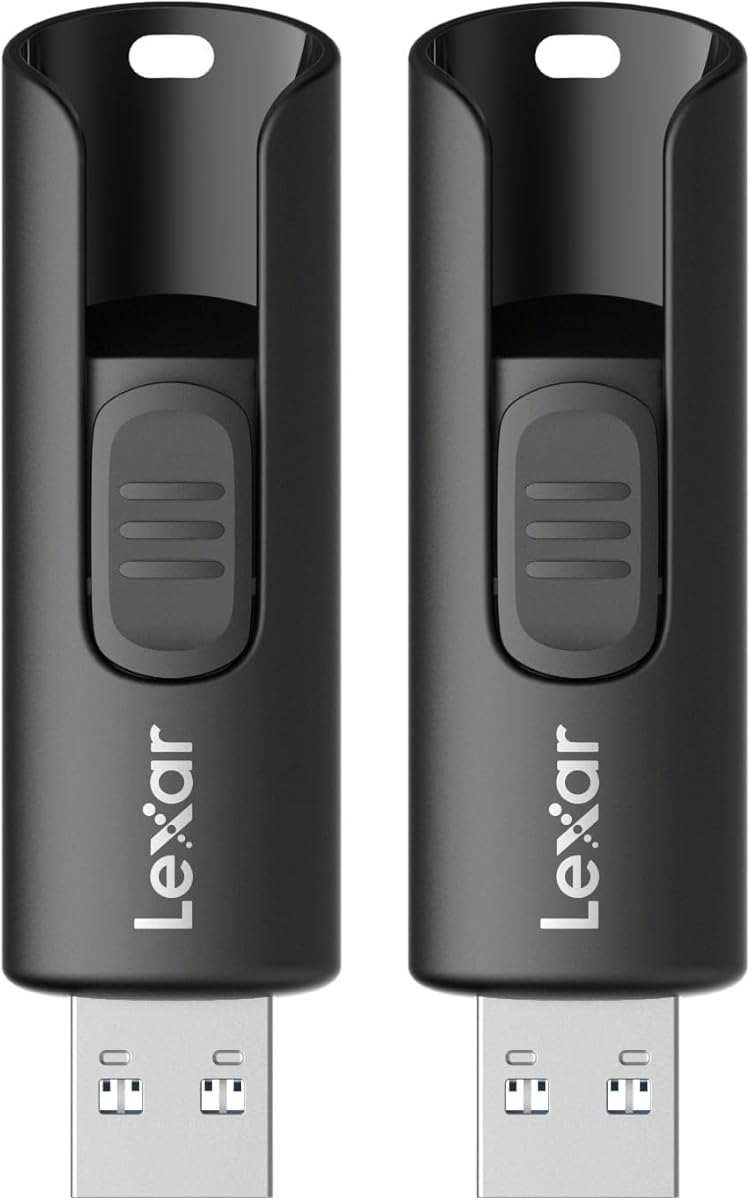


The Lexar A30E USB 3.2 Gen 1 Flash Drive 128GB 2-Pack offers a practical solution for users needing multiple storage options without breaking the bank. With a solid rating and consistent performance this two pack ensures you always have a backup drive ready for immediate use across various devices.
We may earn a commission when you buy through this link, at no additional cost to you.
Transfer speeds reaching up to 100 MB/s make this drive significantly faster than standard USB 2.0 options. The lightweight design at just 7.41 grams ensures portability while the push-button retractor mechanism protects the connector from damage during transport. Compatibility spans tablets laptops and Macs without requiring software installation.
While it lacks USB-C connectivity the traditional Type-A interface ensures broad compatibility with existing hardware. The included Lexar DataShield adds a layer of security by allowing password protection and encryption for sensitive files. This balance of affordability and feature set makes it a reliable choice for general storage needs.
We recommend this model for students or professionals who frequently share files between different computers or need extra drives for distribution. It is also ideal for those who prioritize security features without wanting to pay for top-tier speed specifications.
Having two drives means you can keep one at work and one at home or share with a colleague without losing access to your data.
The integrated DataShield software allows you to create password protected safe zones for confidential documents without needing third-party tools.
We may earn a commission when you buy through this link, at no additional cost to you.
The Lexar D50E 256GB Solid State Dual Drive stands out as a premium choice for users needing high-speed data transfers across both modern and legacy systems. Its ability to handle large files efficiently makes it perfect for creative professionals or anyone managing extensive media libraries on the go.
We may earn a commission when you buy through this link, at no additional cost to you.
With read speeds up to 400MB/s and write speeds reaching 360MB/s this drive outperforms many standard flash drives by a significant margin. The dual USB-A and USB-C connectors eliminate the need for adapters allowing seamless connection to laptops tablets and smartphones. The durable metal housing protects the connectors and internal components from physical damage.
Although it offers robust features the higher cost reflects its advanced performance and build quality. The Lexar App supports media backup for iOS and Android but does not yet support iCloud content backup which might be a limitation for Apple ecosystem users. Still the speed and convenience justify the investment for heavy users.
This drive is best suited for photographers videographers or power users who regularly move large datasets between devices. If you need reliable fast storage that bridges the gap between traditional USB ports and modern Type-C interfaces this model is an excellent investment.
The combination of SSD-level speeds and dual connectors ensures you never wait long for file transfers regardless of the host device type.
The included app offers a straightforward way to back up photos and videos from your mobile devices directly to the drive.
We may earn a commission when you buy through this link, at no additional cost to you.
The Lexar 128GB JumpDrive S80 delivers impressive performance in a compact form factor making it ideal for users who prioritize speed and portability. With a solid rating and a competitive price point it offers a balanced mix of features suitable for students and general office use.
We may earn a commission when you buy through this link, at no additional cost to you.
Read speeds reaching up to 150MB/s ensure quick access to documents and media files. The protective retractable design keeps the connector safe from dust and physical damage without requiring a removable cap. The included advanced security software provides 256-bit AES encryption to keep your private data secure on any shared device.
While it lacks USB-C connectivity its USB 3.2 Gen 1 interface ensures fast transfers on modern systems and backwards compatibility with older ports. The three-year limited warranty adds peace of mind regarding long-term reliability. However users should note that extended heavy use may cause the metal housing to warm slightly.
This drive is recommended for anyone needing a reliable fast storage solution for school work or office files. Its blend of speed security and durable design makes it a top contender in the mid-range category for USB 3.2 drives.
The advanced security software ensures that sensitive files are encrypted and protected from unauthorized access on any computer.
The retractable mechanism protects the connector effectively reducing the risk of loss or breakage compared to cap-based designs.
We may earn a commission when you buy through this link, at no additional cost to you.
The Lexar D40E 128GB Dual USB 3.2 Gen 1 Type-C Jump Drive provides a versatile storage solution for users who need to switch between devices with different ports. Its dual connector design and swivel mechanism offer convenience and durability making it a practical choice for mixed environments.
We may earn a commission when you buy through this link, at no additional cost to you.
Transfer speeds up to 100MB/s provide reliable performance for everyday file transfers. The 360-degree swivel design allows easy switching between USB-A and USB-C connectors without worrying about losing caps. The metal enclosure withstands a wide temperature range and offers robust protection for the internal components.
While the speed is adequate for general use it may feel slower compared to high performance drives. The swivel mechanism is convenient but could potentially wear down with extreme use over many years. The included security software with 256-bit AES encryption ensures your data remains protected on shared systems.
This drive is ideal for users who own both older laptops and newer USB-C devices and want a single solution for both. It is also a good choice for those who prefer a mechanical swivel design over retractable or cap-based connectors.
The dual connectors mean you can plug directly into modern phones and tablets as well as traditional laptops without adapters.
Files are protected using advanced encryption software that creates a safe zone for sensitive documents automatically.
We may earn a commission when you buy through this link, at no additional cost to you.
The Lexar JumpDrive TwistTurn2 USB 2.0 Flash Drives 32GB Pack of 3 offers a simple and affordable solution for basic storage needs. With a high rating and a design that prevents cap loss it is well suited for occasional use or low bandwidth transfers.
We may earn a commission when you buy through this link, at no additional cost to you.
The twist design reveals the USB interface without needing a removable cap ensuring you never lose a piece. It supports fast data transfers for USB 2.0 standards and is backward compatible with older USB 1.1 ports. Compatibility with most PC and Mac computers makes it universally useful for simple file sharing tasks.
While the USB 2.0 interface limits speed compared to newer standards it remains adequate for small documents and photos. The pack of three provides value for families or small offices needing multiple drives for different members or backups. It is not ideal for large media files but perfect for general tasks.
We recommend this for users needing basic portable storage without paying for high speeds. It is also excellent for keeping at home or as backup drives in a drawer since the compact design and twist mechanism are durable.
The hinge rotates to protect the interface so there is no removable cap to misplace during daily travel.
Works seamlessly with most older and newer computers without requiring any special software installation.
We may earn a commission when you buy through this link, at no additional cost to you.
The Lexar 256GB JumpDrive D400 Dual Flash Drive offers a robust storage solution with high capacity and versatile connectivity. Its combination of speed and dual interfaces makes it a strong contender for users needing to transfer large files across different device types easily.
We may earn a commission when you buy through this link, at no additional cost to you.
With read speeds up to 130MB/s this drive handles daily transfers efficiently. The dual USB-C and USB-A ports allow direct connection to modern smartphones and older laptops without adapters. The metal housing adds a stylish touch and protects the internal components from scratches and minor impacts during use.
Although the swivel design is convenient for switching connectors it may feel less robust than solid retractor mechanisms. The Lexar DataShield solution adds value by securing your files with encryption and password protection. For the capacity and features offered it represents good value in the mid-range category.
This drive is recommended for users managing moderate media files who need to connect to both Type-C and Type-A systems. It balances performance and price well making it a practical choice for general consumers and professionals alike.
With 256GB of space you can store thousands of photos and hours of video without needing to delete data constantly.
Lexar DataShield ensures your private files stay secure with encryption that protects against unauthorized access on shared devices.
We may earn a commission when you buy through this link, at no additional cost to you.
The Lexar JumpDrive S60 USB 2.0 Flash Drives 32GB Set of 5 offers exceptional value for those needing multiple portable storage units. With a high rating and a simple functional design it serves well for basic file sharing or keeping backups accessible at different locations.
We may earn a commission when you buy through this link, at no additional cost to you.
The sliding cover protects the connector effectively without the risk of losing a cap. USB 2.0 interface supports fast transfers for small files and is backward compatible with older systems. The assorted colors help identify drives easily which is useful for families or small teams using multiple units.
While the capacity and speed are limited compared to modern standards this bulk pack provides versatility and convenience. The 2-year limited warranty ensures protection against manufacturing defects for each drive included. It remains a practical solution for users who do not need high bandwidth transfers.
This model is ideal for schools or small offices needing simple drives for various users. It is also great for personal use where having multiple drives ensures you always have one handy when needed.
The assortment of colors allows you to assign different drives to specific tasks or people without confusion.
The sliding cover mechanism keeps the connector safe from dust and damage while remaining easy to operate quickly.
We may earn a commission when you buy through this link, at no additional cost to you.
The Lexar 128GB JumpDrive M400 Flash Drive combines high performance with a durable stylish design that stands out among standard drives. With a solid rating and fast transfer capabilities it is a strong choice for users who want reliable speed and aesthetic appeal.
We may earn a commission when you buy through this link, at no additional cost to you.
Read speeds up to 150MB/s ensure quick access to documents and media. The USB 3.2 Gen 1 interface supports fast transfers and is backwards compatible with older ports. Its durable construction protects internal components from daily wear and tear while maintaining a sleek professional appearance on your desk.
The included Lexar DataShield adds a layer of security for sensitive files allowing password protection and encryption. While the design is stylish some users may prefer simpler functional forms. The performance remains consistent for typical daily workflows and file transfers.
This drive is recommended for professionals who value both performance and design in their tech accessories. It offers a reliable solution for quick data transfers and secure storage of important documents on the go.
The durable stylish design ensures the drive looks premium and professional in any work environment or travel setup.
With read speeds up to 150MB/s you can move large files quickly without waiting for long transfer times.
We may earn a commission when you buy through this link, at no additional cost to you.
The Lexar E31 64GB USB 3.2 Gen 1 Flash Drive delivers reliable performance in a compact metal enclosure. With a high rating and solid build quality it offers a balance of speed and portability suitable for everyday storage and transfer needs.
We may earn a commission when you buy through this link, at no additional cost to you.
Transfer speeds up to 100MB/s provide efficient performance for standard files. The all-metal construction ensures durability and protection from physical impacts. The integrated keyring loop allows easy attachment to keys or bags ensuring you never lose the drive. Compatibility spans PCs laptops TVs and car audio systems for broad usability.
While the 64GB capacity is limited for media it remains ideal for documents and small files. Lexar Quality Labs testing ensures performance and reliability across various digital devices. It offers a dependable solution for users needing a quick reliable portable storage option.
This drive is best suited for everyday users needing quick access to important files on the go. Its durable design and simple plug-and-play setup make it a trustworthy accessory for work or personal use.
The metal build protects against daily wear and the keyring loop ensures you can carry it safely on your keychain.
Compatibility with TVs and car audio systems allows you to share media beyond just computers easily.
We may earn a commission when you buy through this link, at no additional cost to you.
The Lexar JumpDrive S60 USB 2.0 Flash Drives 32GB Black Pack of 3 offers a practical and affordable bulk solution. With a high rating and sleek black finish these drives are ideal for users needing multiple units for distribution or backups.
We may earn a commission when you buy through this link, at no additional cost to you.
The sliding protective cover keeps the connector safe during transport. USB 2.0 interface supports reliable transfers for small files and works with most PC and Mac systems. The 2-year limited warranty provides assurance for each drive included in the pack ensuring reliable usage over time.
While the speed is not as fast as USB 3.0 models it remains effective for everyday document and photo transfers. The uniform black design maintains a professional look suitable for business environments. This pack provides value for those who prefer uniformity in their accessories.
We recommend this set for small businesses or families needing identical reliable drives for various members. It is also suitable for keeping in a vehicle or office drawer for emergency backup needs.
The all-black finish provides a clean professional look ideal for corporate environments or consistent branding.
Backed by a 2-year warranty these drives ensure consistent performance for routine file sharing tasks.
We may earn a commission when you buy through this link, at no additional cost to you.
Selecting the right Lexar USB Flash Drive requires understanding key factors like interface speed capacity and build quality.
Modern drives offer USB 3.2 Gen 1 which provides much faster data transfers compared to older USB 2.0 models. USB-C connectors are becoming standard for newer laptops and mobile devices so choosing a dual interface model may future-proof your purchase.
Ensure the drive connector matches your devices to avoid needing extra adapters that can add cost and bulk to your setup.
Read speeds determine how quickly you can access files while write speeds affect how fast you can save data to the drive. Models with read speeds over 100MB/s are significantly faster than standard drives and save time when working with large files.
Look for specifications indicating MB/s rates to gauge real world performance and choose higher speeds if you handle media or data transfers often.
Capacities range from 32GB for basic documents to 256GB or more for extensive media libraries. Determine your needs based on file types and frequency of transfers to avoid paying for unused space or running out of room.
Higher capacity drives often support more files and reduce the need to delete data frequently so choose wisely based on usage habits.
Metal enclosures offer better protection against drops and heat compared to plastic cases. Retractable or swivel mechanisms protect the USB connector from damage and reduce the risk of losing caps during transport.
A sturdy build ensures longevity and reliable performance so invest in a drive that can withstand your travel or daily handling needs.
Some models include built-in software for password protection and AES encryption to safeguard sensitive data. This is especially important if you carry personal or business files on shared or public computers.
Choose drives with proven security tools like Lexar DataShield to ensure your information remains private and protected from unauthorized access.
Lexar typically offers a 2-year to 3-year limited warranty depending on the model. This ensures you are covered in case of manufacturing defects or unexpected failures during normal use.
Check the warranty terms before purchasing to confirm how long you are protected and whether customer support is accessible for claims or issues.
Most drives work with Windows Mac and Linux systems without needing drivers but software features may vary by platform. Ensure any included security or backup tools support your operating system to maximize usability.
Compatibility with both PC and Mac is common but verify specific software requirements if you plan to use advanced features on different platforms.
Prices vary significantly based on capacity speed and design features. Budget models may offer lower speeds but still handle daily tasks efficiently while premium drives justify higher costs with faster transfers and extra features.
Determine your priorities and balance cost with needed features to get the best value for your specific storage requirements without overspending.
Plug the drive directly into an available USB port on your computer or compatible device. Wait for the system to recognize the new storage and open the drive through your file explorer to access files.
Always eject the drive safely before unplugging it to prevent data corruption or loss. Use the operating system eject option to ensure all transfers are complete before removing the physical drive from the port.
Store the drive in a cool dry place away from direct sunlight or magnetic interference. Use a protective case or keep it attached to your keychain to avoid losing it or exposing it to physical damage.
Yes most Lexar USB drives are compatible with Mac computers without requiring additional software. The standard USB interfaces work directly with macOS and file systems can be formatted for Mac use if needed.
Many models include Lexar DataShield which allows you to create password protected safe zones with encryption. Files stored in these zones are secured and deleted files are erased securely to prevent recovery.
USB 3.2 Gen 1 offers significantly faster transfer speeds up to 100MB/s or more compared to USB 2.0. It is backwards compatible so it works with older ports but requires a 3.2 port for full speed.
Yes if you have a USB-C version of the drive you can connect directly to Android devices and some iOS devices using adapters. Always check your phone model for compatible OTG or USB-C support.
With proper care and regular use a Lexar drive can last several years. Flash memory has a limited number of write cycles but typical daily use will not reach this limit quickly.
No most Lexar drives are plug and play and do not require drivers. They are recognized automatically by Windows Mac and Linux systems upon connection.
We have reviewed ten top models ranging from budget-friendly USB 2.0 packs to high-speed dual interface solutions. Each offers distinct advantages depending on your need for speed capacity and connectivity options.
Prioritize transfer speed and connector type if you frequently move large files between modern and legacy devices. For basic use consider bulk packs that provide versatility without requiring top-tier performance specs.
Always verify the latest pricing and availability before purchase as costs may change based on market demand and retailer offers.