
G650-04686-01 Coral M.2 Accelerator B+M Key
5.0Editor score
4 TOPS peak performance
Debian Linux compatible
Low power consumption
This guide compares the top M2 Accelerator Cards for AI workloads, edge computing, and storage expansion to help you choose the right hardware for your
M2 Accelerator Cards are specialized hardware components designed to offload intensive computational tasks from your main CPU. These cards enable faster processing for artificial intelligence, machine learning, and high-speed data storage applications across various computing environments.
We evaluated ten leading M2 Accelerator Cards based on performance metrics, compatibility, power efficiency, and developer support. Our analysis focuses on real-world use cases ranging from edge AI deployment to enterprise-grade storage expansion and server rack integration.
Each product entry highlights key specifications, pros, cons, and ideal user scenarios. Please note that pricing and availability fluctuate frequently, so verify current details before purchasing to ensure you get the best value for your budget.
5.0Editor score

4.3Editor score

4.5Editor score
The following table provides a side-by-side comparison of all ten M2 Accelerator Cards analyzed in this guide. Review key specifications to identify the model that best aligns with your performance requirements and system constraints.


The MX3 M.2 AI Accelerator stands out as a top contender for developers and engineers seeking high-performance AI processing. It carries a 4.3 star rating and delivers exceptional efficiency for computer vision workloads.
We may earn a commission when you buy through this link, at no additional cost to you.
Its key strength lies in the comprehensive SDK that simplifies development and deployment tasks significantly. The hardware compatibility with PCI-SIG M.2 M-key 2280 specifications ensures broad integration potential.
While it is optimized for Linux systems which may limit Windows users, the energy-efficient design mitigates thermal concerns. These trade-offs are acceptable given the robust performance it offers for edge AI applications.
This card is ideal for professionals deploying AI solutions on Raspberry Pi 5 or similar Linux-based platforms. It represents a balanced choice for those prioritizing performance and software support in equal measure.
The provided SDK ensures that developers can deploy models quickly without extensive customization or complex configuration hurdles.
Minimizing power consumption allows for deployment in power-constrained environments without sacrificing computational output.
We may earn a commission when you buy through this link, at no additional cost to you.
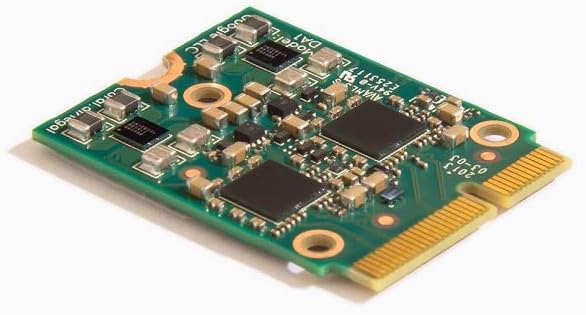
The G650-04686-01 Coral M.2 Accelerator earns a perfect 5.0 rating for its reliable performance and efficiency. It is designed to execute state-of-the-art mobile vision models like MobileNet v2 at high speeds.
We may earn a commission when you buy through this link, at no additional cost to you.
Its Edge TPU coprocessor handles 4 TOPS while using only 0.5 watts per TOPS. This energy efficiency makes it a standout choice for battery-powered or heat-sensitive embedded projects.
Compatibility with Debian Linux is a constraint for Windows users but standard for many server environments. The ability to compile TensorFlow Lite models directly on the device simplifies the development workflow significantly.
This option is best for budget-conscious developers who need reliable ML inference capabilities. It offers premium features at an accessible price making it an excellent value for educational and industrial use cases.
MobileNet v2 execution at 400 FPS demonstrates its capability to handle complex visual tasks efficiently.
TensorFlow Lite support allows developers to convert models easily without rebuilding from the ground up.
We may earn a commission when you buy through this link, at no additional cost to you.
The Rocket 1604L brings next-generation PCIe 5.0 technology to M.2 storage expansion. With a high rating and robust specs, it supports up to four NVMe devices with dedicated x4 lanes each.
We may earn a commission when you buy through this link, at no additional cost to you.
Its ability to support both Intel and AMD x86 architectures as well as ARM platforms makes it versatile for diverse computing environments. Natively supported by mainstream operating systems ensures easy setup.
The main trade-off is the requirement for a motherboard that supports PCIe 5.0 which may not be universally available yet. However for high-performance workloads requiring massive data throughput this limitation is justified by the speed gains.
This card is recommended for server administrators and creative professionals needing maximum storage bandwidth. It stands as the premier choice for those building high-end systems where latency and capacity are critical factors.
PCIe 5.0 x16 provides unparalleled speeds for data-heavy applications like video editing and database management.
Support for ARM platforms alongside x86 ensures longevity and flexibility as hardware architectures evolve.
We may earn a commission when you buy through this link, at no additional cost to you.
This M.2 Accelerator combines two Google Edge TPU modules into a single card for doubled performance. It achieves a total of 8 TOPS with a rating of 4.1 reflecting its solid reliability in ML tasks.
We may earn a commission when you buy through this link, at no additional cost to you.
The inclusion of dual TPU modules allows for processing multiple model streams simultaneously without contention. It maintains 2 TOPS per watt ensuring efficiency even when running heavy workloads continuously.
While the E-key 2230 form factor is compact it may not fit larger slots without an adapter. Also PCIe Gen2 x1 interface limits raw bandwidth but is sufficient for most edge AI applications.
Ideal for developers needing higher throughput than a single TPU can provide this card offers a scalable solution. It balances performance and size effectively for robotics or surveillance systems requiring real-time processing.
Running two TPUs side by side enables complex multi-model deployments within a compact hardware footprint.
High performance per watt ensures the card runs cool and extends battery life in mobile edge devices.
We may earn a commission when you buy through this link, at no additional cost to you.
The QNAP QM2-2P10G1TB is designed to enhance NAS performance with storage and networking options. It features two NVMe SSD slots for caching and a 10GbE port for high-speed network connections.
We may earn a commission when you buy through this link, at no additional cost to you.
With a 4.4 rating, it is a proven tool for IT administrators managing enterprise storage environments. The Marvell AQtion controller ensures reliable connectivity and fast data transfers across devices.
While it works with Windows and Linux, its full potential is realized within QNAP ecosystems. PCIe Gen3 x8 limits maximum theoretical speeds but provides ample throughput for most real-world applications.
This card is perfect for users upgrading QNAP NAS systems with limited PCIe slots. It adds critical storage and networking capabilities in a single card streamlining hardware configurations for better efficiency.
The 10GbE port removes the need for separate network cards saving valuable expansion slot space.
NVMe slots enable fast caching to boost read/write speeds for frequently accessed datasets.
We may earn a commission when you buy through this link, at no additional cost to you.
This adapter allows you to run two Coral M.2 Accelerator cards in a single PCIe slot. It splits a PCIe Gen3 x4 connection into four Gen2 x1 lanes ensuring both TPUs function independently.
We may earn a commission when you buy through this link, at no additional cost to you.
Rated 4.5 stars, it is a favorite among enthusiasts needing multi-stream AI processing without buying new hardware. The included heatsink maintains thermal stability during extended operation cycles effectively.
While lane splitting can limit bandwidth, most ML models do not saturate this limit. The design is future-proof allowing for easy scaling of TPU counts as project requirements grow over time.
Buy this if you already own Coral cards and want to expand capability cost-effectively. It transforms a standard workstation into a dual-TPU machine learning unit with minimal hardware changes and maximum value.
Converting PCIe Gen3 x4 to 4x Gen2 x1 ensures compatibility with standard Coral modules effectively.
Built-in heatsinks prevent overheating ensuring stable performance during continuous training or inference sessions.
We may earn a commission when you buy through this link, at no additional cost to you.
The ASUS Hyper M.2 x16 Gen5 Card supports up to four NVMe M.2 drives with high bandwidth speeds. It features server-grade components to ensure reliability and stable transfer performance under heavy loads.
We may earn a commission when you buy through this link, at no additional cost to you.
Its active cooling system includes a top and bottom thermal pad plus an extra fan cable to maintain low temperatures. This prevents throttling and ensures consistent performance during intensive data transfers.
Users should note the requirement for a 6-pin PCIe power connector which might complicate installation in some cases. However the RAID support adds flexibility for data redundancy without needing external controllers.
This card is ideal for users building workstations that need massive local storage capacity. It consolidates multiple drives into a single slot simplifying cable management while offering premium thermal and data protection features.
The dedicated fan ensures drives run cool preventing speed throttling during long-duration write operations.
Built-in RAID support allows creating bootable arrays across different platforms easily for data safety.
We may earn a commission when you buy through this link, at no additional cost to you.
The waveshare Hailo-8 module delivers an impressive 26 TOPS for real-time AI inferencing on edge devices. With a 4.6 rating, it is designed to process multiple streams and models simultaneously with high efficiency.
We may earn a commission when you buy through this link, at no additional cost to you.
It consumes only 2.5W typical power making it ideal for energy-sensitive applications. Its support for major frameworks like TensorFlow, ONNX, and Pytorch simplifies the integration process significantly.
While it is a module that requires proper mounting on a board, its wide temperature range ensures reliability in harsh environments. The need for specific OS drivers may require initial setup effort.
This module is perfect for advanced developers building high-performance edge AI systems. It provides a balanced mix of raw power and power efficiency for professional robotics or industrial automation projects.
Support for major frameworks allows developers to import existing models easily without rewriting code.
Simultaneous processing enables complex scenarios like multi-camera surveillance systems without latency.
We may earn a commission when you buy through this link, at no additional cost to you.
The Coral M.2 Accelerator A+E Key is designed for industrial-grade reliability in challenging environments. It offers a solid 4 TOPS peak performance with a 4.2 rating reflecting consistent operation over time.
We may earn a commission when you buy through this link, at no additional cost to you.
With support for Linux and Windows 10, it integrates easily into existing systems. The A+E key interface ensures compatibility with many standard slots without requiring custom adapters.
Operating temperature range of -20°C to +85°C makes it suitable for harsh industrial settings. The low power design provides 2 TOPS per watt reducing thermal load on host systems significantly.
Buy this for industrial automation where durability and reliability are paramount. It offers a robust platform for ML inference that withstands varying temperatures and environmental stresses effectively.
Operates reliably across a wide temperature range ensuring uptime in variable factory conditions.
2 TOPS per watt ratio keeps power consumption low while maintaining strong inference speeds.
We may earn a commission when you buy through this link, at no additional cost to you.
This adapter is designed exclusively for Coral M.2 Accelerator modules to maximize inference performance. It fits standard M.2 2280 B or M key slots ensuring a secure fit for your hardware.
We may earn a commission when you buy through this link, at no additional cost to you.
With a perfect 5.0 rating, it is praised for its clear specifications and reliable connectivity. The upstream bidirectional Gen2 bandwidth allows efficient data flow between the card and host system.
Users should note it is incompatible with SATA M.2 slots and CM4 enclosures to prevent buyer errors. The included stainless steel screw provides vibration-resistant fixation which is crucial for mobile or moving setups.
Ideal for users with Raspberry Pi or other boards needing dual TPU support, it offers a clean solution. It expands AI capabilities effectively in a compact form without needing additional complex hardware configurations.
Included screws and vibration-resistant PCB fixation ensure the card stays secure during operation.
Explicit incompatibility notes prevent common mistakes ensuring buyers know exactly what works.
We may earn a commission when you buy through this link, at no additional cost to you.
Selecting the right M2 Accelerator Card requires understanding your system constraints and application needs. This guide breaks down the critical factors to consider before making a purchase.
M2 cards come in various sizes like 2230 and 2280 with different key types like M, B, E, or A. Ensure your motherboard or HAT supports the physical dimensions and the specific key required for PCIe data transfer.
Performance is measured in TOPS (Tera Operations Per Second). Identify if you need 4 TOPS for simple classification or 26+ TOPS for complex multi-stream AI tasks to match hardware capability with workload demand.
Power consumption affects thermal design and battery life. Look for cards offering high TOPS per watt ratios to ensure the system remains cool and energy-efficient during long operational periods.
Many accelerators are optimized for Linux, especially Debian or Ubuntu. Check if your workflow runs on Windows or Mac to ensure driver availability and software compatibility before buying.
A robust SDK or support for TensorFlow Lite and ONNX can save weeks of development time. Review the available documentation and community resources to gauge how easy it is to deploy models.
Consider whether you need a single card or a solution that supports multiple accelerators like a dual TPU adapter. Future-proofing your hardware can prevent bottlenecks as your project complexity grows.
Prices range from under $100 to hundreds depending on capabilities. Balance initial cost against long-term efficiency gains and productivity improvements to determine the best value for your specific use case.
Industrial-grade cards often support wider temperature ranges and better thermal management. For outdoor or server deployments, prioritize models with proven reliability ratings and sturdy mounting options.
Begin by ensuring your system has a compatible slot and sufficient PCIe lanes. Use an adapter or HAT if necessary to match the physical dimensions of your accelerator card to the motherboard interface.
M2 Accelerator Cards are used to offload intensive computational tasks like machine learning inference, AI processing, and high-speed data storage. They improve system performance and efficiency by handling these workloads directly.
While many accelerators support Linux, some models support Windows 10 or newer. Check specific product documentation for OS compatibility before purchasing to ensure driver availability for your setup.
Most M2 Accelerator Cards are designed to be energy-efficient with low thermal output. However, models with multiple TPUs or high bandwidth may require additional cooling solutions like heatsinks or active fans.
Yes, many M2 Accelerator Cards are compatible with Raspberry Pi 5 and other single-board computers using M-key or HAT interfaces. Ensure your Pi model supports the physical and electrical requirements of the card.
Yes, most cards require specific drivers and development kits like TensorFlow Lite or ONNX. Manufacturers provide documentation for setting up these environments on supported operating systems.
Yes, using adapters or PCIe splitters you can often install multiple M2 accelerator cards. Ensure your system has enough PCIe lanes and physical space to support multiple devices simultaneously.
The M2 Accelerator Cards reviewed here offer a diverse range of capabilities from budget-friendly options to premium performance models. Selecting the right one depends on your specific workload, system compatibility, and budget.