
EooCoo for MacBook Neo Case 13 inch 2026
4.7Editor score
Crystal Clear Slim Design
Includes Keyboard Cover
Scratch Resistant Protection
The MacBook Neo 13-inch model released in 2026 brings incredible performance with its A18 Pro chip but it needs the right accessories to truly shine and protect your investment from daily wear and tear effectively.
We compared ten top rated options including hard cases privacy screens and productivity tools focusing on compatibility with model A3404 build quality and user ratings to find the best value for every type of user today.
Each pick in this guide highlights specific strengths and real world usability so you can choose confidently while keeping in mind that availability and stock levels may shift quickly for these new model specific items soon.
4.7Editor score
4.6Editor score

4.2Editor score
As an Amazon Associate we earn from qualifying purchases.
This side by side comparison evaluates all ten top accessories based on their specific features compatibility with the A3404 model and overall value proposition for new MacBook Neo owners seeking protection and productivity.


The 2026 Mac OS Shortcuts Sticker is a highly rated productivity tool with a 4.6 rating that helps users master macOS commands quickly without searching online for common keyboard combinations repeatedly.
We may earn a commission when you buy through this link, at no additional cost to you.
It features 52 essential shortcuts placed directly on the palm rest so you can glance down and find them instantly which is ideal for beginners or power users who want to speed up their workflow significantly.
While the adhesive is premium and leaves no residue when removed some users note the vinyl is so thin that it might feel slightly less durable than a thicker sticker over very long periods of use.
This sticker is perfect for anyone transitioning to a new MacBook Neo or simply wanting to boost efficiency and it pairs well with other physical protectors for a complete productivity setup.
Having shortcuts right at your fingertips reduces time wasted searching and helps you build muscle memory for essential commands over time effortlessly.
The premium vinyl adhesive ensures you can lift it off cleanly whenever you want without leaving glue marks or damaging the surface of your MacBook device.
We may earn a commission when you buy through this link, at no additional cost to you.
This MOSISO case stands out with a 4.5 rating for its crystal clarity and engineering polycarbonate material that keeps your MacBook Neo looking pristine while protecting it from daily scratches and scuffs effectively.
We may earn a commission when you buy through this link, at no additional cost to you.
The top and bottom covers fit securely with a gentle push making installation easy and the bundle includes keyboard covers and a screen protector which adds significant value for total device protection.
Some users report that the smooth surface might show fingerprints slightly more than a matte finish but the crack-resistant material ensures long lasting beauty and durability for your device.
If you want to show off your MacBook Neo design while keeping it safe this is an ideal choice for students and professionals who need reliable daily protection without bulk.
The high transparency shell allows the original design and color of your MacBook Neo to shine through clearly without fading or yellowing over time.
Including dustproof keyboard covers and a screen protector ensures your device gets full body security right out of the box without buying separate items.
We may earn a commission when you buy through this link, at no additional cost to you.
Rated 4.6 this MOSISO set is our Editor's Choice because it combines a matte hard shell with a 360 degree protective sleeve offering comprehensive protection for your MacBook Neo without compromising portability much.
We may earn a commission when you buy through this link, at no additional cost to you.
The matte finish actively repels fingerprints and smudges keeping your laptop looking pristine and the included keyboard covers and screen protector ensure every part of your device is shielded from spills and debris.
The 360 degree protective sleeve with handle carrying bag adds an extra layer of protection against accidental spills while remaining lightweight enough to slide into a backpack or briefcase easily.
For users who need maximum protection during travel or daily commutes this kit provides everything you need in one package making it a top pick for students and professionals alike.
The engineered matte surface actively repels fingerprints and smudges keeping your laptop looking as pristine as the day you unboxed it without constant cleaning.
The included portable lightweight sleeve cushions your laptop against scratches bumps and everyday shocks making it ideal for business and travel use.
We may earn a commission when you buy through this link, at no additional cost to you.
This MOSISO set with a 4.6 rating is distinguished by its Sixteen Grid puffy laptop sleeve bag which offers a soft plush interior that cushions your laptop against scratches bumps and everyday shocks effectively.
We may earn a commission when you buy through this link, at no additional cost to you.
The case shields your laptop from daily scratches and scuffs while slipping off cleanly to leave your device looking flawless and the bundle includes keyboard covers and a screen protector for total protection.
The puffy polyester material protects your laptop against accidental spills while remaining lightweight enough to slide into a briefcase or backpack for daily business travel use without much added weight.
Ideal for those who want a stylish and soft option for carrying their MacBook Neo this set combines a protective shell with a durable bag for comprehensive daily security.
The plush interior of the puffy sleeve cushions your laptop against scratches bumps and everyday shocks ensuring your device stays safe during transport.
Made of square quilted puffy polyester material this bag is portable and lightweight does not bulk your device up and can easily slide into your briefcase.
We may earn a commission when you buy through this link, at no additional cost to you.
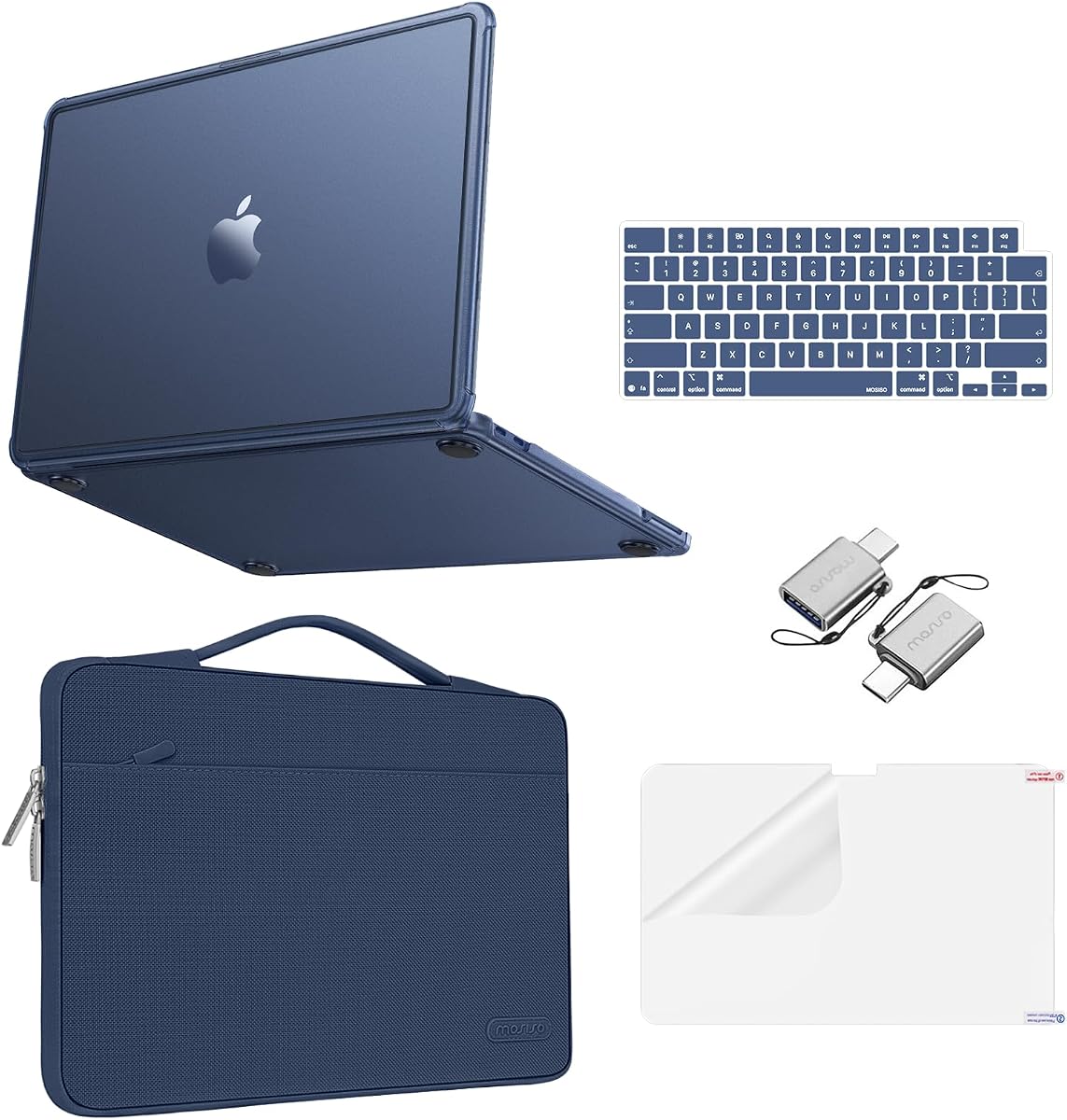
Rated 4.7 the EooCoo case is our Best Budget pick for its high durability and transparent PC material that fully shows off your Mac Book Neo beautiful color and design while keeping the design ultra slim.
We may earn a commission when you buy through this link, at no additional cost to you.
It includes a matching keyboard cover versatile usb-c to usb-a adaptors and screen protector to protect your keyboard and screen against spills scratches debris and oil stains ensuring comprehensive protection right away.
The durable hard plastic exterior with full edge wrap shields against daily scratches scuffs fingerprints dust and minor bumps so you can enjoy long-lasting durability that keeps your device looking brand new for longer.
This option is perfect for office workers freelancers and students who want stylish protection and functional accessories without paying a premium for extra features they might not need daily.
Transparent PC material fully shows off your Mac Book Neo beautiful color and design while adding minimal bulk to your daily carry setup.
The bundle includes a keyboard cover USB-C adapters and a screen protector to protect your device against spills scratches debris and oil stains fully.
We may earn a commission when you buy through this link, at no additional cost to you.
This VENTION USB C hub is our Best Premium pick with a 4.2 rating offering high-speed Thunderbolt transmission and up to 80Gbps bandwidth enabling ultra-clear 8K@240Hz video output for immersive viewing.
We may earn a commission when you buy through this link, at no additional cost to you.
It features a detachable magnetic USBC connector that ensures effortless attachment and detachment and includes ports for 4K@60Hz video HDMI USB 3.0 and up to 140W PD charging for your MacBook Neo.
The aluminum alloy shell provides durability and better heat dissipation making it stylish and practical for office work entertainment and long-term use though you should note case compatibility warnings before buying.
Ideal for users who need high bandwidth video output and fast charging while traveling this dock unlocks the full performance of your device without needing multiple adapters or converter cables.
Equipped with 2 USBC ports this hub supports a blazing-fast bandwidth of up to 80Gbps enabling ultra-clear 8K@240Hz video output for any setup.
The detachable magnetic USBC connector design is compatible with MacBook and iPad ensuring effortless attachment and detachment without frequent plugging and unplugging needed.
We may earn a commission when you buy through this link, at no additional cost to you.
Rated 4.2 this magnetic privacy screen protector is custom designed for the latest MacBook Neo 13-inch models and features strong magnetic attachment enabling one-second installation and removal without adhesive residue.
We may earn a commission when you buy through this link, at no additional cost to you.
It blocks side views beyond 30 degrees ensuring clear visibility only from the front which effectively safeguards your private data from unwanted peeping in public spaces like cafes or airports.
The anti-glare and blue light blocking technology relieves eye strain and visual discomfort during long-time use while the scratch-resistant PET material shields the screen from daily abrasion and unwanted scratches.
For professionals who value data security and eye comfort this ultra-thin 0.065mm protector fits most protective cases perfectly without affecting laptop lid closure or adding much weight.
Blocks side views beyond 30 degrees ensuring clear visibility only from the front which effectively safeguards your private data from unwanted peeping.
Adopted anti-glare and blue light blocking technology relieves eye strain and visual discomfort during long-time use for better eye health.
We may earn a commission when you buy through this link, at no additional cost to you.
This Peslv privacy screen with a 4.2 rating offers an innovative magnetic mounting method that improves installation speed allowing you to align and press the screen to the top bezel in seconds.
We may earn a commission when you buy through this link, at no additional cost to you.
It ensures that only the 30 degree angle directly in front of the screen is visible protecting your data while importing high-quality materials from Japan to improve performance and reduce 95 percent of blue light.
The high-quality filter layer reduces 95 percent of blue light and 92 percent of UV light with a matte surface that anti-glare effectively intercepts 95 percent of the reflected light for eye protection.
Ideal for those who need a removable solution for various occasions this magnetic screen sticks tightly to the screen and maintains a super high light transmission rate for close to original picture quality.
The top of the privacy screen has a reinforced magnetic strip which can be installed in a second by simply aligning it with the top bezel and gently pressing.
The filter layer reduces 95% of blue light and 92% of UV light with a matte surface that effectively intercepts 95% of the reflected light.
We may earn a commission when you buy through this link, at no additional cost to you.
The Synerlogic sticker is a highly rated option with 4.6 stars designed for Air and Pro models to help users master Mac shortcuts instantly and avoid frustration with online searches for commands.
We may earn a commission when you buy through this link, at no additional cost to you.
It features a new adhesive that offers a stronger hold and fewer air bubbles for the smoothest finish making it easy for beginners and power users to boost their skills and speed up everyday tasks.
While the adhesive may leave a light residue when removed this wipes off easily with a soft cloth and warm soapy water and the product is made in the USA with trusted quality and responsive support.
For those who want a durable and well-printed cheatsheet to keep on their device this option provides a reliable way to learn and use essential Mac commands without distraction.
This sticker keeps the most important keyboard shortcuts visible on your device making it easy to boost your skills and speed up everyday tasks.
Designed printed and packaged in the USA this product is backed by responsive customer support and a satisfaction guarantee for peace of mind.
We may earn a commission when you buy through this link, at no additional cost to you.
Rated 4.7 this CaseBuy pack offers essential dust protection for the new 2026 Apple MacBook Neo 13 inch using high-quality silicone dust plugs that protect ports from scratches debris and liquid splashes effectively.
We may earn a commission when you buy through this link, at no additional cost to you.
The pack includes 7 different types of dust plugs covering USB-C ports MagSafe 3 HDMI SDXC and headphone jack along with webcam covers and a gift plastic case for organized storage and port safety.
These plugs are flexible yet durable and stay securely in place during daily use but won't leave residue ensuring your MacBook remains clean and safe from dust while maintaining its sleek minimalist design.
For users who want to keep their ports pristine and safe from debris these easy to use covers provide a low profile solution that maintains aesthetics while protecting valuable connectors.
The macbook neo dust plug is made of high-quality silicone flexible yet durable to protect ports from scratches debris and liquid splashes without damaging your MacBook.
The low-profile design maintains your MacBook's aesthetics while keeping ports clean and safe from debris or liquid damage during use.
We may earn a commission when you buy through this link, at no additional cost to you.
Choosing the right MacBook Neo accessories requires balancing protection aesthetics and functionality to ensure your A18 Pro device stays safe and efficient during daily use.
Always verify that the accessory matches your specific MacBook Neo model A3404 released in 2026 to ensure a perfect fit and avoid issues with ports or lid closure.
Check the model number on the back of your laptop before purchase to confirm that the case or screen protector is designed specifically for your device.
Look for durable materials like engineering polycarbonate for cases or PET for screen protectors that offer long-lasting protection without yellowing or cracking over time.
High quality materials ensure your device stays looking pristine and protected against daily wear and tear like scratches bumps and spills.
Consider whether you need a hard shell for daily protection or a complete kit with a sleeve for travel to ensure your device is safe from accidents in various settings.
Full body protection kits often provide the most peace of mind for students and professionals who carry their laptops in backpacks or briefcases regularly.
Choose accessories that are easy to install such as magnetic privacy screens or snap-on cases that do not require tools or leave residue when removed.
Simple installation ensures you can quickly apply and remove accessories as needed without damaging your device or wasting time.
Decide if you prefer a crystal clear case to show off your MacBook Neo design or a matte finish that resists fingerprints for a cleaner look.
Your personal style preferences should align with the accessory to ensure you are happy with how your device looks while using it daily.
If you need more ports or better viewing privacy consider hubs or privacy screens that add utility without compromising the performance of your MacBook Neo.
Accessories that improve your workflow or protect your data can be just as valuable as physical protection when choosing what to buy.
Evaluate the price against the features offered such as included keyboard covers or adapters to ensure you get the best value for your investment.
A higher priced item may save money in the long run if it provides comprehensive protection and useful accessories in a single package.
Stick to well-known brands like MOSISO VENTION and EooCoo that have positive customer ratings and responsive support for warranty issues.
A reputable brand gives you confidence that the product will last and that you will receive help if something goes wrong with your accessory.
For hard cases ensure your MacBook Neo is clean and dry before snapping on the shell to avoid trapping dust or scratches between the device and the case.
When using magnetic privacy screens align the top bezel carefully to ensure a secure fit and remove gently to avoid any stress on the screen surface.
Clean accessories regularly with a soft cloth to remove dust and oils especially for matte finishes and dust plugs to keep them effective and looking new.
Most accessories in this guide are specifically designed for the MacBook Neo 13-inch model A3404 and may not fit MacBook Air or Pro models. Always check the compatibility details on the product page before buying to ensure a perfect fit for your device.
You can clean your hard case with a soft dry cloth to remove fingerprints or smudges. For stubborn marks use a mild soap solution and dry thoroughly before reapplying to the MacBook Neo to avoid moisture damage.
Yes privacy screens are worth it if you work in public spaces like cafes or offices where data security is important. They protect your screen from side views and often include blue light filters to reduce eye strain.
Yes you can use a hard shell case and a protective sleeve together. Many kits include both options to provide layered protection against scratches and impacts during daily commute or travel.
If residue remains after removing a sticker wipe it off with a soft cloth and warm soapy water. Avoid using harsh chemicals that might damage the surface of your MacBook Neo or its anti-reflective coating.
High-quality hubs like VENTION support pass-through charging so you can charge your MacBook Neo while using the ports. Ensure the hub supports your laptop's power requirements like 140W PD to avoid slow charging.
We explored ten top accessories for the MacBook Neo ranging from protective cases and privacy screens to productivity tools like shortcut stickers and USB hubs to cover all your needs.
Prioritize compatibility and material quality to ensure your new device stays safe and efficient whether you need a clear shell to show design or a full kit for travel protection.
Prices and stock levels change quickly so verify current availability and ratings on the product pages before making your final decision to get the best deal for your setup.